C# LINQ GroupBy and Join: Keys, ToLookup, CountBy
LINQ GroupBy and Join beyond the basics: composite keys, ToLookup, null and duplicate keys, .NET 9 CountBy, measured on .NET 10.
Revised November 2026. This tutorial first appeared in Korean in 2021. We recompiled its four examples on .NET 10.0.14 (C# 14), and none of them compiled as written: a variable-name case mismatch (
StudentList),fromtyped asform, a class namedStudentused asPerson, the query keywordgroupused as a variable, statements placed outside any method, numbers assigned tostringproperties, andscore.Mathfor a property namedmath. Once fixed, the outer-join example also showed students with no scores as getting 100 points. Below are the fixes, plus the deeper material that our LINQ basics article does not cover, with measurements.
This article is for developers who can already write group by and join but have hit the next layer of problems: composite keys that refuse to group, joins that return more rows than expected, or memory spikes on large inputs. The short answer: group keys must be types that compare by value (anonymous types, tuples, records); GroupBy recomputes every time you read it; and when you only need counts or sums, .NET 9's CountBy/AggregateBy were 3–6x faster than GroupBy in our test and allocated almost nothing. Query-expression basics and .NET 10's LeftJoin are in LINQ basics.
The four 2021 examples on .NET 10
| Example | Compiler output | Cause | Fix |
|---|---|---|---|
| nested from | error CS0103: The name 'StudentList' does not exist in the current context |
declared as studentList |
match the case |
| group by | 8 errors starting with error CS1002: ; expected |
form instead of from |
from |
| group by (cont.) | 39 errors including error CS1525: Invalid expression term 'group' |
select new { sexCheck = group.Key } after into data: group is a query keyword |
data.Key |
| group by (cont.) | error CS0246: The type or namespace name 'Person' could not be found |
the class was declared as Student |
Person |
| inner join | 9 syntax errors (CS1519 …); moved into Main, 10 × error CS0029: Cannot implicitly convert type 'int' to 'string' |
query and foreach sat in the class body; math/english declared as string |
move into Main, use int |
| outer join | error CS1061: 'Score' does not contain a definition for 'Math'… |
the property is math |
score.math |
The article's prose also used group person by … into group. That fails with CS1525 too, because group is a keyword inside a query. If you really want that name, write into @group; we checked that it runs.
Nested from and group by, fixed
Two from clauses let you range over the score array inside each student; in method syntax that is SelectMany. The original named the variable failScore while selecting scores of 90 and above, so we aligned the name and the condition:
Student[] studentList =
[
    new("A", [88, 99, 66, 91]),
    new("B", [78, 67, 89, 51]),
    new("C", [38, 73, 100, 44]),
];
var good = from student in studentList
           from score in student.Scores
           where score >= 90
           select new { student.Name, Score = score };
// method syntax: studentList.SelectMany(st => st.Scores, (st, score) => new { st.Name, Score = score }).Where(x => x.Score >= 90)

record Student(string Name, int[] Scores);
A 99
A 91
C 100
With its three fixes, the group-by example works as intended:
var groups = from p in people
             group p by p.Sex == "male" into g
             select new { IsMale = g.Key, People = g };
female: A, C, E
male: B, D
The original said the into variable "holds two groups". It holds two only because the key is a bool. The number of groups equals the number of distinct keys, and groups come out in order of each key's first appearance, not sorted. Female comes first above simply because the first person is female.
Group-key traps: case, composite keys, null
We experimented with this order data (note the one capitalized Kim):
var orders = new List<Order>
{
    new(1, "kim",  "web", 2026, 10, 1200),
    new(2, "lee",  "app", 2026, 10,  800),
    new(3, "kim",  "app", 2026, 11,  500),
    new(4, "park", "web", 2026, 11, 3000),
    new(5, "Kim",  "web", 2026, 11,  700),
    new(6, "lee",  "app", 2026, 11,  900),
};
record Order(int Id, string Customer, string Channel, int Year, int Month, decimal Amount);
Case. String keys are case-sensitive by default. GroupBy(o => o.Customer) produced kim:2, lee:2, park:1, Kim:1; passing a comparer gave kim:3, lee:2, park:1. Query syntax (group … by) has no slot for a comparer, so use method syntax:
orders.GroupBy(o => o.Customer, StringComparer.OrdinalIgnoreCase)
Composite keys. Grouping by year and month should give 2 groups (2026-10, 2026-11). The key type changed the result:
orders.GroupBy(o => new { o.Year, o.Month })               // anonymous type -> 2
orders.GroupBy(o => (o.Year, o.Month))                     // tuple          -> 2
orders.GroupBy(o => new MonthKeyRecord(o.Year, o.Month))   // record         -> 2
orders.GroupBy(o => new MonthKeyClass(o.Year, o.Month))    // class          -> 6 (!)

record MonthKeyRecord(int Year, int Month);
class MonthKeyClass(int y, int m) { public int Y = y; public int M = m; }
A plain class without Equals/GetHashCode overrides compares by reference, so every key was different and each element got its own group. No error, no warning: a hard bug to spot. Pick anonymous types, tuples or records for keys.
Null keys. GroupBy treats null as an ordinary key and produced (null):2, x:1. Join, however, never matches elements whose key is null: although both sides had a null key, the join returned a single row, b-xtag. Comparing the same data by hand with Where(t => t.Key == p.Tag) returned 3 rows, because null == null is true. That difference bites when you refactor a Join into a loop with ==, or the other way round.
GroupBy is deferred, ToLookup is immediate
Like other LINQ operators, GroupBy regroups from scratch each time you enumerate it. We counted key-selector calls:
int keyCalls = 0;
var q = orders.GroupBy(o => { keyCalls++; return o.Channel; });
// right after definition    keyCalls=0
foreach (var g in q) { }
// after one foreach         keyCalls=6
_ = q.Count();
// after Count()             keyCalls=12   <- grouped all 6 again
orders.Add(new(7, "choi", "store", 2026, 11, 100));
// enumerate again: web, app, store        keyCalls=19  <- picks up the new order
keyCalls = 0;
var first = q.First();
// after First()             keyCalls=7 (of 7)  <- read everything to return one group
The last line matters. Even when you need only one group, GroupBy must read the source to the end, because a member of that group could be the very last element. GroupBy(...).First() on an infinite or very long stream never finishes or runs out of memory.
ToLookup groups once, at the moment you call it, and freezes the result:
keyCalls = 0;
var lk = orders.ToLookup(o => { keyCalls++; return o.Channel; });
// right after ToLookup keyCalls=7
orders.Add(new(8, "jung", "phone", 2026, 11, 50));
// lk keys: web, app, store (3)  <- the later "phone" order is not included
lk["fax"].Count();     // 0, no exception
lk.Contains("fax");    // False

var dict = orders.GroupBy(o => o.Channel).ToDictionary(g => g.Key, g => g.ToList());
_ = dict["fax"];       // KeyNotFoundException: The given key 'fax' was not present in the dictionary.
For a missing key, ILookup returns an empty sequence while Dictionary throws. If your code builds "orders per customer" and then queries it repeatedly, call ToLookup once instead of re-running GroupBy.
Joins in depth: duplicate keys, GroupJoin, outer joins
Inner and outer joins (diagrams from 2021)
An inner join keeps only keys present on both sides:
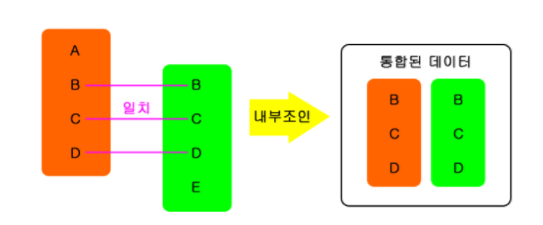
The fixed 2021 example (profiles A–E, scores for B, E, F, G, H) returns:
{ Name = B, Age = 22, Math = 20, English = 70 }
{ Name = E, Age = 15, Math = 50, English = 20 }
An outer (left) join keeps every element of the left side and fills in a blank where there is no partner. The diagram labels read "base data", "join data" and "merged data":
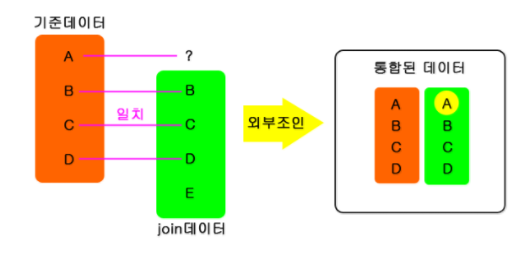
The 2021 code filled the blanks with DefaultIfEmpty(new Score() { math = 100, english = 100 }). Fixed and run, that gives:
{ Name = A, Age = 11, Math = 100, English = 100 }
{ Name = B, Age = 22, Math = 20, English = 70 }
{ Name = C, Age = 33, Math = 100, English = 100 }
...
Students with no scores now look like top students. A default should be able to say "missing", so take null from DefaultIfEmpty() and read it with ?.:
var outer = from p in profiles
            join s in scores on p.Name equals s.Name into temp
            from s in temp.DefaultIfEmpty()
            select new { p.Name, p.Age, Math = s?.Math, English = s?.English };
{ Name = A, Age = 11, Math = , English =  }
{ Name = B, Age = 22, Math = 20, English = 70 }
...
Compared with .NET 10's LeftJoin using SequenceEqual, the result was True. .NET 10 also has the mirror-image RightJoin: running orders.RightJoin(customers, …) kept the customer han, who has no orders, as han:-.
Duplicate keys multiply rows
If the right side contains the same key twice, matching rows are multiplied. We joined orders to a customer table that lists kim twice (Seoul and Busan):
var customers = new[] { new C("kim", "Seoul"), new C("kim", "Busan"), new C("lee", "Daegu") };
var j = orders.Join(customers, o => o.Customer, c => c.Name, (o, c) => (o.Id, c.City)).ToList();
(1, Seoul) (1, Busan) (2, Daegu) (3, Seoul) (3, Busan) (6, Daegu)
kim's two orders became four rows, while the orders from park and capitalized Kim, who are not in the customer table, disappeared. The total happened to stay at 6, so a check that only compared Count() would have passed. Before joining against master data, verify the key is unique: customers.CountBy(c => c.Name).Where(kv => kv.Value > 1) returned [kim, 2] here.
GroupJoin: a join that does not flatten
GroupJoin (join … into in query syntax) attaches the whole list of matches to each left element. It suits one-to-many summaries such as "order count and total per customer", and customers with no matches stay in with zero:
var summary = customers.DistinctBy(c => c.Name).Append(new C("han", "Incheon"))
    .GroupJoin(orders, c => c.Name, o => o.Customer,
               (c, os) => new { c.Name, Count = os.Count(), Total = os.Sum(o => o.Amount) });
{ Name = kim, Count = 2, Total = 1700 }
{ Name = lee, Count = 2, Total = 1700 }
{ Name = han, Count = 0, Total = 0 }
.NET 9 CountBy and AggregateBy, and measured speed
Often you do not need each group's elements, only a count or a total. .NET 9 added CountBy and AggregateBy for exactly that. They return a sequence of KeyValuePair<TKey, TValue> and are deferred as well:
foreach (var kv in orders.CountBy(o => o.Channel)) Console.Write($"{kv.Key}={kv.Value} ");
// web=3 app=3
foreach (var kv in orders.AggregateBy(o => o.Channel, seed: 0m, (sum, o) => sum + o.Amount)) Console.Write($"{kv.Key}={kv.Value} ");
// web=4900 app=2200
How big is the difference? We counted or summed 5 million items (readonly record struct Item(int Key, int Value)) across 1,000 keys, and joined 20,000 × 20,000 items. .NET 10.0.14, Release, Apple M1 Pro, three runs; allocation is the GC.GetAllocatedBytesForCurrentThread() delta.
| Operation | Run 1 | Run 2 | Run 3 | Allocated |
|---|---|---|---|---|
GroupBy + Count() |
53.9 ms | 52.4 ms | 51.7 ms | 125.4 MB |
ToLookup + Count() |
60.7 ms | 59.0 ms | 57.8 ms | 125.4 MB |
CountBy (.NET 9) |
17.5 ms | 16.9 ms | 17.1 ms | 0.1 MB |
hand-written Dictionary count |
12.3 ms | 12.2 ms | 12.2 ms | 0.1 MB |
GroupBy + Sum() |
111.2 ms | 107.9 ms | 107.3 ms | 125.4 MB |
AggregateBy (.NET 9) sum |
18.5 ms | 18.2 ms | 18.0 ms | 0.1 MB |
Join 20k × 20k |
2.5 ms | 2.4 ms | 2.4 ms | 2.2 MB |
nested foreach 20k × 20k |
189.1 ms | 187.7 ms | 187.9 ms | 0 MB |
SelectMany + Where 20k × 20k |
159.1 ms | 158.3 ms | 160.0 ms | 4.9 MB |
GroupByandToLookupcopy all 5 million elements into their groups, hence 125 MB.CountBy/AggregateBykeep one value per key: 0.1 MB, and 3–6x faster.- The hand-written
Dictionaryloop (CollectionsMarshal.GetValueRefOrAddDefault) was fastest, but only about 5 ms ahead ofCountBy. In most code,CountBy's readability wins. Joinbuilds a hash table over the right side and looks each key up once, so it was about 77x faster than the nested loop. Contrary to "LINQ is slow", here the hand-written loop was the slow one. Emulating a join withWhereinsideSelectManyis the same O(N×M) as the nested loop.
Which to use when
| Goal | Use |
|---|---|
| Count per group | CountBy (.NET 9+); earlier, GroupBy(…).Select(g => (g.Key, g.Count())) |
| One aggregate per group (sum, max…) | AggregateBy (.NET 9+) |
| Need each group's elements, enumerate once | GroupBy |
| Query the same groups repeatedly, missing keys safe | ToLookup |
| Group by several properties | anonymous type, tuple or record key (never a plain class) |
| Case-insensitive or custom equality | method syntax + an IEqualityComparer |
| Only rows present on both sides | Join |
| Keep every left row | LeftJoin (.NET 10); earlier, join … into + DefaultIfEmpty() |
| Summarize one-to-many | GroupJoin |
Keys may be null |
remember Join never matches them; map null to a sentinel first if needed |
For the basic clauses and deferred execution, see LINQ basics; for what the lambdas you pass to LINQ cost when they capture variables, see C# lambda expressions.
Tested with .NET SDK 10.0.403 / runtime 10.0.14, C# 14, macOS on Apple M1 Pro.
FAQ
What is the difference between GroupBy and ToLookup?
GroupBy is deferred: it regroups the whole source every time you enumerate it. With 6 items, one foreach plus one Count() called the key selector 12 times. ToLookup groups once, immediately, and freezes the result; looking up a missing key returns an empty sequence instead of throwing.
How do I group by several properties (a composite key)?
Use an anonymous type new { o.Year, o.Month }, a tuple (o.Year, o.Month) or a record as the key. A plain class without Equals/GetHashCode compares by reference, so equal values become different keys: data that should form 2 groups produced 6 (one per element).
What is the fastest way to count items per group?
On .NET 9 or later, CountBy. For 5 million items and 1,000 keys, GroupBy+Count took about 52 ms and allocated 125 MB, CountBy about 17 ms and 0.1 MB, and a hand-written Dictionary loop about 12 ms (.NET 10, Release, Apple M1 Pro).