C++入門:最初のプログラム・型・参照・std::string
C++講座1。Apple clang 21 で全部実行:5分で最初のコンパイル、cout・printf・std::print の速度実測、参照とポインタ、const、{} 初期化の縮小変換エラー。
シリーズ:C++講座 1/6(初級)。 C++ が初めての人、C や Java は少し書けるが配属先で C++ のコードを読むことになった人向けです。読み終えると、C++ のプログラムをビルドして実行し、cout・printf・std::print を使い分け、参照・ポインタ・const を説明でき、波括弧初期化が出す縮小変換エラーを読めるようになります。
ゲームエンジン、金融システム、ブラウザの部品、モバイルアプリのネイティブ部分。新しく配属されたチームの足元が C++ だった、というのはよくある話です。言語は巨大ですが、最初の 1 週間でつまずく場所はだいたい決まっています。小数が黙って消える、符号付きと符号なしの比較が逆に転ぶ、+ で「連結」したつもりの文字列がポインタ演算になる。この講座ではそれぞれを本物のコンパイラで動かし、本物のメッセージを見せます。以下はすべて Apple Silicon Mac(M1 Pro)、macOS 26、Apple clang 21.0.0 + libc++ で実行した結果で、出力中のパスは短くしています。
AtCoder などの競技プログラミングで C++ に触れた人は、「おまじない」の ios::sync_with_stdio(false) を覚えているかもしれません。あれが今の環境で本当に効くのかも、後半で実測します。C を知っている人は、コンパイルの流れと printf の書式を C言語講座 1 で先に見ておくと、同じ部分を読み飛ばせます。
5分で最初の C++ プログラム
Mac では Xcode Command Line Tools にコンパイラが入っています。C++ のコマンドは clang ではなく clang++ です。
$ clang++ --version
Apple clang version 21.0.0 (clang-2100.4.1.1)
Target: arm64-apple-darwin25.6.0
hello.cpp を作ります。
#include <iostream>

int main() {
    std::cout << "Hello, C++!\n";
    return 0;
}
#include <iostream> は標準ライブラリの入出力ストリームを読み込みます。std:: は名前空間という接頭辞で、標準の名前と自分の名前がぶつからないようにするものです。std::cout が標準出力で、<< で値を流し込みます。
$ clang++ -std=c++23 -Wall -Wextra -pedantic -o hello hello.cpp
$ ./hello
Hello, C++!
-std=c++23 は言語の版を選ぶオプションで、必ず付けてください。付けないと Apple clang 21 は C++14 としてコンパイルしました。__cplusplus を表示すると 201402L で、C++17 の機能(構造化束縛)を使うと warning: decomposition declarations are a C++17 extension [-Wc++17-extensions] が出ます。-Wall -Wextra -pedantic は初心者のバグの多くを拾う警告をまとめて有効にします。
初日に必ず見る 2 つのエラー
std:: を付け忘れた場合:
nostd.cpp:3:5: error: use of undeclared identifier 'cout'; did you mean 'std::cout'?
    3 |     cout << "Hello\n";
      |     ^~~~
      |     std::cout
clang++ ではなく clang でビルドした場合。コンパイルは通りますが、最後のリンカ(自分のコードとライブラリをつなぐ工程)が C++ 標準ライブラリを見つけられず、こんなエラーが大量に出ます。
Undefined symbols for architecture arm64:
  "std::__1::ios_base::getloc() const", referenced from:
  ...
ld: symbol(s) not found for architecture arm64
clang: error: linker command failed with exit code 1 (use -v to see invocation)
Hello world が std::__1 入りの Undefined symbols で落ちたら、まず打ったコマンドを確認します。clang++ は -lc++ を自動で足してくれます。
出力:cout、printf、std::print
C++ は C の printf を受け継ぎ、ストリームを足しました。C++23 では Python のように {} を使う std::print も入りました。この環境では 3 つとも動きます。
#include <cstdio>
#include <iostream>
#include <print>

int main() {
    double price = 19.99;
    int qty = 3;
    std::printf("%d x %.2f\n", qty, price);           // C style: format must match types
    std::cout << qty << " x " << price << '\n';        // stream: type picked by the compiler
    std::print("{} x {:.2f}\n", qty, price);           // C++23: type-safe and formatted
}
3 行とも 3 x 19.99 と表示されます。初心者にとって大事な違いは型安全です。printf は書式を間違えても(-Wformat 警告付きで)コンパイルが通り、でたらめな値を出します。cout と std::print は型からコンパイラが変換を選びます。std::format(C++20)は同じ書き方で std::string を作ります。どちらも新しいモードでしか使えません。-std=c++20 では std::print が error: no member named 'print' in namespace 'std'、-std=c++17 では std::format が同じエラーになりました。
std::endl は「C++ の改行」ではない
std::endl は '\n' を書いたうえでフラッシュします。バッファにたまった文字を OS へ押し出す処理です。端末では違いが見えませんが、ファイルへ書くと高くつきます。整数 100 万個を 1 行ずつファイルへ書き出し(./outbench MODE > out.txt)、-O2、各 7 回の中央値を取りました。
| 方法 | 中央値 |
|---|---|
std::printf("%d\n", i) |
67.9 ms |
std::cout << i << '\n' |
92.4 ms |
同上、std::ios::sync_with_stdio(false) 後 |
92.4 ms |
std::print("{}\n", i)(C++23) |
541.6 ms |
std::cout << i << std::endl |
1646.7 ms |
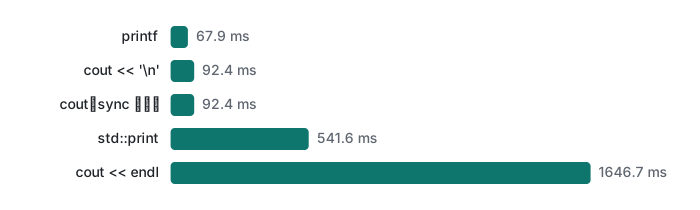
意外だった点が 3 つあります。
std::endlは'\n'の 18 倍遅い。'\n'を使い、どうしても今すぐ表示したいとき(長い計算の前など)だけstd::cout.flush()を 1 回呼びます。- 競プロでおなじみの
sync_with_stdio(false)は、この libc++ では出力について何も変えませんでした。測ったのは出力だけで、このおまじないの主な狙いであるcinの入力は別に測る必要があります。それでも、別のライブラリで測られた古い助言をそのまま持ち込めないことははっきりしました。 - フラッシュなしの中では
std::printが一番遅い結果でした。libc++ の<print>ヘッダを読むと、呼ぶたびに出力先が端末かどうかを確かめてから書いています。書式化自体は速く、std::formatで文字列を作ってfputsする方法は同じ出力で約 62 ms でした。これはこの libc++ の性質で、std::print全般の話ではありません。GCC の libstdc++ や MSVC は試していません。
普段のコードなら cout と '\n'、または std::print で十分です。何百万行も出すときだけ最速の方法を選びます。
型・auto・整数の落とし穴
組み込み型は C と同じで、この環境では int が 4 バイト、long とポインタが 8、double が 8 です。C++ で最初に出会う追加点は 2 つ。
bool型とtrue/false。std::coutはstd::boolalphaを付けない限り1/0と表示します。autoは初期化式から型を推論します。auto n = 7 / 2;はint(値は 3)、auto x = 7 / 2.0;はdouble(3.5)。autoは計算を賢くするわけではなく、式の型をそのまま写すだけです。
次のファイルは警告 2 つだけでコンパイルが通り、どれも直感に反する結果を出します。
#include <iostream>
#include <vector>

int main() {
    std::vector<int> v;                       // empty
    std::cout << "v.size() - 1 = " << v.size() - 1 << '\n';

    int n = -1;
    if (n < v.size()) std::cout << "-1 < 0 ?  yes\n";
    else              std::cout << "-1 < 0 ?  no (!)\n";

    auto big = 100000 * 100000;              // int * int
    std::cout << "big = " << big << '\n';

    float f = 16777216.0f;
    std::cout << "16777216f + 1 == 16777216f ? " << (f + 1.0f == f) << '\n';
}
traps.cpp:12:23: warning: overflow in expression; result is 1'410'065'408 with type 'int' [-Winteger-overflow]
traps.cpp:9:11: warning: comparison of integers of different signs: 'int' and 'size_type' (aka 'unsigned long') [-Wsign-compare]

v.size() - 1 = 18446744073709551615
-1 < 0 ?  no (!)
big = 1410065408
16777216f + 1 == 16777216f ? 1
size()は符号なし型(size_t、ここでは 8 バイト)を返します。符号なしは 0 未満になれないので、0 - 1は 2⁶⁴ − 1 に回り込みます。C++ のループで一番多いバグです(講座 2 の演習 3 で実際に落とします)。intとsize_tを比べると-1が巨大な符号なし値に変換され、-1 < 0が偽になります。C++ では-Wallが-Wsign-compareを有効にするので警告が出ます。100000 * 100000はintで計算されて桁あふれします。左辺をautoやlong longにしても手遅れです。100000LL * 100000と書きます。floatの精度は 24 ビットなので、16,777,216 を超えるとすべての整数は表せず、1 を足しても変わりません。基本はdoubleを使います。
波括弧初期化と縮小変換エラー
C++11 で波括弧初期化 int x{5}; が入りました。最大の利点は、情報を失う変換、つまり縮小変換を拒否することです。
#include <iostream>
int main() {
    double price = 19.99;
    int a = price;          // compiles, a = 19, no warning with -Wall -Wextra
    int b{price};           // error
    int c{3.5};             // error
    char d{300};            // error
    unsigned e{-1};         // error
    std::cout << a << b << c << d << e << '\n';
}
narrow.cpp:5:11: error: type 'double' cannot be narrowed to 'int' in initializer list [-Wc++11-narrowing]
    5 |     int b{price};           // error
      |           ^~~~~
narrow.cpp:5:11: note: insert an explicit cast to silence this issue
      |           static_cast<int>( )
narrow.cpp:7:12: error: constant expression evaluates to 300 which cannot be narrowed to type 'char' [-Wc++11-narrowing]
narrow.cpp:8:16: error: constant expression evaluates to -1 which cannot be narrowed to type 'unsigned int' [-Wc++11-narrowing]
2 warnings and 4 errors generated.
(省略した 2 つの警告は、3.5 が 3 に、300 が 44 になるという内容です。)注目は 4 行目の int a = price; で、-Wall -Wextra -pedantic でも何も出ません。-Wconversion を足して初めて implicit conversion turns floating-point number into integer: 'double' to 'int' [-Wfloat-conversion] と言われます。波括弧は黙った切り捨てをビルドエラーに変えます。本当に切り捨てたいなら static_cast<int>(price) と書けば意図が残ります。
参照・ポインタ・const
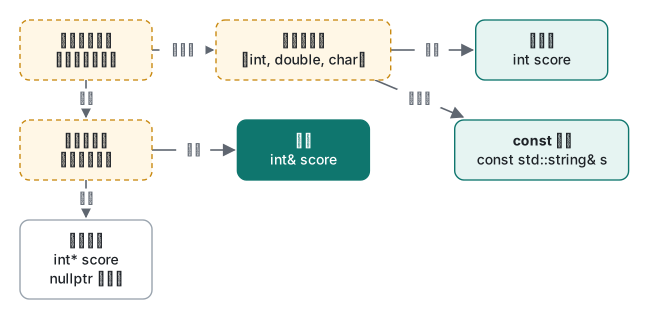
参照は既にあるオブジェクトの別名、ポインタはアドレスを入れる変数です。同じ処理を 3 通りで書きます。
#include <iostream>

void add_bonus_copy(int score) { score += 10; }            // changes a copy
void add_bonus_ref(int& score) { score += 10; }            // changes the caller's int
void add_bonus_ptr(int* score) { if (score) *score += 10; } // may receive nullptr

int main() {
    int s = 50;
    add_bonus_copy(s); std::cout << "copy: " << s << '\n';
    add_bonus_ref(s);  std::cout << "ref:  " << s << '\n';
    add_bonus_ptr(&s); std::cout << "ptr:  " << s << '\n';
    add_bonus_ptr(nullptr);

    int& r = s;
    int other = 1;
    int* p = &s;
    p = &other;   // a pointer can be re-seated
    r = other;    // a reference cannot: this copies 1 into s
    std::cout << "s=" << s << " *p=" << *p << '\n';
}
refs.cpp:3:25: warning: parameter 'score' set but not used [-Wunused-but-set-parameter]
copy: 50
ref:  60
ptr:  70
s=1 *p=1
値渡し版が無意味なことを clang は既に見抜いていて、「引数を変更しているが使っていない」と警告しています。最後の行は定番の驚きどころです。r = other は r の参照先を変えるのではなく、s に 1 を代入します。
const は「この名前を通してはオブジェクトを変えない」という約束で、コンパイラが守らせます。わざと 5 つ間違えたファイルです。
int main() {
    int& r;                 // must be initialized
    const int limit = 10;
    limit = 20;             // const
    int& r2 = limit;        // drops const
    int& r3 = 42;           // non-const ref to temporary
    const int& r4 = 42;     // OK
    int x = 5;
    const int* pc = &x;     // pointer to const int
    *pc = 6;
    return r4 + r2 + r3 + r;
}
referr.cpp:2:10: error: declaration of reference variable 'r' requires an initializer
referr.cpp:4:11: error: cannot assign to variable 'limit' with const-qualified type 'const int'
referr.cpp:5:10: error: binding reference of type 'int' to value of type 'const int' drops 'const' qualifier
referr.cpp:6:10: error: non-const lvalue reference to type 'int' cannot bind to a temporary of type 'int'
referr.cpp:10:9: error: read-only variable is not assignable
4 つ目のエラーは覚えておく価値があります。int& r3 = 42; は通りませんが、const int& r4 = 42; は通ります。const 参照は一時オブジェクトを束縛できるので、関数の引数を const std::string& にすると、呼び出し側は "text" をそのまま渡せます。
「動いてしまう」ぶら下がり参照
参照はオブジェクトより長生きしてはいけません。次のコードは警告付きで通ります。
const std::string& greeting() {
    std::string s = "hello";
    return s;                 // s is destroyed when the function returns
}
dang.cpp:5:12: warning: reference to stack memory associated with local variable 's' returned [-Wreturn-stack-address]
実行結果は警告よりも教訓的でした。普通のビルドは空行を表示。AddressSanitizer 付き(-fsanitize=address)は何事もなかったように hello と表示。ASAN_OPTIONS=detect_stack_use_after_return=1 を付けて初めて ERROR: AddressSanitizer: stack-use-after-return ... in main dang.cpp:7 で止まりました。未定義動作は成功に見えることがあり、サニタイザの検査にも既定で無効なものがある、という 2 つの教訓です。std::string は値で返せば十分安く済みます(理由は講座 4)。
std::string と C 文字列
C 文字列は末尾が 0 の char 配列、std::string はメモリを自分で持ち長さを知っているクラスです。最初にぶつかる違いを並べます。
a == b (C strings): 0            // compares addresses, not text
strcmp(a, b) == 0 : 1
s1 == s2 (std::string): 1        // compares text
Hello, Mina! size=12
"日本" size() = 6 (bytes, not characters)
sizeof(std::string) = 24
at(10): basic_string             // the exception text libc++ gives
size() はバイト数です。UTF-8 の日本語は 1 文字 3 バイトなので、"日本" は 6 になります。文字数を数えたい場面(入力欄の文字数制限など)で size() を使うと 3 倍に数えてしまいます。sizeof(std::string) は中身の長さに関係なく libc++ では 24 バイトで、短い文字列はこの 24 バイトの中に、長い文字列はヒープに置かれます(切り替わる長さは講座 6 で測ります)。C の関数に渡すときは .c_str() を使います。
リテラル同士の連結は定番の最初のエラーです。
strerr.cpp:2:40: error: invalid operands to binary expression ('const char[8]' and 'const char[6]')
    2 | int main() { std::string s = "Hello, " + "world"; ...
"Hello, " + name は片方が std::string なので通ります。リテラル 2 つはただの配列です。もっと危ないのはリテラルと数値の足し算で、こちらはコンパイルが通ります(演習 3)。
よくある間違い → 実際に起きたこと → 直し方
| 間違い | 実際に見たもの | 直し方 |
|---|---|---|
-std= を付けない |
C++14 扱い、C++17 のコードで警告 | 常に -std=c++20 か -std=c++23 |
clang++ でなく clang |
Undefined symbols ... std::__1 |
clang++ を使う |
ループ内の std::endl |
ファイル出力が 18 倍遅い | '\n' にして最後に 1 回 flush |
空の v で for (size_t i = v.size() - 1; ...) |
18446744073709551615 | 先に empty() を確認、逆順は安全な書き方で |
int a = price; |
黙って 19 | int a{price} ならエラー、意図的なら static_cast<int> |
| ローカル変数への参照を返す | 空行、ASan 付きでは「動く」 | 値で返す |
"Total: " + n |
でたらめか何も出ない | std::to_string(n) か std::format |
正直な限界・バージョンの注記
- 実行したのは arm64 macOS 26 上の Apple clang 21.0.0 と libc++(
_LIBCPP_VERSION220106)だけです。GCC/libstdc++、MSVC、Linux は試していません。 -stdなしの既定はこのコンパイラでは C++14(__cplusplusで確認)。他のコンパイラは既定が違います。- 波括弧初期化と縮小変換エラーは C++11。
auto x{42}がinitializer_listではなくintになるのは C++17 の規則(N3922)。std::formatは C++20、std::printは C++23 で、ここでは-std=c++23のときだけ使えました。 - 出力の時間は 1 台のマシンでファイルへ書いたときのものです。端末への出力はどれも遅くなり、順位も変わり得ます。ただし
endlの教訓はどこでも同じです。フラッシュは本当に仕事をするからです。
演習
1. 出力を予想してから実行してください。
int a{7 / 2};
double b = 7 / 2;
auto c = 7 / 2.0;
auto d = 'A' + 1;
std::cout << a << ' ' << b << ' ' << c << ' ' << d << '\n';
2. 次のうちコンパイルエラーになるのはどれで、なぜですか。int x{2.0}; / const int k = 5; k++; / int& r; / const int& t = 5;
3. 次のコードはコンパイルが通ります。何が表示され、どう直しますか。
int total = 42;
std::string s = "Total: " + total;
std::cout << s << '\n';
解答
1. 実際の出力は 3 3 3.5 66。a と b はどちらも整数の割り算 7 / 2 = 3 です(b は 3.0 で、cout は 3 と表示)。2.0 で割る c だけが 3.5。'A' + 1 は char が int に昇格するので、d は 'B' ではなく int の 66 です。
2. エラーは最初の 3 つ。int x{2.0} は整数値でも縮小変換です(type 'double' cannot be narrowed to 'int')。k++ は const を変更しています。int& r; は初期化がありません。const int& t = 5; は const 参照なので一時オブジェクトを束縛でき、問題ありません。
3. clang は adding 'int' to a string does not append to the string [-Wstring-plus-int] と警告します。リテラルは 8 文字の配列で、+ 42 はポインタを 42 バイト先へ進めるだけなので、自分のものではないメモリを読みます。手元の実行では空行でした。-fsanitize=undefined を付けると runtime error: index 42 out of bounds for type 'const char[8]'。直し方は "Total: " + std::to_string(total) か std::format("Total: {}", total) で、どちらも Total: 42 と表示します。
次の講座
講座 2 は関数・オーバーロード・std::vector です。show(5L) がなぜ曖昧になるのか、vector の値渡しが実際いくらかかるのか、push_back の後に死ぬ参照を扱います。
- 次へ:C++講座 2/6:関数・オーバーロード・vector・string
- この先の講座:クラス・RAII・5 のルール、スマートポインタとムーブ、テンプレート・STL アルゴリズム・ranges、性能・コンテナ・並行処理
- C を知っている人へ:C言語講座 1、C言語講座 3(ポインタ)
- 他の言語との順番:プログラミング学習ロードマップ
よくある質問
std::endl と '\n' はどちらを使うべき?
'\n' です。std::endl は改行のあとにストリームをフラッシュするので、ファイルへ出力すると 1 行ごとにシステムコールが走ります。手元の Apple Silicon Mac で 100 万行をファイルへ書くと、'\n' は 92.4 ms、std::endl は 1646.7 ms で約 18 倍遅くなりました。すぐに見せたいときだけ明示的に flush します。
C++ の参照とポインタの違いは?
参照は既にあるオブジェクトの別名で、必ず初期化が必要、null にならず、あとから別のオブジェクトを指し直せません(参照への代入は元の変数への値のコピーになります)。ポインタはアドレスを持つ変数で、nullptr になり得て、指す先を変えられます。必ず存在するなら参照、無いこともあるならポインタを使います。
int x{3.5}; がコンパイルエラーになるのはなぜ?
C++11 の波括弧初期化は縮小変換(情報が失われる変換)を禁止しているからです。clang 21 は「error: type 'double' cannot be narrowed to 'int' in initializer list [-Wc++11-narrowing]」を出します。int x = 3.5; なら通ってしまい、黙って 3 が入ります。黙ったデータ欠落をビルドエラーに変えられるのが波括弧の利点です。