Dart 비동기·Stream·Isolate 실측: 354ms 멈춤을 18ms로
이벤트 루프 실행 순서, Future.wait 610→303ms, try/catch 를 빠져나가는 미대기 Future, Stream 오류, Isolate.run 으로 UI 멈춤 해결까지 Dart 3.11 실측.
시리즈: Dart 강좌 5/6 (고급). Dart·Flutter 코드는 이미 쓰고 있고, "JSON 파싱하는 동안 화면이 멈춘다", "try/catch 를 썼는데 안 잡힌다", "Bad state: Stream has already been listened to" 중 하나라도 겪어 본 분을 위한 글입니다. 다 읽으면 비동기 코드의 실행 순서를 예측하고, 독립된 호출을 병렬로 돌리고, Stream 을 제대로 취소하고, CPU 작업을 이득이 있을 때만 isolate 로 옮길 수 있습니다.
신입 분들이 가장 자주 묻는 질문은 "async 를 붙였는데 왜 화면이 버벅이나요?" 입니다. 답은 짧습니다. Dart 는 isolate 하나에 스레드 하나이고, async 는 코드가 언제 도는지만 바꿀 뿐 어디서 도는지는 바꾸지 않습니다. 아래의 모든 주장은 실제로 돌린 작은 프로그램과 그 출력으로 뒷받침했고, 글을 쓰다가 예상치 못하게 만난 오류 두 개도 그대로 실었습니다.
실행 환경: Dart SDK 3.11.5 (stable), 따로 적지 않으면 dart run(JIT), Apple Silicon Mac (M1 Pro, 8 코어, 16GB), macOS. 시간은 3 회 중앙값입니다. Flutter 의 compute() 는 앱을 돌려 본 것이 아니라 Flutter 3.41.9 소스를 읽어서 확인했습니다.
이벤트 루프: 마이크로태스크가 항상 먼저
isolate 에는 스레드 하나와 큐 두 개가 있습니다. 이벤트 큐에는 바깥에서 오는 일(타이머, I/O 완료, Future(() {...}))이, 마이크로태스크 큐에는 짧은 후속 작업(scheduleMicrotask, 완료된 Future 의 then 콜백, await 뒤의 코드)이 들어갑니다. 규칙은 단순하고 엄격합니다. 동기 코드가 끝나면 루프는 마이크로태스크 큐를 전부 비운 뒤에야 다음 이벤트를 하나 꺼냅니다.
import 'dart:async';

void main() {
  print('A main start');
  Timer.run(() => print('B Timer.run'));
  Future(() => print('C Future(() {...})'));
  Future.delayed(Duration.zero, () => print('D Future.delayed(zero)'));
  scheduleMicrotask(() => print('E scheduleMicrotask'));
  Future.value(1).then((_) => print('F Future.value(1).then'));
  Future.microtask(() {
    print('G Future.microtask');
    scheduleMicrotask(() => print('H microtask queued by a microtask'));
  });
  () async {
    print('I async body, before the first await');
    await null;
    print('J async body, after await null');
  }();
  print('K main end');
}
A main start
I async body, before the first await
K main end
E scheduleMicrotask
F Future.value(1).then
G Future.microtask
J async body, after await null
H microtask queued by a microtask
B Timer.run
C Future(() {...})
D Future.delayed(zero)
놀라운 점이 세 가지 있습니다. I 가 K 보다 먼저 나옵니다. async 함수는 첫 await 까지는 동기로 실행되기 때문입니다. 마이크로태스크가 추가한 마이크로태스크 H 도 먼저 예약된 타이머 B 를 앞지릅니다. 그리고 Future.delayed(Duration.zero) 는 "지금"이 아니라 "이미 줄 선 것들이 다 끝난 뒤"입니다.
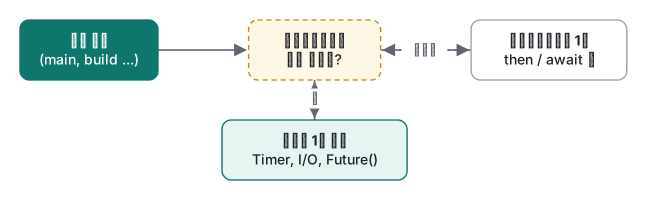
Flutter 로 옮기면 이렇습니다. 프레임은 메인 isolate 가 이벤트 루프로 돌아와야 그릴 수 있습니다. 긴 마이크로태스크 사슬이나 긴 동기 함수 하나는 주위에 await 가 몇 개 있든 프레임을 붙잡습니다.
Future, async/await, Future.wait 실측
Future<T> 는 나중에 도착할 값(또는 오류)이고, await 는 그것이 올 때까지 함수를 멈춥니다. 가장 흔한 실수는 서로 상관없는 호출을 하나씩 기다리는 것입니다. 앱 스플래시 화면에서 설정, 회원 정보, 광고 설정을 차례로 불러오는 코드를 떠올려 보세요.
Future<String> fetch(String name, int ms) async {
  await Future.delayed(Duration(milliseconds: ms));
  return '$name($ms ms)';
}

Future<void> main() async {
  final sw = Stopwatch()..start();
  final a = await fetch('config', 300);
  final b = await fetch('user', 200);
  final c = await fetch('ads', 100);
  print('sequential: $a $b $c -> ${sw.elapsedMilliseconds} ms');

  sw.reset();
  final r = await Future.wait([fetch('config', 300), fetch('user', 200), fetch('ads', 100)]);
  print('Future.wait: $r -> ${sw.elapsedMilliseconds} ms');

  sw.reset();
  final (x, y, z) = await (fetch('config', 300), fetch('user', 200), fetch('ads', 100)).wait;
  print('record .wait: $x $y $z -> ${sw.elapsedMilliseconds} ms');
}
sequential: config(300 ms) user(200 ms) ads(100 ms) -> 610 ms
Future.wait: [config(300 ms), user(200 ms), ads(100 ms)] -> 305 ms
record .wait: config(300 ms) user(200 ms) ads(100 ms) -> 303 ms
세 번 돌린 결과는 순차 610 / 615 / 611ms, Future.wait 305 / 302 / 303ms 였습니다. 병렬로 돌리면 합이 아니라 가장 느린 호출 시간만큼 걸립니다. 레코드 형태 (f1, f2, f3).wait 는 요소마다 타입(String, int …)을 유지한다는 점이 List<T> 를 돌려주는 Future.wait 와 다릅니다.
잘 알려지지 않은 것은 실패했을 때의 동작입니다. 50ms 짜리 호출이 예외를 던지게 바꿔 봤습니다.
Future.wait failed after 303 ms: Bad state: ads down
eagerError: true failed after 56 ms: Bad state: ads down
record .wait failed after 302 ms: ParallelWaitError<(String?, String?), (AsyncError?, AsyncError?)>
기본 Future.wait 는 Future 가 전부 끝날 때까지 기다린 뒤 첫 오류를 알려 줍니다. 빨리 실패해도 가장 느린 호출만큼 기다리는 셈입니다. eagerError: true 를 주면 바로 실패합니다(나머지 Future 는 계속 돌고 결과만 버려집니다). 레코드 .wait 는 성공한 값과 오류를 함께 담은 ParallelWaitError 를 던지므로, 불러온 것만이라도 화면에 보여 주고 싶을 때 쓸모가 있습니다.
흔한 실수: try/catch 를 빠져나가는 미대기 Future
실수: try 안에서 async 함수를 await 없이 부른다.
Future<void> saveScore(int score) async {
  await Future.delayed(const Duration(milliseconds: 10));
  throw Exception('disk full while saving $score');
}

Future<void> main() async {
  try {
    saveScore(42); // no await
    print('try block finished');
  } catch (e) {
    print('caught: $e'); // never runs
  }
  await Future.delayed(const Duration(milliseconds: 50));
  print('main done'); // never reached either
}
실제로 일어나는 일:
try block finished
Unhandled exception:
Exception: disk full while saving 42
#0      saveScore (~/demo/unawaited.dart:3:3)
<asynchronous suspension>
프로세스는 종료 코드 255 로 끝났고 main done 은 찍히지 않았습니다. try 블록은 오류가 생기기 10ms 전에 이미 끝났으니 받아 줄 곳이 없었던 것입니다. Flutter 앱이라면 같은 오류가 PlatformDispatcher.onError 나 zone 핸들러로 가고, 릴리스 빌드의 사용자는 "저장이 안 됐다"는 결과만 보게 됩니다.
고치는 법: await saveScore(42); 로 쓰면 출력이 caught: Exception: disk full while saving 42, 그다음 main done 이 됩니다. 도구가 찾아 주게 하려면 analysis_options.yaml 에 린트를 켭니다.
linter:
  rules:
    - unawaited_futures
info - unawaited.dart:8:5 - Missing an 'await' for the 'Future' computed by this expression. Try adding an 'await' or wrapping the expression with 'unawaited'. - unawaited_futures
일부러 기다리지 않는 경우(통계 전송 등)에는 dart:async 의 unawaited(...) 로 감싸고 .catchError 를 달아, 의도와 오류 처리가 둘 다 코드에 보이게 합니다.
Stream: 단일 구독과 브로드캐스트, 그리고 취소
Stream<T> 는 시간에 걸쳐 여러 값을 전달합니다. 대부분의 Stream(async* 함수, 파일 읽기, HTTP 본문)은 단일 구독이라 리스너를 평생 하나만 가질 수 있습니다.
Stream<int> ticks(int n) async* {
  for (var i = 1; i <= n; i++) {
    await Future.delayed(const Duration(milliseconds: 20));
    yield i;
  }
}
// ...
final s = ticks(3);
s.listen((v) => print('first listener: $v'));
s.listen((v) => print('second listener: $v')); // throws
ERROR StateError: Bad state: Stream has already been listened to.
first listener: 1
first listener: 2
first listener: 3
Flutter 에서는 build() 안에서 만든 Stream 을 StreamBuilder 에 넘겨 재빌드될 때나, 위젯 두 개가 Stream 하나를 같이 쓸 때 주로 나옵니다. asBroadcastStream() 이나 StreamController.broadcast() 를 쓰면 리스너를 여럿 둘 수 있습니다(실행하면 A got 1, B got 1, A got 2 … 순으로 나옵니다). 다만 브로드캐스트 Stream 은 버퍼에 담아 두지 않습니다. 아무도 듣지 않을 때 넣은 이벤트는 사라집니다.
final bus = StreamController<String>.broadcast();
bus.add('login');            // nobody listening yet
await Future.delayed(Duration.zero);
bus.stream.listen((e) => print('late listener got: $e'));
bus.add('purchase');
late listener got: purchase
login 은 아무 경고 없이 버려졌습니다. 늦게 붙은 리스너도 최신 값이 필요하다면 값을 필드에 들고 있다가 구독 시점에 내보내야 합니다.
취소는 받기를 멈추는 것만이 아니라 일 자체를 멈추는 방법입니다. StreamController 는 리스너가 떠나는 순간을 알려 줍니다.
var produced = 0;
late final StreamController<int> ctrl;
Timer? timer;
ctrl = StreamController<int>(
  onListen: () {
    print('onListen: start producing');
    timer = Timer.periodic(const Duration(milliseconds: 10), (_) => ctrl.add(++produced));
  },
  onCancel: () {
    print('onCancel: stop producing after $produced events');
    timer?.cancel();
  },
);
final sub = ctrl.stream.listen((v) => v % 5 == 0 ? print('got $v') : null);
await Future.delayed(const Duration(milliseconds: 115));
await sub.cancel();
await Future.delayed(const Duration(milliseconds: 50));
print('after cancel, produced is still $produced, isClosed=${ctrl.isClosed}');
onListen: start producing
got 5
got 10
onCancel: stop producing after 11 events
after cancel, produced is still 11, isClosed=false
sub.cancel() 이 없으면(Flutter 에서는 dispose() 에서 부르지 않으면) 타이머는 앱이 살아 있는 내내 돕니다. 취소해도 컨트롤러가 닫히지는 않는다는 점도 보입니다. close() 를 부르기 전까지 isClosed 는 false 입니다.
Isolate: 메인 isolate 가 막히는 것을 재 보기
isolate 는 자기 스레드와 이벤트 루프를 가진 별도의 Dart 힙입니다. isolate 끼리는 객체를 공유하지 않고 메시지로만 대화합니다. Isolate.run(f) 는 isolate 를 하나 띄워 f 를 실행하고 결과를 돌려준 뒤 종료합니다. "막힌다"는 것이 무엇인지 보려고, 16ms 주기의 "프레임" 타이머를 돌리면서 소수를 세는 동안 틱 사이의 가장 큰 간격을 기록했습니다.
import 'dart:async';
import 'dart:isolate';

int countPrimes(int n) {
  var count = 0;
  for (var i = 2; i < n; i++) {
    var prime = true;
    for (var d = 2; d * d <= i; d++) {
      if (i % d == 0) { prime = false; break; }
    }
    if (prime) count++;
  }
  return count;
}

Future<void> measure(String label, Future<int> Function() work) async {
  final sw = Stopwatch()..start();
  var last = 0, maxGap = 0, ticks = 0;
  final t = Timer.periodic(const Duration(milliseconds: 16), (_) {
    final now = sw.elapsedMilliseconds;
    if (now - last > maxGap) maxGap = now - last;
    last = now;
    ticks++;
  });
  await Future.delayed(const Duration(milliseconds: 100)); // settle
  final start = sw.elapsedMilliseconds;
  final ticksBefore = ticks;
  final result = await work();
  final took = sw.elapsedMilliseconds - start;
  final ticksDuring = ticks - ticksBefore;
  await Future.delayed(const Duration(milliseconds: 50));
  t.cancel();
  print('$label: result=$result, work took $took ms, '
      'ticks during work=$ticksDuring (expected ~${took ~/ 16}), '
      'max heartbeat gap=$maxGap ms');
}

Future<void> main() async {
  const n = 3000000;
  await measure('main isolate   ', () async => countPrimes(n));
  await measure('Isolate.run    ', () => Isolate.run(() => countPrimes(n)));
}
main isolate   : result=216816, work took 349 ms, ticks during work=0 (expected ~21), max heartbeat gap=354 ms
Isolate.run    : result=216816, work took 353 ms, ticks during work=22 (expected ~22), max heartbeat gap=18 ms
() async => countPrimes(n) 의 async 는 아무것도 바꾸지 못했습니다. 작업 중 틱은 0 번, 가장 큰 간격은 354ms(다른 실행은 355, 354ms)로, 60Hz 기준 약 21 프레임이 빠진 셈입니다. Isolate.run 으로는 작업 시간은 같았지만 타이머가 계속 돌았습니다. 틱 22 번, 가장 큰 간격 18ms 입니다.

Flutter 의 compute(fn, arg) 도 똑같습니다. Flutter 3.41.9 의 foundation/_isolates_io.dart 는 그냥 Isolate.run 을 부릅니다. 웹에는 isolate 가 없어서 compute 가 메인 스레드에서 함수를 실행합니다.
isolate 로 데이터를 보내는 비용
isolate 는 메모리를 공유하지 않으므로 넘기는 데이터는 복사됩니다. 요소 1,000 만 개를 워커에 보내고 길이만 돌려받으면서 16ms 타이머를 같이 돌렸습니다(5 회 중앙값. "가장 큰 간격"이 16ms 미만이면 늦은 틱이 없었다는 뜻).
| 보낸 것 (요소 1,000 만 개) | 시간 | 타이머 최대 간격 |
|---|---|---|
Isolate.run, 클로저가 List<int> 를 캡처 |
27.6 ms | 27 ms |
Isolate.run, 클로저가 Uint8List(10MB) 를 캡처 |
1.8 ms | 8 ms |
상주 isolate 에 SendPort.send(List<int>) |
27.7 ms | 28 ms |
SendPort.send(Uint8List) |
1.0 ms | 7 ms |
SendPort.send(TransferableTypedData) |
1.0 ms | 8 ms |
빈 Isolate.run(() => 0) |
0.2 ms | — |
교훈은 두 가지입니다. 첫째, 복사는 보내는 쪽 isolate 에서 일어납니다. List<int> 복사 28ms 는 그 자체로 한 프레임보다 깁니다. 파싱을 isolate 로 옮겨 놓고 거대한 List<int> 를 넘기면 여전히 버벅일 수 있다는 뜻입니다. typed data 는 바이트가 한 덩어리로 붙어 있어서 memcpy 에 가까운 속도로 복사됩니다. 둘째, 돌려받는 쪽은 쌉니다. Isolate.run 은 Isolate.exit 로 결과의 메모리를 호출한 쪽에 그대로 넘깁니다. 1,000 만 개 List<int> 를 만드는 데 그냥은 81.1ms, isolate 에서 만들어 돌려받으면 89.4ms 였습니다.
흔한 실수: 너무 많이 캡처하는 클로저
실수: 보낼 수 없는 것(ReceivePort, StreamController, 소켓, Flutter 에서는 흔히 State 객체 자체)을 함께 들고 있는 메서드 안에서 클로저를 써서 Isolate.run 을 부른다.
import 'dart:isolate';

Future<void> main() async {
  final port = ReceivePort(); // something your State object owns
  final numbers = List<int>.generate(1000, (i) => i);
  void cleanUp() => port.close(); // another closure captures `port`

  final sum = await Isolate.run(() => numbers.reduce((a, b) => a + b));
  print('sum = $sum');
  cleanUp();
}
실제로 일어나는 일:
Unhandled exception:
Invalid argument(s): Illegal argument in isolate message: object is unsendable - Library:'dart:isolate' Class: _ReceivePortImpl@1026248 (see restrictions listed at `SendPort.send()` documentation for more information)
 <- Context num_variables: 2 <- Closure: () => int (from ~/demo/capture_trap.dart)
 <- resultPort in Instance of '_RemoteRunner<int>' (from dart:isolate)
클로저는 numbers 만 썼지만, 같은 스코프에서 만든 클로저들은 컨텍스트 객체 하나를 공유하고 그 안에 port 도 들어 있습니다. 사실 위의 측정 코드를 쓰다가 처음 우연히 밟았습니다. 계산을 최상위 함수 sumAll(numbers) 로 빼고도 main 안에서 Isolate.run(() => sumAll(numbers)) 로 부르면 똑같이 실패했습니다. 클로저가 여전히 main 의 스코프에서 만들어졌기 때문입니다.
고치는 법: 보내고 싶은 변수만 가진 작은 함수 안에서 클로저를 만듭니다.
int sumAll(List<int> xs) => xs.reduce((a, b) => a + b);
Future<int> sumInIsolate(List<int> xs) => Isolate.run(() => sumAll(xs));
// main 에서: final sum = await sumInIsolate(numbers);   -> sum = 499500
Flutter 에서 compute(parseJson, body) 에 최상위 함수나 static 함수를 넘기는 것이 안전한 패턴인 이유도 같습니다.
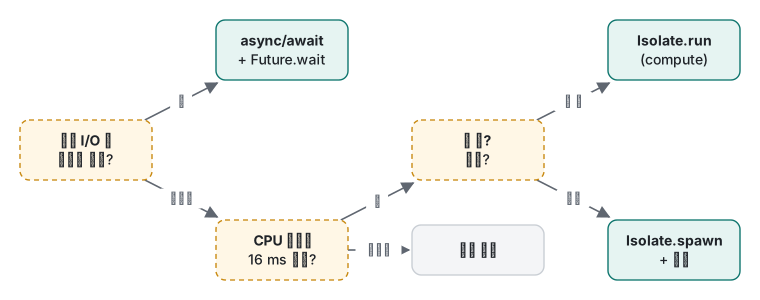
판단표
| 상황 | 쓸 것 | 이 글의 측정 |
|---|---|---|
| 네트워크·디스크·타이머 대기 | async/await |
— |
| 서로 독립된 요청 여러 개 | Future.wait 또는 레코드 .wait |
610 → 303 ms |
| 하나라도 실패하면 바로 실패 | Future.wait(..., eagerError: true) |
303 → 56 ms |
| 의도적으로 안 기다림 | unawaited(f.catchError(...)) |
처리 안 하면 exit 255 |
| 리스너 하나, 순서대로 | 단일 구독 Stream | — |
| 리스너 여럿, 지금부터의 이벤트만 | 브로드캐스트 Stream | 이른 이벤트 유실 |
| 16ms 미만 CPU 작업 | 그냥 실행 | — |
| 한 프레임 넘는 CPU 작업, 한 번 | Isolate.run / compute |
간격 354 → 18 ms |
| 반복되는 CPU 작업 | Isolate.spawn + SendPort |
호출마다 0.2 ms 시작 비용 절약 |
| isolate 로 큰 데이터 | Uint8List 등 typed data |
27.6 → 1.8 ms |
연습 문제
1. 실행하지 말고 출력 순서를 적은 뒤 돌려 보세요.
import 'dart:async';
void main() {
  Future(() => print('1'));
  Future.value().then((_) => print('2'));
  scheduleMicrotask(() => print('3'));
  print('4');
}
정답
4, 2, 3, 1. 동기 코드(4)가 먼저입니다. 그다음 마이크로태스크가 등록된 순서대로 실행됩니다. Future.value().then 이 scheduleMicrotask 보다 먼저 등록됐으니 2, 3. Future(() ...) 는 이벤트라서 1 이 마지막입니다.
2. 어떤 화면이 프로필(400ms)과 피드(250ms)를 await 두 번으로 차례로 불러옵니다. 약 400ms 에 끝나고, 값마다 타입이 유지되고, 프로필만 실패해도 피드는 보여 주도록 고쳐 보세요.
정답
레코드 .wait 를 쓰고 ParallelWaitError 를 잡습니다. AsyncError 는 dart:async 에 있어서, import 를 빼면 컴파일러가 Error: 'AsyncError' isn't a type. 으로 멈춥니다.
import 'dart:async';
// ...
try {
  final (profile, feed) = await (loadProfile(), loadFeed()).wait;
  show(profile, feed);
} on ParallelWaitError<(Profile?, Feed?), (AsyncError?, AsyncError?)> catch (e) {
  final (profile, feed) = e.values;
  show(profile, feed); // one of them may be null
}
400ms 뒤에 예외를 던지는 프로필과 250ms 뒤에 돌아오는 피드로 돌리자 405ms 뒤에 profile=null feed=12 가 찍혔습니다.
솔직한 한계와 버전 메모
- 모든 코드는 Dart 3.11.5 에서만 돌렸습니다. 레코드, 즉
(f1, f2).wait는 언어 버전 3.0 이 필요합니다.// @dart=2.19주석을 붙이면 분석기가 레코드 리터럴을experiment_not_enabled("This requires the 'records' language feature to be enabled")로 거부합니다.Isolate.run은 문서상 Dart 2.19 에서 추가됐지만, 옛 SDK 로 직접 확인하지는 않았습니다. - 하트비트 타이머는 Flutter 프레임 스케줄러를 흉내 낸 것이지 스케줄러 자체가 아닙니다. 실제 버벅임은 래스터 시간에도 좌우되는데, 이 실험은 그 부분을 건드리지 않습니다. 앱의 숫자는 실기기에서 profile 모드로 Flutter DevTools 의 성능 화면을 보세요.
- 복사 비용은 이 기기와 이 크기에서의 값입니다. 필드가 많은 객체는
int보다 요소당 비용이 큽니다. 자기 데이터로 재 보세요. - 웹에는 isolate 가 없어서
compute가 그 자리에서 실행됩니다.
이번 강좌는 코드가 어디서 도는지를 다뤘습니다. 6강에서는 얼마나 빨리 도는지, 즉 JIT 와 AOT, 워밍업, 메모리를 잽니다.
이전 강좌: 4강: 레코드·패턴·sealed 클래스 · 다음 강좌: 6강: 성능, JIT 대 AOT, 메모리
관련 글: Swift 5강: 동시성, async 와 actor · Java 가상 스레드와 동시성 · Python 스레드·프로세스·asyncio·GIL · Flutter 앱 16 개 마이그레이션에서 깨진 것들
자주 묻는 질문
Dart 의 async/await 는 다른 스레드에서 실행되나요?
아닙니다. async 함수도 같은 isolate, 같은 스레드에서 돕니다. await 는 Future 를 기다리는 동안 이벤트 루프가 다른 일을 하게 해 줄 뿐입니다. async 함수 안에서 약 350ms 동안 소수를 세자 16ms 타이머가 354ms 동안 멈췄습니다. 메인 isolate 밖으로 일을 옮기는 것은 isolate(Isolate.run, Flutter 의 compute)뿐입니다.
Future 에서 난 예외를 try/catch 가 못 잡는 이유는?
await 하지 않았기 때문입니다. Future 가 실패하기 전에 try 블록이 이미 끝나서 처리할 곳이 없고, 'Unhandled exception' 이 되어 테스트 프로그램이 종료 코드 255 로 끝났습니다. await 를 붙이거나 catchError 를 달고, unawaited_futures 린트로 빠진 await 를 찾으세요.
isolate 로 데이터를 보내는 비용은 큰가요?
타입에 따라 다릅니다. 요소 1,000 만 개짜리 List<int> 는 약 28ms 가 걸렸고 그동안 보내는 쪽 isolate 가 멈췄습니다. 10MB Uint8List 는 1~2ms 였습니다. Isolate.run 의 반환값은 Isolate.exit 로 복사 없이 넘어가서 쌉니다.