Dart Async, Streams and Isolates, Measured on 3.11
Dart's event loop order, Future.wait 610→303 ms, the unawaited error try/catch misses, stream errors, and a 354 ms UI freeze fixed with Isolate.run.
Series: Dart lecture 5/6 (advanced). For developers who already write Dart or Flutter code and have met at least one of these: a UI that freezes while JSON is parsed, a try/catch that did not catch, or Bad state: Stream has already been listened to. After this lecture you can predict the order in which async code runs, run independent calls in parallel, cancel streams properly, and move CPU work to an isolate only when it pays off.
If you build Flutter apps, this is the lecture that explains jank that a profiler shows but does not explain. Dart has one thread per isolate, and async does not change that: it only decides when code runs, not where. Every claim below is backed by a small program we ran, with its real output, including two errors we did not expect to hit while writing it.
Environment: Dart SDK 3.11.5 (stable), dart run (JIT) unless noted, Apple Silicon Mac (M1 Pro, 8 cores, 16 GB), macOS. Timings are the median of 3 runs. Flutter's compute() was checked by reading the source of Flutter 3.41.9, not by running an app.
The event loop: microtasks always go first
An isolate has one thread and two queues. The event queue holds outside work: timers, I/O completions, Future(() {...}). The microtask queue holds short follow-ups: scheduleMicrotask, then callbacks on completed futures, and the code after an await. The rule is simple and strict: after synchronous code finishes, the loop empties the whole microtask queue before it takes the next event.
import 'dart:async';

void main() {
  print('A main start');
  Timer.run(() => print('B Timer.run'));
  Future(() => print('C Future(() {...})'));
  Future.delayed(Duration.zero, () => print('D Future.delayed(zero)'));
  scheduleMicrotask(() => print('E scheduleMicrotask'));
  Future.value(1).then((_) => print('F Future.value(1).then'));
  Future.microtask(() {
    print('G Future.microtask');
    scheduleMicrotask(() => print('H microtask queued by a microtask'));
  });
  () async {
    print('I async body, before the first await');
    await null;
    print('J async body, after await null');
  }();
  print('K main end');
}
A main start
I async body, before the first await
K main end
E scheduleMicrotask
F Future.value(1).then
G Future.microtask
J async body, after await null
H microtask queued by a microtask
B Timer.run
C Future(() {...})
D Future.delayed(zero)
Three things surprise people here. I prints before K: an async function runs synchronously until its first await. H, a microtask queued by a microtask, still beats the timer B that was scheduled first. And Future.delayed(Duration.zero) is not "now"; it is "after everything already queued".
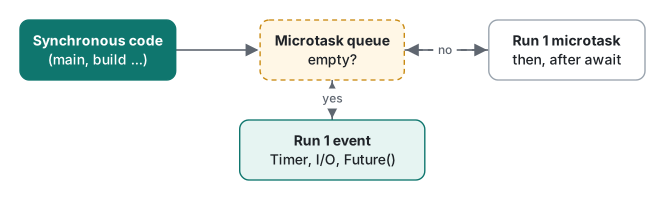
In Flutter terms: a frame can only be drawn when the main isolate gets back to the event loop. A long chain of microtasks, or one long synchronous function, holds the frame back no matter how many awaits surround it.
Future, async/await and Future.wait, measured
A Future<T> is a value that will arrive later, or an error. await pauses the function until it does. The classic mistake is awaiting independent calls one after another, as in an app start screen that loads config, user and ads:
Future<String> fetch(String name, int ms) async {
  await Future.delayed(Duration(milliseconds: ms));
  return '$name($ms ms)';
}

Future<void> main() async {
  final sw = Stopwatch()..start();
  final a = await fetch('config', 300);
  final b = await fetch('user', 200);
  final c = await fetch('ads', 100);
  print('sequential: $a $b $c -> ${sw.elapsedMilliseconds} ms');

  sw.reset();
  final r = await Future.wait([fetch('config', 300), fetch('user', 200), fetch('ads', 100)]);
  print('Future.wait: $r -> ${sw.elapsedMilliseconds} ms');

  sw.reset();
  final (x, y, z) = await (fetch('config', 300), fetch('user', 200), fetch('ads', 100)).wait;
  print('record .wait: $x $y $z -> ${sw.elapsedMilliseconds} ms');
}
sequential: config(300 ms) user(200 ms) ads(100 ms) -> 610 ms
Future.wait: [config(300 ms), user(200 ms), ads(100 ms)] -> 305 ms
record .wait: config(300 ms) user(200 ms) ads(100 ms) -> 303 ms
Over three runs: sequential 610 / 615 / 611 ms, Future.wait 305 / 302 / 303 ms. Parallel time is the slowest call, not the sum. The record form (f1, f2, f3).wait keeps each element's type (String, int, …), which Future.wait's List<T> cannot.
Failure behaviour is the part nobody tells you. We made the 50 ms call throw:
Future.wait failed after 303 ms: Bad state: ads down
eagerError: true failed after 56 ms: Bad state: ads down
record .wait failed after 302 ms: ParallelWaitError<(String?, String?), (AsyncError?, AsyncError?)>
By default Future.wait waits for all futures and then reports the first error, so a fast failure still costs you the slowest call. Pass eagerError: true to fail at once (the other futures keep running; their results are just ignored). The record .wait throws a ParallelWaitError that carries both the partial values and the errors, which is useful when you want to show the screen with whatever did load.
Common mistake: the unawaited future that escapes try/catch
Mistake: calling an async function without await inside try.
Future<void> saveScore(int score) async {
  await Future.delayed(const Duration(milliseconds: 10));
  throw Exception('disk full while saving $score');
}

Future<void> main() async {
  try {
    saveScore(42); // no await
    print('try block finished');
  } catch (e) {
    print('caught: $e'); // never runs
  }
  await Future.delayed(const Duration(milliseconds: 50));
  print('main done'); // never reached either
}
What actually happens:
try block finished
Unhandled exception:
Exception: disk full while saving 42
#0      saveScore (~/demo/unawaited.dart:3:3)
<asynchronous suspension>
The process exited with code 255 and main done never printed. The try block ended 10 ms before the error existed, so no handler was waiting. In a Flutter app the same error goes to PlatformDispatcher.onError / the zone handler, and in a release build users see nothing except data that was never saved.
Fix: write await saveScore(42); and the output becomes caught: Exception: disk full while saving 42 followed by main done. To have the tool find these for you, enable the lint in analysis_options.yaml:
linter:
  rules:
    - unawaited_futures
info - unawaited.dart:8:5 - Missing an 'await' for the 'Future' computed by this expression. Try adding an 'await' or wrapping the expression with 'unawaited'. - unawaited_futures
When fire-and-forget is intended (an analytics ping), wrap it in unawaited(...) from dart:async and attach .catchError so the intent and the error handling are both visible.
Streams: single-subscription vs broadcast, and cancelling
A Stream<T> delivers many values over time. Most streams (an async* function, a file read, an HTTP body) are single-subscription: one listener, ever.
Stream<int> ticks(int n) async* {
  for (var i = 1; i <= n; i++) {
    await Future.delayed(const Duration(milliseconds: 20));
    yield i;
  }
}
// ...
final s = ticks(3);
s.listen((v) => print('first listener: $v'));
s.listen((v) => print('second listener: $v')); // throws
ERROR StateError: Bad state: Stream has already been listened to.
first listener: 1
first listener: 2
first listener: 3
In Flutter this usually appears when a StreamBuilder is rebuilt with a stream created inside build(), or two widgets share one stream. asBroadcastStream() or StreamController.broadcast() allows many listeners (the run printed A got 1, B got 1, A got 2 …). But broadcast streams do not buffer: an event added before anyone listens is gone.
final bus = StreamController<String>.broadcast();
bus.add('login');            // nobody listening yet
await Future.delayed(Duration.zero);
bus.stream.listen((e) => print('late listener got: $e'));
bus.add('purchase');
late listener got: purchase
login was dropped silently. If late listeners need the latest value, keep it in a field and emit it on subscribe.
Cancelling is how you stop work, not only how you stop receiving. A StreamController tells you when the listener goes away:
var produced = 0;
late final StreamController<int> ctrl;
Timer? timer;
ctrl = StreamController<int>(
  onListen: () {
    print('onListen: start producing');
    timer = Timer.periodic(const Duration(milliseconds: 10), (_) => ctrl.add(++produced));
  },
  onCancel: () {
    print('onCancel: stop producing after $produced events');
    timer?.cancel();
  },
);
final sub = ctrl.stream.listen((v) => v % 5 == 0 ? print('got $v') : null);
await Future.delayed(const Duration(milliseconds: 115));
await sub.cancel();
await Future.delayed(const Duration(milliseconds: 50));
print('after cancel, produced is still $produced, isClosed=${ctrl.isClosed}');
onListen: start producing
got 5
got 10
onCancel: stop producing after 11 events
after cancel, produced is still 11, isClosed=false
Without sub.cancel() (in Flutter: in dispose()), the timer would tick for as long as the app lives. Note that cancelling does not close the controller; isClosed is still false until you call close().
Isolates: measuring a blocked main isolate
An isolate is a separate Dart heap with its own thread and event loop; isolates share no objects and talk by messages. Isolate.run(f) starts one, runs f, returns the result and shuts it down. To see what blocking means, we ran a 16 ms "frame" timer and recorded the largest gap between ticks while counting primes:
import 'dart:async';
import 'dart:isolate';

int countPrimes(int n) {
  var count = 0;
  for (var i = 2; i < n; i++) {
    var prime = true;
    for (var d = 2; d * d <= i; d++) {
      if (i % d == 0) { prime = false; break; }
    }
    if (prime) count++;
  }
  return count;
}

Future<void> measure(String label, Future<int> Function() work) async {
  final sw = Stopwatch()..start();
  var last = 0, maxGap = 0, ticks = 0;
  final t = Timer.periodic(const Duration(milliseconds: 16), (_) {
    final now = sw.elapsedMilliseconds;
    if (now - last > maxGap) maxGap = now - last;
    last = now;
    ticks++;
  });
  await Future.delayed(const Duration(milliseconds: 100)); // settle
  final start = sw.elapsedMilliseconds;
  final ticksBefore = ticks;
  final result = await work();
  final took = sw.elapsedMilliseconds - start;
  final ticksDuring = ticks - ticksBefore;
  await Future.delayed(const Duration(milliseconds: 50));
  t.cancel();
  print('$label: result=$result, work took $took ms, '
      'ticks during work=$ticksDuring (expected ~${took ~/ 16}), '
      'max heartbeat gap=$maxGap ms');
}

Future<void> main() async {
  const n = 3000000;
  await measure('main isolate   ', () async => countPrimes(n));
  await measure('Isolate.run    ', () => Isolate.run(() => countPrimes(n)));
}
main isolate   : result=216816, work took 349 ms, ticks during work=0 (expected ~21), max heartbeat gap=354 ms
Isolate.run    : result=216816, work took 353 ms, ticks during work=22 (expected ~22), max heartbeat gap=18 ms
Note the async in () async => countPrimes(n): it changes nothing. Zero ticks fired during the work, and the largest gap was 354 ms (355 and 354 in the other runs), which at 60 Hz is about 21 dropped frames. With Isolate.run the work took the same time, but the timer kept ticking: 22 ticks, largest gap 18 ms.

In Flutter, compute(fn, arg) is this same thing: in Flutter 3.41.9, foundation/_isolates_io.dart simply calls Isolate.run. On the web there are no isolates, and compute runs the function on the main thread.
What it costs to send data to an isolate
Isolates do not share memory, so data you pass in is copied. We sent 10 million elements to a worker and back with only the length as the reply, while the 16 ms timer ran (median of 5; a "max gap" under 16 ms means no tick was late):
| What was sent (10 M elements) | Time | Largest timer gap |
|---|---|---|
Isolate.run, closure captures a List<int> |
27.6 ms | 27 ms |
Isolate.run, closure captures a Uint8List (10 MB) |
1.8 ms | 8 ms |
SendPort.send(List<int>) to a long-lived isolate |
27.7 ms | 28 ms |
SendPort.send(Uint8List) |
1.0 ms | 7 ms |
SendPort.send(TransferableTypedData) |
1.0 ms | 8 ms |
Empty Isolate.run(() => 0) |
0.2 ms | — |
Two lessons. First, the copy happens on the sending isolate: 28 ms of List<int> copying is itself longer than a frame, so moving the parsing into an isolate but passing a huge List<int> in can still jank. Typed data is a flat block of bytes and copied with something close to memcpy. Second, the return path is cheap: Isolate.run uses Isolate.exit, which hands the result's memory to the caller. Generating a 10 M List<int> took 81.1 ms on its own and 89.4 ms when built in an isolate and returned.
Common mistake: the closure that captures too much
Mistake: calling Isolate.run with a closure written inside a method that also holds something unsendable (a ReceivePort, a StreamController, a socket, in Flutter often the State object itself).
import 'dart:isolate';

Future<void> main() async {
  final port = ReceivePort(); // something your State object owns
  final numbers = List<int>.generate(1000, (i) => i);
  void cleanUp() => port.close(); // another closure captures `port`

  final sum = await Isolate.run(() => numbers.reduce((a, b) => a + b));
  print('sum = $sum');
  cleanUp();
}
What actually happens:
Unhandled exception:
Invalid argument(s): Illegal argument in isolate message: object is unsendable - Library:'dart:isolate' Class: _ReceivePortImpl@1026248 (see restrictions listed at `SendPort.send()` documentation for more information)
 <- Context num_variables: 2 <- Closure: () => int (from ~/demo/capture_trap.dart)
 <- resultPort in Instance of '_RemoteRunner<int>' (from dart:isolate)
Our closure only used numbers, but closures created in the same scope share one context object, and that context also holds port. We first hit this by accident while writing the measurement above. Moving the computation into a top-level function sumAll(numbers) but still writing Isolate.run(() => sumAll(numbers)) inside main failed the same way, because the closure was still created in main's scope.
Fix: create the closure in a small function whose only variables are what you want to send:
int sumAll(List<int> xs) => xs.reduce((a, b) => a + b);
Future<int> sumInIsolate(List<int> xs) => Isolate.run(() => sumAll(xs));
// in main: final sum = await sumInIsolate(numbers);   -> sum = 499500
The same rule explains why compute(parseJson, body) with a top-level or static function is the safe Flutter pattern.
Decision table
| Situation | Use | Measured here |
|---|---|---|
| Waiting on network, disk, timers | async/await |
— |
| Several independent requests | Future.wait or record .wait |
610 → 303 ms |
| Fail fast if any request fails | Future.wait(..., eagerError: true) |
303 → 56 ms |
| Fire-and-forget on purpose | unawaited(f.catchError(...)) |
exit 255 if unhandled |
| One listener, data in order | single-subscription stream | — |
| Many listeners, events only from now on | broadcast stream | early event dropped |
| CPU work under ~16 ms | run inline | — |
| CPU work over a frame, once | Isolate.run / compute |
gap 354 → 18 ms |
| Repeated CPU work | Isolate.spawn + SendPort |
saves the 0.2 ms start per call |
| Large data to an isolate | Uint8List / typed data |
27.6 → 1.8 ms |

Exercises
1. Without running it, write the output order of this program. Then run it.
import 'dart:async';
void main() {
  Future(() => print('1'));
  Future.value().then((_) => print('2'));
  scheduleMicrotask(() => print('3'));
  print('4');
}
Answer
4, 2, 3, 1. Synchronous code first (4). Then microtasks in the order they were queued: Future.value().then was registered before scheduleMicrotask, so 2 then 3. Future(() ...) is an event, so 1 is last.
2. A screen loads a profile (400 ms) and a feed (250 ms) with two awaits in a row. Rewrite it so it takes about 400 ms, keeps each value's type, and still shows the feed if only the profile fails.
Answer
Use the record .wait and catch ParallelWaitError. AsyncError lives in dart:async; without that import the compiler stops with Error: 'AsyncError' isn't a type.
import 'dart:async';
// ...
try {
  final (profile, feed) = await (loadProfile(), loadFeed()).wait;
  show(profile, feed);
} on ParallelWaitError<(Profile?, Feed?), (AsyncError?, AsyncError?)> catch (e) {
  final (profile, feed) = e.values;
  show(profile, feed); // one of them may be null
}
With a profile that throws after 400 ms and a feed that returns after 250 ms, our run printed profile=null feed=12 after 405 ms.
Honest limits / version notes
- Everything ran on Dart 3.11.5 only. Records, and therefore
(f1, f2).wait, need language version 3.0: with a// @dart=2.19comment the analyzer rejects a record literal withexperiment_not_enabled("This requires the 'records' language feature to be enabled").Isolate.runis documented as added in Dart 2.19; we did not run an older SDK to confirm. - The heartbeat timer is a stand-in for Flutter's frame scheduler, not the scheduler itself. Real jank also depends on raster time, which this test does not touch. Use Flutter DevTools' performance view in profile mode on a real device for app numbers.
- Copy costs are for this machine and these sizes. Objects with many fields cost more per element than
ints; measure your own payload. - Isolates are not available on the web;
computeruns inline there.
This lecture covered where code runs. Lecture 6 measures how fast it runs: JIT vs AOT, warm-up, and memory.
Previous: Lecture 4: records, patterns and sealed classes · Next: Lecture 6: performance, JIT vs AOT and memory
Related: Swift lecture 5: concurrency, async and actors · Java virtual threads and concurrency · Python threads, processes, asyncio and the GIL · Flutter: what broke when migrating 16 apps
FAQ
Does async/await in Dart run code on another thread?
No. An async function runs on the same isolate and the same thread; await only lets the event loop do other work while a Future is pending. CPU-heavy code inside an async function still blocks everything: counting primes for about 350 ms stopped a 16 ms timer for 354 ms. Only an isolate (Isolate.run, or compute in Flutter) moves work off the main isolate.
Why does try/catch not catch an error thrown by my Future?
Because the Future was not awaited. The try block finishes before the Future fails, so the error has no handler and becomes an 'Unhandled exception' that ended our test program with exit code 255. Add await, or attach catchError; the unawaited_futures lint flags the missing await.
Is it expensive to send data to an isolate?
It depends on the type. Sending a List<int> of 10 million elements took about 28 ms and blocked the sending isolate for that long. A 10 MB Uint8List took about 1 to 2 ms. Returning a result from Isolate.run is cheap because it uses Isolate.exit, which hands the object over without copying.