파이썬 데코레이터와 컨텍스트 매니저: wraps·lru_cache·with 실전
타이밍·재시도·캐시 데코레이터를 직접 만들고, functools.wraps 가 없으면 무엇이 깨지는지, lru_cache 로 fib 가 3만 배 빨라지는 실측, with 와 ExitStack 까지.
시리즈: 파이썬 강의 4/6 (중급). Django·FastAPI 에서 @login_required 나 @app.get 을 매일 쓰고 with open(...) 도 습관처럼 쓰지만 직접 만들어 본 적은 없는 분을 위한 글입니다. 다 읽으면 인자가 있는/없는 데코레이터를 쓰고, functools.wraps 가 정확히 무엇을 고치는지 알고, 본문이 실패해도 정리가 확실히 되는 컨텍스트 매니저를 만들 수 있습니다.
로깅 데코레이터를 붙였더니 라우트가 엉뚱하게 매칭되거나, "안전하게" 감싼 함수가 JSON 에러를 삼켜서 세 줄 뒤에 NoneType 에러로 터지거나, with 블록이 꼭 봐야 할 예외를 먹어 버린 경험이 있다면 이 글이 그 문제를 다룹니다. 셋 다 한 줄짜리 실수이고, 아래에 실제 출력과 함께 재현했습니다. 모든 코드는 Python 3.9 에서 실행했고(시간 측정은 Apple Silicon Mac, M1 Pro), 동작은 Python 3.11 에서 다시 확인했습니다.
핵심 숫자부터: lru_cache 는 재귀 fib(30) 을 약 32,000배 빠르게 했고(175.9ms → 5.5µs), 아무것도 안 하는 데코레이터 하나가 작은 함수 호출 비용을 약 2배로 늘렸으며(89 → 180ns), lru_cache 를 붙이면 RecursionError 전까지 갈 수 있는 재귀 깊이가 절반이 됐습니다(996 → 497).
함수는 객체다
데코레이터가 가능한 이유는 함수가 평범한 객체이기 때문입니다. 다른 이름에 대입하고, dict 에 넣고, 인자로 넘기고, 다른 함수에서 돌려주고, 속성을 붙일 수 있습니다.
def shout(text):
    """Return text in upper case."""
    return text.upper() + "!"

yell = shout
print(yell("hi"), yell is shout, yell.__name__)
print(type(shout), shout.__doc__)
handlers = {"loud": shout, "quiet": str.lower}
print(handlers["loud"]("ok"), handlers["quiet"]("OK"))

def make_counter():
    count = 0
    def inc():
        nonlocal count
        count += 1
        return count
    return inc
c = make_counter()
print(c(), c(), c.__closure__[0].cell_contents)
HI! True shout
<class 'function'> Return text in upper case.
OK! ok
1 2 2
yell.__name__ 이 여전히 shout 인 점에 주목하세요. 이름은 변수가 아니라 함수 객체에 붙어 있습니다. 마지막 줄은 클로저입니다. make_counter 가 끝난 뒤에도 inc 가 셀 안에 count 를 살려 둡니다. nonlocal 과 스코프는 2강에서 다뤘고, 데코레이터는 바로 이 패턴에서 붙잡는 변수가 함수인 경우입니다.
데코레이터 만들기: 실행 시간 측정
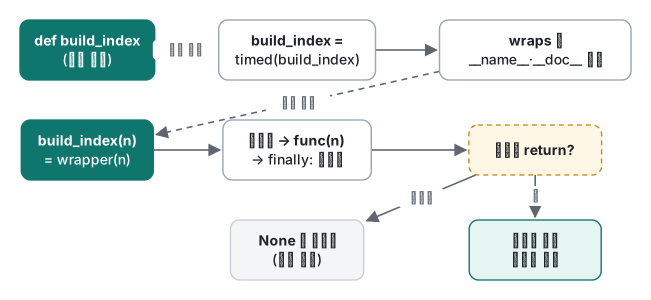
def 위의 @timed 는 func = timed(func) 를 뜻하며, 정의 시점에 한 번 실행됩니다. timed 는 원래 함수를 받아 대체 함수를 돌려주는데, 보통 wrapper 라는 클로저가 원래 함수 호출 앞뒤로 일을 합니다.
import functools, time

def timed(func):
    @functools.wraps(func)
    def wrapper(*args, **kwargs):
        t0 = time.perf_counter()
        try:
            return func(*args, **kwargs)
        finally:
            ms = (time.perf_counter() - t0) * 1000
            print(f"[timed] {func.__name__} {ms:.1f} ms")
    return wrapper

@timed
def build_index(n):
    """Map each word to its positions."""
    index = {}
    for i in range(n):
        index.setdefault(f"w{i % 1000}", []).append(i)
    return index

idx = build_index(200_000)
print(len(idx), build_index.__name__, build_index.__doc__)

# what @timed means, without the syntax:
def build_index2(n): return n
build_index2 = timed(build_index2)
build_index2(1)
[timed] build_index 39.7 ms
1000 build_index Map each word to its positions.
[timed] build_index2 0.0 ms
세 가지 습관이 들어 있습니다. 어떤 시그니처든 통과시키는 *args, **kwargs, 결과를 잃지 않는 return func(...), 함수가 예외를 던져도 시간을 찍는 try/finally 입니다.
functools.wraps: 없으면 무엇이 깨지나
@functools.wraps(func) 줄을 지우면 돌려받는 객체는 wrapper 그 자체이고, 메타데이터도 wrapper 의 것입니다.
import functools, inspect, time

def timed_bad(func):
    def wrapper(*args, **kwargs):
        return func(*args, **kwargs)
    return wrapper

def timed(func):
    @functools.wraps(func)
    def wrapper(*args, **kwargs):
        return func(*args, **kwargs)
    return wrapper

@timed_bad
def load_users(limit: int = 10) -> list:
    """Load up to `limit` users."""
    return list(range(limit))

@timed
def load_items(limit: int = 10) -> list:
    """Load up to `limit` items."""
    return list(range(limit))

for f in (load_users, load_items):
    print(f.__name__, "|", f.__doc__, "|", inspect.signature(f), "|", f.__qualname__)
wrapper | None | (*args, **kwargs) | timed_bad.<locals>.wrapper
load_items | Load up to `limit` items. | (limit: int = 10) -> list | load_items
wraps 가 없으면 이름, docstring, 시그니처, 정규 이름이 모두 사라집니다. help(), IDE 툴팁, Sphinx, pytest 출력, 로그가 전부 이 값을 읽습니다. 웹 프레임워크나 플러그인 레지스트리처럼 이름을 키로 쓰는 곳에서는 더 심각해집니다.
import functools, pickle

def logged(func):
    def wrapper(*args, **kwargs):
        return func(*args, **kwargs)
    return wrapper

ROUTES = {}
def route(func):
    ROUTES[func.__name__] = func
    return func

@route
@logged
def home(): return "home"

@route
@logged
def about(): return "about"

print(ROUTES)
print(ROUTES["wrapper"]())
pickle.dumps(home)
{'wrapper': <function logged.<locals>.wrapper at 0x1051f09d0>}
about
Traceback (most recent call last):
  File "~/demo/nowraps2.py", line 23, in <module>
    pickle.dumps(home)
AttributeError: Can't pickle local object 'logged.<locals>.wrapper'
라우트 두 개를 넣었는데 하나만 남았고, 에러도 없었습니다. home 이 about 에 조용히 덮어써졌습니다. pickle 실패는 함수를 multiprocessing 에 넘기는 순간(5강) 문제가 됩니다. def wrapper 위에 @functools.wraps(func) 를 넣고, 마지막 두 줄을 print(ROUTES["home"](), ROUTES["about"]()) 와 print(len(pickle.dumps(home)), "bytes pickled") 로 바꿔 다시 돌리면:
{'home': <function home at 0x1011dc820>, 'about': <function about at 0x1011dc940>}
home about
32 bytes pickled
두 라우트가 모두 살아 있고 pickle 도 됩니다. pickle 은 함수를 모듈과 정규 이름으로 저장하는데, wraps 가 __module__, __name__, __qualname__, __doc__, __annotations__ 를 복사하고 __dict__ 를 갱신하며, __wrapped__ 에 원래 함수를 넣어 inspect 가 꿰뚫어 볼 수 있게 하기 때문입니다.
데코레이터는 아래에서 위로 적용된다는 점도 기억하세요. @route 는 @logged 의 결과를 받았습니다.
인자를 받는 데코레이터: 재시도
@retry(times=4) 는 데코레이터를 돌려주는 호출입니다. 그래서 함수가 세 겹입니다. 팩토리가 옵션을, 데코레이터가 함수를, wrapper 가 호출 인자를 받습니다. 크롤러에서 일시적인 연결 끊김을 재시도할 때 그대로 쓸 수 있는 형태입니다.
import functools, random, time

def retry(times=3, delay=0.01, exceptions=(Exception,)):
    """Decorator factory: retry(...) returns the real decorator."""
    def decorator(func):
        @functools.wraps(func)
        def wrapper(*args, **kwargs):
            for attempt in range(1, times + 1):
                try:
                    return func(*args, **kwargs)
                except exceptions as e:
                    print(f"  {func.__name__}: attempt {attempt} failed: {e!r}")
                    if attempt == times:
                        raise
                    time.sleep(delay * 2 ** (attempt - 1))
        return wrapper
    return decorator

rng = random.Random(3)

@retry(times=4, exceptions=(ConnectionError,))
def fetch(url):
    if rng.random() < 0.6:
        raise ConnectionError("reset by peer")
    return f"200 OK {url}"

print(fetch("https://example.com/api"))

@retry(times=2, exceptions=(ConnectionError,))
def parse(text):
    return int(text)

try:
    parse("12a")
except ValueError as e:
    print("not retried:", e)

@retry
def oops():
    return 1
print(oops)
try:
    oops()
except TypeError as e:
    print("TypeError:", e)
  fetch: attempt 1 failed: ConnectionError('reset by peer')
  fetch: attempt 2 failed: ConnectionError('reset by peer')
  fetch: attempt 3 failed: ConnectionError('reset by peer')
200 OK https://example.com/api
not retried: invalid literal for int() with base 10: '12a'
<function retry.<locals>.decorator at 0x102e4c550>
TypeError: decorator() missing 1 required positional argument: 'func'
가져다 쓸 포인트: 재시도할 가치가 있는 예외만 재시도하고(잘못된 입력에서 나는 ValueError 는 몇 번을 해도 똑같이 실패합니다), 지수적으로 대기하고, 마지막 시도에서는 맨 raise 로 원래 트레이스백을 살려 다시 던집니다. 마지막 블록은 전형적인 실수입니다. 괄호 없이 @retry 라고 쓰면 oops 가 times 로 들어가 oops 자체가 안쪽 decorator 가 되고, 에러는 누군가 호출할 때 비로소 납니다. Python 3.11 에서는 메시지가 retry.<locals>.decorator() missing 1 required positional argument: 'func' 로 조금 더 친절합니다.
캐시: 직접 만든 memoize 와 lru_cache
캐시 데코레이터는 클로저 안의 dict 하나입니다.
import functools

def memoize(func):
    cache = {}
    @functools.wraps(func)
    def wrapper(*args):
        if args not in cache:
            cache[args] = func(*args)
        return cache[args]
    wrapper.cache = cache                  # functions can carry attributes
    return wrapper

@memoize
def slow_square(x):
    print(f"  computing {x}")
    return x * x

print(slow_square(4), slow_square(4), slow_square.cache)
  computing 4
16 16 {(4,): 16}
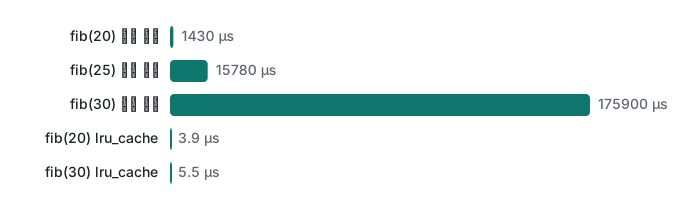
크기 제한이 없고, 키워드 인자를 무시하고, 통계도 없습니다. 표준 라이브러리의 functools.lru_cache 는 이걸 C 로 다 처리합니다. 단순 재귀와 비교한 측정입니다(매 실행마다 캐시를 비움).
"""Naive fib vs lru_cache fib (Python 3.9, Apple M1 Pro)."""
import functools, sys, time

def fib_plain(n):
    return n if n < 2 else fib_plain(n - 1) + fib_plain(n - 2)

@functools.lru_cache(maxsize=None)
def fib_cached(n):
    return n if n < 2 else fib_cached(n - 1) + fib_cached(n - 2)

def best(fn, arg, repeat=5, clear=None):
    out = float("inf")
    for _ in range(repeat):
        if clear: clear()                      # cold cache every run
        t0 = time.perf_counter(); fn(arg); out = min(out, time.perf_counter() - t0)
    return out

print("Python", sys.version.split()[0])
for n in (20, 25, 30):
    tp = best(fib_plain, n)
    tc = best(fib_cached, n, clear=fib_cached.cache_clear)
    print(f"fib({n}) = {fib_plain(n):>6}  plain {tp*1000:7.2f} ms  "
          f"lru_cache {tc*1e6:5.1f} us  x{tp/tc:,.0f}")

fib_cached.cache_clear()
fib_cached(30)
print(fib_cached.cache_info())
fib_cached(30)
print(fib_cached.cache_info())
Python 3.9.6
fib(20) =   6765  plain    1.43 ms  lru_cache   3.9 us  x370
fib(25) =  75025  plain   15.78 ms  lru_cache   4.9 us  x3,210
fib(30) = 832040  plain  175.90 ms  lru_cache   5.5 us  x31,740
CacheInfo(hits=28, misses=31, maxsize=None, currsize=31)
CacheInfo(hits=29, misses=31, maxsize=None, currsize=31)
두 번째 실행은 1.44/16.16/175.96ms 와 3.7/4.8/5.5µs 였습니다. 단순 재귀는 n 이 5 늘 때마다 약 11배씩 늘고(fib(30) 에서 호출 2,692,537회), 캐시 버전은 선형으로 늡니다. cache_info() 가 증거입니다. 서로 다른 인자 0..30 에 대해 misses 31, 각 호출의 두 번째 가지에서 hits 28, 다시 부르면 hit 하나가 더해집니다.
lru_cache 의 함정 두 가지
@functools.lru_cache(maxsize=128)
def total(items):
    return sum(items)
print(total((1, 2, 3)))
total([1, 2, 3])
6
Traceback (most recent call last):
  File "~/demo/memo.py", line 24, in <module>
    total([1, 2, 3])
TypeError: unhashable type: 'list'
인자가 dict 키가 되므로 해시 가능해야 합니다. 튜플이나 frozenset 을 넘기세요.
두 번째는 측정하다 발견한 것입니다. lru_cache 를 거치는 재귀 호출은 재귀 한도를 한 단계가 아니라 두 단계씩 씁니다. 기본 한도 1000 에서 f(n) = 1 + f(n - 1) 이 성공하는 최대 n 을 재면:
recursionlimit 1000
plain max depth  996
cached max depth 497
Python 3.11 에서는 997 과 498 이었습니다. 빈 캐시에서 메모이즈한 재귀 함수는 예상의 절반 깊이에서 RecursionError: maximum recursion depth exceeded 를 냅니다. 동적 계획법 문제를 재귀 + lru_cache 로 풀 때 자주 걸리는 지점입니다. 캐시를 아래에서부터 데우거나(f(200), f(400), … 순으로 호출) 반복문으로 바꾸세요.
컨텍스트 매니저: with 프로토콜
with EXPR as x: 는 EXPR.__enter__() 를 불러 결과를 x 에 묶고, 본문을 실행한 뒤 반드시 __exit__(exc_type, exc, tb) 를 부릅니다. 본문이 성공했으면 인자는 None 세 개입니다. __exit__ 가 참인 값을 돌려주면 예외가 억제됩니다.
import contextlib, os, tempfile, time

class Timer:
    def __enter__(self):
        self.t0 = time.perf_counter()
        print("enter")
        return self                       # bound to the name after `as`
    def __exit__(self, exc_type, exc, tb):
        self.elapsed = time.perf_counter() - self.t0
        print(f"exit: exc_type={exc_type.__name__ if exc_type else None}")
        return False                      # do not swallow the exception

with Timer() as t:
    sum(range(100_000))
print("elapsed set:", t.elapsed > 0)

try:
    with Timer():
        1 / 0
except ZeroDivisionError:
    print("ZeroDivisionError still reached the caller")
enter
exit: exc_type=None
elapsed set: True
enter
exit: exc_type=ZeroDivisionError
ZeroDivisionError still reached the caller
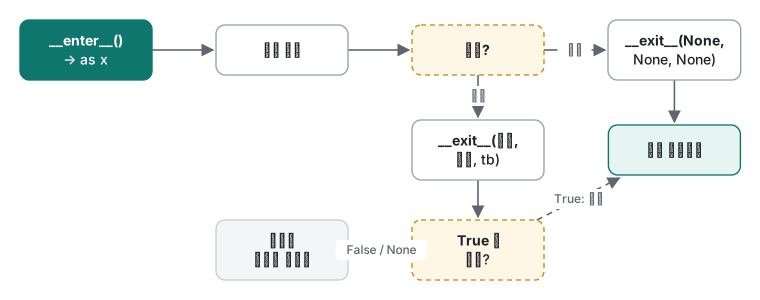
대부분의 경우 contextlib.contextmanager 로 제너레이터를 컨텍스트 매니저로 바꾸는 편이 짧습니다. yield 앞이 __enter__, yield 한 값이 as 로 묶이는 값, 뒤가 __exit__ 입니다. try/finally 는 선택이 아닙니다.
@contextlib.contextmanager
def chdir_tmp():
    old = os.getcwd()
    path = tempfile.mkdtemp()
    os.chdir(path)
    try:
        yield path
    finally:                              # without try/finally, an error skips cleanup
        os.chdir(old)
        os.rmdir(path)
이게 없으면 본문의 예외가 yield 지점에서 다시 발생해 yield 뒤가 통째로 건너뛰어집니다.
@contextlib.contextmanager
def opened_resource(name):
    print(f"acquire {name}")
    yield name
    print(f"release {name}")          # BUG: no try/finally

try:
    with opened_resource("db-conn"):
        raise ValueError("query failed")
except ValueError as e:
    print("caught:", e)
acquire db-conn
caught: query failed
"release" 줄이 없습니다. 실제 코드라면 DB 커넥션이나 락이 새는 것입니다.
contextlib.suppress 는 특정 예외 하나만 명시적으로 무시하는 방법이고, ExitStack 은 실행 시점에야 개수가 정해지는 자원들을 관리하며 역순으로 닫아 줍니다.
with contextlib.suppress(FileNotFoundError):
    os.remove("does-not-exist.txt")
print("suppress: continued")

paths = []
for i in range(3):
    fd, p = tempfile.mkstemp(suffix=f"-{i}.txt"); os.close(fd); paths.append(p)
with contextlib.ExitStack() as stack:
    files = [stack.enter_context(open(p, "w")) for p in paths]
    stack.callback(print, "callback: runs last-in, first-out")
    for i, f in enumerate(files):
        f.write(f"part {i}\n")
    print("open:", [f.closed for f in files])
print("closed:", [f.closed for f in files])
for p in paths: os.remove(p)
suppress: continued
open: [False, False, False]
callback: runs last-in, first-out
closed: [True, True, True]
콜백은 마지막에 등록했으므로 가장 먼저, 파일 세 개가 닫히기 전에 실행됐습니다. 세 번째 파일 열기가 실패했어도 앞의 두 개는 닫혔을 것입니다.
흔한 실수: 결과와 에러를 먹어 버리는 데코레이터
코드 리뷰에서는 무해해 보이는 두 버그입니다.
import functools, logging
logging.basicConfig(level=logging.INFO, format="%(levelname)s %(message)s")

def logged(func):
    @functools.wraps(func)
    def wrapper(*args, **kwargs):
        logging.info("call %s%r", func.__name__, args)
        func(*args, **kwargs)                       # BUG 1: result is dropped
    return wrapper

def safe(func):
    @functools.wraps(func)
    def wrapper(*args, **kwargs):
        try:
            return func(*args, **kwargs)
        except Exception as e:                      # BUG 2: swallowed, returns None
            logging.error("%s failed: %s", func.__name__, e)
    return wrapper

@logged
def price_with_tax(yen):
    return round(yen * 1.1)

total = price_with_tax(1000)
print("total:", total)

@safe
def load_config(text):
    import json
    return json.loads(text)

cfg = load_config('{"retries": 3,}')
print(cfg["retries"])
INFO call price_with_tax(1000,)
total: None
ERROR load_config failed: Expecting property name enclosed in double quotes: line 1 column 15 (char 14)
Traceback (most recent call last):
  File "~/demo/deco_bad.py", line 33, in <module>
    print(cfg["retries"])
TypeError: 'NoneType' object is not subscriptable
실제로 일어나는 일:
return누락: 데코레이터를 붙인 모든 함수가None을 돌려줍니다. 에러는 전혀 없고,total: None이 다음 계산이나 JSON 응답으로 그대로 흘러갑니다.- 예외 삼키기: 진짜 원인(JSON 끝의 쉼표)은 실패 지점에서 로그 한 줄로 남고, 크래시는 나중에 다른 곳에서
NoneType에 대한TypeError로 납니다. 로그가 많은 서버에서는 아무도 두 줄을 연결하지 못합니다.
해결: 항상 return func(*args, **kwargs). 예외를 잡는 데코레이터라면 다시 던지거나(except Exception: log(...); raise), 예상한 특정 예외만 잡고 호출한 쪽이 처리하도록 설계된 값을 돌려주세요. __exit__ 도 같은 규칙입니다.
class Swallow:
    def __enter__(self): return self
    def __exit__(self, *exc):
        print("cleanup")
        return True                    # BUG: True means "exception handled"

with Swallow():
    raise KeyError("user_id")
print("the KeyError vanished")
cleanup
the KeyError vanished
__exit__ 에서 True 는 의도했을 때만, 그것도 exc_type 을 확인한 다음에만 돌려주세요.
판단표
| 필요한 것 | 쓸 것 |
|---|---|
| 여러 함수에 공통 동작 추가(시간 측정, 로깅, 인증, 재시도) | functools.wraps 를 쓴 데코레이터 |
| 그 동작에 옵션이 필요 | 데코레이터 팩토리: @retry(times=3) |
| 순수 함수, 반복되는 인자, 해시 가능한 입력 | functools.lru_cache (또는 3.9+ functools.cache) |
| 만료가 필요하거나 프로세스 간 공유하는 캐시 | lru_cache 가 아님: TTL 이 있는 명시적 캐시 |
| 블록 앞뒤의 준비와 확실한 정리 | 컨텍스트 매니저 |
| 간단한 일회성 컨텍스트 매니저 | try/finally 를 넣은 @contextlib.contextmanager |
| 상태를 갖거나 자주 재사용 | __enter__/__exit__ 클래스 |
| 특정 예외 하나만 무시 | contextlib.suppress(그예외) |
| 개수가 정해지지 않은 자원 | contextlib.ExitStack |
비용도 하나 기억해 두세요. 인자 두 개짜리 함수를 그냥 통과시키는 데코레이터로 감싸면 호출당 178~183ns, 감싸지 않으면 89~90ns 였습니다(100만 회 호출, 5회 중 최솟값, 2회 실행). 네트워크 호출에는 무시할 수준이지만, 수백만 건을 도는 루프 안에서는 보이는 차이입니다.
솔직한 한계와 버전 메모
- 시간 측정: Apple Silicon Mac(M1 Pro)의 Python 3.9.6,
time.perf_counter, 5회 중 최솟값, 각각 2회 실행. seed 고정(재시도 예제는random.Random(3)). Python 3.11 은 동작과 메시지 확인에만 썼고 시간 측정에는 쓰지 않았습니다. functools.cache(크기 무제한lru_cache)는 3.9 부터, 괄호 없는@lru_cache는 3.8 부터이며 둘 다 3.9 에서 확인했습니다.contextlib.chdir는 3.11 부터라서(3.9 에 없고 3.11 에 있음을 확인) 위 예제는 직접 만들었습니다.- 재귀 깊이 수치(3.9 에서 996/497, 3.11 에서 997/498)는 이 버전들에 한정됩니다. Python 3.12 는 C 코드를 거치는 재귀의 제한 방식을 바꿨으므로 값이 다를 수 있고, 3.12 이상은 실행하지 않았습니다.
- Python 3.11 트레이스백은 실패한 식 아래에
^^^^표시를 추가합니다. 그 밖의 메시지는 같았습니다.
시리즈 이동: 이전: 파이썬 강의 3: 이터레이터, 제너레이터와 메모리 · 다음: 파이썬 강의 5: 스레드, 프로세스, asyncio 와 GIL. C# 을 해 봤다면 데코레이터는 델리게이트와 어트리뷰트가 나눠 맡는 역할이고, with 는 C# 의 using 입니다. 예외를 삼키는 문제의 .NET 쪽 이야기는 C# 예외 처리를 참고하세요.
자주 묻는 질문
functools.wraps 를 빼먹으면 실제로 무엇이 깨지나요?
감싼 함수의 __name__ 이 'wrapper' 가 되고 docstring 은 None, inspect.signature 는 (*args, **kwargs) 가 됩니다. 실험에서는 이름으로 등록한 라우트 두 개가 하나로 합쳐져 home 을 부르면 about 이 실행됐고, pickle 은 AttributeError: Can't pickle local object 'logged.<locals>.wrapper' 로 실패했습니다.
lru_cache 를 붙이면 fib 가 얼마나 빨라지나요?
Apple M1 Pro 의 Python 3.9 에서 단순 재귀 fib(30) 은 175.9ms, lru_cache 버전은 빈 캐시에서 5.5µs 로 약 32,000배 빨랐습니다. cache_info() 는 misses=31, hits=28 로, 각 값이 한 번씩만 계산됐음을 보여 줍니다.
with 블록 안의 예외가 사라지는 이유는 뭔가요?
__exit__ 가 참인 값을 돌려줬기 때문입니다. __exit__ 의 True 반환은 '예외를 처리했다'는 뜻입니다. 억제할 의도가 없으면 False 나 None 을 돌려주고, 억제하려면 contextlib.suppress(특정예외) 를 쓰세요.