Pythonデコレータとコンテキストマネージャ:wraps・lru_cache・with
計測・リトライ・キャッシュのデコレータを自作し、functools.wraps がないと何が壊れるか、lru_cache で fib が約3万倍速くなる実測、with と ExitStack まで。
シリーズ:Python 講座 4/6(中級)。 Flask の @app.route や pytest の @pytest.fixture、with open(...) は毎日使っているけれど、自分で書いたことはない人向けです。読み終えると、引数あり・なしのデコレータを書け、functools.wraps が何を直しているのかを正確に説明でき、本体が失敗しても後片付けが確実に行われるコンテキストマネージャを作れるようになります。
ログ出力用のデコレータを付けたらルーティングがおかしくなった、「安全のため」に包んだ関数が JSON のエラーを握りつぶして数行後に NoneType のエラーで落ちた、with ブロックが見たかった例外を飲み込んだ。この記事はそういう問題を抱えた人のためのものです。どれも1行のミスで、以下に実際の出力付きで再現しています。コードはすべて Python 3.9 で実行し(時間計測は Apple Silicon Mac、M1 Pro)、動作は Python 3.11 でも確認しました。
数字を先に出しておきます。lru_cache で再帰の fib(30) は約 32,000倍 速くなり(175.9 ms → 5.5 µs)、何もしないデコレータ1つで小さな関数呼び出しのコストが 約2倍 になり(89 → 180 ns)、lru_cache を付けると RecursionError までに到達できる再帰の深さが 半分 になりました(996 → 497)。
関数はオブジェクト
デコレータが成り立つのは、関数がごく普通のオブジェクトだからです。別の名前に代入でき、dict に入れられ、引数として渡せ、別の関数から返せ、属性も付けられます。
def shout(text):
    """Return text in upper case."""
    return text.upper() + "!"

yell = shout
print(yell("hi"), yell is shout, yell.__name__)
print(type(shout), shout.__doc__)
handlers = {"loud": shout, "quiet": str.lower}
print(handlers["loud"]("ok"), handlers["quiet"]("OK"))

def make_counter():
    count = 0
    def inc():
        nonlocal count
        count += 1
        return count
    return inc
c = make_counter()
print(c(), c(), c.__closure__[0].cell_contents)
HI! True shout
<class 'function'> Return text in upper case.
OK! ok
1 2 2
yell.__name__ が shout のままである点に注目してください。名前は変数ではなく関数オブジェクトに付いています。最後の行はクロージャです。make_counter が終わった後も、inc がセルの中で count を生かし続けています。nonlocal とスコープは第2回で扱いました。デコレータは、このパターンで捕まえる変数が関数になったものです。
デコレータを書く:実行時間の計測
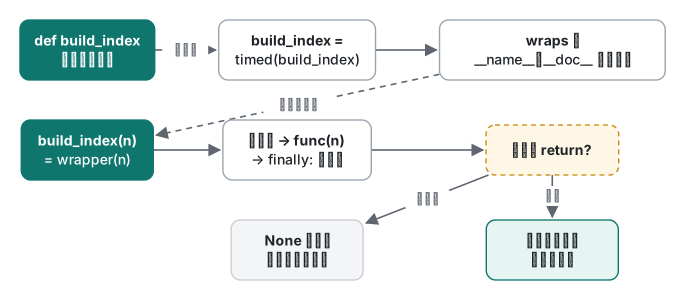
def の上の @timed は func = timed(func) という意味で、定義時に一度だけ実行されます。timed は元の関数を受け取って代わりの関数を返します。普通は wrapper という名前のクロージャが、元の関数の呼び出しの前後で仕事をします。
import functools, time

def timed(func):
    @functools.wraps(func)
    def wrapper(*args, **kwargs):
        t0 = time.perf_counter()
        try:
            return func(*args, **kwargs)
        finally:
            ms = (time.perf_counter() - t0) * 1000
            print(f"[timed] {func.__name__} {ms:.1f} ms")
    return wrapper

@timed
def build_index(n):
    """Map each word to its positions."""
    index = {}
    for i in range(n):
        index.setdefault(f"w{i % 1000}", []).append(i)
    return index

idx = build_index(200_000)
print(len(idx), build_index.__name__, build_index.__doc__)

# what @timed means, without the syntax:
def build_index2(n): return n
build_index2 = timed(build_index2)
build_index2(1)
[timed] build_index 39.7 ms
1000 build_index Map each word to its positions.
[timed] build_index2 0.0 ms
3つの習慣が入っています。どんなシグネチャでも通す *args, **kwargs、結果を失わない return func(...)、関数が例外を投げても時間を出力する try/finally です。
functools.wraps:ないと何が壊れるか
@functools.wraps(func) の行を消すと、返ってくるオブジェクトは wrapper そのもので、メタデータも wrapper のものになります。
import functools, inspect, time

def timed_bad(func):
    def wrapper(*args, **kwargs):
        return func(*args, **kwargs)
    return wrapper

def timed(func):
    @functools.wraps(func)
    def wrapper(*args, **kwargs):
        return func(*args, **kwargs)
    return wrapper

@timed_bad
def load_users(limit: int = 10) -> list:
    """Load up to `limit` users."""
    return list(range(limit))

@timed
def load_items(limit: int = 10) -> list:
    """Load up to `limit` items."""
    return list(range(limit))

for f in (load_users, load_items):
    print(f.__name__, "|", f.__doc__, "|", inspect.signature(f), "|", f.__qualname__)
wrapper | None | (*args, **kwargs) | timed_bad.<locals>.wrapper
load_items | Load up to `limit` items. | (limit: int = 10) -> list | load_items
wraps がないと、名前・docstring・シグネチャ・修飾名がすべて消えます。help()、IDE のツールチップ、Sphinx、pytest の出力、ログはどれもこの値を読んでいます。Web フレームワークやプラグイン登録のように名前をキーとして使う場面では、さらに深刻です。
import functools, pickle

def logged(func):
    def wrapper(*args, **kwargs):
        return func(*args, **kwargs)
    return wrapper

ROUTES = {}
def route(func):
    ROUTES[func.__name__] = func
    return func

@route
@logged
def home(): return "home"

@route
@logged
def about(): return "about"

print(ROUTES)
print(ROUTES["wrapper"]())
pickle.dumps(home)
{'wrapper': <function logged.<locals>.wrapper at 0x1051f09d0>}
about
Traceback (most recent call last):
  File "~/demo/nowraps2.py", line 23, in <module>
    pickle.dumps(home)
AttributeError: Can't pickle local object 'logged.<locals>.wrapper'
ルートを2つ登録したのに1つしか残らず、エラーも出ません。home が about に黙って上書きされました。pickle の失敗は、関数を multiprocessing に渡した瞬間(第5回)に問題になります。def wrapper の上に @functools.wraps(func) を足し、最後の2行を print(ROUTES["home"](), ROUTES["about"]()) と print(len(pickle.dumps(home)), "bytes pickled") に替えて再実行すると:
{'home': <function home at 0x1011dc820>, 'about': <function about at 0x1011dc940>}
home about
32 bytes pickled
両方のルートが残り、pickle も通ります。pickle は関数をモジュール名と修飾名で保存しますが、wraps が __module__、__name__、__qualname__、__doc__、__annotations__ をコピーして __dict__ を更新し、__wrapped__ に元の関数を入れて inspect が中を見通せるようにするからです。
デコレータは下から上へ適用される点も覚えておきましょう。@route が受け取ったのは @logged の結果です。
引数付きデコレータ:リトライ
@retry(times=4) はデコレータを返す呼び出しです。だから関数が3重になります。ファクトリがオプションを、デコレータが関数を、wrapper が呼び出しの引数を受け取ります。外部 API がたまに接続を切ってくる業務バッチで、そのまま使える形です。
import functools, random, time

def retry(times=3, delay=0.01, exceptions=(Exception,)):
    """Decorator factory: retry(...) returns the real decorator."""
    def decorator(func):
        @functools.wraps(func)
        def wrapper(*args, **kwargs):
            for attempt in range(1, times + 1):
                try:
                    return func(*args, **kwargs)
                except exceptions as e:
                    print(f"  {func.__name__}: attempt {attempt} failed: {e!r}")
                    if attempt == times:
                        raise
                    time.sleep(delay * 2 ** (attempt - 1))
        return wrapper
    return decorator

rng = random.Random(3)

@retry(times=4, exceptions=(ConnectionError,))
def fetch(url):
    if rng.random() < 0.6:
        raise ConnectionError("reset by peer")
    return f"200 OK {url}"

print(fetch("https://example.com/api"))

@retry(times=2, exceptions=(ConnectionError,))
def parse(text):
    return int(text)

try:
    parse("12a")
except ValueError as e:
    print("not retried:", e)

@retry
def oops():
    return 1
print(oops)
try:
    oops()
except TypeError as e:
    print("TypeError:", e)
  fetch: attempt 1 failed: ConnectionError('reset by peer')
  fetch: attempt 2 failed: ConnectionError('reset by peer')
  fetch: attempt 3 failed: ConnectionError('reset by peer')
200 OK https://example.com/api
not retried: invalid literal for int() with base 10: '12a'
<function retry.<locals>.decorator at 0x102e4c550>
TypeError: decorator() missing 1 required positional argument: 'func'
真似したい点:リトライする価値のある例外だけをリトライする(不正な入力による ValueError は何度やっても同じように失敗します)、指数的に待ち時間を延ばす、最後の試行では素の raise で元のトレースバックを保ったまま投げ直す。最後のブロックは典型的なミスです。括弧なしで @retry と書くと oops が times に入り、oops 自体が内側の decorator になって、エラーは誰かが呼んだときに初めて出ます。Python 3.11 ではメッセージが retry.<locals>.decorator() missing 1 required positional argument: 'func' となり、少し分かりやすくなっています。
キャッシュ:自作 memoize と lru_cache
キャッシュのデコレータは、クロージャの中の dict 1つです。
import functools

def memoize(func):
    cache = {}
    @functools.wraps(func)
    def wrapper(*args):
        if args not in cache:
            cache[args] = func(*args)
        return cache[args]
    wrapper.cache = cache                  # functions can carry attributes
    return wrapper

@memoize
def slow_square(x):
    print(f"  computing {x}")
    return x * x

print(slow_square(4), slow_square(4), slow_square.cache)
  computing 4
16 16 {(4,): 16}
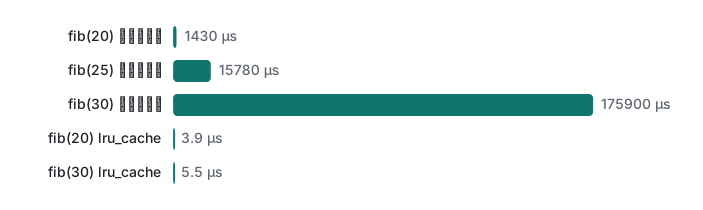
サイズ上限がなく、キーワード引数を無視し、統計も取れません。標準ライブラリの functools.lru_cache はこれらを C で全部面倒見てくれます。素朴な再帰との比較です(毎回キャッシュを空にしています)。
"""Naive fib vs lru_cache fib (Python 3.9, Apple M1 Pro)."""
import functools, sys, time

def fib_plain(n):
    return n if n < 2 else fib_plain(n - 1) + fib_plain(n - 2)

@functools.lru_cache(maxsize=None)
def fib_cached(n):
    return n if n < 2 else fib_cached(n - 1) + fib_cached(n - 2)

def best(fn, arg, repeat=5, clear=None):
    out = float("inf")
    for _ in range(repeat):
        if clear: clear()                      # cold cache every run
        t0 = time.perf_counter(); fn(arg); out = min(out, time.perf_counter() - t0)
    return out

print("Python", sys.version.split()[0])
for n in (20, 25, 30):
    tp = best(fib_plain, n)
    tc = best(fib_cached, n, clear=fib_cached.cache_clear)
    print(f"fib({n}) = {fib_plain(n):>6}  plain {tp*1000:7.2f} ms  "
          f"lru_cache {tc*1e6:5.1f} us  x{tp/tc:,.0f}")

fib_cached.cache_clear()
fib_cached(30)
print(fib_cached.cache_info())
fib_cached(30)
print(fib_cached.cache_info())
Python 3.9.6
fib(20) =   6765  plain    1.43 ms  lru_cache   3.9 us  x370
fib(25) =  75025  plain   15.78 ms  lru_cache   4.9 us  x3,210
fib(30) = 832040  plain  175.90 ms  lru_cache   5.5 us  x31,740
CacheInfo(hits=28, misses=31, maxsize=None, currsize=31)
CacheInfo(hits=29, misses=31, maxsize=None, currsize=31)
2回目の実行は 1.44/16.16/175.96 ms と 3.7/4.8/5.5 µs でした。素朴な再帰は n が5増えるごとに約11倍になり(fib(30) で呼び出し 2,692,537 回)、キャッシュ版は線形に増えるだけです。cache_info() がその証拠です。異なる引数 0〜30 に対して misses が31、各呼び出しの2本目の枝で hits が28、もう一度呼ぶと hit が1つ増えます。
lru_cache の落とし穴2つ
@functools.lru_cache(maxsize=128)
def total(items):
    return sum(items)
print(total((1, 2, 3)))
total([1, 2, 3])
6
Traceback (most recent call last):
  File "~/demo/memo.py", line 24, in <module>
    total([1, 2, 3])
TypeError: unhashable type: 'list'
引数が dict のキーになるので、ハッシュ可能でなければなりません。タプルや frozenset を渡します。
2つ目は計測中に見つけたものです。lru_cache を通る再帰呼び出しは、再帰上限を1段ではなく2段ずつ消費します。デフォルト上限 1000 で、f(n) = 1 + f(n - 1) が成功する最大の n を測ると:
recursionlimit 1000
plain max depth  996
cached max depth 497
Python 3.11 では 997 と 498 でした。空のキャッシュから始めたメモ化再帰は、想定の半分の深さで RecursionError: maximum recursion depth exceeded になります。AtCoder の DP をメモ化再帰で書くとき、sys.setrecursionlimit を上げても足りないと感じたらこれが原因かもしれません。キャッシュを下から温める(f(200)、f(400)…の順に呼ぶ)か、ループに書き換えます。
コンテキストマネージャ:with のプロトコル
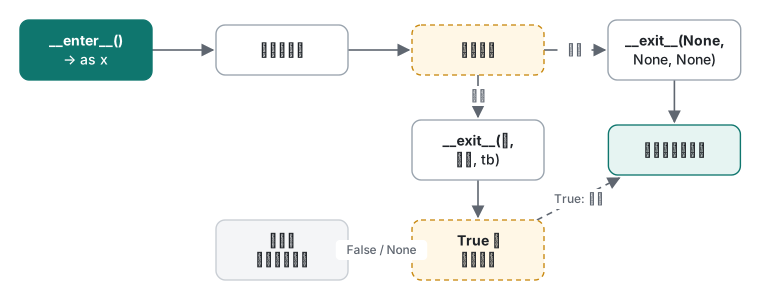
with EXPR as x: は EXPR.__enter__() を呼んで結果を x に束縛し、本体を実行したあと必ず __exit__(exc_type, exc, tb) を呼びます。本体が成功していれば引数は None 3つです。__exit__ が真の値を返すと例外は抑制されます。
import contextlib, os, tempfile, time

class Timer:
    def __enter__(self):
        self.t0 = time.perf_counter()
        print("enter")
        return self                       # bound to the name after `as`
    def __exit__(self, exc_type, exc, tb):
        self.elapsed = time.perf_counter() - self.t0
        print(f"exit: exc_type={exc_type.__name__ if exc_type else None}")
        return False                      # do not swallow the exception

with Timer() as t:
    sum(range(100_000))
print("elapsed set:", t.elapsed > 0)

try:
    with Timer():
        1 / 0
except ZeroDivisionError:
    print("ZeroDivisionError still reached the caller")
enter
exit: exc_type=None
elapsed set: True
enter
exit: exc_type=ZeroDivisionError
ZeroDivisionError still reached the caller
たいていは contextlib.contextmanager でジェネレータをコンテキストマネージャにするほうが短く書けます。yield の前が __enter__、yield した値が as に束縛される値、後ろが __exit__ です。try/finally は省略できません。
@contextlib.contextmanager
def chdir_tmp():
    old = os.getcwd()
    path = tempfile.mkdtemp()
    os.chdir(path)
    try:
        yield path
    finally:                              # without try/finally, an error skips cleanup
        os.chdir(old)
        os.rmdir(path)
これがないと、本体の例外が yield の位置で再送出され、yield より後ろがまるごと飛ばされます。
@contextlib.contextmanager
def opened_resource(name):
    print(f"acquire {name}")
    yield name
    print(f"release {name}")          # BUG: no try/finally

try:
    with opened_resource("db-conn"):
        raise ValueError("query failed")
except ValueError as e:
    print("caught:", e)
acquire db-conn
caught: query failed
"release" の行がありません。実際のコードなら DB コネクションやロックのリークです。
contextlib.suppress は特定の例外1種類だけを明示的に無視する方法で、ExitStack は実行時まで個数が分からないリソースを管理し、逆順に閉じてくれます。
with contextlib.suppress(FileNotFoundError):
    os.remove("does-not-exist.txt")
print("suppress: continued")

paths = []
for i in range(3):
    fd, p = tempfile.mkstemp(suffix=f"-{i}.txt"); os.close(fd); paths.append(p)
with contextlib.ExitStack() as stack:
    files = [stack.enter_context(open(p, "w")) for p in paths]
    stack.callback(print, "callback: runs last-in, first-out")
    for i, f in enumerate(files):
        f.write(f"part {i}\n")
    print("open:", [f.closed for f in files])
print("closed:", [f.closed for f in files])
for p in paths: os.remove(p)
suppress: continued
open: [False, False, False]
callback: runs last-in, first-out
closed: [True, True, True]
コールバックは最後に登録したので最初に、3つのファイルが閉じられる前に実行されました。3つ目のファイルを開くのに失敗していても、先の2つは閉じられていたはずです。
よくある間違い:結果と例外を食べるデコレータ
コードレビューでは無害に見える2つのバグです。
import functools, logging
logging.basicConfig(level=logging.INFO, format="%(levelname)s %(message)s")

def logged(func):
    @functools.wraps(func)
    def wrapper(*args, **kwargs):
        logging.info("call %s%r", func.__name__, args)
        func(*args, **kwargs)                       # BUG 1: result is dropped
    return wrapper

def safe(func):
    @functools.wraps(func)
    def wrapper(*args, **kwargs):
        try:
            return func(*args, **kwargs)
        except Exception as e:                      # BUG 2: swallowed, returns None
            logging.error("%s failed: %s", func.__name__, e)
    return wrapper

@logged
def price_with_tax(yen):
    return round(yen * 1.1)

total = price_with_tax(1000)
print("total:", total)

@safe
def load_config(text):
    import json
    return json.loads(text)

cfg = load_config('{"retries": 3,}')
print(cfg["retries"])
INFO call price_with_tax(1000,)
total: None
ERROR load_config failed: Expecting property name enclosed in double quotes: line 1 column 15 (char 14)
Traceback (most recent call last):
  File "~/demo/deco_bad.py", line 33, in <module>
    print(cfg["retries"])
TypeError: 'NoneType' object is not subscriptable
実際に起きていること:
returnの付け忘れ: デコレータを付けた関数がすべてNoneを返します。エラーは一切出ず、total: None(税込価格のはずの値)が次の計算や JSON レスポンスにそのまま流れていきます。- 例外の握りつぶし: 本当の原因(JSON 末尾のカンマ)は失敗した場所でログ1行として残るだけで、クラッシュは後から別の場所で
NoneTypeのTypeErrorとして起きます。ログが大量に出るサーバーでは、誰もこの2行を結び付けられません。
対処: 常に return func(*args, **kwargs) と書きます。例外を捕まえるデコレータなら投げ直す(except Exception: log(...); raise)か、想定した特定の例外だけを捕まえ、呼び出し側が扱えるよう設計された値を返します。__exit__ も同じルールです。
class Swallow:
    def __enter__(self): return self
    def __exit__(self, *exc):
        print("cleanup")
        return True                    # BUG: True means "exception handled"

with Swallow():
    raise KeyError("user_id")
print("the KeyError vanished")
cleanup
the KeyError vanished
__exit__ で True を返すのは意図したときだけ、それも exc_type を確認してからにします。
判断表
| 必要なこと | 使うもの |
|---|---|
| 多くの関数に共通の処理を追加(計測・ログ・認証・リトライ) | functools.wraps 付きのデコレータ |
| その処理にオプションが必要 | デコレータファクトリ:@retry(times=3) |
| 純粋関数、同じ引数の繰り返し、ハッシュ可能な入力 | functools.lru_cache(3.9+ なら functools.cache も) |
| 有効期限が必要、プロセス間で共有するキャッシュ | lru_cache ではなく TTL 付きの明示的なキャッシュ |
| ブロックの前後での準備と確実な後片付け | コンテキストマネージャ |
| 簡単な使い捨てのコンテキストマネージャ | try/finally 入りの @contextlib.contextmanager |
| 状態を持つ、何度も再利用する | __enter__/__exit__ のクラス |
| 特定の例外1つだけを無視 | contextlib.suppress(その例外) |
| 個数が決まっていないリソース | contextlib.ExitStack |
コストも1つ覚えておきましょう。引数2つの関数を素通しするだけのデコレータで包むと1回の呼び出しが 178〜183 ns、包まなければ 89〜90 ns でした(100万回呼び出し、5回中の最良値、2回実行)。ネットワーク呼び出しなら誤差ですが、数百万件を回すループの中では見える差です。
正直な限界とバージョンメモ
- 時間計測:Apple Silicon Mac(M1 Pro)の Python 3.9.6、
time.perf_counter、5回中の最良値、それぞれ2回実行。seed は固定(リトライ例はrandom.Random(3))。Python 3.11 は動作とメッセージの確認にだけ使い、時間計測には使っていません。 functools.cache(サイズ無制限のlru_cache)は 3.9 から、括弧なしの@lru_cacheは 3.8 からで、どちらも 3.9 で確認しました。contextlib.chdirは 3.11 からなので(3.9 になく 3.11 にあることを確認)、上の例では自作しています。- 再帰の深さ(3.9 で 996/497、3.11 で 997/498)はこれらのバージョンに限った値です。Python 3.12 は C コードを経由する再帰の制限方法を変えたので値が異なる可能性があり、3.12 以降は実行していません。
- Python 3.11 のトレースバックは失敗した式の下に
^^^^を付けます。それ以外のメッセージは同じでした。
シリーズ: 前回:Python 講座 3:イテレータ・ジェネレータとメモリ ・ 次回:Python 講座 5:スレッド・プロセス・asyncio と GIL。C# 経験者なら、デコレータはデリゲートと属性が分担している役割、with は C# の using に当たります。例外を握りつぶす問題の .NET 側の話は C# の例外処理を参照してください。
よくある質問
functools.wraps を付け忘れると実際に何が壊れますか?
ラップした関数の __name__ が 'wrapper' に、docstring が None に、inspect.signature が (*args, **kwargs) になります。実験では名前で登録したルート2つが1つにまとまり、home を呼ぶと about が実行されました。pickle も AttributeError: Can't pickle local object 'logged.<locals>.wrapper' で失敗しました。
lru_cache を付けると fib はどれくらい速くなりますか?
Apple M1 Pro の Python 3.9 で、素朴な再帰の fib(30) は 175.9 ms、lru_cache 版は空のキャッシュから 5.5 µs で、約32,000倍速くなりました。cache_info() は misses=31、hits=28 で、各値が一度ずつしか計算されていないことが分かります。
with ブロックの中の例外が消えてしまうのはなぜですか?
__exit__ が真の値を返したからです。__exit__ が True を返すのは「例外を処理した」という意味です。抑制するつもりがなければ False か None を返し、抑制したいなら contextlib.suppress(特定の例外) を使います。