Build-Time OG Cards with Pillow and CJK Line Breaking
Generating a 1200×630 og:image for every post with Pillow and Noto fonts: title fitting, three failed Japanese line-break attempts, caching, and the meta tags.
Until this week, no post on this blog had an og:image. Shared links showed a bare text preview, and the JSON-LD for each article had no image, which is one of the fields search engines look for in article markup. This post is for anyone running a static site who wants a generated card per post, especially with Japanese or Korean titles. It covers the generator we added to our Python static site generator, and the three wrong cards it drew before Japanese titles broke in sensible places.
What the card contains and why it is drawn at build time
Every post now gets a 1200×630 PNG, drawn during the build by scripts/og_card.py, 142 lines of Pillow code:
- the post title, as large as it can be while fitting in at most four lines
- the category label in that category's accent color
- the brand "t.laboratory" bottom left and the domain bottom right
- a dark background with a faint 40 px grid and a 14 px accent bar on the left edge
Drawing everything in code means there is no image licensing question. Nothing is a stock photo or an AI-generated picture. The only third-party asset is the font, and that has a clear license (next section). Generating at build time also means a new post can never ship without a card: the build calls draw_card for every post it collects.
# scripts/build.py (trimmed)
for p in posts[lang]:
    …
    draw_card(OUT / "static" / "og" / lang / f"{p['slug']}.png", p["title"], p["cat"]["name"],
              lang, p["category"], brand=site["brand"])
    p["og_image"] = f"{base}/static/og/{lang}/{p['slug']}.png"

draw_card(OUT / "static" / "og" / "default.png", site["langs"]["en"]["tagline"], "t.laboratory",
          "en", "web", brand=site["brand"])
Fonts: Noto variable fonts in Pillow
We use three variable fonts from the google/fonts repository on GitHub: Noto Sans for Latin (about 2.0 MB), Noto Sans JP (about 9.6 MB) and Noto Sans KR (about 10.4 MB). All three are under the SIL Open Font License 1.1. The OFL restricts selling or renaming the font files, but it allows commercial use of what you render with them, so a PNG card is fine. The font files live in an assets folder of the repository and are never deployed; only the rendered PNGs go to the server.
Pillow 11.3.0 loads a variable font like any TrueType file. You pick the weight afterwards by its named instance:
def _font(lang, size, weight="Bold"):
    f = ImageFont.truetype(str(FONTS / FONT_FILE.get(lang, FONT_FILE["en"])), size)
    try:
        f.set_variation_by_name(weight)
    except Exception:
        pass
    return f
The try/except is deliberate. set_variation_by_name raises if the font has no instance with that name, or if the FreeType library Pillow uses lacks variation support. In both cases we would rather draw the default weight than fail the whole build over a card.
One font per language is the simplest way to avoid tofu (empty boxes). Noto Sans JP covers kana and the kanji used in Japanese, Noto Sans KR covers Hangul, and both include Latin, so "iOS" or "AI" inside a Japanese title renders without fallback logic. The brand and domain always use the Latin font.
Fitting the title: six sizes and a 1.32 line height
Titles range from four words to a long Korean sentence. Instead of measuring and computing a size, the code just tries a fixed list from large to small and takes the first one that fits in four lines:
max_w = W - pad * 2          # 1200 - 160
for size in (68, 62, 56, 50, 46, 42):
    tf = _font(lang, size, "Bold")
    lines = _wrap(d, title, tf, max_w, lang)
    if len(lines) <= 4:
        break
lines = lines[:4]
line_h = int(size * 1.32)
The line height of 1.32× the font size is enough room for Japanese and Korean glyphs, which sit taller in the em box than Latin capitals. The block is then centered vertically, but never higher than y = 140, so it cannot collide with the category label. If even 42 px needs a fifth line, lines[:4] silently drops the rest. That has not happened with our titles, but it is the first thing to check if you reuse this with longer ones.
For English, and for Korean titles that contain spaces, wrapping is plain word wrap measured with draw.textlength. Korean breaks at spaces between words, just like English, so the same loop works. Japanese has no spaces, and that is where things went wrong.
Japanese line breaks: three wrong cards

Version 1: one character at a time. The first version treated Japanese as a stream of characters and broke wherever the next one did not fit. The test card for a post on share links came out as:
iOSとAndroidで共通の共有リン
ク:流入元ごと…
The katakana word リンク (link) was cut in half. A Japanese reader notices that instantly.
Version 2: a regex tokenizer. We split the title into tokens that must not be broken: Latin words (including things like C# or Node.js), runs of katakana, and otherwise single characters. We also force a break after a full-width colon, because our titles often use 「:」 between topic and detail:
tokens = re.findall(r"[A-Za-z0-9][A-Za-z0-9.+#_/'’-]*|[ァ-ヶー・]+|\s+|.", text)
…
if tok in (":", ":", "—") and cur.strip():
    lines.append(cur.rstrip())
    cur = ""
That fixed リンク. The next post's card then read:
AIコーディングエージェントに本
番サーバー…
本番 (production) is a two-kanji compound, and the tokenizer had no idea. Kanji compounds are not marked in the text in any way.
Version 3: break after a particle. Japanese grammar helps here. Particles such as に, を, の, で, が, は, と, へ, も, や, and commas, end a phrase (a bunsetsu). Breaking right after one is almost always natural. So when a line overflows, the code looks back for the last particle or comma and breaks there, as long as that point is at least halfway through the line:
if cur and draw.textlength(cur + tok, font=font) > max_w:
    cut = max((i + 1 for i, c in enumerate(cur) if c in "にをのでがはとへもや、,"), default=0)
    if cut >= len(cur) * 0.5 and cut < len(cur):
        lines.append(cur[:cut].rstrip())
        cur = cur[cut:].lstrip() + tok
    else:
        lines.append(cur.rstrip())
        cur = tok.lstrip()
The 50% rule stops a particle near the start of the line from producing a very short line followed by a very long one. The same title now reads:
AIコーディングエージェントに
本番サーバーを触らせる:
効いたガードレール
Finally, kinsoku. Japanese typesetting has rules (kinsoku shori) about characters that must not start a line: commas and periods, closing brackets, the long-vowel mark ー, and small kana such as ッ or ょ. After wrapping, any such character at the start of a line is pulled back to the end of the previous one:
for i in range(1, len(lines)):
    while lines[i] and lines[i][0] in "、。,.)」』ーっゃゅょァィゥェォッャュョ":
        lines[i - 1] += lines[i][0]
        lines[i] = lines[i][1:]
Two honest caveats. First, this is a heuristic, not morphological analysis. A particle character can also sit inside a word (は in はじめて, or の in a name written in hiragana), so a break can still land mid-word, and a title with no particles falls back to breaking between tokens. Google's BudouX or a morphological analyzer such as MeCab would segment phrases properly and is the more robust choice. We did not use one because it would add a dependency to a build whose dependencies are Pillow, Jinja2, Markdown, PyYAML and python-dotenv, and because our titles are short, hand-written, and checked visually. Second, the kinsoku step does not re-measure the line it appends to. It relies on the 80 px right padding to absorb one extra character.
Caching so the build stays fast
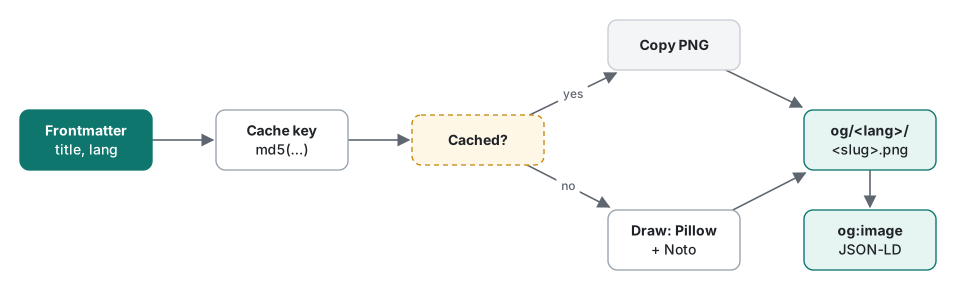
Drawing 130-odd PNGs with large CJK fonts on every build would be wasteful, since titles rarely change. Each card is keyed by an md5 of everything that affects its pixels:
VERSION = "3"  # bump when the design changes → every card is redrawn

key = hashlib.md5("|".join([VERSION, title, label, lang, category, brand]).encode()).hexdigest()
cached = CACHE / f"{key}.png"          # .cache/og/<md5>.png
if cached.exists():
    shutil.copyfile(cached, out_path)
    return
Same inputs mean a file copy instead of a redraw. VERSION is the escape hatch for changes the key cannot see, such as the wrapping code itself. It went from 1 to 2 to 3 during the three versions above, and each bump redrew every card on the next build.
The result: 132 post cards (24 English, 24 Japanese and 84 Korean, including legacy Korean posts that are still noindex) plus one site default card, 133 PNGs and 5.1 MB in total, about 38 KB each. A full site build with cards measured about 6.0 s user / 6.7 s wall on a Mac, and that run was mostly served from the cache. The deploy script compares md5 hashes, so a card that did not change is never uploaded again. The first deploy after this change pushed 342 changed files, because every HTML page also gained new meta tags.
Wiring it into the meta tags, and a small render() gotcha
The template now always emits an image, with its size so that crawlers do not have to fetch it to lay out the preview:
<meta property="og:image" content="{{ og_image }}">
<meta property="og:image:width" content="1200">
<meta property="og:image:height" content="630">
<meta name="twitter:card" content="summary_large_image">
<meta name="twitter:image" content="{{ og_image }}">
twitter:card was summary before, which shows a small square thumbnail. With summary_large_image the card is shown full width. The article's JSON-LD TechArticle also gets the image:
"image": {"@type": "ImageObject", "url": post["og_image"], "width": 1200, "height": 630}
if post.get("og_image") else None,
Pages that are not posts, such as category lists and the home page, fall back to /static/og/default.png. To do that we put og_image into the dictionary of values every template receives, and passed a per-post value on article pages. The first build failed:
TypeError: …render() got multiple values for keyword argument 'og_image'
Our render() helper passed render(**common, **ctx) to the Jinja2 template. Unpacking two dictionaries into keyword arguments does not merge them; a key present in both is an error. Merging first lets the page value win:
def render(tpl, rel, **ctx):
    …
    write(rel, jenv.get_template(tpl).render(**{**common, **ctx}))
Verification, and what we did not test
We opened the generated PNGs directly and read every Japanese and Korean title for bad breaks. After deploying, curl -I on a card URL returned 200 with content-type: image/png, and the HTML of a post contained the card URL in og:image and summary_large_image in twitter:card.
We have not yet run the cards through the Facebook Sharing Debugger, the X card validator or a LINE link preview. Those services cache previews and apply their own cropping rules, so they are the next check, especially for LINE, which matters for Japanese readers.
When this approach fits
| Situation | Choice |
|---|---|
| Static site, titles change rarely, a few hundred posts | Draw at build time with Pillow, cache by content hash |
| Thousands of pages or titles from user input | An on-demand image endpoint with a CDN cache |
| Japanese titles written by hand and checked by eye | Particle and kinsoku heuristic, as above |
| Japanese titles you never look at (generated, user-submitted) | BudouX or a morphological analyzer |
| Korean or English titles | Word wrap at spaces is enough |
The interesting lesson was not Pillow. It was that "wrap the text" means three different things in three languages, and for Japanese the test cases came from our own titles, one wrong card at a time.
FAQ
Can I use Noto Sans in og:image cards on a commercial site?
Yes. Noto Sans, Noto Sans JP and Noto Sans KR are released under the SIL Open Font License 1.1, which allows using images rendered with the font commercially. The restrictions are about redistributing or selling the font files themselves, and the cards contain only rendered pixels.
Why not use BudouX or a morphological analyzer for Japanese line breaks?
They would be more robust. We used a small heuristic instead because it adds no dependency to the build and our titles are short and written by hand: break after a particle or comma when the line overflows, keep katakana and Latin words whole, and pull forbidden line-start characters back to the previous line.
Do I need to change twitter:card when adding og:image?
Yes, if you want the large image. With twitter:card set to summary, X shows a small square thumbnail. Set it to summary_large_image and add twitter:image so the 1200×630 card is shown full width.