When the AI Agent's First Diagnosis Was Wrong
Six times our AI coding agent was confidently wrong, from a MySQL limit to robots.txt order and a shell loop, and the log or measurement that showed it.
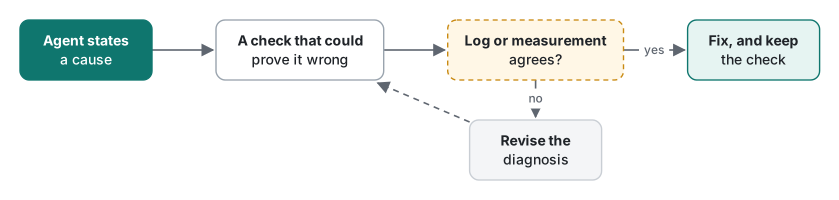
This is for developers who let an AI coding agent diagnose and fix production problems, and who want to know what its wrong answers look like in practice. Over four days of running a live site and app APIs with an AI agent, we collected six cases where its first explanation was confident, plausible and wrong. Each was caught the same way: a log, a parser or a measurement contradicted it. Reading the code more carefully would not have done it.
These are not the five catches from AI Coding Agent on a Live Server: Guardrails That Held. Those were mistakes in generated output. These are wrong beliefs: about how a limit is counted, how deep a directory is, how a parser reads a file. Each case below is written up as assumption, check, evidence and fix.
Case 1: "Everything shares one hourly budget"
Assumption. A cron job on our shared host failed with MySQL error 1226, max_connections_per_hour, with a limit of 500. The agent's diagnosis: every app API, cron job and legacy page logs in as the same database user, so they all draw from one budget of 500 an hour, and heavy API traffic was starving the cron. That made sense, and we published an article saying it.
Check. To find out who was using the budget, the agent added a one-line logger to the shared database connection function. It wrote time, source and a client class for every connection, and nothing else in the response changed.
Evidence. The log contradicted the diagnosis within a few hours. The app APIs alone made 1,557 and 1,503 connections in two evening hours, about three times the limit, and every request succeeded. If there were one shared budget of 500, those requests would have failed. The difference was the connection path: the APIs connect via localhost, while the failing cron used the database server's remote hostname, the same path an external crawler uses.
Fix. MySQL accounts are user@host, and the limit counted against the remote path, not the local one. The cron now tries a local connection first, and the article was corrected that evening with a section on what the new measurements changed. The details are in MySQL 1226 max_connections_per_hour on Shared Hosting.
Lesson. The first diagnosis was built from documentation and reasoning. The second came from counting. Only the second was right.
Case 2: "Five levels up is the home directory"
Assumption. The connection logger lived outside the web root, in a private folder under the account's home. Ten legacy PHP files had to include it, so the agent wrote @include_once(dirname(__FILE__, 5) . '/<private>/connlog.php') and a comment saying "5 levels up is home". The @ was deliberate: if the logger is missing, the page must still work.
Check. After deploying, the agent did not stop at "the page still loads". It downloaded the day's log from the server and counted the lines by source.
Evidence.
new-format lines: 22
[(('api', 'dart'), 22)]
All 22 lines came from the app APIs. There were none from the legacy pages, although the agent had just requested several of them. The page bytes were identical to the pre-deploy copy. That was the problem: the @ that kept the page safe also hid the failure. The path is easy to get wrong. Here is the same structure with placeholder names, run on PHP 8.5:
<?php
// A file inside the web root of a shared host (placeholder path)
$file = '/home/user/domains/example.com/www/app/lib/db.php';
foreach ([1, 5, 6] as $n) {
    printf("dirname(\$file, %d) = %s\n", $n, dirname($file, $n));
}
// What @include_once does with a missing file: nothing visible
$r = @include_once dirname($file, 5) . '/private/log.php';
var_dump($r);
dirname($file, 1) = /home/user/domains/example.com/www/app/lib
dirname($file, 5) = /home/user/domains
dirname($file, 6) = /home/user
bool(false)
The agent had counted the folders above lib/, but dirname() counts from the file. That makes the first level the file's own folder, so reaching home takes six levels, not five.
Fix. dirname(__FILE__, 6) in all ten files, redeploy, read the log again: two legacy lines appeared, and the page was still byte-identical.
Lesson. When failure is silent by design, the only proof of success is the side effect you expected. Check for it.
Case 3: "Allow first, then the exceptions"
Assumption. For scraper protection we added rules to robots.txt. The general group already read Allow: / followed by Disallow: lines for the API and the legacy app pages. Allow everything, then list the exceptions. It reads naturally.
Check. Before deploying, the agent ran the built file through Python's standard urllib.robotparser with a list of (bot, path) pairs and the expected answer for each.
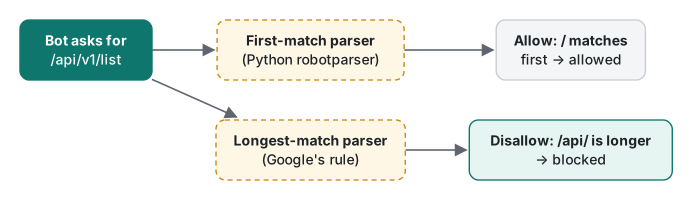
Evidence. Googlebot /api/v1/x 허용, where 허용 means allowed. That was a path we meant to block. Python's parser takes the first rule that matches, and Allow: / matches everything. Google documents a longest-match rule, so Googlebot itself would have blocked the path, but not every crawler follows Google's rules. A minimal reproduction (Python 3.9):
from urllib.robotparser import RobotFileParser

ALLOW_FIRST = """User-agent: *
Allow: /
Disallow: /api/
Disallow: /legacy-app/
"""
DISALLOW_FIRST = """User-agent: *
Disallow: /api/
Disallow: /legacy-app/
Allow: /
"""
for name, text in [("Allow first", ALLOW_FIRST), ("Disallow first", DISALLOW_FIRST)]:
    rp = RobotFileParser()
    rp.parse(text.splitlines())
    print(name)
    for path in ["/api/v1/list", "/legacy-app/page.php", "/en/some-post/"]:
        print(f"  {path:22} {'allowed' if rp.can_fetch('Googlebot', 'https://example.com' + path) else 'blocked'}")
Allow first
  /api/v1/list           allowed
  /legacy-app/page.php   allowed
  /en/some-post/         allowed
Disallow first
  /api/v1/list           blocked
  /legacy-app/page.php   blocked
  /en/some-post/         allowed
Fix. The Disallow lines now come before Allow: /. With that order, first-match and longest-match parsers give the same answer. The agent re-ran the parser, deployed, and fetched the live file to confirm the order.
Lesson. "Correct for Google" and "correct" are different claims. Test with a parser that reads it the other way.
Case 4: "Send a Googlebot user agent to see what Googlebot sees"
Assumption. The same change added an .htaccess rule that returns 403 to a list of aggressive crawlers on the legacy pages. Search engines had to stay unaffected. The agent added a test case: request a legacy page with Googlebot's user agent string and expect 200.
Check. The full rule set ran in a throwaway folder on the real server, as all our rewrite tests do.
Evidence. Every case passed except that one (the harness prints Korean labels: 봇차단 = bot block, 옛 화면 = legacy page, 앱 = app, 안드로이드 웹뷰 = Android WebView):
OK   403 GET  봇차단: AhrefsBot → 옛 화면 403
OK   200 GET  앱 Dart → API 200
OK   200 GET  안드로이드 웹뷰 → 옛 화면 200
FAIL 403 GET  Googlebot → 옛 화면 200
The first guess was that our new rule had matched too much. The agent checked that guess before changing the rule. It sent the same Googlebot string to pages the rule does not cover, such as the blog's home page and an article. Both returned 403, and so did a Bingbot string. Our rule could not have caused that. The host's CDN rejects requests that claim to be Googlebot or Bingbot but do not come from their networks, across the whole site.
Fix. The rule was not the problem, so it stayed. The test case was removed, with a comment explaining why a fake Googlebot cannot be tested from outside. What Googlebot really sees can only be checked from Search Console's URL inspection, which sends a real Googlebot request.
Lesson. A test that fails is evidence about the whole path, including the layers you did not write. Before you fix the code, find out which layer said no.
Case 5: "The figures look fine", until we looked at them at phone width
Assumption. Our figures are SVGs generated from YAML, with an automatic vertical layout for phones. The renderer placed 28 px between the columns of that vertical layout. On desktop the figures looked right, and the width checker reported 0 warnings.
Check. Agents adding figures to older posts were required to render them to PNG and look at them, including the vertical versions.
Evidence. Several agents reported the same thing independently: on sideways arrows in the phone layout, the labels ("yes", "no", short conditions) sat on top of the box borders. One report named the cause: "the column gap there is only 28 px". The width checker could not see this, because nothing was too wide. The labels just overlapped.
Fix. The gap went from 28 px to 54 px in one line of the renderer. All 41 figures at the time were re-checked, with 0 errors and 0 warnings, and the main session confirmed the result with a headless-browser screenshot of two figures at 358 px wide.
We made the same kind of mistake with Japanese text on our OG cards. The first line breaker split words in the middle, between the two kanji of 本番 for example. It passed every check until someone looked at a rendered card. The fix is covered in Build-Time OG Cards with Pillow and CJK Line Breaking.
Lesson. For anything visual, a screenshot at the size people actually use is part of the test.
Case 6: "All 75 unused images were moved", found while writing this article
Assumption. After revising 54 old posts, the main session listed 75 legacy images that no post referenced, wrote the list to a file, and moved each one to a local backup with a shell loop. Then the deploy pruned them from the server.
Check. We had no check for this at the time. We found it while recounting for this article. The same unused-image script, run today:
29 files, 28 referenced, 1 unused
   /static/img/legacy/2021/07/st.jpg
Evidence. That file was on the list, so why was it still there? The list file had 75 entries but no newline after the last one, and a plain while read loop drops a last line without a newline. The log of that day already showed the mismatch, but nobody compared the two numbers: unused: 75 from the listing, prune would delete: 74 from the dry run. A reproduction in zsh:
printf '/img/a.png\n/img/b.png\n/img/c.jpg' > list.txt
echo "lines by wc -l: $(wc -l < list.txt)   entries by grep -c: $(grep -c . list.txt)"
echo "-- while read"; while read u; do echo "move $u"; done < list.txt
echo "-- while read || [ -n ]"; while read -r u || [ -n "$u" ]; do echo "move $u"; done < list.txt
lines by wc -l:        2   entries by grep -c: 3
-- while read
move /img/a.png
move /img/b.png
-- while read || [ -n ]
move /img/a.png
move /img/b.png
move /img/c.jpg
The missed file was a third-party product photo. It was no longer in any post, but it was still online at its old URL. We found it while counting for this post, and it is removed in the same deploy that publishes it.
Fix. Use while read -r u || [ -n "$u" ], and compare counts: the number listed, the number moved and the number deleted must be equal before anyone calls the cleanup done.

The pattern behind all six
| Case | The agent believed | The check that disagreed |
|---|---|---|
| MySQL 1226 | One budget for all clients | Per-connection log: about 1,500/hour succeeding on localhost |
| Include depth | Five levels up is home | Expected log lines: 0 from legacy pages |
| robots.txt | Allow-first order is fine | Standard first-match parser: blocked path allowed |
| Fake Googlebot | The test checks our rule | Same 403 on pages our rule does not cover |
| Phone figures | No width warning means fine | Rendered PNGs of the vertical layout |
| Image cleanup | 75 listed means 75 moved | Listed 75, dry run 74, file still served |
None of these were exotic. Each wrong belief was the kind an experienced developer could hold too. The agent did not need to be smarter. It needed a check that could prove it wrong, and it needed to run that check before calling the job done.
Checklist: make the agent prove it
Before you accept "fixed" from an AI agent, ask for the proof that fits the claim:
- "It's caused by X": show a measurement that would look different if X were false. A count, a log or a timing, not a paragraph.
- "The change works": name the side effect that proves it (a log line, a header, a row) and show it after the deploy, not only "no errors".
- "Errors are suppressed for safety": then show positive evidence that the code ran, because the error will never tell you.
- "This file is correct": run it through a standard parser that reads it differently from the one you care about.
- "The test failed because of my change": repeat the request where your change does not apply. If it still fails, the cause is somewhere else.
- "It looks right": show a screenshot at the size users see, in every language that wraps differently.
- "All N items were processed": show N in, N processed, N out, and compare them.
- Keep the check. Every check above is still in our scripts or our notes, so the same wrong belief gets caught faster next time.
The agent's speed came from writing code. Its reliability came from these checks, and they are cheap to ask for.
FAQ
Were these mistakes hallucinations?
No. Each one was a reasonable assumption that happened to be false on this server: a rule about how a limit is counted, how many directory levels a path has, how a parser reads a file, what a CDN does with a user agent. That is why reading the code did not catch them and a log or a measurement did.
What is the cheapest way to catch this kind of error?
Ask for a check that could prove the claim wrong, and run it before the fix is called done. In our cases that was a log line that should appear, a standard parser run over the real file, a screenshot at phone width, or two counts that should be equal.
Did any of these reach users?
One did, briefly: an article stated the wrong cause of a MySQL error until new measurements corrected it the same evening. One unused image stayed online after a cleanup and was found while writing this post. The others were caught before or right after deployment, with no visible effect.