Python Iterators and Generators: Measured Memory
Hand-written __iter__/__next__, generators, yield from, itertools, the exhausted-iterator trap, and 390 MiB vs 0.3 KiB measured with tracemalloc.
Series: Python lecture 3/6 (intermediate). For developers who can write functions and loops and now want to process data that does not fit comfortably in memory: after this lecture you can write your own iterators, build generator pipelines, and prove the memory difference with a number instead of a hunch.
If you have ever had a script die halfway through a log file, or found that a loop over the "same" data printed nothing the second time, this lecture is about your problem. Both come from one idea, the iterator protocol, and both are easy to fix once you can see it. The measurements below were all run on Python 3.9 on an Apple Silicon Mac (M1 Pro), and the outputs are pasted unedited, apart from local paths shortened to ~/demo/.
Short version: a generator expression summing ten million squares peaked at 0.3 KiB of traced memory, the equivalent list comprehension at 390 MiB, and the time was the same within 5%. A streaming log processor over an 86 MiB file peaked at 29.7 KiB; the readlines() version peaked at 1,027 MiB and was three times slower.
The iterator protocol, written by hand
A for loop does not know about lists. It calls iter(obj), which calls obj.__iter__() and must get back an iterator. Then it calls next() on that iterator, which calls __next__(), until StopIteration is raised. That is the whole protocol.
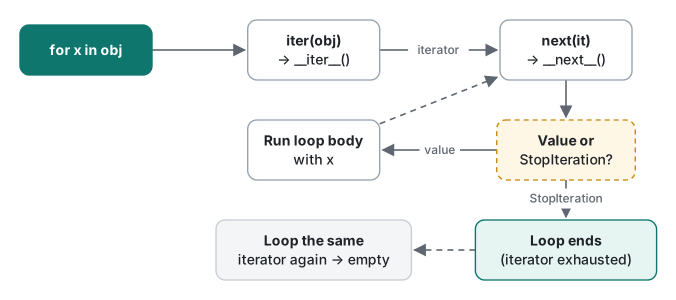
The cleanest way to write it by hand is to separate the iterable (the thing you can loop over many times) from the iterator (the cursor that remembers where it is):
class Countdown:
    """Iterable: each for loop gets a fresh iterator."""
    def __init__(self, start):
        self.start = start
    def __iter__(self):
        return CountdownIter(self.start)

class CountdownIter:
    def __init__(self, n):
        self.n = n
    def __iter__(self):
        return self
    def __next__(self):
        if self.n <= 0:
            raise StopIteration
        self.n -= 1
        return self.n + 1

c = Countdown(3)
print(list(c), list(c))          # reusable
it = iter(c)
print(next(it), next(it), next(it))
try:
    next(it)
except StopIteration:
    print("StopIteration raised")
print(next(it, "default"))
[3, 2, 1] [3, 2, 1]
3 2 1
StopIteration raised
default
Note two details. An iterator's own __iter__ returns self, so an iterator can be passed anywhere an iterable is expected. And next(it, default) returns the default instead of raising, which is handy for "first match or None".
Common mistake: the container that is its own iterator
Many first attempts put __next__ on the container itself and return self from __iter__:
class Bag:
    def __init__(self, items):
        self.items, self.i = items, 0
    def __iter__(self):
        return self              # BUG: the container is its own iterator
    def __next__(self):
        if self.i >= len(self.items):
            raise StopIteration
        self.i += 1
        return self.items[self.i - 1]

b = Bag(["x", "y"])
print(list(b), list(b))
print([(p, q) for p in b for q in b])
['x', 'y'] []
[]
No error, just wrong answers: the second pass is empty, and a nested loop over the same object shares one cursor. Fix: return a new iterator from __iter__ (as Countdown does), or, much shorter, make __iter__ a generator: def __iter__(self): yield from self.items.
Generators: the protocol for free
A function containing yield returns a generator object when called. The body does not run until the first next(). Each yield hands out one value and freezes the function's local state until the next request.
def countdown(n):
    while n > 0:
        yield n
        n -= 1

g = countdown(3)
print(g)
print(list(g), list(g))
<generator object countdown at 0x1030ce900>
[3, 2, 1] []
Same result as twenty lines of class, with the same catch on the last line: a generator is an iterator, so it is single-use.
yield from delegates to another iterable. It is the natural way to write recursive generators, and it also passes through the inner generator's return value:
def walk(tree):
    for node in tree:
        if isinstance(node, list):
            yield from walk(node)
        else:
            yield node
print(list(walk([1, [2, [3, 4]], 5])))

def inner():
    yield 1
    yield 2
    return "inner done"
def outer():
    result = yield from inner()
    print("outer got:", result)
print(list(outer()))
[1, 2, 3, 4, 5]
outer got: inner done
[1, 2]
A generator expression is the one-line form: (x * x for x in data). When it is the only argument, the extra parentheses can go: sum(x * x for x in data).
Trap: StopIteration inside a generator becomes RuntimeError
Since Python 3.7 (PEP 479), a StopIteration that leaks out of a generator body is converted into a RuntimeError. This bites code that calls next() without a default inside a generator:
def first_words(lines):
    it = iter(lines)
    while True:
        line = next(it)          # raises StopIteration at the end...
        yield line.split()[0]

print(list(first_words(["hello world", "good bye"])))
Traceback (most recent call last):
  File "~/demo/pep479.py", line 4, in first_words
    line = next(it)          # raises StopIteration at the end...
StopIteration

The above exception was the direct cause of the following exception:

Traceback (most recent call last):
  File "~/demo/pep479.py", line 7, in <module>
    print(list(first_words(["hello world", "good bye"])))
RuntimeError: generator raised StopIteration
Fix: for line in lines: yield line.split()[0], or return explicitly when next(it, None) gives None.
The exhausted-iterator trap, with real output
This is the bug that costs people an afternoon, because nothing crashes where the mistake is. You parse rows with a generator expression "to save memory", then loop over it twice:
rows = ["alice,30", "bob,25", "carol,41"]
parsed = (line.split(",") for line in rows)
names = [p[0] for p in parsed]
ages  = [int(p[1]) for p in parsed]
print(names, ages)
print(sum(ages) / len(ages))
['alice', 'bob', 'carol'] []
Traceback (most recent call last):
  File "~/demo/trap.py", line 6, in <module>
    print(sum(ages) / len(ages))
ZeroDivisionError: division by zero
The error appears two lines after the real mistake, and it is about division, not iteration. The same thing happens with map, filter, zip, file objects, and csv.reader, which are all iterators in Python 3:
nums = map(int, ["3", "1", "2"])
print(max(nums))
print(min(nums))
3
Traceback (most recent call last):
  File "~/demo/trap2.py", line 3, in <module>
    print(min(nums))
ValueError: min() arg is an empty sequence
Two related surprises: 3 in iter([1, 2, 3, 4]) returns True and consumes 1, 2 and 3 (a following list() gives [4]), and len(zip(...)) fails with TypeError: object of type 'zip' has no len(), because an iterator does not know its length without consuming itself.
Fix, depending on what you need:
| Situation | Do this |
|---|---|
| You need the data twice and it is small | parsed = [line.split(",") for line in rows] (a list) |
| You need two aggregates in one pass | One for loop that updates both |
| You need two independent passes over a stream | itertools.tee, but only if the passes stay close together; otherwise it buffers everything |
| You want a reusable lazy object | A class whose __iter__ is a generator |
You need len() |
Materialize, or count while you iterate |
itertools essentials
itertools is a set of building blocks that take iterators and return iterators, so they compose without creating intermediate lists. The ones worth memorizing, with real output from Python 3.9:
import itertools as it

print(list(it.islice(it.count(10, 5), 4)))
print(list(it.chain([1, 2], (3, 4), "ab")))
print(list(it.chain.from_iterable([[1], [2, 3], []])))
rows = [("ja", "tokyo"), ("ja", "osaka"), ("ko", "seoul"), ("ja", "nagoya")]
print([(k, [c for _, c in g]) for k, g in it.groupby(rows, key=lambda r: r[0])])
print([(k, [c for _, c in g]) for k, g in it.groupby(sorted(rows), key=lambda r: r[0])])
print(list(it.accumulate([3, 1, 4, 1, 5])))
print(list(it.takewhile(lambda x: x < 4, [1, 3, 5, 2])))
print(list(it.zip_longest("abc", [1], fillvalue="-")))
print(list(it.combinations([1, 2, 3], 2)))
[10, 15, 20, 25]
[1, 2, 3, 4, 'a', 'b']
[1, 2, 3]
[('ja', ['tokyo', 'osaka']), ('ko', ['seoul']), ('ja', ['nagoya'])]
[('ja', ['nagoya', 'osaka', 'tokyo']), ('ko', ['seoul'])]
[3, 4, 8, 9, 14]
[1, 3]
[('a', 1), ('b', '-'), ('c', '-')]
[(1, 2), (1, 3), (2, 3)]
Look at the two groupby lines. groupby only groups consecutive equal keys, so unsorted input gives ja twice. That is not a bug in itertools; it is what lets groupby work on an infinite stream. Sort first, or use a dict/Counter if the data fits in memory.
count is infinite, so it must be cut with islice or takewhile; list(it.count()) never returns. A chunker that works on any iterator, including a file:
def chunks(iterable, size):
    iterator = iter(iterable)
    while True:
        block = list(it.islice(iterator, size))
        if not block:
            return
        yield block
print(list(chunks(range(7), 3)))   # [[0, 1, 2], [3, 4, 5], [6]]
Python 3.12 added itertools.batched for exactly this, and 3.10 added pairwise. On our Python 3.9, itertools.pairwise raised AttributeError: module 'itertools' has no attribute 'pairwise'; on Python 3.11 it worked, and batched was still missing. If you support 3.9, keep the hand-written version.
Measured: list comprehension vs generator expression
Memory was measured with tracemalloc (peak traced allocation during the call), and time in a separate pass with tracing off, best of 5, because tracing itself slowed the same code down more than 10 times in a first attempt.
"""List vs generator: tracemalloc peak and wall time (Python 3.9)."""
import time, tracemalloc

def sum_list(n):  return sum([i * i for i in range(n)])
def sum_gen(n):   return sum(i * i for i in range(n))

def peak_kb(fn, n):
    tracemalloc.start()
    fn(n)
    _, peak = tracemalloc.get_traced_memory()
    tracemalloc.stop()
    return peak / 1024

def best_ms(fn, n, repeat=5):
    best = float("inf")
    for _ in range(repeat):
        t0 = time.perf_counter()
        fn(n)
        best = min(best, time.perf_counter() - t0)
    return best * 1000

for n in (1_000_000, 10_000_000):
    for label, fn in (("list comp", sum_list), ("generator", sum_gen)):
        print(f"n={n:>10,}  {label:<10} peak={peak_kb(fn, n):>11,.1f} KB"
              f"  best of 5={best_ms(fn, n):8.1f} ms")
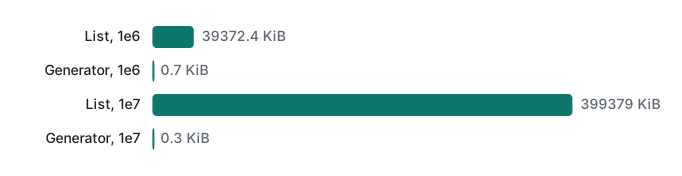
n= 1,000,000  list comp  peak=   39,372.4 KB  best of 5=    42.0 ms
n= 1,000,000  generator  peak=        0.7 KB  best of 5=    43.0 ms
n=10,000,000  list comp  peak=  399,378.7 KB  best of 5=   493.5 ms
n=10,000,000  generator  peak=        0.3 KB  best of 5=   516.5 ms
(The "KB" in the output is KiB, since we divide by 1024.) A second run gave 40.2/43.7 ms and 503.1/522.4 ms, with identical memory figures.
What the numbers say:
- Memory for the list grows linearly: about 40 bytes per element (an 8-byte pointer in the list plus a 32-byte int object for large squares). Ten million items is 390 MiB before you have done anything useful.
- The generator's peak stays under 1 KiB regardless of
n, because only one value exists at a time. - Speed is a wash. The generator was 2–7% slower here, since resuming a frame for each item costs a little more than appending to a list. Choose a generator for memory and early exit, not for speed.
A streaming large-file processor
The real use: a log file too large to load comfortably. The script below writes a fake 2,000,000-line access log (86 MiB, seed 7), then counts HTTP 500 errors per path two ways: a generator pipeline, and readlines() plus list comprehensions.
"""Streaming a large log file with a generator pipeline (Python 3.9 stdlib)."""
import os, random, sys, time, tracemalloc
from collections import Counter

PATH = "access.log"

def make_log(path, n=2_000_000, seed=7):
    rng = random.Random(seed)
    paths = ["/", "/api/v1/user", "/api/v1/items", "/static/app.js", "/login"]
    codes = [200] * 90 + [304] * 5 + [404] * 3 + [500] * 2
    with open(path, "w") as f:
        for i in range(n):
            f.write(f"2026-11-12T10:{i % 60:02d}:00 GET {rng.choice(paths)} "
                    f"{rng.choice(codes)} {rng.randint(80, 9000)}ms\n")

def read_lines(path):
    with open(path) as f:
        for line in f:                 # the file object is itself a lazy iterator
            yield line.rstrip("\n")

def parse(lines):
    for line in lines:
        _ts, _method, path, code, ms = line.split(" ")
        yield path, int(code), int(ms[:-2])

def only_errors(records):
    return (r for r in records if r[1] >= 500)

def streaming(path):
    return Counter(p for p, _c, _ms in only_errors(parse(read_lines(path))))

def eager(path):
    with open(path) as f:
        lines = f.readlines()                       # whole file in memory
    records = [l.rstrip("\n").split(" ") for l in lines]
    return Counter(r[2] for r in records if int(r[3]) >= 500)

def run(fn):
    tracemalloc.start()
    res = fn(PATH)
    peak = tracemalloc.get_traced_memory()[1]
    tracemalloc.stop()
    t0 = time.perf_counter(); fn(PATH); dt = time.perf_counter() - t0
    print(f"{fn.__name__:<10} peak={peak/1024:11,.1f} KiB  time(no tracing)={dt:5.2f} s  {res.most_common(2)}")

if __name__ == "__main__":
    if not os.path.exists(PATH):
        make_log(PATH)
    print(f"file: {os.path.getsize(PATH)/2**20:.1f} MiB, Python {sys.version.split()[0]}")
    run(streaming)
    run(eager)
file: 86.0 MiB, Python 3.9.6
streaming  peak=       29.7 KiB  time(no tracing)= 1.13 s  [('/', 8057), ('/static/app.js', 8044)]
eager      peak=1,051,415.9 KiB  time(no tracing)= 3.89 s  [('/', 8057), ('/static/app.js', 8044)]
Over five runs the streaming version took 1.11–1.37 s and the eager one 3.55–3.89 s. Both found the same 40,053 errors. An 86 MiB file turned into 1 GiB of Python objects in the eager version: each line becomes a str (about 100 bytes with header), then a list of five more str objects. The streaming pipeline holds one line at a time, and each stage is a few lines that can be tested on its own with a plain list as input. It also stops reading as soon as the consumer stops: replacing Counter(...) with next(...) would read only up to the first error.

send(), briefly
Generators can also receive values: value = yield x hands out x and pauses; gen.send(v) resumes it with value = v. A running average:
def running_avg():
    total, count, avg = 0.0, 0, None
    while True:
        value = yield avg
        total += value
        count += 1
        avg = total / count

avg = running_avg()
print(next(avg))          # prime it: runs to the first yield
print(avg.send(10))
print(avg.send(20))
print(avg.send(60))
fresh = running_avg()
fresh.send(5)
None
10.0
15.0
30.0
Traceback (most recent call last):
  File "~/demo/send.py", line 15, in <module>
    fresh.send(5)
TypeError: can't send non-None value to a just-started generator
The last line is the classic mistake: a fresh generator has not reached a yield yet, so there is nowhere to deliver the value. Call next() once first. This send/yield mechanism is what old-style coroutines were built on before async/await; in new code, a small class with a method is usually clearer, and lecture 5 covers asyncio.
Which one should I use?
| You have | Use |
|---|---|
Small data, needed more than once, needs len() or indexing |
list |
| One pass over large or unbounded data | generator expression or generator function |
| Several transformation steps over a stream | a pipeline of generator functions |
| A custom collection that must be looped many times | class with __iter__ written as a generator |
An iterator with explicit state that others will call next() on |
class with __iter__ + __next__ |
| Grouping, slicing, chaining, combinations | itertools before writing your own |
Honest limits / version notes
- All timings: Python 3.9.6, Apple Silicon Mac (M1 Pro), best of 5 (memory loop) or a single run repeated 5 times (log file). Seeds fixed (7 for the log). Python 3.11 was used only to check behavior and error messages, never for timing.
tracemalloccounts memory allocated through Python's allocators. It is not RSS: the interpreter itself, and buffers allocated outside those allocators, are not in the figure. It is the right tool for comparing two versions of the same code, not for sizing a container.- Python 3.11 adds caret markers (
~~~~^~~~) under the failing expression in tracebacks; the messages above were otherwise identical on 3.9 and 3.11. - PEP 479 (
StopIteration→RuntimeError) is the default since 3.7.itertools.pairwiseis 3.10+ (checked: missing on 3.9, present on 3.11);itertools.batchedis 3.12+ and was not run here.
Series navigation: previous: Python lecture 2: functions, scope and default arguments · next: Python lecture 4: decorators and context managers. The same lazy evaluation idea appears as deferred execution in C# LINQ basics, and lecture 6, profiling and optimization, goes further into measuring memory and time.
FAQ
Why does my generator return an empty list the second time?
A generator is an iterator, and an iterator can be consumed only once. After the first list() or for loop it is exhausted, and every later pass silently yields nothing. Store the results in a list if you need them twice, or make a class whose __iter__ returns a fresh iterator each time.
How much memory does a generator expression save compared to a list comprehension?
For sum(i * i for i in range(10_000_000)) on Python 3.9, tracemalloc reported a peak of 0.3 KiB for the generator and 399,379 KiB (about 390 MiB) for the list comprehension. The time was almost the same: 0.52 s versus 0.50 s.
Is a generator faster than a list?
Not by itself. In our runs the generator was 2 to 7% slower for plain summing. It wins when the list would be large enough to strain memory, or when you can stop early. Our streaming log processor was about 3x faster than readlines() only because it avoided allocating 1 GiB of objects.