Python Functions: Scope, Default Args and Closures
Python functions from real runs: *args, **kwargs, / and *, the mutable default trap, LEGB and UnboundLocalError, late-binding lambdas, match, call cost.
Series: Python lecture 2/6 (beginner). For people who can write a def but have been bitten by a function that "remembers" old data or a variable that is suddenly "referenced before assignment". After this lecture you will know exactly when Python evaluates defaults, where it looks up names, and how much a function call costs.
Most function bugs beginners report to us are not about logic at all. They come from three rules nobody states loudly: default values are created once, assigning to a name makes it local for the whole function, and a closure reads a variable when it runs rather than when it is created. Each rule is shown below with code you can paste into one file and the output it actually printed on Python 3.9 and Python 3.11 (Apple Silicon Mac, M1 Pro). Paths in tracebacks are shortened to ~/demo/.
If you have not read lecture 1, skim its first section: "names point to objects" is the key to every trap here.
Parameters: positional, keyword, args, *kwargs
def describe(name, version, *tags, debug=False, **extra):
    print(f"name={name} version={version} tags={tags} debug={debug} extra={extra}")

describe("app", "1.0")
describe("app", "1.0", "ios", "android", debug=True, store="jp")

args = ("app", "2.0", "web")
opts = {"debug": True, "region": "eu"}
describe(*args, **opts)
name=app version=1.0 tags=() debug=False extra={}
name=app version=1.0 tags=('ios', 'android') debug=True extra={'store': 'jp'}
name=app version=2.0 tags=('web',) debug=True extra={'region': 'eu'}
*tagscollects extra positional arguments into a tuple.- Anything after
*tagscan only be passed by keyword, sodebugis keyword-only. **extracollects unknown keyword arguments into a dict.- At the call site,
*argsand**optsdo the reverse: they unpack a sequence and a dict into arguments.
The / and * markers
Python 3.8 added /: parameters before it are positional-only. A bare * makes everything after it keyword-only.
def clamp(value, /, low=0, high=100, *, strict=False):
    if strict and not (low <= value <= high):
        raise ValueError(f"{value} out of range")
    return max(low, min(high, value))

print(clamp(150), clamp(-5, low=-10), clamp(50, 0, 40))
100 -5 40
And here are the four TypeErrors you get when you call functions wrongly. These messages were identical on 3.9 and 3.11:
clamp(value=5)                  -> TypeError: clamp() got some positional-only arguments passed as keyword arguments: 'value'
clamp(5, 0, 100, True)          -> TypeError: clamp() takes from 1 to 3 positional arguments but 4 were given
describe('a')                   -> TypeError: describe() missing 1 required positional argument: 'version'
describe('a', '1', version='2') -> TypeError: describe() got multiple values for argument 'version'
The second one is the point of *: clamp(5, 0, 100, True) would be unreadable ("what is True?"), so the function refuses it. When to use which:
| You want | Write | Why |
|---|---|---|
| Caller may rename freely; name is meaningless | def f(x, /) |
You can rename the parameter later without breaking callers |
| Flags and options | def f(x, *, verbose=False) |
Forces verbose=True at the call site, which reads well |
| Wrap another function and pass everything through | def f(*args, **kwargs) |
Decorators, thin wrappers (lecture 4) |
| Normal parameters | def f(a, b=1) |
Default choice |
Common mistake: the mutable default argument
This is the most famous Python trap, and it is the aliasing from lecture 1 in disguise.
def add_item(item, bucket=[]):
    bucket.append(item)
    return bucket

print(add_item("a"))
print(add_item("b"))
print(add_item("c", []))
print(add_item("d"))
print("defaults:", add_item.__defaults__)
['a']
['a', 'b']
['c']
['a', 'b', 'd']
defaults: (['a', 'b', 'd'],)
What actually happens: the expression [] is evaluated once, when the def statement runs, and the resulting list is stored on the function object in __defaults__. Every call that omits bucket gets that same list. Passing your own list ("c") works, which is why the bug hides in tests and appears in production, where a web handler collects items from every request since the server started.
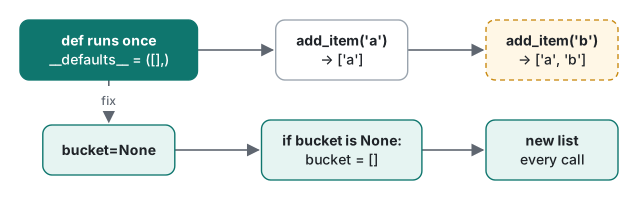
Fix: use None as the sentinel and create the object inside:
def add_item_fixed(item, bucket=None):
    if bucket is None:
        bucket = []
    bucket.append(item)
    return bucket

print(add_item_fixed("a"), add_item_fixed("b"))
['a'] ['b']
The same rule bites with any default that is computed: def log(msg, when=time.time()) records the time the module was imported. We called it, slept 1.1 seconds, called it again, and both calls returned the same timestamp. Write when=None and compute time.time() inside.
Scope: LEGB and UnboundLocalError
When a function uses a name, Python searches four places in order and stops at the first hit: Local, Enclosing (outer functions), Global (the module), Builtins.
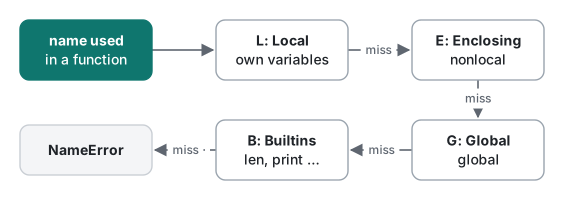
x = "global"
def outer():
    x = "enclosing"
    def inner():
        print("inner sees:", x)
    inner()
outer()
inner sees: enclosing
Reading outer names is free. Assigning is where beginners crash. This counter looks harmless:
count = 0

def hit():
    count += 1
    return count

hit()
Python 3.9:
Traceback (most recent call last):
  File "~/demo/unbound.py", line 7, in <module>
    hit()
  File "~/demo/unbound.py", line 4, in hit
    count += 1
UnboundLocalError: local variable 'count' referenced before assignment
Python 3.11 rewords it, and the new wording is closer to the truth:
    count += 1
    ^^^^^
UnboundLocalError: cannot access local variable 'count' where it is not associated with a value
The decision "is count local?" is made when the function is compiled, by scanning the whole body for assignments. count += 1 assigns, so count is local everywhere in hit, including on the right-hand side of that same line. Even more confusing, the assignment can come later:
total = 100

def report():
    print("before:", total)   # fails here
    total = 0

report()
    print("before:", total)
UnboundLocalError: local variable 'total' referenced before assignment
global and nonlocal
count = 0
def hit():
    global count
    count += 1
    return count
hit(); hit()
print("count =", count)

def make_counter():
    n = 0
    def step():
        nonlocal n
        n += 1
        return n
    return step

c1, c2 = make_counter(), make_counter()
print(c1(), c1(), c1(), "|", c2())
count = 2
1 2 3 | 1
global rebinds a module-level name; nonlocal rebinds a name in the nearest enclosing function. Each call to make_counter creates a fresh n, so c1 and c2 count independently.
| Situation | Best choice |
|---|---|
| Function needs a value | pass it as a parameter |
| Function produces a new value | return it |
| Small private state between calls | closure + nonlocal (or a class) |
| Module-wide setting changed rarely, e.g. at startup | global, sparingly |
| Mutating a shared list or dict | no keyword needed (.append is not an assignment), but think twice |
Closures and the late-binding trap
A closure is an inner function that keeps access to variables of the function that created it:
def make_multiplier(k):
    return lambda v: v * k

double, triple = make_multiplier(2), make_multiplier(3)
print(double(5), triple(5))
print("cell:", c1.__closure__[0].cell_contents)
10 15
cell: 3
The captured variable lives in a cell; c1 from the previous section has counted to 3. The trap: a closure stores the variable, not its value at creation time.
fns = [lambda: i for i in range(3)]
print("late binding:", [f() for f in fns])

fns = [lambda i=i: i for i in range(3)]
print("default fix :", [f() for f in fns])

from functools import partial
def show(i): return i
fns = [partial(show, i) for i in range(3)]
print("partial fix :", [f() for f in fns])
late binding: [2, 2, 2]
default fix : [0, 1, 2]
partial fix : [0, 1, 2]
All three lambdas read i when called, after the loop has finished with i == 2. The i=i fix works because of the rule from the default-argument section: defaults are evaluated once, at definition time, which is exactly what we want here. In GUI code this shows up as "every button does the same thing":
buttons = {}
for name in ("save", "load"):
    buttons[name] = lambda: f"clicked {name}"
print(buttons["save"]())
clicked load
Type hints are not enforced
def area(w: float, h: float) -> float:
    return w * h

print(area("ab", 3))
print(area.__annotations__)
ababab
{'w': <class 'float'>, 'h': <class 'float'>, 'return': <class 'float'>}
No error: CPython stores the hints in __annotations__ and otherwise ignores them. "ab" * 3 is valid string repetition, so you silently get ababab. Hints pay off through tools such as mypy or your editor, and as documentation. If a value must be checked at run time, check it yourself (if not isinstance(w, (int, float)): raise TypeError(...)).
match (Python 3.10+)
Structural pattern matching is not a switch; it matches the shape of data. Run on Python 3.11:
def handle(cmd):
    match cmd.split():
        case ["quit" | "exit"]:
            return "bye"
        case ["go", direction] if direction in ("north", "south"):
            return f"moving {direction}"
        case ["go", _]:
            return "unknown direction"
        case ["drop", *items]:
            return f"dropping {len(items)} item(s): {items}"
        case _:
            return f"??? {cmd!r}"

def status(resp):
    match resp:
        case {"status": 200, "data": data}:
            return f"ok: {data}"
        case {"status": 404}:
            return "not found"
        case {"status": int(code)} if code >= 500:
            return f"server error {code}"
        case _:
            return "unexpected"
quit           -> bye
go north       -> moving north
go up          -> unknown direction
drop key lamp  -> dropping 2 item(s): ['key', 'lamp']
dance          -> ??? 'dance'
{'status': 200, 'data': [1, 2]}  -> ok: [1, 2]
{'status': 404, 'msg': 'x'}      -> not found
{'status': 503}                  -> server error 503
{'code': 1}                      -> unexpected
Mapping patterns ignore extra keys ('msg' above). The same file on Python 3.9 does not even start:
  File "~/demo/l2_match.py", line 2
    match cmd.split():
          ^
SyntaxError: invalid syntax
If your code must also run on 3.9 (older servers, macOS's bundled Python 3.9), use if/elif.
The match trap beginners hit: a bare name in a case is a capture, not a comparison.
NOT_FOUND = 404
def check(code):
    match code:
        case NOT_FOUND:
            return "not found"
        case 200:
            return "ok"
    case NOT_FOUND:
         ^^^^^^^^^
SyntaxError: name capture 'NOT_FOUND' makes remaining patterns unreachable
That error is the lucky case. With only one case, it compiles, matches everything, and assigns the value to NOT_FOUND: calling it with 200 returned matched; NOT_FOUND inside = 200. Use a dotted name (case HTTP.NOT_FOUND: with an IntEnum, which matched 404 and skipped 200) or a literal.
A measurement: what does a function call cost?
Summing i * i for a million i, written six ways (timeit, best of 7, Python 3.9, Apple M1 Pro; all six return the same total):
import timeit
N = 1_000_000
def square(x): return x * x

def run_inline():
    t = 0
    for i in range(N): t += i * i
    return t
def run_call():
    t = 0
    for i in range(N): t += square(i)
    return t
# run_lambda: sq = lambda x: x * x, then t += sq(i)
# run_kw:     t += square(x=i)
def run_comp(): return sum([i * i for i in range(N)])
def run_map():  return sum(map(square, range(N)))

for f in (run_inline, run_call, run_comp, run_map):
    print(f.__name__, min(timeit.repeat(f, number=1, repeat=7)))
| Style | Run 1 | Run 2 | Per iteration |
|---|---|---|---|
list comprehension + sum |
42.3 ms | 41.0 ms | ~42 ns |
| inline loop | 44.2 ms | 44.8 ms | ~44 ns |
sum(map(square, …)) |
50.2 ms | 50.6 ms | ~50 ns |
| lambda call in loop | 80.4 ms | 79.2 ms | ~80 ns |
def call in loop |
82.9 ms | 84.0 ms | ~83 ns |
keyword call square(x=i) |
92.2 ms | 91.1 ms | ~92 ns |
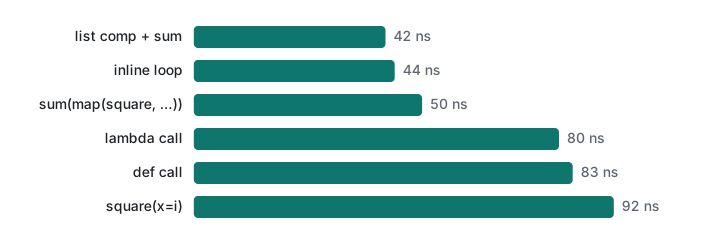
On Python 3.9 a plain function call costs about 40 ns on top of the work, and a keyword argument adds ~9 ns more. A lambda is not faster than a def; they are the same kind of object. For a loop body this trivial, the call doubles the time. For anything real (a database query, a JSON parse, a regex) 40 ns is noise. Keep functions for readability, and inline only inside a loop you have measured to be hot (lecture 6 covers profiling). Python 3.11 made calls noticeably cheaper, but our 3.11 build runs under emulation on this Mac, so we did not time it.
Honest limits / version notes
- All code was run on Python 3.9.6 and Python 3.11.4. Timings come from 3.9 only.
/positional-only parameters: added in Python 3.8 (PEP 570); we ran them on 3.9 and 3.11, not on 3.8.match: added in Python 3.10 (PEP 634). We ran it on 3.11 and confirmed theSyntaxErroron 3.9; we did not run 3.10 itself.- The
UnboundLocalErrormessage changed in 3.11, as shown above. Code that matches on the message text breaks across versions; catch the exception type instead. - Python 3.12 adds the
typestatement and PEP 695 generic syntax (def first[T](xs: list[T]) -> T). We describe them only; they were not run, since 3.11 rejects that syntax.
Next
- Previous: Python lecture 1/6: types, mutability, is vs ==
- Next: Python lecture 3/6: iterators, generators and memory
- Closures and
*args, **kwargscome back in lecture 4: decorators and context managers, and call overhead in lecture 6: profiling and optimization. - The same ideas elsewhere: VB.NET lecture 2: ByVal, ByRef and control flow, C# lambda expressions, C# methods
FAQ
Why does my Python function remember the list from the previous call?
A default value is evaluated once, when the def statement runs, not on every call. def add_item(item, bucket=[]) shares one list across calls: the second call returned ['a', 'b']. Use bucket=None and create the list inside the function.
What causes UnboundLocalError: local variable referenced before assignment?
Assigning to a name anywhere inside a function (including count += 1) makes that name local for the whole function, so reading it before the assignment fails. Declare global count or nonlocal count if you really mean the outer variable, or better, pass the value in and return the new value.
Why do all my lambdas created in a loop return the last value?
Closures look up the variable when they are called, not when they are created. [lambda: i for i in range(3)] returned [2, 2, 2]. Bind the current value with a default argument (lambda i=i: i) or functools.partial; both returned [0, 1, 2].