Regex Metacharacters and the $ Newline Trap
Every regex metacharacter with real outputs: Multiline vs Singleline, the $ trailing-newline trap, and which digits \d matches per engine.
Revised November 2026. This tutorial first appeared in Korean in 2021. We re-ran its examples in .NET 10 (System.Text.RegularExpressions), Python 3.9 and 3.12
re, PHP 8.5 (PCRE2 10.47) and Dart 3.11, whose RegExp follows JavaScript syntax. The original table needed several fixes:\dand\ware not[0-9]and[a-zA-Z0-9_]in .NET by default, the\slist left out the space character, and\x09was introduced as a "newline" when it is a tab. We added^,$,|,{ }, Multiline and Singleline, and the trailing-newline trap.
This article is for anyone who wants every special regex symbol in one place, and for anyone whose ^\d+$ validation let through something it should not have. The meaning of each metacharacter is mostly the same across engines. The edge behavior is not: where $ matches and which digits \d accepts differed between the engines we tested. In input validation, those differences become security bugs.
The 14 metacharacters at a glance
These characters have a special meaning inside a pattern. To match one literally, put a \ in front of it (\., \$, \(). Escaping a whole user-supplied string is covered in simple string matching.
| Metacharacter | Meaning | Details |
|---|---|---|
. |
Any single character except newline | This page |
^ $ |
Start and end of the string (or line) | This page |
| |
Alternation (or) | This page |
? * + |
0 or 1, 0 or more, 1 or more | Quantifiers |
{ } |
Repetition count: {2}, {2,5} |
Repeated characters |
( ) |
Group | Subexpressions |
[ ] |
Character set: [abc] |
Character sets |
\ |
Escape, and sequences such as \d |
This page |
| has the lowest precedence of all, which causes a classic mistake. ^cat|dog$ means "^cat or dog$", not "a line that is exactly cat or dog". On three lines, catalog, hotdog and dogma, with Multiline on, all four engines matched the cat in catalog and the dog in hotdog. Group the alternatives, ^(cat|dog)$, and only a line consisting of just dog matched.
A { that does not look like a quantifier was treated as a literal by most engines: x{a} matched the text x{a} in all four. a{,2} split them. .NET and Dart read it as the literal text a{,2}; Python and PHP (PCRE2 10.47) read it as the quantifier {0,2}. Dart in unicode: true mode rejected it with Lone quantifier brackets. When you mean a literal brace, always write \{.
Escape sequences and the 2021 examples
Here is the 2021 table, corrected against the actual results:
| Sequence | Meaning | Correction |
|---|---|---|
\t \n \r \f |
Tab, line feed, carriage return, form feed | |
\v |
Vertical tab (U+000B) | In PHP (PCRE) it is any vertical whitespace, so it also matches \n |
[\b] |
Backspace (only inside a set) | Outside a set, \b is a word boundary |
\xHH |
One character by hex code (\x09 = tab) |
Not "matches hex digits" |
\0, \012 |
One character by octal code (\0 = NUL, \012 = \n) |
Not "matches octal digits" |
\d \D |
Digit / non-digit | May include Unicode digits (see below) |
\w \W |
Word character / not | .NET includes Hangul and CJK by default |
\s \S |
Whitespace / not | The original list was missing the space |
\x needs exactly two hex digits. .NET rejected both \x and \x4 with Insufficient or invalid hexadecimal digits, Python with incomplete escape \x4, while Dart in its default mode quietly read \x as the letter x. On the text a\nb\x0Bc, \v found only the \x0B in .NET, Python and Dart, but both \n and \x0B in PHP.
The 2021 examples gave the original results in every engine:
\[\d\]  on [0] [a] [1][2] [b] [c] [3]      -> [0], [1], [2], [3]
\[\W\]  on [0] [-] [a] [B] [$][@] [3]      -> [-], [$], [@]
\x09    on Text1<tab>A Text2<tab>B Text3   -> two tabs
[ and ] build character sets, so they are escaped as \[ and \]. The original introduced \x09 as "the hex value for newline" and then found tabs. 0x09 is tab; line feed is \x0A.
\d, \w and \s differ between engines
The 2021 table said \d equals [0-9]. On the same input, the engines disagreed. The input was ascii 123 / arabic-indic ١٢٣ / fullwidth 123 / devanagari १२:
| Engine and mode | \d+ matches |
|---|---|
| .NET 10 default | 123, ١٢٣, 123, १२ |
.NET 10 RegexOptions.ECMAScript |
123 |
| Python 3.9 / 3.12 (str pattern) | 123, ١٢٣, 123, १२ |
Python re.ASCII |
123 |
PHP 8.5 /u |
123, ١٢٣, 123, १२ |
PHP 8.5 without /u |
123 |
Dart (default and unicode: true) |
123 |
This bites when validation and parsing disagree. In .NET, 123 passed ^\d+$, and then int.Parse("123") threw FormatException: The input string '123' was not in a correct format. Full-width digits are common with Japanese input methods. Python's int('123'), by contrast, returned 123. If you want ASCII digits, write [0-9] or turn on RegexOptions.ECMAScript (.NET) or re.ASCII (Python). In PHP, adding /u made \d match Unicode digits too.
\w and \s showed the same split:
| Input | .NET default | .NET ECMAScript | Python | Python re.A |
PHP /u |
Dart |
|---|---|---|---|---|---|---|
\w+ on hello 안녕 日本語 café_1 |
all 4 words | hello, caf, _1 |
all 4 | hello, caf, _1 |
all 4 | hello, caf, _1 |
\s on space, NBSP, U+3000, tab |
all 4 | space, tab | all 4 | space, tab | all 4 | all 4 |
Note the last row. Dart (JavaScript) treated every Unicode space as \s, but .NET's ECMAScript option matched only the space and the tab. The ECMAScript option is not a perfect copy of JavaScript. Character ranges you write yourself are covered in character sets.
^ and $ with Multiline, . with Singleline
By default, ^ and $ match at the start and end of the whole string; with Multiline they match at the start and end of each line. By default . does not match \n; with Singleline (Python re.S, PHP /s, Dart dotAll) it does. Tested on first line\nsecond line\nthird, with identical results in all four engines:
| Pattern | No option | Multiline | Singleline | Both |
|---|---|---|---|---|
^\w+ |
first |
first, second, third |
first |
first, second, third |
\w+$ |
third |
line, line, third |
third |
line, line, third |
first.*third |
no match | no match | whole text | whole text |
Despite the names, the two options are not opposites. Multiline acts on ^ and $; Singleline acts on .. You can use both together.
The dot had two engine differences. First, .+ on ab\r\ncd returned ab\r, including the carriage return, in .NET, Python and PHP; Dart returned ab. Second, ^.$ on a single emoji 😀 matched in Python and PHP (/u), but not in .NET, where ^..$ matched instead. A .NET . matches one UTF-16 code unit, and the emoji is two. Dart behaved like .NET by default and like Python with unicode: true.
The $ trap: it also matches before a final newline
This is the most common validation bug in this area. ^\d+$ as a "digits only" check also accepts "123\n":
Pattern ^\d+$ on "123\n"
.NET 10     : match ("123")
Python 3.9  : match
Python 3.12 : match
PHP 8.5     : match
Dart        : no match
In .NET, Python and PHP, $ matches at the end of the string or just before a newline at the end. With two newlines, "123\n\n", no engine matched. The trap bites when you validate values that easily carry a trailing \n: form fields, lines read from a file, header values.
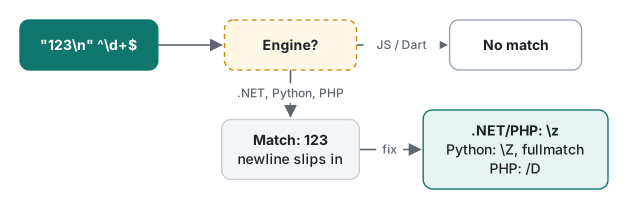
How to anchor at the true end differs per engine:
| Engine | ^\d+\z |
^\d+\Z |
Other options |
|---|---|---|---|
| .NET 10 | no match (true end) | match (same as $) |
|
| PHP 8.5 | no match | match | /^\d+$/D gives no match |
| Python 3.9 / 3.12 | error bad escape \z |
no match (true end) | re.fullmatch(r"\d+", s) returns None |
| Dart | no match | no match | $ already means the true end |
Python's \Z means what \z means in .NET and PHP. The same escape does opposite things in different engines, so check it whenever you port a pattern. Dart with unicode: true rejected both \z and \Z with Invalid identity escape.
Windows line endings add one more trap. On ab\r\ncd\r\n, Multiline ^\w+$ found nothing in .NET, Python and PHP. $ matches before \n, but there is a \r in the way that \w+ cannot consume. Dart treats \r as a line terminator and found ab and cd. PHP found both after we prefixed the pattern with (*ANYCRLF). In .NET, write \r?$ or split the text into lines first.
Summary
| Situation | Recommendation |
|---|---|
| Validate an entire value | .NET and PHP ^…\z, Python re.fullmatch, Dart ^…$ |
| ASCII digits only | [0-9], or .NET ECMAScript / Python re.ASCII |
| Process each line | Multiline, plus \r?$ for CRLF text |
.* across lines |
Singleline (re.S, /s, dotAll) |
Literal {, ., $ |
\{, \., \$ |
Alternation | |
Wrap the alternatives in ( ) |
When to use a regex at all is discussed in What is regex?; repetition continues in quantifiers and repeated characters.
Tested on macOS (Apple Silicon Mac) with .NET 10.0.14, Python 3.9.6 and 3.12.14, PHP 8.5.6 (PCRE2 10.47) and Dart 3.11.5, November 2026.
FAQ
Why does ^\d+$ accept "123\n"?
In .NET, Python and PHP, $ matches at the end of the string and also just before a final newline. To anchor at the true end, use \z in .NET and PHP, \Z or re.fullmatch in Python, or the D modifier in PHP. Dart, which follows JavaScript syntax, did not match in the first place.
Is \d the same as [0-9]?
Not everywhere. In .NET by default, in Python 3 str patterns and in PHP with /u, \d+ matched Arabic-Indic digits ١٢٣, full-width digits 123 and Devanagari digits. With .NET RegexOptions.ECMAScript, Python re.ASCII, or in Dart, only the ASCII 123 matched.
What is the difference between Multiline and Singleline?
Multiline makes ^ and $ match at the start and end of every line. Singleline makes . match the newline \n as well. They affect different metacharacters, so you can turn both on; with both on, both effects applied.