What Is Regex? Uses, Limits and a .NET Speed Test
What regex is good and bad at, why HTML and JSON break it, backtracking vs RE2-style engines, and measured .NET timings: Contains vs Regex.
Revised November 2026. This started as a very short Korean introduction in 2021 (about 1.6 KB). It is now a practical introduction. We re-ran the original example in .NET 10 (System.Text.RegularExpressions), Python 3.9 and 3.12
re, PHP 8.5 (PCRE2 10.47) and Dart 3.11, whose RegExp follows JavaScript syntax. One correction: the original reported the second match at index21. That value only appears when lines end in CRLF; with LF it is20. Every number below was measured.
This article is for people meeting regular expressions for the first time, and for anyone deciding whether a regex is the right tool for a job. The short version: regex is excellent at finding text by its shape, slower than plain string methods for fixed strings, and the wrong tool for nested formats such as HTML and JSON. Engines also differ in small ways, so test in the engine your code actually runs on.
A small language for the shape of text
A regular expression describes the shape of the text you want. You mix ordinary characters with metacharacters such as ., *, +, ? and [ ], and the engine finds every part of the input that fits. Here is the example from the 2021 post, run again:
Pattern: https?://[\w./]+
Text:    http://www.abc.com/
         https://www.abc.net/
         ftp://www.abc.org/
         irc://www.abc.org/
s? means "an optional s", and [\w./]+ means "one or more word characters, dots or slashes". All four engines returned the same two matches:
0  : http://www.abc.com/
20 : https://www.abc.net/      <- lines end in LF (\n)
21 : https://www.abc.net/      <- lines end in CRLF (\r\n)
The first line is 19 characters long, so the second line starts at 20 with LF endings and at 21 with Windows CRLF endings. The 2021 post showed 21 because its sample text had CRLF line endings. If your code stores or compares match positions, line endings matter.
Regex is a good fit for:
- Validation of values with a fixed shape: postal codes, dates like
\d{4}-\d{2}-\d{2}, version strings. - Extraction: pulling the time, level and request ID out of a log line. Groups are covered in subexpressions.
- Replacement: reformatting dates, collapsing whitespace, removing doubled words (backreferences).
- Combined conditions: "contains at least one digit and one uppercase letter" (lookaround).
What regex is bad at: HTML and JSON
A regular expression cannot count arbitrarily deep nesting, the way matching parentheses or tags nest. Try pulling the content out of a div:
Pattern: <div>(.*?)</div>
Text:    <div>a<div>b</div>c</div>
Match:   <div>a<div>b</div>      <- not the outer div's content
The lazy .*? stops at the first </div>, which belongs to the inner element. Switch to greedy .* and the opposite happens: on <div>a</div><div>b</div> it swallowed both siblings as one match. All four engines agreed on both results. Neither version finds "the matching closing tag", because that requires counting.
JSON fails in a quieter way, through escapes:
Pattern: "name":\s*"([^"]*)"
Text:    {"name": "Kim \"K\" Lee", "age": 30}
Group 1: Kim \               <- the real value is Kim "K" Lee
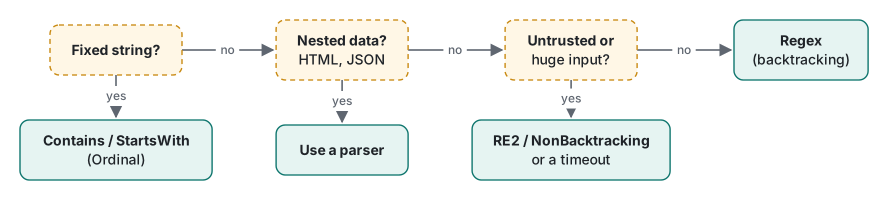
[^"]* has no idea that \" is an escaped quote, so it stops at the first one. You do not get an error. You get a wrong value, which is worse. Use an HTML or JSON parser for structured data, and use a regex to check the single value the parser gives you.
Two engine families: backtracking and linear time
Engines that all call themselves "regex" fall into two families:
| Family | Examples | Strength | Weakness |
|---|---|---|---|
| Backtracking | .NET default, Python re, PHP (PCRE2), Perl, Java, JavaScript |
Rich features: backreferences, lookaround | Some patterns take exponential time |
| Linear time (automata) | Google RE2, Go regexp, Rust regex, .NET RegexOptions.NonBacktracking |
Time grows linearly with input length | No backreferences, limited lookaround |
To see the difference, we fed the classic bad pattern ^(a+)+$ a string of n as followed by !, which can never match. .NET 10, Release build, Apple Silicon Mac, with a 3-second timeout:
| n | Backtracking (default) | NonBacktracking |
|---|---|---|
| 16 | 6.52 ms | 0.00 ms |
| 20 | 104.25 ms | 0.01 ms |
| 22 | 415.09 ms | 0.01 ms |
| 24 | 1,906.75 ms | 0.04 ms |
| 26 | timeout | 0.01 ms |
| 10,000 | timeout | 1.45 ms |
The backtracking engine tries every way to split the as between the inner and outer +, so each two extra characters cost about 4x. NonBacktracking handled 10,000 characters in 1.45 ms. The trade-off is real: building a pattern with a backreference using NonBacktracking threw NotSupportedException. If users supply the pattern or the input can be large, use a linear-time engine, or give the backtracking engine a matchTimeout.
Measured: when regex is slower than string methods
A common habit is using a regex to find a fixed string, such as counting log lines that contain ERROR. We generated 10,000 log lines (89 characters on average, 1% containing ERROR) and timed each approach with Stopwatch in a .NET 10 Release build on an Apple Silicon Mac. Each measurement ran the 10,000 lines 200 times; we took the median of 7 measurements.
lines.Count(l => l.Contains("ERROR"));                 // string method, ordinal
lines.Count(l => Regex.IsMatch(l, "ERROR"));           // static method, uses the internal cache
var compiled = new Regex("ERROR", RegexOptions.Compiled);
lines.Count(l => P.Err().IsMatch(l));                   // [GeneratedRegex("ERROR")]
| Approach | Per line (median) |
|---|---|
Contains("ERROR") |
12.6 ns |
Contains("error", OrdinalIgnoreCase) |
12.2 ns |
Regex.IsMatch(l, "ERROR") (static) |
27.6 ns |
new Regex("ERROR") (interpreted) |
27.3 ns |
RegexOptions.Compiled |
24.8 ns |
[GeneratedRegex] source generator |
27.1 ns |
RegexOptions.NonBacktracking |
33.7 ns |
new Regex(...) inside the loop |
352.1 ns |
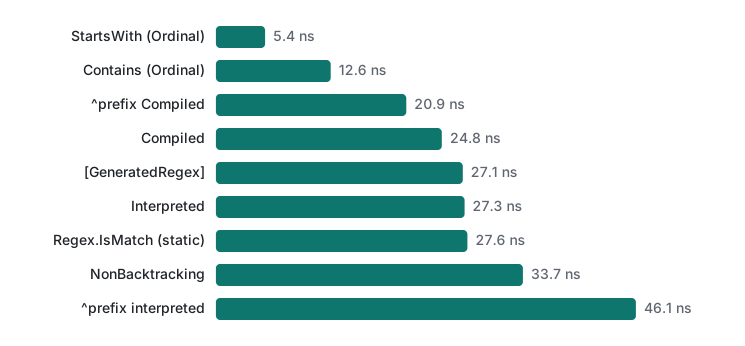
A second run gave 12.5 / 27.8 / 26.5 / 24.6 / 28.0 / 33.3 / 368.3 ns, essentially the same. Every regex variant took at least twice as long as Contains. Constructing a Regex per line was 28 times slower.
Prefix checks showed a bigger gap. StartsWith("2026-11-11T09:3", StringComparison.Ordinal) took 5.4 ns per line. The regex ^2026-11-11T09:3 took 46.1 ns interpreted, 20.9 ns Compiled and 21.5 ns with the source generator. The surprise was StartsWith(string) without a comparison argument: 521.3 ns. That overload compares with the current culture's rules. Always pass StringComparison.Ordinal when you mean an exact match.
Construction has its own cost. The first Regex built in the process took 1,093 µs interpreted, 5,888 µs with Compiled and 11,751 µs with NonBacktracking. Building the same pattern again took 0.6 µs interpreted and 6.2 µs Compiled. Compiled generates IL at run time, which is why its first build is expensive. [GeneratedRegex] generates C# at build time, so there is no run-time construction cost. If the pattern is fixed in code, the source generator (available since .NET 7) is the sensible default.
Python showed the same pattern. On the same 10,000 lines, "ERROR" in line took 47.7 ns per line, a precompiled rx.search(line) 99.1 ns, and calling re.search("ERROR", line) each time 363.6 ns on Python 3.9.6 (46.8 / 105.8 / 257.9 ns on 3.12.14). Those numbers include the loop overhead.
Engines differ: how to read this series
The 2021 series was based on VB.NET. This revision centres on .NET 10 and adds Python, PHP and JavaScript (tested through Dart), listing only differences we actually observed. A preview of three we hit while writing this page:
| Pattern and input | .NET 10 | Python 3.9 / 3.12 | PHP 8.5 | Dart |
|---|---|---|---|---|
C++ |
error | 3.9 error, 3.12 matches C |
matches C |
error |
\d+ on ١٢٣ (Arabic-Indic digits) |
match | match | match (/u) |
no match |
^\d+$ on "123\n" |
match | match | match | no match |
Python 3.12 and PHP read the second + in C++ as a possessive quantifier and matched C. .NET rejected it with Nested quantifier '+'. The last two rows are explained in metacharacters.
The series runs: simple string matching, metacharacters, character sets, quantifiers, repeated characters, subexpressions, backreferences and lookaround.
Tested on macOS (Apple Silicon Mac) with .NET 10.0.14, Python 3.9.6 and 3.12.14, PHP 8.5.6 (PCRE2 10.47) and Dart 3.11.5, November 2026.
FAQ
Should I use a regex to search for a fixed string?
No. On 10,000 log lines in .NET 10, Contains("ERROR") took 12.6 ns per line, Regex.IsMatch 27.6 ns and even the [GeneratedRegex] source generator 27.1 ns. For a fixed string, an ordinal string method is faster and states the intent more clearly.
Why shouldn't I parse HTML or JSON with a regex?
Nesting and escapes break it. <div>(.*?)</div> applied to <div>a<div>b</div>c</div> returned <div>a<div>b</div> in all four engines we tried, and on the JSON string "Kim \"K\" Lee" the capture stopped at Kim \. Use a real parser for structured data.
RegexOptions.Compiled or [GeneratedRegex]?
Matching speed was about the same (24.8 ns vs 27.1 ns per line). The difference is construction: the first Compiled regex took about 6 ms to build, while the source generator emits the code at build time. If the pattern is known at compile time, prefer [GeneratedRegex].