Simple Regex String Matching: Case, Culture, Escape
Literal regex matching in .NET, Python, PHP and Dart: case-insensitivity, the Turkish I (real output), RegexOptions and Regex.Escape.
Revised November 2026. This tutorial first appeared in Korean in 2021. We re-ran its examples in .NET 10 (System.Text.RegularExpressions), Python 3.9 and 3.12
re, PHP 8.5 (PCRE2 10.47) and Dart 3.11, whose RegExp follows JavaScript syntax. Two corrections: the original said a lowercase patterntextstill findsText, and thatR\.also finds ther.inMr.. Both are true only with case-insensitive matching turned on. We also added the culture problem (the Turkish I), a RegexOptions overview and escaping of user input.
This article is for anyone who wants a regex to find "this word" in some text, and for anyone who pasted a search box's contents straight into a pattern and got an exception. Three things to remember: plain characters are already a valid regex, but matching is case-sensitive by default; case-insensitive matching depends on culture; and user input must always be escaped. If you are new to regex, start with What is regex?.
Plain text is a regex too
A pattern with no special characters matches exactly those characters. The example from the 2021 post:
Pattern: Text
Text:    ABCText Text ITexty
         ioTextm Textll abcdety
Result:  five matches of "Text", at positions 3, 8, 14, 22 and 28
It matches inside words too (ABCText, ITexty). To match whole words only, add word boundaries: \bText\b.
The original then said that changing the pattern to lowercase text still finds everything "without case sensitivity". That is not the default. All four engines found zero matches for text and five once case-insensitive matching was on:
| Engine | Option | Inline form |
|---|---|---|
| .NET | RegexOptions.IgnoreCase |
(?i)text, (?i:t)ext |
| Python | re.I (re.IGNORECASE) |
(?i)text (start of pattern only) |
| PHP | /text/i |
(?i)text |
| Dart | RegExp('text', caseSensitive: false) |
not supported (Invalid group) |
Inline flags differ more than you might expect. x(?i)text, with the flag in the middle, worked in .NET and PHP. Python 3.9 printed DeprecationWarning: Flags not at the start of the expression and then worked; Python 3.12 refused it with global flags not at the start of the expression. Dart did not accept (?i) at all.
The dot means any one character, spaces included
. matches any single character except a newline. The 2021 pattern h.s on an English paragraph found has, has, his, his in all four engines.
h.. produced 18 matches. In the 2021 post the highlighting had broken, so results looked like hashur. The real matches are three characters each: has, hur, her, hat, he, h i, hab and so on. As he and h i show, the dot matches spaces. It matched a tab as well, but not a newline: on h s h\ts h\ns the pattern h.s returned only h s and h\ts. The Singleline option that changes this is covered in metacharacters.
To match a literal dot, escape it as \.:
Pattern:          R\.
Text:             I think I should do well to name him, Mr. Alfred R. Phillips.
Default:          R.             (1 match)
Case-insensitive: r. (in Mr.), R. (2 matches)
The 2021 post showed both r. and R., which again is the case-insensitive result. We also checked what happens when you forget to escape: the pattern 1.5 on version 105 and 1.5 matched both 105 and 1.5. No error, just extra matches, which is the kind of bug that survives code review.
Case-insensitive matching and culture: the Turkish I
"Treat A and a as equal" is not the whole story. Turkish has a dotted capital İ (U+0130) and a dotless small ı (U+0131). Under Turkish rules, the lowercase of I is ı and the uppercase of i is İ. We ran the pattern i with IgnoreCase against I İ ı i in .NET 10, switching CurrentCulture:
en-US /i/i  -> [I,İ,i]   +CultureInvariant -> [I,i]
tr-TR /i/i  -> [İ,i]     +CultureInvariant -> [I,i]
tr-TR /I/i  -> [I,ı]     +CultureInvariant -> [I,i]
tr-TR "FILE".ToLower() = fıle, ToLowerInvariant = file
tr-TR Contains("file", CurrentCultureIgnoreCase) = False, OrdinalIgnoreCase = True
tr-TR Regex.IsMatch("FILE", "file", IgnoreCase) = False, +CultureInvariant = True
built under tr-TR, run under en-US: False
Under tr-TR, Regex.IsMatch("FILE", "file", RegexOptions.IgnoreCase) returned False. That is how "the file-extension check fails only for Turkish users" bugs happen. The last line matters too: a Regex constructed under tr-TR still returned False after we switched the culture to en-US. .NET fixes the casing rules when the Regex is built, not when it runs. A pattern stored in a static field at startup is tied to whatever culture was current at that moment.
The other engines do not read a culture setting, but they still disagreed with each other:
Pattern i, case-insensitive, on I İ ı i |
Matches |
|---|---|
| .NET 10 (en-US) | I, İ, i |
| .NET 10 + CultureInvariant | I, i |
| Python 3.9 / 3.12 | I, İ, ı, i |
PHP 8.5 /iu |
I, i |
| Dart | I, i |
The Kelvin sign K (U+212A) matched k in .NET, Python and PHP, and in Dart only with unicode: true. The German ß did not match strasse in any engine, because case-insensitive regex matching compares one character with one character.
The rule of thumb: for language-neutral values (file extensions, HTTP headers, commands, configuration keys) use RegexOptions.CultureInvariant, or StringComparison.OrdinalIgnoreCase with string methods. Only natural-language search shown to users should follow culture rules.
RegexOptions at a glance
Each row was checked by running it on .NET 10:
| Option | Effect | What we observed |
|---|---|---|
IgnoreCase |
Case-insensitive | See the Turkish I above |
CultureInvariant |
Casing independent of culture | FILE matches file even under tr-TR |
Multiline |
^ and $ match at every line |
Metacharacters |
Singleline |
. also matches \n |
Metacharacters |
IgnorePatternWhitespace |
Ignore spaces in the pattern, allow # comments |
(\d{4}) - (\d{2}) # year-month gives 2026-11 |
ExplicitCapture |
Unnamed ( ) do not capture |
Group keys of (\d{4})-(?<m>\d{2}): 0, m |
RightToLeft |
Search from right to left | First match of \w\d in a1 b2 c3 is c3 |
ECMAScript |
JavaScript rules (ASCII \d, etc.) |
ECMAScript | Singleline throws ArgumentOutOfRangeException |
Compiled |
Compile to IL, costly to build | About 6 ms for the first build (measured) |
NonBacktracking |
Linear-time engine | With a backreference: NotSupportedException |
The static Regex.IsMatch(input, pattern) keeps recently used patterns in an internal cache; the default Regex.CacheSize was 15. If your code cycles through dozens of patterns, keep Regex instances in fields or use [GeneratedRegex].
Escape user input with Regex.Escape
Say a user types C++ (beta) into a search box and you drop it straight into a pattern:
.NET       : RegexParseException: Invalid pattern 'C++' at offset 3. Nested quantifier '+'.
.NET       : Invalid pattern '(beta' at offset 5. Not enough )'s.
Python 3.9 : multiple repeat at position 2
PHP        : Compilation failed: missing closing parenthesis at offset 5
Dart       : FormatException: Nothing to repeat
An exception is the lucky outcome. $5.00 raised no error in any of the four engines and matched nothing, because $ means end of line. 1.5 matched 105, as shown above. The fix is escaping:
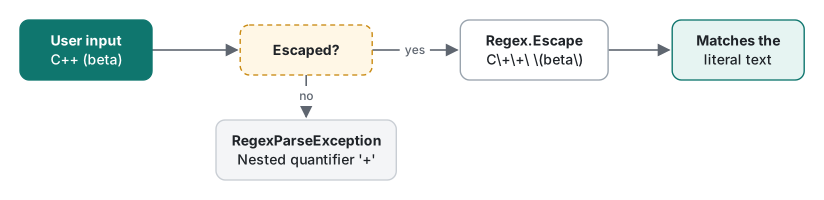
Here is what each engine's escape function returned for C++ (beta) $5.00? a#b c.d [x]:
| Function | Output |
|---|---|
.NET Regex.Escape |
C\+\+\ \(beta\)\ \$5\.00\?\ a\#b\ c\.d\ \[x] |
Python re.escape (3.9, 3.12) |
C\+\+\ \(beta\)\ \$5\.00\?\ a\#b\ c\.d\ \[x\] |
PHP preg_quote |
C\+\+ \(beta\) \$5\.00\? a\#b c\.d \[x\] |
Dart RegExp.escape |
C\+\+ \(beta\) \$5\.00\? a#b c\.d \[x\] |
The outputs differ (.NET leaves ] alone; spaces and # vary), but each matched the original string exactly. PHP has one trap: preg_quote does not escape the / delimiter unless you pass it. "/" . preg_quote("a/b") . "/" failed with the warning Unknown modifier 'b'; preg_quote("a/b", "/") worked.
string user = "C++ (beta)";
var rx = new Regex(Regex.Escape(user), RegexOptions.IgnoreCase | RegexOptions.CultureInvariant);
The replacement string is a separate language. Regex.Escape is for patterns only; in a .NET replacement, a literal $ is written $$. Regex.Replace("price: X", "X", "$5.00") happened to produce price: $5.00 because group 5 does not exist, but a replacement of "[$0]" produced price: [X], inserting the whole match. When user input goes into a replacement, double every $ or use a MatchEvaluator. The per-engine replacement syntax is tabulated in backreferences.
Summary
| Goal | Use |
|---|---|
| Check whether a fixed string occurs | Contains(..., StringComparison.Ordinal) rather than a regex |
| Case-insensitive identifiers or extensions | IgnoreCase | CultureInvariant |
Match a symbol such as . or $ |
\., \$ (metacharacters) |
| User input in a pattern | Regex.Escape / re.escape / preg_quote($s, '/') / RegExp.escape |
| User input in a replacement | $ to $$, or a MatchEvaluator |
Picking one of several characters with [abc] is covered in character sets, and repetition counts in quantifiers.
Tested on macOS (Apple Silicon Mac) with .NET 10.0.14, Python 3.9.6 and 3.12.14, PHP 8.5.6 (PCRE2 10.47) and Dart 3.11.5, November 2026.
FAQ
Is a regex case-sensitive by default?
Yes. In all four engines we tested (.NET, Python, PHP, Dart) the pattern text did not match Text. You need RegexOptions.IgnoreCase in .NET, re.I in Python, /i in PHP or caseSensitive: false in Dart. The 2021 version of this post claimed otherwise; it was describing a tool that had case-insensitive matching switched on.
Does IgnoreCase behave differently under a Turkish culture?
Yes. In .NET 10 with CurrentCulture set to tr-TR, Regex.IsMatch("FILE", "file", RegexOptions.IgnoreCase) returned False. Adding RegexOptions.CultureInvariant made it True. Use CultureInvariant for language-neutral values such as identifiers, file extensions and protocol keywords.
How do I put user input into a pattern safely?
Escape it: Regex.Escape in .NET, re.escape in Python, preg_quote with the delimiter as the second argument in PHP, RegExp.escape in Dart. Unescaped, the input C++ made .NET throw Nested quantifier '+'.