CSV Encoding: UTF-8, the BOM and Excel, Byte by Byte
Write the same CSV as UTF-8, UTF-8 with BOM and cp1252, read it back with Python, PHP and sqlite3, measure the BOM's side effects and pick the right encoding.
Series: Text & Encoding lecture 4/6 (intermediate). For developers who export or import CSV files and get "weird characters" from customers, finance or a spreadsheet. You will write the same rows in several encodings, look at the bytes, read them back with three tools, and choose an encoding from a table based on who opens the file.
If a customer emails you a screenshot of Zoë and it’s in Excel, if your import script crashes with KeyError: 'name' although the header clearly says name, or if a nightly export dies on one user's emoji, this lecture is for you. CSV has no place to declare its encoding, so every program guesses, and each guess leaves fingerprints in the bytes. We produce the exact bytes of each variant with Python, read them with Python's csv, PHP's fgetcsv and sqlite3's .import, and measure what the BOM does. Excel and Windows are not available here, so their behaviour is described from Microsoft's documentation and marked "not run here".
Previous lecture: Unicode normalization, NFC and NFD. The whole map: the programming learning roadmap.
Environment: macOS 26.6.2, Apple Silicon Mac (M1 Pro), Python 3.9.6 (csv, codecs), PHP 8.5.6 (mbstring), sqlite3 3.51.0, iconv and file as shipped with macOS, xxd. Paths are shortened to ~/demo.
Three files with the same rows
A BOM (byte order mark) is the character U+FEFF placed at the very start of a file. In UTF-8 it is the three bytes EF BB BF. UTF-8 has no byte order to mark, so here it only works as a signature: "this file is UTF-8". cp1252 (Windows-1252) is the legacy single-byte code page of Western-European Windows, where every character is one byte. Python's codec utf-8-sig writes the BOM and also skips it when reading.
# write_csv.py - the same rows in three encodings
import csv, sys
ROWS = {
    "en": [["name", "city", "note"], ["Zoë", "São Paulo", "it’s café"]],
    "ja": [["name", "city", "note"], ["髙橋", "東京", "①~③"]],
    "ko": [["name", "city", "note"], ["김똠", "서울", "한글"]],
    "es": [["name", "city", "note"], ["Peña", "Bogotá", "¿Qué tal?"]],
}
LEGACY = {"en": "cp1252", "ja": "cp932", "ko": "cp949", "es": "cp1252"}
lang = sys.argv[1]
for enc in ("utf-8", "utf-8-sig", LEGACY[lang]):
    with open(f"{lang}_{enc}.csv", "w", encoding=enc, newline="") as f:
        csv.writer(f).writerows(ROWS[lang])
newline="" matters: the csv module writes \r\n line endings itself (you can see 0d 0a below), and without it Python would translate them again. Here are the English rows in each encoding:
~/demo % xxd en_utf-8.csv
00000000: 6e61 6d65 2c63 6974 792c 6e6f 7465 0d0a  name,city,note..
00000010: 5a6f c3ab 2c53 c3a3 6f20 5061 756c 6f2c  Zo..,S..o Paulo,
00000020: 6974 e280 9973 2063 6166 c3a9 0d0a       it...s caf....
~/demo % xxd en_utf-8-sig.csv | head -1
00000000: efbb bf6e 616d 652c 6369 7479 2c6e 6f74  ...name,city,not
~/demo % xxd en_cp1252.csv
00000000: 6e61 6d65 2c63 6974 792c 6e6f 7465 0d0a  name,city,note..
00000010: 5a6f eb2c 53e3 6f20 5061 756c 6f2c 6974  Zo.,S.o Paulo,it
00000020: 9273 2063 6166 e90d 0a                   .s caf...
ë is c3 ab in UTF-8 and the single byte eb in cp1252. The curly apostrophe ’ (U+2019) is e2 80 99 in UTF-8 and 92 in cp1252. File sizes: 46, 49 and 41 bytes. The file command guesses, and its guesses differ for files you would call "the same encoding":
~/demo % file -I en_cp1252.csv es_cp1252.csv en_utf-8-sig.csv
en_cp1252.csv:    text/plain; charset=unknown-8bit
es_cp1252.csv:    text/plain; charset=iso-8859-1
en_utf-8-sig.csv: text/plain; charset=utf-8
The English file has byte 92, which is a control code in ISO-8859-1, so file gives up; the Spanish file has only ñ, á, ¿, é, which are identical in both, so it says ISO-8859-1. That guessing problem is the subject of lecture 6.
Reading it back: Python, PHP and sqlite3
Python's csv with the wrong codec
# read_csv.py - read a CSV with a given encoding and show the header keys
import csv, sys
path, enc = sys.argv[1], sys.argv[2]
with open(path, encoding=enc, newline="") as f:
    rows = list(csv.DictReader(f))
print(enc, list(rows[0].keys()))
print("row['name'] =", rows[0].get("name"))
~/demo % python3 read_csv.py en_cp1252.csv utf-8
Traceback (most recent call last):
  ...
UnicodeDecodeError: 'utf-8' codec can't decode byte 0xeb in position 18: invalid continuation byte
Byte 18 is the eb of Zoë: in UTF-8 a byte eb must start a three-byte sequence, and 2c (the comma) cannot continue it. A strict decoder failing loudly is good news: nothing wrong got into your data.
The BOM side effect, measured
Now the BOM file read as plain utf-8:
~/demo % python3 read_csv.py en_utf-8-sig.csv utf-8
utf-8 ['name', 'city', 'note']
row['name'] = None
~/demo % python3 read_csv.py en_utf-8-sig.csv utf-8-sig
utf-8-sig ['name', 'city', 'note']
row['name'] = Zoë
~/demo % python3 read_csv.py en_utf-8.csv utf-8-sig
utf-8-sig ['name', 'city', 'note']
row['name'] = Zoë
The first header became name. It prints as name in most terminals, so the bug hides: row["name"] is None, or KeyError with row["name"]. The last line is the important one: utf-8-sig also reads files without a BOM, so it is the safe default for reading.
PHP's fgetcsv does not strip the BOM either:
<?php
// read.php - fgetcsv and the BOM
$f = fopen($argv[1], 'r');
$head = fgetcsv($f, null, ',', '"', '');
$row  = fgetcsv($f, null, ',', '"', '');
$rec  = array_combine($head, $row);
var_dump($head[0], strlen($head[0]), isset($rec['name']));
echo bin2hex($head[0]), "\n";
~/demo % php read.php en_utf-8-sig.csv
string(7) "name"
int(7)
bool(false)
efbbbf6e616d65
A four-letter header that is seven bytes long is the BOM's signature. Note the fifth argument '': PHP 8.5 prints Deprecated: fgetcsv(): the $escape parameter must be provided as its default value will change if you leave it out. A small reader that strips the BOM and converts a known legacy encoding:
<?php
// read2.php - strip the BOM, convert legacy encodings to UTF-8
function open_csv(string $path, string $from = 'UTF-8') {
    $data = file_get_contents($path);
    if (str_starts_with($data, "\xEF\xBB\xBF")) {
        $data = substr($data, 3);
    } elseif ($from !== 'UTF-8') {
        $data = mb_convert_encoding($data, 'UTF-8', $from);
    }
    $f = fopen('php://memory', 'r+');
    fwrite($f, $data);
    rewind($f);
    return $f;
}
$f = open_csv($argv[1], $argv[2] ?? 'UTF-8');
while (($r = fgetcsv($f, null, ',', '"', '')) !== false) {
    echo implode(' | ', $r), "\n";
}
~/demo % php read2.php en_cp1252.csv Windows-1252
name | city | note
Zoë | São Paulo | it’s café
sqlite3 .import
sqlite3 3.51.0 handled the BOM for us, and stored legacy bytes without complaint:
~/demo % sqlite3 :memory: ".import --csv ko_utf-8-sig.csv t" "select name, hex(name), length(name) from t;"
김똠|EAB980EB98A0|2
~/demo % sqlite3 :memory: ".import --csv ko_cp949.csv t" "select name, hex(name), length(name) from t;"
��c|B1E88C63|3
The second table now holds bytes that are not valid UTF-8 in a TEXT column, with a wrong length. sqlite3 does not convert; convert the file with iconv -f CP949 -t UTF-8 before importing.
What Excel does (described, not run here)
According to Microsoft's documentation and support articles, Excel for Windows opens a double-clicked .csv with the system's legacy "ANSI" code page unless the file starts with a UTF-8 BOM: cp1252 on English and Western-European Windows, cp932 on Japanese, cp949 on Korean. Excel offers "CSV UTF-8 (Comma delimited)" in Save As, which writes a BOM, and "Data > From Text/CSV" lets the user choose the encoding by hand. We cannot run Excel here, but we can produce exactly what such a reader shows by decoding our UTF-8 bytes with cp1252:
data = open("en_utf-8.csv", "rb").read().split(b"\r\n")[1]
print(data.decode("cp1252", errors="replace"))
print(repr(b"\xef\xbb\xbf".decode("cp1252")))
Zoë,São Paulo,it’s café
''
That is the famous ’: the three UTF-8 bytes of ’ shown as three cp1252 characters. And  is what a BOM looks like when a program does not know about it.
Characters that cannot be encoded
Legacy code pages are small. cp1252 defines only 251 of its 256 byte values; an emoji in a user name is enough to break an export:
# emoji.py
import csv
with open("out.csv", "w", encoding="cp1252", newline="") as f:
    csv.writer(f).writerows([["id", "nickname"], ["1", "Zoë 👍"]])
~/demo % python3 emoji.py
Traceback (most recent call last):
  File "~/demo/emoji.py", line 3, in <module>
    csv.writer(f).writerows([["id", "nickname"], ["1", "Zoë 👍"]])
  File ".../python3.9/encodings/cp1252.py", line 19, in encode
    return codecs.charmap_encode(input,self.errors,encoding_table)[0]
UnicodeEncodeError: 'charmap' codec can't encode character '\U0001f44d' in position 6: character maps to <undefined>
Position 6 counts inside the row text 1,Zoë 👍, not the file. The worst part is in the file: out.csv already contained the 13-byte header line id,nickname\r\n when the exception hit, so a cron job leaves a valid-looking, truncated CSV behind. (cp932 gave the same 13-byte, header-only file.) Polish ł fails the same way ('ł'), so cp1252 is not even enough for all of Europe.
PHP takes the opposite approach and silently replaces:
<?php
// write.php - UTF-8 with BOM, or a legacy code page, from PHP
$rows = [['id', 'nickname'], ['1', $argv[2]]];
$enc = $argv[1];                       // UTF-8-BOM | SJIS-win | CP949 | Windows-1252
$f = fopen('php://output', 'w');
if ($enc === 'UTF-8-BOM') {
    fwrite($f, "\xEF\xBB\xBF");
}
foreach ($rows as $r) {
    if ($enc !== 'UTF-8-BOM') {
        $r = array_map(fn($v) => mb_convert_encoding($v, $enc, 'UTF-8'), $r);
    }
    fputcsv($f, $r, ',', '"', '', "\r\n");
}
~/demo % php write.php Windows-1252 'José👍' | xxd
00000000: 6964 2c6e 6963 6b6e 616d 650d 0a31 2c4a  id,nickname..1,J
00000010: 6f73 e93f 0d0a                           os.?..
The emoji became 3f, a question mark, with no warning. Python can do the same with errors="replace" (ゆい? in our cp932 run) or errors="xmlcharrefreplace" (ゆい👍). Choose deliberately: failing is right for financial data, replacing may be fine for a display name.
Common mistake: "just add the BOM everywhere"
The mistake. After one Excel complaint, a team adds a BOM to every CSV, including the ones their own services consume.
What actually happens. Each consumer that reads with plain utf-8 gets name (Python) or a 7-byte name (PHP), and the first column silently disappears from lookups. Shell tools see it too: cut -d, -f1 en_utf-8-sig.csv | head -1 | xxd printed efbb bf6e 616d 65, and cat a.csv a.csv | xxd showed 0aef bbbf 6e61 6d65, a stray BOM in the middle of the data.
The fix. Decide per consumer, not per file. Write with BOM only for files people open in Excel, and read every CSV you consume with utf-8-sig, falling back to one known legacy code page:
# read_any.py - accept UTF-8 (with or without BOM), else one known legacy code page
import csv, io
def read_rows(path, legacy):
    data = open(path, "rb").read()
    try:
        text, used = data.decode("utf-8-sig"), "utf-8-sig"
    except UnicodeDecodeError:
        text, used = data.decode(legacy), legacy      # strict: still fails loudly
    return used, list(csv.DictReader(io.StringIO(text, newline="")))
en_utf-8.csv      utf-8-sig {'name': 'Zoë', 'city': 'São Paulo', 'note': 'it’s café'}
es_cp1252.csv     cp1252    {'name': 'Peña', 'city': 'Bogotá', 'note': '¿Qué tal?'}
Adding or removing a BOM in the shell is a byte operation: { printf '\xEF\xBB\xBF'; cat in.csv; } > out.csv adds it and tail -c +4 removes it; both outputs were byte-identical to Python's (cmp printed nothing). macOS iconv has no UTF-8-BOM target (iconv_open(UTF-8-BOM, UTF-8): Invalid argument).
Size: is UTF-8 bigger?
A common objection to UTF-8 is file size. We wrote a 10,000-row CSV (id, name, city, note) from each language's sample words, seed 42, and counted bytes:
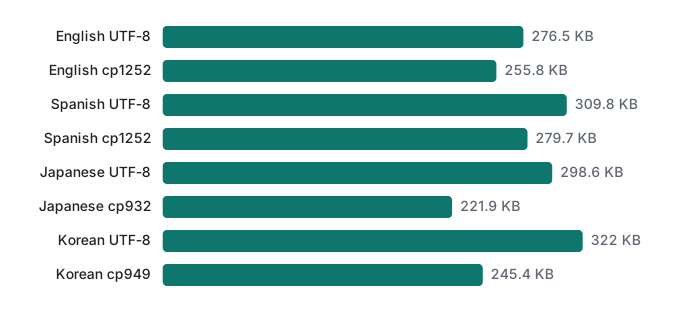
For English and Spanish, UTF-8 was only 8% and 11% larger than cp1252, because most characters are ASCII. For Japanese and Korean it was 35% and 31% larger, since kana, kanji and Hangul take 3 bytes in UTF-8 against 2 in cp932 or cp949. The BOM adds exactly 3 bytes per file. After gzip (level 9, mtime=0) the gap almost vanished: UTF-8 was 1.6% (en), 2.9% (ja), 3.9% (ko) and 1.2% (es) larger, all between 33 and 37 KB. That is much cheaper than one support ticket.
Which encoding to write: a decision table
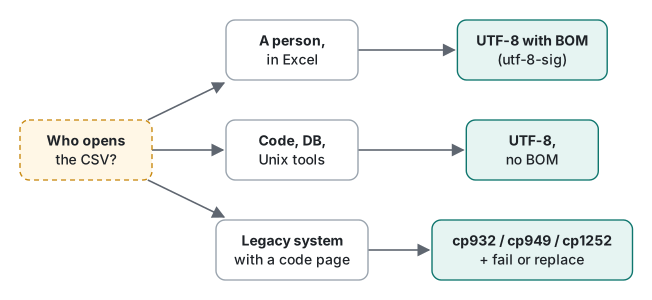
| Who opens the file | Write | Notes |
|---|---|---|
| A person, double-clicking in Excel for Windows | UTF-8 with BOM (utf-8-sig) |
Excel's behaviour described from documentation, not run here |
| Your own code, a database import, an API | UTF-8, no BOM | Read with utf-8-sig anyway |
Unix tools (cut, sort, awk, cat) |
UTF-8, no BOM | A BOM sticks to the first field |
| A legacy system that documents a code page | That code page, exactly (cp1252, not latin-1) |
Choose fail or replace for unencodable characters |
| Unknown, mixed audience | UTF-8 with BOM, plus a note on how to import | And keep the original UTF-8 |
Honest limits and version notes
- Excel, Windows and Google Sheets were not run. The Excel behaviour above comes from Microsoft's documentation and support articles; check your Excel build, since newer Microsoft 365 versions may change how CSVs open.
utf-8-sigexists in Python 2.5+ and 3.x.str_starts_withneeds PHP 8.0+; thefputcsvend-of-line argument needs PHP 8.1+. The$escapedeprecation was observed on PHP 8.5.6.- sqlite3's BOM handling was checked only on 3.51.0.
- The size test uses short sample words chosen by us; real data with more ASCII (numbers, e-mail addresses, IDs) narrows the gap further.
Exercises
- A partner sends
customers.csv. Python withencoding="utf-8"givesKeyError: 'id'althoughprint(reader.fieldnames)shows['id', ...]. What is the cause and the one-word fix? - Your export must be cp1252 for an old accounting tool, and a customer is named
Łukasz. List two acceptable behaviours and the Python argument for each.
Answers
- The file has a UTF-8 BOM, so the first field name is
'id'. Printrepr(reader.fieldnames[0])to see it. Fix:encoding="utf-8-sig". - Fail and alert, with the default
errors="strict"(catchUnicodeEncodeError, write to a temporary file and rename only on success, so no half-written file is left). Or replace and log, witherrors="replace"(?) after recording which rows changed. Silently dropping the row is not acceptable.
Previous: Lecture 3: Unicode normalization, NFC and NFD. Next: Lecture 5: string length, emoji and graphemes. Related: shell pipes and text tools, SQL basics, HTTP headers and charset.
FAQ
Why does my first CSV column come out as \ufeffname?
The file starts with a UTF-8 BOM (bytes EF BB BF) and you read it as plain utf-8, so the BOM became part of the first header. In our run, Python's DictReader returned '\ufeffname' and row['name'] was None, and PHP's fgetcsv returned a 7-byte 'name'. Read with encoding='utf-8-sig' in Python, or strip the three bytes in PHP.
Should I write CSV files with a BOM?
Only when a person will double-click the file in Excel. Excel for Windows uses the BOM to recognize UTF-8 (described from Microsoft's documentation, not run here). For files read by code, databases or Unix tools, write UTF-8 without a BOM, and read with utf-8-sig so both kinds work.
Why does writing a CSV in cp1252 crash on an emoji?
cp1252 has no code for 👍, so Python raises UnicodeEncodeError ('charmap' codec can't encode character '\U0001f44d') and the file is left half-written. PHP's mb_convert_encoding silently wrote '?' instead. Decide on purpose: fail, replace, or keep UTF-8.