NFC vs NFD: Unicode Normalization, Mac Files and Zips
Why "café" == "café" can be False: NFC, NFD, NFKC and NFKD measured in Python and PHP, what APFS really stores, Mac zips without the UTF-8 flag, and git.
Series: Text & Encoding lecture 3/6 (intermediate). For developers who already know that text is bytes (lectures 1 and 2) and now hit bugs where two strings look identical but are not. You will learn the four Unicode normalization forms, see what macOS really stores in file names, and fix the comparison, zip and git bugs that follow.
If a user named "Zoë" cannot log in on Tuesday but could on Monday, if find . -name 'café*' finds nothing while ls shows café.txt, or if a colleague's Mac zip unpacks into cafe╠ü.txt, this lecture is about your bug. The cause is the same in all three cases: Unicode allows the same visible text to be stored as different code points, and most code compares code points. Everything below was run on a Mac, and every output is copied from the terminal; Windows behaviour is described from documentation and labelled "not run here".
Previous lecture: Mojibake: decode, encode and how to fix it. The whole map: the programming learning roadmap.
Environment: macOS 26.6.2 on APFS, Apple Silicon Mac (M1 Pro), Python 3.9.6 (unicodedata 13.0.0), PHP 8.5.6 with intl (ICU 78.3), JavaScriptCore jsc, Swift 6.4.2, Info-ZIP Zip 3.0 as shipped by Apple, ditto, git 2.54.0 (Apple Git-157), sqlite3 3.51.0. Paths are shortened to ~/demo.
One "é", two strings
A code point is the number Unicode gives a character, written U+00E9. A combining character is a code point that attaches to the one before it, like U+0301 COMBINING ACUTE ACCENT. Unicode allows "é" to be written either way, so this small script prints both forms with their code points and UTF-8 bytes:
# cps.py - code points and UTF-8 bytes of the NFC and NFD forms
import unicodedata as ud, sys
for s in sys.argv[1:]:
    for f in ("NFC", "NFD"):
        t = ud.normalize(f, s)
        print(f, s, " ".join(f"U+{ord(c):04X}" for c in t), t.encode().hex(" "))
~/demo % python3 cps.py é ñ
NFC é U+00E9 c3 a9
NFD é U+0065 U+0301 65 cc 81
NFC ñ U+00F1 c3 b1
NFD ñ U+006E U+0303 6e cc 83
NFC (Normalization Form C, "composed") uses the single precomposed code point where one exists. NFD ("decomposed") splits it into a base letter plus combining marks. Both are valid Unicode and both render the same. Now watch ordinary code fail:
>>> a = "café"; b = "café"
>>> a == b, len(a), len(b)
(False, 4, 5)
>>> "é" in b
False
>>> {a: 1}.get(b)          # dict lookup misses
>>> b[:4]                  # slicing cuts the accent off
'cafe'
The same happens in JavaScript (jsc) and PHP:
~/demo % jsc n.js                      # a === b, lengths, then after normalize("NFC")
false 4 5
true
~/demo % php norm.php                  # $nfd === $nfc, then after Normalizer::normalize
bool(false)
bool(true)
The four forms: NFC, NFD, NFKC, NFKD
There are two more forms. The K stands for "compatibility": NFKC and NFKD also replace characters that Unicode considers formatting variants, such as full-width letters, ligatures and circled digits. That is useful for search, and destructive for storage. Here is the real output for strings from several languages:
# norm.py - one string, four normalization forms
import unicodedata as ud
print("unicodedata", ud.unidata_version)
for s in ["café", "naïve", "fi", "ABC123", "①㈱", "ガギ", "한글", "〜~"]:
    print(s, *[f"{f}={ud.normalize(f, s)!r}/{len(ud.normalize(f, s))}" for f in ("NFC", "NFD", "NFKC")])
| Input | NFC (len) | NFD (len) | NFKC (len) | What changed |
|---|---|---|---|---|
café |
café (4) | café (5) | café (4) | NFD splits é |
naïve |
naïve (5) | naïve (6) | naïve (5) | NFD splits ï |
fi (ligature) |
fi (1) | fi (1) | fi (2) | NFKC expands the ligature |
ABC123 (full-width) |
unchanged (6) | unchanged (6) | ABC123 (6) | NFKC makes it ASCII |
①㈱ |
unchanged (2) | unchanged (2) | 1(株) (4) | NFKC loses the circle |
ガギ (half-width kana) |
unchanged (4) | unchanged (4) | ガギ (2) | NFKC joins kana and mark |
한글 |
한글 (2) | 한글 (6) | 한글 (2) | NFD splits syllables into jamo |
〜~ (U+301C, U+FF5E) |
unchanged (2) | unchanged (2) | 〜~ (2) | only U+FF5E becomes ~ |
Three things surprise people:
- NFC is not "ASCII-ize". It never touches full-width letters, ligatures or circled digits. Only the K forms do.
- NFKC is lossy.
①becomes1,fibecomesfi, and you cannot get the original back. Never run NFKC over text you will display or store as the user typed it. - Not every look-alike is a decomposition. A spacing sound mark typed on its own (
カ+゛, U+309B) is not the combining U+3099, so NFC leavesカ゛as two characters. NFKC turns it intoカ, a space and U+3099, which is still notガ. Text from old input methods needs a dedicated replacement, not just a normalization call.
PHP gives the same answers through intl's Normalizer (ICU 78.3 here). strlen counts bytes, so normalization changes it:
~/demo % php norm.php
한글 strlen=6 NFD strlen=18 mb_strlen=6 NFKC=한글
ガギ strlen=12 NFD strlen=12 mb_strlen=4 NFKC=ガギ
①㈱ strlen=6 NFD strlen=6 mb_strlen=2 NFKC=1(株)
~ strlen=3 NFD strlen=3 mb_strlen=1 NFKC=~
año strlen=4 NFD strlen=5 mb_strlen=4 NFKC=año
A Korean syllable is three code points in NFD (initial, vowel, final consonant), so "한글" grows from 6 to 18 bytes. A VARCHAR(10) limit counted in bytes (see lecture 5) can suddenly overflow just because the text came from a Mac.
What APFS really does with NFC and NFD names
The old HFS+ file system converted names to a decomposed form. Many blog posts still say "macOS stores NFD", so we measured APFS on macOS 26.6. First, a file created with an NFC name, then a lookup and a second create using the NFD name:
# apfs.py - what does APFS do with NFC vs NFD file names?
import os, unicodedata as ud
os.makedirs("t", exist_ok=True)
for word in ["café", "한글", "ガギ", "año"]:
    nfc, nfd = ud.normalize("NFC", word), ud.normalize("NFD", word)
    open(os.path.join("t", nfc + ".txt"), "w").write("nfc")
    print(word, "exists via NFD name:", os.path.exists(os.path.join("t", nfd + ".txt")))
    try:
        with open(os.path.join("t", nfd + ".txt"), "x") as f:
            f.write("nfd")
    except FileExistsError as e:
        print("  FileExistsError:", e.strerror)
for name in sorted(os.listdir("t")):
    print(repr(name), name.encode().hex(" "))
café exists via NFD name: True
  FileExistsError: File exists
한글 exists via NFD name: True
  FileExistsError: File exists
...
'café.txt' 63 61 66 c3 a9 2e 74 78 74
'한글.txt' ed 95 9c ea b8 80 2e 74 78 74
So APFS here is normalization-insensitive (either form finds the file, and you cannot have both) and normalization-preserving (the listing returns the bytes you created it with, NFC in this case). When we created the files with NFD names instead, listdir returned NFD bytes (63 61 66 65 cc 81 for café).
Who creates NFD names on a modern Mac? We asked Foundation, the framework behind Finder and most Mac apps, with a three-line Swift program:
FileManager.default.createFile(atPath: "sw/\(w).txt", contents: Data("x".utf8))
café.txt 63 61 66 65 cc 81 2e 74 78 74 9
ガギ.txt e3 82 ab e3 82 99 e3 82 ad e3 82 99 2e 74 78 74 8
한글.txt e1 84 92 e1 85 a1 e1 86 ab e1 84 80 e1 85 b3 e1 86 af 2e 74 78 74 10
Foundation passed NFD to the file system, and APFS kept it. Opening such a file by its NFC name works (cat d/한글.txt printed the content), but anything that compares strings itself does not:
~/demo % find d -name '한글*'          # typed NFC: no output
~/demo % ls d | grep 한글; echo $?
1
~/demo % python3 -c 'import glob; print(glob.glob("d/한*"))'
[]
~/demo % bash -c 'a=(d/café*); echo ${#a[@]}'   # with nullglob
0
zsh 5.9 did match d/한* here, which is why the bug can look random: the same command works in one shell and not in another. macOS's iconv has a UTF-8-MAC encoding that converts NFD to NFC on the way through:
~/demo % ls d | iconv -f UTF-8-MAC -t UTF-8 | grep 한글
한글.txt

Zips made on a Mac
A zip archive stores each name as bytes plus a flag: general-purpose bit 11 says "these bytes are UTF-8". Without it, the ZIP specification says to read them as IBM code page 437. We zipped the Foundation-made folder with both macOS tools and inspected every entry:
# zipinfo.py (core) - raw names and the UTF-8 flag (bit 11)
for i in zipfile.ZipFile(path).infolist():
    utf8 = bool(i.flag_bits & 0x800)
    raw = i.filename.encode("utf-8" if utf8 else "cp437")
    print(int(utf8), "NFC" if ud.is_normalized("NFC", raw.decode()) else "NFD", repr(i.filename))
== zip -r zip_nfd.zip sw
  flag800=0 NFD extra=['0x5455', '0x7875'] python_sees='sw/café.txt'
  flag800=0 NFD extra=['0x5455', '0x7875'] python_sees='sw/한글.txt'
== ditto -c -k --sequesterRsrc sw ditto_nfd.zip
  flag800=0 NFD extra=['0x5855'] python_sees='café.txt'
  flag800=0 NFD extra=['0x5855'] python_sees='πé½πéÖπé¡πéÖ.txt'
Neither tool set the flag, and both kept the NFD bytes. Python, following the spec, decoded them as CP437 and produced garbage. ditto --sequesterRsrc also added a __MACOSX/._café.txt entry for every file. On Windows (not run here), tools that see no flag typically use the system's OEM code page; decoding the same NFD bytes as CP949 or CP932 gives �꼺�뀫… and 繧ォ繧吶く繧…. Even when a reader correctly guesses UTF-8, the names stay NFD, which Windows shows as café with a separate accent, a Korean name split into jamo, or カ followed by a separate sound mark, depending on the font.
The fix is to produce archives with NFC names and the flag set. Python's zipfile sets bit 11 automatically for non-ASCII names:
# safezip.py - zip a folder with NFC names and the UTF-8 flag set
import os, sys, zipfile, unicodedata as ud
src, dst = sys.argv[1], sys.argv[2]
with zipfile.ZipFile(dst, "w", zipfile.ZIP_DEFLATED) as z:
    for root, dirs, files in os.walk(src):
        for f in sorted(files):
            if f == ".DS_Store":
                continue
            path = os.path.join(root, f)
            z.write(path, ud.normalize("NFC", os.path.relpath(path, src)))
== safe.zip
  flag800=1 NFC extra=[] python_sees='café.txt'
  flag800=1 NFC extra=[] python_sees='한글.txt'
  flag800=1 NFC extra=[] python_sees='ガギ.txt'
When you receive a Mac zip, repair the names on read: re-encode as CP437 to get the raw bytes back, decode them as UTF-8, then normalize to NFC ('sw/cafe╠ü.txt' -> sw/café.txt in our run).
Git and core.precomposeunicode
Git on macOS has a setting for exactly this problem. git init set core.precomposeunicode=true in our test, and with it git recorded an NFD file name as NFC (ed 95 9c ea b8 80). With the setting forced to false, the index got the NFD bytes. Then the interesting part: we cloned that NFD repository with the default setting.
~/demo/c_nfd % git -c core.quotepath=false status --short
?? 한글.txt
~/demo/c_nfd % git ls-files -s
100644 c1b0730e… 0  "\341\204\222\341\205\241\341\206\253…"
The tracked NFD file is reported as an untracked NFC file sitting next to itself, and a careless git add -A && git commit gives teammates on Linux two names. The fix is a one-time rename commit:
~/demo/c_nfd % git -c core.precomposeunicode=false rm -q --cached -- "$(git -c core.precomposeunicode=false ls-files -z | tr -d '\0')"
~/demo/c_nfd % git add -A && git -c core.quotepath=false status --short
R  한글.txt -> 한글.txt
After the commit, the index holds NFC bytes and status is clean.
Common mistake: comparing before normalizing
The mistake. User names arrive from a web form (NFC), an iPhone keyboard (usually NFC), and a CSV built from Mac file names (NFD). They go into a column with a UNIQUE constraint.
What actually happens. We stored the NFD forms in sqlite3 and searched with the NFC forms:
café: rows=0
한글: rows=0
ガギ: rows=0
año: rows=0
inserted NFC café as a second, 'unique' row: 2
Nothing is found, and the "unique" column holds two cafés. Sorting is off too: sorted(["cafez", "café", "café"]) puts cafez first, because U+0301 sorts after z.
The fix. Normalize once, at the boundary where text enters your system (form input, file names, CSV import, API body), and store NFC. Use a separate search key column for loose matching:
import unicodedata as ud
def store(s):      return ud.normalize("NFC", s)
def search_key(s): return ud.normalize("NFKC", s).casefold()
print(search_key("CAFÉ") == search_key("café"))   # True
Keep the user's NFC text for display; NFKC plus casefold() is only for matching.
What normalization costs
Is it safe to call normalize on every string? We timed 200,000 random 12-character names (seed 42, best of 5, Apple Silicon Mac (M1 Pro), Python 3.9.6):
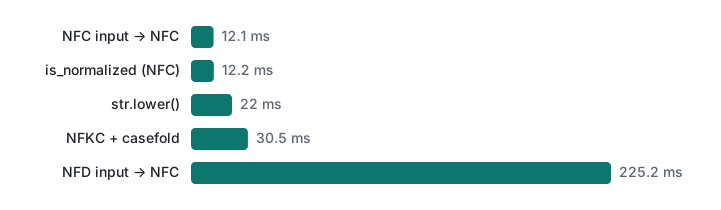
Normalizing text that is already NFC costs about the same as str.lower(), because CPython first runs a quick check and returns the string unchanged. Real work only happens on NFD input, and even then it was about 1.1 µs per name. Normalizing at the boundary is cheap; skipping it is what costs you.
Which form to use: a decision table
| Situation | Form | Why |
|---|---|---|
| Storing user text, DB keys, file names you create | NFC | Shortest, what most systems and keyboards produce |
| Comparing two strings for equality | NFC on both sides | Equal text gives equal bytes |
| Search, login IDs, duplicate detection | NFKC + casefold() in a separate key |
Full-width, ligatures and case become equal |
| Stripping accents ("año" → "ano") | NFD, then drop combining marks | Accents become separate code points |
| Displaying or round-tripping what the user typed | NFC, never NFKC | NFKC loses ①, ㈱, fi |
| Archives for Windows users | NFC names + UTF-8 flag | Mac tools here set neither |
Honest limits and version notes
- Python 3.9's
unicodedatauses Unicode 13.0.0; PHP intl here reported ICU 78.3 and Unicode 17.0. NFC/NFD results for existing characters are stable across versions by Unicode policy, but newer characters only normalize correctly in newer data. unicodedata.is_normalizedwas added in Python 3.8;str.casefoldin 3.3.- APFS behaviour was measured only on macOS 26.6.2 on the system volume. Apple changed APFS's normalization handling during its early releases, and other volumes (exFAT USB sticks, SMB shares) may behave differently. Not checked here.
- Windows, Explorer's zip support and NTFS were not run. The description follows the ZIP specification and common reports.
dittoand Apple'szipwere checked only as shipped with macOS 26.6.2.
Exercises
- A CSV of product names compares fine in Python but
"Peña" in namesisFalse. Write one line that finds which entries are not NFC. - You must accept login IDs typed as
TAROortaro, but show the ID exactly as registered. Which value do you store, and which do you put in the unique index?
Answers
[n for n in names if not unicodedata.is_normalized("NFC", n)](Python 3.8+). Then fix the source withunicodedata.normalize("NFC", n).- Store
normalize("NFC", typed)for display, and putnormalize("NFKC", typed).casefold()in a separate column with theUNIQUEindex. Both inputs give the keytaro.
Previous: Lecture 2: Mojibake, decode and encode. Next: Lecture 4: CSV encodings, the BOM and Excel, where the same strings meet a spreadsheet. Related: non-ASCII URLs in .htaccess rewrites, Python strings and types, PHP strings.
FAQ
Why does "café" == "café" return False?
One string stores é as a single code point (U+00E9, NFC) and the other as e followed by a combining acute accent (U+0065 U+0301, NFD). They look identical but have different code points, lengths and bytes. Normalize both sides to NFC with unicodedata.normalize('NFC', s) before comparing or storing.
Does macOS store file names in NFD?
On APFS (measured on macOS 26.6) the file system keeps whatever form it was given and finds a file by either form. But Foundation-based programs, like a Swift FileManager call, wrote NFD names in our test, so NFD names really appear. Tools that compare strings, such as find -name, bash globs and Python glob, then miss them when you type the NFC form.
Why do file names in a zip made on a Mac break on Windows?
Both the zip command and ditto on macOS 26.6 stored the raw UTF-8 bytes without setting the UTF-8 flag (bit 11), so readers fall back to a legacy code page (Python used CP437), and NFD names add separated accents or jamo on top. Make the zip with a tool that normalizes names to NFC and sets the flag, such as Python's zipfile.