Programming Basics for New Hires: A Study Roadmap
Which language to learn first, how to study, and the order to read our lectures: terminal, Git, SQL, Python, Java, PHP, Dart, Swift, C#, VB.NET and more.
We have written software since 2001, and the question we hear most from people joining a team is not about any particular bug. It is: "Where do I start, and in what order?" This page is the answer we send. It tells you which language to start with for the work you will actually do, how to study so that the basics stick, and which of our lectures to read in which order, from beginner to advanced.
Who this is for, and how to use it
This guide is for three kinds of readers:
- New hires who can write a few lines of code but have never shipped anything, and who have been told to "get up to speed" on the team's language.
- People switching stacks, for example a web developer moving to a Flutter team, or a Java developer who inherited a VB.NET tool.
- Mentors who want one link to send instead of writing the same advice again.
How to use it: read the next section on study habits once. Then use the decision table to pick one language, open that language's lecture list and work through it in order. Each of our lectures states its level at the top (beginner, intermediate or advanced) and ends with a link to the next one.
Most lectures contain measurement sections: timings, memory numbers, benchmark tables. On a first pass you can skip them. They exist because a rule of thumb you have measured is one you will trust, but they are not what you need in your first week. Come back to them when your work makes you ask "is this fast enough?"
How we study the basics (and how these lectures are written)
Every lecture on this site was written by running the code and pasting the real output, errors included. That only helps you if you study the same way. These seven habits are the ones we see separate people who are productive after a month from people who are still copying snippets after three.
- Type the code yourself and run it. Do not copy and paste. Typing makes you notice the semicolon, the colon after
ifin Python, the?after a type in Dart. Your first typos produce your first error messages, which is exactly what you need to practise reading. - Read the error message before searching. Compiler errors are more helpful than they look. Swift's error tells you the line and often the fix; Java's
incompatible typesnames both types; VB.NET'sBC30512says exactly which implicit conversion Option Strict blocked. Read the whole message, find the line number, then look at that line. Search only after that. - Change one thing and predict the output before running. After an example works, change one value: make the list empty, pass
null, use a number above two billion. Write down what you expect, then run it. When you are wrong, you have found something you did not understand, which is the point. - Do the exercises before reading the answers. The Dart, Swift and PHP lectures end with exercises. Give each one at least fifteen minutes before you open the answer. For lectures without exercises, step 3 is your exercise.
- Measure instead of believing folklore. Programming is full of rules that were true once. In our Python concurrency lecture, adding threads to a CPU-bound job did not make it faster; in our ML series, gradient descent needed 140,538 epochs on unscaled features and 2 on scaled ones. You do not have to measure everything, but when a claim matters, test it.
- Use AI assistants to explain errors, not to skip typing. Pasting an error you have already read and asking "why does this happen?" is a good use. Asking it to write the exercise for you skips the part that teaches you. If it suggests a fix, make sure you can say why the fix works before you keep it.
- Keep it concrete and short. Thirty minutes of running code beats two hours of watching videos. Each study session should end with something you ran, not something you read about.
Which language first, by goal
Pick the language from the work you will do, not from popularity rankings. If your team already has a codebase, its language wins every argument.
| Your goal | Start with | Then |
|---|---|---|
| Mobile apps (iOS and Android from one codebase) | Dart, then Flutter | Swift if you also touch native iOS code |
| iOS-only or native iOS features | Swift | Dart if the team also ships Flutter |
| Web pages, APIs, server work | PHP, Java or Python (the one your codebase uses) | Regex, SQL safety in the PHP PDO lecture |
| Data analysis, AI, automation scripts | Python | The ML from scratch series |
| Company .NET apps, Windows tools | C# | VB.NET only if you maintain VB code |
| Legacy VB code you have to keep running | VB.NET | C#, for the interop lecture |
| CS fundamentals (everyone) | Algorithms and data structures | Regex |
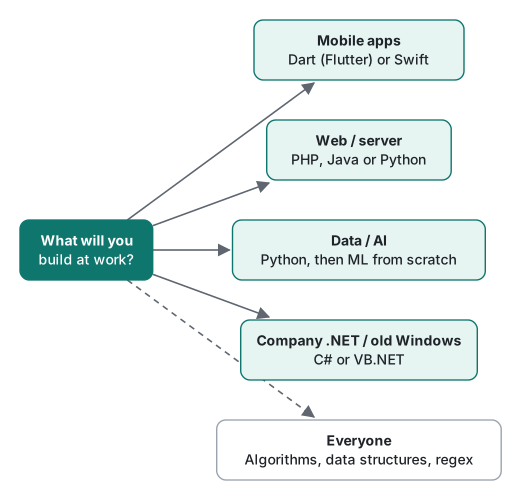
If nobody has told you which language the team uses, ask. That is a better first question than any we can answer here.
Every series in order, beginner to advanced
The six-part series follow the same pattern: lectures 1 and 2 are beginner, 3 and 4 intermediate, 5 and 6 advanced. On a first pass, stop after lecture 4.
Python
| Level | Lecture |
|---|---|
| Beginner | 1. Python Types and Mutability: Names, Copies, is vs == |
| Beginner | 2. Python Functions: Scope, Default Args and Closures |
| Intermediate | 3. Python Iterators and Generators: Measured Memory |
| Intermediate | 4. Python Decorators and Context Managers, Measured |
| Advanced | 5. Python GIL: Threads vs Processes vs asyncio, Measured |
| Advanced | 6. Python Profiling: What Actually Made Code Faster |
Java
| Level | Lecture |
|---|---|
| Beginner | 1. Java Basics: Types, Strings and == vs equals |
| Beginner | 2. Java Classes, Records, Interfaces and Sealed Types |
| Intermediate | 3. Java Collections Performance, Measured on JDK 26 |
| Intermediate | 4. Java Streams, Lambdas and Optional on JDK 26 |
| Advanced | 5. Java Virtual Threads on JDK 26: Measured Limits |
| Advanced | 6. Java JIT, GC and Memory on JDK 26, Measured |
PHP
| Level | Lecture |
|---|---|
| Beginner | 1. PHP Basics: Types, == vs ===, Strings and Arrays |
| Beginner | 2. PHP Functions, Forms and the Built-in Server |
| Intermediate | 3. PHP OOP: Classes, Interfaces, Enums and 8.5 Features |
| Intermediate | 4. PHP PDO and SQLite: SQL Injection, Shown Then Fixed |
| Advanced | 5. PHP Security: XSS, CSRF, Sessions Tested on PHP 8.5 |
| Advanced | 6. PHP OPcache, JIT and Profiling on PHP 8.5, Measured |
If you write PHP that faces the internet, treat lectures 4 and 5 as required, not advanced.
Dart (for Flutter)
| Level | Lecture |
|---|---|
| Beginner | 1. Dart Basics: Types, final vs const and Null Safety |
| Beginner | 2. Dart Functions and Collections: Lazy Iterables |
| Intermediate | 3. Dart Classes, Mixins and Extensions on Dart 3.11 |
| Intermediate | 4. Dart Records, Patterns and Sealed Classes, Measured |
| Advanced | 5. Dart Async, Streams and Isolates, Measured on 3.11 |
| Advanced | 6. Dart Performance: JIT vs AOT, Warm-up and Memory |
For Flutter work, read lecture 5 early: almost every app talks to a network, and a frozen UI is usually an async mistake.
Swift
| Level | Lecture |
|---|---|
| Beginner | 1. Swift Basics: let, Types, Strings and Optionals, Run |
| Beginner | 2. Swift Functions, Closures and Collections, Timed |
| Intermediate | 3. Swift Structs, Classes, Enums and Protocols |
| Intermediate | 4. Swift Error Handling and Generics: throws, Result |
| Advanced | 5. Swift Concurrency: async/await, Actors, Swift 6 Errors |
| Advanced | 6. Swift ARC, Retain Cycles and -O Performance, Measured |
VB.NET
| Level | Lecture |
|---|---|
| Beginner | 1. VB.NET Basics: Option Strict, Types and Nothing |
| Beginner | 2. VB.NET Procedures: ByVal, ByRef, AndAlso and Try/Catch |
| Intermediate | 3. VB.NET Classes, Inheritance and Interfaces on .NET 10 |
| Intermediate | 4. VB.NET LINQ and Collections, Run on .NET 10 |
| Advanced | 5. VB.NET Async/Await: Traps, Deadlocks and WhenAll |
| Advanced | 6. VB.NET on .NET 10: What Works and What C# Breaks |
C
The C# course is not six long lectures but many short articles, one topic each. Read them in this order.
Beginner: setup and the language core
- Set Up C# in 2026: .NET 10 SDK, dotnet CLI, Editors
- C# Variables & Types on .NET 10: decimal vs double
- C# Operators on .NET 10: Overflow, ??, % and Shifts
- C# if vs switch: Patterns, CS8509 and Speed (.NET 10)
- C# Loops on .NET 10: foreach Internals and Speed
- C# break, continue, goto: Exiting Nested Loops
- C# Arrays on .NET 10: Jagged vs 2D, Span, Resize Cost
- C# Methods on .NET 10: ref, out, params and Overloads
- C# Exception Handling, Re-tested on .NET 10
Intermediate: classes and collections
- C# Classes on .NET 10: Primary Ctors, required, init
- C# Access Modifiers and this: Two-Assembly Test
- C# Constructors and Finalizers: Order, GC, Dispose
- C# Property Basics: get/set, Auto-Properties, init
- C# Properties in Depth: the field Keyword and required
- C# Inheritance: override vs new and Constructor Traps
- C# Interfaces: Default Methods and Static Abstract
- C# Structs: Copies, Defensive Copies and Boxing Costs
- C# Extension Methods, partial and Nested Classes
- C# ArrayList, Hashtable: Boxing Cost and Migration
- C#
List<T>Internals: Capacity Growth and AsSpan - Choosing C# Collections: Dictionary, HashSet, Frozen
- C# File I/O on .NET 10: Async, BOM and Path Traps
Advanced: functions as values, LINQ, generics, events
- C# Anonymous Types and Anonymous Methods in 2026
- C# Lambda Expressions, Re-run on .NET 10
- C# Func and Action Delegates: Pitfalls and Call Cost
- C# LINQ Basics, Re-run on .NET 10
- C# LINQ Query vs Method Syntax: What the Compiler Does
- C# LINQ GroupBy and Join: Keys, ToLookup, CountBy
- C# Generics on .NET 10: Constraints, Variance, Boxing
- C# Delegates and Events, Re-tested on .NET 10
- C# Delegate Callbacks: Progress, Cancellation, Chains
- C# Events Beyond the Basics: Accessors, Async, Weak
- C# Reflection & Attributes: Invoke Cost, AOT Warnings
Windows-only topics (read when your job needs them): C# Registry on .NET 10: CA1416, RegistryView, Pitfalls · WinForms ShowDialog vs Show: Modal vs Modeless · WinForms OK/Cancel Buttons: AcceptButton, DialogResult · WinForms Single Instance: One Form, One App (Mutex)
HTTP and web basics (everyone who touches a server or an API)
Every app talks HTTP. These lectures read real curl -v output against local test servers: status codes, redirects, cookies, caching, TLS and compression. Read 1–3 before your first API task.
| Level | Lecture |
|---|---|
| Beginner | 1. HTTP Basics: Read Every Line of curl -v |
| Beginner | 2. HTTP Status Codes and Redirects, Tested with curl |
| Intermediate | 3. HTTP Headers, Cookies and Sessions with curl and PHP |
| Intermediate | 4. HTTP Caching: ETag, Cache-Control and 304, Measured |
| Advanced | 5. HTTPS and TLS Certificates with openssl and curl |
| Advanced | 6. HTTP Performance: Keep-Alive, gzip, HTTP/2 and CORS |
JavaScript (run on JavaScriptCore)
Language core only: types, functions, objects, classes, promises and performance, all run in the jsc shell that ships with macOS. Browser DOM and Node.js are explained but labelled "not run here".
| Level | Lecture |
|---|---|
| Beginner | 1. JavaScript Basics: Types, == vs === and NaN in jsc |
| Beginner | 2. JavaScript Functions, this and Closures (Run in jsc) |
| Intermediate | 3. JavaScript Objects and Arrays: map, reduce, Copy Traps |
| Intermediate | 4. JS Classes, Prototypes and Modules, Run in jsc |
| Advanced | 5. JS Promises and the Event Loop, Printed and Timed |
| Advanced | 6. JS Performance, Memory and Numbers, Measured in jsc |
C (how the machine really works)
Optional for most jobs, but the fastest way to understand memory, pointers and why other languages behave the way they do. Compiled with clang, with AddressSanitizer catching the bugs.
| Level | Lecture |
|---|---|
| Beginner | 1. C Basics: First Program, Types, printf and Warnings |
| Beginner | 2. C Loops, Functions and Arrays: Off-by-One and ASan |
| Intermediate | 3. C Pointers and malloc: Use-After-Free, Leaks and ASan |
| Intermediate | 4. C Strings, Structs and Buffer Overflows Under ASan |
| Advanced | 5. C Undefined Behavior: Why -O0 and -O2 Disagree |
| Advanced | 6. C Performance, Makefiles and lldb: Measured on macOS |
C++ (after C, or straight from another language)
For games, embedded, high-performance code and competitive programming. Compiled with Apple clang 21 and libc++, with sanitizers catching the bugs and every speed claim measured.
| Level | Lecture |
|---|---|
| Beginner | 1. C++ Basics: First Program, Types, References, Strings |
| Beginner | 2. C++ Functions, Overloading, std::vector and Strings |
| Intermediate | 3. C++ Classes, RAII and the Rule of Zero, Three, Five |
| Intermediate | 4. C++ Smart Pointers and Move Semantics, Measured |
| Advanced | 5. C++ Templates, Concepts, STL Algorithms and Ranges |
| Advanced | 6. C++ Containers, Threads and -O2: Performance Measured |
Algorithms and data structures (everyone)
The examples are mostly C and C++, with some C#, but the ideas carry to any language. Read them after you are comfortable with loops and functions in your own language.
- Beginner, searching and sorting: Linear Search vs Binary Search vs HashSet, Measured → Binary Search in C: Re-running Our 2021 Code → Bubble, Insertion and Quick Sort in C, Measured
- Beginner to intermediate, linear structures: Singly Linked List in C++: Edge-Case Bugs, Cache Cost → Doubly Linked List in C++: prev/next Order Bugs → Circular Linked List in C++: Loop Traps, Josephus → C++ Stack: Overflow Checks, ASan Findings, Benchmarks → Linked Queue in C++: Leaks, Empty Dequeue, Benchmarks → C++ Circular Queue: Full vs Empty and Modulo vs Mask
- Intermediate, trees and heaps: Tree Traversal in C++: When Recursion Overflows → Binary Search Tree in C: Bugs, Deletion, Sorted Input → Binary Heap: O(n) Heapify, Heapsort, PriorityQueue
- Advanced, graphs and strategy: DFS in C++ and C#: Recursion Limits, Cycles, Topo Sort → BFS in C++: Shortest Paths and the Visited-Mark Bug → Greedy Algorithms in C: When Coin Change Fails vs DP
Regular expressions (everyone)
Every developer ends up writing a regex for log searching, input checks or a quick data cleanup. The examples run in .NET, Python, PHP and JavaScript-style engines.
- Beginner: What Is Regex? Uses, Limits and a .NET Speed Test → Simple Regex String Matching: Case, Culture, Escape → Regex Metacharacters and the $ Newline Trap → Regex Character Sets:
[abc], Ranges and\p{L}Tested - Intermediate: Regex Quantifiers: Greedy, Lazy, Possessive, Measured → Regex Groups: Numbering, Named Groups, .NET Balancing → Regex Backreferences in .NET, Python, PHP and JS
- Advanced: Regex for Repeated Characters:
(.)\1+in 4 Engines → Regex Lookaround in 5 Engines: Python, PHP, .NET, JS
Command line (everyone, start here)
These three series are for everyone, whatever language you picked. Most new hires meet the terminal and Git on day one and SQL within the first month, usually before they are comfortable in their main language. Everything was run on SQLite 3.51, Git 2.54 and macOS zsh/bash; where Linux (GNU) tools behave differently, the lectures say so.
| Level | Lecture |
|---|---|
| Beginner | 1. Terminal Basics: Paths, Files and Spaces in Names |
| Beginner | 2. Pipes and Redirection: grep, sort, uniq on a Real Log |
| Intermediate | 3. find, xargs, sed and awk on macOS: BSD vs GNU Traps |
| Intermediate | 4. Shell Variables, Quoting and Exit Codes: bash vs zsh |
| Advanced | 5. Processes, Jobs and Signals: Exit Codes 130/137/143 |
| Advanced | 6. Robust Shell Scripts: Locks, Traps, Logs and Cron |
Git (everyone)
| Level | Lecture |
|---|---|
| Beginner | 1. Git Basics: init, add, commit, and .gitignore |
| Beginner | 2. Git Branches, Merges and Conflicts, Step by Step |
| Intermediate | 3. Git Remotes: push, pull, fetch and Rejected Pushes |
| Intermediate | 4. Git Rebase, Cherry-pick and Rewriting History Safely |
| Advanced | 5. Git Undo: reset, revert, restore, reflog and stash |
| Advanced | 6. Git Internals: Objects, Packfiles, gc and bisect |
SQL (everyone)
| Level | Lecture |
|---|---|
| Beginner | 1. SQL Basics: SELECT, WHERE, ORDER BY and NULL Traps |
| Beginner | 2. SQL INSERT, UPDATE, DELETE and Constraints, Tested |
| Intermediate | 3. SQL JOINs, GROUP BY and Subqueries: Traps, Measured |
| Intermediate | 4. SQL Indexes and EXPLAIN QUERY PLAN on 1M Rows |
| Advanced | 5. SQL Transactions, WAL and 'database is locked' |
| Advanced | 6. SQL Window Functions and CTEs for Real Reports |
Machine learning from scratch (after Python)
Five lectures that use only the Python standard library, so you see what "training" does before a library hides it. Finish Python lectures 1 to 4 first.
- Linear Regression from Scratch: GD, SGD and Scaling (intermediate)
- k-means in Pure Python: Local Minima and k-means++ (intermediate)
- Naive Bayes in Pure Python on 86 Real Blog Posts (intermediate)
- Perceptron to Neural Network in Pure Python, Measured (advanced)
- TF-IDF and BM25 From Scratch: Searching Our Own Blog (advanced, the bridge to RAG)
A suggested first four weeks
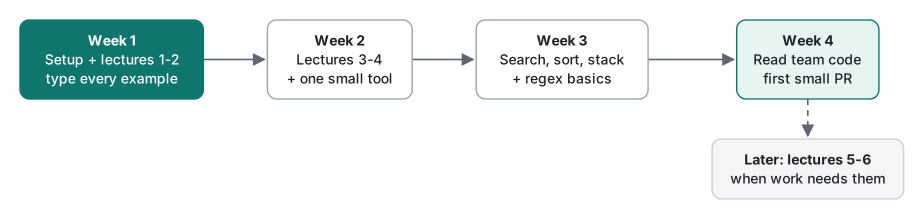
This plan assumes about one hour a day next to your normal onboarding. It covers one language plus the shared fundamentals. It does not cover the advanced lectures, on purpose.
| Week | What to do | Done when |
|---|---|---|
| 1 | Install the toolchain, then lectures 1 and 2 of your language. Type every example. | You can run a file from the terminal and explain one error message you hit. |
| 2 | Lectures 3 and 4, then write one small tool for yourself (a CSV cleaner, a file renamer, a one-screen app). | The tool runs on your own data, about 100 lines. |
| 3 | Fundamentals: linear and binary search, sorting, the stack lecture; regex lectures "What Is Regex?" and "Metacharacters". | You can say when a HashSet beats a list, and write a regex for a log line. |
| 4 | Read your team's code. Find one place where something from weeks 1 to 3 appears. Send your first small change. | A reviewed pull request, however small. |
Before week 1, or alongside it: command line lectures 1–2 and Git lectures 1–2. Most of the "it doesn't run" questions in the first week turn out to be a path, a space in a file name, or an uncommitted change, not the language.
For C#, replace "lectures 1 and 2" with articles 1 to 9 of the beginner list and "lectures 3 and 4" with articles 10 to 22, and expect weeks 1 and 2 to take three weeks. That is normal; the articles are short but there are more of them.
Advanced lectures (5 and 6, async, concurrency, performance, memory) come later, when a real task needs them. Reading them in week 2 mostly produces confusion.
When you get stuck
- Shrink the program. Delete code until the problem disappears, then put back the last thing you removed. A ten-line example that fails is easier to understand, and easier to ask about.
- Print more than you think you need. Print the value and its type (
type(x)in Python,x.runtimeTypein Dart,x.GetType()in C#). Half of beginner bugs are a value that is not the type you assumed. - Check the version.
python3 --version,java -version,dart --version,php -v,swift --version,dotnet --version. An example written for a newer version can fail on an older one with a confusing error. - Ask well. Bring the code, the full error text and what you already tried. A mentor can answer that in two minutes; "it doesn't work" takes twenty.
- Stop after 30 minutes and ask. Being stuck for a whole afternoon teaches less than being unstuck in half an hour and spending the rest practising.
An honest note about our environment
The lectures were run on an Apple Silicon Mac (M1 Pro) with specific versions: Python 3.9 and 3.11, OpenJDK 26, PHP 8.5, Dart SDK 3.11, Swift 6.4, .NET 10 and Apple clang 21, SQLite 3.51, Git 2.54, and zsh 5.9 / bash 3.2 on macOS. Each lecture states the exact versions it used. On Windows or Linux, or on other versions, file paths, timings and a few error messages will differ. The WinForms articles were compiled for Windows but not run on the Mac, and they say so. Timings are from one machine and are meant to show which approach wins and by roughly how much, not exact numbers you should expect.
If something in a lecture does not match what you see, check the version first. If it still differs, that is useful to know, and probably a sign that something changed.
FAQ
Which programming language should a new hire learn first?
The one the team uses. Mobile app teams: Dart with Flutter, or Swift for iOS-only work. Web and server teams: PHP, Java or Python, whichever the codebase is written in. Data and AI work: Python, then the machine learning from scratch series. Company .NET code or old Windows tools: C#, or VB.NET if that is what you will maintain. The command line, Git and SQL come first for everyone; algorithms, data structures and regex are for everyone too.
Do I have to read the measurement sections in every lecture?
No. On a first pass, read the explanation, type and run the examples, and do the exercises. Skip the benchmark tables and the advanced lectures (5 and 6 of each six-part series). Come back to them when your work involves performance or concurrency.
Is it fine to use an AI assistant while learning?
Yes, for explaining an error message you have already read, or for asking why an output surprised you. Do not let it type the examples for you: typing them is how your fingers and eyes learn the syntax, and it is where most of the first-week mistakes are caught.
How long does it take to finish the beginner and intermediate lectures?
At about one hour a day, the four beginner and intermediate lectures of one language fit in two weeks, as in the four-week plan in this article. The C# course is longer because it is split into many short articles; plan three to four weeks for its beginner and intermediate parts.