Dart Functions and Collections: Lazy Iterables
Dart lecture 2 from real runs: named and required params, closures, collection if/for, lazy where/map, ConcurrentModificationError, Set vs List timed.
Series: Dart lecture 2/6 (beginner). For people who finished lecture 1 or can already write a main() in Dart, and now need to pass data around. After this lecture you will declare functions with named and required parameters, build lists and maps the way Flutter code does, and avoid the three collection errors that show up in real crash reports.
Functions and collections are most of what a Flutter build() method is made of: a widget constructor is a function call with named parameters, and a screen full of items is usually [for (final item in items) ItemTile(item)]. This lecture shows each piece with the real output, including the lazy Iterable behaviour that surprises almost everyone the first time. Everything was run with Dart SDK 3.11.5 (stable) on an Apple Silicon Mac (M1 Pro); paths in the output are shortened to ~/demo/.
Functions: positional, optional and named parameters
A function is a named block of code that takes parameters (inputs) and returns a value. Dart has three kinds of parameters:
// Positional, optional positional, named, required named
String greet(String name, [String greeting = 'Hello']) => '$greeting, $name!';

String badge({required String user, int level = 1, String? team}) =>
    '$user (Lv.$level${team == null ? '' : ', $team'})';

int square(int x) => x * x;            // arrow = one expression

void main() {
  print(greet('Mina'));
  print(greet('Jun', 'Hi'));
  print(badge(user: 'mina'));
  print(badge(level: 3, user: 'jun', team: 'iOS'));
}
Hello, Mina!
Hi, Jun!
mina (Lv.1)
jun (Lv.3, iOS)
- Positional parameters (
name) are matched by order and are required. - Optional positional parameters go in
[ ]and need a default or a nullable type. - Named parameters go in
{ }, are passed asuser: 'mina'in any order, and are optional unless markedrequired. =>(arrow syntax) is short for{ return …; }and works only for a single expression.
Named parameters are why Flutter code reads like Text('Hi', style: …, maxLines: 2). Every widget constructor is a function with named parameters.
The errors you get when you call them wrong
String badge({required String user, int level = 1}) => '$user $level';
String greet(String name, [String greeting = 'Hello']) => '$greeting $name';
void setTitle({String title}) => print(title);

void main() {
  print(badge(level: 2));
  print(greet());
  print(greet('a', 'b', 'c'));
  print(badge('mina'));
}
$ dart analyze func_errors.dart
  error - func_errors.dart:3:23 - The parameter 'title' can't have a value of 'null' because of its type, but the implicit default value is 'null'. Try adding either an explicit non-'null' default value or the 'required' modifier. - missing_default_value_for_parameter
  error - func_errors.dart:6:9 - The named parameter 'user' is required, but there's no corresponding argument. Try adding the required argument. - missing_required_argument
  error - func_errors.dart:7:15 - 1 positional argument expected by 'greet', but 0 found. Try adding the missing argument. - not_enough_positional_arguments
  error - func_errors.dart:8:25 - Too many positional arguments: 2 expected, but 3 found. Try removing the extra arguments. - extra_positional_arguments
  error - func_errors.dart:9:15 - Too many positional arguments: 0 expected, but 1 found. Try removing the extra positional arguments, or specifying the name for named arguments. - extra_positional_arguments_could_be_named
The first one is the null-safety rule from lecture 1 showing up in a new place: a named parameter is optional, so if you omit it, it is null, and String cannot be null. Your three choices are String? title, String title = '' or required String title. The last one teaches you that badge('mina') is not the same as badge(user: 'mina'): the analyzer even says "or specifying the name for named arguments".
Functions are values, and closures remember
In Dart a function can be stored in a variable, passed to another function and returned from one. A function that uses a variable from the place it was created is a closure:
int Function() makeCounter() {
  var count = 0;                       // captured by the closure below
  return () => ++count;
}

void main() {
  final c1 = makeCounter();
  final c2 = makeCounter();
  print('${c1()} ${c1()} ${c1()} | ${c2()}');

  final ops = <String, int Function(int)>{'square': square, 'neg': (x) => -x};
  print(ops['square']!(7));
  print([1, 2, 3].map(square).toList());

  final callbacks = <void Function()>[];
  for (var i = 0; i < 3; i++) {
    callbacks.add(() => print('i = $i'));
  }
  for (final cb in callbacks) cb();
}
1 2 3 | 1
49
[1, 4, 9]
i = 0
i = 1
i = 2
Each call to makeCounter() creates a new count, so c1 and c2 count independently. int Function() is the function type ("takes nothing, returns an int"); writing it out lets the compiler check callers. map(square) passes the function itself, without calling it (no parentheses).
The loop result is worth noting if you know JavaScript's old var or Python: in Dart, each iteration of a for loop gets a fresh i, so the three callbacks print 0, 1, 2 rather than 3, 3, 3. Flutter's onPressed: () => select(i) inside a loop works because of this.
List, Set and Map, plus collection if/for
final apps = ['Calculator', 'Scanner', 'Lottery'];      // List<String>
final tags = {'flutter', 'dart', 'flutter'};             // Set<String>
final downloads = {'Calculator': 1200, 'Scanner': 300};  // Map<String, int>
final empty = {};                                        // what type is this?

print('$apps ${apps.length} ${apps[0]}');
print('$tags ${tags.length}');
print('${downloads['Scanner']} ${downloads['Unknown']}');
print('${empty.runtimeType} ${<String>{}.runtimeType}');
[Calculator, Scanner, Lottery] 3 Calculator
{flutter, dart} 2
300 null
_Map<dynamic, dynamic> _Set<String>
- A
Listis ordered and allows duplicates; index from 0. - A
Setkeeps one copy of each value. The analyzer even warned about the duplicate literal:Two elements in a set literal shouldn't be equal. ... - equal_elements_in_set. - A
Mapstores key → value pairs. Looking up a missing key returnsnull, which is whydownloads['Scanner']has the typeint?, notint. {}is an emptyMap<dynamic, dynamic>, not a Set. For an empty set write<String>{}. Writingfinal seen = {};and later callingseen.add('x')is a compile error that confuses many beginners:The method 'add' isn't defined for the type 'Map'. ... - undefined_method.
| You need | Use | Lookup by |
|---|---|---|
| Items in order, duplicates OK, access by position | List |
index, O(1); search by value is O(n) |
| "Have I seen this?" / unique values | Set |
value, O(1) on average |
| Find a value by an ID or name | Map |
key, O(1) on average |
Collection if, for and spread
Inside a collection literal you can use if, for and ... (spread). This is the single most used feature in Flutter layouts:
const isPro = true;
final List<String>? extra = null;
final menu = [
  'Home',
  if (isPro) 'Stats',
  for (final a in apps) 'Open $a',
  ...?extra,
  ...['Settings'],
];
print(menu);

final byLength = {for (final a in apps) a: a.length};
print(byLength);
[Home, Stats, Open Calculator, Open Scanner, Open Lottery, Settings]
{Calculator: 10, Scanner: 7, Lottery: 7}
...?extra spreads a list that may be null (nothing is added when it is). In a widget tree this becomes children: [Header(), if (loggedIn) Profile(), for (final m in messages) MessageTile(m)].
Looping over a map and updating it:
for (final MapEntry(:key, :value) in downloads.entries) {
  print('$key -> $value');
}
downloads.update('Scanner', (v) => v + 1);
downloads.putIfAbsent('Lottery', () => 0);
print(downloads);
Calculator -> 1200
Scanner -> 300
{Calculator: 1200, Scanner: 301, Lottery: 0}
Maps keep insertion order (the default Map is a LinkedHashMap), so the output order is the order you added the keys.
Iterables are lazy: when do the callbacks run?
where (filter) and map (transform) do not return lists. They return an Iterable, a description of the work. Watch when the print calls inside actually run:
void main() {
  final numbers = [1, 2, 3, 4, 5, 6];

  final evens = numbers.where((n) {
    print('  where checks $n');
    return n.isEven;
  }).map((n) {
    print('  map doubles $n');
    return n * 2;
  });

  print('1. pipeline built, type: ${evens.runtimeType}');
  print('2. first = ${evens.first}');
  print('3. toList:');
  final list = evens.toList();
  print('4. list = $list');
  print('5. iterate the lazy one again:');
  for (final x in evens) {
    print('  got $x');
  }

  numbers.add(8);
  print('6. after add(8): ${evens.toList()} vs frozen $list');
}
1. pipeline built, type: MappedIterable<int, int>
  where checks 1
  where checks 2
  map doubles 2
2. first = 4
3. toList:
  where checks 1
  where checks 2
  map doubles 2
  where checks 3
  ...
  map doubles 6
4. list = [4, 8, 12]
5. iterate the lazy one again:
  where checks 1
  where checks 2
  map doubles 2
  got 4
  where checks 3
  ...
  got 12
  where checks 1
  ...
  where checks 8
  map doubles 8
6. after add(8): [4, 8, 12, 16] vs frozen [4, 8, 12]
(The output is shortened with …; the pattern continues for every element.)
What the run shows:
- Building the pipeline ran zero callbacks.
.firststopped as soon as it had one result: two checks, one map..toList()ran everything once and stored the result.- The
forloop ran the whole pipeline again, element by element, interleavingwhere,mapand the loop body. - The lazy
evensis a live view: afternumbers.add(8), it produced16, while the stored list stayed[4, 8, 12].
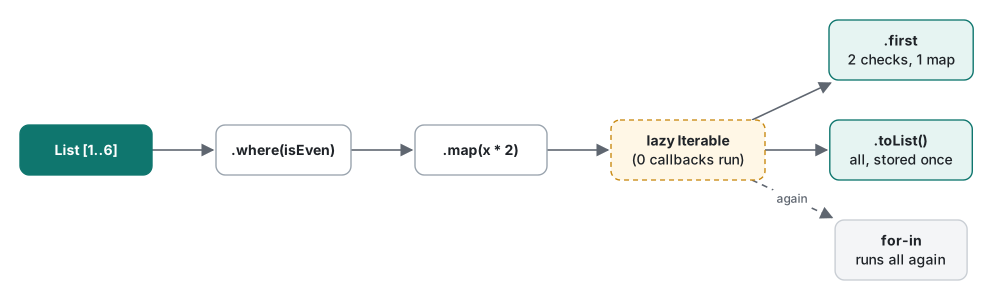
The practical rule: if a callback has side effects (logging, counting, an API call) or is expensive, and you need the result more than once, call .toList() once and keep the list. In Flutter, a where(...) stored in a field and read from build() re-runs the filter on every rebuild.
Common mistakes: changing a list while looping, and const lists
Removing items inside for-in
The situation. You want to drop the failing scores:
final scores = [90, 40, 75, 30, 60];
for (final s in scores) {
  if (s < 50) scores.remove(s);
}
What actually happens.
Unhandled exception:
Concurrent modification during iteration: Instance(length:4) of '_GrowableList'.
#0      ListIterator.moveNext (dart:_internal/iterable.dart:365:7)
#1      main (~/demo/modify.dart:20:19)
The first remove(40) worked (the list now has length 4), and on the next step the loop's iterator noticed the list had changed under it and threw a ConcurrentModificationError. "Concurrent" here does not mean threads; it means "while I was walking over it". The analyzer cannot catch this.
The fix. Three versions, all printing [90, 75, 60]:
final a = [...scores]..removeWhere((s) => s < 50);     // change in place
final b = scores.where((s) => s >= 50).toList();       // build a new list
final c = [...scores];
for (final s in [...c]) {                              // loop over a copy
  if (s < 50) c.remove(s);
}
removeWhere is the clearest. In Flutter state code, building a new list (b) is often better anyway, because setState and most state-management tools expect a new object rather than a mutated one.
Writing to a const list
const defaultTabs = ['home', 'search'];

void main() {
  final fixed = List.filled(3, 0);                  // fixed length
  final view = List.unmodifiable(['a', 'b']);
  final tabs = [...defaultTabs, 'profile'];         // a growable copy
  tabs.add('settings');
  print(tabs);
  fixed[0] = 7;
  print(fixed);
  // then each of these, inside try/catch:
  // fixed.add(1); view.add('c'); defaultTabs[0] = 'feed'; defaultTabs.add('profile');
}
[home, search, profile, settings]
[7, 0, 0]
UnsupportedError: Unsupported operation: Cannot add to a fixed-length list
UnsupportedError: Unsupported operation: Cannot add to an unmodifiable list
UnsupportedError: Unsupported operation: Cannot modify an unmodifiable list
UnsupportedError: Unsupported operation: Cannot add to an unmodifiable list
All four compile without a single analyzer message; the type is still List<String>, which has add. The error appears only at run time. Two lessons: const (and List.unmodifiable) makes the contents immutable, not just the variable, and List.filled(3, 0) gives a fixed-length list, a surprise if you expected a growable one (List.filled(3, 0, growable: true) fixes that). When you need to change a const default, copy it with [...defaultTabs].
Measurements: Set vs List lookups, for loop vs fold
Both benchmarks were compiled with dart compile exe (AOT, like a Flutter release build) and also run with dart run (JIT). Data came from Random(42). Each figure is the best of 7 rounds; the AOT numbers are the median of 3 separate runs. The full file is a single bench.dart using only dart:math and Stopwatch.
10,000 lookups, about half of them hits:
| Collection size | List.contains (AOT) | Set.contains (AOT) | List.contains (JIT) | Set.contains (JIT) |
|---|---|---|---|---|
| 10 | 0.27 ms | 0.14 ms | 0.15–0.24 ms | 0.14–0.15 ms |
| 1,000 | 19.0 ms | 0.14 ms | 5.1 ms | 0.14–0.15 ms |
| 100,000 | 1,920 ms | 0.16 ms | 495–498 ms | 0.16–0.17 ms |

List.contains checks elements one by one, so its time grows with the size; Set.contains uses a hash and stayed flat. At 100,000 items it was about 12,000 times faster in the AOT build. At 10 items the gap was only 2x, so for tiny lists, readability wins.
One surprise we did not expect: the JIT run was about 3.8 times faster than AOT for List.contains (5.1 ms vs 19.0 ms), consistently across runs. We did not profile the cause. The most likely explanation is that the JIT compiler optimises using the types it actually sees at run time (here, only int), while AOT has to compile code that works for any element type. "AOT is always faster" is not a rule; it starts faster (lecture 1: 17 ms vs 199 ms) and is predictable, which is why Flutter uses it for releases.
Summing 10,000,000 ints (total 494,987,162 in every version):
| Version | AOT | JIT |
|---|---|---|
for (var i = 0; i < data.length; i++) |
6.5 ms | 6.6 ms |
for (final x in data) |
6.4 ms | 6.6 ms |
data.fold(0, (a, b) => a + b) |
27.1 ms | 52.2 ms |
data.reduce((a, b) => a + b) |
27.5 ms | 52.6 ms |

fold was about 4 times slower than a plain loop in AOT and about 8 times slower in JIT, because it calls a closure 10 million times. For 10 million items that is 20 ms; for the 30 items on a screen, it is nothing. Use fold when it reads better, and a loop on a hot path that you have measured.
Honest limits / version notes
- All runs: Dart 3.11.5 only, Apple M1 Pro. Absolute times will differ on phones; the AOT/JIT difference may also change between SDK versions.
- The benchmark passes
list.containsas a tear-off (a function value), which adds one function call per lookup to both columns; part of the 0.14 ms Set time is that overhead. - The pattern
for (final MapEntry(:key, :value) in map.entries)shown above needs Dart 3.0 or newer (records and patterns, covered in lecture 4). We checked it: with// @dart=2.19at the top of the file the analyzer reportsThis requires the 'records' language feature to be enabled. ... - experiment_not_enabled, while collectionif/forand spread in the same file still compile (they date from Dart 2.3, which is older than the lowest version 3.11.5 accepts, 2.12, so we could not test 2.2). ConcurrentModificationErroris raised on the next step of the iterator, so whether you see it can depend on where in the list the change happens. We showed the case we ran.
Exercises
1. Write label(String name, {required int price, String currency = 'USD', bool sale = false}) that returns 'Pro plan: 9 USD' for label('Pro plan', price: 9) and adds ' (sale)' when sale is true.
2. How many times does check print, and in what order relative to the two result lines?
final it = [1, 2, 3, 4].where((n) {
  print('check $n');
  return n > 2;
});
print('isEmpty: ${it.isEmpty}');
print('length: ${it.length}');
3. Remove every empty string from ['a', '', 'b', '', '', 'c'] in place, without a ConcurrentModificationError.
Answers
1.
String label(String name, {required int price, String currency = 'USD', bool sale = false}) =>
    '$name: $price $currency${sale ? ' (sale)' : ''}';
label('Pro plan', price: 9) printed Pro plan: 9 USD, and label('Pro plan', price: 7, sale: true, currency: 'EUR') printed Pro plan: 7 EUR (sale). Named arguments can come in any order.
2. Seven times. Real output: check 1, check 2, check 3, isEmpty: false, then check 1 to check 4, length: 2. isEmpty stops at the first match (3); length has to walk the whole list again, because the where result is lazy and stores nothing.
3. words.removeWhere((w) => w.isEmpty); printed [a, b, c].
Next
The next lecture moves from functions to types you define yourself: classes, constructors, mixins and extension methods, with the errors Flutter developers see when they mix them up.
- Previous: Dart lecture 1/6: types, final vs const and null safety
- Next: Dart lecture 3/6: classes, mixins and extensions
- Later in the series: records, patterns and sealed classes, async, futures, streams and isolates, JIT, AOT and memory
- Flutter in practice: what broke when we moved 16 apps to modern Flutter
- Same topic in other languages: Swift lecture 2: functions, closures and collections, Python lecture 2: functions, scope and default arguments, Java collections performance
FAQ
Why does my print inside where() or map() not run in Dart?
where() and map() are lazy: they return an Iterable that only describes the work. The callbacks run when something consumes it, such as .toList(), .first or a for-in loop, and they run again every time it is consumed. Call .toList() once if you need the results more than once.
How do I fix "Concurrent modification during iteration" in Dart?
You added or removed elements of a list while a for-in loop was walking over it. Use list.removeWhere(...), build a new list with where(...).toList(), or loop over a copy ([...list]) and change the original.
Is Set.contains really faster than List.contains in Dart?
Yes, once the collection is more than a handful of items. With 1,000 ints and 10,000 lookups, List.contains took 19.0 ms in an AOT exe and Set.contains 0.14 ms (Dart 3.11.5, M1 Pro). With 10 items the gap was only about 2x.