Dart Basics: Types, final vs const and Null Safety
Dart lecture 1 from real runs: dart run in 5 minutes, final vs const errors, ~/ division, ? ! ?? and late, dart analyze codes and measured startup.
Series: Dart lecture 1/6 (beginner). For people who have never written Dart, or who started a Flutter app and keep hitting red squiggles about null. After this lecture you will run your first program, choose between var, final and const, and read the null-safety errors from the compiler and the crash messages from the runtime.
Dart is the language Flutter apps are written in. If you are joining a team that ships Flutter apps, almost every crash report you will read in your first month is one of the errors on this page: Null check operator used on a null value, LateInitializationError, or a type error the analyzer already warned about. Everything below was actually run with Dart SDK 3.11.5 (stable) on an Apple Silicon Mac (M1 Pro); file paths in the output are shortened to ~/demo/.
Your first program in 5 minutes
If you have Flutter installed, you already have Dart: the dart command ships inside the Flutter SDK. Check it:
$ dart --version
Dart SDK version: 3.11.5 (stable) (Wed Apr 15 00:36:32 2026 -0700) on "macos_arm64"
Create a file called hello.dart:
void main() {
  print('Hello, Dart!');
}
and run it:
$ dart run hello.dart
Hello, Dart!
That is the whole setup. A few terms you just used:
main()is the entry point, the function Dart calls first.voidmeans it returns nothing.print()writes one line to the terminal.- Every statement ends with
;. Forgetting it is the most common first error.dart runsaysError: Expected ';' after this.and points a caret at the spot;dart analyzereports the same thing asExpected to find ';'. - expected_token.
You do not need a project folder for these lectures. dart create -t console my_app makes a full project with a pubspec.yaml and tests, but a single .dart file runs fine on its own, and that is what we do here.
var, final and const (and the errors they give)
A variable is a name for a value. Dart has three ways to declare one:
void main() {
  var count = 3;          // type inferred: int
  final name = 'Mina';    // set once, at run time
  const pi = 3.14159;     // compile-time constant
  final now = DateTime.now();
  print('${count.runtimeType} ${name.runtimeType} ${pi.runtimeType} ${now.year > 2000}');
}
int String double true
We never wrote int or String, but Dart knows them. This is type inference: the compiler looks at the right-hand side and fixes the type of the variable for good. var count = 3 is exactly the same as int count = 3. It is not "a variable that can hold anything", as you will see in a moment.
Now let us break things on purpose. This file has one mistake per line group:
void main() {
  final name = 'Mina';
  name = 'Jun';

  const now = DateTime.now();

  var count = 3;
  count = 'three';

  Object? b = 'hello';
  print(b.length);

  int half = 7 / 2;
}
dart analyze checks a file without running it. Each line ends with a diagnostic code, which is what you search for when you do not understand a message (warnings about unused variables trimmed):
$ dart analyze errors.dart
  error - errors.dart:3:3 - The final variable 'name' can only be set once. Try making 'name' non-final. - assignment_to_final_local
  error - errors.dart:5:15 - Const variables must be initialized with a constant value. Try changing the initializer to be a constant expression. - const_initialized_with_non_constant_value
  error - errors.dart:5:15 - The constructor being called isn't a const constructor. Try removing 'const' from the constructor invocation. - const_with_non_const
  error - errors.dart:8:11 - A value of type 'String' can't be assigned to a variable of type 'int'. Try changing the type of the variable, or casting the right-hand type to 'int'. - invalid_assignment
  error - errors.dart:11:11 - The getter 'length' isn't defined for the type 'Object'. ... - undefined_getter
  error - errors.dart:13:14 - A value of type 'double' can't be assigned to a variable of type 'int'. ... - invalid_assignment
dart run refuses to start the same file and prints its own wording, with a caret under the problem:
errors.dart:3:3: Error: Can't assign to the final variable 'name'.
  name = 'Jun';
  ^^^^
errors.dart:5:24: Error: Cannot invoke a non-'const' constructor where a const expression is expected.
Try using a constructor or factory that is 'const'.
  const now = DateTime.now();
                       ^^^
What each one teaches:
finalmeans "assigned once". The value can be computed at run time (DateTime.now()is fine).constmeans "known when the program is compiled". The current time is not, henceconst_initialized_with_non_constant_value.varfixed the type tointon the first line, socount = 'three'isinvalid_assignment.
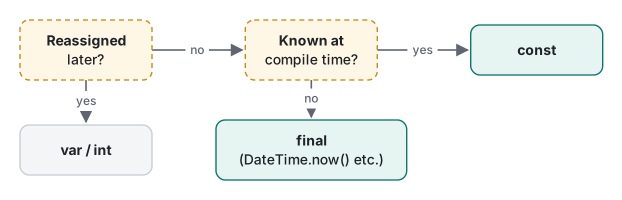
The habit most Flutter teams follow (some enforce it with the optional lint prefer_final_locals): write final by default, const for literal values and widgets that never change, and var only when you really reassign. A const widget is also built once at compile time and reused, which is why Flutter code is full of const Text(...).
dynamic vs Object?: two ways to say "anything"
Both dynamic and Object? can hold a value of any type. The difference is what the compiler lets you do with it:
void main() {
  dynamic a = 'hello';
  Object? b = 'hello';
  print(a.length);
  if (b is String) print(b.length); // promoted to String
  a = 42;
  print(a.length);
}
dart analyze reports No issues found! for this file, yet it crashes:
5
5
Unhandled exception:
NoSuchMethodError: Class 'int' has no instance getter 'length'.
Receiver: 42
Tried calling: length
With dynamic, the compiler stops checking, so the mistake shows up only when that line runs, possibly on a user's phone. With Object?, b.length is rejected at compile time (undefined_getter above) until you check the type with is. After if (b is String), Dart promotes b to String inside the block. That is called type promotion, and null safety uses the same trick.
| You want | Use | Checked by |
|---|---|---|
| A value whose type you know | the type (int, String) or final x = … |
compiler |
"Any value", inspected with is before use |
Object? (or Object if never null) |
compiler |
| Raw JSON you will cast immediately | dynamic, then convert to a typed class right away |
nobody until run time |
jsonDecode() returns dynamic, which is why Flutter code that reads API responses is where NoSuchMethodError crashes come from. Convert to typed data at the boundary.
Numbers: int, double and ~/
print(7 / 2);       // 3.5
print(7 ~/ 2);      // 3
print(-7 ~/ 2);     // -3
print(7 % 3);       // 1
print(-7 % 3);      // 2
print((-7).remainder(3)); // -1
print(0.1 + 0.2);   // 0.30000000000000004
print(1 / 0);       // Infinity
print(9223372036854775807 + 1);
print(2.5.round());   // 3
print((-2.5).round()); // -3
3.5
3
-3
1
2
-1
0.30000000000000004
Infinity
-9223372036854775808
3
-3
Four things to remember:
/always returns adouble, even for8 / 2(it gives4.0). For integer division use~/, which truncates toward zero, so-7 ~/ 2is-3, not-4.%is never negative for a positive divisor:-7 % 3is2. If you want the C/Java style-1, call.remainder().intsilently overflows on the Dart VM and in native apps: the largest 64-bit value plus one wrapped to the smallest. No exception.round()rounds halves away from zero (2.5→3,-2.5→-3), unlike Python's banker's rounding.
int.parse('42') converts text to a number and throws on bad input; int.tryParse('4x2') returns null instead, which brings us to null safety.
Strings and interpolation
final name = 'Mina';
final apps = 3;
print('Hi $name, you have $apps apps.');
print('Next year: ${apps + 1} apps, ${name.toUpperCase()}');
print('Price: \$${(1234.5).toStringAsFixed(2)}');
print(r'raw \n $name');
print('😀'.length);
print('😀'.runes.length);
Hi Mina, you have 3 apps.
Next year: 4 apps, MINA
Price: $1234.50
raw \n $name
2
1
$name inserts a variable; ${…} inserts any expression. A literal dollar sign needs \$. Single and double quotes are the same; ''' makes a multi-line string; an r prefix turns off escapes and interpolation. 'Age: ' + apps is a compile error (int is not a String); interpolation is the idiomatic fix.
The emoji line is a real trap: .length counts UTF-16 code units, so one emoji is 2. If you limit a nickname to 10 "characters" with .length, emoji users get 5. .runes.length counts code points; for what a person sees as one character (flags, skin tones) you need the characters package, which Flutter already depends on.
Sound null safety: ?, ?., ??, ! and late
Since Dart 2.12, and with no opt-out since Dart 3, a type like String cannot hold null. If a value may be missing, you add ?: String?. The compiler then makes you deal with the null before you use it.
String? findNickname(String user) => user == 'mina' ? 'Mimi' : null;

void main() {
  String? a = findNickname('mina');
  String? b = findNickname('jun');

  print(a?.length);            // 4
  print(b?.length);            // null
  print(b ?? 'no nickname');   // fallback
  b ??= 'guest';               // assign only if null
  print(b);

  String? c = findNickname('jun');
  if (c != null) {
    print(c.length);           // promoted to String inside the if
  }

  print(c!.length);            // you promised it is not null... it is
}
4
null
no nickname
guest
Unhandled exception:
Null check operator used on a null value
#0      main (file:///~/demo/nulls.dart:18:10)
?.calls the member only if the value is not null; otherwise the whole expression isnull.??gives a fallback;??=assigns only when the variable is null.if (c != null)promotesctoStringinside the block, exactly likeis Stringdid.!(the null assertion operator) tells the compiler "this is not null, trust me". The compiler stops complaining, and the check moves to run time. When you are wrong, you get the most common crash in Flutter apps.
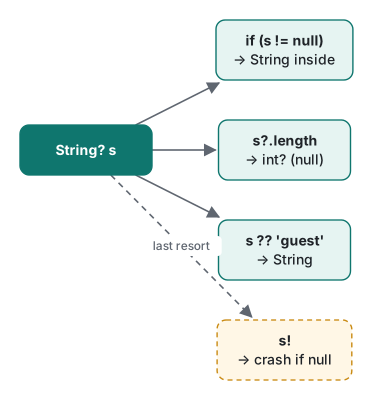
Without the ?, the compiler catches you first:
error - errors.dart:16:14 - The property 'length' can't be unconditionally accessed because the receiver can be 'null'. Try making the access conditional (using '?.') or adding a null check to the target ('!'). - unchecked_use_of_nullable_value
error - errors.dart:18:13 - A value of type 'Null' can't be assigned to a variable of type 'int'. ... - invalid_assignment
Note the analyzer's suggestion: "or adding a null check to the target ('!')". It is technically correct and usually the wrong fix. Reach for if, ?. or ?? first.
late: "I will set it before I read it"
late lets a non-nullable variable start without a value. It is common in Flutter State classes (late final AnimationController controller; set in initState).
class Settings {
  late String token;                         // "I will set it before reading it"
  late final String theme = loadTheme();     // lazy: runs on first read
  late final int id;                         // set once, later

  void login() => token = 'abc123';
}

String loadTheme() {
  print('  loadTheme() runs now');
  return 'dark';
}

void main() {
  final s = Settings();
  print('created Settings');
  print(s.theme);
  print(s.theme);

  s.id = 1;
  try {
    s.id = 2;
  } catch (e) {
    print(e);
  }
  print(s.token);                            // forgot to call login()
}
created Settings
  loadTheme() runs now
dark
dark
LateInitializationError: Field 'id' has already been initialized.
Unhandled exception:
LateInitializationError: Field 'token' has not been initialized.
#0      Settings.token (~/demo/late.dart)
#1      main (~/demo/late.dart:26:11)
Three behaviours in one run: late final … = loadTheme() ran only on first read and only once; a late final set twice throws; reading an unset late field throws. For local variables the analyzer can see the mistake: late String msg; print(msg); gives definitely_unassigned_late_local_variable. For fields it cannot, so late is a promise checked only at run time, like !.
Common mistake: silencing the analyzer with !
The situation. A screen shows a user's nickname. The model has String? nickname, the widget does Text(user.nickname!), the red squiggle disappears, and the app works in testing because every test account has a nickname.
What actually happens. The first real user without a nickname opens the screen and gets Null check operator used on a null value. In a Flutter debug build that is a red error screen; in release it is a grey box or a crash report. The analyzer had warned you; ! turned the warning off.
The fix. Decide what the screen should show when the value is missing, and write it down in code:
Text(user.nickname ?? 'Guest')
or, if a missing value means "show nothing", if (user.nickname != null) Text(user.nickname!) is fine only because the check is right next to the !. A quick way to audit an inherited codebase: search for !. and !) and ask, for each one, "who guarantees this?"
A measurement: dart run vs a compiled exe
dart run compiles your code just in time (JIT) every time it starts. dart compile exe compiles it ahead of time (AOT) into a native executable, the same kind of compilation a Flutter release build uses.
$ dart compile exe hello.dart -o hello
Generated: ~/demo/hello
Compiling took 0.87 s and the executable is 5,587,776 bytes (about 5.3 MB, because it carries the Dart runtime). We timed hello.dart 20 times per command and took the median, then repeated that 3 times:
| Command | Median start-up (3 batches) |
|---|---|
dart run hello.dart |
330–340 ms |
dart hello.dart |
193–210 ms |
./hello (AOT exe) |
16–18 ms |

Two findings a summary will not tell you. First, dart run file.dart was consistently about 130 ms slower than dart file.dart for the same file; dart run goes through the package-resolution path (it is the same command that runs bin/ scripts in a project), while dart file.dart just loads the file. We did not dig deeper than that. For quick experiments, dart file.dart is enough. Second, the crash message from the AOT build was the same Null check operator used on a null value, but the stack trace lost its column numbers (nulls.dart:18 instead of nulls.dart:18:10), and both builds exited with code 255.
Honest limits / version notes
- Everything was run on Dart 3.11.5 only, on an Apple M1 Pro. Timings will differ on other machines; the ratios are what matters.
- Null safety arrived in Dart 2.12. We checked the "no opt-out" claim directly: a file starting with
// @dart=2.9fails on 3.11.5 withillegal_language_version_override("The language version must be >=2.12.0"). - Integer overflow wrapping applies to the Dart VM and native (Flutter mobile/desktop). On the web,
intis a JavaScript number with different limits. We did not run a web build for this post. dart analyzehere ran without apubspec.yaml, so only the default diagnostics appear. A project fromdart createorflutter createadds a recommended lint package on top, which needspub get; we kept to single files with no packages.
Exercises
1. Without running it, predict the output:
print(17 ~/ 5);
print(17 % 5);
print(-17 ~/ 5);
print(-17 % 5);
print(17 / 5);
2. Write int nameLength(String? name) that returns the length, or 0 when name is null, without using ! or if.
3. This code crashes. Explain the error message and fix it two ways.
String? title;
print(title!.toUpperCase());
Answers
1. Real output: 3, 2, -3, 3, 3.4. ~/ truncates toward zero (-3, not -4), and % with a positive divisor is never negative, so -17 % 5 is 3 (because -17 = -4 × 5 + 3).
2. int nameLength(String? name) => name?.length ?? 0; printed 4 for 'Mina' and 0 for null. ?. makes the result int?, and ?? turns it back into int.
3. Null check operator used on a null value: ! claimed title was not null, but it was. Fix with a fallback, print(title?.toUpperCase() ?? '(untitled)');, or with a check, if (title == null) return '(untitled)'; followed by title.toUpperCase() (promoted, no !). Bonus: in our run the analyzer flagged the first fix in that exact snippet with a dead_code warning, because flow analysis could prove title is always null there. In real code the value comes from somewhere else, and the warning disappears.
Next
The next lecture covers functions (named and required parameters, closures) and collections, including the lazy Iterable trap and the errors you get when you change a list while looping over it.
- Next: Dart lecture 2/6: functions and collections
- Later in the series: classes, mixins and extensions, records, patterns and sealed classes, async, futures, streams and isolates, JIT, AOT and memory
- Flutter in practice: what broke when we moved 16 apps to modern Flutter, Dart's http client does not follow a 301 on POST
- Same topic in other languages: Swift lecture 1: optionals and types, Python lecture 1: types and mutability, Java lecture 1: types, strings and equality
FAQ
What does "Null check operator used on a null value" mean in Dart or Flutter?
Some code used the ! operator on a variable that was null at that moment. ! tells the compiler "trust me, this is not null"; the check moves to run time and the program stops. Replace ! with a null check (if (x != null)), ?. or a ?? fallback.
What is the difference between final and const in Dart?
Both can be assigned only once. const must be known when the program is compiled (literals, other consts), while final can be computed at run time. const now = DateTime.now() fails with const_initialized_with_non_constant_value; final now = DateTime.now() is fine.
Why does Dart say 7 / 2 can't be assigned to an int?
In Dart, / always returns a double, so int half = 7 / 2 is a compile error (invalid_assignment). Use the integer division operator ~/ (7 ~/ 2 is 3) or convert explicitly with (7 / 2).toInt() or .round().