Java Basics: Types, Strings and == vs equals
Java beginner lecture on OpenJDK 26: int overflow, double vs BigDecimal, == vs equals and the Integer cache (127 vs 128), and the real javac errors.
Series: Java lecture 1/6 (beginner). For people who can write a loop in some language and now want to write Java that compiles the first time and does not lie to them. After this lecture you will know which comparisons, number types and string operations are safe, and you will recognise the compiler errors that stop most beginners.
If you are new to Java, most of your early bugs will not be logic bugs. They will be a number that silently wrapped around, a == that worked in a test and failed in production, or a compiler error whose wording does not tell you what to change. This lecture runs into each of those on purpose, on OpenJDK 26 (Temurin 26+35) on an Apple Silicon Mac (M1 Pro), and shows the real output.
Every snippet here is one file you can run with java FileName.java, with no build tool and no IDE.
Running Java without a build tool: java Hello.java and JShell
Since Java 11 you can run a single source file directly. The launcher compiles it in memory and runs it; no .class file is written to disk.
public class HelloClassic {
    public static void main(String[] args) {
        System.out.println("Hello, " + (args.length > 0 ? args[0] : "world"));
    }
}
$ java HelloClassic.java Duke
Hello, Duke
On Java 25 and later, a file can even skip the class declaration (a "compact source file"), and IO.println exists for beginners:
void main() {
    IO.println("Hello, Java " + Runtime.version().feature());
}
$ java Hello.java
Hello, Java 26
$ javac --release 21 Hello.java
Hello.java:1: error: implicitly declared classes are not supported in -source 21
void main() {
^
  (use -source 25 or higher to enable implicitly declared classes)
We also put App.java and Greeter.java in one folder; java App.java found Greeter automatically (multi-file source launch, Java 22+). The rest of this series uses classic public class files so the code works on Java 21 too.
For one-line experiments, use JShell, the REPL shipped with the JDK. It is the fastest way to check what an expression really does:
jshell> int x = Integer.MAX_VALUE + 1
x ==> -2147483648
jshell> "a" + 1 + 2
$5 ==> "a12"
jshell> 1 + 2 + "a"
$6 ==> "3a"
The last two lines are a classic quiz: + runs left to right, and once one side is a String, it becomes concatenation.
Primitives vs references, and numbers that lie quietly
Java has eight primitive types (byte short int long float double char boolean). A primitive variable holds the value itself. Every other type (String, Integer, arrays, your classes) is a reference type: the variable holds a reference to an object on the heap. That single distinction explains most of this lecture.
Primitive arithmetic does not check for overflow. This program shows four quiet traps:
import java.math.BigDecimal;

public class Basics {
    public static void main(String[] args) {
        int max = Integer.MAX_VALUE;
        System.out.println("max     = " + max);
        System.out.println("max + 1 = " + (max + 1));
        long bad  = 1_000_000 * 3_000;          // int * int, then widened
        long good = 1_000_000L * 3_000;
        System.out.println("bad  = " + bad + ", good = " + good);
        try { Math.addExact(max, 1); }
        catch (ArithmeticException e) { System.out.println("addExact: " + e.getMessage()); }

        System.out.println("7 / 2   = " + (7 / 2));
        System.out.println("-7 / 2  = " + (-7 / 2) + ", -7 % 2 = " + (-7 % 2));
        System.out.println("7 / 2.0 = " + (7 / 2.0));
        System.out.println("0.1 + 0.2 = " + (0.1 + 0.2));
        double sum = 0;
        for (int i = 0; i < 10; i++) sum += 0.1;
        System.out.println("0.1 x10 = " + sum + "  == 1.0? " + (sum == 1.0));
        System.out.println("new BigDecimal(0.1)   = " + new BigDecimal(0.1));
        System.out.println("BigDecimal(\"0.1\")+\"0.2\" = "
            + new BigDecimal("0.1").add(new BigDecimal("0.2")));
        System.out.println("1.10 equals 1.1? " + new BigDecimal("1.10").equals(new BigDecimal("1.1"))
            + ", compareTo = " + new BigDecimal("1.10").compareTo(new BigDecimal("1.1")));
        System.out.println("1.0 / 0 = " + (1.0 / 0) + ", 0.0/0 = " + (0.0 / 0));
        try { System.out.println(1 / 0); }
        catch (ArithmeticException e) { System.out.println("1 / 0 -> " + e); }
    }
}
max     = 2147483647
max + 1 = -2147483648
bad  = -1294967296, good = 3000000000
addExact: integer overflow
7 / 2   = 3
-7 / 2  = -3, -7 % 2 = -1
7 / 2.0 = 3.5
0.1 + 0.2 = 0.30000000000000004
0.1 x10 = 0.9999999999999999  == 1.0? false
new BigDecimal(0.1)   = 0.1000000000000000055511151231257827021181583404541015625
BigDecimal("0.1")+"0.2" = 0.3
1.10 equals 1.1? false, compareTo = 0
1.0 / 0 = Infinity, 0.0/0 = NaN
1 / 0 -> java.lang.ArithmeticException: / by zero
What to take from it:
long bad = 1_000_000 * 3_000is the sneakiest line. The right side is computed inintand overflows before it is widened tolong. Assigning to alongdoes not help; make one operandlong(1_000_000L).javac -Xlint:allgave no warning for it.Math.addExact,multiplyExactand friends throw instead of wrapping. Use them where an overflow would be a bug (counters, sizes, money in minor units).- Integer division truncates toward zero, so
-7 / 2is-3, and%keeps the sign of the left side. - Integer
1 / 0throws, but floating-point1.0 / 0isInfinity. javac did warn here:warning: [divzero] division by zero. doublecannot represent 0.1 exactly. For money, buildBigDecimalfrom a String, never from adouble, and compare withcompareTo, becauseequalsalso compares the scale (1.10has scale 2,1.1has scale 1).
Casts truncate as well. In the same run, (int) 2.7 was 2, (int) -2.7 was -2, Math.round(2.5) was 3 but Math.round(-2.5) was -2, and (int) 5_000_000_000L was 705032704.
== vs equals: strings and the Integer cache
For reference types, == asks "is this the same object?" and equals asks "do these mean the same value?". With strings and boxed numbers the answer to the first question depends on details you do not control, which is why code that uses == can pass a test and still be wrong.
public class Equality {
    public static void main(String[] args) {
        String a = "hello";
        String b = "hello";
        String c = new String("hello");
        String d = "hel" + "lo";                 // compile-time constant
        String part = "hel";
        String e = part + "lo";                  // built at run time
        System.out.println("a == b      : " + (a == b));
        System.out.println("a == c      : " + (a == c));
        System.out.println("a == d      : " + (a == d));
        System.out.println("a == e      : " + (a == e));
        System.out.println("a == e.intern(): " + (a == e.intern()));
        System.out.println("a.equals(e) : " + a.equals(e));

        Integer i1 = 127, i2 = 127;
        Integer j1 = 128, j2 = 128;
        System.out.println("127 == 127 : " + (i1 == i2));
        System.out.println("128 == 128 : " + (j1 == j2));
        System.out.println("128 equals : " + j1.equals(j2));
        Long big = 128L;
        System.out.println("Long(128).equals(128) : " + big.equals(128));
    }
}
a == b      : true
a == c      : false
a == d      : true
a == e      : false
a == e.intern(): true
a.equals(e) : true
127 == 127 : true
128 == 128 : false
128 equals : true
Long(128).equals(128) : false
String literals are pooled, and "hel" + "lo" is folded by the compiler into the same literal, so a == b and a == d are true. A string built at run time (from user input, a file, JSON) is a new object. That is exactly where == breaks in real programs: tests use literals, production uses input.
Integer i1 = 127 compiles to Integer.valueOf(127), which returns a cached object for values from -128 to 127. That is why 127 looks fine and 128 does not. It gets worse: the upper bound is configurable. Running the same class with java -XX:AutoBoxCacheMax=1000 printed 128 == 128 : true. Code that relies on == can behave differently depending on JVM flags.
The last line is a different trap: big.equals(128) boxes 128 as an Integer, and Long.equals returns false for anything that is not a Long. No compiler error, no warning.
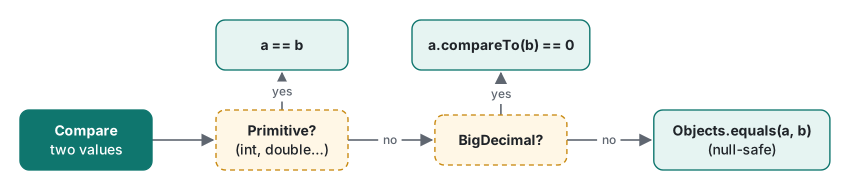
| You compare | Use | Why |
|---|---|---|
int, long, double, char, boolean |
== |
primitives hold the value |
String, Integer, Long, your objects |
a.equals(b) or Objects.equals(a, b) |
== is identity; Objects.equals also handles null |
BigDecimal |
a.compareTo(b) == 0 |
equals also compares the scale |
double results of arithmetic |
Math.abs(a - b) < 1e-9 |
rounding error, as shown above |
| enums | == |
each constant is a single object |
Strings are immutable, so build them with StringBuilder
A String object never changes. Methods such as toUpperCase, trim and replace return a new string. Ignoring the return value is a common beginner mistake:
String s = "java";
s.toUpperCase();
System.out.println(s);        // java
s = s.toUpperCase();
System.out.println(s);        // JAVA
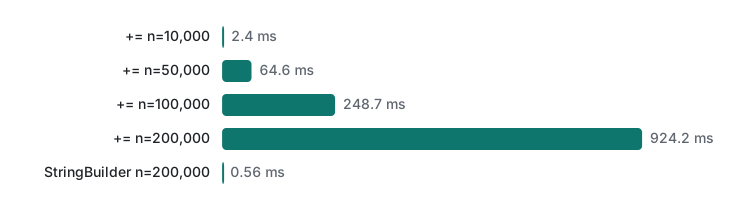
Immutability is why strings are safe to share and to use as HashMap keys. Its cost appears when you build a string piece by piece: s += x in a loop copies the whole string each time, so the work grows with the square of the length. We measured it:
public class Concat {
    static String plus(int n) {
        String s = "";
        for (int i = 0; i < n; i++) s += i % 10;
        return s;
    }
    static String builder(int n) {
        StringBuilder sb = new StringBuilder();
        for (int i = 0; i < n; i++) sb.append(i % 10);
        return sb.toString();
    }
    static double timeMs(java.util.function.IntFunction<String> f, int n) {
        long t0 = System.nanoTime();
        String r = f.apply(n);
        long t1 = System.nanoTime();
        if (r.length() != n) throw new AssertionError();
        return (t1 - t0) / 1e6;
    }
    public static void main(String[] args) {
        for (int w = 0; w < 5; w++) { plus(5_000); builder(5_000); }   // JIT warm-up
        for (int n : new int[]{10_000, 50_000, 100_000, 200_000}) {
            double best1 = Double.MAX_VALUE, best2 = Double.MAX_VALUE;
            for (int rep = 0; rep < 5; rep++) {
                best1 = Math.min(best1, timeMs(Concat::plus, n));
                best2 = Math.min(best2, timeMs(Concat::builder, n));
            }
            System.out.printf("n=%,7d  +=: %8.1f ms   StringBuilder: %6.2f ms%n", n, best1, best2);
        }
    }
}
n= 10,000  +=:      2.4 ms   StringBuilder:   0.14 ms
n= 50,000  +=:     64.6 ms   StringBuilder:   0.15 ms
n=100,000  +=:    248.7 ms   StringBuilder:   0.32 ms
n=200,000  +=:    924.2 ms   StringBuilder:   0.56 ms
Compiled with javac, run with java -cp, best of 5 after a short JIT warm-up, OpenJDK 26 on an M1 Pro. Three separate runs stayed within about 5% of each other (the 200,000 row ranged from 924 to 976 ms). Doubling n roughly quadruples the += time; StringBuilder stays linear.
You do not need StringBuilder everywhere. "Hello, " + name + "!" on one line is fine; the compiler optimises a single expression. The rule is: concatenation inside a loop that runs many times → StringBuilder (or String.join / Collectors.joining when you already have a collection).
var, text blocks and switch expressions
Three newer features change how beginner code looks. We compiled each with --release to check the version where it became standard.
var list = new ArrayList<String>();      // inferred: ArrayList<String>
var ratio = 10 / 4;                      // inferred: int, value 2

String json = """
    {
      "name": "t.laboratory",
      "path": "C:\\temp"
    }
    """;

static String kind(int day) {
    return switch (day) {
        case 6, 7 -> "weekend";
        case 1, 2, 3, 4, 5 -> {
            String s = "week";
            yield s + "day";
        }
        default -> throw new IllegalArgumentException("day " + day);
    };
}
varis still static typing: the type is fixed at compile time.var ratio = 10 / 4is anintwith value 2, not 2.5.var a;,var b = null;andvar c = {1, 2};are all errors (cannot infer type for local variable a, with the reason in parentheses).- In a text block, the indentation of the closing
"""decides how much leading space is stripped, and escapes still work (\\printed as one backslash). - An arrow
switchnever falls through. The old colon form does: withday = 1, our old-style switch printedMonday,Tuesdayandother.javac -Xlint:fallthroughwarns about it:warning: [fallthrough] possible fall-through into case. - A switch expression must cover every value. Without
defaulton anint, javac said:error: the switch expression does not cover all possible input values.
Common mistakes: the javac errors beginners actually hit
These are copied from javac 26. Note that javac reports errors in phases: type errors first, then flow errors such as "missing return". If you fix the first batch and a new batch appears, that is why, not because you broke something.
int count = "42";                 // 1
long big = 5_000_000_000L;
int small = big;                  // 2
double avg = 2.5;
int rounded = avg;                // 3
String s = null;
if (s = null) { }                 // 4
Mistakes.java:11: error: incompatible types: String cannot be converted to int
Mistakes.java:13: error: incompatible types: possible lossy conversion from long to int
Mistakes.java:15: error: incompatible types: possible lossy conversion from double to int
Mistakes.java:17: error: incompatible types: String cannot be converted to boolean
| Error | What actually happened | Fix |
|---|---|---|
String cannot be converted to int |
Java never converts text to numbers implicitly | Integer.parseInt("42") (throws NumberFormatException on bad input) |
possible lossy conversion from long to int |
narrowing could drop bits | keep it long, or Math.toIntExact(big) to throw on overflow; a plain (int) cast silently gave 705032704 |
possible lossy conversion from double to int |
the fraction would be lost | decide: (int) truncates, Math.round rounds |
String cannot be converted to boolean |
= assigns, == compares |
if (s == null) |
The flow errors:
static int sign(int x) {
    if (x > 0) return 1;
    else if (x < 0) return -1;
}                                       // x == 0 returns nothing
static int after() {
    return 0;
    System.out.println("never");
}
public static void main(String[] args) {
    int total;
    if (args.length > 0) total = 1;
    System.out.println(total);
}
Flow.java:5: error: missing return statement
Flow.java:8: error: unreachable statement
Flow.java:17: error: variable total might not have been initialized
"Missing return" points at the closing brace because that is where execution can fall out without a value. The fix is a final return 0; or an else branch, not return null. A statement after while (true) { } without a break is also "unreachable".
NullPointerException: read the helpful message
Since Java 14 (on by default since 15), an NPE tells you which expression was null. This one comes from auto-unboxing a missing Map value, a bug that has no . in the line at all:
Map<String, Integer> stock = new HashMap<>();
stock.put("apple", 3);
int n = stock.get("banana");
Exception in thread "main" java.lang.NullPointerException: Cannot invoke "java.lang.Integer.intValue()" because the return value of "java.util.Map.get(Object)" is null
    at Npe.main(Npe.java:7)
With a record chain, u.address().city().length() printed Cannot invoke "Modern$Address.city()" because the return value of "Modern$User.address()" is null, so you know which link broke.
One surprise: for a local variable, both java Npe2.java and a plain javac build printed because "<local1>" is null. Only after compiling with javac -g did it print because "name" is null. Build tools usually pass -g, so you will see names in Maven or Gradle builds, but not when compiling by hand.
Honest limits and version notes
- Everything above was compiled and run on OpenJDK 26 (Temurin 26+35), Apple Silicon Mac (M1 Pro). Timings are a single machine, best-of-N after warm-up, not a JMH benchmark; read them as ratios.
- Version claims we checked with
javac --release N:varfails on 9 and works on 10; switch expressions fail on 13 and work on 14; text blocks fail on 14 and work on 15; compact source files (void main()) fail on 24 and work from 25.--release 8still works on JDK 26 but printssource value 8 is obsolete and will be removed in a future release. - We did not run Java 11's single-file launch or Java 14's NPE messages on those old JDKs; we only ran them on 26. Multi-file source launch (Java 22) was run on 26 only.
-XX:AutoBoxCacheMaxis a HotSpot option; other JVMs may not have it.
Next: Java lecture 2/6: classes, records and interfaces. The same level in other languages: Python lecture 1 and VB.NET lecture 1. Coming from C#? Compare with C# variables and data types.
FAQ
Why does Integer 127 == 127 print true but 128 == 128 print false?
Autoboxing goes through Integer.valueOf, which returns cached objects for -128 to 127. Two boxed 127s are the same object, two boxed 128s are two different objects, and == on objects compares identity. The cache upper bound can even be raised with -XX:AutoBoxCacheMax, which made 128 == 128 print true in our run. Compare boxed numbers with equals (or unbox them).
Should I use double or BigDecimal for money in Java?
Neither double nor new BigDecimal(0.1). Adding 0.1 ten times in double gave 0.9999999999999999, and new BigDecimal(0.1) printed 0.1000000000000000055511151231257827021181583404541015625. Use BigDecimal built from a String (new BigDecimal("0.1")) or store whole minor units (cents, yen) in a long. Compare BigDecimal values with compareTo, because 1.10 and 1.1 are not equal().
Why does my NullPointerException say <local1> instead of the variable name?
Helpful NPE messages name local variables only if the class was compiled with debug info (javac -g). Without it, OpenJDK 26 printed: Cannot invoke "String.length()" because "<local1>" is null. With -g it printed because "name" is null. Fields, method return values and array elements are named either way.