C# Variables & Types on .NET 10: decimal vs double
C# variables, numeric ranges, var, nullable and const on .NET 10: the real 0.1 + 0.2 result, measured decimal vs double speed and the const trap.
Revised November 2026. This tutorial first appeared in Korean in 2021. We recompiled every example on .NET 10.0.14 (C# 14). All of them still run, but a few details in the original were wrong or have changed: the
longrange in the table was missing digits,floatanddoublenow print more digits than the 2021 output showed, andfloat.Parse("123.456")returns 123456 on a machine set to German. We also added what a 2021 beginner course left out:var,0.1 + 0.2, nullable value types,default,constvsreadonly, and a measured comparison ofdecimalanddoublespeed.
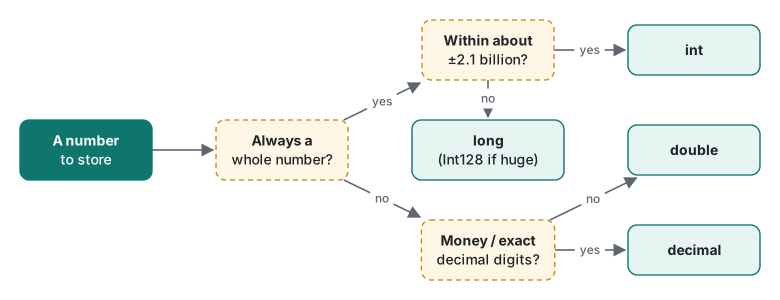
This article is for people starting C#, and for developers coming from Python or JavaScript who want to know which numeric type to pick and why. The short answer: use int for whole numbers and double for measurements, switch to long when values can pass about 2.1 billion, and use decimal for money because it is exact for decimal fractions, even though it was 6 to 45 times slower in our test. Other topics, such as arrays, have their own articles; links are at the end.
Declaring a variable, and what changed since 2021
A variable is a named storage location with a fixed type. You declare it with a type and a name, and you can initialize it in the same statement:
int a;          // declared, not yet assigned
a = 1000;       // assigned
int b = 2000, c = 3000;   // several at once, same type
Console.WriteLine(a);
1000
The 2021 version wrapped every example in namespace ConsoleApplication1 { class Program { static void Main… } } with four using lines. Since C# 10 and .NET 6, a new console project uses top-level statements and implicit usings, so the five lines above are the whole Program.cs. The old form still compiles. The "Press any key to continue" line in the 2021 output came from Visual Studio, not from the program.
Two small corrections to the original text:
- It described
intas "a decimal (base-10) integer".intis a 32-bit two's-complement binary integer. Base 10 is only how you write the literal;0x3E8and0b1111101000are the same value as1000. - It showed a picture of
int aoccupying four bytes at addresses00120B14to00120B17. We removed that image: its address column skipped00120B12, and a localintin .NET usually lives in a CPU register or on the stack frame, not at a fixed address you can count on.
You cannot read a local variable before assigning it. int x; Console.WriteLine(x); is a compile error (CS0165), not a random value as in C.
var: the type is still fixed
var lets the compiler infer the type from the initializer. The variable is still statically typed:
var v1 = 10; var v2 = 10L; var v3 = 10.0; var v4 = 10f; var v5 = 10m;
var v6 = 3_000_000_000;
Console.WriteLine($"{v1.GetType().Name} {v2.GetType().Name} {v3.GetType().Name} {v4.GetType().Name} {v5.GetType().Name} {v6.GetType().Name}");
Int32 Int64 Double Single Decimal UInt32
Note the last one. 3_000_000_000 does not fit in int, so the literal becomes uint, not long. If you write int i = 3_000_000_000; you get error CS0266: Cannot implicitly convert type 'uint' to 'int'. The underscore digit separator itself has been allowed since C# 7.0.
var needs an initializer with a type: var x; is error CS0818: Implicitly-typed variables must be initialized, and var y = null; is error CS0815: Cannot assign <null> to an implicitly-typed variable.
Numeric types and their real ranges
Rather than copying a table, we printed MinValue and MaxValue on .NET 10:
| Type | Size | Range (printed on .NET 10) |
|---|---|---|
byte / sbyte |
1 | 0 to 255 / -128 to 127 |
short / ushort |
2 | -32,768 to 32,767 / 0 to 65,535 |
int / uint |
4 | -2,147,483,648 to 2,147,483,647 / 0 to 4,294,967,295 |
long / ulong |
8 | -9,223,372,036,854,775,808 to 9,223,372,036,854,775,807 / 0 to 18,446,744,073,709,551,615 |
float |
4 | ±3.4028235E+38, about 7 significant digits |
double |
8 | ±1.7976931348623157E+308, about 15-17 digits |
decimal |
16 | ±79,228,162,514,264,337,593,543,950,335, 28-29 digits |
char |
2 | one UTF-16 code unit |
bool |
1 | true / false |
The 2021 table listed long as "-922337203685477508 to 922337203685477507". That is one digit short on both ends; the real limits are about ±9.22 × 10^18. It also wrote the decimal range as "±1.0x10e-28 to ±7.9x10e28"; 10e28 means 10^29, so the intended notation is ±1.0 × 10^-28 to ±7.9 × 10^28.
Types added since the original article: nint/nuint (C# 9, native-sized integers, 8 bytes on a 64-bit process), and Int128, UInt128 and Half (.NET 5/7 library types, not keywords). We printed Int128.MaxValue as 170141183460469231731687303715884105727.
The u prefix means unsigned: the type has no sign bit, so the bit pattern that would encode negative numbers is used for larger positive ones.
float, double, decimal: what 0.1 + 0.2 really prints
The 2021 floating-point example still compiles, but its output changed:
float a = 123.567891011f;
double b = 1234.567878910111213;
decimal c = 1234.56789101112131415161718m;
Console.WriteLine("a={0}, b={1}, c={2}", a, b, c);
a=123.567894, b=1234.5678789101112, c=1234.56789101112131415161718
In 2021 the post showed a=123.5679, b=1234.56787891011. Since .NET Core 3.0, ToString() on float and double prints the shortest string that round-trips to the same value, so you now see more digits. That is not a precision change; it is a formatting change. Old .NET Framework apps that compare formatted strings can break on this when ported.
The suffixes are required. Without f and m, .NET 10 reports:
error CS0664: Literal of type double cannot be implicitly converted to type 'float'; use an 'F' suffix to create a literal of this type
error CS0664: Literal of type double cannot be implicitly converted to type 'decimal'; use an 'M' suffix to create a literal of this type
(The 2021 code was printed as 123.567891011 f, with a space before the suffix. Copied literally, that is error CS1003: Syntax error, ',' expected. The suffix must touch the number.)
Now the famous one:
double d = 0.1 + 0.2;
Console.WriteLine($"{d}  {d == 0.3}");
Console.WriteLine($"{0.1m + 0.2m}  {0.1m + 0.2m == 0.3m}");
double sum = 0; for (int i = 0; i < 10; i++) sum += 0.1;
Console.WriteLine(sum);
Console.WriteLine($"{Math.Abs(d - 0.3) < 1e-9}");
0.30000000000000004  False
0.3  True
0.9999999999999999
True
double stores base-2 fractions, and 0.1 has no finite base-2 form, just as 1/3 has no finite base-10 form. decimal stores a base-10 mantissa and exponent, so 0.1 is exact. It is not magic: 1m / 3 * 3 printed 0.9999999999999999999999999999. And float runs out of integer precision early: 16777216f + 1 printed 16777216.
Measured: how much slower is decimal?
Exactness costs time. We summed 10 million values from a price array (two decimal places) with each type, using a Release build, Stopwatch, [MethodImpl(NoInlining)] loops, one warm-up and three measured runs on an Apple Silicon Mac (M1 Pro):
| Operation (10 M times) | double | decimal | ratio |
|---|---|---|---|
s += p[i] |
9.7-9.9 ms | 56.2-57.2 ms | ~6x |
s += p[i] * 1.08 |
9.8-10.2 ms | 69.9-72.6 ms | ~7x |
s += p[i] / 3 |
9.8-10.1 ms | 447.2-457.8 ms | ~45x |
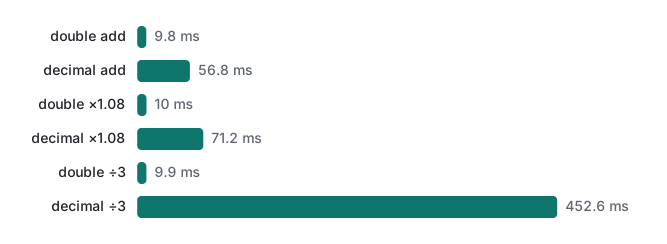
The same run showed why you would still pay that price. The exact total of the 10 million prices was 4924253250.72; the double total was 4924253250.706993, already off by more than a cent. For invoices and balances, use decimal. For sensor values, coordinates and statistics, double is the right default.
Conversions and parsing
Casting double to int truncates toward zero: (int)123.45 is 123 and (int)-123.45 is -123. If you want rounding, call Math.Round, and know that its default is banker's rounding: Math.Round(2.5) printed 2, Math.Round(3.5) printed 4. Casts that can overflow are covered in the operators article.
ToString() and Parse work as in 2021, but both use the current culture. On a German system the decimal separator is a comma, so:
var de = CultureInfo.GetCultureInfo("de-DE");
Console.WriteLine(float.Parse("123.456", de));
Console.WriteLine(float.Parse("123.456", CultureInfo.InvariantCulture));
123456
123.456
No exception, just a value 1,000 times too large. For data files, APIs and config, always pass CultureInfo.InvariantCulture. For user input, prefer TryParse: int.Parse("12a") throws FormatException: The input string '12a' was not in a correct format., while int.TryParse("12a", out var n) returns false.
object can hold anything because every type derives from System.Object. What the 2021 post did not mention is that putting a value type into object boxes it, a heap allocation. object a = 12345678910; stored a System.Int64. The cost of boxing is measured in C# generics.
Nullable value types and default
A value type such as int cannot be null. Add ? to get Nullable<int>:
int? n = null;
Console.WriteLine($"{n.HasValue} {n ?? -1} {n.GetValueOrDefault()}");
Console.WriteLine($"{(n + 1) is null} {n < 5} {n >= 5}");
int x = n.Value;   // warning CS8629, then InvalidOperationException at run time
False -1 0
True False False
Unhandled exception. System.InvalidOperationException: Nullable object must have a value.
Arithmetic with null gives null, and every comparison with null is false, including both n < 5 and n >= 5. The compiler warned on the .Value line: warning CS8629: Nullable value type may be null.
The default literal (C# 7.1) gives the zero value of any type: int x = default; is 0, bool is false, DateTime is 0001-01-01, and a reference type is null.
const vs readonly
The 2021 rules for const still hold, now with error codes:
k = 60;           // error CS0131: The left-hand side of an assignment must be a variable, property or indexer
const int a;      // error CS0145: A const field requires a value to be provided
A const must be a compile-time constant of a built-in type or string. public const DateTime T = DateTime.Now; gives error CS0283: The type 'DateTime' cannot be declared const. For values computed at run time, use static readonly, which can be assigned only in its initializer or a static constructor (error CS0198 otherwise).
The bigger difference is versioning. The compiler copies a const value into every assembly that uses it. We built a library with public const int MaxItems = 10; and public static readonly int MaxItemsRo = 10;, built an app that prints both, then changed both to 50 and replaced only the library DLL:
before: const=10 readonly=10
after:  const=10 readonly=50
The app kept printing the old const until it was rebuilt. Use const for values that never change (π, the number of months) or that stay inside one project; expose static readonly from libraries and NuGet packages.
Summary
| Need | Use |
|---|---|
| Counters, indexes, most whole numbers | int |
| IDs, timestamps, file sizes past 2.1 billion | long |
| Money, exact decimal fractions | decimal (6-45x slower in our test) |
| Measurements, science, graphics | double; compare with a tolerance |
| "No value yet" for a value type | int?, double?, … |
| Fixed literal used in one project | const |
| Public value that may change, or is computed | static readonly |
| Parsing data files | Parse(s, CultureInfo.InvariantCulture) or TryParse |
Next steps: operators and overflow in C# operators, branching in if and switch, and storing many values in C# arrays.
Tested with .NET SDK 10.0.403 / runtime 10.0.14, C# 14 (the net10.0 default), macOS on an Apple Silicon Mac (M1 Pro).
FAQ
Why does 0.1 + 0.2 not equal 0.3 in C#?
double stores binary fractions, and neither 0.1 nor 0.2 has an exact binary form. On .NET 10, 0.1 + 0.2 prints 0.30000000000000004 and (0.1 + 0.2 == 0.3) is False. With decimal, 0.1m + 0.2m is exactly 0.3. For double, compare with a tolerance such as Math.Abs(a - b) < 1e-9.
Should I use const or static readonly?
const values are copied into every assembly that uses them at compile time. In our test, changing a library const from 10 to 50 and replacing only the library DLL left the app still printing 10, while a static readonly field printed 50. Use const for values that truly never change (inside one project), and static readonly for anything public that might change or that is not a compile-time constant, such as a DateTime.
How much slower is decimal than double?
In a Release build on .NET 10 (Apple Silicon Mac), 10 million additions took 9.8 ms with double and 56.8 ms with decimal, multiplications 10.0 ms vs 71.2 ms, and divisions 9.9 ms vs 452.6 ms. That is roughly 6-7x for + and *, and about 45x for division. For money the exactness is usually worth it; for physics, graphics or statistics, use double.