Python Types and Mutability: Names, Copies, is vs ==
Python basics from real runs: why 0.1+0.2 isn't 0.3, list aliasing and the [[0]*3]*3 trap, copy vs deepcopy, is vs ==, real tracebacks and measured costs.
Series: Python lecture 1/6 (beginner). For people who can write a few lines of Python but get surprised when a list changes "by itself". After this lecture you will be able to predict when two variables share one object, pick the right copy, and read the first tracebacks every beginner meets.
If you came to Python from Excel macros, JavaScript or C#, three things will bite you in your first week: 0.1 + 0.2 prints 0.30000000000000004, a list you never touched changes, and is sometimes agrees with == and sometimes does not. All three come from one idea, a variable in Python is a name attached to an object, not a box that holds a value. Every output below was produced by running the code on Python 3.9 and Python 3.11 on an Apple Silicon Mac (M1 Pro); file paths in tracebacks are shortened to ~/demo/.
Names point to objects
Run this:
a = [1, 2, 3]
b = a
b.append(4)
print("a =", a, "| a is b:", a is b, "| id equal:", id(a) == id(b))

x = 10
y = x
y += 1
print("x =", x, "y =", y)
a = [1, 2, 3, 4] | a is b: True | id equal: True
x = 10 y = 11
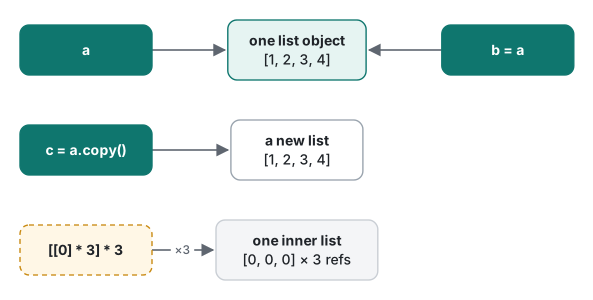
b = a did not copy the list. It attached a second name to the same list object, so appending through b is visible through a. With the integers, y += 1 looks like the same pattern but behaves differently: an int cannot be changed, so y += 1 builds a new int object 11 and moves the name y onto it. x still points to 10.
That is the whole difference between mutable and immutable types:
| Type | Mutable? | What += does |
|---|---|---|
int, float, bool, None |
no | builds a new object, rebinds the name |
str, tuple, frozenset, bytes |
no | builds a new object, rebinds the name |
list, dict, set, bytearray |
yes | changes the object in place; every name sees it |
The basic types, and two surprises
print(type(1), type(1.0), type("1"), type(True), type(None))
print(True + True, isinstance(True, int))
<class 'int'> <class 'float'> <class 'str'> <class 'bool'> <class 'NoneType'>
2 True
bool is a subclass of int, so True + True is 2. That is occasionally handy (sum(x > 0 for x in data) counts positives) and occasionally a bug, for example when a JSON field that should be a number arrives as true and still passes isinstance(v, int).
0.1 + 0.2, and when to reach for Decimal
import math
from decimal import Decimal

print(0.1 + 0.2, 0.1 + 0.2 == 0.3)
print(f"{0.1:.20f}")
print(math.isclose(0.1 + 0.2, 0.3))
print(Decimal("0.1") + Decimal("0.2"), Decimal(0.1))
print(round(2.675, 2), round(0.5), round(1.5), round(2.5))
0.30000000000000004 False
0.10000000000000000555
True
0.3 0.1000000000000000055511151231257827021181583404541015625
2.67 0 2 2
A float is a binary IEEE 754 double. 0.1 has no exact binary form, so the stored value is a tiny bit more than 0.1, and the errors of 0.1 and 0.2 add up. This is not a Python bug; JavaScript, Java and C# print the same thing. Two lines in that output trip people up:
Decimal(0.1)is not 0.1. Passing a float hands Decimal the already-wrong binary value. Always build Decimals from strings:Decimal("0.1").round(2.675, 2)gives2.67, because the stored value is 2.67499999…, andround(0.5)/round(2.5)give0and2because Python rounds halves to the even neighbour ("banker's rounding").
When to use which:
| Situation | Use |
|---|---|
| Money, invoices, tax, anything a human will add up by hand | Decimal built from strings |
| Measurements, physics, graphics, ML | float, compare with math.isclose |
| Counting whole things (items, cents) | int (store 1999 cents, not 19.99) |
Common mistake: [[0] * 3] * 3
You want a 3×3 grid of zeros, and this looks right:
grid = [[0] * 3] * 3
grid[0][0] = 9
print("trap :", grid)

grid = [[0] * 3 for _ in range(3)]
grid[0][0] = 9
print("fixed:", grid)
trap : [[9, 0, 0], [9, 0, 0], [9, 0, 0]]
fixed: [[9, 0, 0], [0, 0, 0], [0, 0, 0]]
What actually happens: [[0] * 3] is a list holding one inner list. Multiplying the outer list by 3 copies the reference three times, so all three rows are the same object. The inner [0] * 3 is fine because it repeats references to the immutable 0, and you can never change a 0 in place.
Fix: build each row separately with a comprehension, as in the second half. The same trap appears as [{}] * n and [[]] * n.
Copying: assignment, copy, deepcopy
There are three levels, and beginners usually need the second when they think they need the first.
import copy

orig = {"name": "app", "tags": ["a", "b"]}
sh = copy.copy(orig)       # shallow: new dict, same inner list
dp = copy.deepcopy(orig)   # deep: new dict, new inner list
sh["tags"].append("SH")
print("orig:", orig, "| deep:", dp)
orig: {'name': 'app', 'tags': ['a', 'b', 'SH']} | deep: {'name': 'app', 'tags': ['a', 'b']}
The shallow copy made a new dict, but its "tags" value is still the original list, so appending to it changed orig. The deep copy walked the whole structure and copied every mutable object inside.
Immutability is also shallow. A tuple cannot be reassigned, but a list inside it can still change:
t = (1, [2, 3])
t[1].append(4)
print(t)
t[0] = 99
(1, [2, 3, 4])
TypeError: 'tuple' object does not support item assignment
Strings behave like tuples: s[0] = "z" raises TypeError: 'str' object does not support item assignment. Use s = "z" + s[1:] or s.replace(...), both of which build a new string.
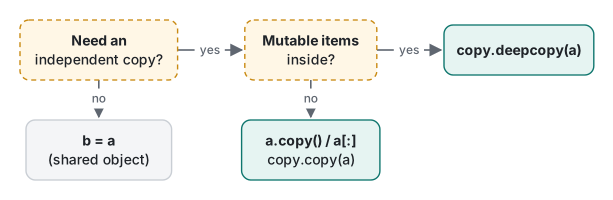
deepcopy is not free. On a config dict holding 1,000 user records (each with a small tag list), copy.copy took 0.25 µs and copy.deepcopy took 5.4 ms, roughly 20,000 times longer (Python 3.9, best of 5). Deep-copy once at a boundary, not inside a loop.
is vs ==, and the small-int cache
== asks "are the values equal?". is asks "are these the same object?". They often agree by accident:
a = 256; b = int("256")
c = 257; d = int("257")
print(a is b, c is d, c == d)
print(None is None)
True False True
True
CPython keeps one shared object for every int from -5 to 256, so any 256 is the same object. 257 is not cached, so int("257") built a fresh object. The result also depends on how the code is compiled. Typed line by line into the interactive interpreter:
>>> a = 257
>>> b = 257
>>> a is b
False
But inside one .py file, x = 257; y = 257; print(x is y) printed True, because the compiler stored the constant once for the whole module. Same code, different answer. That is exactly why you must not rely on it, and Python 3.8+ tells you so when it compiles your file:
~/demo/islit.py:5: SyntaxWarning: "is" with a literal. Did you mean "=="?
  print(n is 1000)
Rule: use == for values, and is only for singletons, in practice x is None (and x is not None).
Truthiness and f-strings
Every object has a truth value. The rule is "empty or zero is false, everything else is true":
for v in (0, 0.0, "", "0", [], [0], None, {}, " "):
    print(repr(v), bool(v))
0 False
0.0 False
'' False
'0' True
[] False
[0] True
None False
{} False
' ' True
"0" and " " are true: they are non-empty strings. Watch for this when you read form input or CSV cells. if count: also treats 0 like "missing"; when 0 is a valid value, write if count is not None:.
f-strings (Python 3.6+) are the modern way to format output, and {n=} (3.8+) is a debugging gift:
name, n = "lecture", 3
print(f"{name!r} {n:03d} {3.14159:.2f} {1234567:,} {n=}")
'lecture' 003 3.14 1,234,567 n=3
Reading your first tracebacks
Two errors every beginner hits in week one. First, adding a number to a string:
age = 30
print("Age: " + age)
Python 3.9:
Traceback (most recent call last):
  File "~/demo/age.py", line 2, in <module>
    print("Age: " + age)
TypeError: can only concatenate str (not "int") to str
Python 3.11 adds markers that point at the failing expression:
    print("Age: " + age)
          ~~~~~~~~^~~~~
TypeError: can only concatenate str (not "int") to str
Read a traceback from the bottom: the last line is the error type and message, the line above it is where it happened. Fix with f"Age: {age}" or "Age: " + str(age). Python never converts silently between str and int, unlike JavaScript.
Second, mixed indentation:
def total(prices):
    s = 0
    for p in prices:
        s += p
      return s          # 6 spaces: matches neither 4 nor 8
  File "~/demo/indent.py", line 5
    return s
            ^
IndentationError: unindent does not match any outer indentation level
There is no "Traceback" header: this is raised when the file is compiled, before any line runs. Forgetting to indent a function body gives IndentationError: expected an indented block on 3.9, which 3.11 improves to expected an indented block after function definition on line 1. Set your editor to insert 4 spaces for Tab and the whole class of error disappears.
A measurement: list vs tuple
sys.getsizeof reports the size of the container object itself (not the items it points to):
import sys
print(sys.getsizeof([]), sys.getsizeof(()))
for n in (1, 10, 1000):
    data = list(range(n))
    print(n, sys.getsizeof(data), sys.getsizeof(tuple(data)))
| Items | list (bytes) | tuple (bytes) |
|---|---|---|
| 0 | 56 | 40 |
| 1 | 64 | 48 |
| 10 | 136 | 120 |
| 1,000 | 8,056 | 8,040 |
Each slot is an 8-byte pointer, so the difference is a fixed 16-byte header, not a percentage. A list built by append is bigger, because it over-allocates to make the next appends cheap: appending 20 items one by one, the size went 56 → 88 → 120 → 184 → 248 bytes in steps.
Build time is where it gets interesting (timeit, 1,000,000 builds, best of 5, Python 3.9; the last two rows were timed as x = 5; …, so they include one assignment):
| Expression | Time per build |
|---|---|
[1, 2, 3, 4, 5] |
36 ns |
(1, 2, 3, 4, 5) |
4.3 ns |
[1, 2, 3, 4, x] |
42 ns |
(1, 2, 3, 4, x) |
39 ns |
The 8× gap is not "tuples are fast". dis shows that the all-constant tuple is folded into one constant at compile time (LOAD_CONST ((1, 2, 3, 4, 5))), while the list must be built every time (BUILD_LIST + LIST_EXTEND). As soon as one element is a variable, both are built at run time and the times are close. Choose tuple vs list by meaning (a fixed record vs a growing collection), not by these nanoseconds.

The Decimal cost from earlier, measured: summing 100,000 prices (seeded with random.Random(42)) took 0.28 ms as floats and 3.5 ms as Decimals (best of 5; a second run gave 4.5 ms). The float total printed 5051429.01000001, the Decimal total 5051429.01. For a shopping cart that is nothing; for a numeric simulation, stay with float.
Honest limits / version notes
- Every snippet was run on Python 3.9.6 and Python 3.11.4. Timings are from 3.9 only, on an Apple Silicon Mac (M1 Pro); expect different absolute numbers elsewhere.
- The small-int range (-5 to 256) and constant folding are CPython implementation details, not language rules. PyPy and future CPython versions may differ, which is one more reason not to depend on
isfor numbers. sys.getsizeofsizes are for 64-bit CPython 3.9; they shift slightly between versions.- The 3.11 traceback markers (
~~~^~~~) come from PEP 657. Python 3.12 and 3.13 improve messages further (for example "Did you mean …?" suggestions in more places); we did not run those versions here.
Next
The next lecture covers functions: arguments, the mutable default argument trap (the same aliasing you just saw, hiding in a def), scope and closures.
- Next: Python lecture 2/6: functions, scope and default arguments
- Later in the series: iterators and generators, decorators and context managers, threads, processes, asyncio and the GIL, profiling and optimization
- Same topic in other languages: Java lecture 1: types, strings and equality, VB.NET lecture 1: Option Strict and types
FAQ
Why did changing one list also change another variable in Python?
Because b = a does not copy anything. It gives the same list object a second name, so a.append() and b.append() change one object. Use a.copy() (or copy.deepcopy if the list contains lists or dicts) when you need an independent list.
Why does [[0] * 3] * 3 change every row when I set one cell?
The outer * 3 repeats a reference to one inner list three times. Setting grid[0][0] = 9 printed [[9, 0, 0], [9, 0, 0], [9, 0, 0]]. Build the rows with a comprehension instead: [[0] * 3 for _ in range(3)].
Should I use is or == to compare values in Python?
Use == for values and keep is for identity, in practice for None (x is None). 256 is int('256') was True but 257 is int('257') was False on Python 3.9 and 3.11, because only small ints are cached. Python even warns: SyntaxWarning: "is" with a literal.