HTTP Status Codes and Redirects, Tested with curl
HTTP lecture 2: a php -S router for 2xx-5xx, POST under 301/302/303 vs 307/308 with curl -L, 404 vs 410, a crash sent as 200, redirect costs.
Series: HTTP lecture 2/6 (beginner). For people who finished lecture 1 and now have to decide what an endpoint should return, or why a client "lost" its POST data after a redirect. By the end you will have written a small router that returns every common status code, and you will have watched curl follow 301, 302, 303, 307 and 308 with a POST.
Status codes look like trivia until one of them costs you a day: a login form that silently turns into a GET, an old URL that redirects in a circle, or a crashed PHP page that monitoring reports as healthy because it returned 200. This lecture runs each of those cases on your own machine so you can recognise them in logs later. Everything was run with PHP 8.5.6 (php -S) and curl 8.7.1 on an Apple Silicon Mac (M1 Pro); paths are shortened to ~/demo/.
A router you can test against
php -S is PHP's development server. Given a router script, it sends every request to that script, which lets us return any status code we want. Save this as ~/demo/router.php:
<?php
// php -S 127.0.0.1:18102 router.php
$path   = parse_url($_SERVER['REQUEST_URI'], PHP_URL_PATH);
$method = $_SERVER['REQUEST_METHOD'];

function redirect(int $code, string $to): void {
    http_response_code($code);
    header("Location: $to");
}

if (preg_match('#^/hop/(\d+)$#', $path, $m)) {      // /hop/3 -> /hop/2 -> ... -> /hop/0
    $n = (int)$m[1];
    if ($n > 0) { redirect(301, '/hop/' . ($n - 1)); } else { echo "arrived\n"; }
    exit;
}

switch ($path) {
    case '/':        echo "home\n"; break;
    case '/old':     redirect(301, '/new'); break;    // moved for good
    case '/temp':    redirect(302, '/echo'); break;   // temporary
    case '/see':     redirect(303, '/echo'); break;   // "go GET this"
    case '/t307':    redirect(307, '/echo'); break;   // temporary, keep method
    case '/p308':    redirect(308, '/echo'); break;   // permanent, keep method
    case '/new':     echo "new page\n"; break;
    case '/echo':    echo "$method body=[" . file_get_contents('php://input') . "]\n"; break;
    case '/loop-a':  redirect(302, '/loop-b'); break;
    case '/loop-b':  redirect(302, '/loop-a'); break;
    case '/gone':    http_response_code(410); echo "deleted on purpose\n"; break;
    case '/items':
        if ($method !== 'POST') { http_response_code(405); header('Allow: POST'); break; }
        http_response_code(201); header('Location: /items/42'); echo "{\"id\":42}\n"; break;
    case '/items/42':
        if ($method === 'DELETE') { http_response_code(204); break; }
        echo "{\"id\":42}\n"; break;
    case '/private': http_response_code(401); header('WWW-Authenticate: Bearer'); break;
    case '/admin':   http_response_code(403); echo "forbidden\n"; break;
    case '/busy':    http_response_code(503); header('Retry-After: 30'); echo "maintenance\n"; break;
    case '/boom':    throw new RuntimeException('db down');
    case '/slow':    sleep(3); echo "finally\n"; break;
    default:         http_response_code(404); echo "not found: $path\n";
}
cd ~/demo && php -S 127.0.0.1:18102 router.php
http_response_code() sets the status, header() adds a header. Both must run before any output; lecture 3 shows what happens otherwise. In the outputs below we removed the Date, Host, Connection and X-Powered-By lines to keep them short, except where they matter.
2xx: it worked, but how?
200 is not the only success. A typical REST resource uses three:
$ curl -si -X POST -d '{"name":"a"}' -H 'Content-Type: application/json' http://127.0.0.1:18102/items
HTTP/1.1 201 Created
Host: 127.0.0.1:18102
Date: Thu, 12 Nov 2026 14:29:26 GMT
Connection: close
X-Powered-By: PHP/8.5.6
Location: /items/42
Content-type: text/html; charset=UTF-8

{"id":42}

$ curl -si -X DELETE http://127.0.0.1:18102/items/42 | head -1
HTTP/1.1 204 No Content
- 201 Created says a new resource exists, and
Locationsays where. A client should not have to guess the new id. - 204 No Content means success with an intentionally empty body. A client that always calls
JSON.parseon the body will crash on it; check the code first.
Two quirks are visible in the full output: php -S sends a Host header in the response (real servers do not), and it forgot to change Content-type from its text/html default although we sent JSON. Real APIs must set Content-Type: application/json themselves (lecture 3).
4xx: the client asked wrong
$ curl -si http://127.0.0.1:18102/nope
HTTP/1.1 404 Not Found
Content-type: text/html; charset=UTF-8

not found: /nope

$ curl -si http://127.0.0.1:18102/gone
HTTP/1.1 410 Gone
Content-type: text/html; charset=UTF-8

deleted on purpose

$ curl -si http://127.0.0.1:18102/private
HTTP/1.1 401 Unauthorized
WWW-Authenticate: Bearer
Content-type: text/html; charset=UTF-8

$ curl -si http://127.0.0.1:18102/admin
HTTP/1.1 403 Forbidden
Content-type: text/html; charset=UTF-8

forbidden

$ curl -si http://127.0.0.1:18102/items | grep -E 'HTTP|Allow'
HTTP/1.1 405 Method Not Allowed
Allow: POST
The pairs beginners mix up:
- 401 vs 403. 401 means "I don't know who you are": log in or send a token. It should come with
WWW-Authenticate. 403 means "I know who you are, and the answer is no". Retrying with the same token will not help. - 404 vs 410. Both say "not here". 410 adds "removed on purpose, will not come back".
- 405 means the URL exists but not for this method, and
Allowlists the methods that work. Returning 404 here sends people looking for a typo in the URL.
Other 4xx you will meet: 400 (malformed request, e.g. invalid JSON), 409 (conflict, e.g. duplicate username), 422 (well-formed but invalid data), 429 (too many requests, usually with Retry-After).
5xx and the crash that returned 200
/boom throws an exception that nobody catches. This is the real response with Homebrew's default settings (display_errors on):
$ curl -si http://127.0.0.1:18102/boom
HTTP/1.1 200 OK
Host: 127.0.0.1:18102
Date: Thu, 12 Nov 2026 14:32:09 GMT
Connection: close
X-Powered-By: PHP/8.5.6
Content-type: text/html; charset=UTF-8

<br />
<b>Fatal error</b>:  Uncaught RuntimeException: db down in ~/demo/router.php:38
Stack trace:
#0 {main}
  thrown in <b>~/demo/router.php</b> on line <b>38</b><br />
Common mistake: "the status code tells me whether the page worked." What actually happens: a fatal error printed into a 200 OK, plus your server path handed to every visitor. A health check like curl -f passes, an app tries to parse HTML as JSON, and a search engine may index the error text. Fix: turn display_errors off outside your own machine and log errors instead. The same request on a second server started with php -d display_errors=0 -d log_errors=1 -S 127.0.0.1:18103 router.php:
$ curl -si http://127.0.0.1:18103/boom | head -1
HTTP/1.0 500 Internal Server Error
$ curl -fsS http://127.0.0.1:18103/boom; echo "exit=$?"
curl: (22) The requested URL returned error: 500
exit=22
and the error went to the server log, where it belongs:
[Thu Nov 12 14:30:07 2026] PHP Fatal error: Uncaught RuntimeException: db down in ~/demo/router.php:38
(Note the HTTP/1.0 on the 500: another php -S quirk.) For planned downtime, 503 Service Unavailable with Retry-After tells clients and crawlers to come back:
$ curl -si http://127.0.0.1:18102/busy
HTTP/1.1 503 Service Unavailable
Retry-After: 30
Content-type: text/html; charset=UTF-8

maintenance
3xx: 301, 302, 303, 307, 308 with a POST
A redirect is a 3xx status plus a Location header. curl prints it but does not follow unless you add -L:
$ curl -s -o /dev/null -w '%{http_code} %{redirect_url}\n' http://127.0.0.1:18102/old
301 http://127.0.0.1:18102/new
The interesting part is what happens to a POST. We sent the same form body to each redirect and let /echo print what arrived:
$ for p in /old /temp /see /t307 /p308; do curl -sL -d 'name=mina' http://127.0.0.1:18102$p -w 'final=%{http_code} redirects=%{num_redirects}\n'; done
new page
final=200 redirects=1
GET body=[]
final=200 redirects=1
GET body=[]
final=200 redirects=1
POST body=[name=mina]
final=200 redirects=1
POST body=[name=mina]
final=200 redirects=1
-v shows the moment it happens:
> POST /temp HTTP/1.1
< HTTP/1.1 302 Found
< Location: /echo
* Issue another request to this URL: 'http://127.0.0.1:18102/echo'
* Switch from POST to GET
> GET /echo HTTP/1.1
The 301 case did the same (* Switch from POST to GET, then > GET /new).
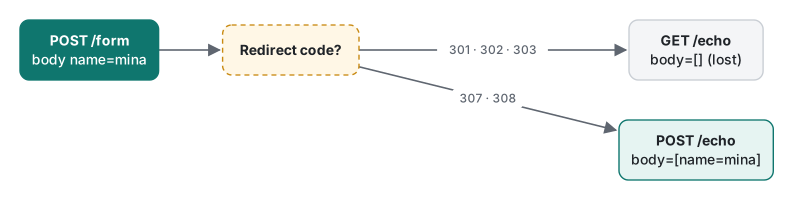
| Code | Meaning | Method after redirect (curl -L, browsers) | Typical use |
|---|---|---|---|
| 301 | moved permanently | POST becomes GET | old URL → new URL, http → https for pages |
| 302 | found, temporary | POST becomes GET | short-lived detours |
| 303 | see other | always GET | after a form POST (Post/Redirect/GET) |
| 307 | temporary, keep method | unchanged | temporary move of an API endpoint |
| 308 | permanent, keep method | unchanged | permanent move of an API endpoint |
The historic reason: HTTP/1.0 did not allow clients to change the method on 301/302, browsers changed POST to GET anyway, and later specs accepted that. HTTP/1.1 added 303 to mean "GET this on purpose" and 307 to mean "keep the method"; 308 (RFC 7538, 2015) is the permanent version of 307. For a mobile app that POSTs to an old API path, this is the difference between working and silently losing the body; the Dart client case is in Dart http: POST redirect not followed.
Common mistake: forcing the method with -X POST. What actually happens: curl keeps the word POST but still drops the body.
$ curl -sL -X POST -d 'name=mina' http://127.0.0.1:18102/temp
POST body=[]
-v showed * Switch from POST to GET followed by > POST /echo HTTP/1.1 with no Content-Length and no body: a request no real client sends. Fix: do not use -X with -d. If you really want curl to re-POST after a 302, use --post302 (or --post301, --post303), which kept the body: POST body=[name=mina].
Removing a page: 301, 404 or 410?
| Situation | Return | Why |
|---|---|---|
| Content moved to a new URL | 301 (pages) or 308 (APIs taking POST) | clients and search engines move to the new URL |
| Content temporarily elsewhere | 302 / 307 | the old URL stays the real one |
| Deleted on purpose, no replacement | 410 | says "do not come back" explicitly |
| Unknown URL, typos, never existed | 404 | the honest default |
| Deleted, but you redirect to the home page | avoid | search engines tend to treat it as a "soft 404", users get confused |
| Down for maintenance | 503 + Retry-After |
not an error of the page itself |
For search engines, Google's documentation treats 4xx codes (except 429) alike: the URL drops out of the index. Google staff have said a 410 may be processed a little faster; we did not measure that.
Redirect loops and timeouts
Two routes pointing at each other:
$ curl -sSL --max-redirs 5 http://127.0.0.1:18102/loop-a -o /dev/null; echo "exit=$?"
curl: (47) Maximum (5) redirects followed
exit=47
$ curl -sSL http://127.0.0.1:18102/loop-a -o /dev/null -w 'redirects=%{num_redirects}\n'
curl: (47) Maximum (50) redirects followed
redirects=50
curl's default limit is 50; browsers give up much earlier and show "too many redirects" (not run here). Real loops usually come from two rules disagreeing, for example the application forcing https while a proxy in front talks to it over http, or www and non-www rules pointing at each other. curl -sIL URL | grep -i -E '^(HTTP|location)' prints the chain hop by hop.
A server that never answers is the other failure. /slow sleeps 3 seconds:
$ curl -sS --max-time 1 http://127.0.0.1:18102/slow
curl: (28) Operation timed out after 1001 milliseconds with 0 bytes received
Without --max-time, curl waits as long as the server keeps the connection open. Always set it in scripts.
Measured: what a redirect costs
/hop/N redirects N times before answering. 30 runs per chain length after one warm-up, curl -sL -w '%{time_total}', median, on 127.0.0.1:
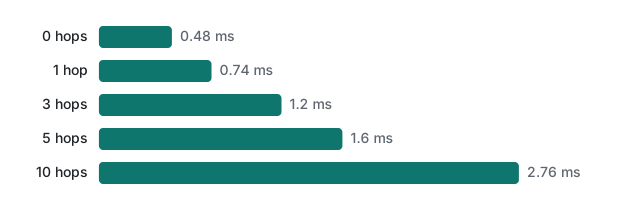
About 0.23 ms per hop locally, because each hop is a full new request and, with php -S closing every connection, a new TCP connection too. On the internet each hop costs at least one round trip. Five requests to our own site gave:
| Request | Median of 5 | Range |
|---|---|---|
https://tlaboratory.net/ directly |
62.1 ms | 59.4–183.1 ms |
http://tlaboratory.net/ with -L (1 redirect to https) |
124.6 ms | 99.3–174.5 ms |
One HTTP→HTTPS redirect doubled the time of the first request. Link to the final URL directly, and avoid chains like http:// → https:// → https://www. → /new-path/.
Honest limits and version notes
- Status codes and redirect semantics are now in RFC 9110 (June 2022). 303 and 307 came with HTTP/1.1 (RFC 2068 in 1997 and RFC 2616 in 1999); 308 was RFC 7538 (2015) and is now part of RFC 9110.
- The POST→GET switch was observed in curl 8.7.1. Browsers do the same for 301/302/303 and keep the method for 307/308, but we did not run a browser. Browsers also cache 301 and 308 redirects, sometimes for a long time; curl does not cache anything, so a "fixed" redirect can still appear in your browser.
php -S(8.5.6) is single-process and closes the connection after every response; it also adds aHostresponse header and answered the 500 withHTTP/1.0. Apache, nginx and LiteSpeed behave differently in these details.display_errorswas on because the Homebrewphp.iniwe used is the development one. Your server's default may differ; check withphp -i | grep display_errors.- The tlaboratory.net timings are 5 samples from one network; your numbers will differ.
Exercises
1. A mobile app POSTs JSON to /api/v1/save. You move the endpoint to /api/v2/save. Which status code do you return from the old path, and why not 301?
2. Your monitoring runs curl -s https://example.test/health every minute and alerts on non-zero exit codes. It never fired, although the page showed a PHP fatal error for an hour. Give two reasons and the fixed command.
3. Without running it: what does curl -s -o /dev/null -w '%{http_code} %{num_redirects}\n' http://127.0.0.1:18102/hop/3 print, and what changes with -L?
Answers
1. 308 Permanent Redirect (or 307 if it is temporary). With 301, clients that follow the redirect switch POST to GET and drop the body, as /old did above; with 308 the method and body survived (POST body=[name=mina]). Also note that old app versions may not follow redirects for POST at all, so an internal rewrite on the server is often safer than any redirect.
2. (a) Without -f, curl exits 0 for any HTTP status. (b) With display_errors on, the fatal error was sent with status 200 anyway. Fix both: display_errors=0 on the server (so a crash becomes 500), and curl -fsS --max-time 10 https://example.test/health, which exits 22 on 4xx/5xx and 28 on a hang.
3. 301 0: curl stops at the first response. With -L it prints 200 3 and the body arrived goes to /dev/null.
Next
- Previous: HTTP lecture 1/6: requests, responses and curl -v
- Next: HTTP lecture 3/6: headers, cookies and sessions
- Later: caching with ETag and Cache-Control, HTTPS and TLS, keep-alive and compression
- Redirects cached by a CDN: CDN caches API responses and redirects
- Rewrite rules that break on non-ASCII URLs: LiteSpeed .htaccess rewrites and non-ASCII URLs
- The
php -Sserver from the PHP side: PHP functions, forms and the built-in server - All lecture series: programming learning roadmap
FAQ
Why did my POST become a GET after a redirect?
With 301, 302 and 303, clients switch POST to GET and drop the body. curl -L printed Switch from POST to GET and the target saw GET body=[]. With 307 and 308 the method and body are kept: the target saw POST body=[name=mina]. Use 307 or 308 when a POST must survive a redirect, or 303 on purpose after a form submit.
Should a deleted page return 404 or 410?
Both tell clients the page is not there. 410 Gone says it was removed on purpose and will not come back; 404 only says nothing is here now. If the content moved, neither is right: return a 301 to the new URL. A 404 is fine as the default for unknown URLs.
My PHP page crashed but curl shows 200 OK. Why?
With display_errors on, PHP printed the fatal error into the body and the response kept status 200, so monitoring that checks only the code saw success. With display_errors=0 the same crash returned 500 Internal Server Error and curl -f exited with 22.