Mojibake: Why ’ Appears and How to Fix It in Python
Reproduce ’ and é on purpose, read the pattern, repair double-encoded text with encode/decode, and measure which mojibake is reversible.
Series: Text & Encoding lecture 2/6 (beginner). For developers who have seen don’t, café or � in their app, a database or an e-mail, and want to know what happened and whether it can be undone. By the end you will reproduce mojibake on purpose, recognize the common patterns at a glance, repair double-encoded text safely, and know which cases are lost for good.
This lecture is for whoever gets the ticket "the apostrophes are broken again": a WordPress import full of ’, a CSV where every é became é, a log that says UnicodeDecodeError: 'utf-8' codec can't decode byte 0x92. Mojibake (文字化け, Japanese for "character transformation") is what you get when correct bytes are decoded with the wrong encoding. The good news: most of it can be reversed, if nobody has "fixed" it with errors="replace" first. Everything below ran on an Apple Silicon Mac (M1 Pro) with Python 3.9.6, PHP 8.5.6 and the macOS iconv; file paths in tracebacks are shortened to ~/demo/.
If bytes, code points and UTF-8 are new to you, read lecture 1 first. This one assumes you can read e2 80 99 as three bytes.
How mojibake happens: right bytes, wrong decoder
There are only two directions, and each produces its own look.
UTF-8 bytes decoded as a legacy encoding (Windows-1252, Latin-1). Every non-ASCII character turns into two or three "foreign" characters, and the text grows. This decode almost never fails, which is why the damage spreads silently.
Legacy bytes decoded as UTF-8. The legacy bytes are usually not valid UTF-8, so a strict decoder stops with UnicodeDecodeError, and a lenient one prints � (U+FFFD, the REPLACEMENT CHARACTER).
You can make both on purpose in two lines:
print("don’t café".encode("utf-8").decode("cp1252"))   # don’t café
print("don’t café".encode("cp1252").decode("utf-8", "replace"))   # don�t caf�
Why exactly ’? The curly apostrophe U+2019 is e2 80 99 in UTF-8. In Windows-1252, byte e2 is â, 80 is € and 99 is ™. Every ’ costs you three characters. é is c3 a9; c3 is à and a9 is ©.

The same mechanism hits every language, with its own legacy encoding. I ran the four that this site's readers meet most:
| Original | Saved as | Read as | You see |
|---|---|---|---|
don’t |
UTF-8 | cp1252 | don’t |
“smart” |
UTF-8 | latin-1 | â\x80\x9csmartâ\x80\x9d (invisible control characters) |
año |
UTF-8 | cp1252 | año |
ありがとう |
UTF-8 | cp932 (Shift_JIS) | 縺ゅj縺後→縺� (with errors="replace") |
한글 |
UTF-8 | cp1252 | 한글 |
café |
cp1252 | UTF-8 | caf�, or UnicodeDecodeError |
文字化け |
cp932 | cp1252 | •¶Žš‰»‚¯ |
한글 |
cp949 | cp1252 | ÇÑ±Û |
Notice that “ read as Latin-1 gives â plus two invisible C1 control characters, while Windows-1252 gives “. Latin-1 and Windows-1252 agree on every byte except 0x80–0x9F, which is exactly where €, ’, “, ”, — and ™ live in Windows-1252. That difference matters for repair, as you will see.
Your first five minutes: the real error message
Save a file the way an old Windows program would, then open it the default way:
# make_old.py: write the bytes an old Windows program would write
open("old.txt", "wb").write("don’t café\n".encode("cp1252"))
# readfile.py: run as  python3 readfile.py old.txt
import sys
with open(sys.argv[1]) as f:     # no encoding= → UTF-8 on macOS and Linux
    print(f.read())
Traceback (most recent call last):
  File "~/demo/readfile.py", line 3, in <module>
    print(f.read())
  File ".../lib/python3.9/codecs.py", line 322, in decode
    (result, consumed) = self._buffer_decode(data, self.errors, final)
UnicodeDecodeError: 'utf-8' codec can't decode byte 0x92 in position 3: invalid start byte
Read the last line like a detective. 0x92 at position 3 (counting from 0, right after don) is the apostrophe in Windows-1252. invalid start byte means a byte from 0x80 to 0xBF showed up where UTF-8 needs the first byte of a character. A byte in 0x80–0x9F in a "text" file is a strong hint of Windows-1252. The fix is to say what the file is: open("old.txt", encoding="cp1252") printed don’t café.
xxd confirms it in one line: 646f 6e92 7420 6361 66e9 0a. One byte per character, and e9 for é, is a single-byte legacy encoding, not UTF-8 (c3 a9).
Recognizing the patterns
With a little practice, the garbage tells you its own cause. These are outputs from the runs above:
| You see | Typical cause | Repair |
|---|---|---|
é, ñ, ’, “, ¿ |
UTF-8 read as cp1252 | s.encode("cp1252").decode("utf-8") |
ñ (four characters for one) |
the above, done twice | apply the repair twice |
caf�, don�t (ASCII intact, one � per accented letter) |
cp1252/Latin-1 read as UTF-8 with replacement | re-read the original bytes as cp1252; the str is lost |
縺, 繧, 繝 mixed with random kanji |
Japanese UTF-8 read as Shift_JIS/cp932 | partial at best; re-read the bytes as UTF-8 |
한글, 안녕 |
Korean UTF-8 read as cp1252 | s.encode("cp1252").decode("utf-8") |
ÇÑ±Û |
Korean cp949 read as cp1252 | s.encode("cp1252").decode("cp949") |
Repairing double encoding
The most common real-world case is "UTF-8 read as cp1252, then saved as UTF-8 again": the text now is valid UTF-8, it just contains é. Since no bytes were lost, you can run the steps backward:
print("don’t".encode("cp1252").decode("utf-8"))   # don’t
print("año".encode("cp1252").decode("utf-8"))     # año
twice = "año".encode().decode("cp1252").encode().decode("cp1252")
print(twice, "->", twice.encode("cp1252").decode("utf-8"),
      "->", twice.encode("cp1252").decode("utf-8").encode("cp1252").decode("utf-8"))
don’t
año
año -> año -> año
Two traps here. First, use the same codec that broke it. "don’t".encode("latin-1") fails with 'latin-1' codec can't encode characters in position 4-5: ordinal not in range(256), because € and ™ do not exist in Latin-1.
Second, Python's cp1252 is stricter than a browser's. Five bytes, 81 8D 8F 90 9D, are undefined in Windows-1252. Python raises on them; browsers (per the WHATWG Encoding Standard) map them to the invisible C1 controls U+0081 and so on. The closing quote ” is e2 80 9d in UTF-8, so its last byte hits that hole: '“Hola”' mangled by a browser-like decoder comes back as '“Holaâ€\x9d', and .encode("cp1252") then fails with character maps to <undefined>. A repair function that handles both:
def unmojibake(s, codec="cp1252"):
    out = bytearray()
    for ch in s:
        try:
            out += ch.encode(codec)
        except UnicodeEncodeError:
            if ord(ch) < 256:          # U+0081 etc. left by a browser-style decoder
                out.append(ord(ch))
            else:
                raise
    return out.decode("utf-8")
Only run it on text you have identified as double-encoded. Applied to clean text it raises (good) or, on short strings, can turn valid text into something else. Check a sample by eye before running it on a whole table.
PHP produces the same bug in one call, which is a good way to find it in legacy code. mb_convert_encoding("año", "UTF-8", "Windows-1252") on a string that was already UTF-8 returned bytes 61 c3 83 c2 b1 6f, which print as año. The reverse call, mb_convert_encoding("año", "Windows-1252", "UTF-8"), printed año. A classic database version of this is a MySQL connection left at latin1 while the application sends UTF-8: the server stores each byte as a Latin-1 character and re-encodes it. That is described from experience with MySQL, not run here; SQL basics covers the client side.
strict, replace, ignore and surrogateescape
Every Python decode takes an errors argument. Here are all of them on the same Windows-1252 bytes of café (63 61 66 e9):
| errors= | Result | Reversible? |
|---|---|---|
strict (default) |
UnicodeDecodeError: 'utf-8' codec can't decode byte 0xe9 in position 3: unexpected end of data |
nothing decoded |
replace |
'caf�' |
no |
ignore |
'caf' |
no, and silent |
backslashreplace |
'caf\\xe9' |
by hand |
surrogateescape |
'caf\udce9' |
yes: .encode("utf-8", "surrogateescape") gave the original bytes back |
The encoding side has the same switch. Encoding "¡Olé! 👍 €" to Latin-1 with errors="replace" gave b'\xa1Ol\xe9! ? ?': the emoji and the euro sign (which Latin-1 lacks; cp1252 has it at 0x80) became plain ? bytes, indistinguishable from a real question mark. xmlcharrefreplace gave 👍 € instead, which at least keeps the information.
iconv on macOS
iconv converts files from the shell. iconv -l lists the names it knows; WINDOWS-1252, CP932, CP949 and UTF-8 are all there.
$ printf "don’t café\n" | iconv -f WINDOWS-1252 -t UTF-8      # wrong direction on purpose
don’t café
$ printf "don’t café\n" | iconv -f UTF-8 -t WINDOWS-1252     # the repair
don’t café
$ iconv -f UTF-8 -t UTF-8 old.txt; echo "exit=$?"            # validate a file
iconv: iconv(): Illegal byte sequence
donexit=1
$ iconv -c -f UTF-8 -t UTF-8 old.txt; echo "exit=$?"
dont caficonv: unexpected end of file; the last character is incomplete.
exit=1
iconv -f UTF-8 -t UTF-8 is a handy validator: it stops at the first bad byte (after printing don) and exits 1. -c drops what it cannot convert, which is the shell version of errors="ignore": don’t café became dont caf. Do not ship -c in a pipeline unless you log the warning.
//TRANSLIT (approximate characters you cannot encode) exists on macOS but its output surprised me: naïve café to ASCII became na"ive caf'e, and don’t came out as do', a control byte 0x19, a space and t. Do not rely on it for user-facing text.
Common mistake: "fixing" the error with replace or ignore
Mistake. A job crashes with UnicodeDecodeError, and someone adds errors="ignore" (or iconv -c) so the nightly import goes green.
What actually happens. The crash disappears and the data quietly loses letters: café becomes caf, naïve becomes nave. Nobody notices until a customer named José complains. With replace it is at least visible (caf�), but the original byte is still gone.
PHP has its own silent version. Feeding invalid UTF-8 to htmlspecialchars with explicit flags ENT_QUOTES (without ENT_SUBSTITUTE) returned an empty string on PHP 8.5. The default flags since PHP 8.1 include ENT_SUBSTITUTE, which returned � for each bad byte instead. Code written before 8.1 often passes ENT_QUOTES alone, so a single bad byte blanks the whole field.
Fix. Find out what the bytes really are (xxd, the patterns above, lecture 6 on detection) and decode with that. If you must pass unknown bytes through, use surrogateescape, which round-trips. Keep replace for display only, never for data you write back.
When it cannot be undone: a measurement
Which mojibake is reversible? I generated 1,000 random strings of 20 characters per language (random.Random(42), characters drawn from a sample sentence for each language), encoded them as UTF-8, decoded them with the wrong codec, and then tried unmojibake:
rng = random.Random(42)
for _ in range(1000):
    s = "".join(rng.choice(POOL) for _ in range(20))
    raw = s.encode("utf-8")
    try:
        wrong = raw.decode(codec)              # how often does the wrong decode even succeed?
    except UnicodeDecodeError:
        wrong = raw.decode(codec, handler)     # what a lenient tool would have shown
    fixed += unmojibake(wrong, codec) == s
ja read as cp932   (replace): decoded without error   49/1000, repaired   49/1000
ko read as cp949   (replace): decoded without error    0/1000, repaired    0/1000
es read as cp1252  (replace): decoded without error  584/1000, repaired  584/1000
es read as cp1252  (c1     ): decoded without error  584/1000, repaired 1000/1000
es read as latin-1 (strict ): decoded without error 1000/1000, repaired 1000/1000
en read as cp1252  (replace): decoded without error  688/1000, repaired  688/1000
en read as cp1252  (c1     ): decoded without error  688/1000, repaired 1000/1000
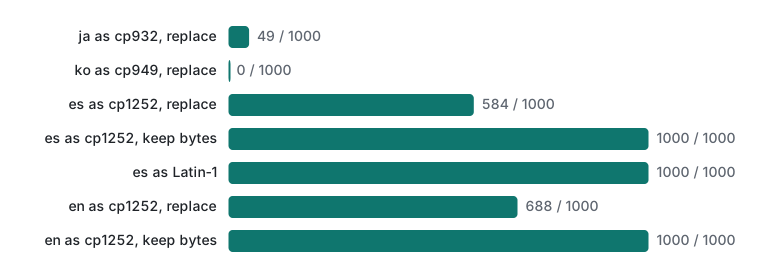
For English, 312 of 1,000 strings contained a byte from the five-byte hole (all of them from ”, whose last UTF-8 byte is 9d). Decoded Python-style with replace, they were lost; decoded browser-style, all 1,000 came back. The browser-style decoder is one line, a custom error handler that keeps each undefined byte as the matching U+0081…U+009D character:
import codecs
codecs.register_error("c1", lambda e: (chr(e.object[e.start]), e.start + 1))
"“Hola”".encode().decode("cp1252", "c1")   # '“Holaâ€\x9d', and unmojibake() reverses it
Latin-1 maps all 256 bytes, so it never loses anything. Japanese and Korean UTF-8 read as cp932/cp949 almost always hits an invalid sequence, and once a � is in, the repair fails. Copy the loop, put a sample of your own data in the pool, and measure before you promise a customer that the text can be fixed.
The irreversible cases, in short:
- Any
�that was saved. The bytes behind it are gone. - Any
?written by an encoder witherrors="replace"("①"to Shift_JIS, an emoji to Latin-1). - Anything dropped by
ignoreoriconv -c. - Text converted to an encoding that lacks a character and the tool chose a look-alike (
//TRANSLIT).
Honest limits / version notes
- Python 3.9.6, PHP 8.5.6 with mbstring, macOS 26
iconv(it has no--version; it is not GNU libiconv, and messages differ from Linux). Linux and Windows were not run here. - On Windows, Python before 3.15 opens text files with the locale encoding (cp1252 on English Windows) unless you pass
encoding=. PEP 686 makes UTF-8 the default from Python 3.15. That is from the PEP, not run here. - The browser behaviour for the five undefined bytes is from the WHATWG Encoding Standard; no browser was run. MySQL
latin1double encoding is described, not run. ftfy, a popular library that automates this repair, is not installed here (nothing was installed), so it is not compared.- The 1,000-string test draws from short sample sentences, so it exaggerates rare characters like
”. Measure your own data.
Exercises
- You find
Ñandáin a customer table. What were they, and what line of Python repairs them? - A file starts with the bytes
64 6f 6e 92 74. Which encoding is it most likely in, and what does it say? - Why does
"año".encode("latin-1").decode("utf-8")work, but"don’t".encode("latin-1").decode("utf-8")fail?
Answers
Ñandá.s.encode("cp1252").decode("utf-8")turnedÑintoÑandáintoá.- Windows-1252:
0x92is the curly apostrophe there (and invalid as a UTF-8 start byte). It saysdon’t. Ãand±both exist in Latin-1, so the bytesc3 b1come back.€and™do not exist in Latin-1, so the encode fails withordinal not in range(256); usecp1252(orunmojibake) for text broken by a Windows-1252 decoder.
Next
Sometimes the bytes are perfect UTF-8 on both sides and the strings still do not match. That is Unicode normalization.
- Previous: Text & Encoding lecture 1/6: characters, code points and UTF-8 bytes
- Next: Text & Encoding lecture 3/6: Unicode normalization, NFC/NFD and filenames
- Later: CSV encodings, the BOM and Excel, string length and emoji, detection and performance
- Related: HTTP headers, Content-Type charset and cookies, non-ASCII URLs in .htaccess on LiteSpeed, the programming learning roadmap
FAQ
Why does don’t show up as don’t?
The text was saved as UTF-8, where the curly apostrophe U+2019 is the three bytes E2 80 99, and then read as Windows-1252, which shows those bytes as â, € and ™. Nothing is lost: s.encode('cp1252').decode('utf-8') turned don’t back into don’t.
Can every kind of mojibake be repaired?
No. UTF-8 read as Latin-1 is always reversible, because Latin-1 maps all 256 bytes. But once a tool used errors='replace' or wrote ? in place of a character, the original bytes are gone. In our test, 1,000 of 1,000 strings came back when the wrong decode kept every byte, and only 688 of 1,000 when Python's cp1252 had replaced undefined bytes.
Should I use errors='ignore' to stop UnicodeDecodeError?
Only if losing data is acceptable. errors='ignore' turned café saved as Windows-1252 into caf without any warning. Find the real encoding and decode with it, or use errors='surrogateescape' when you must pass unknown bytes through unchanged.