Old Blog Posts: A Privacy and Copyright Audit
Before republishing 67 posts from 2021, we audited text and images: account names in compiler paths, real names in sample data, copied diagrams.
If you are about to republish or translate old blog posts, this is the check to run first. A tutorial written years ago can carry personal data and copyright risks that nobody noticed back then. We revised 67 programming tutorials from 2021 into new English, Japanese and Korean articles. Before any of them went public again, we audited every post's text and every image it used. The audit removed real names, Windows account names and 85 images, and the rest of this post explains what we looked for and how.
The revision itself was done by parallel AI sub-agents, described in Revising 67 Old Posts with Parallel AI Agents. Each agent audited its own posts against a shared brief. The main session then ran site-wide checks before the deploy. Below, names and paths are described only in general terms, for the obvious reason.
What we found
| What | Where it was | What we did |
|---|---|---|
| A Windows account name | In pasted compiler errors and in the output of programs that print their own path (C:\Users\<name>\Documents\Visual Studio …), across several posts |
Replaced with fresh output from today's compiler, with paths trimmed |
| The same kind of path in an image | A 2021 exception screenshot | Image deleted; the post now shows real .NET 10 output |
| Two different account names | Across the 2021 posts as a whole | Both removed everywhere |
| The author's name as sample data | Two posts used it as a value in example code | Replaced with neutral sample names |
| A real celebrity's name | Sample data in one post | Replaced |
| A signed-in profile picture | A screenshot of the IDE's main window | Image deleted |
| Someone else's user folder | A vendor promotional image reused in a setup post | Image deleted |
| Textbook-style diagrams | Graph, maze, queue and object diagrams, a "Figure 3." captioned diagram | Replaced with our own figures |
| Vendor tutorial screenshots | Two images whose file names and red-box style matched the vendor's own docs | Replaced |
| Stock and product photos | A stock 3D image of people in a queue; a designer bookshelf product photo | Deleted |
| A game's UI | A screenshot of a game that no longer ships with the OS | Deleted |
| Hand-drawn letter shapes | Console art that might be someone's initials | Deleted, to be safe |
Two things surprised us. First, the riskiest text was never prose. It was always pasted output, which writers copy without reading because it is "just what the compiler said". Second, even fresh output carries local paths. One agent's new compiler output for a Win32 post contained the toolchain's install path, which it trimmed to …/winuser.h before publishing. Re-running the code does not make the output clean by itself.
Text: pattern scans, and what they miss
Each agent scanned its own posts. After waves of agents finished, the main session scanned the whole site. The patterns we used look for structure, not for specific names, so the same scan works for anyone:
"""Scan Markdown posts for text that often leaks personal data. Prints counts, not the values."""
import re, sys, pathlib, collections

RULES = {
    "windows-user-folder": r"[Cc]:\\+[Uu]sers\\+[^\\\s<>]+",
    "unix-home-dir":       r"/(?:Users|home)/[a-z][\w.-]+",
    "email":               r"[\w.%+-]+@[\w-]+(?:\.[\w-]+)+",
    "temp-dir":            r"/var/folders/\w+",
}
ALLOW = re.compile(r"example\.|/me\b|\bid@")   # placeholders we wrote on purpose

root = pathlib.Path(sys.argv[1])
hits = collections.Counter(); files = collections.defaultdict(set); allowed = 0
for p in root.rglob("*.md"):
    for n, line in enumerate(p.read_text(encoding="utf-8").splitlines(), 1):
        for name, rx in RULES.items():
            for m in re.finditer(rx, line):
                if ALLOW.search(m.group(0)):
                    allowed += 1
                    continue
                hits[name] += 1; files[name].add(str(p))
print("files scanned:", sum(1 for _ in root.rglob("*.md")))
for name in RULES:
    print(f"{name:20} {hits[name]:3} hits in {len(files[name])} files")
print("placeholders skipped:", allowed)
Run over the blog's content/ folder today (Python 3.9, standard library only):
files scanned: 259
windows-user-folder    3 hits in 3 files
unix-home-dir          0 hits in 0 files
email                  9 hits in 6 files
temp-dir               0 hits in 0 files
placeholders skipped: 27
The 12 remaining hits were all reviewed by eye. The three Windows hits are C:\Users\… with an ellipsis, in the setup post, where we explain that the old screenshot showed a user folder. The e-mail hits are a capitalised Dev@Example.com the allow-list does not catch, and test addresses in a regex post, some with non-ASCII domains on purpose. A scan cannot decide these. It can only make the list short enough for a person to read.
What the scan does not catch is names. Our first site-wide search for the operator's name used a word-boundary pattern, and it missed one post where the name was joined to another word in a sample identifier. An agent found that one by reading the post. We widened the pattern and searched again, and the final site-wide scan before the deploy came back clean. Names need a pattern built for each name, run case-insensitively and without word boundaries, plus a person reading the sample data. Fake-looking sample values are exactly where real names end up.
Images: open every one
We had no OCR tool on the machine, so the image audit could not be automated, and we decided that was fine. The brief told every agent to open every image its 2021 post referenced, look at it, and decide. When the last six-post batch started, the legacy image folder held 114 files.
Opening the images found problems that no text scan could have found. An avatar has no text. A user name inside a screenshot is pixels. A diagram copied from a textbook has no watermark. It just has the look of a textbook. The agents reported what they saw: "Microsoft promo capture showing a user folder path", "VS2019 main window showing the signed-in account's profile avatar", "a stock 3D image of people standing in line".
Each image went through the same rule, in this order:
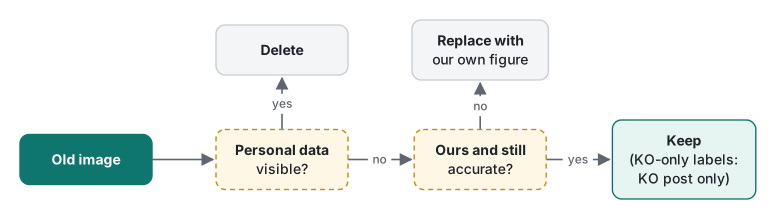
Personal data comes first because nothing else can make up for it. A screenshot that is accurate, useful and our own still goes if it shows an account. After that, the question is whether the image is clearly ours and still accurate. Being ours is not enough. One diagram was removed because its constraint table was wrong, and another because its labels suggested the wrong indexing for a 2D array.
Keep, replace or delete
| The image is… | Decision | Example from this audit |
|---|---|---|
| Showing a user name, folder path, e-mail or avatar | Delete, even if accurate | Exception screenshot with a local path; IDE window with an avatar |
| Third-party: stock, product, game UI, vendor promo | Delete | Queue stock image; bookshelf photo; vendor promo |
| Possibly copied: textbook look, vendor tutorial style | Replace with our own figure | Graph and maze diagrams in the BFS/DFS posts |
| Ours, but wrong | Replace | A constraint table with errors |
| Ours, but outdated (old installer screens, old OS) | Delete, or replace if the idea is still needed | 11 installer and IDE screens from a 2019 setup guide |
| Ours, accurate, labels in Korean only | Keep in the Korean post only | A generics diagram with Korean labels |
| Ours, accurate, language-neutral | Keep in all languages | A one-dimensional array diagram |
The last rows matter. An audit that deletes everything is easy and loses real work. Of the images still on disk when the last batch started, 28 are still used by the revised posts.
Replacing images with figures we draw from code
Every removed diagram that still carried an idea was replaced with a figure defined in YAML and rendered to SVG at build time. The renderer draws boxes, arrows and bar charts, in three languages, with dark mode and a phone layout. Across the 67 revised posts there are now 108 such figures. Because we draw them from text, their copyright question has a simple answer: we wrote them. They also cannot contain a stray avatar or path, because placeholders like example.com and <app> are the only names in them.
This also changed what the figures are for. The old images were mostly screenshots of a moment, an IDE or an installer, and they age badly. The new figures show the idea: how a jagged array sits in memory, or when greedy search fails. Those stay accurate.
Backup, prune, check 404
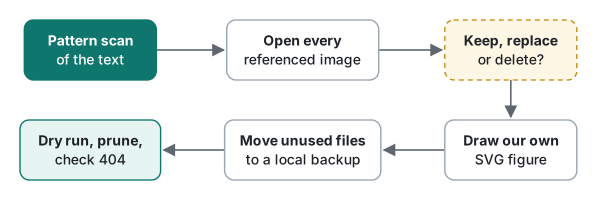
Taking an image out of a post does not take it off the internet. The file stays at its old URL, and that URL may already be in an image index. So removal had four steps:
- List unused files. A short script compares every file in the legacy image folder with every
/static/img/legacy/…reference in the posts. - Move them to a local backup, not delete them. If a judgment was wrong, the original is one copy away.
- Dry-run the deploy with prune. Our deploy script deletes only files it uploaded itself, and only under an allow-list of paths. The dry run printed the exact list. We checked that it contained images only:
prune would delete: 74 | non-image: []. - Deploy, then request a removed URL and expect 404. In the first batch that was the screenshot with the local path; in the second, the IDE screenshot with the avatar:
404 /static/img/legacy/2021/06/20190404_171228_204.png
The last step belongs to the operator: a CDN cache purge from the hosting panel, because a CDN can keep serving a deleted file until its cache expires.
The count, across two deploys: 11 images in the first batch and 74 in the second, so 85 moved out and pruned, all kept locally. One more file should have gone and did not. Here is the same unused-image script, run while writing this article:
29 files, 28 referenced, 1 unused
   /static/img/legacy/2021/07/st.jpg
That is the bookshelf product photo. It was on the list of 75 unused files, but the shell loop that moved them skipped the last line of the list, because the file had no final newline. It stayed on the server at its old URL, although no post used it. It goes out in the same deploy as this article. The loop bug is written up in When the AI Agent's First Diagnosis Was Wrong. The lesson for audits: compare the count you listed, the count you moved and the count the server deleted.

Honest limits
- "Looks copied" is a judgment, not proof. We did not trace every diagram to a source. We removed anything we could not confidently call our own. Some of those were probably ours.
- No OCR. Text inside images was read by eye, image by image. That worked for 114 images. For thousands it would not.
- The web remembers. Pruning stops our server from serving a file. It does not remove copies in search caches or web archives. For anything sensitive, a removal request to the search engine is a separate step.
- This is not legal advice. We applied a conservative rule to our own posts. Whether a particular image is fair use is a question for someone qualified to answer it.
- Scans are snapshots. The text scan above covered 259 files at the time of writing. New posts need the same scan, which is why it is now part of every agent brief.
The short version: read the pasted output, open every image, draw your own figures, keep a local backup, and prove deletion with a 404 and a count.
FAQ
Where does personal data hide in old programming tutorials?
Mostly in pasted tool output: compiler errors and stack traces that include a Windows user folder, screenshots of an IDE that show the signed-in account's avatar, and sample data where the author typed their own name. None of it looks like personal data while you are writing the tutorial.
Is it enough to remove the image from the post?
No. Removing the reference leaves the file at its old URL, and search engines may already know that URL. We moved each unused file to a local backup, deleted it from the server with a dry run first, and checked that the URL returned 404. A CDN cache purge by the operator is the last step.
How did you decide an image was a copyright risk?
We could not prove the origin of every 2021 image, so we used a rule: keep an image only if it is clearly our own work and still accurate. Textbook-style diagrams, vendor tutorial screenshots, stock photos and product photos were replaced with figures we draw from code.