PHP Security: XSS, CSRF, Sessions Tested on PHP 8.5
XSS in four contexts, a CSRF check that passed an empty token, session fixation via real Set-Cookie headers, bcrypt vs argon2id timed, unsafe uploads.
Series: PHP lecture 5/6 (advanced). For developers who can already build a PHP form and a PDO query and now need to ship it to the public internet. After this lecture you can escape output for the right context, write a CSRF check that has no hole, harden sessions against fixation, choose a password hash cost from a measurement, and accept file uploads without running someone else's code.
If you maintain a PHP site that has login, a comment box or an upload button, this is the list of mistakes that actually get exploited. Each one below is shown on PHP's built-in server bound to 127.0.0.1, attacked with curl, with the raw response kept. One of the bugs was ours: the first version of the CSRF check written for this lecture accepted an empty token, and we left the output in.
Environment: PHP 8.5.6 CLI and built-in server (php -S 127.0.0.1:8851), curl 8.7.1, Apple Silicon Mac (M1 Pro), macOS. All examples are generic; none comes from a real application. Paths in the output are shortened to ~/demo/.
Lecture 4 (PDO, SQLite and SQL injection) covered the database side. For what this looks like in a ten-year-old codebase, see our audit write-up: fixing SQLi and XSS in legacy PHP without changing output.
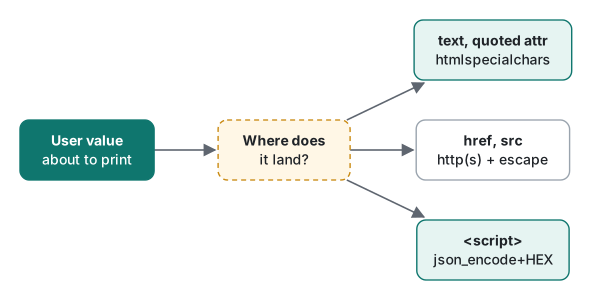
XSS: one input, four output contexts
Cross-site scripting (XSS) means an attacker gets their HTML or JavaScript into a page that another user's browser runs. Reflected XSS comes straight back from the request (a search box); stored XSS is saved first (a comment) and served to everyone. The fix is the same for both: escape on output, for the context the value lands in. This page prints one parameter in five places:
<?php
// xss.php — one input, five output contexts. Run: php -S 127.0.0.1:8851 -t www
declare(strict_types=1);
$q = $_GET['q'] ?? '';
function e(string $s): string { return htmlspecialchars($s, ENT_QUOTES | ENT_SUBSTITUTE, 'UTF-8'); }
header('Content-Type: text/html; charset=UTF-8');
?>
<p>1 raw:       <?= $q ?></p>
<p>2 escaped:   <?= e($q) ?></p>
<a href="<?= e($q) ?>">3 href, escaped</a>
<input value=<?= e($q) ?>>
<script>
var a = "<?= e($q) ?>";                                  // 5a htmlspecialchars in JS
var b = <?= json_encode($q, JSON_UNESCAPED_SLASHES | JSON_UNESCAPED_UNICODE) ?>;   // 5b "pretty" flags
var c = <?= json_encode($q, JSON_HEX_TAG | JSON_HEX_AMP | JSON_HEX_APOS | JSON_HEX_QUOT | JSON_THROW_ON_ERROR) ?>; // 5c safe
</script>
curl -G --data-urlencode 'q=</script><script>alert(1)</script>' returned:
<p>1 raw: </script><script>alert(1)</script></p>
<p>2 escaped: </script><script>alert(1)</script></p>
...
var a = "</script><script>alert(1)</script>";
var b = "</script><script>alert(1)</script>";
var c = "<\/script><script>alert(1)<\/script>";
Line 1 is the classic hole. Line b is the surprise: json_encode escapes / by default ("<\/script>"), which is exactly what keeps </script> from closing the block. Teams add JSON_UNESCAPED_SLASHES | JSON_UNESCAPED_UNICODE to make JSON readable (very common in code that outputs Japanese or Korean), and that removes the protection. The HTML parser ends the script at the first </script>, whatever JavaScript thinks is a string.
Two more payloads show where htmlspecialchars is not the right tool even though it ran:
q=javascript:alert(1)
<a href="javascript:alert(1)">3 href, escaped</a>

q=x onfocus=alert(1) autofocus
<input value=x onfocus=alert(1) autofocus>
Nothing in javascript:alert(1) needs escaping, so the link runs script when clicked. For URLs, check the scheme against an allow-list (http, https) before escaping. The unquoted attribute needs no quote to break out: a space starts a new attribute. Always quote attributes; then htmlspecialchars with ENT_QUOTES is enough.
Line a fails differently. With the input Tom "the cat" O'Neil:
var a = "Tom "the cat" O'Neil";
var b = "Tom \"the cat\" O'Neil";
var c = "Tom "the cat" O'Neil";
Inside <script> the browser does not decode entities, so the user's name becomes the literal text ". That is a data bug rather than XSS, but in a context without quotes, such as var id = <?= e($id) ?>;, the input 1;alert(1) contains no special characters and runs. json_encode with the four JSON_HEX_* flags produces a valid JavaScript literal of the right type and never emits <, >, &, ' or ".
Invalid UTF-8: two different failures
Sending the Latin-1 byte \xE9 (q=caf%E9) showed the last trap. With JSON_THROW_ON_ERROR, the page died mid-output:
Fatal error:  Uncaught JsonException: Malformed UTF-8 characters, possibly incorrectly encoded in ~/demo/www/xss.php:15
Stack trace:
#0 ~/demo/www/xss.php(15): json_encode('caf\xE9', 4194319)
Without the flag, json_encode returns false and var c = ; is a syntax error. Note also that this error page printed the file path to the visitor: display_errors must be off in production. And a detail about htmlspecialchars flags we confirmed with php -r:
htmlspecialchars("caf\xe9")              → string(6) "caf�"   (default flags include ENT_SUBSTITUTE)
htmlspecialchars("caf\xe9", ENT_QUOTES)  → string(0) ""
Passing ENT_QUOTES alone replaces the default flags, dropping ENT_SUBSTITUTE, and invalid input turns into an empty string. Always pass ENT_QUOTES | ENT_SUBSTITUTE.
Stored XSS on a comment board
A tiny board saves comments with a prepared statement (so no SQL injection) and prints them back. ?raw=1 skips escaping:
$ curl -b j1 -d 'body=<script>alert(document.cookie)</script>' '.../board.php?nocsrf=1'
saved
$ curl -b j1 '.../board.php?raw=1'
<li><script>alert(document.cookie)</script></li>
$ curl -b j1 '.../board.php'
<li><script>alert(document.cookie)</script></li>
Prepared statements protect the query, not the page. Store the text as the user typed it, and escape when you print. Escaping before saving breaks the data for JSON APIs and leads to double escaping (&lt;).
CSRF: random_bytes, hash_equals, and the empty-token hole
Cross-site request forgery (CSRF) makes the victim's browser send a request to your site, with the victim's cookies, from a page the attacker controls. The usual defence is a secret token in the session that every state-changing form must echo back:
function csrf_token(): string {
    return $_SESSION['csrf'] ??= bin2hex(random_bytes(32));   // 64 hex chars, 256 bits
}
random_bytes uses the operating system's cryptographic random source. mt_rand, rand and uniqid are predictable and must never be used for tokens.
Common mistake: a CSRF check that accepts nothing
The mistake. Our first version:
function csrf_check(): void {
    $sent = $_POST['csrf'] ?? '';
    if (!is_string($sent) || !hash_equals($_SESSION['csrf'] ?? '', $sent)) {
        http_response_code(403);
        exit("403 bad CSRF token\n");
    }
}
It rejected a missing token, a wrong token and csrf[]=x (an array) with 403, and accepted the right one with 200. What actually happened with a victim who logged in but never opened a page that called csrf_token():
$ curl -c v1 -b v1 -d user=alice .../login.php
id=9dd562e445a4cb40820d8ec11a1b560f user=alice
$ curl -i -b v1 -d "body=attack&csrf=" .../board.php
HTTP/1.1 200 OK
saved
The session has no token, so $_SESSION['csrf'] ?? '' is '', the attacker sends '', and hash_equals('', '') is true. The fix: treat a missing stored token as failure.
function csrf_check(): void {
    $expected = $_SESSION['csrf'] ?? null;
    $sent     = $_POST['csrf'] ?? null;
    if (!is_string($expected) || $expected === '' || !is_string($sent)
        || !hash_equals($expected, $sent)) {
        http_response_code(403);
        exit("403 bad CSRF token\n");
    }
}
Same request after the fix: HTTP/1.1 403 Forbidden. The is_string checks matter too: without them hash_equals throws instead of returning false:
PHP Fatal error:  Uncaught TypeError: hash_equals(): Argument #2 ($user_string) must be of type string, null given
#0 Command line code(1): hash_equals(Object(SensitiveParameterValue), Object(SensitiveParameterValue))
(The SensitiveParameterValue in the trace is PHP hiding both arguments so the secret does not end up in logs.)
Why hash_equals and not ===
=== stops at the first differing byte; hash_equals always looks at every byte. We timed 5 million comparisons per case, third of three rounds:
| Comparison | 4,096-byte strings | 64-byte strings |
|---|---|---|
===, differs at byte 0 |
26.8 ns | 26.5 ns |
===, differs at last byte |
154.8 ns | 28.1 ns |
hash_equals, first byte |
2,122.9 ns | 73.1 ns |
hash_equals, last byte |
2,113.8 ns | 72.7 ns |
With long strings the leak is obvious (27 vs 155 ns). For a 64-character token the difference is under 2 ns and would be hard to measure over a network, but hash_equals costs nothing worth saving, so use it. Never use ==: var_dump("0e1234" == "0e9999") prints bool(true) on PHP 8.5, because both strings look like the number 0 in scientific notation, and md5("240610708") == md5("QNKCDZO") is also true.
Sessions: fixation, session_regenerate_id and cookie flags
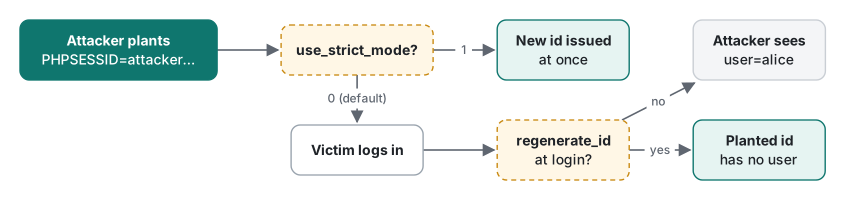
Session fixation means the attacker chooses the session id before the victim logs in, then reuses it. The login script:
<?php
require __DIR__ . '/common.php';                // session_start() lives here
if ($_SERVER['REQUEST_METHOD'] === 'POST') {
    // pretend the password was checked here
    if (($_GET['fix'] ?? '') === '1') {
        session_regenerate_id(true);          // new id, delete the old session file
    }
    $_SESSION['user'] = $_POST['user'] ?? 'nobody';
}
echo 'id=', session_id(), ' user=', $_SESSION['user'] ?? '-', "\n";
With PHP's defaults (session.use_strict_mode=0):
$ curl -i -b 'PHPSESSID=attacker1234567890' .../login.php
id=attacker1234567890 user=-
$ curl -i -b 'PHPSESSID=attacker1234567890' -d user=alice .../login.php
id=attacker1234567890 user=alice
# later, the attacker with the same cookie:
$ curl -b 'PHPSESSID=attacker1234567890' .../login.php
id=attacker1234567890 user=alice
The server accepted an id it had never issued, sent no Set-Cookie at all, and after login the attacker was alice. With ?fix=1, session_regenerate_id(true) issued a new id and the planted one was empty:
Set-Cookie: PHPSESSID=cd27da816f4f065991013f1f3357da6e; path=/
id=cd27da816f4f065991013f1f3357da6e user=alice
$ curl -b 'PHPSESSID=attacker2234567890' .../login.php
id=attacker2234567890 user=-
The default Set-Cookie and headers, unchanged php.ini:
X-Powered-By: PHP/8.5.6
Set-Cookie: PHPSESSID=cbe551da3f65b2298e9aafd66cf69633; path=/
No HttpOnly (JavaScript can read the cookie, which turns any XSS into account theft), no Secure, no SameSite, and the PHP version is advertised. Restarting the server with five settings:
php -d session.use_strict_mode=1 -d session.cookie_httponly=1 -d session.cookie_secure=1 \
    -d session.cookie_samesite=Lax -d expose_php=0 -S 127.0.0.1:8852 -t www

$ curl -i -b 'PHPSESSID=attacker3234567890' .../login.php
Set-Cookie: PHPSESSID=c820dbbc39f17601dd73818788753c12; path=/; secure; HttpOnly; SameSite=Lax
id=c820dbbc39f17601dd73818788753c12 user=-
Strict mode refused the planted id and issued a fresh one immediately, and X-Powered-By was gone. Use both strict mode and session_regenerate_id(true) at login and at every privilege change. SameSite=Lax also blocks most cross-site POSTs, a second line of defence behind the CSRF token, not a replacement.
A testing trap: the cookie has Secure, yet curl sent it back over plain http://127.0.0.1 (and http://localhost) on the next request. curl, like modern browsers, treats localhost as a secure origin. On a real host over plain HTTP the cookie would not come back, so test Secure behaviour on the real domain.
Two deprecations seen while trying the old tuning knobs on 8.5:
PHP Deprecated:  PHP Startup: session.sid_length INI setting is deprecated in Unknown on line 0
PHP Deprecated:  ini_set(): Enabling session.use_trans_sid INI setting is deprecated
The default id is 32 hex characters (128 bits) and does not need tuning; ids in URLs (use_trans_sid) leak through logs and the Referer header.
Password hashing: password_hash, password_verify and cost measured
Never store passwords with md5, sha1 or hash('sha256'). They are fast, and fast is what an attacker with a stolen table wants. password_hash picks a salt and a slow algorithm; password_verify compares in constant time. On 8.5, PASSWORD_DEFAULT is bcrypt with cost 12:
PASSWORD_DEFAULT: $2y$12$pSB6GmFI8jk.DSQgPsxnmezkJ5yMuJWMIolLGojMotf9ecXex0.KO
argon2id available: yes
bcrypt cost 10    hash median   58.7 ms (min   58.6, max   60.3)  verify   58.8 ms
bcrypt cost 12    hash median  235.3 ms (min  234.1, max  246.3)  verify  241.4 ms
argon2id default  hash median  156.0 ms (min  151.9, max  167.7)  verify  156.3 ms  $argon2id$v=19$m=65536,t=4,p=1
Median of 9 calls each. Each bcrypt cost step doubles the time (58.7 → 235.3 ms for +2). argon2id also needs memory: the process's maximum resident size went from 25.5 MB to 89.6 MB during one hash, about the 64 MiB of m=65536, which memory_get_peak_usage() does not show because libargon2 allocates it outside PHP's allocator. On a small shared host, 20 simultaneous logins would need over a gigabyte.

Two bcrypt limits we confirmed on 8.5: a password containing a NUL byte throws ValueError: Bcrypt password must not contain null character, and only the first 72 bytes count, so password_verify(str_repeat('a', 72) . 'TOTALLY DIFFERENT', $hash) returned true for a hash of 72 as. A 73-byte password raised no error. If you allow very long passphrases, argon2id has no such limit.
How to pick: aim for roughly 100–300 ms per login on your production hardware, and use password_needs_rehash() to upgrade old hashes when users log in (exercise 2).
File uploads: what the browser tells you is a lie
Everything in $_FILES except tmp_name and size comes from the client. This endpoint trusts type and name:
<?php
// upload_bad.php — DO NOT COPY. Trusts the browser's name and type.
$f = $_FILES['f'] ?? null;
if (!$f || $f['error'] !== UPLOAD_ERR_OK) { http_response_code(400); exit('error code ' . ($f['error'] ?? 'none') . "\n"); }
echo "client says type=", $f['type'], " name=", $f['name'], "\n";
if (!str_starts_with($f['type'], 'image/')) { http_response_code(415); exit("images only\n"); }
move_uploaded_file($f['tmp_name'], __DIR__ . '/uploads/' . $f['name']);   // name chosen by the client!
echo "stored at /uploads/", $f['name'], "\n";
A one-line hello.php that prints PHP_OS_FAMILY, labelled as a PNG by curl:
$ curl -F 'f=@hello.php;type=image/png' .../upload_bad.php
client says type=image/png name=hello.php
stored at /uploads/hello.php
$ curl .../uploads/hello.php
this ran on the server: Darwin
That is remote code execution with a harmless payload. Two things PHP already does for you: it strips directories from name (filename=../escaped.php arrived as escaped.php), while the client's original path is still available in $_FILES['f']['full_path'] ("../../etc/escaped.php"), so never use that key for a file path. And finfo, which reads the bytes, is necessary but not sufficient: a real 1×1 PNG with the PHP line appended was detected as image/png, and when stored as poly.php by the bad endpoint it still executed.
The version that survived every test decides the name, extension and location itself:
<?php
// upload_good.php — decide everything on the server.
declare(strict_types=1);
const ALLOWED = ['image/png' => 'png', 'image/jpeg' => 'jpg', 'image/webp' => 'webp'];
$f = $_FILES['f'] ?? null;
if (!is_array($f) || !is_int($f['error']) || $f['error'] !== UPLOAD_ERR_OK) {
    http_response_code(400); exit('upload error ' . ($f['error'] ?? 'none') . "\n");
}
if ($f['size'] > 1_000_000) { http_response_code(413); exit("too large\n"); }
$mime = (new finfo(FILEINFO_MIME_TYPE))->file($f['tmp_name']);     // look at the bytes
if (!isset(ALLOWED[$mime])) { http_response_code(415); exit("rejected: content is $mime\n"); }
$name = bin2hex(random_bytes(16)) . '.' . ALLOWED[$mime];          // our name, our extension
$dir  = dirname(__DIR__) . '/safe_uploads';                         // outside the document root
if (!move_uploaded_file($f['tmp_name'], "$dir/$name")) { http_response_code(500); exit("move failed\n"); }
echo "stored as $name ($mime)\n";
hello.php sent as cat.png  → rejected: content is text/x-php
dot.png sent as x.php      → stored as 730012bfe318b504c45210f535042d0b.png (image/png)
300 KB file (limit 200K)   → upload error 1          (UPLOAD_ERR_INI_SIZE)
1.2 MB file (post max 1M)  → HTTP/1.1 400, upload error none
The last row is a common confusion. Over post_max_size, PHP throws away the whole body, so $_FILES and $_POST are both empty, and logs PHP Warning: PHP Request Startup: POST Content-Length of 1200209 bytes exceeds the limit of 1048576 bytes. Handle "nothing arrived" as its own error. The polyglot PNG was stored as .png outside the document root, where the web server will never execute it.
Security headers, and the "headers already sent" trap
Headers must go out before the body:
$nonce = base64_encode(random_bytes(16));
header_remove('X-Powered-By');
header("Content-Security-Policy: default-src 'self'; script-src 'nonce-$nonce'; object-src 'none'; base-uri 'none'; frame-ancestors 'none'");
header('X-Content-Type-Options: nosniff');
header('Referrer-Policy: strict-origin-when-cross-origin');
header('Permissions-Policy: camera=(), microphone=(), geolocation=()');
if (($_SERVER['HTTPS'] ?? '') === 'on') {
    header('Strict-Transport-Security: max-age=31536000; includeSubDomains');   // only over HTTPS
}
curl showed the CSP with a fresh nonce on each request and no X-Powered-By. A Content-Security-Policy with a nonce means only <script nonce="..."> blocks run, so an injected <script> is blocked even if escaping fails somewhere. We did not test the blocking itself: that happens in a browser, and this lecture only used curl. frame-ancestors 'none' replaces X-Frame-Options: DENY, and HSTS should only be sent over HTTPS.
A file beginning with one space before <?php, then header(...), worked on the built-in server. ini_get('output_buffering') returned "4096" there: the space sat in a 4 KB buffer. After a flush() the real warning appeared:
Warning: Cannot modify header information - headers already sent in ~/demo/www/late2.php on line 4
Code like that works locally and fails on a host with output_buffering=0, or once a page prints more than 4 KB before the header. Omit the closing ?> in PHP-only files and watch for a BOM at the start of the file.
Decision table
| Situation | Do this | Seen above |
|---|---|---|
| Value in HTML text or a quoted attribute | htmlspecialchars($s, ENT_QUOTES | ENT_SUBSTITUTE, 'UTF-8') |
<img …> printed as text |
Value in href/src |
allow http/https only, then escape |
javascript: passed escaping |
Value inside <script> |
json_encode with the four JSON_HEX_* flags |
JSON_UNESCAPED_SLASHES broke out |
| State-changing POST | session token, hash_equals, reject empty |
empty token got 200 |
| Login | use_strict_mode=1 + session_regenerate_id(true) |
planted id became alice |
| Session cookie | HttpOnly; Secure; SameSite=Lax |
default had none |
| Password storage | PASSWORD_DEFAULT, password_needs_rehash |
235 ms at cost 12 |
| Uploads | finfo + allow-list + random name + outside docroot |
.php upload executed |
Honest limits and version notes
- Everything was run on PHP 8.5.6 only. These version facts come from the PHP changelogs, and we did not run older versions to confirm them:
htmlspecialcharsdefaults becameENT_QUOTES | ENT_SUBSTITUTE | ENT_HTML401in 8.1 (before, single quotes were not escaped by default);$_FILES[...]['full_path']was added in 8.1;SensitiveParameterValuein traces in 8.2; the bcrypt default cost rose from 10 to 12 andsession.sid_length/use_trans_sidwere deprecated in 8.4. - The built-in server is single-threaded and for development only. Apache, nginx with PHP-FPM, or LiteSpeed decide which directories run
.phpfiles, which is why "outside the document root" matters more than any upload check. - XSS was verified by reading the HTML that curl received, not by running a browser. CSP blocking and
SameSitebehaviour are browser features we described but did not test. - The timing table measured PHP's comparison functions in one process. It does not show whether a remote attacker could measure a 2 ns difference through a network; the point is that
hash_equalsremoves the question.
Exercises
1. This button records a click with the user's name. htmlspecialchars is applied. Why is it still exploitable with the name x');alert(1);//, and what is the fix?
<button onclick="track('<?= e($name) ?>')">Like</button>
Answer
The browser decodes entities in an attribute before the JavaScript runs. Our output was track('x');alert(1);//'), and after decoding the JS engine sees track('x');alert(1);//'). Encode for JavaScript first, then for the HTML attribute:
<button onclick="track(<?= e(json_encode($name, JSON_HEX_TAG | JSON_HEX_AMP | JSON_HEX_APOS | JSON_HEX_QUOT | JSON_THROW_ON_ERROR)) ?>)">Like</button>
Output: track("x');alert(1);\/\/"), which the browser decodes to a single string argument. Better still, put the value in a data- attribute and attach the handler from a script file.
2. Your users' hashes were created years ago with bcrypt cost 10. Upgrade them to the current default without forcing a password reset.
Answer
function login(string $password, string &$storedHash): bool {
    if (!password_verify($password, $storedHash)) return false;
    if (password_needs_rehash($storedHash, PASSWORD_DEFAULT)) {
        $storedHash = password_hash($password, PASSWORD_DEFAULT);   // save this to the DB
    }
    return true;
}
Run against a cost-10 hash, it printed $2y$10$ -> true -> $2y$12$. The plain password is only available at login, so that is the only moment you can rehash.
Previous: Lecture 4: PDO, SQLite and SQL injection · Next: Lecture 6: OPcache, JIT and profiling
Related: Fixing SQLi and XSS in legacy PHP without changing output · Lecture 2: functions, forms and the built-in server
FAQ
Is htmlspecialchars enough for a value inside a script tag?
No. Inside <script> the browser does not decode entities, so an escaped quote shows up as the literal text ", and an unquoted number context needs no special characters at all. Use json_encode with JSON_HEX_TAG, JSON_HEX_AMP, JSON_HEX_APOS and JSON_HEX_QUOT. Adding JSON_UNESCAPED_SLASHES for prettier output let </script> break out in our test.
Why does my CSRF check with hash_equals accept an empty token?
If the session never received a token, $_SESSION['csrf'] ?? '' is an empty string, and hash_equals('', '') is true. A victim who logged in but never opened a form page was attackable in our test. Reject the request when the stored token is missing or empty.
How slow is password_hash in PHP 8.5?
On an M1 Pro, bcrypt cost 10 took 58.7 ms, cost 12 (the default since PHP 8.4) took 235.3 ms, and argon2id with defaults (64 MiB, 4 passes) took 156.0 ms, median of 9 calls. password_verify costs the same as hashing.