PHP Functions, Forms and the Built-in Server
PHP 8.5 lecture 2, all run for real: typed and named-argument functions, closures, a php -S form tested with curl, XSS without escaping, ?? and require.
Series: PHP lecture 2/6 (beginner). For people who have finished lecture 1 and now need to build or fix a small page that takes user input. By the end you will write typed functions and closures, run a local web server with one command, handle a GET and a POST form, and print user input without opening an XSS hole.
This lecture solves a very common first assignment: "Please fix the search box on this old PHP page." To do that you need three things that tutorials usually split across ten pages, namely functions that reject bad input, a way to run the page locally, and the habit of escaping every value you print. Everything below was run with PHP 8.5.6 on an Apple Silicon Mac (M1 Pro). The HTTP requests were real curl 8.7.1 calls to php -S on 127.0.0.1, and file paths are shortened to ~/demo/.
Functions with type declarations
A function is a named block of code that takes parameters and may return a value. Since lecture 1 we always start with declare(strict_types=1);, so the types we write are enforced.
<?php
declare(strict_types=1);

function greet(string $name, string $greeting = "Hello", bool $shout = false): string {
    $msg = "$greeting, $name!";
    return $shout ? strtoupper($msg) : $msg;
}
echo greet("Mina"), "\n";
echo greet("Mina", shout: true), "\n";
echo greet(greeting: "Hi", name: "Ken"), "\n";
Hello, Mina!
HELLO, MINA!
Hi, Ken!
string $nameis a type declaration for the parameter;: stringafter the parentheses is the return type. Use: voidwhen a function returns nothing.$greeting = "Hello"is a default value, used when the caller leaves the argument out.shout: trueis a named argument (PHP 8.0+). It lets you skip the middle parameters and makes calls likegreet("Mina", "Hello", true)readable.
Named arguments have their own errors. These are the real messages from 8.5.6, each from a one-line call against the same greet():
greet(shout: true);
Fatal error: Uncaught ArgumentCountError: greet(): Argument #1 ($name) not passed in ~/demo/e.php:3

greet("A", nme: "B");
Fatal error: Uncaught Error: Unknown named parameter $nme in ~/demo/e.php:5

greet(name: "A", "Hi");
Fatal error: Cannot use positional argument after named argument in ~/demo/e.php on line 5
The last one is a compile-time error. php -l file.php (lint, a syntax check without running the file) reports it before anything runs, so run php -l on every file you touch. One more consequence: once callers use named arguments, renaming a parameter breaks them. Parameter names are now part of your function's public interface.
Nullable and union types
<?php
declare(strict_types=1);

function findUser(int $id): ?array {
    return $id === 1 ? ["id" => 1, "name" => "Mina"] : null;
}
var_dump(findUser(2));
echo findUser(2)["name"] ?? "guest", "\n";

function formatId(int|string $id): string {
    return is_int($id) ? sprintf("#%05d", $id) : "#" . $id;
}
echo formatId(42), " ", formatId("A-7"), "\n";
echo formatId(1.5), "\n";
NULL
guest
#00042 #A-7

Fatal error: Uncaught TypeError: formatId(): Argument #1 ($id) must be of type string|int, float given, called in ~/demo/fn.php on line 14 and defined in ~/demo/fn.php:10
?arrayis a nullable type: an array ornull(PHP 7.1+). It is the honest way to say "may find nothing". The caller then has to handlenull, here with??.int|stringis a union type (PHP 8.0+): any of the listed types. Notice that the error message prints it asstring|int, in PHP's own order, so do not search your code for the exact text.
| You want to say | Write |
|---|---|
| exactly one type | int $x |
| "or nothing" | ?int $x (same as int|null) |
| one of several | int|string $x |
| returns nothing | : void |
| the argument is optional | int $x = 0 (a default) |
Closures, use, and arrow functions
A closure (anonymous function) is a function without a name that you can store in a variable or pass to another function. The surprise for JavaScript and Python users: a PHP closure does not see outside variables unless you import them with use.
<?php
$rate = 1.1;
$withTax = fn(int $p): float => $p * $rate;              // arrow fn: captures by value
$counter = 0;
$inc = function () use (&$counter): void { $counter++; };   // by reference
$incCopy = function () use ($counter): int { return $counter + 100; }; // copied now
$inc(); $inc();
echo $withTax(1000), " ", $counter, " ", $incCopy(), "\n";
$rate = 2.0;
echo $withTax(1000), "\n";
echo implode(",", array_map(fn($x) => $x ** 2, [1, 2, 3])), "\n";
1100 2 100
1100
1,4,9
- An arrow function
fn(...) => expr(PHP 7.4+) captures outside variables automatically, by value, at creation time. Changing$ratelater did not change$withTax(1000). use ($counter)copies the value when the closure is created.$incCopy()still saw 0 and returned 100.use (&$counter)shares the variable, so$inc()really changed it to 2.
Common mistake: the closure that never updates the total
<?php
$total = 0;
$add = function (int $x) { $total += $x; };
$add(5);
echo $total, "\n";
$fnAdd = fn(int $x) => $total += $x;
$fnAdd(5);
echo $total, "\n";
Warning: Undefined variable $total in ~/demo/cl.php on line 3
0
0
What actually happens: inside the first closure, $total is a brand-new local variable, hence the Warning. The arrow function is quieter but just as wrong: it modified its own copy. Fix: function (int $x) use (&$total) { $total += $x; }. Better still, return a value and assign it outside, which is easier to test.
A real web page in one command: php -S
PHP ships with a built-in development server. You do not need Apache, nginx or XAMPP to try a page. In a folder with your files:
$ php -S 127.0.0.1:8099 -t .
[Thu Nov 12 15:18:52 2026] PHP 8.5.6 Development Server (http://127.0.0.1:8099) started
127.0.0.1 means "only this computer". Do not use 0.0.0.0 on office Wi-Fi, because that would let everyone on the network open your files. -t . sets the document root. Every request prints log lines:
[Thu Nov 12 15:18:53 2026] 127.0.0.1:64641 Accepted
[Thu Nov 12 15:18:53 2026] 127.0.0.1:64641 [200]: GET /form.php?q=php+8.5
[Thu Nov 12 15:18:53 2026] 127.0.0.1:64641 Closing
The manual is clear that this server is for development, not production. It handles one request at a time by default.
Handling a GET and a POST form
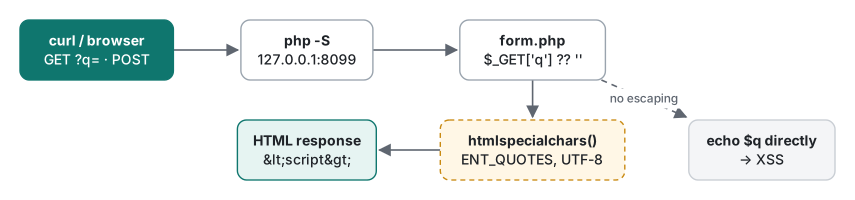
$_GET holds the query string (?q=...), $_POST holds the body of a submitted form, and $_SERVER['REQUEST_METHOD'] says which one you got. These are superglobals: arrays that PHP fills before your script starts. Here is the whole form.php:
<?php
declare(strict_types=1);

function h(string $s): string {
    return htmlspecialchars($s, ENT_QUOTES | ENT_SUBSTITUTE, 'UTF-8');
}

$method = $_SERVER['REQUEST_METHOD'];
$q      = $_GET['q'] ?? '';
$name   = trim($_POST['name'] ?? '');
$errors = [];

if ($method === 'POST' && $name === '') {
    $errors[] = 'Name is required.';
}
?>
<!doctype html>
<meta charset="utf-8">
<title>Form demo</title>
<form method="get"><input name="q" value="<?= h($q) ?>"><button>Search</button></form>
<?php if ($q !== ''): ?>
<p>You searched for: <?= h($q) ?></p>
<?php endif; ?>
<form method="post"><input name="name"><button>Send</button></form>
<?php foreach ($errors as $e): ?>
<p class="error"><?= h($e) ?></p>
<?php endforeach; ?>
<?php if ($method === 'POST' && !$errors): ?>
<p>Thanks, <?= h($name) ?>!</p>
<?php endif; ?>
<?= ... ?> is short for <?php echo ... ?>. The if (...): / endif; form is the template-friendly syntax for control structures. Testing it with curl, no browser needed:
$ curl -s -i "http://127.0.0.1:8099/form.php?q=php+8.5"
HTTP/1.1 200 OK
Host: 127.0.0.1:8099
Connection: close
X-Powered-By: PHP/8.5.6
Content-type: text/html; charset=UTF-8

<!doctype html>
...
<form method="get"><input name="q" value="php 8.5"><button>Search</button></form>
<p>You searched for: php 8.5</p>

$ curl -s -d "name=Mina" http://127.0.0.1:8099/form.php | tail -1
<p>Thanks, Mina!</p>

$ curl -s -d "name=" http://127.0.0.1:8099/form.php | grep error
<p class="error">Name is required.</p>
-d sends a POST with a form body. Note the X-Powered-By: PHP/8.5.6 header, which tells every visitor your exact version. On a real server set expose_php = Off in php.ini. One more detail: the empty-name POST still returned 200. If you want clients to see a validation failure, send http_response_code(422) yourself.
Escaping output: the XSS you get without htmlspecialchars
This is the version many old pages contain:
<?php
$q = $_GET['q'];
echo "<p>You searched for: $q</p>\n";
$ curl -s -G --data-urlencode 'q=<script>alert(1)</script>' http://127.0.0.1:8099/unsafe.php
<p>You searched for: <script>alert(1)</script></p>
The input went into the HTML unchanged. In a browser that script runs on your domain, with your users' cookies. This is cross-site scripting (XSS). The same request to form.php, which uses h():
<p>You searched for: <script>alert(1)</script></p>
Attributes are the case people forget. A value that closes the quote and adds an event handler:
$ curl -s -G --data-urlencode 'q=" autofocus onfocus="alert(1)' http://127.0.0.1:8099/form.php | grep input
<form method="get"><input name="q" value="" autofocus onfocus="alert(1)"><button>Search</button></form>
Without ENT_QUOTES (or with the PHP 7 defaults, which left single quotes alone) the quote would survive. Since PHP 8.1 the default flags are ENT_QUOTES | ENT_SUBSTITUTE | ENT_HTML401, but writing them explicitly, plus 'UTF-8', makes the code safe on any version and obvious to reviewers. Korean, Japanese and other non-ASCII text passes through untouched: name=민아 <b> came back as Thanks, 민아 <b>!.
Rules of thumb: escape at output, not at input. Escape every value, including your own error messages. htmlspecialchars is for HTML text and quoted attributes only; URLs, JavaScript and CSS contexts need other tools. Lecture 5 covers those cases, plus CSRF and sessions: PHP lecture 5: XSS, CSRF and sessions. For a real-world clean-up of these bugs in old PHP code, see our legacy PHP SQLi/XSS audit.
Missing keys: $_GET warnings, ?? and ?:
Open unsafe.php with no q at all:
$ curl -s http://127.0.0.1:8099/unsafe.php
<br />
<b>Warning</b>:  Undefined array key "q" in <b>~/demo/unsafe.php</b> on line <b>2</b><br />
<p>You searched for: </p>
Two problems. The page shows a warning to the visitor, and the real output contained the full absolute path of the file on our machine (we shortened it). That leaks your server layout. On production set display_errors=Off and log_errors=On. In our test, the warning then appeared only in the server log.
The fix is ??, which we used in form.php. Beware the similar-looking ?: (the "Elvis" operator):
<?php
$x = [];
echo $x['p'] ?: 'default', "\n";
echo $x['p'] ?? 'default', "\n";
$g = ['page' => '0'];
var_dump($g['page'] ?: 1, $g['page'] ?? 1);
Warning: Undefined array key "p" in ~/demo/ex.php on line 3
default
default
int(1)
string(1) "0"
| Operator | Missing key | Value is null |
Value is "0", "", 0 |
|---|---|---|---|
$a['k'] ?? 'd' |
'd', no warning |
'd' |
keeps the value |
$a['k'] ?: 'd' |
'd' plus Warning |
'd' |
'd' (falsy) |
isset($a['k']) |
false | false | true |
For form input, ?? is almost always the right one: ?page=0 is a real value, not "missing".
include vs require
include and require both insert another PHP file at that point. The difference shows up when the file is missing:
<?php
$which = $_GET['mode'] ?? 'include';
if ($which === 'include') {
    include __DIR__ . '/missing.php';
} else {
    require __DIR__ . '/missing.php';
}
echo "still running after $which\n";
$ curl -s "http://127.0.0.1:8099/inc.php?mode=include"
Warning:  include(~/demo/missing.php): Failed to open stream: No such file or directory in ~/demo/inc.php on line 4
Warning:  include(): Failed opening '~/demo/missing.php' for inclusion (include_path='.:…/share/php/pear') in ~/demo/inc.php on line 4
still running after include

$ curl -s -i "http://127.0.0.1:8099/inc.php?mode=require"
HTTP/1.1 200 OK
...
Warning:  require(~/demo/missing.php): Failed to open stream: No such file or directory in ~/demo/inc.php on line 6
Fatal error:  Uncaught Error: Failed opening required '~/demo/missing.php' (include_path='.:…/share/php/pear') in ~/demo/inc.php:6
Stack trace:
#0 {main}
(HTML tags removed for readability.) include warned twice and kept running. require threw an Error and stopped. The surprise is the status line: with display_errors on, the fatal request still said 200 OK, because the warning text had already started the response body. With the server started as php -d display_errors=0 -S ..., the same request returned HTTP/1.0 500 Internal Server Error with an empty body. That is one more reason to turn display_errors off outside your own machine.
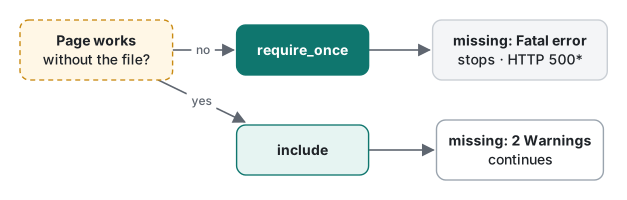
| Situation | Use |
|---|---|
| Config, functions, classes the page cannot run without | require_once |
| A template part that is safe to skip (banner, sidebar) | include |
| A file that may be loaded twice (function definitions) | the _once variants, to avoid "Cannot redeclare" |
| A path built from user input | never; pick from a fixed list instead |
Always build paths from __DIR__ (the directory of the current file). A relative include 'lib.php' depends on the current working directory and the include_path, which differ between the CLI, the built-in server and Apache.
Measuring a request round trip
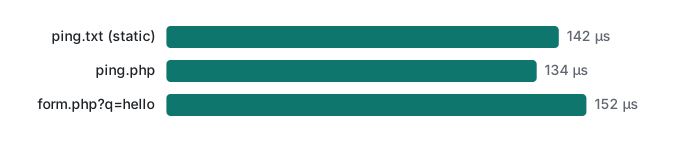
How long does one request to the built-in server take on the same machine? A PHP client using the curl extension, 20 warm-up requests not counted, then 500 timed requests per URL, sequentially, against 127.0.0.1:8099 (PHP 8.5.6, Apple M1 Pro, OPcache not tuned):
<?php
$N = 500;
$ch = curl_init();
curl_setopt_array($ch, [CURLOPT_RETURNTRANSFER => true]);
foreach (['/ping.txt', '/ping.php', '/form.php?q=hello'] as $path) {
    curl_setopt($ch, CURLOPT_URL, "http://127.0.0.1:8099$path");
    for ($i = 0; $i < 20; $i++) curl_exec($ch);                 // warm-up
    $t = [];
    for ($i = 0; $i < $N; $i++) {
        $s = hrtime(true); curl_exec($ch); $t[] = (hrtime(true) - $s) / 1e3;
    }
    sort($t);
    printf("%-18s median %4.0f µs  p95 %4.0f µs\n", $path, $t[$N >> 1], $t[(int) ($N * .95)]);
}
| URL | Median (run 1) | p95 (run 1) | Median (run 2) | p95 (run 2) |
|---|---|---|---|---|
/ping.txt (static file) |
142 µs | 267 µs | 139 µs | 157 µs |
/ping.php (echo "pong") |
134 µs | 180 µs | 148 µs | 172 µs |
/form.php?q=hello (243 bytes) |
152 µs | 181 µs | 155 µs | 204 µs |
The table comes from the full script, which also checks that each status is 200. The shortened listing above, run once more later while other jobs were running on the machine, gave medians of 159, 167 and 193 µs. That is the same picture, just noisier.
What this tells a beginner:
- On localhost, a whole HTTP request plus running a small PHP script cost about 0.13–0.15 ms. The static file and the PHP script were within noise of each other. The p95 (the slowest 5%) jumped around more than the median, which is why we report a median, not one run.
- Starting PHP from scratch is far more expensive. 50 sequential
php hello.phpruns averaged about 56 ms each on this machine (two runs: 57.1 and 55.9 ms; a plain/bin/echotook about 2 ms per launch, so most of this is PHP itself). The server process stays alive, so only your script runs per request. - On a real host, network latency (tens of milliseconds) dwarfs both. Measure there before optimizing PHP code. Lecture 6 does that with OPcache and profiling.
New in 8.5: the pipe operator
Since you now write small functions, one 8.5 addition is worth seeing. |> passes the left value as the single argument of the callable on the right:
<?php
$slug = "  Hello PHP 8.5 World  "
    |> trim(...)
    |> strtolower(...)
    |> (fn($s) => preg_replace('/[^a-z0-9]+/', '-', $s));
var_dump($slug);
string(19) "hello-php-8-5-world"
trim(...) is the first-class callable syntax (8.1+) that turns a function into a closure. The operator is new syntax, so older versions cannot parse this file (we did not run an older PHP to see the exact message). Do not use |> in code that must run on older shared hosts.
Honest limits / version notes
- Run: every snippet on PHP 8.5.6 CLI and its built-in server (
cli-serverSAPI) on macOS, Apple M1 Pro; HTTP via curl 8.7.1 to 127.0.0.1 only. Not run: Apache/mod_php, PHP-FPM, any PHP older than 8.5. Behaviour under Apache (status codes on fatal errors, include_path) can differ. - Versions from the manual, not re-checked on old builds: nullable types 7.1; arrow functions 7.4; named arguments and union types 8.0;
htmlspecialcharsdefault flags changed toENT_QUOTES | ENT_SUBSTITUTEin 8.1; first-class callables 8.1; pipe operator 8.5. Compile-time fatal errors print aStack trace:in our 8.5 output because of the newfatal_error_backtracessetting (its value was 1 in our build). - The round-trip numbers are loopback only, sequential, one client. They say nothing about concurrency. The built-in server is single-process unless you set
PHP_CLI_SERVER_WORKERS, which we did not test. - The ~56 ms CLI start-up is for this Homebrew build, which lists 67 modules.
php -n(no php.ini) listed the same 67 and was just as slow (57–58 ms). We did not try a smaller custom build.
Exercises
1. Fix the closure from the "common mistake" section so that $add(5); $add(7); echo $total; prints 12.
Answer
<?php
$total = 0;
$add = function (int $x) use (&$total): void { $total += $x; };
$add(5); $add(7);
echo $total, "\n";   // 12
We ran it and got 12. Without the &, use ($total) copies 0 and the outer $total never changes.
2. What does htmlspecialchars('<a href="x">it\'s</a>') print on PHP 8.5, and what changes with the ENT_NOQUOTES flag?
Answer
Default: <a href="x">it's</a>. With ENT_NOQUOTES: <a href="x">it's</a>, which leaves both quote characters, so it is unsafe inside an attribute.
3. A list page reads $page = $_GET['page'] ?: 1;. What happens for /list.php and for /list.php?page=0, and what should it be?
Answer
Without page: Warning "Undefined array key" and $page = 1. With page=0: "0" is falsy, so $page = 1 silently. Use $page = (int) ($_GET['page'] ?? 1); and then validate the range (for example max(1, $page)).
Next
- Previous: PHP lecture 1/6: types, ==/===, strings and arrays
- Next: PHP lecture 3/6: classes, interfaces and enums
- Later: PDO, SQLite and SQL injection, XSS, CSRF and sessions, OPcache, JIT and profiling
- Same lecture in Python: functions, scope and default arguments
- Keeping old PHP endpoints alive while you reorganize files: move a legacy PHP API without breaking old app versions
FAQ
How do I run a PHP page locally without installing Apache or XAMPP?
Use the built-in development server: php -S 127.0.0.1:8099 in the folder that holds your .php files, then open http://127.0.0.1:8099/form.php or call it with curl. It prints one log line per request. It is for development only; on 127.0.0.1 a simple request took a median of about 0.13 to 0.15 ms in our test.
What is the difference between include and require when the file is missing?
include emits two Warnings (Failed to open stream, Failed opening ... for inclusion) and the script continues. require emits the Warning and then a Fatal error (Uncaught Error: Failed opening required ...) and stops. With display_errors off, the require case returned HTTP 500 from the built-in server.
Do I need htmlspecialchars if the value comes from my own form?
Yes. Anyone can send any value to your form. Echoing $_GET['q'] directly returned <script>alert(1)</script> unchanged in the HTML; with htmlspecialchars($q, ENT_QUOTES | ENT_SUBSTITUTE, 'UTF-8') it became <script>... and an attribute-breaking value lost its quotes as ".