Hashing vs Encryption vs Encoding, Run and Measured
Security lecture 1: decode Base64 in one line, hash your text with SHA-256, flip one bit to see 128 bits change, and measure why MD5 fails for passwords.
Series: Security Basics lecture 1/6 (beginner). For developers who have heard "hash it", "encrypt it" and "it's Base64 encoded" used as if they meant the same thing. After this lecture you can tell the four tools apart, run each one yourself in under a minute, and explain why a fast hash is the wrong place for a password.
If you work on a web or mobile backend, a lot of security bugs start with one wrong word. Someone "encrypts" an API key with Base64, "hashes" a session ID that should have been signed, or stores passwords as SHA-256 and believes they are safe. The OWASP Top 10 groups these under Cryptographic Failures (A02 in the 2021 edition), and most of them are not exotic attacks at all; they are a confusion between encoding, hashing, MACs and encryption.
Everything below was run on an Apple Silicon Mac (M1 Pro) with Python 3.9.6, PHP 8.5.6, OpenSSL 4.1.0 and the macOS shasum and base64 tools. No library was installed. Paths are shortened to ~/demo/.
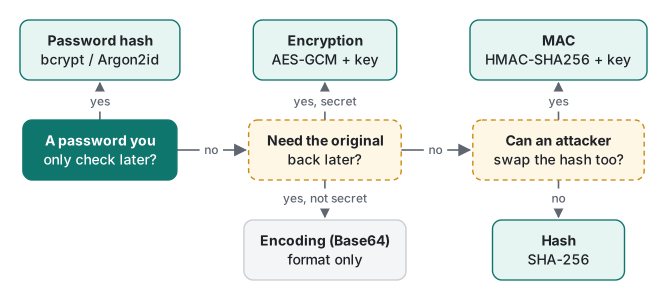
Four words that are not the same
Here are the four ideas, side by side. The rest of the lecture runs each one.
| Tool | Example | Needs a key? | Reversible? | What it protects against |
|---|---|---|---|---|
| Encoding | Base64, hex, UTF-8 | No | Yes, by anyone | Nothing. It only changes the format |
| Hash | SHA-256, BLAKE2 | No | No (one-way) | Accidental change; finding the input from the output |
| MAC | HMAC-SHA256 | Yes, a shared secret | No | Forgery: someone without the key changing the data |
| Encryption | AES-GCM | Yes | Yes, with the key | Reading: someone without the key seeing the data |
Two terms appear in that table for the first time, so in plain words: a hash function turns any input into a fixed-size fingerprint (32 bytes for SHA-256), and you cannot run it backwards. A MAC (message authentication code) is a hash that also takes a secret key, so only someone who knows the key can make a fingerprint that checks out.
Base64 is not encryption: decode it in one line
Base64 maps every 3 bytes to 4 characters taken from A–Z a–z 0–9 + /. It exists so binary data can travel through places that only accept text: e-mail, JSON, URLs, HTTP headers. Here is a "secret" that a beginner might paste into a config file because it looks scrambled:
import base64
token = base64.b64encode(b"admin:Summer2026!").decode()
print("encoded :", token)
print("decoded :", base64.b64decode(token))
encoded : YWRtaW46U3VtbWVyMjAyNiE=
decoded : b'admin:Summer2026!'
The shell does the same without Python, and anyone who sees the string can do it:
$ echo 'YWRtaW46U3VtbWVyMjAyNiE=' | base64 -d
admin:Summer2026!
This exact string is what HTTP Basic authentication sends. We started php -S 127.0.0.1:18157 with a three-line script that prints the header it receives, then called it with curl:
$ curl -sv -u 'admin:Summer2026!' http://127.0.0.1:18157/ 2>&1 | grep -E '^> Auth|^decoded'
> Authorization: Basic YWRtaW46U3VtbWVyMjAyNiE=
decoded: admin:Summer2026!
So Basic auth over plain HTTP sends the password in readable form. Only TLS protects it (see HTTPS, TLS and certificates). The rule: if there is no key, there is no secret.
Your first hash in 5 minutes: SHA-256
Hashes work on bytes, not on "text". For non-ASCII text the bytes depend on the encoding, so we encode to UTF-8 first. (If bytes vs characters is new to you, read text encoding, bytes, UTF-8 and code points first.)
import hashlib
for s in ["Hello, OWASP", "Hello, OWASP!", "password123"]:
    b = s.encode("utf-8")
    print(f"{s!r:16} {len(b):2d} bytes  {hashlib.sha256(b).hexdigest()}")
'Hello, OWASP'   12 bytes  7c15623eb2e7f0d3f153268d5a37f0f3c1fae53f255e421c3e34a743e7ea2d19
'Hello, OWASP!'  13 bytes  40906cb95090ed0be1be9b9231ffb5b8448942e847825fac7b90a5a974aa9fd7
'password123'    11 bytes  ef92b778bafe771e89245b89ecbc08a44a4e166c06659911881f383d4473e94f
Check it with three other tools. All four agree, because SHA-256 is a standard:
$ printf 'Hello, OWASP' | shasum -a 256
7c15623eb2e7f0d3f153268d5a37f0f3c1fae53f255e421c3e34a743e7ea2d19  -
$ printf 'Hello, OWASP' | openssl dgst -sha256
SHA2-256(stdin)= 7c15623eb2e7f0d3f153268d5a37f0f3c1fae53f255e421c3e34a743e7ea2d19
$ php -r 'echo hash("sha256", "Hello, OWASP"), "\n";'
7c15623eb2e7f0d3f153268d5a37f0f3c1fae53f255e421c3e34a743e7ea2d19
Now the first beginner trap. Use echo instead of printf and the hash changes completely:
$ echo 'Hello, OWASP' | shasum -a 256
c050e7f478c959380d7a58386bd5c9632d82b3fbc641cf3d22408a14803f259b  -
echo adds a newline, so you hashed 13 bytes, not 12. When two systems "compute the same hash" and disagree, check the bytes first: trailing newlines, a BOM, or Unicode normalization. The same visible word contraseña is 11 bytes in NFC form and 12 bytes in NFD form, and gives two unrelated hashes (edf9cf90… vs 897184f7…).
The avalanche effect: flip one bit
A good hash has the avalanche effect: changing one input bit changes about half of the output bits, with no visible pattern. We changed H (0x48) to I (0x49), which is exactly one bit:
b'Hello, OWASP' 7c15623eb2e7f0d3f153268d5a37f0f3c1fae53f255e421c3e34a743e7ea2d19
b'Iello, OWASP' ab4d7b3d2213c9bc8a3286cb80924bcfc49d4c3a6eff5441f3a742727fae1c66
input bits changed : 1
output bits changed: 124 of 256
One example could be luck, so we repeated it 10,000 times with random 32-byte inputs and a fixed seed:
import hashlib, random, statistics
rng = random.Random(2026)
bits = lambda b: int.from_bytes(b, "big")
counts = []
for _ in range(10_000):
    m = bytearray(rng.getrandbits(8) for _ in range(32))
    a = hashlib.sha256(m).digest()
    i = rng.randrange(256)
    m[i // 8] ^= 1 << (i % 8)          # flip one random bit
    counts.append(bin(bits(a) ^ bits(hashlib.sha256(m).digest())).count("1"))
print(f"N={len(counts)} mean={statistics.mean(counts):.2f} "
      f"stdev={statistics.pstdev(counts):.2f} min={min(counts)} max={max(counts)}")
N=10000 mean=127.96 stdev=8.00 min=92 max=160
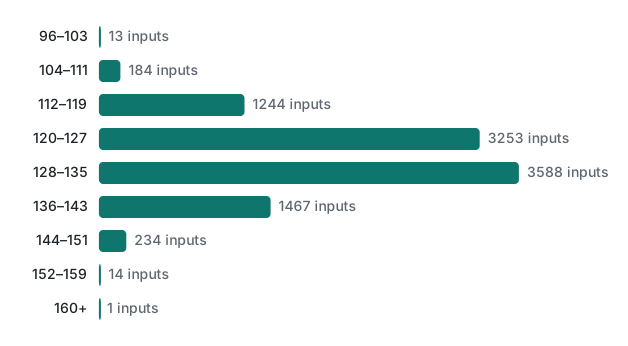
That is the shape you would get from 256 fair coin flips: mean 128, standard deviation 8. This is why you cannot "nudge" a hash towards a target or tell from two hashes that the inputs were similar.
Hash vs MAC vs encryption, run side by side
A plain hash has no secret. If a server sends user_id=42&role=member plus its SHA-256 to a client, the client can change the role and compute a new SHA-256 itself. A MAC fixes this, because the tag needs the server's key:
import hmac, hashlib
key = b"server-side-secret-key-32-bytes!"
msg = b"user_id=42&role=member"
tag = hmac.new(key, msg, hashlib.sha256).hexdigest()
forged = b"user_id=42&role=admin"
print("tag     :", tag)
print("forged message accepted?",
      hmac.compare_digest(tag, hmac.new(key, forged, hashlib.sha256).hexdigest()))
tag     : 099ccdda84f0a9886626a2edb75c8355bef871583e16a20d72a2855d5dbbe9f6
forged message accepted? False
OpenSSL gives the same tag, which is how you check two implementations against each other:
$ printf 'user_id=42&role=member' | openssl dgst -sha256 -hmac 'server-side-secret-key-32-bytes!'
SHA2-256(stdin)= 099ccdda84f0a9886626a2edb75c8355bef871583e16a20d72a2855d5dbbe9f6
A MAC still does not hide anything: role=member is readable. Hiding needs encryption, which is reversible with the key and fails without it:
$ printf 'card ending 4242' > plain.txt
$ openssl enc -aes-256-cbc -pbkdf2 -salt -in plain.txt -out c.bin -pass pass:correct-horse
$ openssl enc -d -aes-256-cbc -pbkdf2 -in c.bin -pass pass:correct-horse
card ending 4242
$ openssl enc -d -aes-256-cbc -pbkdf2 -in c.bin -pass pass:wrong
bad decrypt
80E182F501000000:error:1C800064:Provider routines:ossl_cipher_unpadblock:bad decrypt:...
$ echo $?
1
The first 8 bytes of c.bin are literally Salted__, followed by the random salt. Leave out -pbkdf2 and OpenSSL 4.1 still prints *** WARNING : deprecated key derivation used. That trap, and why we really want AES-GCM instead of CBC, is the topic of lecture 5.
Common mistakes: what happens, and the fix
1. "We Base64-encode the API key in the app, so it's hidden."
What happens: anyone who unpacks the app runs base64 -d and has the key in seconds. The fix: a secret that ships inside a client app is not a secret. Keep it on the server, and give the app a short-lived token instead (lecture 3).
2. sha256(secret + message) as a homemade signature.
What happens: SHA-256 is built so that, from sha256(secret + message) alone, an attacker can compute a valid hash for secret + message + padding + extra. This is the length-extension attack. We describe it here and do not run it. The fix: use hmac.new(key, msg, sha256) or PHP hash_hmac(), which are designed against it.
3. Comparing tags with ==.
What happens: in PHP, "0e462097431906509019562988736854" == "0e830400451993494058024219903391" is true, because both look like the number 0 (we run it in lecture 2). In any language, == stops at the first different byte, which leaks timing. The fix: hmac.compare_digest() in Python or hash_equals() in PHP (lecture 6).
4. "Decrypting" a hash. What happens: sites that claim to decrypt MD5 or SHA-256 only look the hash up in a big table of hashes of known strings. The fix: understand that a hash of a guessable input is guessable. This is exactly why passwords need salts and slow hashes.
5. MD5 for "is this file the one we published?" What happens: MD5 and SHA-1 have practical collision attacks: someone can build two different files with the same hash. That breaks signatures and download checks where an attacker chooses the file. The fix: SHA-256 or BLAKE2 for integrity, and a MAC or digital signature if an attacker can also change the published hash.
Measured: why MD5, SHA-1 and SHA-256 are not for passwords
People usually say "MD5 is broken" when explaining why it is bad for passwords. Collisions are not the real reason, though. The real reason is speed. A password hash must make each guess expensive, and these functions were designed to be cheap. We measured one CPU core with OpenSSL's own benchmark (16-byte inputs, 2 seconds each, 3 runs):
$ openssl speed -seconds 2 -bytes 16 -evp sha256
Doing sha256 ops for 2s on 16 size blocks: 15614250 sha256 ops in 1.98s
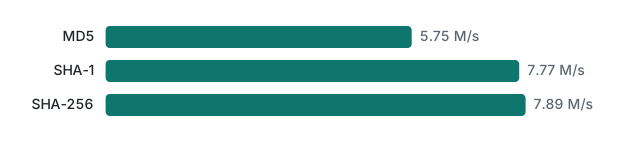
SHA-256 ran at about 7.89 million hashes per second on one core, MD5 at 5.75 million. On this chip SHA-256 is not even slower than MD5, because Apple Silicon has SHA-256 instructions. Moving from MD5 to SHA-256 therefore adds nothing for passwords.
Turn that into time. All lowercase 8-letter passwords are 26⁸ ≈ 2.09 × 10¹¹ candidates: 2.09 × 10¹¹ / 7.89 × 10⁶ ≈ 26,500 seconds, about 7.4 hours on one laptop core. A list of one million common passwords takes about 0.13 seconds. Attackers use many cores and GPUs, which are much faster again (not measured here).
From Python the numbers are lower (3.25 million SHA-256 hashes per second for 8-byte inputs, N = 200,000, median of 5 runs), because the interpreter loop costs more than the hash. When you estimate an attacker's speed, use the fastest implementation, not your own.
Which tool for which job
| You want to… | Use | Not |
|---|---|---|
| Put bytes in JSON, a URL or an e-mail | Base64 / Base64url | thinking it hides anything |
| Check a download or detect accidental corruption | SHA-256, BLAKE2 | MD5, SHA-1 |
| Prove a cookie or webhook came from you | HMAC-SHA256 with a secret key | sha256(secret + msg) |
| Keep data secret and get it back later | AES-GCM or libsodium (lecture 5) | Base64, XOR, ECB mode |
| Store passwords | bcrypt, Argon2id, scrypt, PBKDF2 (lecture 2) | MD5, SHA-1, SHA-256, encryption |
| Make tokens and keys | secrets / random_bytes (lecture 3) |
random, time, a hash of the user ID |
Honest limits and version notes
- Run with Python 3.9.6 (its
hashlibis linked to LibreSSL 2.8.3 on this Mac), PHP 8.5.6 and OpenSSL 4.1.0. The hash values are standard and match on any platform; the speeds are specific to this M1 Pro core. openssl speedmeasures C code with hardware SHA instructions. It is a rough attacker baseline for one CPU core, not a GPU number.- The avalanche statistics come from one seed (2026) and N = 10,000. A different seed gives slightly different counts with the same shape.
- The length-extension and MD5 collision attacks are described, not run. Both are well documented; SHA-256 resists collisions but is still subject to length extension, while HMAC and SHA-3 are not.
- OWASP's numbering changes between editions; we only cite the 2021 category name.
Exercises
1. Without running anything: what does echo -n 'Hello, OWASP' | shasum -a 256 print, and why does it differ from echo 'Hello, OWASP' | shasum -a 256?
2. A teammate stores base64(user_id + ":" + expiry) in a cookie to remember logins. Name the problem and the tool from the table that fixes it.
3. At 7.89 million hashes per second, how long does one core need to try every 6-digit PIN (000000 to 999999) hashed with unsalted SHA-256?
Answers
1. It prints 7c15623e…2d19, the same as printf, because -n suppresses the newline. Plain echo hashes 13 bytes and gives c050e7f4…259b. (zsh's builtin echo accepts -n; in some sh versions it does not, which is one more reason to prefer printf.)
2. Base64 is reversible and keyless, so any user can decode it, change the user ID and re-encode it. Add an HMAC-SHA256 tag with a server-side key and verify it with a constant-time compare (or use a random session ID stored on the server).
3. 10⁶ / 7.89 × 10⁶ ≈ 0.13 seconds. A 6-digit PIN has no hope against an offline attacker whatever the hash, which is why the next lecture also talks about rate limits and password length.
Next
- Next: Security Basics 2/6: password hashing with bcrypt and Argon2id
- Later in this series: secure random tokens, JWT HS256 signing pitfalls, AES-GCM done right, timing attacks and constant-time compare
- Related: PHP security: XSS, CSRF and sessions, HTTP headers, cookies and sessions
- All lecture series: the programming learning roadmap
FAQ
Is Base64 a form of encryption?
No. Base64 only rewrites bytes as 64 printable characters so they survive text-only channels. There is no key: base64 -d or one line of Python turns YWRtaW46U3VtbWVyMjAyNiE= back into admin:Summer2026! instantly. An HTTP Basic Authorization header is Base64, which is why it must only travel over HTTPS.
What is the difference between a hash, a MAC and encryption?
A hash such as SHA-256 is a keyless one-way fingerprint anyone can compute. A MAC such as HMAC-SHA256 mixes in a secret key, so only key holders can produce a valid tag and forged messages are rejected. Encryption is two-way: with the key you get the original back. Only encryption hides data, and only a MAC proves who wrote it.
Why shouldn't I store passwords with MD5, SHA-1 or SHA-256?
Because they are fast. One core of an Apple M1 Pro computed about 7.9 million SHA-256 hashes per second and 5.75 million MD5 hashes per second in our openssl speed test, so all 8-letter lowercase passwords fall in about 7.4 hours. Passwords need a deliberately slow, salted hash such as bcrypt or Argon2id.