HTTPS and TLS Certificates with openssl and curl
TLS handshake, certificate chain, SNI and HSTS from real openssl s_client and curl output, handshake time measured, and every curl exit 60 error reproduced.
Series: HTTP lecture 5/6 (advanced). For developers who can read HTTP headers and now have to debug what happens before the first header: the TLS handshake. By the end you will read openssl s_client and curl -v output line by line, check a certificate chain and its names, explain SNI and HSTS, break down where connection time goes, and fix every flavour of curl: (60) without reaching for -k.
This lecture is for the developer whose CI job, cron script or mobile app suddenly says "SSL certificate problem" while the site opens fine in a browser, and for the one who must set up HTTPS on a local test server. These failures look identical from the outside and have different causes, so we reproduce each one. All of it was run on an Apple Silicon Mac (M1 Pro) with curl 8.7.1 (built with LibreSSL 3.3.6), OpenSSL 4.1.0 for openssl s_client, and Python 3.9.6 for a local HTTPS server on 127.0.0.1; the remote examples are a few read-only connections to example.com and to this site.
What happens before the first byte
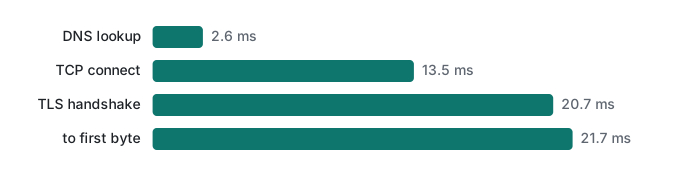
An HTTPS request is four steps, and curl can time each of them with -w:
- DNS lookup: the host name becomes an IP address (
time_namelookup). - TCP connect: three packets to open a connection, one round trip (
time_connect). - TLS handshake: client and server agree on keys and the server proves who it is (
time_appconnect). - HTTP: the request goes out and the first byte of the answer comes back (
time_starttransfer).
The -w values are cumulative seconds since the start. Five runs against example.com:
F='%{http_version} dns=%{time_namelookup} tcp=%{time_connect} tls=%{time_appconnect} ttfb=%{time_starttransfer} total=%{time_total} size=%{size_download}\n'
for i in 1 2 3 4 5; do curl -s -o /dev/null -w "$F" https://example.com/; done
2 dns=0.002424 tcp=0.017864 tls=0.040317 ttfb=0.061982 total=0.062068 size=577
2 dns=0.002940 tcp=0.020906 tls=0.057755 ttfb=0.084294 total=0.084388 size=577
2 dns=0.002504 tcp=0.014979 tls=0.031247 ttfb=0.047049 total=0.047126 size=577
2 dns=0.002605 tcp=0.015017 tls=0.034790 ttfb=0.053917 total=0.054041 size=577
2 dns=0.002586 tcp=0.016089 tls=0.036742 ttfb=0.060710 total=0.061533 size=577
Subtracting each step from the next and taking the median of the five runs gives DNS 2.6 ms, TCP 13.5 ms, TLS 20.7 ms and server-plus-first-byte 21.7 ms. The TLS step costs about one more round trip than TCP, which matches TLS 1.3's single-round-trip handshake. (TLS 1.2 needs two; we did not run it.)
Three runs against this site show why you always measure more than once:
2 dns=0.446026 tcp=0.462804 tls=0.628998 ttfb=0.669523 total=0.669712 size=3450
2 dns=0.002408 tcp=0.911410 tls=0.938718 ttfb=0.954015 total=0.954337 size=3450
2 dns=0.006323 tcp=0.022163 tls=0.044374 ttfb=0.079341 total=0.079685 size=3450
The first run paid 446 ms for a cold DNS lookup. The second spent 909 ms in TCP connect, which looks like one lost SYN packet waiting for the retransmission timer (we did not capture packets, so that is an inference). The third, 80 ms in total, is the normal case.
Reading the handshake in curl -v
curl -v prints the TLS messages as they pass (IP addresses replaced with <ip>):
* Connected to example.com (<ip>) port 443
* ALPN: curl offers h2,http/1.1
* (304) (OUT), TLS handshake, Client hello (1):
* (304) (IN), TLS handshake, Server hello (2):
* (304) (IN), TLS handshake, Unknown (8):
* (304) (IN), TLS handshake, Certificate (11):
* (304) (IN), TLS handshake, CERT verify (15):
* (304) (IN), TLS handshake, Finished (20):
* (304) (OUT), TLS handshake, Finished (20):
* SSL connection using TLSv1.3 / AEAD-CHACHA20-POLY1305-SHA256 / [blank] / UNDEF
* ALPN: server accepted h2
* Server certificate:
*  subject: CN=example.com
*  start date: Sep 26 22:49:11 2026 GMT
*  expire date: Dec 25 22:56:35 2026 GMT
*  subjectAltName: host "example.com" matched cert's "example.com"
*  issuer: C=US; O=SSL Corporation; CN=Cloudflare TLS Issuing ECC CA 3
*  SSL certificate verify ok.
* using HTTP/2
Line by line:
- ClientHello: the client lists TLS versions, cipher suites, a key share and the host name it wants (SNI, below). ALPN is in here too: curl offers
h2andhttp/1.1. - ServerHello: the server picks a version and cipher. From here on in TLS 1.3 everything is encrypted.
- Unknown (8): message type 8 is EncryptedExtensions. LibreSSL's debug output in this curl build has no name for it, so it says Unknown; it is not an error.
- Certificate and CERT verify: the server sends its chain and proves it holds the private key.
- Finished both ways: the handshake is done;
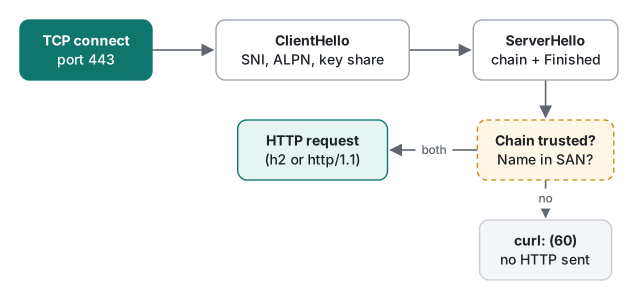
ALPN: server accepted h2decides that HTTP/2 is spoken. subjectAltName: host "example.com" matchedis the host name check.verify okis the chain check. Both must pass.
Note the cipher: curl (LibreSSL) ended up with ChaCha20-Poly1305, while openssl s_client against the same host got TLS_AES_256_GCM_SHA384. The client's preference list decides; neither is wrong.
The certificate chain, checked with openssl s_client
openssl s_client -connect example.com:443 -servername example.com </dev/null
Certificate chain
 0 s:CN=example.com
   i:C=US, O=SSL Corporation, CN=Cloudflare TLS Issuing ECC CA 3
   a:PKEY: EC, (prime256v1); sigalg: ecdsa-with-SHA256
   v:NotBefore: Sep 26 22:49:11 2026 GMT; NotAfter: Dec 25 22:56:35 2026 GMT
 1 s:C=US, O=SSL Corporation, CN=Cloudflare TLS Issuing ECC CA 3
   i:C=US, O=SSL Corporation, CN=SSL.com TLS Transit ECC CA R2
 …
Negotiated TLS1.3 group: X25519MLKEM768
New, TLSv1.3, Cipher is TLS_AES_256_GCM_SHA384
Verify return code: 0 (ok)
s: is the subject (who the certificate is for) and i: the issuer (who signed it). Entry 0 is the leaf certificate for the site, the next ones are intermediate CAs, and the chain ends at a root the client already trusts. Each i: must equal the next entry's s:. The same command against this site:
 0 s:CN=tlaboratory.net
   i:C=US, O=Let's Encrypt, CN=YE1
   v:NotBefore: Oct  6 09:53:38 2026 GMT; NotAfter: Jan  4 09:53:37 2027 GMT
 1 s:C=US, O=Let's Encrypt, CN=YE1
   i:C=US, O=ISRG, CN=Root YE
 2 s:C=US, O=ISRG, CN=Root YE
   i:C=US, O=Internet Security Research Group, CN=ISRG Root X2
 3 s:C=US, O=Internet Security Research Group, CN=ISRG Root X2
   i:C=US, O=Internet Security Research Group, CN=ISRG Root X1
Verify return code: 0 (ok)
Both leaf certificates were valid for 90 days, so renewal must be automatic. The names a certificate covers are in the subjectAltName extension, not in CN:
openssl s_client -connect tlaboratory.net:443 -servername tlaboratory.net </dev/null 2>/dev/null \
  | openssl x509 -noout -ext subjectAltName -dates
X509v3 Subject Alternative Name:
    DNS:tlaboratory.net, DNS:www.tlaboratory.net
notBefore=Oct  6 09:53:38 2026 GMT
notAfter=Jan  4 09:53:37 2027 GMT
X25519MLKEM768 in the first output is worth a second look: both servers agreed on a hybrid key exchange that combines classic X25519 with the post-quantum ML-KEM. Nothing had to be configured on the client; OpenSSL 4.1.0 offered it by default.
SNI: one IP address, many certificates
A shared host or CDN serves thousands of names from one IP address. It learns which certificate to present from SNI (Server Name Indication), a field in the ClientHello. Leave it out and see:
$ openssl s_client -connect example.com:443 -noservername </dev/null
…:error:0A000410:SSL routines:ssl3_read_bytes:tls alert handshake failure:…:SSL alert number 40
$ openssl s_client -connect tlaboratory.net:443 -noservername </dev/null
…:error:0A000438:SSL routines:ssl3_read_bytes:tlsv1 alert internal error:…:SSL alert number 80
Two servers, two different alerts, same cause. If an old Android HTTP client, an embedded device or a hand-written socket fails against a CDN while curl works, missing SNI is the first suspect. openssl s_client without -servername also used to be a classic way to get the wrong certificate during debugging; OpenSSL 1.1.1 and later send SNI automatically from the -connect host name, which is why we had to switch it off explicitly.
A self-signed certificate on loopback, and every exit 60
To test HTTPS locally, make a certificate for localhost and 127.0.0.1, valid 30 days:
openssl req -x509 -newkey ec -pkeyopt ec_paramgen_curve:P-256 -nodes \
  -keyout key.pem -out cert.pem -days 30 -subj "/CN=localhost" \
  -addext "subjectAltName=DNS:localhost,IP:127.0.0.1"
And a small HTTPS server with keep-alive (tls_server.py), which we reuse in lecture 6:
# python3 tls_server.py PORT [cert.pem key.pem]  -> HTTP/1.1 keep-alive server, HTTPS if cert given
import ssl, sys
from http.server import HTTPServer, BaseHTTPRequestHandler

BODY = b"hello over TLS\n"

class H(BaseHTTPRequestHandler):
    protocol_version = "HTTP/1.1"          # keep-alive by default
    def do_GET(self):
        self.send_response(200)
        self.send_header("Content-Type", "text/plain")
        self.send_header("Content-Length", str(len(BODY)))
        self.end_headers()
        self.wfile.write(BODY)
    def log_message(self, fmt, *args):
        pass

srv = HTTPServer(("127.0.0.1", int(sys.argv[1])), H)
if len(sys.argv) > 3:
    ctx = ssl.SSLContext(ssl.PROTOCOL_TLS_SERVER)
    ctx.load_cert_chain(sys.argv[2], sys.argv[3])
    srv.socket = ctx.wrap_socket(srv.socket, server_side=True)
srv.serve_forever()
Start it with python3 tls_server.py 18160 cert.pem key.pem and try the mistakes one by one:
$ curl -sS https://127.0.0.1:18160/; echo "exit=$?"
curl: (60) SSL certificate problem: self signed certificate
More details here: https://curl.se/docs/sslcerts.html
…
exit=60
$ curl -sS --cacert cert.pem https://127.0.0.1:18160/; echo "exit=$?"
hello over TLS
exit=0
$ curl -sS --cacert cert.pem --resolve wrong.example:18160:127.0.0.1 https://wrong.example:18160/
curl: (60) SSL: no alternative certificate subject name matches target host name 'wrong.example'
$ curl -sS --cacert old.pem https://localhost:18161/        # a certificate that ended 2025-02-01
curl: (60) SSL certificate problem: certificate has expired
$ curl -sS http://127.0.0.1:18160/                           # http:// to a TLS port
curl: (56) Recv failure: Connection reset by peer
$ curl -sS https://127.0.0.1:18162/                          # https:// to a plain HTTP port
curl: (35) LibreSSL/3.3.6: error:1404B42E:SSL routines:ST_CONNECT:tlsv1 alert protocol version
openssl s_client says the same thing in its own words: Verify return code: 18 (self-signed certificate). The expired certificate was made with OpenSSL's -not_before 20250101000000Z -not_after 20250201000000Z options.
| Message | Cause | Fix |
|---|---|---|
(60) … self signed certificate |
chain does not reach a trusted CA | --cacert your test CA; in production, install the full chain |
(60) … unable to get local issuer certificate (not reproduced here) |
server sends the leaf without its intermediate | configure the full chain file on the server |
(60) … no alternative certificate subject name matches |
host name not in subjectAltName | use a listed name, or reissue with the name |
(60) … certificate has expired |
clock past NotAfter (or a wrong client clock) | renew; check the device's date |
(35) … alert protocol version / wrong version number |
TLS spoken to a plain HTTP port | check the port and scheme |
(56) Recv failure / empty reply |
plain HTTP spoken to a TLS port | use https:// |
Common mistake: "just add -k"
What people do: the script fails with exit 60, someone adds -k (--insecure) or verify=False, and it works. What actually happens: the connection is still encrypted, but nobody checks who is on the other end. Our -k request to the self-signed server printed hello over TLS and exit 0 — and so would a request to any machine that intercepts the traffic. The flag also survives into production because "it works". Fix: trust the specific certificate (--cacert, or your language's CA bundle setting), and for a public server fix the server: a missing intermediate is the most common reason a site works in a desktop browser (which may have cached or fetched the intermediate) but fails in curl or an app.
HSTS: forcing HTTPS after the first visit
Redirecting http:// to https:// leaves one plain-text request open to tampering. HSTS (Strict-Transport-Security: max-age=<seconds>) tells a client to use HTTPS for that host on its own, without trying HTTP first. curl implements it with --hsts <file>. We made the local server send Strict-Transport-Security: max-age=300:
$ curl -s --cacert cert.pem --hsts hsts.txt -o /dev/null -D - https://localhost:18163/
HTTP/1.1 200 OK
Strict-Transport-Security: max-age=300
…
$ grep -v '^#' hsts.txt
localhost "20261112 14:42:43"
$ curl -sv --cacert cert.pem --hsts hsts.txt http://localhost:18163/
* Switched from HTTP to HTTPS due to HSTS => https://localhost:18163/
…
hello over TLS
curl stored an expiry five minutes ahead (UTC) and upgraded the next http:// request before sending anything. On the day of writing, neither example.com nor this site sent the header; this site answered http:// with 301 Moved Permanently to https://. Start with a short max-age, because once a browser has seen a long one, the site cannot go back to HTTP for that long, and includeSubDomains applies to every subdomain, including forgotten ones.
Measured: what a handshake costs
Two measurements of the same question: how much do new connections cost compared with reusing one?
Loopback, 200 requests in one curl process (https://localhost:18160/r[1-200]), reused vs forced Connection: close, three rounds. Times include starting curl once.
| Mode | New connections | Total (3 rounds) | Per request |
|---|---|---|---|
| HTTPS, reuse | 1 | 85 / 81 / 77 ms | 0.38–0.43 ms |
| HTTPS, Connection: close | 200 | 366 / 361 / 356 ms | 1.78–1.83 ms |
| plain HTTP, reuse | 1 | 75 / 83 / 68 ms | 0.34–0.42 ms |
| plain HTTP, Connection: close | 200 | 87 / 86 / 80 ms | 0.40–0.44 ms |
On loopback the TCP connect is almost free (about 0.05 ms per request) but each TLS handshake cost about 1.4 ms of CPU for the ECDSA P-256 certificate and key exchange. Over the internet, five requests to example.com in one curl process: with reuse the first took 104 ms and the next four 18–23 ms each; with Connection: close (HTTP/1.1) every request took 76–120 ms. Lecture 6 builds on these numbers.
Honest limits / version notes
- Run: curl 8.7.1 with LibreSSL 3.3.6 (as shipped with macOS), OpenSSL 4.1.0 for
s_client/req/x509, Python 3.9.6sslserver. Remote results are a handful of connections from one network on one day; your round-trip times will differ. - Not run: browsers (their own certificate stores and HSTS preload list), TLS 1.2 handshakes, session resumption and 0-RTT, OCSP/CRL revocation checks, certificate transparency checks, packet captures.
- Specs: TLS 1.3 is RFC 8446 (2018); SNI is defined in RFC 6066; HSTS is RFC 6797 (2012); ALPN is RFC 7301. ML-KEM hybrid key exchange appeared in OpenSSL 3.5; we only ran 4.1.0. The
-not_before/-not_afteroptions ofopenssl reqare recent; we only checked them on 4.1.0. - The validity dates and chains shown are snapshots; certificates are renewed every few weeks.
Exercises
1. A cron job on a server fails with curl: (60) SSL certificate problem: unable to get local issuer certificate against your API, while browsers show the padlock. Which openssl s_client output would confirm the cause, and where is the fix?
2. Using -w, how would you show that a slow request was slow because of TLS and not because of the server's application code?
Answers
1. Run openssl s_client -connect api.example.com:443 -servername api.example.com </dev/null and look at Certificate chain: if only entry 0 (the leaf) is listed and the verify code is 20 or 21 (unable to get/verify the issuer), the server is not sending the intermediate. Fix it on the server by configuring the full chain file (leaf + intermediate), not on the client.
2. Print time_connect, time_appconnect and time_starttransfer. TLS time is time_appconnect − time_connect; server time is time_starttransfer − time_appconnect. In our example.com runs the medians were 20.7 ms for TLS and 21.7 ms for the rest, so neither dominated; a slow application shows a large last gap with a normal TLS gap.
Next
- Previous: HTTP lecture 4/6: caching, ETag and Cache-Control
- Next: HTTP lecture 6/6: keep-alive, compression, HTTP/2 and CORS
- From the start: lecture 1/6: requests, responses and curl, lecture 2/6: status codes and redirects, lecture 3/6: headers, cookies and sessions
- Redirects in a real app: Dart http does not follow 301 on POST
- Session cookies need HTTPS: PHP security: XSS, CSRF and sessions
- All series in order: Programming basics for new hires: a study roadmap
FAQ
What does curl: (60) SSL certificate problem: self signed certificate mean?
curl could not build a chain from the server's certificate to a CA it trusts. On a local test server the fix is to trust that one certificate with --cacert cert.pem, not to disable checking with -k. The same exit code 60 also appeared for a host name that is not in the certificate's subjectAltName and for an expired certificate; the message after 'SSL' tells them apart.
How long does a TLS handshake take?
To example.com from our network, the median of five runs was 13.5 ms for the TCP connect and another 20.7 ms for the TLS 1.3 handshake, about one extra round trip. On loopback, 200 requests that each opened a new TLS connection took 356 to 366 ms in total, against 77 to 85 ms when one connection was reused, about 1.4 ms per extra handshake.
Why does openssl s_client fail without -servername?
Servers that host many names on one IP address pick the certificate from the SNI field of the ClientHello. With -noservername, example.com answered with TLS alert 40 (handshake failure) and our site with alert 80 (internal error). Modern curl and browsers always send SNI; old clients and hand-written socket code may not.