VB.NET Async/Await: Traps, Deadlocks and WhenAll
VB.NET Async/Await on .NET 10: an Async Sub crash Try/Catch can't stop, a reproduced .Result deadlock, BC36943, IProgress order, measured WhenAll gains.
Series: VB.NET lecture 5/6 (advanced). For VB developers who already write Async Function but have hit a hang, a crash with no stack in their own code, or "it isn't faster". After this lecture you can pick between Await, WhenAll, Task.Run and Parallel.For with numbers in hand, and you know which C# async features VB does not have.
If you maintain a VB.NET WinForms tool or a VB service that calls web APIs, async code is where the strangest bugs live: a Try/Catch that does not catch, a button click that freezes the window forever, a progress bar that jumps backwards. This lecture reproduces each of those on .NET 10 with real output, not descriptions. It also measures what Task.WhenAll buys over awaiting one call at a time, and why wrapping a loop in Task.Run alone does not make it faster.
Environment: .NET SDK 10.0.403, runtime 10.0.14, Visual Basic 17.13 (the SDK default), Apple Silicon Mac (M1 Pro, 8 cores). Timings are Release builds after a JIT warm-up. The HTTP test talks only to a local HttpListener on 127.0.0.1.
Setup: one file, one mode per section
Every demo below lives in one Program.vb. VB has no Async Sub Main (you will see the error in a moment), so Main picks a mode and blocks on it with GetAwaiter().GetResult():
dotnet new console -lang VB -o async1
cd async1
dotnet run -c Release -- basic      # or asyncsub, deadlock, cancel, progress, http, cpu, asyncenum
Option Strict On
Imports System.Collections.Concurrent
Imports System.Diagnostics
Imports System.Net
Imports System.Net.Http
Imports System.Threading

Module Program
    Sub Main(args As String())
        Dim mode = If(args.Length > 0, args(0), "basic")
        Select Case mode
            Case "basic" : BasicAsync().GetAwaiter().GetResult()
            Case "asyncsub" : AsyncSubDemo()
            Case "deadlock" : DeadlockDemo()
            Case "cancel" : CancelAsync().GetAwaiter().GetResult()
            Case "progress" : ProgressAsync().GetAwaiter().GetResult()
            Case "http" : HttpAsync().GetAwaiter().GetResult()
            Case "cpu" : CpuDemo()
            Case "asyncenum" : AsyncEnumDemo().GetAwaiter().GetResult()
        End Select
    End Sub
    ' … the functions from each section below go here …
End Module
GetAwaiter().GetResult() is preferred over .Result here because it rethrows the original exception instead of wrapping it in an AggregateException.
Async Function, Await and Task.WhenAll
An Async Function returns a Task or Task(Of T) immediately; Await suspends the method until that task finishes, without blocking the thread. Here, five fake calls of 200 ms each, first awaited one by one, then started together:
Async Function FetchAsync(id As Integer, ms As Integer) As Task(Of String)
    Await Task.Delay(ms)
    Return $"item{id}"
End Function

Async Function BasicAsync() As Task
    Dim sw = Stopwatch.StartNew()
    For i = 1 To 5
        Dim s = Await FetchAsync(i, 200)          ' one after another
    Next
    Console.WriteLine($"sequential Await x5 : {sw.ElapsedMilliseconds} ms")

    sw.Restart()
    Dim tasks = Enumerable.Range(1, 5).Select(Function(i) FetchAsync(i, 200)).ToArray()
    Dim results As String() = Await Task.WhenAll(tasks)   ' all started first
    Console.WriteLine($"Task.WhenAll x5     : {sw.ElapsedMilliseconds} ms -> {String.Join(",", results)}")
End Function
sequential Await x5 : 1009 ms
Task.WhenAll x5     : 202 ms -> item1,item2,item3,item4,item5
Two details matter. The .ToArray() is what starts the tasks: a LINQ Select is lazy, and WhenAll would start them anyway, but materializing makes the moment of starting explicit. And WhenAll returns results in the order of the input, not the order of completion.
What the compiler tells you when you get it wrong
These four mistakes are the ones we see most in VB code. Here is the real output of dotnet build (English UI):
Async Sub Main(args As String())                  ' (1)
Async Function NoAwaitAsync() As Task(Of Integer) ' (2) no Await inside
    Return 1
End Function
Try
    Await Task.Delay(1)
Catch ex As Exception
    Await LogAsync(ex.Message)                    ' (3)
Finally
    Await LogAsync("done")                        ' (4)
End Try
LogAsync("x")                                     ' (5) result ignored
Program.vb(5,15): error BC36934: The 'Main' method cannot be marked 'Async'.
Program.vb(9,20): warning BC42356: This async method lacks 'Await' operators and so will run synchronously. ...
Program.vb(21,13): error BC36943: 'Await' cannot be used inside a 'Catch' statement, a 'Finally' statement, or a 'SyncLock' statement.
Program.vb(23,13): error BC36943: 'Await' cannot be used inside a 'Catch' statement, a 'Finally' statement, or a 'SyncLock' statement.
Program.vb(28,9): warning BC42358: Because this call is not awaited, execution of the current method continues before the call is completed. ...
A sixth one is confusing: writing Await t inside a method that is not marked Async does not produce an "add Async" error. VB parses Await as an ordinary identifier there, so you get error BC30800: Method arguments must be enclosed in parentheses. Because it is a syntax error, it also hides every other error in the file until you fix it.
The Async Sub trap, with real output
Async Sub exists for event handlers (Button1.Click must be a Sub). Anywhere else it is a trap, because the caller gets nothing to wait on, and therefore nothing to catch on:
Async Sub FireAndForget()
    Await Task.Delay(50)
    Throw New InvalidOperationException("boom from Async Sub")
End Sub

Sub AsyncSubDemo()
    Try
        FireAndForget()
        Console.WriteLine("call returned, no exception seen")
    Catch ex As Exception
        Console.WriteLine("caught: " & ex.Message)   ' never runs
    End Try
    Thread.Sleep(500)
    Console.WriteLine("this line is never printed")
End Sub
call returned, no exception seen
Unhandled exception. System.InvalidOperationException: boom from Async Sub
   at async1.Program.FireAndForget() in ~/demo/async1/Program.vb:line 45
   at System.Threading.Tasks.Task.<>c.<ThrowAsync>b__124_1(Object state)
   at System.Threading.ThreadPoolWorkQueue.Dispatch()
   at System.Threading.PortableThreadPool.WorkerThread.WorkerThreadStart()
   at System.Threading.Thread.StartCallback()
The process exited with code 134 (abort). FireAndForget() returned at its first Await, the Try block ended, and 50 ms later the exception had no caller left. With no SynchronizationContext, the runtime rethrows it on a thread-pool thread, which kills the process. On a WinForms UI thread the exception goes to the UI context instead, where it usually ends up in Application.ThreadException and the default crash dialog; we did not run that on this Mac.
Common mistake: List.ForEach with an Async lambda
The same trap hides in a lambda, because List(Of T).ForEach takes an Action(Of T), so the Async Sub(n) lambda becomes an Async Sub:
Dim sw = Stopwatch.StartNew()
Dim names As New List(Of String) From {"a", "b", "c"}
names.ForEach(Async Sub(n)
                  Await Task.Delay(100)
                  Console.WriteLine($"  saved {n} at {sw.ElapsedMilliseconds} ms")
              End Sub)
Console.WriteLine($"ForEach returned at {sw.ElapsedMilliseconds} ms")
ForEach returned at 2 ms
  saved c at 102 ms
  saved a at 102 ms
  saved b at 102 ms
What actually happens: ForEach returned after 2 ms, before anything was saved, and the order changed between runs (a-c-b, c-b-a, c-a-b in three runs). Any exception in the lambda would crash the process as above. Fix: make the lambda a Function that returns a Task, and await them: Await Task.WhenAll(names.Select(Async Function(n) …)), or a plain For Each with Await inside if order matters. The compiler gives no warning for this one.
.Result, .Wait() and the deadlock you cannot see in a console app
The famous deadlock needs two things: a thread that blocks on .Result or .Wait(), and a SynchronizationContext that wants to resume the awaiting method on that same thread. A UI thread has one. A console app does not, so to be honest, the console app below does not deadlock. To show the real thing without Windows, we install a ten-line context that queues continuations for one thread, like a UI message loop:
NotInheritable Class SingleThreadContext
    Inherits SynchronizationContext
    Public ReadOnly Queue As New BlockingCollection(Of (SendOrPostCallback, Object))
    Public Overrides Sub Post(d As SendOrPostCallback, state As Object)
        Queue.Add((d, state))
    End Sub
End Class

Async Function GetValueAsync(useConfigureAwait As Boolean) As Task(Of Integer)
    Await Task.Delay(100).ConfigureAwait(Not useConfigureAwait)
    Return 42
End Function

Sub DeadlockDemo()
    Console.WriteLine($"console: SynchronizationContext.Current is Nothing = {SynchronizationContext.Current Is Nothing}")
    Dim t0 = GetValueAsync(False)
    Console.WriteLine($"console: .Result = {t0.Result}  (no deadlock)")

    Dim ctx As New SingleThreadContext()
    SynchronizationContext.SetSynchronizationContext(ctx)   ' pretend this is a UI thread
    Dim t1 = GetValueAsync(False)
    Dim done1 = t1.Wait(2000)            ' blocks the only thread that could run the continuation
    Console.WriteLine($"UI-like context, plain Await : finished within 2 s = {done1}, queued continuations = {ctx.Queue.Count}")

    Dim t2 = GetValueAsync(True)
    Dim done2 = t2.Wait(2000)
    Console.WriteLine($"UI-like context, ConfigureAwait(False): finished = {done2}, value = {t2.Result}")
    SynchronizationContext.SetSynchronizationContext(Nothing)
End Sub
console: SynchronizationContext.Current is Nothing = True
console: .Result = 42  (no deadlock)
UI-like context, plain Await : finished within 2 s = False, queued continuations = 1
UI-like context, ConfigureAwait(False): finished = True, value = 42
The second line is why "it works in my console test" proves nothing about the WinForms app. The third line is the deadlock: the rest of GetValueAsync (the Return 42) is sitting in the queue, and the only thread that would run it is the one waiting in Wait. We used Wait(2000) so the demo finishes; with .Result it would wait forever. ConfigureAwait(False) lets the continuation run on a pool thread instead.
The real fix is "async all the way": make the click handler an Async Sub that Awaits, and never block on a task on the UI thread. ConfigureAwait(False) belongs in library code that never touches UI controls after the await.
Cancellation with a timeout, and IProgress
CancellationTokenSource takes a timeout directly. Pass the token down to every awaitable that accepts one:
Async Function SlowWorkAsync(ct As CancellationToken) As Task(Of Integer)
    For i = 1 To 10
        Await Task.Delay(100, ct)
    Next
    Return 10
End Function

Async Function CancelAsync() As Task
    Using cts As New CancellationTokenSource(TimeSpan.FromMilliseconds(350))
        Dim sw = Stopwatch.StartNew()
        Try
            Dim n = Await SlowWorkAsync(cts.Token)
            Console.WriteLine($"finished {n}")
        Catch ex As OperationCanceledException
            Console.WriteLine($"{ex.GetType().Name} after {sw.ElapsedMilliseconds} ms, IsCancellationRequested={cts.IsCancellationRequested}")
        End Try
    End Using
End Function
TaskCanceledException after 360 ms, IsCancellationRequested=True
Catch OperationCanceledException, not TaskCanceledException: the latter derives from the former, and ct.ThrowIfCancellationRequested() throws the base type.
IProgress(Of T) has a surprise in console apps and services. Progress(Of T) captures the current SynchronizationContext when it is created; when there is none, each Report is posted to the thread pool. Twenty quick reports:
Dim seen As New ConcurrentQueue(Of Integer)
Dim p As IProgress(Of Integer) = New Progress(Of Integer)(Sub(v) seen.Enqueue(v))
For i = 1 To 20
    p.Report(i)
Next
Thread.Sleep(200)
Console.WriteLine("Progress order: " & String.Join(" ", seen))
Progress order: 1 2 6 3 4 5 8 9 10 11 12 13 14 15 16 17 18 20 19 7
Progress order: 1 2 4 5 6 7 8 9 10 11 12 13 14 15 16 17 18 19 20 3
Progress order: 2 4 1 3 5 6 8 9 10 11 12 13 14 15 16 17 18 19 20 7
Four of five runs arrived out of order, so a log line could say "100%" before "7%". On a UI thread the callbacks are queued to that one thread and keep their order. If you need ordered, synchronous reports outside a UI, implement IProgress(Of T) yourself: a 10-line class whose Report simply calls the delegate.
Measured: sequential vs WhenAll over real HTTP
Task.Delay is a clean model, so we also measured real sockets. A local HttpListener on http://127.0.0.1:18080/ answers every request after 100 ms (it never leaves the machine). The client sends 10 GETs one by one, then 10 with WhenAll, three rounds after one warm-up request:
Using client As New HttpClient()
    Await client.GetStringAsync(prefix)   ' warm-up
    For round = 1 To 3
        Dim sw = Stopwatch.StartNew()
        For i = 1 To 10
            Await client.GetStringAsync(prefix & i)
        Next
        Dim seqMs = sw.ElapsedMilliseconds
        sw.Restart()
        Await Task.WhenAll(Enumerable.Range(1, 10).Select(Function(i) client.GetStringAsync(prefix & i)))
        Console.WriteLine($"round {round}: sequential {seqMs} ms, WhenAll {sw.ElapsedMilliseconds} ms")
    Next
End Using
round 1: sequential 1021 ms, WhenAll 103 ms
round 2: sequential 1013 ms, WhenAll 101 ms
round 3: sequential 1014 ms, WhenAll 101 ms
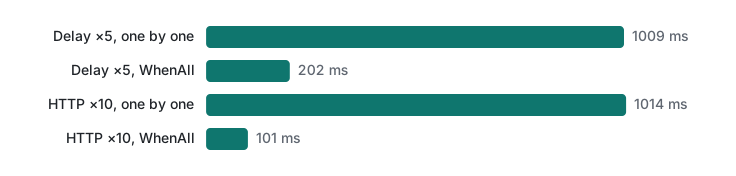
WhenAll took the time of the slowest call, not the sum. That only holds while the other side can handle the calls in parallel. Against a real API with rate limits, cap the concurrency (for example with SemaphoreSlim.WaitAsync, which is also the VB replacement for Await inside SyncLock) instead of firing 1,000 requests at once.
CPU-bound work: Task.Run vs Parallel.For
Async does not make computation faster. We counted primes below 5,000,000 four ways (correct count: 348,513 in every case):
Dim a = CountRange(0, N)                                  ' plain loop
Dim b = Task.Run(Function() CountRange(0, N)).Result      ' one Task.Run
' 8 chunks (one per core), each in its own Task.Run, then WhenAll
Dim parts = Enumerable.Range(0, chunks).Select(
    Function(k) Task.Run(Function() CountRange(k * size, If(k = chunks - 1, N, (k + 1) * size)))).ToArray()
Dim c = Task.WhenAll(parts).Result.Sum()
' Parallel.For with a thread-local counter
Parallel.For(0, N, Function() 0,
             Function(i, st, local) If(IsPrime(i), local + 1, local),
             Sub(local) Interlocked.Add(total, local))
round 1: seq 587 ms | Task.Run x1 561 ms | Task.Run x8 187 ms | Parallel.For 144 ms | counts 348513 348513 348513 348513
round 2: seq 586 ms | Task.Run x1 582 ms | Task.Run x8 156 ms | Parallel.For 129 ms | counts 348513 348513 348513 348513
round 3: seq 558 ms | Task.Run x1 560 ms | Task.Run x8 173 ms | Parallel.For 149 ms | counts 348513 348513 348513 348513
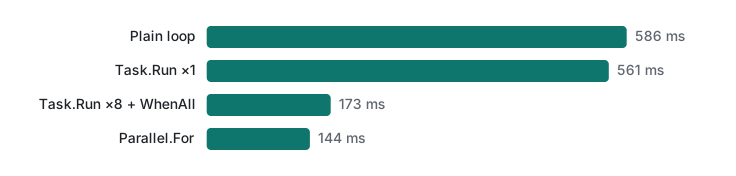
One Task.Run (561 ms median) is as slow as the plain loop (586 ms): it only moves the work to another thread, which is exactly what you want to keep a UI responsive, but nothing more. Eight equal chunks reached 173 ms, and Parallel.For 144 ms, because it balances the load: primes get rarer and more expensive to test as numbers grow, so equal-sized chunks finish at different times. That is about 4x on 8 cores, not 8x; the M1 Pro has 6 performance and 2 efficiency cores. The thread-local overload of Parallel.For matters: a shared counter with Interlocked.Increment per prime would serialize the threads on one memory location.
VB limitations: Await in Catch, and IAsyncEnumerable
Two C# async features are missing in VB as of the .NET 10 SDK, and we checked both with the compiler rather than from memory.
1. No Await in Catch/Finally (BC36943, shown above). C# allowed it in C# 6. The VB workaround is to capture and await afterwards:
Dim failure As Exception = Nothing
Try
    Await SaveAsync()
Catch ex As Exception
    failure = ex
End Try
If failure IsNot Nothing Then Await LogAsync(failure.Message)
2. No Await For Each. VB can neither write async iterators nor loop over IAsyncEnumerable(Of T). Both attempts fail:
Await For Each x In src
Program.vb(11,15): error BC30201: Expression expected.
Program.vb(13,9): error BC30092: 'Next' must be preceded by a matching 'For'.

For Each x In src
Program.vb(11,23): error BC32023: Expression is of type 'IAsyncEnumerable(Of Integer)', which is not a collection type.
The workaround is to drive the enumerator by hand. Note the trap: the natural place for Await e.DisposeAsync() is a Finally block, which BC36943 forbids, so we dispose after the Try and rethrow with the original stack trace:
Async Function AsyncEnumDemo() As Task
    Dim ch = Channels.Channel.CreateUnbounded(Of Integer)()
    Dim producer = Task.Run(Async Function()
                                For i = 1 To 3
                                    Await Task.Delay(20)
                                    Await ch.Writer.WriteAsync(i)
                                Next
                                ch.Writer.Complete()
                            End Function)
    Dim source As IAsyncEnumerable(Of Integer) = ch.Reader.ReadAllAsync()

    Dim e = source.GetAsyncEnumerator()
    Dim failure As Exception = Nothing
    Try
        While Await e.MoveNextAsync()
            Console.WriteLine($"got {e.Current}")
        End While
    Catch ex As Exception
        failure = ex                          ' no Await allowed in Catch/Finally
    End Try
    Await e.DisposeAsync()                    ' so dispose after the Try block
    If failure IsNot Nothing Then Runtime.ExceptionServices.ExceptionDispatchInfo.Capture(failure).Throw()

    Dim list = Await AsyncEnumerable.Range(1, 5).Where(Function(x) x Mod 2 = 1).ToListAsync()
    Console.WriteLine("ToListAsync: " & String.Join(",", list))
End Function
got 1
got 2
got 3
ToListAsync: 1,3,5
Await works on the ValueTask(Of Boolean) that MoveNextAsync returns. The last two lines use System.Linq.AsyncEnumerable, which is part of the .NET 10 base library (no NuGet package needed, as our build confirmed). ToListAsync() is the simplest workaround when the sequence is finite and fits in memory; the manual loop is for streams you must process item by item.
Decision table
| Situation | Use | Avoid |
|---|---|---|
| Waiting on HTTP, DB, files | Async Function … As Task(Of T) + Await |
.Result/.Wait() on a UI thread |
| Several independent I/O calls | Start all, then Await Task.WhenAll |
Awaiting one by one in a loop |
| Many calls to a rate-limited API | WhenAll + SemaphoreSlim cap |
1,000 requests at once |
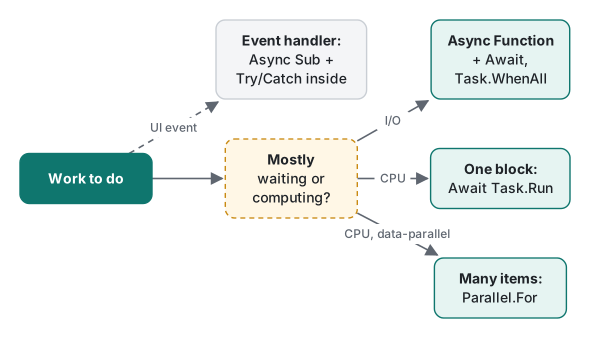
| Event handler (Click, Load) | Async Sub with Try/Catch inside |
Async Sub anywhere else |
| One CPU block, keep UI responsive | Await Task.Run(...) |
Expecting it to be faster |
| Same CPU work over many items | Parallel.For with thread-local state |
One Task.Run per item |
Library code after Await |
.ConfigureAwait(False) |
Touching UI controls after it |
Console Main |
MainAsync().GetAwaiter().GetResult() |
Async Sub Main (BC36934) |
| Timeouts | New CancellationTokenSource(TimeSpan) + pass the token |
Thread.Sleep loops |
IAsyncEnumerable in VB |
Manual MoveNextAsync loop or ToListAsync |
Await For Each (does not exist) |
Honest limits / version notes
- Everything was compiled with the VB compiler in .NET SDK 10.0.403 (Roslyn 5.9.0, default language version 17.13) and run on runtime 10.0.14. We did not test older compilers;
Async/Awaititself dates from VB 11 (Visual Studio 2012). - The deadlock was reproduced with our own single-thread
SynchronizationContext, not with WinForms or WPF, which cannot run on macOS. The mechanism is the same, but the UI-specific crash path for anAsync Subexception (crash dialog,Application.ThreadException) was not run here. System.Linq.AsyncEnumerablein the base library is new in .NET 10; on older targets the same methods come from theSystem.Linq.AsyncNuGet package, which we did not install.- Timings are from one machine (Apple M1 Pro, 8 cores) and three rounds each; treat them as ratios, not absolutes. The HTTP numbers include almost no network cost because the server is on loopback.
- The
Progress(Of T)ordering result depends on the thread pool and will vary between runs; the point is that order is not guaranteed without a SynchronizationContext.
Previous: VB.NET lecture 4/6: LINQ and collections. Next: VB.NET lecture 6/6: VB in .NET 10 and C# interop. For the same ideas in other languages see Python threads, processes and asyncio and Java virtual threads; for exceptions in general, C# exception handling and C# delegates and events.
FAQ
Why does my Try/Catch not catch an exception thrown inside an Async Sub?
An Async Sub returns nothing the caller can wait on, so by the time the exception is thrown the caller's Try block has already finished. In a .NET 10 console app the exception was rethrown on a thread-pool thread and the process died with exit code 134. Return a Task (Async Function … As Task) and Await it, or put the Try/Catch inside the Async Sub.
Can I use Await inside a Catch or Finally block in VB.NET?
No. C# allows it since C# 6, but the VB compiler in the .NET 10 SDK (language version 17.13) still reports BC36943. Store the exception in a variable inside Catch and Await after End Try.
Does .Result or .Wait() deadlock in a VB console app?
Not by itself, because a console app has no SynchronizationContext. It deadlocks on a UI thread (WinForms, WPF) or any single-threaded context. We reproduced it with a 10-line UI-like context: Wait(2000) returned False with one continuation stuck in the queue; ConfigureAwait(False) made it return True.