C# Exception Handling, Re-tested on .NET 10
C# try/catch/finally on .NET 10: when filters, throw; vs throw ex; stack traces, using declarations, ThrowIfNull, and measured exception cost.
Revised November 2026. This tutorial first appeared in Korean in 2021. We recompiled and ran its four examples in a default .NET 10.0.14 console project (C# 14). All of them work, but several points needed correcting. (1) The introduction said that taking the square root of a negative number throws an exception. It does not:
Math.Sqrt(-1)returnsNaN. (2) Thefinallyexample now raises two nullable warnings (CS8600), and ausingdeclaration replaces it in far fewer lines. (3) Thethrowexample threw the baseExceptiontype and also rejecteda = 0, which is a perfectly valid dividend. (4) The original console screenshot came from .NET Framework on a localized Windows and showed a local path; we replaced it with real .NET 10 output. We also addedwhenfilters, the stack-trace difference betweenthrow;andthrow ex;,ExceptionDispatchInfo, theThrowIfNullhelpers, and a measurement of what an exception costs.
This article is for developers who can write try/catch but are less sure where to catch, how to rethrow so the logs still show the cause, and whether exceptions are acceptable as ordinary control flow. In short: catch only specific exceptions you can handle, rethrow with throw;, release resources with using, and handle expected failures with return values such as TryParse. Each of these is shown below with real output.
When does an exception actually occur?
An exception signals that execution cannot continue normally. If nothing catches it, the process ends. A two-line program that divides an integer by zero ends like this on .NET 10:
int a = 5, b = 0;
Console.WriteLine(a / b);
Unhandled exception. System.DivideByZeroException: Attempted to divide by zero.
   at Program.<Main>$(String[] args) in …/Program.cs:line 2
The macOS shell reported exit code 134. On .NET (Core) and later, runtime exception messages are in English regardless of the OS language, which is useful to know when you search logs.
The 2021 post listed "dividing by zero, the square root of a negative number, an empty argument" as typical exceptions. Running them gives a different picture:
Console.WriteLine($"Math.Sqrt(-1)   = {Math.Sqrt(-1)}");
Console.WriteLine($"5.0 / 0         = {5.0 / 0}");
Console.WriteLine($"int.MaxValue + 1 = {Max() + 1}");
try { Console.WriteLine(checked(Max() + 1)); }
catch (OverflowException e) { Console.WriteLine($"checked: {e.GetType().Name}: {e.Message}"); }
try { int zero = 0; Console.WriteLine(5 / zero); }
catch (DivideByZeroException e) { Console.WriteLine($"5 / 0: {e.GetType().Name}: {e.Message}"); }
static int Max() => int.MaxValue;
Math.Sqrt(-1)   = NaN
5.0 / 0         = ∞
int.MaxValue + 1 = -2147483648
checked: OverflowException: Arithmetic operation resulted in an overflow.
5 / 0: DivideByZeroException: Attempted to divide by zero.
double arithmetic follows IEEE 754 and returns NaN or infinity instead of throwing. Integer overflow also wraps silently unless the code is checked. This is how you get a try block that never catches anything because the bad value slips through. Check floating-point results with double.IsNaN or double.IsFinite.
try/catch and the order of catch clauses
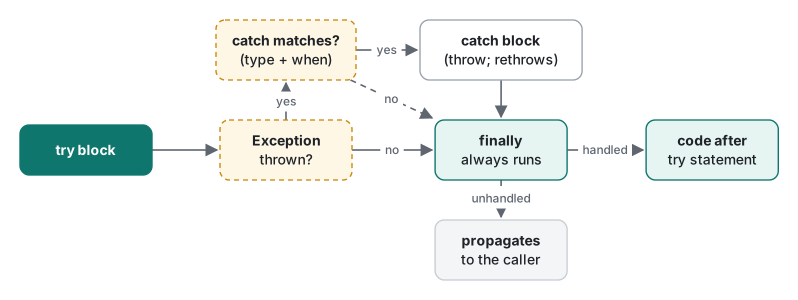
When code in a try block throws, the first catch whose type matches handles it. The original example (three integer divisions) still compiles without warnings:
static int Division(int a, int b)
{
    try
    {
        return a / b;
    }
    catch (DivideByZeroException e)
    {
        Console.WriteLine(e.Message);
        return -1;
    }
}
// Main prints Division(5, 0), Division(10, 2), Division(49, 7)
Attempted to divide by zero.
-1
5
7
You can have several catch clauses, and they are checked top to bottom. Put a broad type first and the compiler refuses:
try { int z = 0; _ = 1 / z; }
catch (Exception e) { Console.WriteLine(e.Message); }
catch (DivideByZeroException e) { Console.WriteLine("never"); }
Program.cs(3,8): error CS0160: A previous catch clause already catches all exceptions of this or of a super type ('Exception')
Specific types go first; Exception goes last, or better, only at the single top-level logging point of the program. As the original explained, if no catch matches, the exception travels up to the calling method, and if nobody catches it, the process ends.
Exception filters: catch only when a condition holds
Since C# 6 you can add a condition with catch (T e) when (condition). Here the same HttpRequestException is handled differently depending on the status code:
foreach (var code in new[] { 404, 503 })
{
    try
    {
        Fetch(code);
    }
    catch (HttpRequestException e) when (e.StatusCode == System.Net.HttpStatusCode.ServiceUnavailable)
    {
        Console.WriteLine($"{code}: retry later");
    }
    catch (HttpRequestException e) when (Log(e))   // Log returns false: logs, does not catch
    {
    }
    catch (HttpRequestException e)
    {
        Console.WriteLine($"{code}: give up ({e.Message})");
    }
}

static void Fetch(int code) =>
    throw new HttpRequestException($"HTTP {code}", null, (System.Net.HttpStatusCode)code);

static bool Log(Exception e) { Console.WriteLine($"  log: {e.Message}"); return false; }
  log: HTTP 404
404: give up (HTTP 404)
503: retry later
503 matched the first filter. 404 failed it, then Log recorded it and returned false, so the third clause handled it. The practical benefit of a filter is that the stack is not unwound when the condition is false. Unlike catching, testing with if and rethrowing, an exception you decline to handle stays exactly as it was, which also keeps crash dumps useful.
finally, and using declarations instead
A finally block runs whether or not an exception occurred, which makes it the place to close files and connections. The original file-copy example (append A.txt to B.txt) still works, and with no A.txt it printed Could not find file '…/A.txt'.. In today's default project it also warns twice:
Program.cs(14,36): warning CS8600: Converting null literal or possible null value to non-nullable type.
Program.cs(15,36): warning CS8600: Converting null literal or possible null value to non-nullable type.
The warnings come from the pattern of initializing StreamReader sreader = null; and checking it in finally. A C# 8 using declaration removes both the null checks and the finally. Dispose is called at the end of the enclosing block, in reverse order of declaration, even when an exception is thrown:
File.WriteAllLines("A.txt", ["line 1", "line 2"]);
Console.WriteLine($"copied {Copy("A.txt", "B.txt")} lines");
try { Copy("missing.txt", "B.txt"); }
catch (FileNotFoundException e) { Console.WriteLine($"not found: {Path.GetFileName(e.FileName)}"); }
Console.WriteLine(Order());

static int Copy(string from, string to)
{
    using var reader = new StreamReader(from);              // disposed at the end of the method,
    using var writer = new StreamWriter(to, append: true);  // in reverse order
    int n = 0;
    while (reader.ReadLine() is { } line) { writer.WriteLine(line); n++; }
    return n;
}

static string Order()
{
    try { Console.WriteLine("try"); return "return value"; }
    finally { Console.WriteLine("finally (runs before the caller sees the return)"); }
}
copied 2 lines
not found: missing.txt
try
finally (runs before the caller sees the return)
return value
The original caught Exception; this version catches only FileNotFoundException, so a permissions error or a failing disk is not swallowed as if it were "file not found". As Order() shows, finally runs even after return inside try, before the caller receives the value.
throw: validate arguments with the ThrowIf helpers
The original throw example threw new Exception(...) with a "zero or negative values are not allowed" message for any value of 0 or less, and its output matched (5, 7, then the message). Throwing the base Exception type forces callers into catch (Exception), which catches everything else too, and the check also rejected a = 0, although dividing zero is fine. For argument validation, use the static helpers added in .NET 6 through 8:
Console.WriteLine(Division(10, 2));
Console.WriteLine(Division(49, 7));
foreach (var (a, b) in new[] { (5, -1), (5, 0) })
{
    try { Console.WriteLine(Division(a, b)); }
    catch (ArgumentOutOfRangeException e) { Console.WriteLine($"{e.GetType().Name}: {e.Message}"); }
}
try { Greet(null); }
catch (ArgumentNullException e) { Console.WriteLine($"{e.GetType().Name}: {e.Message}"); }

static int Division(int a, int b)
{
    ArgumentOutOfRangeException.ThrowIfNegative(a);
    ArgumentOutOfRangeException.ThrowIfNegativeOrZero(b);
    return a / b;
}

static string Greet(string? name)
{
    ArgumentNullException.ThrowIfNull(name);
    return "Hello " + name;
}
5
7
ArgumentOutOfRangeException: b ('-1') must be a non-negative and non-zero value. (Parameter 'b')
Actual value was -1.
ArgumentOutOfRangeException: b ('0') must be a non-negative and non-zero value. (Parameter 'b')
Actual value was 0.
ArgumentNullException: Value cannot be null. (Parameter 'name')
The parameter names 'b' and 'name' appear in the messages without being passed in, thanks to [CallerArgumentExpression]. ThrowIfNull arrived in .NET 6; ThrowIfNegative and ThrowIfNegativeOrZero in .NET 8.
throw; vs throw ex;, and ExceptionDispatchInfo
When you catch an exception only to log it and rethrow, throw; and throw ex; produce different results. We rethrew the same int.Parse("abc") failure three ways and printed each stack trace (Debug build):
using System.Runtime.ExceptionServices;

Show("throw;", Demo.Rethrow);
Show("throw ex;", Demo.RethrowEx);
Show("ExceptionDispatchInfo", Demo.Deferred);

static void Show(string title, Action a)
{
    try { a(); }
    catch (Exception e) { Console.WriteLine($"--- {title}\n{e.StackTrace}\n"); }
}

static class Demo
{
    static void Parse() => int.Parse("abc");

    public static void Rethrow()
    {
        try { Parse(); }
        catch (FormatException) { throw; }
    }

    public static void RethrowEx()
    {
        try { Parse(); }
        catch (FormatException ex) { throw ex; }
    }

    public static void Deferred()
    {
        ExceptionDispatchInfo? captured = null;
        try { Parse(); }
        catch (FormatException ex) { captured = ExceptionDispatchInfo.Capture(ex); }
        Console.WriteLine("(cleanup, then rethrow)");
        captured?.Throw();
    }
}
--- throw;
   at System.Number.ThrowFormatException[TChar](ReadOnlySpan`1 value)
   at System.Int32.Parse(String s)
   at Demo.Parse() in Program.cs:line 15
   at Demo.Rethrow() in Program.cs:line 19
   at Program.<<Main>$>g__Show|0_0(String title, Action a) in Program.cs:line 9

--- throw ex;
   at Demo.RethrowEx() in Program.cs:line 26
   at Program.<<Main>$>g__Show|0_0(String title, Action a) in Program.cs:line 9

(cleanup, then rethrow)
--- ExceptionDispatchInfo
   at System.Number.ThrowFormatException[TChar](ReadOnlySpan`1 value)
   at System.Int32.Parse(String s)
   at Demo.Parse() in Program.cs:line 15
   at Demo.Deferred() in Program.cs:line 32
--- End of stack trace from previous location ---
   at Demo.Deferred() in Program.cs:line 35
   at Program.<<Main>$>g__Show|0_0(String title, Action a) in Program.cs:line 9
(Paths shortened to Program.cs.) The throw ex; trace starts at line 26, the rethrow, and the frames where the failure happened, int.Parse and Demo.Parse(), are gone. It is the classic way to make a production log useless. The default analyzers flag it at build time:
Program.cs(26,38): warning CA2200: Re-throwing caught exception changes stack information (https://learn.microsoft.com/dotnet/fundamentals/code-analysis/quality-rules/ca2200)
ExceptionDispatchInfo.Capture(ex).Throw() is for rethrowing later, outside the catch block: after some cleanup, or on another thread than the one that caught it. The original trace is kept, followed by --- End of stack trace from previous location --- and the rethrow location. This is also how await rethrows the exception stored in a faulted Task.
Don't use exceptions for control flow (measured)
How much do you lose by handling an expected failure, such as "the user typed something that isn't a number", with an exception? We parsed an invalid string "abc" and a valid string "123" 100,000 times each. Method: .NET 10.0.14, Release build, Stopwatch, 100,000 iterations, one warm-up pass then three timed runs, on an Apple Silicon Mac (M1 Pro).
// invalid input, handled with an exception
for (int i = 0; i < N; i++) { try { s += int.Parse(bad); } catch (FormatException) { s--; } }
// invalid input, handled with a return value
for (int i = 0; i < N; i++) { if (int.TryParse(bad, out int v)) s += v; else s--; }
// the same two loops measured again with the valid input "123"
| Case | Run 1 | Run 2 | Run 3 |
|---|---|---|---|
invalid: Parse + catch |
292.67 ms | 264.28 ms | 262.12 ms |
invalid: TryParse |
0.50 ms | 0.45 ms | 0.45 ms |
valid: Parse inside try |
0.65 ms | 0.62 ms | 0.61 ms |
valid: TryParse |
0.66 ms | 0.61 ms | 0.61 ms |
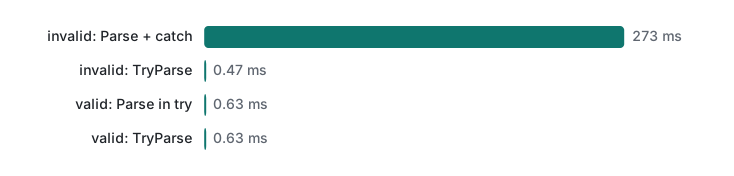
One throw-and-catch cost about 2.7 µs on average, roughly 580 times the TryParse path, and that is with a shallow call stack; deeper stacks cost more. When nothing was thrown, the try block itself cost nothing measurable (0.63 ms vs 0.63 ms). So entering try is close to free; throwing is what costs. For a genuine error that happens a few times per second, 2.7 µs does not matter. On paths where failure is common, such as input validation, file existence checks or dictionary lookups, use the Try pattern: TryParse, File.Exists, TryGetValue.
Choosing the right tool
| Situation | Use |
|---|---|
| Expected failure (bad input format, missing key) | Try pattern: TryParse, TryGetValue |
| Invalid argument | ArgumentNullException.ThrowIfNull, ArgumentOutOfRangeException.ThrowIfNegative, … |
| Handle only some exceptions of a type | catch (T e) when (condition) |
| Log and rethrow | throw; (never throw ex;, CA2200) |
| Rethrow later, outside the catch block | ExceptionDispatchInfo.Capture(ex).Throw() |
| Release files and connections | using var declaration instead of finally plus null checks |
| Floating-point errors | no exception is thrown; check double.IsNaN / IsFinite |
catch (Exception) |
only at the single top-level logging point |
Exceptions thrown inside event handlers have their own rules for multicast chains; see C# delegates and events and the multicast traps in Func and Action delegates.
Tested with .NET SDK 10.0.403 / runtime 10.0.14, C# 14, macOS on Apple Silicon (M1 Pro).
FAQ
What is the difference between throw; and throw ex; inside a catch block?
throw; keeps the original stack trace. throw ex; resets it to the line of the rethrow. On .NET 10 the throw ex; trace lost the int.Parse and Parse() frames where the failure actually happened, and the build reported warning CA2200. Use throw; to rethrow.
Does the square root of a negative number, or dividing a double by zero, throw?
No. Math.Sqrt(-1) returns NaN and 5.0 / 0 returns infinity, with no exception. DivideByZeroException comes only from integer division, and OverflowException only in a checked context.
How expensive is throwing and catching an exception?
In a Release build on an Apple Silicon Mac, parsing 100,000 invalid strings with int.Parse plus catch took 273.0 ms on average (about 2.7 µs each); int.TryParse took 0.47 ms. When nothing was thrown, wrapping the call in try cost nothing measurable (0.63 ms in both cases).