VB.NET on .NET 10: What Works and What C# Breaks
VB.NET on .NET 10, tested: WinForms builds on a Mac, C# features VB can't use (real BC30668, BC37315), a Span crash, and 30% lost to overflow checks.
Series: VB.NET lecture 6/6 (advanced). For teams that own a VB.NET codebase and must decide what to do with it on .NET 10. After this lecture you know, from compiler output rather than rumour, what VB can and cannot consume from modern C#, how to add C# next to VB without a rewrite, and what the one real performance difference costs.
If you are responsible for a VB.NET application, sooner or later someone asks "should we rewrite it in C#?" The usual answers are opinions. This lecture answers with a build log: we wrote a C# 14 class library full of modern features, referenced it from a VB project on .NET 10, and recorded every BC error, every silent success, and one program that compiled cleanly and then crashed before Main printed a line. The last part measures the same loop in both languages.
Environment: .NET SDK 10.0.403 (Roslyn 5.9.0), runtime 10.0.14, Visual Basic 17.13 and C# 14 (SDK defaults), Apple Silicon Mac (M1 Pro). Timings are Release builds after a JIT warm-up.
Where VB stands in 2026
Microsoft's position is written down on Microsoft Learn, in the article ".NET Managed languages strategy". In short, it says that Visual Basic keeps a stable design and stays straightforward; that when C# or the runtime add features that need language support, VB generally takes a "consumption-only" approach and avoids new syntax; that VB will not be extended to new workloads; and that Microsoft keeps investing in the Visual Studio experience and C# interop, especially for Windows Forms and libraries. The same article notes that some .NET workloads are not supported in VB and that VB developers commonly use C# for those.
Two things on this Mac confirm it in practice. The compiler lists the language versions it knows:
$ dotnet vbc.dll /langversion:?
Supported language versions: default 9 10 11 12 14 15 15.3 15.5 16 16.9 17.13 (default) latest
Version 17.13 is the default, but nothing in this lecture needed it: the working example below also built at LangVersion 16.9, and the required check fired the same way there. And dotnet new list --language VB shows console, class library, WinForms (app, control library, class library), WPF (four templates) and MSTest/NUnit/xUnit. There is no ASP.NET Core, Blazor, MAUI or worker-service template for VB.
So the realistic picture: VB is a maintained, stable language for desktop apps and libraries, and C# is where new workloads go. Nothing in this lecture contradicted that.
What builds on .NET 10, verified
Console and class library: dotnet new console -lang VB targets net10.0; everything in lectures 1 to 5 of this series ran on it.
WinForms, compile only. WinForms needs Windows to run, but it can be compiled elsewhere. Without the extra property the SDK refuses:
$ dotnet new winforms -lang VB -o wf && cd wf
$ dotnet build
…targets(120,5): error NETSDK1100: To build a project targeting Windows on this operating system, set the EnableWindowsTargeting property to true.
$ dotnet build -p:EnableWindowsTargeting=true
  wf -> ~/demo/wf/bin/Debug/net10.0-windows/wf.dll
Build succeeded.
    0 Warning(s)
    0 Error(s)
The template targets net10.0-windows with <UseWindowsForms>true</UseWindowsForms> and <StartupObject>Sub Main</StartupObject>. We compiled it; we did not run it. Starting the DLL on macOS fails with "You must install or update .NET to run this application ... Framework: 'Microsoft.WindowsDesktop.App'", which is expected: the Windows Desktop runtime does not exist for macOS. The point of compiling on a Mac or Linux CI agent is to catch build errors early; the tests that touch forms still need Windows.
The test: a C# 14 library consumed from VB
Here is the C# side, one file in a dotnet new classlib project. Each type uses one feature that VB might not understand:
using System;
using System.Numerics;

namespace ModernLib;

public class Person
{
    public string Name { get; init; } = "";       // C# 9 init-only setter
    public int Age { get; set; }
}

public class Order
{
    public required string Id { get; set; }       // C# 11 required member
    public decimal Total { get; set; }
}

public ref struct Cursor                          // ref struct (C# 7.2)
{
    private ReadOnlySpan<char> _rest;
    public Cursor(ReadOnlySpan<char> text) { _rest = text; }
    public bool TryNext(out int value)
    {
        value = 0;
        if (_rest.IsEmpty) return false;
        int comma = _rest.IndexOf(',');
        var token = comma < 0 ? _rest : _rest[..comma];
        _rest = comma < 0 ? default : _rest[(comma + 1)..];
        value = int.Parse(token);
        return true;
    }
}

public static class Spans
{
    public static int SumDigits(ReadOnlySpan<char> s)
    {
        int t = 0;
        foreach (var c in s) if (char.IsAsciiDigit(c)) t += c - '0';
        return t;
    }
    public static int CountCommas(ReadOnlySpan<char> s) => s.Count(',');
    // VB-friendly wrappers: string in, int out. The Span stays inside C#.
    public static int SumDigits(string s) => SumDigits(s.AsSpan());
    public static int SumCsv(string csv)
    {
        var cur = new Cursor(csv);
        int total = 0;
        while (cur.TryNext(out var v)) total += v;
        return total;
    }
}

public interface IParsable2<TSelf> where TSelf : IParsable2<TSelf>
{
    static abstract TSelf Parse(string s);          // C# 11 static abstract member
}

public readonly record struct Meters(double Value) : IParsable2<Meters>
{
    public static Meters Parse(string s) => new(double.Parse(s.TrimEnd('m')));
}

public static class Generic
{
    public static T ParseAll<T>(string s) where T : IParsable2<T> => T.Parse(s);
    public static T Sum<T>(T[] xs) where T : INumber<T>     // generic math (.NET 7)
    {
        T t = T.Zero;
        foreach (var x in xs) t += x;
        return t;
    }
}

public interface IGreeter
{
    string Name { get; }
    string Greet() => $"Hello, {Name}";            // C# 8 default interface method
}

public static class TextExtensions
{
    extension(string s)                            // C# 14 extension block
    {
        public bool IsBlank => string.IsNullOrWhiteSpace(s);   // extension property
        public string Shout() => s.ToUpperInvariant() + "!";    // extension method
    }
}
The VB console project references it with dotnet add reference ../ModernLib/ModernLib.csproj. Both target net10.0; one dotnet build builds both.
What VB cannot consume: the real BC errors
First, the code a VB developer would naturally write against that library:
Option Strict On
Imports ModernLib

Module Program
    Sub Main()
        Dim p As New Person With {.Name = "Kim"}
        p.Name = "Lee"                                   ' init-only after construction
        Dim span As ReadOnlySpan(Of Char) = "a1b2".AsSpan()
        Dim c As New Cursor("1,2,3")
        Dim blank = "  ".IsBlank
    End Sub
End Module

Class VbMeters
    Implements IParsable2(Of VbMeters)
End Class

Class VbGreeter
    Implements IGreeter
    Public ReadOnly Property Name As String Implements IGreeter.Name
        Get
            Return "VB"
        End Get
    End Property
End Class
The first build reports only the two class-level errors:
Program.vb(17,16): error BC37315: Class 'VbMeters' cannot implement interface 'IParsable2(Of VbMeters)' because it contains shared abstract or virtual 'Function Parse(s As String) As VbMeters'.
Program.vb(21,16): error BC30149: Class 'VbGreeter' must implement 'Function Greet() As String' for interface 'IGreeter'.
Only after removing the two classes did the method-body errors appear. Expect errors to arrive in waves when you first point VB at a modern C# library:
Program.vb(7,9): error BC37311: Init-only property 'Name' can only be assigned by an object member initializer, or on 'Me', 'MyClass` or 'MyBase' in an instance constructor.
Program.vb(8,21): error BC30668: 'ReadOnlySpan(Of Char)' is obsolete: 'Types with embedded references are not supported in this version of your compiler.'.
Program.vb(11,22): error BC30668: 'Cursor' is obsolete: 'Types with embedded references are not supported in this version of your compiler.'.
Program.vb(12,21): error BC30456: 'IsBlank' is not a member of 'String'.
And the parts that worked, which surprised us more than the errors:
Dim p As New Person With {.Name = "Kim", .Age = 30}   ' init-only via object initializer
Dim o As New Order With {.Id = "A-1"}                  ' required member set
Console.WriteLine($"Span wrapper : {Spans.SumDigits("a1b2c3")} / {Spans.SumCsv("10,20,30")}")
Console.WriteLine($"Span-only    : {Spans.CountCommas("a,b,c")}")
Dim m = Generic.ParseAll(Of Meters)("12.5m")
Console.WriteLine($"generic math : {Generic.Sum(New Integer() {1, 2, 3})} {Generic.Sum(New Double() {0.5, 0.25})}")
Console.WriteLine($"ext. method  : {"hi".Shout()}")
Console.WriteLine($"ext. property: {TextExtensions.get_IsBlank("  ")}")
init-only    : Kim
required     : Id = A-1
Span wrapper : 6 / 60
Span-only    : 2
static abstr.: 12.5
generic math : 6 0.75
ext. method  : HI!
ext. property: True
The summary, all checked on this compiler:
| C# feature | VB on .NET 10 | Evidence |
|---|---|---|
init setter |
Set in With {…} only |
BC37311 on later assignment; at LangVersion 16 even the initializer fails with BC36716 |
required member |
Enforced | New Order() → BC37321, even at LangVersion 16.9 |
Span/ReadOnlySpan, ref struct named as a type |
Not allowed | BC30668 "Types with embedded references…" |
Method with a ReadOnlySpan(Of Char) parameter, passed a String |
Works | CountCommas("a,b,c") = 2 |
Calling a generic method constrained by static abstract |
Works | ParseAll(Of Meters) = 12.5 |
Implementing an interface with static abstract members |
Not allowed | BC37315 |
Generic math (INumber(Of T)) |
Works for calls | Sum of Integer and Double |
| Default interface method | Must be implemented anyway | BC30149 |
C# 14 extension method in an extension block |
Works | "hi".Shout() |
| C# 14 extension property | Not as a property | BC30456; TextExtensions.get_IsBlank(s) works but is ugly |
The required row corrects a common belief: VB does not silently ignore it. The compiler reports BC37321 ("Required member … must be set in the object initializer or attribute arguments").
Common mistake: Span "works" in VB, then crashes
BC30668 fires when you write the Span type's name. Let type inference pick it, and the compiler accepts it:
Dim inferred = "a1b2".AsSpan()                   ' type not written
Console.WriteLine($"Length = {inferred.Length}")   ' prints: Length = 4
That looks like a loophole. It is a trap, because VB does not know the safety rules for ref structs. Capture that variable in a lambda:
Sub Main()
    Console.WriteLine("start")
    Dim inferred = "a1b2".AsSpan()
    Dim f = Function() inferred.Length              ' lambda captures a Span
    Console.WriteLine(f())
End Sub
What actually happens: the build reports 0 errors and 0 warnings, and the program dies before printing "start":
Unhandled exception. System.TypeLoadException: A ByRef or ByRef-like type cannot be used as the type for an instance field in a non-ByRef-like type.
   at VbErr.Program.Main()
The lambda turned inferred into a field of a compiler-generated closure class, and the runtime refuses to load a class with a Span field. Because the failure happens when Main is compiled by the JIT, not when the line runs, even the first Console.WriteLine never executes. A C# compiler would have rejected this at build time. Keeping such a variable alive across an Await would turn it into a state-machine field in the same way; we did not run that case.
Fix: never let a Span reach VB code at all. Give the C# library a VB-friendly overload (SumDigits(String), SumCsv(String) above) and keep every Span inside C#.
The mixed-solution pattern: keep VB, add C# beside it
That fix is also the architecture. You do not have to choose between "all VB" and "rewrite":
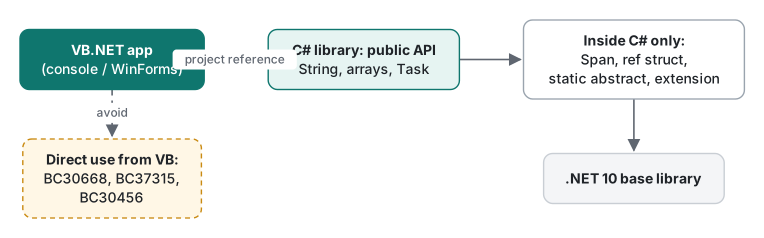
- Keep the VB project as it is, retargeted to
net10.0(ornet10.0-windowsfor WinForms). - Add a C# class library to the same solution and a project reference from VB to C#.
- Write new code that needs modern features (Span parsing, async streams, source generators,
static abstractinterfaces) in that library. - Expose only types VB handles well:
String, arrays,List(Of T),Task(Of T), plain classes and records with ordinary orinitproperties. For async streams, exposeTask(Of List(Of T))or a callback instead ofIAsyncEnumerable, since VB has noAwait For Each(see lecture 5). - Move VB modules into C# only when you are changing them anyway.
The reverse reference (a C# project using a VB library) needs nothing special: a VB class library is ordinary .NET metadata. Note that the project reference also carries build properties: dotnet build -p:LangVersion=17 on the VB project failed with error CS1617 from the C# project, because a global -p: property applies to every project in the build. Put LangVersion in each project file instead.
Measured: the same loop in VB and C
Both compilers produce IL for the same runtime, so the question is only whether they produce different IL. We decoded the method bodies with MethodBody.GetILAsByteArray() and a small opcode table:
Function SumAllVb(a As Integer()) As Long
    Dim total As Long = 0
    For i = 0 To a.Length - 1
        total += a(i)
    Next
    Return total
End Function
public static long SumAll(int[] a)
{
    long total = 0;
    for (int i = 0; i < a.Length; i++) total += a[i];
    return total;
}
For the related SumEven loop the decoder printed:
C#  SumEven: 33 bytes IL, ops: add rem
VB  SumEven: 37 bytes IL, ops: add.ovf rem
The difference is add.ovf: VB checks every integer addition for overflow unless you set <RemoveIntegerChecks>true</RemoveIntegerChecks>. We timed both methods in the same process over 10,000,000 Integers from Random(42), 5 warm-up calls, then the median of 30 runs, three process runs each:
default build:            SumAll 10M ints: C# 6.50 / 6.50 / 6.45 ms | VB 8.49 / 8.42 / 8.36 ms
RemoveIntegerChecks=true: SumAll 10M ints: C# 6.46 / 6.46 / 6.63 ms | VB 6.46 / 6.45 / 6.66 ms

So VB's default was about 30% slower on this tight loop, and identical once the checks were off. On a branchy loop (summing only even numbers, where branch misprediction dominates) the gap shrank to about 2%: C# 33.7–34.2 ms vs VB 34.1–35.3 ms. Real applications spend their time in I/O and libraries, so the language rarely matters; tight numeric loops are the exception.
The overflow check is also a correctness difference when you port code. A hash function copied from C#:
Function HashVb(a As Integer()) As Integer
    Dim h = 17
    For Each x In a
        h = h * 31 + x
    Next
    Return h
End Function
C# Hash = -2025638595
VB Hash -> OverflowException: Arithmetic operation resulted in an overflow.
C# wraps silently; VB throws. With RemoveIntegerChecks both printed -2025638595. (Lecture 1 shows the same with Integer.MaxValue + 1.) Turn the checks off per project only if you understand which code relies on wrapping; the safer fix for hash code is to do that arithmetic in the C# library or with Long and masking.
Migration decision table
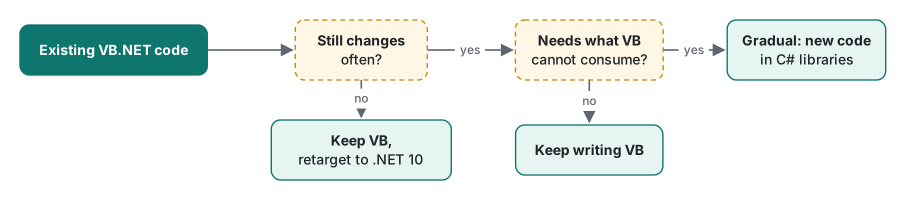
| Situation | Recommendation | Why |
|---|---|---|
| Stable WinForms/console app, few changes | Keep in VB, retarget to .NET 10 | Compiles and runs; the strategy promises a stable language and Windows Forms support |
| Active app, new features are ordinary business logic | Keep writing VB | Nothing in our tests blocked plain classes, LINQ, async, generics |
| Active app, new features need Span APIs, async streams, source generators | Gradual: new C# library beside VB | VB cannot name Span types (BC30668) or consume IAsyncEnumerable with a loop |
You must implement modern BCL interfaces (INumber(Of T), IParsable(Of T)) |
Gradual: that type in C# | VB cannot implement static abstract members (BC37315) |
| Need a web API, Blazor or MAUI front end | Gradual: new C# project, share VB libraries | No VB templates for these workloads; the strategy says VB won't be extended to them |
| Small codebase, or a redesign is planned anyway | Rewrite in C# | Mixed solutions have a cost: two languages to review and hire for |
| Large codebase "because VB is dead" | Don't rewrite on that basis alone | The runtime, libraries and IL performance are shared; the measurable difference was overflow checking |
Honest limits / version notes
- Everything ran on .NET SDK 10.0.403 / runtime 10.0.14 on macOS. WinForms was compiled only (
-p:EnableWindowsTargeting=true, using the Windows Desktop reference pack already in the local NuGet cache); it was not run. WPF was not built. - We checked language-version gates only where noted: init-only consumption fails at
LangVersion16 (BC36716) and works at 16.9;requiredenforcement happened at both 16.9 and 17.13. Other rows were checked only with the default 17.13. - The strategy summary paraphrases the Microsoft Learn article ".NET Managed languages strategy" as it read in November 2026; check the page for the current wording.
- The Span-in-lambda crash is our own reproduction. We did not test every way a ref struct can escape in VB (for example across
Await, in iterators or when boxed); assume all of them are unsafe. - Timings come from one Apple M1 Pro, Release builds, median of 30 runs after 5 warm-up calls, three process runs; they show a ratio, not an absolute speed. We did not measure build times.
Previous: VB.NET lecture 5/6: Async/Await. This is the last lecture of the VB.NET series; start again at lecture 1: Option Strict and types. For the C# side of the interop, see C# interfaces, C# generics and C# struct. The parallel advanced lectures are Java: JVM, JIT and GC and Python profiling and optimization.
FAQ
Is VB.NET still supported on .NET 10?
Yes. The .NET 10 SDK ships the VB compiler (default language version 17.13) and VB templates for console apps, class libraries, WinForms, WPF and test projects. Microsoft's '.NET Managed languages strategy' page on Microsoft Learn says VB keeps a stable design, adopts new C# and runtime features on a consumption-only basis, and will not be extended to new workloads. There is no ASP.NET Core template for VB.
Can VB.NET use a C# library that has init-only or required properties?
Yes, both. VB sets init-only properties in an object initializer (assigning later gives BC37311), and it enforces C# required members: New Order() without setting Id failed with BC37321. What VB cannot do is name Span or ref struct types (BC30668), implement interfaces with static abstract members (BC37315), use C# 14 extension properties (BC30456) or inherit default interface methods (BC30149).
Is VB.NET slower than C#?
The IL is nearly identical, with one exception: VB checks integer overflow by default. Summing 10 million Integers took 8.42 ms in VB and 6.50 ms in C# (median of 30, Release, Apple M1 Pro). With RemoveIntegerChecks set to true, VB took 6.46 ms, the same as C#.