VB.NET Procedures: ByVal, ByRef, AndAlso and Try/Catch
VB.NET Sub vs Function and ByVal vs ByRef with real .NET 10 output, Select Case, loops, a NullReferenceException from And, Catch When, AndAlso timed.
Series: VB.NET lecture 2/6 (beginner). For readers who finished lecture 1 or already write simple VB, and want to write procedures and control flow that behave the way they read. After this lecture you can predict what ByVal and ByRef do with any argument, choose the right loop and branch, and write Try/Catch blocks that catch only what they should.
If you have ever "fixed" a VB bug by changing ByVal to ByRef and back without knowing why, or seen a NullReferenceException on a line that checked for Nothing, this lecture is for you. Both come from rules that look obvious and are not: what ByVal copies, and the fact that VB's And evaluates both sides. Every example below was built and run on .NET 10, with the output pasted unchanged, and the last section measures what the wrong operator costs.
Environment: .NET SDK 10.0.403, runtime 10.0.14, Visual Basic 17.13, <OptionStrict>On</OptionStrict> in the .vbproj (see lecture 1), Apple Silicon Mac (M1 Pro).
Sub vs Function, and the missing Return
A Sub does something and returns nothing. A Function returns a value with Return, or, in older code, by assigning to the function's name:
Function Square(x As Integer) As Integer
    Return x * x
End Function

Function Cube(x As Integer) As Integer
    Cube = x * x * x          ' old style, still legal
End Function
Square(4) and Cube(3) printed 16 27. The old style has a trap: a function that never reaches a Return still compiles. We built this:
Function Discount(price As Decimal) As Decimal
    If price > 100D Then
        Return price * 0.9D
    End If
End Function

Function Label(code As Integer) As String
    Select Case code
        Case 1 : Return "one"
    End Select
End Function
Program.vb(8,5): warning BC42353: Function 'Discount' doesn't return a value on all code paths. Are you missing a 'Return' statement?
Program.vb(14,5): warning BC42105: Function 'Label' doesn't return a value on all code paths. A null reference exception could occur at run time when the result is used.
Only warnings, and the build succeeds. At run time, Discount(50D) printed 0 and Label(2) Is Nothing printed True. A price of 50 becoming 0 is the kind of bug that reaches production. Treat these two warnings as errors: add <WarningsAsErrors>BC42353;BC42105</WarningsAsErrors> to the project. We checked: the same two lines then come out as error BC42353 and error BC42105 and the build fails.
ByVal and ByRef: what actually gets copied
VB passes arguments ByVal by default. The rule is short: ByVal copies the variable's contents. For a value type (Integer, Date, a Structure) that is the value. For a reference type (List, arrays, any Class) that is the reference, so both the caller and the procedure point at the same object. This full program shows every case:
Imports System
Imports System.Collections.Generic

Module Program
    Sub BumpVal(ByVal n As Integer)
        n += 1
    End Sub
    Sub BumpRef(ByRef n As Integer)
        n += 1
    End Sub
    Sub AddItemVal(ByVal list As List(Of String))
        list.Add("added")                               ' mutates the caller's object
        list = New List(Of String) From {"replaced"}    ' rebinds the local copy only
    End Sub
    Sub AddItemRef(ByRef list As List(Of String))
        list.Add("added")
        list = New List(Of String) From {"replaced"}
    End Sub
    Sub FillArray(ByVal arr As Integer())
        arr(0) = 99
    End Sub

    Sub Main()
        Dim n = 10
        BumpVal(n) : Console.WriteLine($"after BumpVal: {n}")
        BumpRef(n) : Console.WriteLine($"after BumpRef: {n}")
        BumpRef((n)) : Console.WriteLine($"after BumpRef((n)): {n}")

        Dim names As New List(Of String) From {"a"}
        AddItemVal(names) : Console.WriteLine($"ByVal list: {String.Join(",", names)}")
        names = New List(Of String) From {"a"}
        AddItemRef(names) : Console.WriteLine($"ByRef list: {String.Join(",", names)}")

        Dim arr = {1, 2, 3}
        FillArray(arr) : Console.WriteLine($"array after ByVal: {String.Join(",", arr)}")
    End Sub
End Module
after BumpVal: 10
after BumpRef: 11
after BumpRef((n)): 11
ByVal list: a,added
ByRef list: replaced
array after ByVal: 99,2,3
Three lines deserve a second look.
ByVal list: a,added: the procedure got its listByValand still changed the caller's list. "ByVal means the caller is safe" is only true for value types.ByRef list: replaced: withByRefthe reassignment replaced the caller's variable, and the caller's original list (which had received "added") is gone from its view.BumpRef((n)): extra parentheses turn the argument into an expression, so VB passes a temporary copy even to aByRefparameter.nstayed 11. This is a classic surprise when someone "tidies up" parentheses.
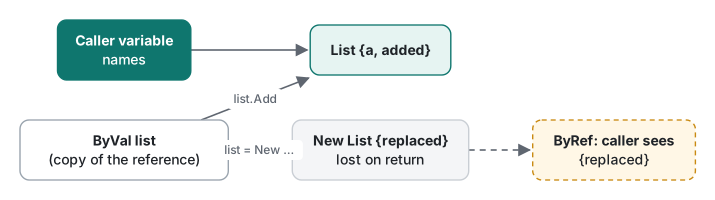
If a procedure must not modify a list it receives, pass IReadOnlyList(Of T) or list.AsReadOnly(); ByVal alone will not protect it.
Optional, ParamArray and overloading
Function Greet(name As String, Optional greeting As String = "Hello") As String
    Return $"{greeting}, {name}"
End Function

Function Sum(ParamArray values As Integer()) As Integer
    Dim t = 0
    For Each v In values
        t += v
    Next
    Return t
End Function

Function Describe(x As Integer) As String
    Return $"Integer {x}"
End Function
Function Describe(x As Double) As String
    Return $"Double {x}"
End Function
Function Describe(x As String) As String
    Return $"String ""{x}"""
End Function
Calls and output:
Console.WriteLine(Greet("Kim"))
Console.WriteLine(Greet("Kim", "Hi"))
Console.WriteLine(Greet(greeting:="Yo", name:="Lee"))
Console.WriteLine($"{Sum()} {Sum(1, 2, 3)} {Sum({4, 5})}")
Console.WriteLine(Describe(1))
Console.WriteLine(Describe(1.5))
Console.WriteLine(Describe("1"))
Console.WriteLine(Describe(1L))
Hello, Kim
Hi, Kim
Yo, Lee
0 6 9
Integer 1
Double 1.5
String "1"
Double 1
The last line is the trap: there is no Long overload, and Long → Integer is narrowing, so VB picks the widening Long → Double overload without a word. If you add overloads for numeric types, add one for every type callers actually pass.
The compiler errors you will meet here:
error BC30812: Optional parameters must specify a default value.
error BC30192: End of parameter list expected. Cannot define parameters after a paramarray parameter.
The first appears for Optional level As Integer with no = 0; the second for Sub Total(ParamArray xs As Integer(), label As String). ParamArray must be last.
If, Select Case and loops
Select Case in VB is more expressive than C#'s classic switch: it takes ranges, comparisons and lists in one Case.
Function Grade(score As Integer) As String
    Select Case score
        Case Is > 100, Is < 0 : Return "invalid"
        Case 90 To 100 : Return "A"
        Case 80 To 89 : Return "B"
        Case 70, 75, 79 : Return "C (exact)"
        Case Else : Return "F"
    End Select
End Function
105->invalid 95->A 85->B 75->C (exact) 72->F -1->invalid
72 fell through to Case Else because 70, 75, 79 is a list of exact values, not a range. Cases are tested top to bottom and the first match wins; there is no fall-through to the next Case.
Loops, with Step, Continue For and Exit For:
For i = 10 To 1 Step -3
    Console.Write($"{i} ")
Next
Console.WriteLine()
For i = 1 To 10
    If i Mod 2 = 0 Then Continue For
    If i > 7 Then Exit For
    Console.Write($"{i} ")
Next
Console.WriteLine()
Dim k = 0
Do While k < 3
    k += 1
Loop
Dim j = 100
Do
    j += 1
Loop While j < 3
Console.WriteLine($"Do While: k={k}, Do...Loop While: j={j}")
Dim last = 5
For i = 1 To last
    last = 2           ' the bound was evaluated once
    Console.Write($"{i} ")
Next
10 7 4 1
1 3 5 7
Do While: k=3, Do...Loop While: j=101
1 2 3 4 5
Two details: a Do … Loop While body runs at least once (j became 101 even though 100 < 3 is false), and the For upper bound is evaluated once, so changing last inside the loop did nothing. Use Do While when the end condition changes while you loop. Exit For outside a For is error BC30096: 'Exit For' can only appear inside a 'For' statement.
Common mistake: And instead of AndAlso
The mistake. Guarding a member access with And:
Class Customer
    Public Name As String
End Class

Function FindCustomer(id As Integer) As Customer
    If id = 1 Then Return New Customer With {.Name = "Alice"}
    Return Nothing
End Function

' in Main:
Dim c = FindCustomer(2)        ' Nothing for id 2
If c IsNot Nothing AndAlso c.Name = "Alice" Then ...   ' fine
If c IsNot Nothing And c.Name = "Alice" Then ...       ' the bug
What actually happens. VB's And and Or are the old operators: they evaluate both sides, always. The check for Nothing is evaluated, then c.Name is evaluated anyway:
AndAlso: not found, no exception
And: NullReferenceException: Object reference not set to an instance of an object.
Fix. Use AndAlso and OrElse for conditions. They stop as soon as the answer is known, like && and || in C#. Keep And/Or for bit operations, where they are correct: 5 And 3 = 1, 5 Or 3 = 7, and Not 0 = -1 (VB's True is -1 when converted to an integer).
| You want | Use | Evaluates right side? |
|---|---|---|
Logical AND in an If |
AndAlso |
Only if left is True |
Logical OR in an If |
OrElse |
Only if left is False |
| Bitwise AND/OR of integers or flags | And / Or |
Always |
| Both sides have side effects you need | And / Or (rare; say so in a comment) |
Always |
Try / Catch / Finally and When filters
Function ParsePort(text As String) As Integer
    Try
        Console.WriteLine($"  try: parsing '{text}'")
        Return Integer.Parse(text)
    Catch ex As FormatException
        Console.WriteLine($"  catch FormatException")
        Return -1
    Catch ex As OverflowException When text.StartsWith("-")
        Console.WriteLine($"  catch OverflowException (negative)")
        Return 0
    Catch ex As OverflowException
        Console.WriteLine($"  catch OverflowException (positive)")
        Return 65535
    Finally
        Console.WriteLine($"  finally runs even after Return")
    End Try
End Function
For the inputs "8080", "abc", "99999999999", "-99999999999":
  try: parsing '8080'
  finally runs even after Return
ParsePort -> 8080
  try: parsing 'abc'
  catch FormatException
  finally runs even after Return
ParsePort -> -1
  try: parsing '99999999999'
  catch OverflowException (positive)
  finally runs even after Return
ParsePort -> 65535
  try: parsing '-99999999999'
  catch OverflowException (negative)
  finally runs even after Return
ParsePort -> 0
Finally ran after every Return, including the one inside Try. Catch … When is a filter: if the condition is False, that Catch is skipped and the next one is tried, without catching and rethrowing. VB has had When since its first .NET version; C# only got the equivalent (catch … when) in C# 6. Order matters: put specific exceptions and filtered catches first. For when to catch at all, see C# exception handling; the advice carries over.
In real code, Integer.TryParse is the better tool for this particular job, because exceptions are slow when they are frequent. Try/Catch belongs around things you cannot check in advance: files, network, other people's code.
Measured: And vs AndAlso, and string building in a loop
Short-circuiting is not only about safety. When the right side is expensive, And pays for it on every row. We counted matches in one million random integers (New Random(42)), with a cheap test first (x Mod 10 = 0) and a deliberately slow one second (200 iterations of hashing, standing in for a regex or a lookup):
Imports System
Imports System.Diagnostics
Imports System.Text

Module Program
    Dim calls As Long

    Function IsValid(i As Integer) As Boolean
        calls += 1
        Dim h = i
        For k = 1 To 200
            h = (h * 31 + k) And &HFFFFF
        Next
        Return h Mod 7 <> 0
    End Function

    Function CountAnd(data As Integer()) As Integer
        Dim n = 0
        For Each x In data
            If x Mod 10 = 0 And IsValid(x) Then n += 1
        Next
        Return n
    End Function

    Function CountAndAlso(data As Integer()) As Integer
        Dim n = 0
        For Each x In data
            If x Mod 10 = 0 AndAlso IsValid(x) Then n += 1
        Next
        Return n
    End Function

    Function Concat(n As Integer) As Integer
        Dim s = ""
        For i = 1 To n
            s &= "x"
        Next
        Return s.Length
    End Function

    Function Builder(n As Integer) As Integer
        Dim sb As New StringBuilder()
        For i = 1 To n
            sb.Append("x"c)
        Next
        Return sb.ToString().Length
    End Function

    Sub Time(name As String, f As Func(Of Integer))
        f()   ' warm-up
        For run = 1 To 3
            calls = 0
            Dim sw = Stopwatch.StartNew()
            Dim r = f()
            sw.Stop()
            Console.WriteLine($"{name,-14} run {run}: {sw.Elapsed.TotalMilliseconds,8:F2} ms  result={r} IsValid calls={calls}")
        Next
    End Sub

    Sub Main()
        Dim rnd As New Random(42)
        Dim data(999_999) As Integer
        For i = 0 To data.Length - 1
            data(i) = rnd.Next(1_000_000)
        Next
        Time("And", Function() CountAnd(data))
        Time("AndAlso", Function() CountAndAlso(data))
        For Each n In {10_000, 50_000, 100_000}
            Time($"&= {n}", Function() Concat(n))
            Time($"SB {n}", Function() Builder(n))
        Next
    End Sub
End Module
Release build, Apple Silicon Mac (M1 Pro), three timed runs after one warm-up call:
| Variant | Run 1 | Run 2 | Run 3 | IsValid calls |
Result |
|---|---|---|---|---|---|
And |
315.97 ms | 313.77 ms | 312.89 ms | 1,000,000 | 86,118 |
AndAlso |
33.41 ms | 33.04 ms | 33.23 ms | 100,381 | 86,118 |

Same answer, about 9.4 times faster, because the slow check ran only for the 100,381 numbers divisible by 10. The speed-up is roughly the ratio of calls, which is the honest way to predict it for your own data.
The same program also timed building a string of n characters:
| n | s &= "x" (run 3) |
StringBuilder (run 3) |
|---|---|---|
| 10,000 | 9.26 ms | 0.03 ms |
| 50,000 | 114.55 ms | 0.08 ms |
| 100,000 | 511.12 ms | 0.15 ms |
Five times the characters cost about twelve times the time with &=, and doubling again cost 4.5 times more: every &= copies the whole string, so the cost grows with the square of the length. StringBuilder stayed under a fifth of a millisecond. For a handful of concatenations & is fine; inside a loop, use StringBuilder or String.Join.
Honest limits / version notes
- All code was built and run on .NET SDK 10.0.403, runtime 10.0.14, VB 17.13, on macOS, with Option Strict On. We did not test Visual Studio on Windows or .NET Framework.
AndAlso,OrElseandCatch … Whenhave existed since VB.NET 2002 andContinue Forsince VB 2005, but we only verified them on .NET 10. - The parenthesised-argument rule (
BumpRef((n))) applies to any expression, including a property passedByRef; we tested only the local-variable case. - The
IsValidwork is synthetic. Your speed-up depends on how often the left side is False and how slow the right side is. - Compiler messages above are the English versions (
DOTNET_CLI_UI_LANGUAGE=en); the BC numbers are the same in every UI language.
Previous: VB.NET lecture 1/6: Option Strict, types and Nothing. Next: VB.NET lecture 3/6: classes, inheritance and interfaces. Related: C# methods, C# if/else and switch, C# loops.
FAQ
If I pass a List ByVal in VB.NET, can the procedure change it?
Yes. ByVal copies the reference, not the object. In our run, a procedure that received a List ByVal added an item and the caller saw it (a,added). Only reassigning the parameter to a new List stayed invisible to the caller.
What is the difference between And and AndAlso in VB.NET?
And always evaluates both sides; AndAlso stops when the left side is False. `c IsNot Nothing And c.Name = "Alice"` threw NullReferenceException when c was Nothing; the AndAlso version did not. With an expensive second test, AndAlso was 33 ms versus 313 ms for And.
What happens if a VB.NET Function forgets to Return?
It compiles with warning BC42353 (or BC42105 for reference types) and returns the type's default value. Our Discount(50D) silently returned 0.