git bisect run: Find the Commit That Broke It
Find a regression in 64 commits with git bisect run: 8 script runs instead of 41, exit 125 for unbuildable commits, and a 1 ms to 613 ms slowdown.
Series: Testing & Debugging lecture 6/6 (advanced). For developers who know something worked last month, broke since, and face a log of dozens of commits. After this lecture you can turn a failing check into a script, let git bisect run find the first bad commit, deal with commits that do not build, and hunt a slowdown the same way.
Here is the on-call situation this lecture is for: a customer reports that a 10% discount on a $3.33 item now shows $2.99 instead of $3.00. The last release was fine. Since then, 63 commits went in, most of them harmless. Reading every diff takes an afternoon; checking out commits one by one takes less, but still a lot. git bisect does a binary search over history, so it needs about log2(N) checks, and git bisect run does the checking for you with any script that returns an exit code. We built a throwaway repository with exactly 64 commits, hid three problems in it, and measured how long each hunt took.
Environment: Git 2.54.0 (Apple Git-157), Python 3.9.6, /bin/sh, Apple Silicon Mac (M1 Pro). All commits use a demo identity and fixed UTC dates, so if you run the generator below with the same Git version, you should get the same commit hashes we show. Paths are shortened to ~/demo/…. Previous lecture: flaky tests. Back to the programming learning roadmap.
The practice repo: 64 commits with three hidden problems
The generator makes a tiny cart.py with two functions, then makes 64 commits. Most commits only bump version.py and a changelog. Four are special:
- 31 "Show totals with money() helper": adds
from fmt import money, butfmt.pydoes not exist yet. Commits 31 to 34 cannot even be imported. - 35 "Add fmt.money": adds the missing file.
- 41 "Simplify discount rounding": the bug.
round(x, 2)becomes truncation. - 52 "Make unique_skus easier to read": a performance regression, a
setreplaced by a list lookup.
#!/bin/sh
# make_repo.sh <dir>: a throwaway repo with 64 commits (macOS sed syntax)
set -eu
export GIT_CONFIG_GLOBAL=/dev/null GIT_CONFIG_NOSYSTEM=1
export GIT_AUTHOR_NAME=demo GIT_AUTHOR_EMAIL=demo@example.com
export GIT_COMMITTER_NAME=demo GIT_COMMITTER_EMAIL=demo@example.com
rm -rf "$1"; mkdir -p "$1"; cd "$1"; git init -q -b main
cat > cart.py <<'PY'
from version import VERSION

def total(prices, discount_pct=0):
    """Sum prices (in dollars) and apply a percentage discount, rounded to cents."""
    subtotal = sum(prices)
    return round(subtotal * (100 - discount_pct) / 100, 2)

def unique_skus(skus):
    """Keep the first occurrence of each SKU, in order."""
    seen, out = set(), []
    for s in skus:
        if s not in seen:
            seen.add(s)
            out.append(s)
    return out
PY
i=1
while [ $i -le 64 ]; do
  echo "VERSION = $i" > version.py
  echo "- change $i" >> CHANGELOG.md
  case $i in
    31) sed -i '' 's/^from version import VERSION$/&\nfrom fmt import money  # added in 31/' cart.py ;;
    35) printf 'def money(x):\n    return f"${x:.2f}"\n' > fmt.py ;;
    41) sed -i '' 's/return round(subtotal \* (100 - discount_pct) \/ 100, 2)/return int(subtotal * (100 - discount_pct)) \/ 100/' cart.py ;;
    52) sed -i '' -e 's/seen, out = set(), \[\]/out = []/' -e 's/if s not in seen:/if s not in out:/' -e '/seen.add(s)/d' cart.py ;;
  esac
  case $i in
    1) msg="Add cart with total() and unique_skus()" ;;  31) msg="Show totals with money() helper" ;;
    35) msg="Add fmt.money" ;;  41) msg="Simplify discount rounding" ;;
    52) msg="Make unique_skus easier to read" ;;  *) msg="Update changelog ($i)" ;;
  esac
  ts=$(( 1793836800 + i * 3600 ))   # 2026-11-05 00:00 UTC + i hours
  git add -A
  GIT_AUTHOR_DATE="@$ts +0000" GIT_COMMITTER_DATE="@$ts +0000" git commit -q -m "$msg"
  i=$((i + 1))
done
GIT_CONFIG_GLOBAL=/dev/null keeps your own Git settings (hooks, signing, aliases) out of the experiment, and the fixed dates make the hashes reproducible. Never practice bisect in a repository you care about until you know how git bisect reset brings you back.
The test script: exit codes are the whole interface
git bisect run checks out a commit, runs your command, and reads only its exit code. Our check:
#!/bin/sh
# check_total.sh: lives OUTSIDE the repo, so checking out old commits cannot change it.
# exit 0 = good, 1 = bad, 125 = cannot test this commit (skip)
python3 -c "import cart" 2>/dev/null || exit 125
python3 - <<'PY'
import sys, cart
got = cart.total([3.33], discount_pct=10)
sys.exit(0 if got == 3.0 else 1)
PY
| Exit code | Meaning for git bisect run |
Typical source |
|---|---|---|
| 0 | good | the check passed |
| 1 to 127, except 125 | bad | assertion failed, test runner reported failures |
| 125 | skip: cannot test this commit | it does not build, a dependency is missing |
| 126, 127 | bad, but Git 2.54 double-checks the good commit first | permission denied, command not found (a typo in the script) |
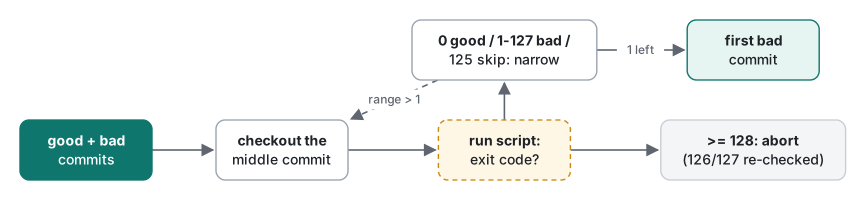
| 128 or more | abort the bisect | the script itself crashed or was killed |
Two rules follow from the table. Put the script outside the repository (or in an untracked file), otherwise checking out an old commit changes or deletes the script mid-hunt. And decide deliberately what "cannot test" means, so that a build problem gives 125 instead of 1.
The hunt: 8 runs, 0.49 seconds
We gave Git the newest commit as bad and the first commit as good, and handed it the script:
$ git bisect start main 0129d59
$ git bisect run ../check_total.sh
Bisecting: 31 revisions left to test after this (roughly 5 steps)
[b8afa63c5781266c73dee632f2e57ff2645db3ec] Update changelog (32)
running '../check_total.sh'
Bisecting: 30 revisions left to test after this (roughly 5 steps)
[22d5c50674ffd3cfd696345963e7b32e8d9e3442] Update changelog (33)
running '../check_total.sh'
Bisecting: 30 revisions left to test after this (roughly 5 steps)
[2faf604004b11123e9c19505a110323dd390ec8f] Update changelog (40)
running '../check_total.sh'
Bisecting: 11 revisions left to test after this (roughly 4 steps)
[6ca4e3b711ecad8482f445fdd802702555ed2990] Make unique_skus easier to read
…
Bisecting: 0 revisions left to test after this (roughly 0 steps)
[497854fdc48159eedda284b046a4363da0bb985b] Simplify discount rounding
running '../check_total.sh'
497854fdc48159eedda284b046a4363da0bb985b is the first bad commit
commit 497854fdc48159eedda284b046a4363da0bb985b
Author: demo <demo@example.com>
Date:   Fri Nov 6 17:00:00 2026 +0000

    Simplify discount rounding
…
bisect found first bad commit
Read it as a story. Git's first pick, commit 32, sits right in the middle, but it is in the unbuildable range, so the script exited 125. The count went from 31 to 30 and stayed there: a skipped commit is only removed from the candidates; it does not halve anything. Git then picked 33 (also unbuildable), then jumped away from the broken area to 40 (good), then 52 (bad), 46, 43, 42 and 41 (all bad). The script ran 8 times; two of those were skips. Then:
git bisect log > ~/demo/bisect.log   # the full decision record, replayable with git bisect replay
git bisect reset                     # back to main, where you started
The diff of the culprit is two lines, round(…, 2) changed to int(…) / 100: 3.33 × 90 = 299.7, truncated to 299, so $2.99.
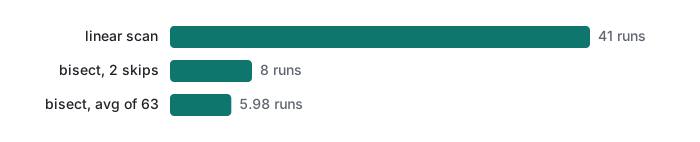
Measured against checking every commit. A loop that checks out each commit from the oldest and stops at the first exit code 1 needed 41 checkouts and 2.98 to 3.07 s (3 runs). git bisect run needed 8 runs and 0.47 to 0.51 s. The ratio matters more than the seconds: our check takes about 60 ms; if yours is a 5-minute build and test, 41 runs is over three hours and 8 runs is 40 minutes.
Steps vs log2. To check the "log2" claim, we used a second script that calls a commit bad when VERSION >= K, and bisected every possible culprit position K = 2 to 64 with no skips. 62 positions needed 6 runs, one needed 5 (average 5.98), and all 63 answers were correct. log2(64) = 6. Doubling the history to 128 commits would add one step, not 64.
Skipping untestable commits, and what happens if you do not
Common mistake → what actually happens → fix. Remove the || exit 125 line, so an import error is just a Python failure, exit code 1. Same repo, same bug:
ModuleNotFoundError: No module named 'fmt'
…
dda1d4a1afa7cc00da8fadaa54ddf6d2fe25b05c is the first bad commit
    Show totals with money() helper
Git confidently blames commit 31, which broke the build but did not touch the rounding. The fix is the 125 line: "I cannot judge this commit" is different from "this commit is bad".
Skipping has a limit. When the culprit sits next to skipped commits, Git cannot narrow further. We pretended the bug arrived in commit 33, inside the broken range:
There are only 'skip'ped commits left to test.
The first bad commit could be any of:
22d5c50674ffd3cfd696345963e7b32e8d9e3442
b8afa63c5781266c73dee632f2e57ff2645db3ec
611340bd60d10b72a26966fce29c32a0923c4425
dda1d4a1afa7cc00da8fadaa54ddf6d2fe25b05c
14e91fd0044a40f3cf34876f640bdad31c3e041e
We cannot bisect more!
error: bisect run cannot continue any more
That is still useful: five candidates instead of 63. To get further, make the broken commits testable (for example, have the script create the missing fmt.py temporarily) and run again.
Two script traps we hit. First, a typo, pyhton3, gives exit code 127 on every commit. Git 2.54 did not blame the first commit; it re-ran the script on the good commit and stopped: error: bogus exit code 127 for good revision. Older Git releases simply counted 127 as bad, so check git help bisect on your version. An exit code of 129 stopped the run with error: bisect run failed: exit code 129 from '../check_129.sh' is < 0 or >= 128. Second, a Python script stored outside the repo (python3 ../bench_skus.py) failed on every commit with ModuleNotFoundError: No module named 'cart', because Python puts the script's directory on sys.path, not the current directory. PYTHONPATH=. python3 ../bench_skus.py fixed it. With || exit 125 in front, that mistake would have skipped every commit, so always run your script by hand on one good and one bad commit before bisect run.
Bisecting a performance regression
Correctness checks are easy to turn into exit codes. Speed needs a threshold, and a threshold needs measurements first:
# bench_skus.py: time cart.unique_skus on fixed data, print the best of 5 in ms
import random, time, cart
rng = random.Random(42)
skus = [f"SKU-{rng.randrange(10_000):05d}" for _ in range(20_000)]
best = min(
    (lambda t0: (cart.unique_skus(skus), time.perf_counter() - t0)[1])(time.perf_counter())
    for _ in range(5)
)
print(f"{best * 1000:.2f}")
Ten runs on commit 51 gave 0.98 to 1.01 ms (median 0.99); ten runs on commit 52 gave 612.65 to 613.58 ms. The list lookup makes the function O(n²) on 20,000 items. Any threshold between the two clusters works; we chose 50 ms, far from both. The script, with Git's custom terms so the output says what we mean:
#!/bin/sh
# check_speed.sh: fast (exit 0) under LIMIT_MS, slow (exit 1) over it
ms=$(PYTHONPATH=. python3 ../bench_skus.py) || exit 125
echo "unique_skus: $ms ms (limit ${LIMIT_MS:-50})"
python3 -c "import sys; sys.exit(0 if $ms < ${LIMIT_MS:-50} else 1)"
$ git bisect start --term-old=fast --term-new=slow
$ git bisect slow main
$ git bisect fast 0129d59
$ git bisect run ../check_speed.sh
…
unique_skus: 0.99 ms (limit 50)
…
unique_skus: 613.02 ms (limit 50)
…
6ca4e3b711ecad8482f445fdd802702555ed2990 is the first slow commit
8 runs, 4.06 s, most of it spent in the slow commits. A real regression is rarely 600 times; for a 10–20% slowdown, take the best of more repetitions, keep the machine quiet, and check the threshold by hand on both sides before trusting the run. For finding where in the code the time goes once you have the commit, see Python profiling and, for C, cache-friendly loops and lldb.
Flaky checks make bisect lie
Bisect assumes the check is deterministic. We wrapped the real check with a 10% chance of a spurious failure (seeded per run and commit, so each result is reproducible) and ran 50 bisects: 46 found commit 41; 4 blamed commits 15, 38, 40 and 40. A single spurious "bad" on a good commit sends the search into the wrong half, and Git never re-tests it. A wrapper that calls a commit bad only after 3 failures in a row got 49 of 50 right (one still blamed 40). Retries reduce the damage; they do not remove it. Fix the flaky test first, with the methods in lecture 5.
Other options worth knowing: git bisect start --first-parent (Git 2.29+) follows only merge commits on the main line, useful when feature branches contain broken intermediate commits; git bisect skip <range> skips a known-broken range by hand; and when bisect lands on a huge commit, that is a sign to make smaller commits, which rebase and cherry-pick can help with. If you find the culprit and need to undo it safely on a shared branch, see git revert and reflog.
Post-mortem habits and the series checklist
Finding the commit is the middle of the story, not the end. After a regression, write a short post-mortem with these fields, without blame:
| Field | Example from this lecture |
|---|---|
| Symptom and first report | 10% off $3.33 shows $2.99 |
| Culprit and how it was found | commit 497854f, git bisect run, 8 runs, bisect.log attached |
| Why tests did not catch it | no test with a value whose third decimal is 5 or more |
| The regression test added | total([3.33], 10) == 3.0, now permanent in the suite |
| What makes it cheaper next time | the check script kept in tools/, commits small and buildable |
The last row is the one people skip. Keeping the bisect script in the repository (in a path no old commit has, or copied out before use) means the next hunt starts in one minute. A cron job that runs the check nightly with good logs, as in robust shell scripts with logging, catches the regression the day it lands.
Testing & Debugging series checklist. Before you ask for help, or before you close a bug:
- Read the whole error and find the first frame in your own code (lecture 1).
- Reproduce it in the smallest program or input you can, then use logging or a debugger, not guesses (lecture 2).
- Write a failing test that shows the bug, then fix the code until it passes (lecture 3).
- Replace slow or external dependencies with fakes, but keep at least one test that exercises the real thing (lecture 4).
- If a test is flaky, measure its rate, find the hidden input, and measure again (lecture 5).
- If it used to work, turn the check into an exit code and let
git bisect runfind the commit. Then write the post-mortem.
Honest limits / version notes
- Run only with Git 2.54.0 (Apple Git-157) and Python 3.9.6.
git bisect runhas existed for a very long time;--term-old/--term-newarrived in Git 2.7 and--first-parentin Git 2.29. The 126/127 double-check is what we observed on 2.54; we did not test older releases. - The
sed -i ''lines in the generator are macOS/BSD syntax. On GNU sed, usesed -iwithout the empty string (not run here). - Which commit Git picks after a skip depends on its internal choice; your sequence may differ from ours if your history differs, but the answer should not.
- Timings are from one machine. The per-run cost here is mostly process start-up, so the ratio between 41 and 8 runs is the number to keep.
Exercises
- Your check script runs
make test. On some old commitsmakefails with "No rule to make target". What exit code should the script return in that case, and how do you detect it separately from failing tests? - You have 1,000 commits between the last good release and today. Roughly how many checks will
git bisect runneed, and what would turn that number into something much larger?
Answers
- Run the build step first and
exit 125if it fails; only then run the tests and return their exit code (orexit 1for any failure). Separating "cannot build" from "tests fail" is exactly what prevents the wrong-culprit result above. - About log2(1000) ≈ 10. Many skipped commits (each adds runs without narrowing) and a flaky check (which can send the search into the wrong half) make it larger or wrong.
Previous: Testing & Debugging 5: flaky tests · This is the last lecture in the series; start again from lecture 1, reading error messages and stack traces.
FAQ
What exit codes does git bisect run expect from my script?
0 means the commit is good, 1 to 127 except 125 means bad, 125 means this commit cannot be tested so skip it, and 128 or more aborts the bisect. On Git 2.54.0 an exit code of 126 or 127 (command not found) makes Git re-run the script on the known good commit; when it fails there too, Git stops with 'error: bogus exit code 127 for good revision' instead of blaming a wrong commit.
How many steps does git bisect need?
About log2 of the number of commits in the range. For 64 commits that is 6. We bisected all 63 possible culprit positions in a 64-commit repo: 62 needed 6 script runs, one needed 5, and every answer was correct. Commits you skip with exit code 125 add extra runs; our real hunt with two unbuildable commits took 8 runs.
Can git bisect find a performance regression?
Yes. Write a script that times the code, exits 0 when it is under a threshold and 1 when it is over, and start with git bisect start --term-old=fast --term-new=slow. Pick the threshold between the two measured levels: ours were 0.98 to 1.01 ms before and 612.65 to 613.58 ms after, so 50 ms was safe. Git reported 'is the first slow commit' after 8 runs in 4.06 s.