Robust Shell Scripts: Locks, Traps, Logs and Cron
A shell script template with strict mode, mkdir lock, cleanup trap, timestamped log and --dry-run, attacked with kill -9 and SIGTERM, plus cron pitfalls.
Series: Command line lecture 6/6 (advanced). For developers who are about to schedule a script, or hand one to a teammate, and want it to survive the things that happen when nobody is watching: a second copy starting, a kill in the middle, a different environment, a log someone has to read at 3 a.m.
This lecture is for the person whose script "worked yesterday": it ran twice at the same time and corrupted a file, it was killed and left a lock behind so every later run refused to start, or it ran from cron and silently did nothing. We build one small, complete script, a log rotator, and then attack it on purpose: two copies at once, kill -9, kill -TERM, a cron-like empty environment. All outputs below are real.
Environment: macOS 26, Apple Silicon Mac (M1 Pro), GNU bash 3.2.57 (#!/bin/bash), BSD userland. We set TZ=UTC so timestamps are comparable. Paths are shown as ~/demo/.... We did not install any crontab entry or launchd job; the cron part is simulated with env -i and the crontab lines are described, not run. GNU/Linux variants are labelled "not run here".
This builds on lecture 4 (strict mode and its holes) and lecture 5 (signals and traps). The series overview is in the learning roadmap.
The template
The job: gzip every *.log file older than N days in a directory. Copy this one file, chmod +x it and it runs.
#!/bin/bash
# rotate-logs.sh - gzip *.log files older than N days in one directory.
# Template: strict mode, fixed PATH, args + --dry-run, mkdir lock, cleanup trap, timestamped log.
set -euo pipefail
IFS=$'\n\t'
export PATH=/usr/bin:/bin:/usr/sbin:/sbin

SCRIPT_DIR="$(cd "$(dirname "$0")" && pwd)"
LOCK_DIR="${TMPDIR:-/tmp}/rotate-logs.lock"
LOG_FILE="$SCRIPT_DIR/rotate-logs.log"
DRY_RUN=0
DAYS=7
TARGET=""
WORK=""
CHILD=""

log() { printf '%s [%s] %s\n' "$(date '+%Y-%m-%dT%H:%M:%S%z')" "$1" "$2" >>"$LOG_FILE"; }
die() { log ERROR "$1"; echo "error: $1" >&2; exit "${2:-1}"; }
usage() { echo "usage: $0 [--dry-run] [--days N] DIR" >&2; exit 2; }

while [ $# -gt 0 ]; do
  case "$1" in
    -n|--dry-run) DRY_RUN=1 ;;
    --days) [ $# -ge 2 ] || usage; DAYS="$2"; shift ;;
    -h|--help) usage ;;
    -*) echo "unknown option: $1" >&2; usage ;;
    *) TARGET="$1" ;;
  esac
  shift
done
[ -n "$TARGET" ] || usage
[ -d "$TARGET" ] || die "not a directory: $TARGET" 3
case "$DAYS" in ''|*[!0-9]*) die "--days needs a number, got '$DAYS'" 2 ;; esac

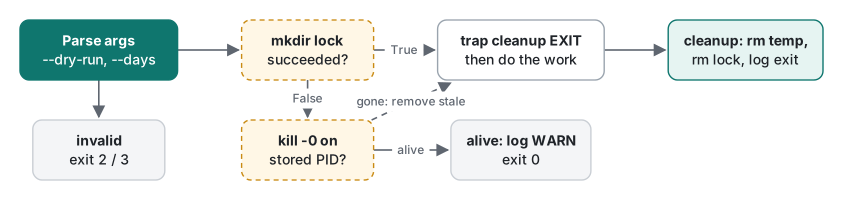
# Lock: mkdir is atomic. Keep our PID inside so a stale lock can be detected.
if ! mkdir "$LOCK_DIR" 2>/dev/null; then
  old=$(cat "$LOCK_DIR/pid" 2>/dev/null || true)
  if [ -n "$old" ] && kill -0 "$old" 2>/dev/null; then
    log WARN "already running as pid $old, exiting"
    exit 0
  fi
  log WARN "removing stale lock (pid '$old' is gone)"
  rm -rf "$LOCK_DIR"
  mkdir "$LOCK_DIR" || die "could not take the lock" 4
fi
echo $$ >"$LOCK_DIR/pid"

cleanup() {
  rc=$?
  [ -z "$CHILD" ] || kill "$CHILD" 2>/dev/null || true
  [ -z "$WORK" ] || rm -rf "$WORK"
  rm -rf "$LOCK_DIR"
  log INFO "exit $rc"
}
trap cleanup EXIT
trap 'exit 130' INT
trap 'exit 143' TERM

WORK=$(mktemp -d "${TMPDIR:-/tmp}/rotate-logs.XXXXXX")
log INFO "start dir=$TARGET days=$DAYS dry_run=$DRY_RUN"
find "$TARGET" -type f -name '*.log' -mtime +"$DAYS" -print0 >"$WORK/list"
count=0
while IFS= read -r -d '' f; do
  if [ "$DRY_RUN" -eq 1 ]; then
    log INFO "would gzip: $f"
  else
    gzip -9 -- "$f"
    log INFO "gzipped: $f"
  fi
  count=$((count + 1))
done <"$WORK/list"
log INFO "done, $count file(s)"

# Test hook: hold the lock for SLOW seconds. Run long commands as '& wait'
# so a TERM is handled at once instead of after the command finishes.
if [ "${SLOW:-0}" -gt 0 ]; then sleep "$SLOW" & CHILD=$!; wait "$CHILD"; fi
Why each part is there:
set -euo pipefail: stop on unhandled failures, unset variables and broken pipelines (lecture 4 shows what it still misses).IFS=$'\n\t': unquoted expansions no longer split on spaces. It is a second line of defence; every expansion is still quoted.export PATH=...: the script does not depend on whoever, or whatever, started it. This is the single most important line for cron.SCRIPT_DIR: the log goes next to the script, not into whatever the current directory happens to be.- Argument parsing with exit codes: 2 for usage errors, 3 for a bad directory, 4 for a lock failure. A caller (or a monitor) can tell them apart.
find ... -print0+read -r -d '': survives file names with spaces and newlines (web access.logis in the test data on purpose).gzip -9 -- "$f":--stops a file named-rf.logfrom being read as options.
Test 1: arguments, dry run, real run
Test data: four app-Nd.log files with modification times 1, 3, 10 and 30 days ago (set with touch -t), plus web access.log and old notes.txt at 40 days.
$ ./rotate-logs.sh; echo "[exit $?]"
usage: ./rotate-logs.sh [--dry-run] [--days N] DIR
[exit 2]
$ ./rotate-logs.sh --days x "logs dir"; echo "[exit $?]"
error: --days needs a number, got 'x'
[exit 2]
$ ./rotate-logs.sh nope; echo "[exit $?]"
error: not a directory: nope
[exit 3]
$ ./rotate-logs.sh --dry-run "logs dir"; echo "[exit $?]"
[exit 0]
$ cat rotate-logs.log
2026-11-12T08:27:44+0000 [ERROR] --days needs a number, got 'x'
2026-11-12T08:27:45+0000 [ERROR] not a directory: nope
2026-11-12T08:27:45+0000 [INFO] start dir=logs dir days=7 dry_run=1
2026-11-12T08:27:45+0000 [INFO] would gzip: logs dir/app-30d.log
2026-11-12T08:27:45+0000 [INFO] would gzip: logs dir/app-10d.log
2026-11-12T08:27:45+0000 [INFO] would gzip: logs dir/web access.log
2026-11-12T08:27:45+0000 [INFO] done, 3 file(s)
2026-11-12T08:27:45+0000 [INFO] exit 0
The dry run is quiet on the terminal and explicit in the log: it names the three files it would touch, skips the 1- and 3-day logs and ignores the .txt file. Then the real run, twice:
$ ./rotate-logs.sh "logs dir"; ls -1 "logs dir"
app-10d.log.gz
app-1d.log
app-30d.log.gz
app-3d.log
old notes.txt
web access.log.gz
$ ./rotate-logs.sh "logs dir"; tail -3 rotate-logs.log
2026-11-12T08:28:34+0000 [INFO] start dir=logs dir days=7 dry_run=0
2026-11-12T08:28:34+0000 [INFO] done, 0 file(s)
2026-11-12T08:28:34+0000 [INFO] exit 0
The second run found nothing to do and said so. A scheduled script should be idempotent: running it again must be safe. Always ship a --dry-run for anything that deletes, moves or compresses; it is the cheapest review you can get (we used the same idea when removing WordPress files from a live host).
Test 2: two copies at once, and the mkdir lock
macOS has no flock command (command -v flock found nothing), so the template uses mkdir, which either creates the directory or fails, atomically. We held the lock for 3 seconds with the test hook and started a second copy meanwhile:
$ SLOW=3 ./rotate-logs.sh --dry-run "logs dir" & first=$!; sleep 0.5
$ ./rotate-logs.sh --dry-run "logs dir"; echo "[second exit $?]"
[second exit 0]
$ wait $first; echo "[first exit $?]"
[first exit 0]
$ cat rotate-logs.log
2026-11-12T08:27:53+0000 [INFO] start dir=logs dir days=7 dry_run=1
...
2026-11-12T08:27:53+0000 [INFO] done, 3 file(s)
2026-11-12T08:27:53+0000 [WARN] already running as pid 5859, exiting
2026-11-12T08:27:56+0000 [INFO] exit 0
The second copy logged a warning and left; the first finished 3 seconds later. Whether a locked-out run should exit 0 or non-zero is a choice: we use 0 because "already running" is normal for a job scheduled every few minutes, and a warning in the log is enough.
Common mistake: a lock without a stale check
A lock that only uses mkdir and rm in a trap works until the process is killed with -9. What actually happens, measured on the template:
$ SLOW=30 ./rotate-logs.sh --dry-run "logs dir" & p=$!; sleep 0.7
$ kill -KILL $p; wait $p; echo "[killed: $?]"
[killed: 137]
$ ls tmp
rotate-logs.iCoz1W
rotate-logs.lock
No exit line appeared in the log, because SIGKILL cannot be trapped: the lock directory and the temp folder were left behind. (The sleep 30 child also survived, re-parented, exactly as in lecture 5; we stopped it by its PID.) A naive lock would now refuse to run forever. The template stores the PID and checks it with kill -0:
$ ./rotate-logs.sh --dry-run "logs dir"; echo "[exit $?]"
[exit 0]
$ cat rotate-logs.log
2026-11-12T08:27:57+0000 [WARN] removing stale lock (pid '5940' is gone)
2026-11-12T08:27:57+0000 [INFO] start dir=logs dir days=7 dry_run=1
...
2026-11-12T08:27:57+0000 [INFO] exit 0
Fix summary: write the PID into the lock, treat it as stale when that PID is gone, and log the takeover so someone can see it happened. The orphaned temp folder rotate-logs.iCoz1W stays; put temp folders under one parent you can clean up, or accept the leftovers after a kill -9.
Test 3: SIGTERM, and why & wait matters
Service managers, CI runners and kill send TERM first. The template traps it and exits 143 after cleanup. But when does the trap run? We measured the delay between kill -TERM and the script's exit, three times each, with the long step written two ways:
| Long step written as | exit code | delay after TERM (3 runs) |
|---|---|---|
sleep "$SLOW" (foreground) |
143 | 4.378 s, 4.045 s, 4.022 s |
sleep "$SLOW" & CHILD=$!; wait "$CHILD" |
143 | 0.038 s, 0.038 s, 0.040 s |
With a foreground command, bash queues the trap until that command finishes: the TERM arrived 1 s into a sleep 5, so the exit came about 4 s later. That is harmless for sleep, and a real problem for a 20-minute rsync when the service manager gives you 10 seconds before it sends KILL. With & wait, wait returns immediately on the signal, the trap runs, and the cleanup also stops the child via $CHILD.
Cron: the environment your script did not expect
cron runs commands with a nearly empty environment. We simulated it with env -i (only HOME, LOGNAME, SHELL and PATH=/usr/bin:/bin, started from the home directory), close to what cron provides: macOS's man 5 crontab says SHELL is set to /bin/sh and LOGNAME and HOME come from the user's account; the default PATH depends on the cron implementation and is usually just /usr/bin:/bin (we did not inspect a real cron run). This is what the script sees:
$ env -i HOME=~ LOGNAME=demo SHELL=/bin/sh PATH=/usr/bin:/bin /bin/sh -c env
SHELL=/bin/sh
PATH=/usr/bin:/bin
PWD=~
SHLVL=1
HOME=~
LOGNAME=demo
_=/usr/bin/env
Now a naive script that uses a helper installed in ~/demo/bin (on PATH in our interactive shell) and a relative path:
#!/bin/bash
# naive.sh
echo "PATH=$PATH"
echo "cwd=$(pwd)"
lines=$(report-tool ./data.txt)
echo "$(date +%F) lines=$lines" >> report.txt
echo "exit so far: $?"
## interactive-like (from ~/demo/cronjob)
PATH=~/demo/bin:/usr/bin:/bin
cwd=~/demo/cronjob
exit so far: 0
## cron-like
PATH=/usr/bin:/bin
cwd=~
~/demo/cronjob/naive.sh: line 4: report-tool: command not found
exit so far: 0
cron-like exit=0
$ cat ~/report.txt ~/demo/cronjob/report.txt
2026-11-12 lines=
2026-11-12 lines=3
Three failures, zero error codes: the tool was not found, ./data.txt was looked up in the home folder, and the report was appended to a new report.txt in the home folder with an empty value. cron would mail that one stderr line to a mailbox nobody reads, if mail is set up at all. Our template avoids all three: it sets PATH itself, it takes an argument and checks it, and it writes its log next to itself. Passing a relative directory under the cron-like environment failed loudly instead:
error: not a directory: logs dir
[exit 3]
The same "worked interactively, broke unattended" pattern is what we found after a hosting account migration: the jobs did not error, they quietly ran in a different environment.
Writing the crontab line (described, not installed)
# m  h  dom mon dow  command
  15 3  *   *   *    /home/demo/bin/rotate-logs.sh --days 14 "/home/demo/app/logs" >> /home/demo/log/rotate-cron.log 2>&1
Rules that bite:
| Pitfall | What happens | Fix |
|---|---|---|
% in the command, e.g. date +%F |
cron turns an unescaped % into a newline; the rest of the line becomes stdin of the command (per man 5 crontab) |
escape as \%, or move the command into a script |
relying on PATH |
command not found (demonstrated above) |
export PATH=... in the script, or a PATH= line at the top of the crontab |
| relative paths | resolved from the home directory | absolute paths, or cd "$(dirname "$0")" in the script |
| no output redirection | output is mailed, or dropped | >> file 2>&1, and log inside the script |
| time zone | cron uses the system time zone | log with an explicit %z offset, as the template does |
| overlapping runs | slow run + short interval = two copies | the lock above |
On macOS, Apple recommends launchd over cron, and a cron job that touches protected folders needs Full Disk Access granted to cron; we did not test either here. On Linux, systemd timers are the modern alternative and log to the journal (not run here).
Logging: what to write and what it costs
A log line that helps at 3 a.m. has a timestamp with offset, a level and one fact: 2026-11-12T08:27:57+0000 [WARN] removing stale lock (pid '5940' is gone). Log the start with the parameters, every change made, and the exit code (the EXIT trap guarantees that last one, except after kill -9).
Each $(date ...) starts a process, though. We wrote 2,000 log lines four ways, 3 runs each, median shown:
| Method (2,000 lines) | median | per line |
|---|---|---|
bash: $(date ...) per line, >> per line |
5.84 s | 2.9 ms |
bash: no timestamp, >> per line |
0.08 s | 0.04 ms |
zsh: strftime builtin (zsh/datetime) per line, >> per line |
0.08 s | 0.04 ms |
bash: one timestamp, whole loop redirected once { ...; } >> log |
0.02 s | 0.01 ms |
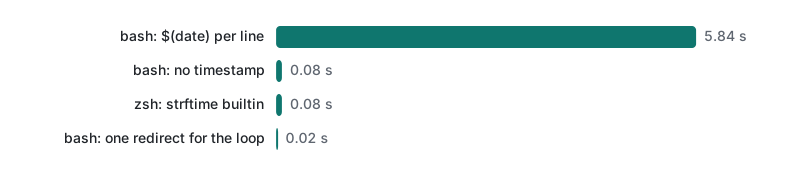
The machine was also running other work (load average 6–9), so the date cost is on the high side. For a script that logs 20 lines, 3 ms per line is irrelevant; for a loop over 100,000 files it is five minutes. Options: log per batch instead of per file, use zsh's strftime builtin, or on bash 4.2+ printf '%(%Y-%m-%dT%H:%M:%S%z)T', which bash 3.2 rejects with printf: '(': invalid format character (we saw that error; the 4.2 version is from the bash NEWS file, not run here). To send lines to the system log instead of a file, logger -t rotate-logs "message" exists on both macOS and Linux (not run here).
Honest limits and version notes
- Everything ran on macOS with bash 3.2.57. The template avoids bash 4+ features on purpose (no
declare -A,mapfile,wait -n,${x,,}), so it should run unchanged on Linux bash 5 (not run here). - The
mkdirlock has a small race: if a second copy starts between the first one'smkdirand itsecho $$ > pid, it sees an empty PID and treats the lock as stale. With a schedule of minutes that window (microseconds) is acceptable for us; on Linux,flock -n 9on a file descriptor avoids it (not run here). kill -9leaves the lock and temp folder; the stale check recovers the lock, not the temp folder.find -mtime +7counts whole days, rounded down: on this Mac a file 7.5 days old was not matched by-mtime +7(-mtime +6matched it). Check the boundary on your own data.- No crontab entry or launchd job was created for this article. The crontab syntax and the
%rule are fromman 5 crontab; the cron environment was simulated withenv -i.
Exercises
- Recreate the test data (with
TZ=UTC, the "1 day" file is stamped 09:00 the previous day) plus afresh.logtouched just now, and run--dry-run --days 0. Which files are reported, and why isapp-1d.logmissing? - A teammate replaces
trap cleanup EXITwithtrap cleanup TERM. Name two situations in which the lock is now left behind.
Answers
- Our run reported
app-3d.log,app-30d.log,app-10d.logandweb access.log(4 files).-mtime +0needs an age of at least one whole day; we ran it at 08:28 UTC, soapp-1d.logwas 23.5 hours old, which rounds down to 0, andfresh.logwas 0 too..txtfiles never match-name '*.log'. Day boundaries are measured from the momentfindstarts, not from midnight. - Any normal finish (the script reaches the end and exits 0) and any
set -efailure ordiecall, because neither is a TERM.EXITcovers all of these; TERM alone covers only the signal. (Andkill -9leaves it behind in both versions.)
Previous: Lecture 5: processes, jobs and signals · Series start: Lecture 1: navigation and files · Lecture 4: variables and exit codes · Back to the learning roadmap
FAQ
Why does my script work in the terminal but fail under cron?
cron starts it with almost no environment: PATH is usually /usr/bin:/bin, the working directory is your home folder and your shell profile is not read. In our simulation a script that called a tool from ~/demo/bin printed 'report-tool: command not found', wrote an empty value into a report in the wrong folder, and still exited 0. Set PATH inside the script and use absolute paths.
How do I stop two copies of a script running at once on macOS, which has no flock?
Use mkdir as the lock: creating a directory is atomic, so only one process succeeds. Write your PID into it, remove it in an EXIT trap, and treat it as stale when kill -0 on that PID fails. We tested a second copy (it logged 'already running' and exited) and a kill -9 (the next run removed the stale lock).
Why did my cleanup trap run late, or not at all?
kill -9 can never be trapped, so nothing runs; our killed run left its lock and temp folder behind. And bash runs a TERM trap only after the current foreground command ends: with a foreground sleep 5 the exit came 4.0 s after the signal; with 'sleep 5 & wait $!' it came in 0.04 s.