Git Undo: reset, revert, restore, reflog and stash
Undo in Git with real output: restore, reset --soft/--mixed/--hard, reflog and fsck recovery, reverting a merge, stash traps, and when a commit is truly gone.
Series: Git lecture 5/6 (advanced). For people who already use branches, rebase and remotes (lectures 1–4) and want to fix mistakes without fear. You will learn which undo command touches which of Git's three areas, how to get "lost" commits back, and when something is really unrecoverable.
This lecture is for the developer who just typed git reset --hard and saw work disappear, who pushed a bad merge to main on a Friday evening, or who popped a stash into a conflict. Git almost never deletes committed data immediately, but it does delete uncommitted data instantly, and that difference decides what you can save. Every scenario below was reproduced and recovered in a scratch repository, with the exact messages Git printed.
Environment: Git 2.54.0 (Apple Git-157), Apple Silicon Mac (M1 Pro), scratch repositories with a demo identity and fixed commit dates (so the hashes match if you repeat the steps), gc.auto set to 0 in the repos.
Which state are you trying to undo?
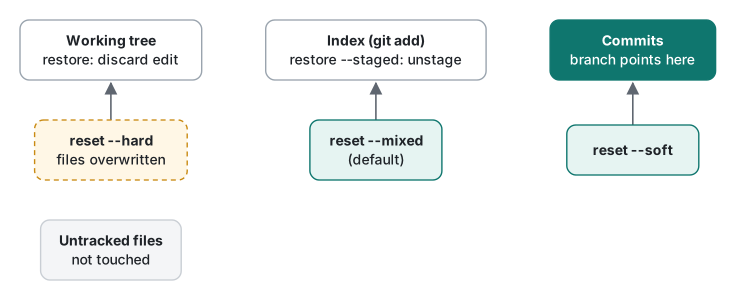
Every undo question becomes simple once you say where the change currently lives:
- Working tree: the files you edit.
- Index (staging area): what the next commit will contain, filled by
git add. - Commits: history, pointed to by branch names.
Plus two side areas: untracked files (Git does not know them at all, so most undo commands ignore them) and the stash. Our test repository has three commits:
8636d9e Add shipping
6b8084b Add tax
7e5d3c2 Add cart
git restore: undo changes that are not committed yet
git restore (added in Git 2.23 together with git switch) only deals with files; it never moves a branch.
echo "oops" >> cart.py
git restore cart.py            # working tree <- index: edit discarded
echo "oops2" >> cart.py
git add cart.py
git status --short             # M  cart.py   (staged)
git restore --staged cart.py
git status --short             #  M cart.py   (edit kept, just unstaged)
The column position in git status --short tells you which area holds the change: left column = index, right column = working tree. git restore --staged moves a change from the left column to the right; plain git restore throws away the right column. The second is destructive: a discarded edit was never stored by Git, so no command brings it back.
reset --soft, --mixed, --hard: one command, three blast radii
git reset <commit> moves the current branch to <commit>. The mode decides how much of the index and working tree is overwritten to match. We ran each mode from the same starting state: on top of 8636d9e, a new staged file notes.txt and an unstaged edit to cart.py. Then git reset --<mode> HEAD~1:
## reset --soft HEAD~1
6b8084b Add tax
MM cart.py          <- "Add shipping" is back in the index, our edit still in the file
A  notes.txt        <- still staged

## reset --mixed HEAD~1
Unstaged changes after reset:
M   cart.py
6b8084b Add tax
 M cart.py          <- everything is now unstaged
?? notes.txt        <- the new file became untracked, but it still exists

## reset --hard HEAD~1
HEAD is now at 6b8084b Add tax
6b8084b Add tax
                    <- status is empty, and `ls` shows only cart.py:
                       notes.txt was deleted, the cart.py edit is gone
| Mode | Branch moves | Index | Working tree | Typical use |
|---|---|---|---|---|
--soft |
yes | kept | kept | Redo the last commit(s) as one commit |
--mixed (default) |
yes | reset | kept | Un-commit and un-stage, keep the edits |
--hard |
yes | reset | overwritten | Throw everything away and match a commit |
--soft is the cleanest way to squash without interactive rebase: git reset --soft main && git commit turns all commits since main into one.
Recovering "lost" commits with reflog
Now the classic accident. Same three commits, a staged notes.txt, and then one reset too far:
$ git reset --hard HEAD~2
HEAD is now at 7e5d3c2 Add cart
$ git log --oneline
7e5d3c2 Add cart
The two commits are not deleted; nothing points to them anymore. The reflog is a local diary of where HEAD has been:
$ git reflog
7e5d3c2 HEAD@{0}: reset: moving to HEAD~2
8636d9e HEAD@{1}: commit: Add shipping
6b8084b HEAD@{2}: commit: Add tax
7e5d3c2 HEAD@{3}: commit (initial): Add cart
HEAD@{1} means "where HEAD was one move ago". Git also leaves ORIG_HEAD after a reset, rebase or merge:
$ git rev-parse --short ORIG_HEAD
8636d9e
$ git reset --hard ORIG_HEAD
HEAD is now at 8636d9e Add shipping
A deleted branch works the same way. git branch -d refuses an unmerged branch, -D forces it, and the reflog still remembers the commit:
$ git branch -d feature/coupon
error: the branch 'feature/coupon' is not fully merged
hint: If you are sure you want to delete it, run 'git branch -D feature/coupon'
$ git branch -D feature/coupon
Deleted branch feature/coupon (was 7a35098).
$ git reflog | head -3
8636d9e HEAD@{0}: checkout: moving from feature/coupon to main
7a35098 HEAD@{1}: commit: Add coupon
8636d9e HEAD@{2}: checkout: moving from main to feature/coupon
$ git branch feature/coupon HEAD@{1}
Two details people learn the hard way. First, Deleted branch … (was 7a35098) already prints the ID: copy it before you clear the terminal. Second, the branch's own reflog is deleted with the branch; after recreating it, git reflog show feature/coupon showed only branch: Created from HEAD@{1}. The HEAD reflog is what saves you.
What reset --hard really destroys
Back to the notes.txt that reset --hard deleted. It was never committed, but it was staged, and git add writes the content into the object database immediately. So it survives as a "dangling" blob with no file name:
$ git fsck --lost-found
dangling blob 2b14cb5b6471c8b527d696145e409ca8669f2718
$ cat .git/lost-found/other/2b14cb5b6471c8b527d696145e409ca8669f2718
uncommitted
What can and cannot be recovered after git reset --hard, as observed:
| Was the change… | After reset --hard |
How to get it back |
|---|---|---|
| committed | gone from the branch | git reflog, ORIG_HEAD |
staged (git add), never committed |
file deleted | content only, via git fsck --lost-found (no file name) |
| edited but never staged | lost | nothing in Git; maybe your editor's history |
| untracked file | untouched (in a second run, draft.txt survived) |
not needed |
revert: undoing on a shared branch
reset rewrites history, which on a pushed branch leads to the force-push problems from lecture 4. git revert instead adds a new commit that applies the inverse change:
$ git revert --no-edit HEAD
[main 8f354f5] Revert "Add shipping"
 1 file changed, 1 deletion(-)
Reverting an older commit can conflict, because later commits touched the same lines. Reverting "Add tax" while "Add shipping" sat on the next line:
CONFLICT (content): Merge conflict in cart.py
error: could not revert 6b8084b... Add tax
hint: After resolving the conflicts, mark them with
hint: "git add/rm <pathspec>", then run
hint: "git revert --continue".
A merge commit has two parents, so Git needs to know which side is "the mainline":
$ git revert --no-edit HEAD
error: commit 3ac3872670169d6aa36cf213e83c05243df56c77 is a merge but no -m option was given.
fatal: revert failed
$ git revert --no-edit -m 1 HEAD
[main 9c31898] Revert "Merge branch 'feature/points'"
 1 file changed, 1 deletion(-)
 delete mode 100644 points.py
The revert-a-merge trap. After reverting the merge, the feature branch got one more commit and we merged it again. Git reported success, but points.py, the file from the original merge, was missing:
$ git merge --no-edit feature/points
Merge made by the 'ort' strategy.
 extra.py | 1 +
$ ls
cart.py  extra.py          <- points.py silently not there
Git considers the old feature commits already merged (they are in history); the revert just hid their effect. The fix is to revert the revert first, then merge:
*   aafbbe4 Merge branch 'feature/points'
|\
| * b4d87b7 Add bonus
* | 0fd236d Reapply "Merge branch 'feature/points'"
* | 6a29dbc Revert "Merge branch 'feature/points'"
* | 226cdb3 Merge branch 'feature/points'
Now ls showed cart.py extra.py points.py. Git 2.54 named the revert of a revert Reapply "…".
stash: shelving unfinished work
$ git stash
Saved working directory and index state WIP on main: bcb47cf Add shop config
$ git status --short
?? new_feature.py           <- untracked file was NOT stashed
Use git stash -u -m "wip: discount" to include untracked files and give the entry a name you will recognise in git stash list. If main changes the same line while the work is shelved, pop conflicts, and the important line is the last one:
$ git stash pop
CONFLICT (content): Merge conflict in shop.conf
...
The stash entry is kept in case you need it again.
A dropped stash is just an unreachable commit, so fsck finds it:
$ git stash drop
Dropped refs/stash@{0} (9d2345afb5693fba01e9879a695ab3e6c7a6b3c6)
$ git fsck --unreachable | grep commit
unreachable commit c010236b209f9c188608ddd37dea64073476e8e6   <- index on main: …
unreachable commit 88f8023dad8a7d4bc420893d821a6f4fa7d79cc4   <- WIP on main: … (the earlier, popped stash)
unreachable commit 90fdaa1ff359276990a9500f667b559e5f3973e9   <- untracked files on main: …
unreachable commit 9d2345afb5693fba01e9879a695ab3e6c7a6b3c6   <- On main: wip: discount
$ git stash apply 9d2345a
Decision table: "I want to undo…"
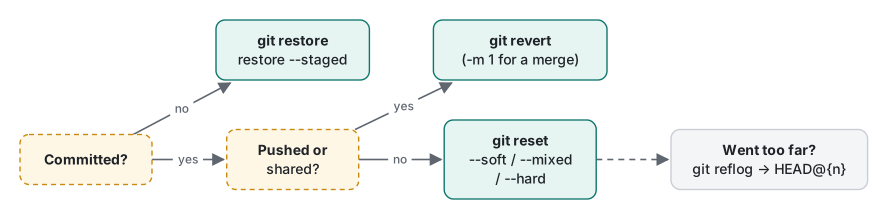
| I want to undo… | Command | Safe on a pushed branch? |
|---|---|---|
| an edit in a file, not staged | git restore <file> |
yes (local only), but the edit is lost |
a git add |
git restore --staged <file> |
yes |
| my last commit, keep changes to recommit | git reset --soft HEAD~1 |
no, rewrites history |
| my last commit and the staging | git reset HEAD~1 (mixed) |
no |
| everything since a commit, files too | git reset --hard <commit> |
no, and deletes uncommitted work |
| a commit that is already pushed | git revert <commit> |
yes |
| a pushed merge | git revert -m 1 <merge> (and later revert the revert) |
yes |
| a reset/rebase I just did | git reset --hard ORIG_HEAD or HEAD@{1} |
n/a (local) |
| a deleted branch | git branch <name> <id from reflog> |
yes |
| a dropped stash | git fsck --unreachable, then git stash apply <id> |
yes |
Measured: reflog vs fsck, and the point of no return
Is searching for lost work expensive on a bigger repo? We generated 5,000 commits with git fast-import (Python random.seed(42), 20-line files, 15,000 objects in one 2.07 MiB pack), lost the last 3 commits with git reset --hard HEAD~3, and timed both search methods. Apple Silicon Mac (M1 Pro), 3 runs:
| Method | Run 1 | Run 2 | Run 3 |
|---|---|---|---|
git reflog -n 5 |
0.031 s | 0.025 s | 0.025 s |
git fsck --lost-found |
0.164 s | 0.164 s | 0.189 s |
Both are instant at this size. Note what fsck reported: one dangling commit a5eadcf…, not three. It only lists the tips; the two older lost commits are reachable from that tip, so git log a5eadcf shows all three.
The point of no return, demonstrated on purpose:
$ git reset --hard HEAD~1
$ git show -s --format='%h %s' HEAD@{1}
af39527 Add b                      <- still recoverable
$ git reflog expire --expire=now --all
$ git gc --prune=now
$ git show -s af39527
fatal: ambiguous argument 'af39527': unknown revision or path not in the working tree.
$ git rev-parse HEAD@{1}
fatal: log for HEAD is empty
By default reflog entries are kept 90 days (30 days for commits no longer reachable), and gc only prunes loose objects older than two weeks. In normal life you have weeks. Never run reflog expire plus gc --prune=now "to clean up" while you might still need something.
Common mistakes
git reset --hard to "clean up" before a pull. What happens: unstaged edits are destroyed without a prompt. Fix: git stash -u first, or git status and read it.
git checkout -- file when you meant to switch branches. What happens: the edit in that file is discarded. Fix: use the 2.23+ split, git switch for branches and git restore for files, so the destructive one has an obvious name.
Re-merging after a reverted merge. What happens: success message, old changes missing (shown above). Fix: git revert <the revert commit> before merging again.
Honest limits / version notes
- Checked only on Git 2.54.0 (Apple Git-157).
git restoreandgit switchexist since Git 2.23. TheReapply "…"message for reverting a revert is what 2.54 printed; older versions writeRevert "Revert …". - The 90/30-day reflog and two-week prune defaults are Git's documented defaults (
gc.reflogExpire,gc.reflogExpireUnreachable,gc.pruneExpire); they were unset in our repos, and we did not wait 90 days to watch them expire. - Hosting services keep their own copies and may let an admin restore a force-pushed branch; that was not tested here.
- Times are from one machine with small files.
Exercise
- You ran
git reset --hard HEAD~3on your local branch, thengit commitonce. Which reflog entry holds the commit you want back, and what command restores the branch to it? - A teammate wants to undo a merge that is already on the shared
main. Which command, and what must they remember the next time that feature branch is merged?
Answers
HEAD@{2}(HEAD@{0}is the new commit,HEAD@{1}the reset).git reset --hard HEAD@{2}, or safer,git branch rescue HEAD@{2}and look first. Always readgit refloginstead of counting in your head.git revert -m 1 <merge-id>. Before merging the branch again, rungit revert <id of that revert>, otherwise the originally merged changes stay out.
Previous: Git lecture 4: rebase, cherry-pick and history · Next: Git lecture 6: internals, objects and performance · Earlier: first commit · Back to the new-hire study roadmap.
FAQ
What is the difference between git reset --soft, --mixed and --hard?
All three move the current branch to another commit. --soft keeps the undone changes staged, --mixed (the default) keeps them in the files but unstaged, and --hard overwrites the staging area and tracked files. In our run --hard also deleted a newly staged file; only its content could be recovered, as a dangling blob found by git fsck --lost-found.
How do I recover a commit after git reset --hard?
Run git reflog, find the entry before the reset (HEAD@{1} in our run, or ORIG_HEAD right after the reset), and run git reset --hard HEAD@{1} or create a branch there. It works as long as the reflog entry exists; after git reflog expire --expire=now --all and git gc --prune=now the commit was gone and Git answered 'unknown revision'.
Should I use git revert or git reset on a shared branch?
git revert. It adds a new commit that undoes an old one and never rewrites history, so pushes stay fast-forward. Reverting a merge needs -m 1, and if you later want the branch merged again you must revert the revert first; otherwise Git merges only the newer commits and silently leaves the old changes out, as our run showed.