Git Internals: Objects, Packfiles, gc and bisect
Hash a blob by hand, read trees and commits, commit with plumbing, measure gc and large binaries, and find a bad commit in 8 of 300 with bisect.
Series: Git lecture 6/6 (advanced). For people who use Git daily (lectures 1–5) and want to know what is inside .git, why some repositories become slow and huge, and how to find the commit that broke something. You will hash objects by hand, build a commit without git commit, and measure gc, large files and bisect.
This lecture is for the developer who has been told "don't commit that video file" without numbers, who wonders why a rebase changes hashes, or who needs to find which of 300 commits broke a calculation. Knowing the object model turns Git's strange behaviour (new IDs after rebase, recoverable "deleted" commits, huge clones) into predictable consequences. Everything below was run and measured, not paraphrased from the documentation.
Environment: Git 2.54.0 (Apple Git-157), macOS shasum, Python 3.9.6 (system) to generate fixed test data, Apple Silicon Mac (M1 Pro). Scratch repositories with a demo identity and fixed dates, so the hashes below are reproducible.
A blob is "blob \0" plus your bytes
$ printf 'hello\n' > hello.txt
$ git hash-object hello.txt
ce013625030ba8dba906f756967f9e9ca394464a
$ printf 'blob 6\0hello\n' | shasum -a 1
ce013625030ba8dba906f756967f9e9ca394464a  -
That is the whole secret: the object ID is the SHA-1 of a short header (blob, a space, the size in bytes, a NUL byte) followed by the content. The file name is not part of it. After git add, the object appears on disk, named by its hash (first two hex digits are the directory):
$ find .git/objects -type f
.git/objects/ce/013625030ba8dba906f756967f9e9ca394464a
$ git cat-file -t ce01362     ->  blob
$ git cat-file -s ce01362     ->  6
$ git cat-file -p ce01362     ->  hello
The file on disk is 21 bytes: it is zlib-compressed. Decompressing it with Python shows the exact bytes that were hashed:
$ python3 -c "import zlib;print(zlib.decompress(open('.git/objects/ce/013625030ba8dba906f756967f9e9ca394464a','rb').read()))"
b'blob 6\x00hello\n'
Change one character and you get a completely different object (hello → v2 gave 8c1384d…). Git never stores "the change"; it stores whole versions and lets the packfile compress them later.
Trees and commits: how a snapshot is stored
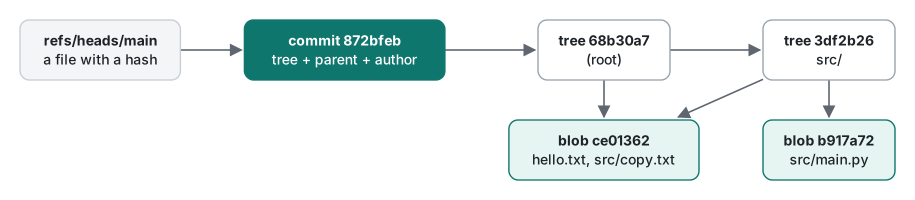
We added src/copy.txt (also containing hello) and src/main.py, and committed. Count the objects:
.git/objects/3d/f2b26e…   tree  (src/)
.git/objects/68/b30a75…   tree  (root)
.git/objects/87/2bfebe…   commit
.git/objects/b9/17a726…   blob  (main.py)
.git/objects/ce/013625…   blob  (hello.txt AND src/copy.txt)
Five objects for three files: both files containing hello share one blob. Reading them:
$ git cat-file -p HEAD
tree 68b30a75a76fffa7bf25023339501ec8cd7104d5
author demo <demo@example.com> 1794445200 +0000
committer demo <demo@example.com> 1794445200 +0000

First commit
$ git cat-file -p HEAD^{tree}
100644 blob ce013625030ba8dba906f756967f9e9ca394464a    hello.txt
040000 tree 3df2b26ecb8bcdda43db72b3f32af69ffa7736b3    src
$ git cat-file -p HEAD:src
100644 blob ce013625030ba8dba906f756967f9e9ca394464a    copy.txt
100644 blob b917a726c93f902e43291d9009d6488385133b67    main.py
A tree is a directory listing: mode, type, hash, name. A commit is a small text: the root tree, the parent commit(s), author, committer, message. And it is hashed the same way as a blob:
$ git cat-file commit HEAD > c.raw
$ printf 'commit %s\0' $(wc -c < c.raw | tr -d ' ') | cat - c.raw | shasum -a 1
872bfebe6661489bdb33dce1ebf41088eb94f21b  -
$ git rev-parse HEAD
872bfebe6661489bdb33dce1ebf41088eb94f21b
Because the parent's hash is inside the commit text, changing any commit changes the hash of every commit after it. That is the whole reason rebase "rewrites history" (lecture 4), and why a commit ID proves the entire history behind it.
Making a commit with plumbing only
git commit is a convenience wrapper around three "plumbing" commands:
$ echo "v2" > hello.txt
$ git add hello.txt
$ git write-tree
9bc1402c06ef1cef8f6d0e539a5333f3797b22de
$ echo "Commit made by hand" | git commit-tree 9bc1402 -p HEAD
6b582d907ea233b6037ec127b2e4405c052d999b
$ git update-ref refs/heads/main 6b582d9
$ git log --oneline
6b582d9 Commit made by hand
872bfeb First commit
$ git status --short
                       <- clean: the index already matched the new tree
write-tree turns the index into tree objects, commit-tree wraps a tree in a commit, and update-ref moves the branch name. A branch really is just a file holding a hash. Errors you will meet when you start poking at objects:
$ git cat-file -p 0000000
fatal: Not a valid object name 0000000
SHA-256 repositories exist too (git init --object-format=sha256); there git hash-object printed 2cf8d83d…ebb4, the same as printf 'blob 6\0hello\n' | shasum -a 256. Same scheme, longer hash.
Loose objects vs packfiles: gc measured
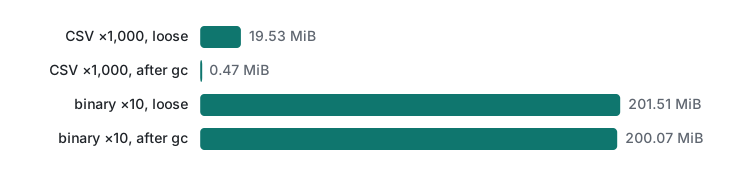
Each git add / git commit writes loose objects: one zlib file per object. git gc packs them into a packfile, storing similar objects as deltas against each other. To see how much that matters we generated, with Python random.seed(7), 1,000 commits that each change one line of a 1,000-line CSV (30,691 bytes). The commits were imported with git fast-import, then unpacked into loose objects with git unpack-objects so every run starts from the same 3,000 loose objects.
## before gc
count: 3000
size: 19.53 MiB
## after gc
count: 0
in-pack: 3000
packs: 1
size-pack: 484.38 KiB
| Run (Apple Silicon Mac, M1 Pro) | .git/objects before |
after | git gc time |
|---|---|---|---|
| 1 | 20,000 KB | 564 KB | 0.80 s |
| 2 | 20,000 KB | 576 KB | 0.92 s |
| 3 | 20,000 KB | 568 KB | 0.92 s |
Inside the pack, by object type (git cat-file --batch-check='%(objectsize) %(objectsize:disk)'):
| Type | Count | Raw size | Size in pack |
|---|---|---|---|
| blob | 1,000 | 30,661,605 B | 214,805 B |
| tree | 1,000 | 39,000 B | 49,846 B |
| commit | 1,000 | 209,837 B | 146,248 B |
git verify-pack -v reported 990 objects stored as deltas, with chains up to 49 deep. Thirty megabytes of CSV history became 210 KB of blobs. Note the trees: tiny objects get bigger when compressed, because zlib has fixed overhead.
You normally do not need to run gc yourself: Git runs gc --auto after many commands once there are enough loose objects. That automatic background run is also what broke our benchmark in lecture 4.
Large binary files: the measured pain
Now the case everyone warns about. A 20 MiB file of random bytes (Python random.seed(v) for version v, so it is reproducible) committed in 10 versions, like re-exporting a video or a game asset.
## loose, after 10 commits
count: 40
size: 201.51 MiB
## git gc (1 run): 24.49 s
size-pack: 200.07 MiB
gc saved 0.7% and took 24.49 s, against 0.8–0.9 s for the text history. Each 20,971,520-byte version occupies 20,977,930 bytes in the pack: random (or already compressed) data does not compress and has no useful deltas, so Git stores every version in full, forever, and every clone downloads all of them. We cloned it three ways (local file:// transport, so network time is excluded), 3 runs:
| Clone | Run 1 | Run 2 | Run 3 | .git size |
|---|---|---|---|---|
full (--no-local) |
1.46 s | 1.66 s | 2.99 s | 207–213 MB |
--depth 1 |
0.23 s | 0.35 s | 0.28 s | 20 MB |
--filter=blob:none (blobless) |
0.27 s | 0.55 s | 0.39 s | 20 MB |
On a real network the difference grows: the full clone transfers about ten times the bytes of the shallow ones. The partial clones have their own costs: in the shallow clone, git switch --detach HEAD~5 failed with fatal: invalid reference: HEAD~5 (that history is not there), and in the blobless clone the same command worked but fetched the missing version on demand (0.43 s here, and .git grew from 20 MB to 40 MB). For files that must be versioned, Git LFS keeps only pointers in Git; it is not installed on this machine, so it was not tested.
| Situation | Choice |
|---|---|
Generated files (builds, .apk, .ipa, exports) |
do not commit; .gitignore and store them as release artifacts |
| Large assets that must be versioned with code | Git LFS (not run here) |
| You only need the latest code (CI, quick look) | git clone --depth 1 |
| You need history but not old file contents | git clone --filter=blob:none |
| Already committed a big file by mistake | it stays in history; removing it means rewriting history (git filter-repo, not run here) and everyone re-cloning |
git bisect: find the bad commit in 8 runs out of 300
A tax calculation was right in the beginning and is wrong now; there are 300 commits in between, all named "Refactor step N". The bug (10% became 1%) is in commit 211, but let us pretend we do not know. Bisect does a binary search over history; git bisect run lets a script judge each commit. The script must exit 0 for good and 1 for bad:
#!/bin/sh
# test_tax.sh: exit 0 = good, 1 = bad
out=$(python3 -c 'from tax import total; print(total(1000))')
[ "$out" = "1100" ]
$ git bisect start HEAD HEAD~299
Bisecting: 149 revisions left to test after this (roughly 7 steps)
[95892e7b…] Refactor step 150
$ git bisect run ~/demo/test_tax.sh
running '~/demo/test_tax.sh'
Bisecting: 74 revisions left to test after this (roughly 6 steps)
[d0546bdf…] Refactor step 225
running '~/demo/test_tax.sh'
Bisecting: 37 revisions left to test after this (roughly 5 steps)
[e787361d…] Refactor step 187
...
[72f52537…] Refactor step 211
running '~/demo/test_tax.sh'
72f52537d6519b73cf52dd4aa0392555090184c1 is the first bad commit
commit 72f52537d6519b73cf52dd4aa0392555090184c1
    Refactor step 211
 tax.py | 4 ++--
bisect found first bad commit
$ git bisect reset
Measured, 3 runs each (Apple Silicon Mac, M1 Pro), against the naive approach of checking out and testing every commit from the oldest until the first failure:
| History | bisect: test runs | bisect time | linear: test runs | linear time |
|---|---|---|---|---|
| 300 commits, bug at 211 | 8 | 0.44 / 0.37 / 0.38 s | 211 | 11.69 / 13.73 / 12.89 s |
| 3,000 commits, bug at 2,111 | 11 | 0.52 / 0.50 / 0.49 s | 2,111 | 122.29 / 135.56 / 133.10 s |
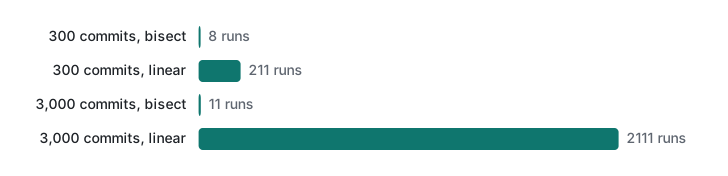
Ten times more history cost bisect three more test runs. With a test that takes a minute (a build plus a test suite), that is the difference between 11 minutes and a day and a half.
Common mistakes
A broken bisect script blames the wrong commit. We introduced a typo (pyhton3) into the test script. Every run printed pyhton3: command not found, the comparison failed, the script exited 1 ("bad") on every commit, and bisect confidently reported:
2d4b99385a37b3ebbb3cd09658e6d8af549f2ddd is the first bad commit
    Refactor step 2
bisect found first bad commit
Fix: run the script by hand on a commit you know is good and confirm echo $? prints 0, before bisect run. Exit code 125 means "cannot test, skip this commit"; codes above 127 abort the bisect.
Running git bisect good before start. Git answers You need to start by "git bisect start". Also run git bisect reset at the end, or you stay on a detached commit from the middle of history.
Reading .git/objects with ls -l to judge repository size. It shows only loose objects, and after gc it is almost empty. Use git count-objects -vH, which reports loose and packed sizes separately.
Honest limits / version notes
- Checked only on Git 2.54.0 (Apple Git-157). SHA-256 object format exists since Git 2.29 and was still marked experimental for a long time; interoperability between SHA-1 and SHA-256 repositories was not tested.
- Partial clone (
--filter) needs server support; our local "server" haduploadpack.allowFilter=true. Hosting services differ. gctimes depend on CPU cores (delta search is multithreaded) and disk; run-to-run variation was ±15%. The large-file gc was measured once.duandcount-objectsdisagree slightly (filesystem blocks vs file bytes); the tables say which one they use.- Git LFS and
git filter-repoare not installed here and are only described.
Exercise
- Without running Git, what command line prints the object ID of a file containing exactly
hifollowed by a newline (3 bytes)? Then check it withgit hash-object. - Your bisect test needs a build that sometimes fails for unrelated reasons (missing dependency in old commits). What should the script exit with in that case, and why not 1?
Answers
printf 'blob 3\0hi\n' | shasum -a 1. It must matchprintf 'hi\n' | git hash-object --stdin.- Exit 125. It tells bisect "this commit cannot be tested, skip it". Exiting 1 would mark the commit bad and steer the search to the wrong place, exactly like the broken script above.
Previous: Git lecture 5: undo with reset, revert and reflog · Series start: Git lecture 1: init, add, commit · Related: rebase and cherry-pick · Back to the new-hire study roadmap.
FAQ
How does Git calculate a commit or file hash?
It hashes a header plus the content: for a file, the bytes 'blob <size>' followed by a NUL byte and the file content. printf 'blob 6\0hello\n' | shasum gave ce013625…, exactly what git hash-object printed. A commit is hashed the same way over its text (tree, parent, author, committer, message), which is why changing a parent changes every later hash.
Does git gc make a repository smaller?
For text history, dramatically: 1,000 versions of a 30 KB CSV took 19.53 MiB as loose objects and 484 KiB after git gc, because 990 of the 1,000 file versions were stored as deltas. For random binary data it did not help at all: 10 versions of a 20 MiB file were 201.51 MiB loose and 200.07 MiB packed, and gc took 24.5 seconds.
How many steps does git bisect need?
About log2 of the number of commits. With git bisect run and a test script, 300 commits needed 8 test runs (0.4 s) and 3,000 commits 11 runs (0.5 s); testing every commit from the oldest needed 211 and 2,111 runs (about 12 s and 2 minutes). The test script must exit 0 for good and 1–127 (except 125) for bad, or bisect blames the wrong commit.