Git Remotes: push, pull, fetch and Rejected Pushes
Remotes with a local bare repo, offline: fetch vs pull, a rejected non-fast-forward push, upstream tracking, pull.rebase, and measured clone sizes.
Series: Git lecture 3/6 (intermediate). For people who commit and branch comfortably (lectures 1–2) but treat push and pull as magic. You will understand what origin/main is, why a push gets rejected, how fetch differs from pull, and which pull setting to choose.
This lecture is for the developer whose git push was just rejected, who ran git pull and got a merge commit nobody wanted, or who was told "never force-push" without being told why. Every example runs offline: the "server" is a bare repository in a local folder, and two clones, alice and bob, play two teammates. The messages are the same ones you see with a hosted service, minus authentication.
Run on Git 2.54.0 (Apple Git-157), Apple Silicon Mac (M1 Pro), demo identity, scratch folders only. Local paths in the output are shortened to ~/demo/….
Set up a remote you can break safely
A remote is another repository your repository knows by name; the usual name is origin. A bare repository has no working tree, only the contents of .git. Servers use bare repositories because nobody edits files there.
git init --bare -b main remote.git
git clone remote.git alice
Initialized empty Git repository in ~/demo/rm3/remote.git/
Cloning into 'alice'...
warning: You appear to have cloned an empty repository.
done.
The warning is harmless. Alice commits and pushes:
cd alice
printf 'orders = []\n' > shop.py; git add shop.py; git commit -qm "Start shop"
git push
git branch -vv
To ~/demo/rm3/remote.git
 * [new branch]      main -> main
* main edd9011 [origin/main] Start shop
[origin/main] is the upstream (tracking branch) of main: the remote branch that push, pull and status compare against by default. git clone set it up for us.
Why not push into a normal (non-bare) repository? We tried, and the server refused:
remote: error: refusing to update checked out branch: refs/heads/main
remote: error: By default, updating the current branch in a non-bare repository
remote: is denied, because it will make the index and work tree inconsistent
...
 ! [remote rejected] main -> main (branch is currently checked out)
Upstream tracking and the first push of a new branch
A new branch has no upstream until you give it one:
git switch -c feature/cart
# ... commit ...
git push
fatal: The current branch feature/cart has no upstream branch.
To push the current branch and set the remote as upstream, use

    git push --set-upstream origin feature/cart

To have this happen automatically for branches without a tracking
upstream, see 'push.autoSetupRemote' in 'git help config'.
Either do what it says (git push -u origin feature/cart), or set push.autoSetupRemote=true once (Git 2.37+). With that setting the same git push printed:
 * [new branch]      feature/cart -> feature/cart
branch 'feature/cart' set up to track 'origin/feature/cart'.
Another classic: pushing a branch name you do not have. Most older tutorials say master, and new repositories use main:
$ git push origin master
error: src refspec master does not match any
error: failed to push some refs to '~/demo/rm3/remote.git'
"src refspec … does not match any" means there is no local branch with that name. Check with git branch.
fetch vs pull: what origin/main really is
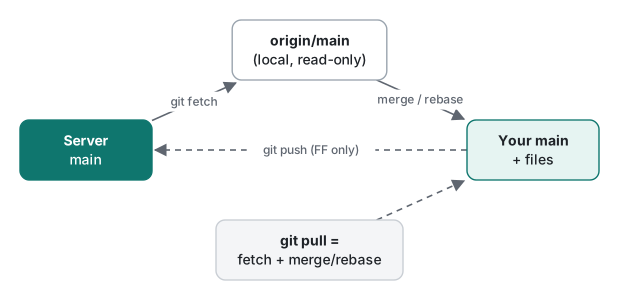
origin/main is a remote-tracking branch: your local, read-only memory of where main was on origin the last time you talked to it. It only changes when you fetch (or pull, which fetches first).
Alice pushes a commit. Bob has not fetched yet:
cd ../bob
git status
On branch main
Your branch is up to date with 'origin/main'.
This is the trap. "Up to date" is measured against Bob's stale origin/main, not against the server. After a fetch:
git fetch
git status -sb
git log --oneline main..origin/main
From ~/demo/rm3/remote
   edd9011..8500a27  main       -> origin/main
## main...origin/main [behind 1]
8500a27 Add TAX
fetch downloaded the commit and moved origin/main; Bob's main and his files did not change. He can inspect first (git log main..origin/main, git diff main origin/main) and then integrate with git merge, which here was a fast-forward. git pull is just git fetch followed by that integration step.
| You want to… | Command | Touches your branch/files? |
|---|---|---|
| See what teammates pushed, safely | git fetch |
No |
| Compare before integrating | git log main..origin/main, git diff main origin/main |
No |
| Get their work into your branch | git pull (fetch + merge/rebase) |
Yes |
| Only accept a fast-forward | git pull --ff-only |
Yes, or fails |
| Check what the server has right now | git ls-remote origin |
No |
The rejected push, and how to integrate
Now both teammates work at the same time. Alice adds a shipping fee and pushes first. Bob adds config.py, commits, and pushes:
$ git push
To ~/demo/rm3/remote.git
 ! [rejected]        main -> main (fetch first)
error: failed to push some refs to '~/demo/rm3/remote.git'
hint: Updates were rejected because the remote contains work that you do not
hint: have locally. This is usually caused by another repository pushing to
hint: the same ref. If you want to integrate the remote changes, use
hint: 'git pull' before pushing again.
hint: See the 'Note about fast-forwards' in 'git push --help' for details.
Git refuses because accepting Bob's push would make the server's main skip Alice's commit. Bob runs git pull with no pull setting configured:
From ~/demo/rm3/remote
   8500a27..b2e3cbf  main       -> origin/main
hint: You have divergent branches and need to specify how to reconcile them.
hint: You can do so by running one of the following commands sometime before
hint: your next pull:
hint:
hint:   git config pull.rebase false  # merge
hint:   git config pull.rebase true   # rebase
hint:   git config pull.ff only       # fast-forward only
...
fatal: Need to specify how to reconcile divergent branches.
Note the first two lines: the fetch already happened. If Bob pushes again now, the reason changes from (fetch first) to (non-fast-forward), because Git now knows the remote commit and sees that Bob's branch is behind it. git status -sb showed [ahead 1, behind 1].
We copied Bob's repository twice and tried both answers.
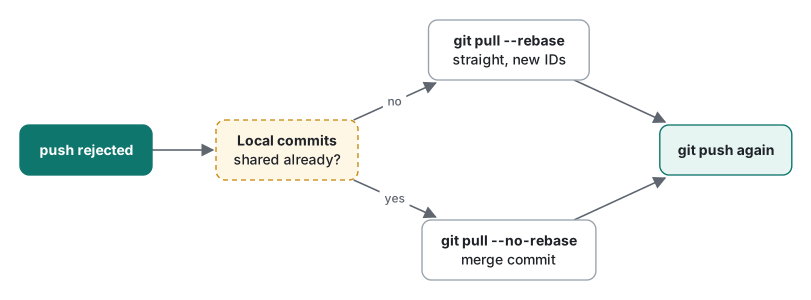
Merge (git pull --no-rebase):
*   c70294d Merge branch 'main' of ~/demo/rm3/remote
|\
| * b2e3cbf Add shipping fee
* | a556d35 Add currency
|/
* 8500a27 Add TAX
Rebase (git pull --rebase):
Successfully rebased and updated refs/heads/main.
* 50a55ed Add currency
* b2e3cbf Add shipping fee
* 8500a27 Add TAX
* edd9011 Start shop
With rebase, Bob's commit was replayed on top of Alice's and got a new ID (a556d35 → 50a55ed); the history is a straight line and the push went through (b2e3cbf..50a55ed main -> main). The merge version also works, but every such pull adds a "Merge branch 'main' of …" commit that says nothing useful.
| Setting | What git pull does on divergence |
Good for |
|---|---|---|
pull.rebase true |
replays your local commits on top | most teams; clean history of unpublished work |
pull.rebase false |
creates a merge commit | when local commits were already shared elsewhere |
pull.ff only |
refuses unless fast-forward | branches you never commit to (e.g. a deploy checkout) |
| nothing set (2.54.0) | fatal: Need to specify how to reconcile divergent branches. |
forcing you to choose |
Rebasing rewrites only your unpushed commits, which is safe. Lecture 4 covers rebase in depth and why you must never rebase commits others already have.
Common mistake: "just force-push it"
What actually happens. Alice's clone still believes origin/main is b2e3cbf (she has not fetched Bob's push). She amends her last commit and pushes. A normal push is rejected, so she reaches for force.
With --force-with-lease, Git first checks that the server still has what Alice last saw:
$ git push --force-with-lease
 ! [rejected]        main -> main (stale info)
error: failed to push some refs to '~/demo/rm3/remote.git'
With plain --force, there is no check:
$ git push --force
 + 50a55ed...56ed907 main -> main (forced update)
Bob's commit 50a55ed is gone from the server's main. The next time Bob pulls, he sees + 50a55ed...56ed907 main -> origin/main (forced update) followed by the divergent-branches error, and his work survives only in his own clone. (We restored the server from a copy afterwards.)
Fix: never force-push a shared branch. On your own feature branch, when you must rewrite (after a rebase), use git push --force-with-lease. If you git fetch right before it, look at what arrived first (git log HEAD..origin/<branch>): the fetch updates the value the lease checks, so it would no longer protect you.
Measured: full, shallow and blobless clones
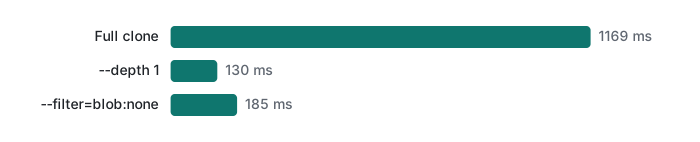
Remotes are also about how much you download. We generated a repository with 2,000 commits of one CSV file that grows by 20 rows per commit (fixed seed 42; final file 40,000 rows, 984,486 bytes; server pack 10.55 MiB after git gc). We cloned it over file:// (which forces a real pack transfer instead of hard links), 3 runs each, Apple Silicon Mac (M1 Pro), Git 2.54.0:
| Clone | Runs (ms) | .git size |
Commits in history |
|---|---|---|---|
| full | 1169.4 / 1124.1 / 1221.5 | 10,936 KB | 2,000 |
--depth 1 (shallow) |
128.1 / 129.6 / 140.9 | 608 KB | 1 |
--filter=blob:none (blobless) |
180.9 / 190.7 / 184.8 | 1,108 KB | 2,000 |
The small clones are not free later:
- In the blobless clone,
git log -p -50took 6,792.8 ms the first time, because Git had to fetch 50 old file versions on demand, and.gitgrew to 25,644 KB. The same command took 300.3 ms the second time. - In the shallow clone,
git log --onelineshowed one commit andgit rev-parse --is-shallow-repositoryprintedtrue.git fetch --unshallowtook 1,241.9 ms and brought.gitto 12,104 KB, about the full clone's cost. - A no-op
git fetch(nothing new) took a median of 41.5 ms over 5 runs.
Rule of thumb: CI jobs that build one commit → --depth 1. Developers who need history but not every old file → blobless. Your daily working clone → full.
Honest limits / version notes
- Everything ran on Git 2.54.0 against local bare repositories. Hosted services add authentication, branch protection and their own rejection messages (for example a protected branch refusing a force-push); those were not run here.
push.autoSetupRemotewas added in Git 2.37. The divergent-branches error became a hard error in the 2.33/2.34 era (earlier versions only warned and merged); we only checked 2.54.0's wording.--force-with-leasehas existed since Git 1.8.5. Without an explicit expected value it compares against yourorigin/main; runninggit fetchfirst updates that value and weakens the protection.- Partial clone (
--filter) needs server support; for the local bare repo we setuploadpack.allowFilter true. Clone timings overfile://exclude network latency, so real-world differences are usually larger.
Exercises
git statussays "Your branch is up to date with 'origin/main'", but a teammate says they pushed 10 minutes ago. Which command shows their commits without changing your branch?- Your push was rejected with
(non-fast-forward). You have two local commits that you never pushed. Which command integrates the remote work while keeping a straight history?
Answers
git fetch, thengit log --oneline main..origin/main. Status only compares against your last-fetchedorigin/main.git pull --rebase(or setgit config pull.rebase trueonce), thengit push. Your two commits get new IDs, which is fine because nobody else has them.
Previous: Git lecture 2: branches, merges and conflicts · Next: Git lecture 4: rebase, cherry-pick and history · Start of the series: Git lecture 1 · Back to the new-hire study roadmap.
FAQ
What is the difference between git fetch and git pull?
git fetch downloads new commits and updates remote-tracking branches such as origin/main, but never touches your branch or files. git pull runs a fetch and then integrates origin/main into your branch, by merge or rebase. In our test, git status said 'up to date' before fetch even though the remote had a new commit; after fetch it said 'behind 1'.
Why was my push rejected with 'fetch first' or 'non-fast-forward'?
The remote branch has commits you do not have, so accepting your push would throw them away. Integrate first with git pull --rebase (or --no-rebase for a merge), then push again. Do not use --force on a shared branch; --force-with-lease refused our overwrite with '(stale info)' because the remote had moved.
What does 'fatal: Need to specify how to reconcile divergent branches' mean?
Your branch and the remote branch both have new commits, and no pull.rebase or pull.ff setting tells Git whether to merge or rebase. Pick one per command (git pull --rebase, --no-rebase, --ff-only) or set it once, for example git config pull.rebase true. The fetch part had already run when this error appeared.