JavaScript Basics: Types, == vs === and NaN in jsc
JavaScript lecture 1, every line run in macOS jsc: let/const/var errors, typeof null, a real == vs === table, 0.1 + 0.2, NaN, "10" + 5 and a measurement.
Series: JavaScript lecture 1/6 (beginner). For people who are about to write their first JavaScript, or who already copy-paste it and are not sure why "10" + 5 gives "105". After this lecture you will run JavaScript from a terminal in five minutes, choose between let, const and var, read the error messages beginners hit, and know exactly when == lies to you.
JavaScript is the language of every web page, and it also runs servers, build tools and many mobile app back offices. The core rules are small, but a few of them (automatic type conversion, one number type for everything, typeof null) surprise people who learned Java, Python or C# first, and they cause real bugs in forms, prices and API responses. Every output on this page comes from a real run on JavaScriptCore (jsc), the engine inside Safari, on macOS 26.6 on an Apple Silicon Mac (M1 Pro). Node.js, Deno and browsers were not run for this article; where their behaviour differs we say so.
Your first program in 5 minutes
Every Mac already contains a JavaScript engine with a command-line shell. It is not on your PATH, so give it a short name first:
$ alias jsc=/System/Library/Frameworks/JavaScriptCore.framework/Versions/Current/Helpers/jsc
$ jsc -e 'print(1 + 2)'
3
Put the alias line in ~/.zshrc if you want to keep it. Now create hello.js:
print("Hello, JavaScript!");
console.log("this line is for browsers and Node");
and run it:
$ jsc hello.js
Hello, JavaScript!
Exception: TypeError: undefined is not an object (evaluating 'console.log')
global code@hello.js:2:8
$ echo $?
3
That is your first error, and it is worth reading slowly:
print()is the output function of thejscshell. Browsers and Node.js useconsole.log()instead.- In this
jsc,consoledoes not exist (typeof consoleprintedundefined), soconsole.logmeans "read the propertylogofundefined", which is aTypeError: an operation on a value of the wrong type. global code@hello.js:2:8is the stack trace: filehello.js, line 2, column 8. Exception means nothing caught the error, so the program stopped, andjscexited with status 3.
If you want one file to run in jsc and in a browser, add this line at the top: globalThis.console ??= { log: print };. In this lecture we simply use print. Run jsc with no file to get an interactive prompt (quit with Ctrl+D); piped into jsc -i, 0.1 + 0.2 printed 0.30000000000000004 and typeof null printed "object". We come back to both.
let, const and var (and the errors they give)
A variable is a name bound to a value. Modern JavaScript has two ways to declare one, plus an old one:
const TAX = 0.1;      // cannot be reassigned
let count = 0;        // can be reassigned
count = count + 1;
var legacy = 1;       // old style (before 2015); avoid in new code
Each one fails in its own way. Reassigning a const:
$ jsc const.js        # const TAX = 0.1; TAX = 0.2;
Exception: TypeError: Attempted to assign to readonly property.
global code@const.js:1:21
Declaring the same let twice is caught before anything runs, as a SyntaxError (the code is not valid JavaScript):
$ jsc redecl.js       # let name = "Mina"; let name = "Ken";
Exception: SyntaxError: Cannot declare a let variable twice: 'name'.
at redecl.js:1
var is the odd one out. A var declaration is hoisted: the name exists from the top of the function or file, holding undefined, before the line that declares it. let and const are hoisted too, but reading them early is an error:
print(a);   // undefined
var a = 1;
print(b);   // error
let b = 2;
undefined
Exception: ReferenceError: Cannot access 'b' before initialization.
global code@hoist.js:3:8
The region before a let/const line is called the temporal dead zone (TDZ); lecture 2 shows how it bites inside functions. A ReferenceError means a name could not be used. A plain typo produces one too: print(totl) gave ReferenceError: Can't find variable: totl. Node and Chrome word the same error as totl is not defined (not run here); search for both.
There is one typo JavaScript does not report by default:
count = 5;   // never declared anywhere
print(count, typeof globalThis.count);   // 5 number
Assigning to an undeclared name silently creates a global variable. Put "use strict"; as the first line of a file and the same assignment becomes ReferenceError: Can't find variable: count. ES modules and class bodies are always strict, so most modern code already gets this protection.
Rule of thumb: const by default, let when the value really changes, var never in new code.
Types and typeof
Every value has a type. JavaScript has seven primitive types (simple, immutable values) plus objects. The typeof operator tells you which, with two famous exceptions. Output of types.js:
42            number
3.14          number
hi            string
true          boolean
undefined     undefined
null          object
10n           bigint
Symbol(id)    symbol
{}            object
[]            object
function(){}  function
NaN           number
Things to notice:
- There is one
numbertype for integers and decimals (64-bit floating point).bigint(written10n) is a separate type for integers beyond 2⁵³. typeof nullis"object". This is a bug from the first version of the language that can never be fixed without breaking old sites. Check for null withvalue === null.- Arrays are objects, so
typeof []is"object". UseArray.isArray([])(it printedtrue). NaN("not a number") is of typenumber. Strange, but logical: it is the number you get from a failed calculation.undefinedmeans "no value was ever set";nullmeans "deliberately empty". APIs use both, which is why the== nulltrick below exists.
== vs ===: the table we actually ran
=== (strict equality) compares without converting types: different types are never equal. == (loose equality) first converts both sides with a set of rules, then compares. We ran every pair below through both operators (eqtable.js):
| a | b | a == b |
a === b |
|---|---|---|---|
0 |
"0" |
true | false |
0 |
"" |
true | false |
0 |
false |
true | false |
"0" |
false |
true | false |
"" |
false |
true | false |
"" |
"0" |
false | false |
null |
undefined |
true | false |
null |
0 |
false | false |
null |
false |
false | false |
undefined |
false |
false | false |
NaN |
NaN |
false | false |
[] |
0 |
true | false |
[] |
"" |
true | false |
[] |
false |
true | false |
"1" |
1 |
true | false |
Look at rows 2, 5 and 6: 0 == "" and 0 == "0" are both true, but "" == "0" is false. Loose equality is not even transitive, so you cannot reason about it the way you reason about = in maths. [] == false is true because the empty array becomes "", then 0.
The only loose comparison worth keeping is x == null: it is true for null and undefined and for nothing else (rows 7–9), which is handy for "was this field sent at all?". Many teams still write x === null || x === undefined to keep the linter rule "always ===" simple.
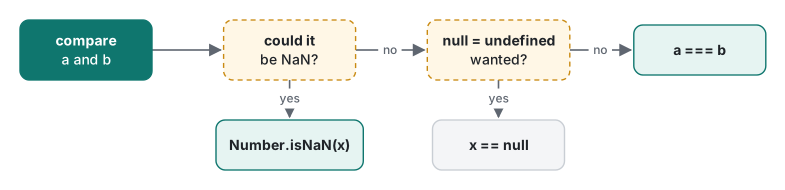
| You want to know… | Write | Not |
|---|---|---|
| are these the same value and type? | a === b |
a == b |
is x null or undefined? |
x == null or x ?? fallback |
!x (also catches 0 and "") |
is x NaN? |
Number.isNaN(x) |
x === NaN (always false) |
is x an array? |
Array.isArray(x) |
typeof x === "object" |
is x really null? |
x === null |
typeof x === "object" |
Numbers: 0.1 + 0.2, NaN and friends
print(0.1 + 0.2);                                   // 0.30000000000000004
print(0.1 + 0.2 === 0.3);                           // false
print(Math.abs(0.1 + 0.2 - 0.3) < Number.EPSILON);  // true
print((0.1 + 0.2).toFixed(2), typeof (0.1 + 0.2).toFixed(2));  // 0.30 string
print(7 / 2, Math.trunc(7 / 2), 7 % 2, -7 % 2);     // 3.5 3 1 -1
print(1 / 0, -1 / 0, 0 / 0);                        // Infinity -Infinity NaN
print(Number.MAX_SAFE_INTEGER, 2 ** 53 + 1, 2n ** 53n + 1n);
// 9007199254740991 9007199254740992 9007199254740993
print(1.15.toFixed(1), 1.25.toFixed(1), 1.35.toFixed(1));  // 1.1 1.3 1.4
0.1 has no exact binary representation, just as 1/3 has none in decimal, so tiny errors appear. Integers are exact up to Number.MAX_SAFE_INTEGER (2⁵³ − 1); one step past it, 2 ** 53 + 1 printed ...992, not ...993. BigInt got it right. Dividing by zero does not throw; it gives Infinity or NaN. And toFixed returns a string and rounds the stored binary value, not the decimal you typed: 1.15 is really 1.149999…, so it became 1.1 while 1.25 became 1.3.
NaN has its own rules:
const age = Number("twenty");
print(age, typeof age);                      // NaN number
print(age === NaN, age == NaN);              // false false
print(Number.isNaN(age), isNaN("hello"), Number.isNaN("hello"));  // true true false
print([NaN].indexOf(NaN), [NaN].includes(NaN));                   // -1 true
print(parseInt("42px"), Number("42px"), Number(""), Number("  7 "), Number(null));
// 42 NaN 0 7 0
NaN is not equal to anything, including itself. The old global isNaN("hello") converts first and says true; Number.isNaN does not convert and is the one to use. Note the two different parsers: parseInt("42px") reads digits until it hits garbage, Number("42px") refuses. And Number("") is 0, not NaN, which is exercise 2.
Strings and template literals
const price = 1200, qty = 3;
print(`Total: ${price * qty} yen (${qty} items)`);  // Total: 3600 yen (3 items)
print('Total: ${price}');                           // Total: ${price}
print(`${null} ${undefined} ${[1, 2]} ${{a: 1}}`);  // null undefined 1,2 [object Object]
A template literal uses backticks; ${...} inserts any expression and the string may span lines. Single or double quotes do not interpolate: the second line printed ${price} literally. Objects inside ${} turn into [object Object]; use JSON.stringify(obj) when you want to see them.
Common mistake: adding a value that came from a form
The mistake. Values from text inputs, URL parameters, prompt() and most CSV files are strings, even when they look like numbers:
const input = "10";
print(input + 5, input - 5, input * 2);   // 105 5 20
What actually happens. + means both "add" and "join strings". If either side is a string, JavaScript joins, so you get "105". The other arithmetic operators only mean maths, so they convert the string to a number: "10" - 5 is 5. The same rule gave "3" * "4" = 12 and the classic "b" + "a" + +"a" + "a" = baNaNa (the unary +"a" is NaN). No error is thrown; the wrong number just flows into your totals.
The fix. Convert once, at the edge, and check:
const qty = Number(input);
if (!Number.isFinite(qty)) throw new Error(`not a number: ${input}`);
print(qty + 5);   // 15
The same family of bug comes from || used for defaults. || replaces every falsy value (0, "", NaN, null, undefined, false), so a real quantity of zero is lost:
const qty0 = 0;
print(qty0 || 10, qty0 ?? 10);   // 10 0
?? (nullish coalescing) only replaces null and undefined. Use it for defaults.
A measurement: money as floats vs integer cents
How bad is float drift in practice? We added 0.10 (ten cents) N times as a float, and 10 as an integer number of cents (drift.js, deterministic, no randomness):
N=10: float=0.9999999999999999  cents/100=1  error=-1.11e-16
N=1000: float=99.9999999999986  cents/100=100  error=-1.41e-12
N=1000000: float=100000.00000133288  cents/100=100000  error=1.33e-6
N=10000000: float=999999.9998389754  cents/100=1000000  error=-1.61e-4
After ten million additions the float total is 0.00016 off: invisible on one receipt, visible in a monthly ledger that must match the bank to the cent. The integer version is exact every time, because integers below 2⁵³ are stored exactly.
The integer loop was also faster. Timing each loop for N = 10,000,000 with performance.now(), five runs in one process, two separate processes, Apple M1 Pro, jsc from macOS 26.6:
float ms: 10.8, 9.5, 9.6, 9.5, 9.5
cents ms: 4.7, 3.2, 3.1, 3.2, 3.2
float ms: 10.7, 9.5, 9.5, 9.4, 9.5
cents ms: 4.4, 3.2, 3.1, 3.1, 3.2

About 9.5 ms against 3.2 ms after the first run (the first run includes JIT compilation, which lecture 6 looks at). We did not dig into the engine to prove why; a likely reason is that the engine keeps small integers in a fast integer representation, and each floating-point addition has to wait for the previous one. Treat it as a bonus, not the reason: you store money as integers because of correctness. Starting jsc itself is cheap: jsc hello2.js took a median of 8.0 ms (20 runs, three batches: 8.0, 8.0, 8.1 ms).
Honest limits / version notes
- Engine: JavaScriptCore as shipped with macOS 26.6.2 (framework version 21624.5.1.11.3), run through its
jscshell. Node.js, Deno and browsers were not run. Engines implement the same ECMAScript standard, so the language results above (equality,typeof, number formatting) are defined by the spec and should match; error messages differ between engines. - jsc only:
printexists only in engine shells.consolewasundefinedin thisjsc; it exists in browsers and Node. There is no DOM, noprompt(), nofetch. - Versions:
let,const, template literals,Number.isNaN,Number.EPSILONandSymbolarrived in ES2015.BigInt,??andglobalThisarrived in ES2020, numeric separators (10_000_000) in ES2021. All worked in thisjsc. Very old browsers (Internet Explorer) lack most of them, which no longer matters for new projects. - Timings are from one machine and one engine version, meant to show the order of magnitude, not to rank engines.
Exercises
1. Predict the output, then run it: print("5" + 3, "5" - 3, [] == false, null == 0, typeof NaN);
2. Write isValidAge(s) that takes a string from a form and returns true for "29" and false for "abc", "", " " and "29.5".
3. This prints 0.6000000000000001. Make it print 0.60 and explain why your version is exact.
let total = 0;
for (const p of [0.1, 0.2, 0.3]) total += p;
print(total);
Answers
1. Real output: 53 2 true false number. + with a string joins; - converts to numbers; [] becomes "" then 0, as does false; null loosely equals only undefined.
2. The obvious version Number.isInteger(Number(s)) && Number(s) >= 0 fails twice: Number("") and Number(" ") are 0, and Number("0x1F") is 31. We ran it and "0x1F" slipped through. A strict version:
function isValidAge(s) {
  const t = s.trim();
  return /^\d{1,3}$/.test(t) && Number(t) < 150;
}
It printed true for "29" and " 7 ", and false for "abc", "", " ", "29.5", "-1", "0x1F" and "1e2". (Regular expressions are covered in what is a regular expression.)
3. Keep cents as integers and format at the end: let cents = 0; for (const p of [10, 20, 30]) cents += p; print((cents / 100).toFixed(2)); printed 0.60. Integer addition is exact, and the single division happens once, at display time.
Next
Lecture 2 covers functions: declarations vs arrows, what this really is, closures, the var-in-a-loop trap and the TDZ error inside functions.
- Next: JavaScript lecture 2/6: functions, scope and closures
- Later in the series: objects, arrays and their methods, classes, prototypes and modules, async, promises and the event loop, performance, memory and numbers
- Same topic in other languages: Java lecture 1: types, strings and equality, Python lecture 1: types and mutability
- Where this fits: the programming learning roadmap
FAQ
Should I use == or === in JavaScript?
Use === by default. == converts types before comparing, so 0 == "", "0" == false and [] == false are all true, while "" == "0" is false. The one common, deliberate use of == is x == null, which is true for both null and undefined and nothing else.
Why is 0.1 + 0.2 not equal to 0.3 in JavaScript?
All JavaScript numbers are 64-bit binary floating point, and 0.1 and 0.2 have no exact binary form. The sum is 0.30000000000000004. Compare with a tolerance, round only when displaying (toFixed returns a string), or keep money in integer cents: adding 10 cents ten million times as a float was off by 0.00016, as integers it was exact.
Why does typeof null return "object"?
It is a bug from the first version of JavaScript that can never be fixed without breaking old web pages. null is its own primitive type. Check for it with value === null, and use Array.isArray for arrays, because typeof [] is also "object".