PHP Basics: Types, == vs ===, Strings and Arrays
PHP 8.5 basics from real runs: 0 == "a" after PHP 8, strict_types TypeErrors, strlen vs mb_strlen on CJK text, array key casting, the foreach & trap.
Series: PHP lecture 1/6 (beginner). For new developers who need to read or write PHP at work and want to start from the right habits. By the end you will be able to run a script, predict how PHP compares and converts values, handle Japanese and Korean text without breaking it, and avoid the two array traps every PHP beginner hits.
This lecture is for people who just got handed a PHP code base, or who learned PHP from a 2015 tutorial and wonder why the answers on the internet disagree with each other. Most of that confusion comes from one fact: PHP 8 quietly changed how == works, how strict types behave, and which mistakes produce a warning instead of silence. Every output below was produced by actually running the code with PHP 8.5.6 CLI on an Apple Silicon Mac (M1 Pro); file paths in error messages are shortened to ~/demo/.
Your first PHP script in 5 minutes
If php -v prints a version, you are ready. (If not: on macOS most people use Homebrew, on Windows the zip from windows.php.net, on Ubuntu apt install php-cli php-mbstring. We did not reinstall anything for this article.) Create hello.php:
<?php
echo "Hello, PHP " . PHP_VERSION . "\n";
$ php hello.php
Hello, PHP 8.5.6
Three things to notice:
- A PHP file starts with the opening tag
<?php. Everything before it is sent out as plain text. In a file that contains only PHP, leave out the closing?>tag, so no stray newline is ever printed after it. echoprints. The dot.joins (concatenates) strings.+is only for numbers.PHP_VERSIONis a built-in constant (a name whose value never changes).
php -r 'echo 1 + 1;' runs one line without a file. It is handy for quick checks, and we use it below.
Variables and types
A variable starts with $. You do not declare its type; the value carries the type. get_debug_type() (PHP 8.0+) prints it in the same words that error messages use:
<?php
$n = 42; $f = 3.14; $s = "42"; $b = true; $x = null; $a = [1, 2];
foreach ([$n, $f, $s, $b, $x, $a] as $v) {
    echo get_debug_type($v), " ";
}
echo "\n";
var_dump("10" + 5, "1.5" + 1, 7 / 2, intdiv(7, 2), 0.1 + 0.2 == 0.3);
int float string bool null array
int(15)
float(2.5)
float(3.5)
int(3)
bool(false)
var_dump() shows type and value together, and is the tool you will use most while learning. Two things here surprise people from other languages. First, "10" + 5 is 15: arithmetic on a numeric string converts it to a number. Second, / always gives a float when the division is not exact; use intdiv() for integer division. 0.1 + 0.2 == 0.3 is false for the same binary floating-point reason as in every other language.
== vs ===, and what PHP 8 changed
== is loose comparison: PHP may convert one side before comparing. === is strict comparison: same type and same value, no conversion. Here is what PHP 8.5.6 printed for a list of classic cases:
<?php
$cases = [
  ['0 == "a"', 0 == "a"],        ['"1" == "01"', "1" == "01"],
  ['"10" == "1e1"', "10" == "1e1"], ['100 == "1e2"', 100 == "1e2"],
  ['null == false', null == false], ['[] == false', [] == false],
  ['"0" == false', "0" == false],  ['"" == null', "" == null],
  ['1 === "1"', 1 === "1"],        ['42 == "42abc"', 42 == "42abc"],
  ['42 == " 42"', 42 == " 42"],    ['42 == "42 "', 42 == "42 "],
];
foreach ($cases as [$label, $r]) printf("%-16s %s\n", $label, var_export($r, true));
0 == "a"         false
"1" == "01"      true
"10" == "1e1"    true
100 == "1e2"     true
null == false    true
[] == false      true
"0" == false     true
"" == null       true
1 === "1"        false
42 == "42abc"    false
42 == " 42"      true
42 == "42 "      true
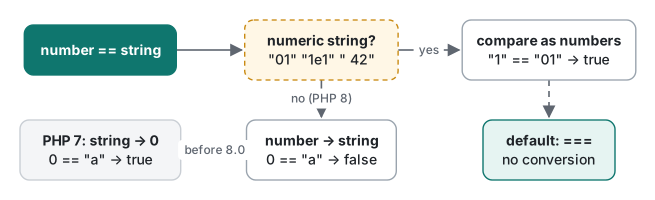
The first line is the famous PHP 8 change. Before PHP 8.0, 0 == "a" converted "a" to the number 0 and returned true, which made in_array("abc", [0]) true and broke a lot of login checks. Since PHP 8.0, if the string is not numeric, PHP turns the number into a string and compares two strings, so the answer is false. (We only ran 8.5 here; the PHP 7 behaviour is from the "Saner string to number comparisons" RFC.)
But look at the rest of the table. Two strings that look like numbers are still compared as numbers: "1" == "01" and "10" == "1e1" are true. If those are product codes or passwords, that is a bug. null, false, "", "0" and [] are all loosely equal to false.
| You are comparing | Use |
|---|---|
| IDs, codes, tokens, anything typed by users | === (and hash_equals() for secrets) |
| Search in an array | in_array($x, $arr, true), array_search($x, $arr, true) |
| "Is it missing?" | $x === null, or isset() / ?? (lecture 2) |
| Numbers that may arrive as strings from a form | convert first ((int), filter_var), then === |
Make === your default and use == only when you can explain the conversion.
declare(strict_types=1) and the real TypeError
You can declare the types a function accepts and returns. By default PHP runs in coercive mode: it tries to convert a wrong-but-convertible argument.
<?php
function addTax(int $price): int {
    return (int) round($price * 1.1);
}
var_dump(addTax("1000"));
var_dump(addTax(1000.0));
var_dump(addTax("1000 yen"));
int(1100)
int(1100)

Fatal error: Uncaught TypeError: addTax(): Argument #1 ($price) must be of type int, string given, called in ~/demo/loose.php on line 7 and defined in ~/demo/loose.php:2
Stack trace:
#0 ~/demo/loose.php(7): addTax('1000 yen')
#1 {main}
  thrown in ~/demo/loose.php on line 2
"1000" was silently converted to 1000. Add declare(strict_types=1); as the first statement of the file and the same call is refused:
<?php
declare(strict_types=1);

function addTax(int $price): int {
    return (int) round($price * 1.1);
}
var_dump(addTax(1000));
var_dump(addTax("1000"));
int(1100)

Fatal error: Uncaught TypeError: addTax(): Argument #1 ($price) must be of type int, string given, called in ~/demo/strict.php on line 8 and defined in ~/demo/strict.php:4
How to read it: the error type is TypeError, "Argument #1 ($price)" tells you which parameter, and "called in … line 8" is where the bad value came from. Fix the caller, not the function.
Two details beginners miss:
- strict_types applies to calls made from the file that declares it, not to the function's file. A strict library called from a non-strict file still converts.
- Even strict mode allows
int→float(g(5)withfloat $xgavefloat(5)). In coercive mode, passing1.5to anintparameter now givesDeprecated: Implicit conversion from float 1.5 to int loses precisionand the valueint(1). That deprecation was added in PHP 8.1.
On the terminal you may see each error twice, once prefixed with PHP. That is the CLI writing to the log (stderr) and to the screen. We trimmed the copies.
Strings: quotes, interpolation, heredoc
<?php
$name = "Mina";
$n = 3;
echo 'Hi $name\n', "\n";
echo "Hi $name, you have {$n} new messages\n";
$user = ['name' => 'Mina'];
echo "Hi {$user['name']}\n";
echo <<<TXT
    Dear $name,
      You have {$n} items.
    TXT;
echo "\n";
echo <<<'RAW'
    No $interpolation here\n
    RAW;
Hi $name\n
Hi Mina, you have 3 new messages
Hi Mina
Dear Mina,
  You have 3 items.
No $interpolation here\n
- Single quotes: almost nothing is special.
$nameand\nstay as typed. - Double quotes: variables are interpolated (replaced by their value) and escapes like
\nwork. Wrap anything more than a plain variable in{…}. - Heredoc
<<<TXTis a multi-line double-quoted string; nowdoc<<<'RAW'is the single-quoted version. Since PHP 7.3 the closing marker may be indented, and that indentation is removed from every line, which is why "Dear" starts at column 0.
Japanese and Korean text: strlen vs mb_strlen
PHP strings are byte strings. strlen() counts bytes. For text that people read, you need the mb_ (multibyte) functions from the mbstring extension:
<?php
foreach (["hello", "こんにちは", "안녕하세요", "👍🏽"] as $s) {
    printf("%-12s strlen=%2d  mb_strlen=%d\n", $s, strlen($s), mb_strlen($s));
}
$s = "こんにちは";
var_dump(substr($s, 0, 4), mb_substr($s, 0, 2));
var_dump(strrev("안녕"));
var_dump(mb_strwidth("こんにちは"), grapheme_strlen("👍🏽"));
hello        strlen= 5  mb_strlen=5
こんにちは strlen=15  mb_strlen=5
안녕하세요 strlen=15  mb_strlen=5
👍🏽     strlen= 8  mb_strlen=2
string(4) "こ�"
string(6) "こん"
string(6) "��눕�"
int(10)
int(1)
Even the output proves the point: printf("%-12s") pads by bytes, so the CJK rows are misaligned. Each kana or Hangul syllable is 3 bytes in UTF-8. substr($s, 0, 4) cut the second character in half and produced an invalid byte (�), and strrev reversed bytes, not characters. A thumbs-up with a skin tone is two code points (mb_strlen = 2) but one visible character; only grapheme_strlen() from the intl extension says 1. mb_strwidth counts full-width characters as 2, useful for fixed-width layouts.
The rule: a length limit on a user name, a "first 20 characters" preview, an uppercase conversion of non-ASCII text, all need mb_strlen, mb_substr, mb_strtoupper. Newer helpers exist too: mb_str_pad (8.3), mb_trim and mb_ucfirst (8.4). On 8.5, trim(" 全角スペース ") left the full-width spaces in place, while mb_trim removed them.
Arrays are ordered maps
A PHP array is not a list in the C or Java sense. It is an ordered map: keys (int or string) mapped to values, keeping insertion order. The trap is that PHP converts some keys for you:
<?php
$a = [];
$a["1"]   = "string one";
$a[1]     = "int one";
$a[true]  = "bool true";
$a["01"]  = "string 01";
$a[1.7]   = "float 1.7";
$a[null]  = "null";
$a["1.5"] = "string 1.5";
var_dump($a);
Deprecated: Implicit conversion from float 1.7 to int loses precision in ~/demo/arr.php on line 7

Deprecated: Using null as an array offset is deprecated, use an empty string instead in ~/demo/arr.php on line 8
array(4) {
  [1]=>
  string(9) "float 1.7"
  ["01"]=>
  string(9) "string 01"
  [""]=>
  string(4) "null"
  ["1.5"]=>
  string(10) "string 1.5"
}
Seven assignments, four keys. "1", 1, true and 1.7 all became the integer key 1, each one overwriting the previous value. "01" and "1.5" stayed strings because they are not in canonical integer form. null became "", and PHP 8.5 now warns about it.
Where this bites in real code: you key an array by user IDs from a database ("100", "200"). They become integer keys, and array_merge() renumbers integer keys:
<?php
$byId = ["100" => "Alice", "200" => "Bob"];
print_r(array_merge($byId, ["300" => "Chen"]));
print_r($byId + ["300" => "Chen"]);
Array
(
    [0] => Alice
    [1] => Bob
    [2] => Chen
)
Array
(
    [100] => Alice
    [200] => Bob
    [300] => Chen
)
Use + (or array_replace) when keys matter. Also, unset($list[1]) on ["a", "b", "c"] leaves keys 0 and 2. array_is_list() (8.1+) returned false, and the next $list[] = "d" went to key 3. Call array_values() to renumber.
Common mistake: foreach by reference duplicates the last element
You want to double every price in place, and then print them:
<?php
$prices = [100, 200, 300];
foreach ($prices as &$p) {
    $p = $p * 2;
}
foreach ($prices as $p) {
    echo $p, " | ";
}
echo "\n";
print_r($prices);
200 | 400 | 400 |
Array
(
    [0] => 200
    [1] => 400
    [2] => 400
)
What actually happens: &$p makes $p a reference (a second name for the same storage) to each element in turn. When the first loop ends, $p is still a reference to $prices[2]. The second loop assigns each element to $p, which means writing into $prices[2]: first 200, then 400, then, at the last step, $prices[2] is copied onto itself. 600 is gone, with no warning.

Fix: unset($p); immediately after a reference loop. Better, do not use a reference at all:
<?php
$prices = [100, 200, 300];
$doubled = array_map(fn($x) => $x * 2, $prices);          // new array
foreach ($prices as $k => $v) { $prices[$k] = $v * 2; }   // in place, by key
echo implode(" ", $doubled), " / ", implode(" ", $prices), "\n";
200 400 600 / 200 400 600
Warnings for undefined variables and keys
PHP 8 turned most "you used something that does not exist" mistakes from a quiet Notice into a Warning. The script keeps running, so read the warnings:
<?php
echo $count + 1, "\n";
$user = ["name" => "Mina"];
echo $user["email"], "|\n";
$list = [10, 20];
echo $list[5], "|\n";
$s = "abc";
echo $s[10], "|\n";
$total = null;
echo $total["sum"], "|\n";
echo $user["email"] ?? "(no email)", "\n";
Warning: Undefined variable $count in ~/demo/undef.php on line 2
1

Warning: Undefined array key "email" in ~/demo/undef.php on line 4
|

Warning: Undefined array key 5 in ~/demo/undef.php on line 6
|

Warning: Uninitialized string offset 10 in ~/demo/undef.php on line 8
|

Warning: Trying to access array offset on null in ~/demo/undef.php on line 10
|
(no email)
The undefined $count was treated as null and null + 1 printed 1. That is how a typo in a variable name becomes a wrong total instead of a crash. The last line shows the fix for keys that may legitimately be missing: the null coalescing operator ?? returns the right side when the left side is missing or null, with no warning. Lecture 2 uses it for form input.
A measurement: building strings and searching arrays
Small timings, so you know which habits matter. Setup: 100,000 random numeric strings (mt_srand(42)), each case run 7 times, median reported, PHP 8.5.6 CLI, Apple Silicon Mac (M1 Pro). OPcache and JIT are off by default in the CLI, which is what we measured. A run with JIT turned on changed nothing meaningful (in_array 47.9 ms instead of 53–54 ms; all others within 0.1 ms).
<?php
mt_srand(42);
$words = [];
for ($i = 0; $i < 100_000; $i++) $words[] = (string) mt_rand(1, 999_999);

function bench(callable $fn, int $runs = 7): float {
    $t = [];
    for ($r = 0; $r < $runs; $r++) {
        $s = hrtime(true); $fn(); $t[] = (hrtime(true) - $s) / 1e6;
    }
    sort($t);
    return $t[intdiv($runs, 2)];
}
printf("concat: %.3f ms\n", bench(function () use ($words) {
    $out = ''; foreach ($words as $w) { $out .= $w . ','; } return $out; }));
printf("implode: %.3f ms\n", bench(fn() => implode(',', $words)));
// the full file also times foreach-sum vs array_sum and in_array vs isset
| Task (100,000 items) | Median, run 1 | Median, run 2 |
|---|---|---|
.= in a loop |
2.872 ms | 2.856 ms |
implode() |
0.784 ms | 0.775 ms |
sum with foreach |
2.354 ms | 2.363 ms |
array_sum() |
1.811 ms | 1.811 ms |
1,000 lookups, in_array on 10,000 items |
53.29 ms | 54.10 ms |
1,000 lookups, isset on flipped keys |
0.021 ms | 0.022 ms |
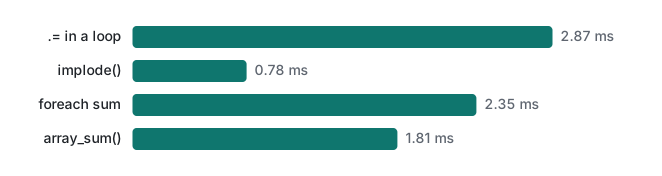
implode() was about 3.7× faster than .= and array_sum() about 1.3× faster than a loop. Both are real, but you only notice them at hundreds of thousands of items. The last pair is the one that matters: in_array scans the whole list each time, while isset($set[$key]) on an array built with array_flip() is a hash lookup. That was about 2,500× faster here, and the gap grows with the list. (Because of the key casting above, flipped numeric strings become int keys. That is fine for isset, but remember it if you read the keys back.)
Honest limits / version notes
- Everything was run on PHP 8.5.6 CLI (Homebrew build, mbstring and intl loaded) on macOS on an Apple M1 Pro. We did not run PHP 7 or older 8.x versions. The PHP 7 result for
0 == "a"and the "added in" versions below come from the PHP manual and RFCs, not from our runs. - Versions: string-to-number comparison change,
get_debug_type(), Warnings for undefined variables/keys (8.0); float-to-int Deprecated,array_is_list()(8.1);mb_str_pad(8.3);mb_trim,mb_ucfirst(8.4); "Using null as an array offset is deprecated" (8.5).strict_typesdates back to 7.0. - Timings are medians of 7 runs on one machine and will differ on a shared host. Our CLI runs had OPcache off, which is the CLI default; lecture 6 measures OPcache and JIT properly.
grapheme_strlenneeds the intl extension. Some cheap hosts do not enable it, so checkphp -m.
Exercises
1. Without running it, predict each result, then check with php -r: "abc" == 0, "1" == "01", "10" == "1e1", null == false, "abc" == "ABC".
Answer
false, true, true, true, false (PHP 8.5.6). "abc" == 0 is false since PHP 8. The two numeric strings compare as numbers. null == false is a loose bool comparison. String comparison is case-sensitive. With ===, all five are false.
2. A sign-up form must allow names of up to 10 characters. The code is strlen($name) <= 10. Why does "たなかはなこさん" (8 characters) get rejected, and what is the fix?
Answer
strlen("たなかはなこさん") is 24 bytes (8 × 3), so the check fails. Use mb_strlen($name) <= 10. We ran a fits() function using mb_strlen and it returned true for this name.
3. How many elements does ["1" => "a", 1 => "b", "1.0" => "c", true => "d"] have, and what are the keys?
Answer
Two. "1", 1 and true all become the int key 1 (final value "d"); "1.0" is not a canonical integer string, so it stays a string key. print_r showed [1] => d and [1.0] => c.
Next
- Next: PHP lecture 2/6: functions, forms and the built-in server
- Later in the series: classes, interfaces and enums, PDO, SQLite and SQL injection, XSS, CSRF and sessions, OPcache, JIT and profiling
- The same first lecture in other languages: Python: types and mutability, Java: types, strings and equality
- A real-world PHP type surprise: prepared statements change JSON number types
FAQ
Is 0 == "a" true or false in PHP 8?
False. Since PHP 8.0, comparing a number with a non-numeric string converts the number to a string and compares two strings, so 0 == "a" is false. On PHP 7 the string was cast to 0 and the result was true. Numeric strings still compare as numbers: "1" == "01" and "10" == "1e1" are both true on PHP 8.5, which is why === is the safe default.
Why does strlen() return 15 for a 5-character Japanese or Korean word?
strlen() counts bytes, not characters. In UTF-8 each kana, kanji or Hangul syllable takes 3 bytes, so こんにちは and 안녕하세요 both gave strlen=15 and mb_strlen=5. Use mb_strlen, mb_substr and the other mb_ functions for user-visible text.
Why does my foreach loop duplicate the last element of the array?
After foreach ($a as &$v) the variable $v is still a reference to the last element. A second foreach ($a as $v) then writes each value into that last slot, so [200, 400, 600] became [200, 400, 400]. Call unset($v) right after the reference loop, or avoid the reference with array_map or $a[$k] = ...