Processes, Jobs and Signals: Exit Codes 130/137/143
ps, kill, trap, jobs, wait and nohup on macOS bash and zsh: why kill -INT did nothing, an orphaned child process, and measured xargs -P speedup.
Series: Command line lecture 5/6 (advanced). For developers who run long jobs from scripts and want to control them: start work in parallel, stop it cleanly, and read what an exit code like 137 is telling them.
This lecture solves three problems that show up as soon as scripts run unattended: a job that "won't die" or leaves a child process running after you stopped it, a CI or container log that only says exit code 137, and a batch that takes 15 seconds when the machine has 8 idle cores. You will see the process tree, send every common signal to processes we started ourselves, read the exit codes they produce, and measure what xargs -P actually buys.
Environment: macOS 26, Apple Silicon Mac (M1 Pro, 8 cores), zsh 5.9 and GNU bash 3.2.57. BSD ps, kill, pgrep and xargs. GNU/Linux forms are labelled "not run here". Working folder shown as ~/demo/jobs. One safety rule we followed throughout and you should too: signal processes by the PID you recorded, never by name. pkill sleep would also hit every other sleep on the machine, including other people's jobs.
If you skipped ahead, lecture 4 covers $? and set -e, which we build on here. The new-hire overview is the learning roadmap.
Processes, PIDs and ps
Every running program is a process with a number, its PID. Every process (except the first one) has a parent, whose number is the PPID. Your shell is a process; each command it runs is a child process. Three shell variables give you the numbers you need:
$$— the PID of the current shell (in a( subshell )it still shows the parent's number in bash 3.2;BASHPIDcame in bash 4.0 and printedunsethere),$!— the PID of the last job you started in the background,$?— the exit code of the last command.
Start three background sleeps and look at them:
# sig.sh (first part)
sleep 300 & p1=$!
sleep 300 & p2=$!
sleep 300 & p3=$!
ps -o pid,ppid,stat,command -p "$p1,$p2,$p3"
## bash
  PID  PPID STAT COMMAND
 3312  3310 S    sleep 300
 3313  3310 S    sleep 300
 3314  3310 S    sleep 300
## zsh
  PID  PPID STAT COMMAND
 3584  3581 SN   sleep 300
 3585  3581 SN   sleep 300
 3586  3581 SN   sleep 300
S means sleeping. The N under zsh is a surprise worth knowing: zsh's BG_NICE option, on by default, runs background jobs at lower priority, even in a script. bash did not. If a parallel job is slower under zsh, that is one reason.
ps -o ... -p PIDS is the BSD form and works on macOS. On Linux, ps -o pid,ppid,stat,cmd -p ... or ps -ef --forest is common (not run here). pgrep -P PID lists the children of one PID, which is how we find the processes our script started without matching names.
Signals and the 128+N rule
A signal is a small message the kernel delivers to a process: "please stop", "stop now", "your terminal went away". A process can catch most signals and run a handler; two (KILL and STOP) can never be caught. When a process dies from signal N, the shell reports exit code 128 + N. The rest of sig.sh:
kill -TERM "$p1"; wait "$p1"; echo "TERM -> wait status $?"
kill -KILL "$p2"; wait "$p2"; echo "KILL -> wait status $?"
kill -INT "$p3"; sleep 0.5; kill -0 "$p3" && echo "INT ignored: $p3 still alive"
kill -TERM "$p3"; wait "$p3"; echo "then TERM -> $?"
kill -0 "$p1"; echo "kill -0 on finished pid -> $?"
## bash
sig.sh: line 5:  3312 Terminated: 15          sleep 300
TERM -> wait status 143
sig.sh: line 6:  3313 Killed: 9               sleep 300
KILL -> wait status 137
INT ignored: 3314 still alive
sig.sh: line 8:  3314 Terminated: 15          sleep 300
then TERM -> 143
sig.sh: line 9: kill: (3312) - No such process
kill -0 on finished pid -> 1
## zsh
TERM -> wait status 143
KILL -> wait status 137
INT ignored: 3586 still alive
then TERM -> 143
sig.sh:kill:9: kill 3584 failed: no such process
kill -0 on finished pid -> 1
kill -0 PID sends nothing; it only checks that the process exists and that you may signal it. It is the standard "is it still running?" test, and lecture 6 uses it to detect a stale lock.
Here is the table we built from these runs and a few more (yes | head -1 for SIGPIPE, nohup for SIGHUP):
| Signal | No. (macOS) | Default action | Can trap? | Exit code seen | Typical source |
|---|---|---|---|---|---|
| HUP | 1 | terminate | yes | 129 | terminal closed, SSH dropped |
| INT | 2 | terminate | yes | 130 | Ctrl-C |
| KILL | 9 | terminate | no | 137 | kill -9, out-of-memory killer, container runtime after a timeout |
| PIPE | 13 | terminate | yes | 141 | writing to a closed pipe (yes | head -1) |
| TERM | 15 | terminate | yes | 143 | kill PID, docker stop, service managers |
| STOP / CONT | 17 / 19 | pause / resume | no / yes | — | kill -STOP; ps shows state T |
Signal numbers are not all portable: kill -l USR1 printed 30 on macOS, while Linux uses 10 (not run here). Always use names (kill -TERM, trap ... TERM), never numbers other than the classic 1, 2, 9 and 15.
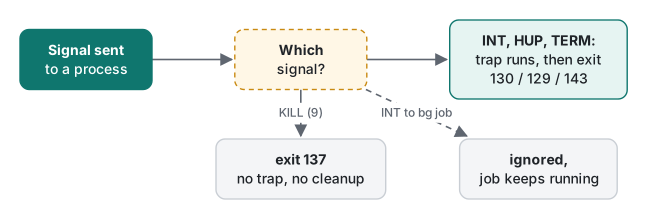
Common mistake: kill -INT on a background job
The INT ignored: ... still alive line above surprises most people. What actually happens: when a non-interactive shell (a script) starts a job with &, it sets SIGINT and SIGQUIT to "ignore" in that child, so a Ctrl-C at the terminal reaches only the foreground. A process cannot un-ignore a signal that was ignored when the shell started it, so even trap in the child cannot catch it.
It got stranger when we sent the signal immediately after &:
# three tries each
bash -c 'sleep 30 & p=$!; sleep 0.2; kill -INT $p; sleep 0.2; kill -0 $p 2>/dev/null && echo "alive after INT" || echo dead; ...'
bash -c 'sleep 30 & p=$!;            kill -INT $p; sleep 0.2; kill -0 $p 2>/dev/null && echo "nosleep: alive" || echo "nosleep: dead"; ...'
alive after INT
alive after INT
alive after INT
nosleep: dead
nosleep: dead
nosleep: dead
With no delay, the signal arrived in the tiny window after fork() and before the child set "ignore", so it died with 130. That is a race: a script that "works" because it signals fast will break on a busier machine. Fix: send TERM to background jobs. It is not ignored, it can be trapped for cleanup, and it is what service managers send.
For the record, a process that really dies from SIGINT does report 130: sh -c 'kill -INT $$' returned 130, and so did a Python one-liner that interrupted itself (after printing KeyboardInterrupt).
Background jobs, wait and collecting exit codes
cmd & returns at once; wait PID blocks until that job ends and returns its exit code. Plain wait with no argument waits for all jobs but returns 0, throwing the codes away:
# waitall.sh
job() { sleep "$1"; return "$2"; }
job 0.3 0 & a=$!
job 0.1 3 & b=$!
job 0.2 0 & c=$!
fail=0
for p in $a $b $c; do
  if wait "$p"; then echo "pid $p ok"; else rc=$?; echo "pid $p failed rc=$rc"; fail=1; fi
done
wait; echo "plain wait returns $? (exit codes lost)"
exit $fail
pid 20922 ok
pid 20923 failed rc=3
pid 20926 ok
plain wait returns 0 (exit codes lost)
script exit=1
zsh 5.9 gave the same result. Note the job that finished first (b, 0.1 s) was still reported correctly when we waited for it second; the shell keeps the status of finished children until you collect it. bash 4.3 added wait -n ("wait for whichever finishes next"); bash 3.2 answered wait: -n: invalid option, so on a stock Mac you loop over PIDs as above.
trap: cleaning up, and the orphan it can leave
trap 'commands' SIGNALS runs commands when the shell receives a signal; the pseudo-signal EXIT runs whenever the shell exits. Here is a first, wrong version:
# trap.sh
tmp=$(mktemp "${TMPDIR:-/tmp}/demo.XXXXXX")
cleanup() { rm -f "$tmp"; echo "cleanup: removed temp file"; }
trap cleanup EXIT
trap 'echo "got TERM"; exit 143' TERM
echo "working, pid $$"
sleep 300 &
wait $!
$ bash trap.sh & tp=$!; sleep 0.5; kill -TERM $tp; wait $tp; echo "trap.sh exit=$?"
working, pid 8570
got TERM
cleanup: removed temp file
trap.sh exit=143
$ ps -o pid,ppid,command -p 8576
  PID  PPID COMMAND
 8576     1 sleep 300
The script cleaned up its temp file and exited 143, exactly as designed, but its child sleep 300 kept running with PPID 1: it was re-parented to launchd (on Linux, init/systemd). Signals go to one process, not to its children. In real life that child is an rsync, a curl or a Python worker, and the next run starts a second copy. (We stopped that orphan by its PID.)
The fix is to remember the child's PID and stop it in the cleanup:
# trap2.sh
tmp=$(mktemp "${TMPDIR:-/tmp}/demo.XXXXXX")
child=""
cleanup() {
  [ -z "$child" ] || kill "$child" 2>/dev/null
  rm -f "$tmp"; echo "cleanup: removed temp file, stopped child"
}
trap cleanup EXIT
trap 'echo "got TERM"; exit 143' TERM
sleep 300 & child=$!
wait "$child"
  PID  PPID STAT COMMAND
99609 99607 SN   bash trap2.sh
99613 99609 SN   sleep 300
got TERM
cleanup: removed temp file, stopped child
trap2.sh exit=143
child still alive? no
Why sleep 300 & wait $! instead of a plain sleep 300? Because bash runs a trap only after the current foreground command finishes. A TERM sent during a foreground sleep waits until the sleep ends; wait is interrupted immediately. Lecture 6 measures this: 4 s delay with a foreground sleep 5, 0 s with & wait.
nohup, SIGHUP and closing the terminal
When a terminal or SSH session closes, its processes get SIGHUP. nohup starts a command with SIGHUP ignored:
# hup.sh
sleep 300 & plain=$!
nohup sleep 300 & guarded=$!
sleep 0.3
kill -HUP "$plain" "$guarded"; sleep 0.3
for p in "$plain" "$guarded"; do
  if kill -0 "$p" 2>/dev/null; then echo "$p alive after HUP"; else wait "$p"; echo "$p died, status $?"; fi
done
kill "$guarded"; wait "$guarded"; echo "guarded after TERM: $?"
ls nohup.out
hup.sh: line 4: 20654 Hangup: 1               sleep 300
20654 died, status 129
20655 alive after HUP
hup.sh: line 8: 20655 Terminated: 15          nohup sleep 300
guarded after TERM: 143
ls: nohup.out: No such file or directory
Two details: nohup protects only against HUP (TERM still killed it, 143), and it creates nohup.out only when stdout is a terminal. In a script whose output was already redirected, no file appears, so redirect explicitly: nohup cmd > job.log 2>&1 &. For anything that must survive reboots, use a real service manager (launchd on macOS, systemd on Linux) instead of nohup.
SIGPIPE, 141 and pipefail
One more signal you meet without sending it:
$ bash -c 'yes | head -1; echo "PIPESTATUS=${PIPESTATUS[*]}"'
y
PIPESTATUS=141 0
$ bash -c 'set -o pipefail; yes | head -1 >/dev/null; echo "pipefail rc=$?"'
pipefail rc=141
head exits after one line; yes then writes into a closed pipe and dies from SIGPIPE (141). That is normal and harmless, but with set -o pipefail (lecture 4) the whole pipeline now "fails" with 141. If a strict-mode script dies on ... | head, this is why; check PIPESTATUS (bash) or pipestatus (zsh, which printed 141 0 too) and accept 141 for the producer.
Measured: xargs -P speedup
xargs -P N runs up to N commands at once. We compressed 16 generated log files (about 11 MB each, 176 MB total, made by awk with srand(42)) with gzip -9, and separately ran 16 tasks that only sleep 0.5:
printf '%s\0' in/*.log | xargs -0 -P "$P" -n 1 sh -c 'gzip -9 -c "$1" > /dev/null' _
| -P | gzip -9 ×16 (median of 3) | speedup | sleep 0.5 ×16 (1 run) |
|---|---|---|---|
| 1 | 15.59 s | 1.0× | 8.19 s |
| 2 | 7.86 s | 2.0× | — |
| 4 | 4.19 s | 3.7× | 2.05 s |
| 8 | 3.89 s | 4.0× | — |
| 16 | 3.96 s | 3.9× | 0.54 s |
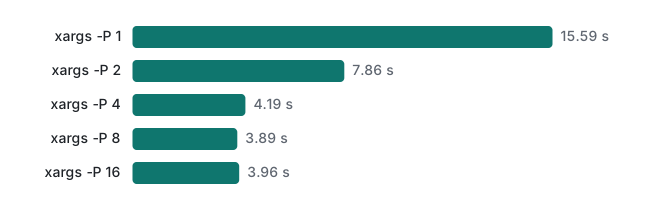
What the numbers say:
- Waiting work (network calls, sleeps) scales almost perfectly: 16 at once took 0.54 s, about 15× faster.
- CPU work scaled well to 4 and then flattened. The M1 Pro has 8 cores (6 performance, 2 efficiency), and the machine was also running other jobs (load average 8.6–12.8 during these runs), so 8 parallel gzips did not get 8 free cores. Runs at -P 8 ranged from 2.53 s to 4.64 s across six tries (the first three fed the names with
ls in/*.log | xargs -P 8 -n 1 ..., the last three with theprintf ... -0form above; the names contain no spaces, so both pass the same arguments). On an idle machine expect more, but never more than the core count. - Going above the core count (16) did not help and only added memory use.
A detail for error handling: when one of 16 tasks failed, BSD xargs on macOS exited with 1 (its man page: 1 for "any other error"). GNU xargs uses 123 for "a command exited 1–125" (not run here). If a script checks for 123, it will miss failures on a Mac.
Which signal, which tool
| You want to… | Use | Why |
|---|---|---|
| ask a process to stop and clean up | kill -TERM PID |
trappable; what service managers send |
| stop it when TERM did not work after a few seconds | kill -KILL PID |
cannot be caught; no cleanup runs (137) |
| check if a PID is still alive | kill -0 PID |
sends nothing |
| pause / resume | kill -STOP / kill -CONT |
ps shows T while stopped |
| survive a closed terminal | nohup cmd > log 2>&1 & |
ignores HUP only |
| run N jobs at once | xargs -0 -P N, or & + wait PID |
wait PID keeps each exit code |
| find your own children | pgrep -P $$ |
no name matching |
Honest limits and version notes
- Run only on macOS (bash 3.2.57, zsh 5.9).
timeout,setsidandflockare not installed on macOS (command -vfound none of them); on Linuxtimeout 10 cmdreturns 124 on timeout (not run here). - Exit codes 128+N are what bash and zsh report. Some tools print their own codes; Docker/Kubernetes "137" means the container's main process got SIGKILL, often from the OOM killer, but that is their convention (not run here).
wait -n(bash 4.3) andBASHPID(bash 4.0) are missing in bash 3.2; we saw the errors. Version numbers come from the bash NEWS file; we did not run bash 4/5.- The benchmark machine was shared with other work. We report medians and the range, and the sleep test is not affected by CPU load.
Exercises
- A script starts
./worker.sh &and later runskill -INT $!to stop it, but the worker keeps running. Why, and what should it send instead? - A CI step reports
exit code 143while another reports137. What happened in each case, and which one could have run a cleanup trap?
Answers
- Background jobs of a non-interactive shell ignore SIGINT, so the signal is discarded. Send
kill -TERM "$pid"andwait "$pid"(expect 143 if it had no handler). - 143 = 128 + 15: the step got SIGTERM (a polite stop, for example a timeout or a cancelled job); a
trap ... TERMortrap ... EXITcould run. 137 = 128 + 9: SIGKILL, often after TERM was ignored or from an out-of-memory kill; no trap runs.
Previous: Lecture 4: variables, quoting and exit codes · Next: Lecture 6: robust scripts, cron and logging · Earlier: Lecture 3: find, xargs, sed and awk
FAQ
What do exit codes 130, 137 and 143 mean?
They are 128 plus a signal number: 130 is SIGINT (2, usually Ctrl-C), 137 is SIGKILL (9, kill -9 or an out-of-memory killer) and 143 is SIGTERM (15, a polite kill). We produced all three with wait after sending each signal to a background sleep. 129 (SIGHUP) and 141 (SIGPIPE) follow the same rule.
Why does kill -INT not stop a background job started from a script?
A non-interactive shell starts background jobs with SIGINT and SIGQUIT ignored, so Ctrl-C at the terminal does not reach them. kill -INT sent 0.2 s after starting the job left it alive in all three tries. Sent immediately after the fork, it killed the job, because the child had not set the ignore yet. Use SIGTERM for background jobs.
How much faster is xargs -P for parallel work?
For 16 gzip -9 jobs of about 11 MB each, the median went from 15.59 s with -P 1 to 7.86 s with -P 2, 4.19 s with -P 4 and 3.89 s with -P 8 on an 8-core M1 Pro that was also running other work. For jobs that mostly wait (sleep 0.5), -P 16 was 15 times faster than -P 1.