find, xargs, sed and awk on macOS: BSD vs GNU Traps
find + xargs with spaces in names, sed and awk one-liners on a generated access log, and the BSD vs GNU differences that break Linux answers on a Mac.
Series: Command line lecture 3/6 (intermediate). For developers who can build a pipeline (lecture 2) and now need to work on whole folder trees and edit text in place: you will find files by name, age and size, hand them safely to other commands, and answer questions about a web access log with one-line sed and awk programs.
Most shell answers on the web are written for Linux, and many of them break on a Mac in one of two ways: loudly (illegal option) or, worse, silently (the command runs and changes nothing, or changes the wrong thing). This lecture is for developers who copy those answers into a macOS terminal, and for anyone whose folders contain names with spaces. Every command below was run on macOS with the BSD tools, and where GNU behaves differently we say so and label it "not run here".
Previous lectures: paths and files, pipes and redirection. Big picture: the programming learning roadmap.
Environment: macOS 26.6, Apple Silicon Mac (M1 Pro), zsh 5.9 and bash 3.2.57; BSD find, xargs, sed, awk (awk version 20200816), grep 2.6.0-FreeBSD. Python 3.9.6 only to generate the sample log. Home paths in outputs are shortened to ~.
Setup: a small project tree and an access log
First a generator for a web server access log in the common "combined" format, with the response time in seconds appended at the end (many servers can be configured to log it). It uses documentation IP ranges and a fixed seed:
# gen_access.py - fake web access log in "combined" format + response time (seeded)
import random, sys
from datetime import datetime, timedelta

n = int(sys.argv[1]) if len(sys.argv) > 1 else 5000
rng = random.Random(7)
t = datetime(2026, 11, 12, 0, 0, 0)
ips = [f"203.0.113.{i}" for i in range(1, 40)] + [f"198.51.100.{i}" for i in range(1, 20)]
bot = "192.0.2.66"
pages = ["/", "/products/12", "/products/31", "/products/7", "/cart", "/login", "/api/search?q=mug"]
uas = ["Mozilla/5.0 (iPhone)", "Mozilla/5.0 (Windows NT 10.0)", "Mozilla/5.0 (Macintosh)"]
for _ in range(n):
    t += timedelta(seconds=rng.randint(0, 30))
    if rng.random() < 0.08:                          # a scanner probing for WordPress
        ip, path, st, ua = bot, rng.choice(["/wp-login.php", "/xmlrpc.php", "/.env"]), 404, "curl/8.7.1"
    else:
        ip, path, ua = rng.choice(ips), rng.choice(pages), rng.choice(uas)
        st = rng.choices([200, 304, 500], [90, 8, 2])[0]
    size = "-" if st == 304 else str(rng.randint(300, 48000) if st == 200 else rng.randint(150, 600))
    rt = round(rng.lognormvariate(-3.0, 0.9) + (1.5 if st == 500 else 0), 3)
    print(f'{ip} - - [{t:%d/%b/%Y:%H:%M:%S} +0000] "GET {path} HTTP/1.1" {st} {size} "-" "{ua}" {rt}')
Then a script that builds a project tree with the usual problems: a folder and a file with spaces, old files, junk:
# setup.sh - a small project tree with the usual problems (spaces, old files, junk)
rm -rf proj
mkdir -p proj/src proj/logs "proj/old logs" proj/notes proj/build
printf 'print("hi")\n' > proj/src/main.py
printf 'def add(a, b):\n    return a + b\n' > proj/src/util.py
printf 'agenda\ndecisions\nnext steps\n' > "proj/notes/Meeting Notes.txt"
printf 'todo\n' > proj/notes/todo.txt
cp access.log proj/logs/access.log
head -100 access.log > "proj/old logs/access 2025.log"
for i in 1 2 3; do echo tmp > "proj/build/cache$i.tmp"; done
touch -t 202610010900 "proj/old logs/access 2025.log" proj/build/*.tmp
Run python3 gen_access.py > access.log and sh setup.sh. md5 -q access.log should print cc723029cc75f8a657bcfd445eee7818 (5,000 lines). The touch -t line backdates some files to 1 October 2026 so that age tests have something to find.
find: the path comes first, the pattern goes in quotes
find walks a folder tree and prints every path that passes its tests:
~/demo/find % find proj -type f
proj/logs/access.log
proj/notes/todo.txt
proj/notes/Meeting Notes.txt
proj/old logs/access 2025.log
proj/build/cache1.tmp
proj/build/cache2.tmp
proj/build/cache3.tmp
proj/src/util.py
proj/src/main.py

~/demo/find % find -name '*.py'
find: illegal option -- n
usage: find [-H | -L | -P] [-EXdsx] [-f path] path ... [expression]
       find [-H | -L | -P] [-EXdsx] -f path [path ...] [expression]
GNU find assumes . when you leave out the path (not run here); BSD find requires it. Always write the path, even if it is just ..
The second rule is quoting the pattern. Unquoted, *.log is expanded by the shell before find runs, and the result depends on what happens to be in the current folder. We tried all three cases:
~/demo/find % touch a.log b.log

~/demo/find % find proj -name *.log
find: access.log: unknown primary or operator

~/demo/find % rm a.log b.log

~/demo/find % find proj -name *.log
proj/logs/access.log

~/demo/find % cd proj

~/demo/find/proj % find . -name *.log
zsh: no matches found: *.log
With three matching files the shell turned the command into find proj -name a.log access.log b.log, which find rejects. With exactly one match (access.log) it became find proj -name access.log: no error, but access 2025.log is silently missing from the result. With no match, zsh refuses to run the command at all. bash 3.2 passes an unmatched *.log through unchanged, so there it found both files: the same line works or fails depending on the shell and the folder. Quoted, find proj -name '*.log' found both files every time.
find tests: type, age, size, and the -o trap
~/demo/find % find proj -type f -mtime +30
proj/old logs/access 2025.log
proj/build/cache1.tmp
proj/build/cache2.tmp
proj/build/cache3.tmp

~/demo/find % find proj -type f -size +100k
proj/logs/access.log

~/demo/find % find proj -name '*.log' -o -name '*.txt' -print
proj/notes/todo.txt
proj/notes/Meeting Notes.txt

~/demo/find % find proj \( -name '*.log' -o -name '*.txt' \) -print
proj/logs/access.log
proj/notes/todo.txt
proj/notes/Meeting Notes.txt
proj/old logs/access 2025.log
-mtime +30 means "modified more than 30 days ago", -size +100k "larger than 100 KiB". Tests written one after another are joined by an implicit AND, which binds tighter than -o (OR). So the third command means "*.log OR (*.txt AND print)": the .log files matched but nothing printed them. Parentheses (escaped so the shell leaves them alone) fix it.
Handing results to another command: xargs, -print0 and -exec
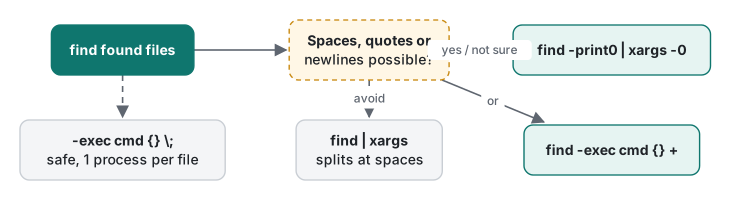
xargs reads words from stdin and appends them as arguments to a command. "Words" is the problem:
~/demo/find % find proj -name '*.txt' | xargs wc -l
wc: proj/notes/Meeting: open: No such file or directory
wc: Notes.txt: open: No such file or directory
       1 proj/notes/todo.txt
       1 total

~/demo/find % find proj -name '*.txt' -print0 | xargs -0 wc -l
       1 proj/notes/todo.txt
       3 proj/notes/Meeting Notes.txt
       4 total

~/demo/find % find proj -name '*.txt' -exec wc -l {} +
       1 proj/notes/todo.txt
       3 proj/notes/Meeting Notes.txt
       4 total
-print0 ends each name with a NUL byte instead of a newline, and xargs -0 splits only on NUL, which cannot appear in a file name. -exec cmd {} + lets find build the argument list itself. Both are safe; with rm instead of wc, the unsafe version would have tried to delete proj/notes/Meeting and Notes.txt, which in another folder could be real files.
Three more xargs behaviours we checked:
~/demo/find % find proj -name '*.bak' | xargs echo removing

~/demo/find % find proj -name '*.py' | xargs -n 1 echo file:
file: proj/src/util.py
file: proj/src/main.py

~/demo/find % find proj -name '*.py' | xargs -I {} cp {} {}.orig
With empty input, BSD xargs did not run echo at all. GNU xargs runs the command once with no arguments unless you add -r (not run here); that is how find … | xargs rm on Linux ends up printing rm: missing operand. macOS xargs accepts -r and ignores it, so xargs -r is the portable spelling. -n 1 runs one command per argument, -I {} substitutes each line where {} appears.
How many arguments go into one command? On 12,000 empty files, xargs -0 sh -c 'echo $#' sh printed 5000, 5000, 2000: BSD xargs defaults to at most 5,000 arguments per command (man xargs). -exec sh -c 'echo $#' sh {} + printed a single 12000; find fills the list up to the system's argument-size limit (getconf ARG_MAX is 1048576 here).
Common mistake: -delete in the wrong place
find evaluates its expression left to right for every file, and -delete is an action, not an option. We tried it on a copy:
~/demo/find % find proj -name '*.tmp' -print
proj/build/cache1.tmp
proj/build/cache2.tmp
proj/build/cache3.tmp

~/demo/find % find proj -name '*.tmp' -delete

~/demo/find % cp -R proj proj-copy

~/demo/find % find proj-copy -delete -name '*.tmp'

~/demo/find % ls proj-copy
ls: proj-copy: No such file or directory
What happened: with -delete first, find deleted every file and folder it visited, then tested the name of what it had already deleted. The whole proj-copy tree is gone, without a single message. Fix: always run the exact command with -print in place of -delete first, check the list, then change only that one word. The same habit works for xargs: put echo in front of the command (xargs -0 echo rm) to see what would run.
sed: stream edits, and the silent no-ops
sed edits text line by line as it streams past. On the access log:
~/demo/find % sed -n '1,2p' access.log
203.0.113.26 - - [12/Nov/2026:00:00:10 +0000] "GET /login HTTP/1.1" 200 35419 "-" "Mozilla/5.0 (iPhone)" 0.011
203.0.113.3 - - [12/Nov/2026:00:00:39 +0000] "GET / HTTP/1.1" 200 16072 "-" "Mozilla/5.0 (Windows NT 10.0)" 0.017

~/demo/find % sed -n '/" 500 /p' access.log | head -2
203.0.113.11 - - [12/Nov/2026:00:10:42 +0000] "GET /login HTTP/1.1" 500 356 "-" "Mozilla/5.0 (Windows NT 10.0)" 1.537
203.0.113.33 - - [12/Nov/2026:00:11:08 +0000] "GET / HTTP/1.1" 500 553 "-" "Mozilla/5.0 (iPhone)" 1.521

~/demo/find % sed -E 's/^([0-9]+\.[0-9]+\.[0-9]+)\.[0-9]+/\1.x/' access.log | head -2
203.0.113.x - - [12/Nov/2026:00:00:10 +0000] "GET /login HTTP/1.1" 200 35419 "-" "Mozilla/5.0 (iPhone)" 0.011
203.0.113.x - - [12/Nov/2026:00:00:39 +0000] "GET / HTTP/1.1" 200 16072 "-" "Mozilla/5.0 (Windows NT 10.0)" 0.017
-n with p prints only selected lines (by number or by /regex/). s/old/new/ substitutes; -E turns on extended regular expressions so + and ( ) work without backslashes. The third command masks the last part of every IP address before you share a log, a common request.
Now the GNU habits that do nothing on macOS, with no error:
~/demo/find % sed '/wp-login\|xmlrpc\|\.env/d' access.log | wc -l
    5000

~/demo/find % sed -E '/wp-login|xmlrpc|\.env/d' access.log | wc -l
    4598

~/demo/find % echo 'aaa bbb' | sed 's/a\+/X/'
aaa bbb

~/demo/find % echo 'aaa bbb' | sed -E 's/a+/X/'
X bbb

~/demo/find % echo 'cat category' | sed 's/\bcat\b/dog/g'
cat category

~/demo/find % echo 'cat category' | sed 's/[[:<:]]cat[[:>:]]/dog/g'
dog category
\|, \+ and \b are GNU extensions to basic regular expressions. BSD sed treats them as something else, matches nothing and moves on: the "remove scanner lines" command removed zero of the 402 lines. With -E the same intent works. One positive surprise: sed 's/,/\n/g' did turn commas into newlines on this macOS version; older guides say BSD sed cannot, so if a colleague's older Mac disagrees, use tr ',' '\n'. More on the regex syntax itself in what a regular expression is.
sed -i on macOS: three outcomes
Editing a file in place is where Linux answers break most visibly:
~/demo/find % printf 'host=old.example.com\nport=8080\n' > app.conf

~/demo/find % sed -i 's/old/new/' app.conf
sed: 1: "app.conf
": command a expects \ followed by text

~/demo/find % sed -i -e 's/old/new/' app.conf

~/demo/find % ls app.conf*
app.conf
app.conf-e

~/demo/find % sed -i '' 's/8080/9090/' app.conf

~/demo/find % sed -i.bak 's/9090/9191/' app.conf && rm app.conf.bak

~/demo/find % cat app.conf
host=new.example.com
port=9191
BSD -i takes the backup suffix as its argument. In the first command, sed used s/old/new/ as the suffix and tried to run app.conf as a sed script (a is the "append" command). The second "worked" but used -e as the suffix and left a stray app.conf-e behind, the kind of file that ends up committed to git. -i '' means "no backup" on BSD only. -i.bak with the suffix attached works on BSD and GNU alike (GNU's form sed -i 's/…/' is not run here).
awk: columns, filters, sums and groups
awk splits each line into fields $1, $2, … on runs of whitespace ($NF is the last one) and runs pattern { action } on lines that match. In the combined format, $1 is the client IP, $7 the path, $9 the status, $10 the size and, in our log, $NF the response time.
~/demo/find % awk '{print $9}' access.log | sort | uniq -c | sort -rn
4126 200
 402 404
 373 304
  99 500

~/demo/find % awk '{print $1}' access.log | sort | uniq -c | sort -rn | head -3
 402 192.0.2.66
  95 203.0.113.12
  92 203.0.113.2

~/demo/find % awk '$9 == 500 {n++; t += $NF} END {printf "%d errors, avg %.3f s\n", n, t/n}' access.log
99 errors, avg 1.566 s

~/demo/find % awk '$9 == 200 {b[$7] += $10} END {for (p in b) printf "%10d %s\n", b[p], p}' access.log | sort -rn | head -3
  14591902 /api/search?q=mug
  14525275 /products/31
  14192831 /products/12

~/demo/find % awk -F'"' '{print $6}' access.log | sort | uniq -c | sort -rn
1535 Mozilla/5.0 (Windows NT 10.0)
1535 Mozilla/5.0 (Macintosh)
1528 Mozilla/5.0 (iPhone)
 402 curl/8.7.1

~/demo/find % awk '$9 == 200 {print $NF}' access.log | sort -n | awk '{v[NR] = $1} END {print "n=" NR, "p50=" v[int(NR*0.50)], "p95=" v[int(NR*0.95)], "max=" v[NR]}'
n=4126 p50=0.05 p95=0.228 max=0.811
In order: requests per status, the noisiest client (our scanner), average time of failed requests, bytes served per path (b[$7] += $10 is an associative array keyed by path), user agents (with -F'"' the quote is the separator, so the user agent is field 6), and the median and 95th percentile response time. That last one is the number to watch: the average hides the slow tail.
Two quoting mistakes that produce wrong output instead of an error:
~/demo/find % awk "{print $1}" access.log | head -1
203.0.113.26 - - [12/Nov/2026:00:00:10 +0000] "GET /login HTTP/1.1" 200 35419 "-" "Mozilla/5.0 (iPhone)" 0.011

~/demo/find % awk '{print $1 $9}' access.log | head -1
203.0.113.26200
In double quotes the shell replaced $1 (empty in an interactive shell) before awk saw it, so awk ran {print } and printed whole lines; always single-quote awk programs. And without a comma, $1 $9 concatenates; print $1, $9 separates with a space.
Measured: -exec {} \; vs {} + vs xargs -0
The fastest way to make a find job slow is one process per file. We made 5,000 one-line files in 50 folders, every name with a space (file 1.txt …), and ran wc -l on all of them three ways, five times each:
zmodload zsh/datetime
rm -rf tree; mkdir tree
for i in {1..5000}; do d=tree/d$(( i % 50 )); [[ -d $d ]] || mkdir $d; print "line $i" > "$d/file $i.txt"; done
for c in "find tree -name '*.txt' -exec wc -l {} \;" \
         "find tree -name '*.txt' -exec wc -l {} +" \
         "find tree -name '*.txt' -print0 | xargs -0 wc -l"; do
  for r in 1 2 3 4 5; do
    s=$EPOCHREALTIME; eval "$c" > out.txt; e=$EPOCHREALTIME
    printf '%s: %.0f ms\n' "$c" $(( (e-s)*1000 ))
  done
done
| Command (5,000 files) | wc processes |
Median of 5 | Runs (ms) |
|---|---|---|---|
-exec wc -l {} \; |
5,000 | 11,958 ms | 10,198 – 12,386 |
-exec wc -l {} + |
1 | 136 ms | 123 – 428 |
-print0 piped to xargs -0 wc -l |
1 | 137 ms | 125 – 181 |

About 88 times slower, for the same output. All three handled the spaces correctly. Running batches in parallel with xargs -P is measured in lecture 5.
BSD (macOS) vs GNU (Linux): what we hit
| Task | macOS, run here | GNU/Linux form (not run here) |
|---|---|---|
| Edit in place | sed -i '' 's/a/b/' f |
sed -i 's/a/b/' f |
| Portable in-place | sed -i.bak 's/a/b/' f && rm f.bak |
same |
| One-or-more in sed | sed -E 's/a+/X/' |
sed 's/a\+/X/' also works |
| Word boundary in sed | [[:<:]]word[[:>:]] |
\bword\b |
| find without a path | error: illegal option -- n |
defaults to . |
| Print size and name | stat -f '%z %N' f |
find -printf '%s %p\n', stat -c %s f |
| xargs on empty input | runs nothing; -r accepted |
runs once unless -r |
| Perl regex in grep | grep: invalid option -- P |
grep -P '\d+' |
| Yesterday's date | date -j -v-1d -f %Y-%m-%d 2026-11-12 +%Y-%m-%d → 2026-11-11 |
date -d yesterday |
| awk extras | calling undefined function strftime / asort |
gawk has strftime, asort, -i inplace |
On this Mac, stat -c %s printed stat: illegal option -- c, find … -printf printed find: -printf: unknown primary or operator and date -d yesterday printed date: illegal option -- d. If a script must run on both systems, stick to the left column's portable subset, or check uname and branch.
Honest limits and version notes
- Everything was checked on macOS 26.6 only (BSD
find,xargs,sed, onetrueawk20200816,grep2.6.0-FreeBSD). The GNU column describes documented GNU behaviour; we did not run it. sed 's/,/\n/g'producing real newlines is what this version did; we did not test older macOS releases.- The 5,000-argument xargs default is from
man xargson this system and matched what we observed. -mtime +30counts in 24-hour periods from now, so the example files dated 1 October 2026 will keep matching; if you change the dates, the result changes.- The timing table is one Apple Silicon Mac (M1 Pro) with other jobs running; the
{} +run of 428 ms was the first, cold run. A second session, running exactly the script shown above when the machine was quieter, gave medians of 8,636 ms, 105 ms and 112 ms: the absolute numbers moved, the ratio (about 80×) did not.
Exercises
- Compress every
.logfile underprojolder than 30 days withgzip, safely for names with spaces, in one command. - Using
awk, count requests per hour of the day inaccess.log.
Answers
- Let find build the argument list:
~/demo/find % find proj -name '*.log' -mtime +30 -exec gzip {} +

~/demo/find % find proj -name '*.gz'
proj/old logs/access 2025.log.gz
- Split the timestamp field
$4([12/Nov/2026:00:00:10) on:; the second piece is the hour:
~/demo/find % awk '{split($4, t, ":"); print t[2]}' access.log | sort | uniq -c | head -4
 238 00
 244 01
 246 02
 256 03
Previous: Lecture 2: pipes and redirection. Next: Lecture 4: variables, scripts and exit codes, where these one-liners become scripts that fail loudly instead of silently. Back to the learning roadmap.
FAQ
Why does sed -i 's/old/new/' file fail on a Mac?
BSD sed requires an argument after -i: the backup suffix. It took the script as the suffix and the file name as the script, and printed 'command a expects \ followed by text'. Use sed -i '' 's/old/new/' file on macOS, or sed -i.bak … && rm file.bak, which works on both BSD and GNU sed.
How do I pass file names with spaces from find to another command?
Use find … -print0 | xargs -0 cmd, or find … -exec cmd {} +. A plain find | xargs split 'Meeting Notes.txt' into 'Meeting' and 'Notes.txt'. -exec cmd {} \; is also safe but starts one process per file: 11,958 ms for 5,000 files versus 136 ms with {} +.
Why does my sed regex with \+ or \| do nothing on macOS?
BSD sed's basic regular expressions do not support the GNU extensions \+, \? and \|, and \b is not a word boundary. They fail silently: no error, no change. Use sed -E with +, ? and |, and [[:<:]] / [[:>:]] for word boundaries.