Shell Variables, Quoting and Exit Codes: bash vs zsh
Variables, quoting, $?, set -euo pipefail, loops and functions run in bash 3.2 and zsh 5.9, with real errors and the cases strict mode lets through.
Series: Command line lecture 4/6 (intermediate). For people who can already move around the terminal and pipe commands together, and now want to turn those commands into a script that fails loudly instead of quietly doing the wrong thing.
If you have ever written a shell script that worked in your terminal and then deleted the wrong file, wrote an empty report, or "succeeded" with exit code 0 while doing nothing, this lecture is for you. Most of those bugs come from three things: how variables are expanded, what $? really contains, and what set -euo pipefail does not catch. We ran every snippet below in both shells a Mac ships with, because a script you test in zsh and later run with bash can behave differently on the same line.
Environment: macOS 26 on an Apple Silicon Mac (M1 Pro), zsh 5.9 and GNU bash 3.2.57 (the /bin/bash Apple ships). Files were created in a scratch folder shown as ~/demo/ws. Linux distributions ship bash 5.x; where that changes the result, we say so and mark it "not run here".
New to the series? Start with the learning roadmap. The previous lecture, find, xargs, sed and awk, is where the one-liners came from; this one wraps them in scripts.
Variables: no spaces around =
A shell variable is just a name holding a string. You set it with name=value and read it with $name. The first trap is the one almost everybody hits on day one:
# t1.sh
name = demo
echo "exit: $?"
name=demo
echo "hello $name"
echo 'hello $name'
echo "file: ${name}_log.txt / $name_log.txt"
## bash
t1.sh: line 1: name: command not found
exit: 127
hello demo
hello $name
file: demo_log.txt / .txt
## zsh
t1.sh:1: command not found: name
exit: 127
hello demo
hello $name
file: demo_log.txt / .txt
With spaces, the shell reads name = demo as "run the command name with two arguments, = and demo". There is no such command, so you get exit code 127. Three more lessons in five lines:
- Double quotes expand variables; single quotes keep the text literally (
'hello $name'). $name_logis a different variable (name_log, which is empty). Use braces:${name}_log.txt.- An empty variable is not an error by default. The script printed
.txtand carried on. We fix that below withset -u.
Quoting: the bash vs zsh difference you need to see once
Here is the line that makes people say "it works on my machine". Two files exist: my report.txt and other.txt.
# split.sh
f="my report.txt"
ls $f
echo "rc=$?"
ls "$f"
list="a b c"
for x in $list; do echo "item: $x"; done
arr=(one two three)
echo "first=${arr[1]} count=${#arr[@]}"
pat="*.txt"
echo $pat
## bash
ls: my: No such file or directory
ls: report.txt: No such file or directory
rc=1
my report.txt
item: a
item: b
item: c
first=two count=3
my report.txt other.txt
## zsh
my report.txt
rc=0
my report.txt
item: a b c
first=one count=3
*.txt
Four differences on one screen:
- Word splitting. bash splits an unquoted
$fon spaces, solsgot two arguments,myandreport.txt. zsh does not split unquoted variables by default. - Globbing. bash expanded
*.txtfrom the variable into file names; zsh printed it literally. - Loops over a string.
for x in $listgave three items in bash and one item in zsh. If you want a list, use an array:for x in "${arr[@]}". - Array indexes. bash arrays start at 0 (
${arr[1]}istwo); zsh arrays start at 1 (one).
When we ran the same file through zsh -c 'emulate sh; source ./split.sh', zsh behaved exactly like bash. So the shell that runs the script decides, not the one you typed it in. The #!/bin/bash line at the top of a file matters.
The rule that removes all of this: quote every expansion ("$f", "${arr[@]}", "$@"), and use arrays for lists. Then bash and zsh give the same answer.
The same rule applies to function arguments. $* and $@ look alike but are not:
# args.sh
count_args() { echo "$# args"; }
show() {
  count_args $*
  count_args "$*"
  count_args "$@"
}
show "my report.txt" other.txt
## bash   ## zsh
3 args    2 args
1 args    1 args
2 args    2 args
Only "$@" passes the two arguments through unchanged in both shells.
Exit codes and $?
Every command ends with an exit code, a number from 0 to 255. Zero means success; anything else means some kind of failure. $? holds the exit code of the last command, so read it immediately, before running anything else (even echo resets it).
# codes.sh
true;  echo "true -> $?"
false; echo "false -> $?"
ls nope.txt; echo "ls missing -> $?"
grep -q zzz other.txt; echo "grep no match -> $?"
grep -q zzz nope.txt; echo "grep missing file -> $?"
nosuchcmd; echo "unknown command -> $?"
printf 'echo hi\n' > noexec.sh; ./noexec.sh; echo "not executable -> $?"
sh -c 'exit 300'; echo "exit 300 -> $?"
true -> 0
false -> 1
ls: nope.txt: No such file or directory
ls missing -> 1
grep no match -> 1
grep: nope.txt: No such file or directory
grep missing file -> 2
codes.sh: line 6: nosuchcmd: command not found
unknown command -> 127
codes.sh: line 7: ./noexec.sh: Permission denied
not executable -> 126
exit 300 -> 44
The numbers were identical in bash and zsh (only the message format differs: zsh prints command not found: nosuchcmd and permission denied: ./noexec.sh). Things worth remembering:
| Code | Meaning | Seen here |
|---|---|---|
| 0 | success | true |
| 1 | general failure / "no" | false, ls on a missing file, grep with no match |
| 2 | misuse or a real error (tool-specific) | grep on a missing file |
| 126 | found but not executable | ./noexec.sh without chmod +x |
| 127 | command not found | typo, or PATH problem |
| 128+N | killed by signal N | see lecture 5 (130, 137, 143) |
Two surprises: grep returns 1 for "no match", which is not an error, and only 2 means it really failed. And exit codes wrap at 256: exit 300 arrived as 44 (300 − 256). Never use exit codes above 125 for your own errors.
set -euo pipefail: what it catches
By default a shell script keeps going after a failure. This file has three bugs and still exits 0:
# strict1.sh
echo "user is $USERNAME_TYPO"
cp nope.txt backup/
echo "after cp, rc=$?"
false | sort
echo "pipeline rc=$?"
echo "reached the end"
user is
cp: backup: No such file or directory
after cp, rc=1
pipeline rc=0
reached the end
[exit 0]
"Strict mode" is three options. We put each into its own file with set -euo pipefail on line 1:
| Option | Catches | Real message (bash 3.2) | zsh 5.9 | Exit |
|---|---|---|---|---|
-e (errexit) |
a failing simple command | cp: backup: No such file or directory |
same | 1 |
-u (nounset) |
reading an unset variable | strict3.sh: line 2: USERNAME_TYPO: unbound variable |
strict3.sh:2: USERNAME_TYPO: parameter not set |
1 |
-o pipefail |
a failure anywhere in a pipeline | (nothing printed, script just stops) | same | 1 |
Without pipefail, the exit code of a pipeline is the exit code of its last command, so false | sort counted as success because sort succeeded.
When you want a default for an unset variable under -u, say so explicitly: ${MISSING:-fallback} prints fallback, and : "${DIR:?DIR is not set}" stops the script with DIR: DIR is not set (exit 1 in both shells). That second form is the guard to put in front of any rm -rf "$DIR/...".
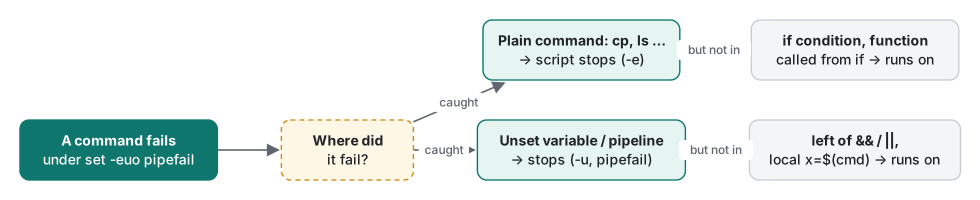
Common mistake: trusting set -e to catch everything
This is the section a one-line summary will not give you. Every line below fails, and the script keeps running anyway:
# gotcha.sh
set -euo pipefail
f() { local out=$(false); echo "A: local hid the failure"; }
f
g() { false; echo "B: still running inside g"; }
if g; then echo "B2: g counted as success"; fi
false && echo no
echo "C: 'false && ...' did not stop the script"
echo "D: default -> ${MISSING:-fallback}"
n=$(printf 'a\nb\n' | grep -c zzz || true); echo "E: matches=$n"
count=0
((count++))
echo "F: never printed in bash"
## bash                                      ## zsh
A: local hid the failure                     A: local hid the failure
B: still running inside g                    B: still running inside g
B2: g counted as success                     B2: g counted as success
C: 'false && ...' did not stop the script    C: 'false && ...' did not stop the script
D: default -> fallback                       D: default -> fallback
E: matches=0                                 E: matches=0
F: never printed in bash                     [exit 1]
[exit 0]
What actually happens:
- A.
local out=$(false): the exit code you see is that oflocal, which succeeded. Fix: declare and assign on separate lines:local out; out=$(false). - B/B2. Inside a function called as an
ifcondition,set -eis switched off for the whole function body.falsedid not stopg, andgreturned 0 because its last command (echo) succeeded. Fix: do not rely on-einside functions used in conditions; end the function with an explicitreturn. - C. A failing command on the left of
&&or||never triggers-e, by design. Note the opposite trap: iffalse && echo nois the last line of a script, the script's exit code becomes 1. - E.
grep -cprints0and exits 1 on no match. Withpipefailthat would kill the script, so|| trueis the right fix here, but only where "no match" is truly fine. - F.
((count++))returns 1 when the old value is 0. zsh 5.9 stopped; bash 3.2 did not (we checked$?, it was 1, and the script continued). Newer bash releases also exit here (not run here). Writecount=$((count + 1)), which always succeeds, and the script behaves the same everywhere.
The lesson is not "don't use strict mode". It catches real bugs (the three in strict1.sh). The lesson is: strict mode is a safety net, not error handling. For commands whose failure matters, check them explicitly:
if ! cp "$src" "$dst"; then
  echo "error: copy failed: $src" >&2
  exit 1
fi
if, test and [[ ]]
if runs a command and looks at its exit code. [ is a command too (it is literally named [), which is why spaces matter and why an empty variable can break it:
# tests.sh
answer=""
if [ $answer = yes ]; then echo yes; else echo "not yes"; fi
if [ "$answer" = yes ]; then echo yes; else echo "quoted: not yes"; fi
x=10
if [ "$x" -gt 9 ]; then echo "10 > 9 numerically"; fi
if [ "$x" \> 9 ]; then echo "string compare says 10 > 9"; else echo "string compare says 10 < 9"; fi
## bash
tests.sh: line 2: [: =: unary operator expected
not yes
quoted: not yes
10 > 9 numerically
string compare says 10 < 9
## zsh
tests.sh:2: parse error: condition expected: =
not yes
quoted: not yes
10 > 9 numerically
tests.sh:6: condition expected: >
string compare says 10 < 9
The unquoted empty $answer disappeared, leaving [ = yes ], which is malformed; the if took the else branch with an error message, and without set -e nobody notices. Also note that > compares strings ("10" sorts before "9"), and zsh's [ does not accept \> at all. Use -gt, -lt, -eq for numbers, or (( x > 9 )). In scripts that are bash/zsh only, [[ $answer == yes ]] does not split variables and is safer, but it is not POSIX sh.
Loops, and the while read variable that vanishes
total=0
printf '3\n4\n5\n' | while read n; do total=$((total + n)); done
echo "pipe+while total=$total"
total=0
while read n; do total=$((total + n)); done < <(printf '3\n4\n5\n')
echo "process-substitution total=$total"
## bash                          ## zsh
pipe+while total=0               pipe+while total=12
process-substitution total=12    process-substitution total=12
In bash, every part of a pipeline runs in a subshell (a child copy of the shell), so the total updated inside the loop was thrown away. zsh runs the last part of a pipeline in the current shell, so it kept 12. The portable fix is to feed the loop with a redirect (< file or < <(cmd)) instead of a pipe.
Functions: return codes vs output
Functions get arguments as $1, $2, … and "$@". They return an exit code with return N (0–255), and they "return" data by printing it:
greet() { echo "hi $1"; return 3; }
msg=$(greet tom); echo "msg=[$msg] rc=$?"
x=1; change() { x=2; local y=5; }; change; echo "x=$x y=${y:-unset}"
msg=[hi tom] rc=3
x=2 y=unset
Variables are global unless you write local. That is a frequent source of "my loop counter changed by itself" bugs when two functions both use i.
Measured: builtin arithmetic vs starting a process
Every $(...) that runs an external program costs a fork and an exec. Inside a loop, that adds up. We counted to 10,000 three ways: i=$(expr "$i" + 1) (external program), i=$(echo $((i + 1))) (subshell, no exec), and i=$((i + 1)) (pure builtin). Each was run 3 times with /usr/bin/time -p; the table shows the median.
| Loop of 10,000 | bash 3.2 | zsh 5.9 |
|---|---|---|
$(expr ...) |
28.04 s | 25.22 s |
$(echo $((...))) |
7.32 s | 8.79 s |
$((...)) |
0.04 s | 0.02 s |

The machine was busy with other jobs (load average around 9–12 on 8 cores), so absolute times are inflated; individual runs varied by up to 25%. The ratio is the point: around 700 times slower when each iteration starts a process. That is about 2.8 ms per expr call here. The same applies to $(date), $(basename ...) or $(cat file) inside loops; lecture 6 measures it for log timestamps.
Honest limits and version notes
- Tested only on macOS with bash 3.2.57 and zsh 5.9. On bash 3.2, associative arrays (
declare -A),mapfileand${x^^}are missing; we gotdeclare: -A: invalid option,mapfile: command not foundandbad substitution. All three arrived in bash 4.0 (per the bash NEWS file; not run here). ((count++))stopping the script underset -eis behaviour of newer bash and of zsh; bash 3.2 continued. Do not depend on either; usecount=$((count + 1)).pipefailworked in/bin/shon this Mac (which runs bash 3.2 in sh mode). On Debian/Ubuntu,/bin/shis dash, not bash; whether it acceptsset -o pipefaildepends on the dash version, so test it there (not run here). If you use bash features, put#!/bin/bash(or#!/usr/bin/env bash) at the top and run the file, rather thansh script.sh.- Real shell programs have many more edge cases in
set -ethan shown here; the list above is the set we reproduced.
Exercises
- A script contains
dir=$1and laterrm -rf "$dir/cache". What happens when it is run without an argument, and what one-line guard prevents it? - Rewrite
cat names.txt | while read n; do count=$((count+1)); done; echo $countso it prints the right number in bash.
Answers
$diris empty, so the command becomesrm -rf "/cache". Add: "${1:?usage: $0 DIR}"(orset -uplusdir=$1, which fails withunbound variablein bash 3.2 too) before using it.count=0; while IFS= read -r n; do count=$((count + 1)); done < names.txt; echo "$count". The redirect keeps the loop in the current shell,IFS=and-rkeep leading spaces and backslashes intact.
Previous: Lecture 3: find, xargs, sed and awk · Next: Lecture 5: processes, jobs and signals · Lecture 6: robust scripts, cron and logging
FAQ
Why does an unquoted variable with a space break in bash but work in zsh?
bash splits the value of an unquoted $f on spaces and expands globs in it, so ls $f with f="my report.txt" runs ls my report.txt and fails twice. zsh does not split unquoted parameters by default, so the same line works there. Quote every expansion ("$f") and the script behaves the same in both shells.
Does set -e stop a script on every failing command?
No. set -e is ignored inside an if condition, on the left of && or ||, in a function called from an if, and when the failure is hidden by local x=$(cmd). We ran all of these: each one kept the script running. pipefail and -u catch other classes of bugs, but you still need explicit checks for important commands.
What do exit codes 126 and 127 mean?
127 means the shell could not find the command (a typo, or a PATH problem). 126 means it found the file but could not execute it, usually because the execute bit is missing. Both came out identically in bash 3.2 and zsh 5.9 on macOS.