SQL INSERT, UPDATE, DELETE and Constraints, Tested
SQL lecture 2 on SQLite 3.51: INSERT, UPDATE, DELETE, real NOT NULL, UNIQUE, CHECK and FOREIGN KEY errors, and an UPDATE without WHERE undone by ROLLBACK.
Series: SQL lecture 2/6 (beginner). For people who can read data with SELECT (lecture 1) and now have to change it, often on a database that other people depend on. After this lecture you will insert, update and delete rows, let constraints refuse bad data for you, and know the one habit that turns the "UPDATE without WHERE" accident into a non-event.
Reading data is safe; changing it is where careers get interesting. Every team has a story about the UPDATE that forgot its WHERE, or about orphaned rows that pointed to a customer who no longer existed. This lecture reproduces those incidents on purpose, in a throwaway database, and shows the exact messages SQLite prints. Everything below was run with the sqlite3 3.51.0 shell on an Apple Silicon Mac (M1 Pro), and every output is pasted from the real run.
Setup: a class roster with rules built in
We will keep a small school database: classes, and students in those classes. The table definitions carry constraints, rules the database checks on every change. Save this as school.sql and run sqlite3 school.db < school.sql:
PRAGMA foreign_keys = ON;
CREATE TABLE classes (
  id   INTEGER PRIMARY KEY,
  name TEXT NOT NULL UNIQUE
);
CREATE TABLE students (
  id       INTEGER PRIMARY KEY,
  username TEXT NOT NULL UNIQUE,
  name     TEXT NOT NULL,
  score    INTEGER CONSTRAINT score_range CHECK (score BETWEEN 0 AND 100),
  class_id INTEGER REFERENCES classes(id)
);
INSERT INTO classes (name) VALUES ('1-A'), ('1-B');
INSERT INTO students (username, name, score, class_id) VALUES
  ('mina01', 'Mina', 82, 1),
  ('jun02',  'Jun',  67, 1),
  ('sora03', 'Sora', 91, 2),
  ('leo04',  'Leo',  55, 2);
What each rule means:
- PRIMARY KEY: identifies a row.
INTEGER PRIMARY KEYis special in SQLite: if you leave it out, SQLite assigns the next number. - NOT NULL: the column must have a value.
- UNIQUE: no two rows may share the value (two students cannot have the same username).
- CHECK: any condition you write. Naming it (
CONSTRAINT score_range) makes the error message readable. - REFERENCES (a foreign key):
class_idmust point to an existing row inclasses.
Then open the database interactively with sqlite3 school.db and type .headers on and .mode table.
INSERT, and what each constraint says when it refuses
A good insert names the columns, so it keeps working when someone adds a column later:
INSERT INTO students (username, name, score, class_id) VALUES ('hana05', 'Hana', 74, 1);
SELECT last_insert_rowid();     -- 5: the id SQLite just assigned
Now four bad inserts, one per constraint:
INSERT INTO students (username, score, class_id) VALUES ('noname', 50, 1);
INSERT INTO students (username, name, score, class_id) VALUES ('mina01', 'Mina Two', 70, 1);
INSERT INTO students (username, name, score, class_id) VALUES ('kai06', 'Kai', 105, 1);
INSERT INTO students (username, name, score, class_id) VALUES ('kai06', 'Kai', NULL, 1);
Runtime error near line 6: NOT NULL constraint failed: students.name (19)
Runtime error near line 7: UNIQUE constraint failed: students.username (19)
Runtime error near line 8: CHECK constraint failed: score_range (19)
(Line numbers in these messages refer to our script file.) Three refusals, and the fourth insert succeeded: Kai is in the table with an empty score. A CHECK fails only when its condition is false; NULL BETWEEN 0 AND 100 is unknown, so it passes, the same NULL logic as in lecture 1. If the score is required, add NOT NULL as well. The (19) is SQLite's code for "constraint violation", which your app sees as an exception (sqlite3.IntegrityError in Python, for example).
FOREIGN KEY: off until you turn it on
Next we inserted a student into class 99, which does not exist, in a new sqlite3 school.db session:
INSERT INTO students (username, name, score, class_id) VALUES ('ghost', 'Ghost', 60, 99);
PRAGMA foreign_keys;
+--------------+
| foreign_keys |
+--------------+
| 0            |
+--------------+
No error. The insert went through, even though the setup script started with PRAGMA foreign_keys = ON. In SQLite, foreign key enforcement is off by default, per connection, and the pragma is not saved in the file. Every new connection, whether a shell session, a Python script or the app on a phone, must turn it on again. To find rows that slipped in while it was off:
PRAGMA foreign_key_check;
+----------+-------+---------+------+
|  table   | rowid | parent  | fkid |
+----------+-------+---------+------+
| students | 7     | classes | 0    |
+----------+-------+---------+------+
With enforcement on, the same mistakes fail, from both directions:
PRAGMA foreign_keys = ON;
INSERT INTO students (username, name, score, class_id) VALUES ('ghost2', 'Ghost2', 60, 99);
DELETE FROM classes WHERE id = 2;                 -- class 1-B still has students
UPDATE students SET class_id = 3 WHERE username = 'leo04';
Runtime error near line 6: FOREIGN KEY constraint failed (19)
Runtime error near line 7: FOREIGN KEY constraint failed (19)
Runtime error near line 10: FOREIGN KEY constraint failed (19)
Note that this message, unlike the others, does not say which column or table failed. With several foreign keys on a table, you have to work it out yourself; PRAGMA foreign_key_list(students) lists them. We then removed the ghost with DELETE FROM students WHERE username = 'ghost'; (changes() returned 1).
The UPDATE-without-WHERE accident, and how a transaction saves you
UPDATE changes columns in every row that matches WHERE; DELETE removes every matching row. Leave out the WHERE, and "every matching row" means every row. Here is the accident. You meant to reset one student's score, and you pressed Enter one line too early:
BEGIN;
UPDATE students SET score = 0;
SELECT id, name, score FROM students;
changes: 6   total_changes: 6
+----+------+-------+
| id | name | score |
+----+------+-------+
| 1  | Mina | 0     |
| 2  | Jun  | 0     |
| 3  | Sora | 0     |
| 4  | Leo  | 0     |
| 5  | Hana | 0     |
| 6  | Kai  | 0     |
+----+------+-------+
Because we typed BEGIN first, nothing is permanent yet. A transaction groups statements so they take effect together on COMMIT, or not at all on ROLLBACK:
ROLLBACK;
SELECT id, name, score FROM students;
+----+------+-------+
| id | name | score |
+----+------+-------+
| 1  | Mina | 82    |
| 2  | Jun  | 67    |
| 3  | Sora | 91    |
| 4  | Leo  | 55    |
| 5  | Hana | 74    |
| 6  | Kai  |       |
+----+------+-------+
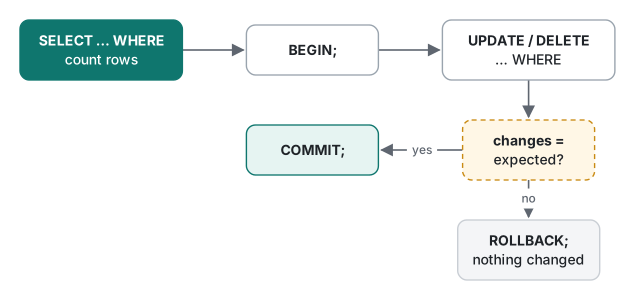
Every score is back. Without BEGIN, each statement commits by itself (autocommit), and the only way back is a backup. The habit for any manual change on a database that matters:
- Run the
WHEREas aSELECTfirst and count the rows. BEGIN;- Run the
UPDATEorDELETEand comparechanges(orSELECT changes();) with step 1. COMMIT;if the numbers match,ROLLBACK;if they do not.
One more trap, tried on a fresh copy of the database. An error inside a transaction does not roll the transaction back; it only cancels the failing statement:
BEGIN;
INSERT INTO students (username, name, score, class_id) VALUES ('rin07', 'Rin', 88, 2);
INSERT INTO students (username, name, score, class_id) VALUES ('mina01', 'Mina again', 70, 1);
COMMIT;
Runtime error near line 5: UNIQUE constraint failed: students.username (19)
Afterwards rin07 was in the table: the COMMIT saved the half that worked. When we ran the same script with .bail on as its first line, the shell stopped at the error with exit status 1, the COMMIT never ran, and rin07 was not saved (count 0). In application code, the equivalent is: catch the exception and call rollback.
UPDATE and DELETE done right: changes and RETURNING
Now three deliberate changes, using the habit above. In the shell, .changes on prints how many rows each statement touched (SELECT changes(); does the same anywhere).
First, inside BEGIN … COMMIT, UPDATE students SET score = score + 5 WHERE class_id = 1 reported changes: 4, but Kai's score stayed empty, because NULL + 5 is NULL. "4 rows changed" does not mean "4 rows got a number".
Then two more, with RETURNING (SQLite 3.35+), which shows the rows a statement touched:
UPDATE students SET score = 100 WHERE name = 'Sora' RETURNING id, name, score;
DELETE FROM students WHERE id = 6 RETURNING *;
+----+------+-------+
| id | name | score |
+----+------+-------+
| 3  | Sora | 100   |
+----+------+-------+
changes: 1   total_changes: 11
+----+----------+------+-------+----------+
| id | username | name | score | class_id |
+----+----------+------+-------+----------+
| 6  | kai06    | Kai  |       | 1        |
+----+----------+------+-------+----------+
changes: 1   total_changes: 12
Common mistakes with keys: what happens and the fix
INSERT OR REPLACE is not an update. We wanted to rename Mina:
INSERT OR REPLACE INTO students (username, name) VALUES ('mina01', 'Mina K.');
SELECT id, username, name, score, class_id FROM students WHERE username LIKE 'mina%';
+----+----------+---------+-------+----------+
| id | username |  name   | score | class_id |
+----+----------+---------+-------+----------+
| 6  | mina01   | Mina K. |       |          |
+----+----------+---------+-------+----------+
Before, she was id 1 with score 87 in class 1. REPLACE deleted that row and inserted a new one, so her id changed and the columns we did not mention became NULL. Anything that stored "student 1" now points at nothing. The fix is an upsert, which updates the existing row in place:
INSERT INTO students (username, name, score, class_id) VALUES ('jun02', 'Jun', 90, 1)
  ON CONFLICT (username) DO UPDATE SET score = excluded.score;
Jun kept id 2 and class 1, and his score became 90. (excluded means "the row we tried to insert".) INSERT OR IGNORE is the third option: on conflict it silently does nothing (changes: 0).
Ids get reused. Look at Mina's new id above: 6 is the id Kai had until we deleted him a moment earlier. To confirm, we deleted the row with the highest id (6) once more and inserted a new student; the new row got id 6 again. Without the AUTOINCREMENT keyword, SQLite uses "largest id + 1", so if another table or a log still refers to the old 6, it now refers to someone else. Add AUTOINCREMENT if ids must never come back.
A TEXT primary key can be NULL. Because of an old SQLite bug kept for compatibility, a non-integer primary key accepts NULL, and more than once:
CREATE TABLE tags (code TEXT PRIMARY KEY, label TEXT);
INSERT INTO tags VALUES (NULL, 'first'), (NULL, 'second');   -- both accepted
CREATE TABLE tags2 (code TEXT PRIMARY KEY NOT NULL, label TEXT);
INSERT INTO tags2 VALUES (NULL, 'first');
Runtime error near line 16: NOT NULL constraint failed: tags2.code (19)
Write NOT NULL explicitly on non-integer keys (STRICT tables, from lecture 1, enforce it for you).
Decision table: which tool for which rule
| You want to… | Use | Note from our runs |
|---|---|---|
| Require a value | NOT NULL |
Also add it to CHECK columns and TEXT primary keys |
| Forbid duplicates | UNIQUE |
Error names the column: students.username |
| Enforce a range or format | CHECK (named) |
NULL passes a CHECK |
| Point to another table | REFERENCES + PRAGMA foreign_keys = ON |
Off per connection by default; error does not name the column |
| Insert or update if it exists | ON CONFLICT … DO UPDATE |
Keeps id and other columns |
| Insert only if new | INSERT OR IGNORE |
Silent: check changes |
| Replace the whole row | INSERT OR REPLACE |
Deletes first: new id, unspecified columns NULL |
| Make a manual change safely | BEGIN … check changes … COMMIT/ROLLBACK |
An error does not roll back by itself |
A measurement: the foreign key that made DELETE 3,600 times slower
Constraints are not free, and one cost surprises almost everyone. When you delete a parent row with foreign keys on, SQLite must check that no child row still points to it. If the child column (students.class_id) has no index, that check reads the whole child table, for every parent row you delete.
We built 2,000 classes and 200,000 students (class ids spread evenly over classes 1–1,000 with a fixed formula, no randomness), then deleted the 100 classes with ids 1,001 to 1,100, which have no students. Each delete ran inside BEGIN … ROLLBACK so it could be repeated: 5 times, median, via Python's sqlite3 module (SQLite 3.51.0) on the M1 Pro.
con.execute("PRAGMA foreign_keys = ON")
con.execute("BEGIN")
t = time.perf_counter()
con.execute("DELETE FROM classes WHERE id BETWEEN 1001 AND 1100")   # 100 rows
elapsed = time.perf_counter() - t
con.execute("ROLLBACK")
| Setup | Median (run 1) | Median (run 2) |
|---|---|---|
| Foreign keys off | 0.17 ms | 0.13 ms |
Foreign keys on, no index on students(class_id) |
634.6 ms | 618.6 ms |
Foreign keys on, CREATE INDEX … ON students(class_id) |
0.17 ms | 0.18 ms |
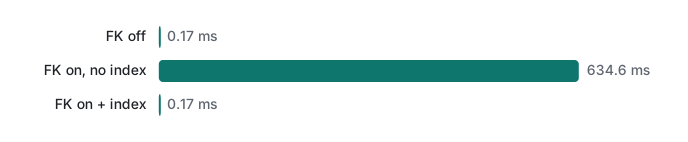
So turning foreign keys on is the right call, but index the child column at the same time. One CREATE INDEX brought the delete back to the speed of no checking at all, about 3,600 times faster. SQLite does not create that index for you (MySQL's InnoDB does; not run here). Lecture 4 covers indexes properly.
Honest limits / version notes
- Run on SQLite 3.51.0 only (shell and Python 3.9's
sqlite3module, both 3.51.0). Per the SQLite release notes, upsert (ON CONFLICT … DO UPDATE) arrived in 3.24.0 andRETURNINGin 3.35.0; foreign key support dates from 3.6.19. Old Android versions ship older SQLite builds. INSERT OR REPLACE,OR IGNOREand the NULL-able TEXT primary key are SQLite behaviours. MySQL hasREPLACE INTO(also delete-then-insert) andINSERT … ON DUPLICATE KEY UPDATE; PostgreSQL hasON CONFLICTlike SQLite (not run here).- In PostgreSQL an error inside a transaction aborts the whole transaction until you roll back, unlike SQLite (not run here).
- The measurement used one laptop and data in the OS cache; the 3,600× ratio depends on the child-table size (200,000 rows here) and grows with it.
Exercises
Start from the roster as it was just before the accident section (6 students, foreign keys on).
- Add student
yuna08(Yuna, score 77) to class 1-B, then give everyone in 1-B 3 extra points without going over 100. - The school merges class 1-B into 1-A. With foreign keys on,
DELETE FROM classes WHERE name = '1-B';fails. Do the merge safely.
Answers
1.
INSERT INTO students (username, name, score, class_id) VALUES ('yuna08', 'Yuna', 77, 2);
UPDATE students SET score = min(score + 3, 100) WHERE class_id = 2;
changes: 3, and the class then held Sora 94, Leo 58, Yuna 80. min() with two arguments returns the smaller one, so a 99 would become 100, not 102.
2. Move the students first, then delete the class, as one transaction:
BEGIN;
UPDATE students SET class_id = 1 WHERE class_id = 2;   -- changes: 3
DELETE FROM classes WHERE name = '1-B';                -- changes: 1
COMMIT;
Our direct delete attempt printed FOREIGN KEY constraint failed (19). After the transaction, classes held only 1-A, and all 7 students were in class 1.
Next
Lecture 3 reads across tables: JOIN, GROUP BY and HAVING, why COUNT(*) and COUNT(col) disagree, the "row explosion" that doubles your totals, and whether a subquery or a JOIN is faster (measured).
- Previous: SQL lecture 1/6: SELECT, WHERE, ORDER BY and NULL
- Next: SQL lecture 3/6: JOINs, GROUP BY and subqueries
- Later: indexes and EXPLAIN QUERY PLAN, transactions, isolation and locking, window functions and CTEs
- Where this fits: Programming basics for new hires: a study roadmap
- Writing to a database from code safely: PHP PDO and SQLite: SQL injection, shown then fixed
FAQ
Why does SQLite accept a row that violates my FOREIGN KEY?
Foreign key enforcement in SQLite is off by default and is a per-connection setting. Run PRAGMA foreign_keys = ON; every time you open the database (or in your app's connection code). In our run, the pragma at the top of the setup script did not carry over to the next session, which happily inserted a student in class 99. PRAGMA foreign_key_check lists rows that slipped in.
How do I undo an UPDATE that I ran without a WHERE clause?
Only if you started a transaction first. After BEGIN, UPDATE students SET score = 0 changed all 6 rows; ROLLBACK put every score back. In autocommit mode (no BEGIN) the change is already permanent, and you need a backup. Make BEGIN, check changes(), then COMMIT your habit for manual edits.
Is INSERT OR REPLACE the same as an upsert?
No. OR REPLACE deletes the conflicting row and inserts a new one, so columns you did not supply become NULL and the row can get a new id. In our test, the student's id changed from 1 to 6 and the score and class were lost. Use INSERT … ON CONFLICT (col) DO UPDATE SET … (SQLite 3.24+) to update in place.