SQL JOINs, GROUP BY and Subqueries: Traps, Measured
SQL lecture 3 on SQLite 3.51: INNER vs LEFT JOIN, the row explosion that triples totals, HAVING vs WHERE, COUNT(*) vs COUNT(col), subquery vs JOIN timed.
Series: SQL lecture 3/6 (intermediate). For people who can write single-table queries (lectures 1 and 2) and now need answers that span tables: "sales per customer", "customers who never ordered". After this lecture you will choose the right JOIN, group and filter correctly, and spot the three mistakes that make report numbers silently wrong.
The queries in this lecture do not fail; they return believable numbers that are wrong. A customer total that is exactly three times too high, a "customers per city" count that equals the order count, a LEFT JOIN that quietly drops the customers you wanted to see. Each of these comes from a real kind of report bug, and each is reproduced here on a tiny dataset where you can count by hand. Everything was run with sqlite3 3.51.0 on an Apple Silicon Mac (M1 Pro); outputs are pasted from the real run.
The sample data: customers, orders, payments
Three tables. A customer has zero or more orders and zero or more payments (one-to-many relationships). Two rows are deliberately awkward: Dan has no orders, and order 107 has no customer (customer_id is NULL, a guest checkout).
CREATE TABLE customers (id INTEGER PRIMARY KEY, name TEXT NOT NULL, city TEXT);
CREATE TABLE orders (
  id INTEGER PRIMARY KEY, customer_id INTEGER REFERENCES customers(id),
  amount INTEGER NOT NULL, ordered_on TEXT NOT NULL
);
CREATE TABLE payments (
  id INTEGER PRIMARY KEY, customer_id INTEGER REFERENCES customers(id),
  paid INTEGER NOT NULL
);
INSERT INTO customers (id, name, city) VALUES
  (1, 'Aoi', 'Osaka'), (2, 'Ben', 'Seoul'), (3, 'Chloe', 'Osaka'), (4, 'Dan', NULL);
INSERT INTO orders (id, customer_id, amount, ordered_on) VALUES
  (101, 1, 3000, '2026-10-01'), (102, 1, 1200, '2026-10-15'),
  (103, 2,  800, '2026-10-20'), (104, 3, 5000, '2026-11-02'),
  (105, 3,  700, '2026-11-03'), (106, 3, 2500, '2026-11-05'),
  (107, NULL, 999, '2026-11-06');
INSERT INTO payments (customer_id, paid) VALUES (1, 2000), (1, 1000), (1, 1200), (3, 8200);
Run it with sqlite3 shop.db < shop.sql, then use .headers on, .mode table and .nullvalue NULL in the shell.
INNER JOIN vs LEFT JOIN
A JOIN pairs rows from two tables using a condition in ON. JOIN (short for INNER JOIN) keeps only pairs that match; LEFT JOIN keeps every row of the left table and fills the right side with NULL when nothing matches:
SELECT c.name, o.id AS order_id, o.amount
FROM customers AS c JOIN orders AS o ON o.customer_id = c.id;
+-------+----------+--------+
| name  | order_id | amount |
+-------+----------+--------+
| Aoi   | 101      | 3000   |
| Aoi   | 102      | 1200   |
| Ben   | 103      | 800    |
| Chloe | 104      | 5000   |
| Chloe | 105      | 700    |
| Chloe | 106      | 2500   |
+-------+----------+--------+
With LEFT JOIN instead, we got 7 rows: the same 6 plus Dan | NULL | NULL. Order 107 appears in neither, because it has no customer to pair with. RIGHT JOIN and FULL JOIN exist in SQLite since 3.39.0; FULL JOIN returned 8 rows, including 107 | 999 | NULL. That makes it a quick way to find orphans on both sides.
Something worth noticing in the LEFT JOIN run: the rows came back as 102, 101 for Aoi and 105, 106, 104 for Chloe. EXPLAIN QUERY PLAN explains why:
QUERY PLAN
|--SCAN c
|--BLOOM FILTER ON o (customer_id=?)
`--SEARCH o USING AUTOMATIC COVERING INDEX (customer_id=?) LEFT-JOIN
SQLite built a temporary index on orders.customer_id for this one query and read the orders in that index's order. The inner join happened to scan in insertion order. Neither is a promise: without ORDER BY, order is whatever the plan produces, and the plan can change when the data grows.
GROUP BY, HAVING and the three COUNTs
GROUP BY collapses rows that share a value into one row per group; aggregate functions (count, sum, avg, min, max) summarise each group. Orders per customer, including customers with none:
SELECT c.name, count(*) AS rows_, count(o.id) AS orders_, coalesce(sum(o.amount), 0) AS total
FROM customers c LEFT JOIN orders o ON o.customer_id = c.id
GROUP BY c.id ORDER BY total DESC;
+-------+-------+---------+-------+
| name  | rows_ | orders_ | total |
+-------+-------+---------+-------+
| Chloe | 3     | 3       | 8200  |
| Aoi   | 2     | 2       | 4200  |
| Ben   | 1     | 1       | 800   |
| Dan   | 1     | 0       | 0     |
+-------+-------+---------+-------+
Look at Dan: count(*) says 1, count(o.id) says 0. count(*) counts rows, and the LEFT JOIN produced one row for him (full of NULLs). count(column) counts non-NULL values. On the orders table alone: count(*) = 7, count(customer_id) = 6 (order 107 is NULL), count(DISTINCT customer_id) = 3.
WHERE filters rows before grouping; HAVING filters groups after. They give different answers:
| Query | Result |
|---|---|
… GROUP BY c.id HAVING sum(o.amount) >= 1000 |
Chloe 8200, Aoi 4200 (Ben's group, 800, dropped) |
… WHERE o.amount >= 1000 GROUP BY c.id |
Chloe 7500, Aoi 4200 (Chloe's 700 order and Ben's 800 order dropped first) |
Put an aggregate in WHERE and SQLite refuses:
Parse error near line 16: misuse of aggregate: count()
  ers c JOIN orders o ON o.customer_id = c.id WHERE count(o.id) > 1 GROUP BY c.i
                                      error here ---^
Common mistake: LEFT JOIN + WHERE quietly becomes INNER JOIN
Goal: every customer with their number of November orders, zeros included. The natural first attempt:
SELECT c.name, count(o.id) AS nov_orders
FROM customers c LEFT JOIN orders o ON o.customer_id = c.id
WHERE o.ordered_on >= '2026-11-01'
GROUP BY c.id ORDER BY c.id;
+-------+------------+
| name  | nov_orders |
+-------+------------+
| Chloe | 3          |
+-------+------------+
What actually happens: the LEFT JOIN did keep Aoi, Ben and Dan, but WHERE runs after the join. For Dan, o.ordered_on is NULL, and NULL >= '2026-11-01' is not true, so his row is removed. Aoi's and Ben's orders are all October, so their rows are removed too. Fix: put the condition in ON, so it decides which orders get attached, not which customers survive:
SELECT c.name, count(o.id) AS nov_orders
FROM customers c LEFT JOIN orders o
  ON o.customer_id = c.id AND o.ordered_on >= '2026-11-01'
GROUP BY c.id ORDER BY c.id;
+-------+------------+
| name  | nov_orders |
+-------+------------+
| Aoi   | 0          |
| Ben   | 0          |
| Chloe | 3          |
| Dan   | 0          |
+-------+------------+
Rule: with a LEFT JOIN, conditions on the right-hand table go in ON; conditions on the left-hand table go in WHERE.
Common mistake: row explosion when joining two one-to-many tables
Goal: per customer, total ordered and total paid. Aoi ordered 4,200 and paid 4,200. The tempting query:
SELECT c.name, sum(o.amount) AS ordered, sum(p.paid) AS paid
FROM customers c
JOIN orders o   ON o.customer_id = c.id
JOIN payments p ON p.customer_id = c.id
GROUP BY c.id;
+-------+---------+-------+
| name  | ordered | paid  |
+-------+---------+-------+
| Aoi   | 12600   | 8400  |
| Chloe | 8200    | 24600 |
+-------+---------+-------+
Aoi's orders are tripled, her payments doubled, Chloe's payment tripled, and Ben vanished because he has no payments. Removing the GROUP BY shows why. Aoi's 2 orders × 3 payments became 6 rows:
+------+----------+--------+------+
| name | order_id | amount | paid |
+------+----------+--------+------+
| Aoi  | 101      | 3000   | 1000 |
| Aoi  | 101      | 3000   | 1200 |
| Aoi  | 101      | 3000   | 2000 |
| Aoi  | 102      | 1200   | 1000 |
| Aoi  | 102      | 1200   | 1200 |
| Aoi  | 102      | 1200   | 2000 |
+------+----------+--------+------+
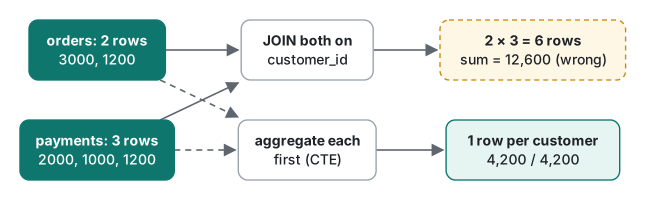
Orders and payments are not related to each other, only to the customer, so the join produces every combination. Fix: aggregate each child table on its own, then join one row per customer:
WITH o AS (SELECT customer_id, sum(amount) AS ordered FROM orders GROUP BY customer_id),
     p AS (SELECT customer_id, sum(paid)   AS paid    FROM payments GROUP BY customer_id)
SELECT c.name, o.ordered, p.paid
FROM customers c
LEFT JOIN o ON o.customer_id = c.id
LEFT JOIN p ON p.customer_id = c.id
ORDER BY c.id;
+-------+---------+------+
| name  | ordered | paid |
+-------+---------+------+
| Aoi   | 4200    | 4200 |
| Ben   | 800     | NULL |
| Chloe | 8200    | 8200 |
| Dan   | NULL    | NULL |
+-------+---------+------+
(WITH defines a named subquery, a CTE; lecture 6 goes further.) Two scalar subqueries, (SELECT sum(amount) FROM orders o WHERE o.customer_id = c.id), gave the identical table. A quick self-check for any report: compare count(*) of the joined rows with what you expect. If it is bigger than the number of rows in the largest table, something exploded.
The same explosion hides in "customers per city". count(*) over customers LEFT JOIN orders gave Osaka 5 (that is the number of orders); count(DISTINCT c.id) gave the correct 2.
Errors and silent surprises in GROUP BY
Two errors you will see in the first week:
Parse error near line 17: ambiguous column name: id
  SELECT id, name FROM customers c JOIN orders o ON o.customer_id = c.id;
         ^--- error here
Both tables have an id, so qualify it: c.id or o.id. Always use table aliases once there is more than one table.
The silent one: SQLite lets you select a column that is neither grouped nor aggregated (a bare column):
SELECT c.name, o.ordered_on, sum(o.amount)
FROM customers c JOIN orders o ON o.customer_id = c.id GROUP BY c.id;
+-------+------------+---------------+
| name  | ordered_on | sum(o.amount) |
+-------+------------+---------------+
| Aoi   | 2026-10-01 | 4200          |
| Ben   | 2026-10-20 | 800           |
| Chloe | 2026-11-02 | 8200          |
+-------+------------+---------------+
Which of Chloe's three dates is that? Whichever row SQLite happened to see; it means nothing. PostgreSQL rejects this query, and so does MySQL with its default ONLY_FULL_GROUP_BY mode (neither run here), so code that works on SQLite can break when you move it. There is one documented SQLite exception: with exactly one max() or min(), the bare columns come from the row that holds that max or min. SELECT c.name, o.id, max(o.amount) … GROUP BY c.id returned Aoi | 101 | 3000, Ben | 103 | 800, Chloe | 104 | 5000, which is correct, but it is SQLite-only. Portable code uses a window function (lecture 6) or a subquery.
Subquery vs JOIN vs EXISTS
A subquery is a SELECT inside another statement. Three questions, three tools:
"Customers with at least one order of 2,500 or more."
SELECT name FROM customers WHERE id IN (SELECT customer_id FROM orders WHERE amount >= 2500);
-- Aoi, Chloe
SELECT c.name FROM customers c JOIN orders o ON o.customer_id = c.id WHERE o.amount >= 2500;
-- Aoi, Chloe, Chloe
The JOIN returned Chloe twice (two qualifying orders). IN or EXISTS answers "is there at least one?" without duplicates; a JOIN answers "list the matching pairs".
"Customers who never ordered." This is where NOT IN bites, because order 107 has a NULL customer_id:
| Query | Rows |
|---|---|
WHERE id NOT IN (SELECT customer_id FROM orders) |
0 |
WHERE NOT EXISTS (SELECT 1 FROM orders o WHERE o.customer_id = c.id) |
Dan |
WHERE id NOT IN (SELECT customer_id FROM orders WHERE customer_id IS NOT NULL) |
Dan |
It is the same NULL logic as lecture 1: 4 NOT IN (1, 2, 3, NULL) is NULL, not true. Prefer NOT EXISTS; it does not care about NULLs.
| You want | Use | Watch out for |
|---|---|---|
| Columns from both tables | JOIN |
Duplicates when the right side has many matches |
| Keep rows with no match | LEFT JOIN |
Right-table conditions belong in ON |
| "Has at least one" | EXISTS / IN |
Nothing serious; no duplicates |
| "Has none" | NOT EXISTS |
NOT IN returns 0 rows if the subquery has a NULL |
| Totals from two child tables | Aggregate each first (CTE), then join | Direct join multiplies sums |
| One value per row | Scalar subquery in SELECT |
Needs an index on the inner column (see below) |
A measurement: correlated subquery vs JOIN, with and without an index
"Subqueries are slow" is half true. We built 2,000 customers and 200,000 orders (customer ids assigned with a fixed formula, (i * 7919) % 2000 + 1, no randomness) and computed each customer's order total three ways. We checked that all three return identical rows. Timed from Python's sqlite3 module (SQLite 3.51.0) on the M1 Pro: median of 3 runs without an index, 7 runs with one.
-- A: correlated subquery
SELECT c.id, (SELECT sum(o.amount) FROM orders o WHERE o.customer_id = c.id) FROM customers c ORDER BY c.id;
-- B: LEFT JOIN + GROUP BY
SELECT c.id, sum(o.amount) FROM customers c LEFT JOIN orders o ON o.customer_id = c.id GROUP BY c.id ORDER BY c.id;
-- C: aggregate first, then join
SELECT c.id, t.total FROM customers c
LEFT JOIN (SELECT customer_id, sum(amount) AS total FROM orders GROUP BY customer_id) t
  ON t.customer_id = c.id ORDER BY c.id;
| A: correlated | B: JOIN + GROUP BY | C: aggregate, then join | |
|---|---|---|---|
| No index (run 1) | 13,389.6 ms | 183.5 ms | 117.4 ms |
| No index (run 2) | 12,649.4 ms | 120.7 ms | 42.2 ms |
CREATE INDEX ON orders(customer_id) (run 2) |
88.9 ms | 93.4 ms | 86.1 ms |
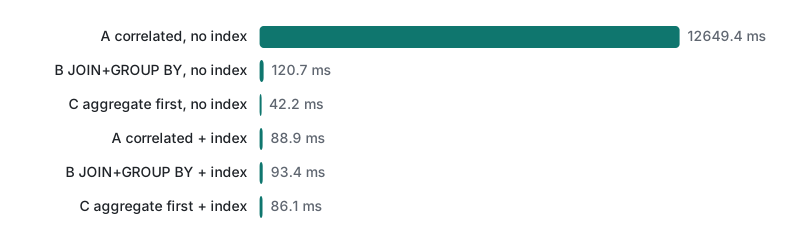
Without an index, the plan for A was CORRELATED SCALAR SUBQUERY 1 → SCAN o: a full read of 200,000 orders for each of 2,000 customers, about 400 million row visits. B and C were fast even without an index, because SQLite built an AUTOMATIC COVERING INDEX for the join (visible in the plan above), which it did not do for the correlated subquery. With a real index, the plan became SEARCH o USING INDEX idx_orders_customer (customer_id=?) and all three forms ran within about 10% of each other.
So the lesson is not "never use subqueries". It is: read the plan, and look for SCAN inside anything that runs once per row. The small numbers (B and C) varied by up to 3× between our two runs. The 100× gap for A did not.
Honest limits / version notes
- Run on SQLite 3.51.0 only (CLI and Python 3.9's
sqlite3module, both 3.51.0). Per the SQLite release notes,RIGHTandFULL OUTER JOINarrived in 3.39.0 and CTEs (WITH) in 3.8.3. TheBLOOM FILTERstep in the plans is a newer optimisation; we only checked it on 3.51. - Automatic indexes are a SQLite feature (on by default,
PRAGMA automatic_index). MySQL and PostgreSQL use hash joins or other strategies instead, so B and C may compare differently there (not run here). - Bare columns: PostgreSQL errors, MySQL errors under
ONLY_FULL_GROUP_BY(default since 5.7), SQLite accepts (only SQLite was run). - The timings come from one laptop with all data cached. The correlated-subquery cost grows with customers × orders, so at 10× the data, expect roughly 100× the time without an index.
Exercises
- List customers in Osaka whose total ordered is 5,000 or more.
- For each city, show the number of customers and the number of orders in one query. (Careful: one of the obvious counts is wrong.)
Answers
1.
SELECT c.name, sum(o.amount) AS total
FROM customers c JOIN orders o ON o.customer_id = c.id
WHERE c.city = 'Osaka'
GROUP BY c.id HAVING total >= 5000;
Real output: Chloe | 8200. The city test is a row condition (WHERE); the total is a group condition (HAVING). SQLite allows the alias total in HAVING; PostgreSQL does not (write sum(o.amount); not run here).
2.
SELECT c.city, count(DISTINCT c.id) AS customers, count(o.id) AS orders
FROM customers c LEFT JOIN orders o ON o.customer_id = c.id
GROUP BY c.city ORDER BY c.city;
Output: NULL | 1 | 0, Osaka | 2 | 5, Seoul | 1 | 1. With count(*) instead of count(DISTINCT c.id), Osaka showed 5 customers: the join made one row per order. Order 107 (no customer) is not in any city, by design of the LEFT JOIN from customers.
Next
Lecture 4 is about speed: EXPLAIN QUERY PLAN in depth, a million-row table timed with and without indexes, composite index column order, and the cases where an index you created is ignored.
FAQ
Why are my SUM totals doubled or tripled after adding a JOIN?
You joined two one-to-many tables (for example orders and payments) to the same parent. Every order row is paired with every payment row, so each amount is counted once per payment. In our run, a customer with 2 orders and 3 payments came out with 12,600 ordered instead of 4,200. Aggregate each table separately first (subquery or CTE), then join the totals.
Why does my LEFT JOIN behave like an INNER JOIN?
A condition on the right-hand table in WHERE removes the rows where that table is NULL, which are exactly the rows LEFT JOIN added. Move the condition into the ON clause. Our November-orders query returned 1 customer with the condition in WHERE and all 4 (three with 0) with it in ON.
Is a subquery slower than a JOIN?
Not by itself. A correlated subquery without an index on the inner column took 12.6 seconds for 2,000 customers and 200,000 orders, while LEFT JOIN + GROUP BY took 121 ms. With an index on orders(customer_id), all three forms ran in 86 to 93 ms. Check EXPLAIN QUERY PLAN for SCAN inside a CORRELATED SUBQUERY.