SQL Window Functions and CTEs for Real Reports
ROW_NUMBER, RANK, LAG, running totals, top-N per group, recursive CTEs and JSON functions in SQLite, with frame and NULL traps and measured speed.
Series: SQL lecture 6/6 (advanced). For developers who write JOINs and GROUP BY comfortably but still export data to a spreadsheet to compute rankings, month-over-month changes or running totals. After this lecture you can do those in one SQL query, walk a tree with a recursive CTE, pull values out of JSON columns, and avoid the three traps that make such reports silently wrong.
Report queries are where SQL pays off most and where wrong answers are least visible: a running total that is slightly off or a month-over-month column that shows 0.0% instead of "no data" looks perfectly plausible in a dashboard. If you build admin pages, KPI e-mails or analytics exports, this post is for you. Every query below was run, every output is pasted as printed, and one trap we only noticed because the output looked too tidy.
Environment: SQLite 3.51.0 CLI (-header -column output mode), plus Python 3.9.6's sqlite3 module (bundled SQLite also 3.51.0) for timings, Apple Silicon Mac (M1 Pro), macOS.
The data, and window functions in one minute
Daily sales for three shops in October. Days without sales are simply missing, which matters later. Save as shop.sql:
CREATE TABLE sales (
  id      INTEGER PRIMARY KEY,
  shop    TEXT    NOT NULL,
  day     TEXT    NOT NULL,      -- 'YYYY-MM-DD'
  amount  INTEGER NOT NULL
);
INSERT INTO sales (shop, day, amount) VALUES
 ('Shibuya','2026-10-01',120),('Shibuya','2026-10-02', 80),('Shibuya','2026-10-04',150),
 ('Shibuya','2026-10-05',150),('Shibuya','2026-10-06', 90),
 ('Umeda',  '2026-10-01',200),('Umeda',  '2026-10-02',200),('Umeda',  '2026-10-03', 60),
 ('Umeda',  '2026-10-05',110),
 ('Tenjin', '2026-10-02', 70),('Tenjin', '2026-10-03', 95);
A window function computes a value from a set of rows related to the current row (its window) but, unlike GROUP BY, keeps every row. PARTITION BY splits rows into groups, ORDER BY orders them inside each group. The three ranking functions differ only on ties:
SELECT shop, day, amount,
       ROW_NUMBER() OVER w AS row_number,
       RANK()       OVER w AS rank,
       DENSE_RANK() OVER w AS dense_rank
FROM sales
WINDOW w AS (PARTITION BY shop ORDER BY amount DESC)
ORDER BY shop, row_number;
shop     day         amount  row_number  rank  dense_rank
-------  ----------  ------  ----------  ----  ----------
Shibuya  2026-10-04  150     1           1     1
Shibuya  2026-10-05  150     2           1     1
Shibuya  2026-10-01  120     3           3     2
Shibuya  2026-10-06  90      4           4     3
Shibuya  2026-10-02  80      5           5     4
Tenjin   2026-10-03  95      1           1     1
Tenjin   2026-10-02  70      2           2     2
Umeda    2026-10-01  200     1           1     1
Umeda    2026-10-02  200     2           1     1
Umeda    2026-10-05  110     3           3     2
Umeda    2026-10-03  60      4           4     3
ROW_NUMBER always counts 1, 2, 3; RANK gives ties the same number and then skips (1, 1, 3); DENSE_RANK does not skip (1, 1, 2). Note that which of the two 150 rows gets row number 1 is not defined by this query; add a tiebreaker such as , day when it matters.
Top N per group
"The two best days per shop" is the classic question. The obvious attempt fails:
sqlite> SELECT shop, day, amount FROM sales WHERE ROW_NUMBER() OVER (PARTITION BY shop ORDER BY amount DESC) <= 2;
Parse error near line 13: misuse of window function ROW_NUMBER()
  SELECT shop, day, amount FROM sales WHERE ROW_NUMBER() OVER (PARTITION BY shop
                              error here ---^
Window functions are computed after WHERE, so they cannot be used in it. Compute them in a CTE (common table expression: a named subquery introduced with WITH), then filter outside:
WITH ranked AS (
  SELECT shop, day, amount,
         ROW_NUMBER() OVER (PARTITION BY shop ORDER BY amount DESC, day) AS rn,
         RANK()       OVER (PARTITION BY shop ORDER BY amount DESC)      AS rnk
  FROM sales
)
SELECT shop, day, amount, rn, rnk FROM ranked WHERE rn <= 2 ORDER BY shop, rn;
shop     day         amount  rn  rnk
-------  ----------  ------  --  ---
Shibuya  2026-10-04  150     1   1
Shibuya  2026-10-05  150     2   1
Tenjin   2026-10-03  95      1   1
Tenjin   2026-10-02  70      2   2
Umeda    2026-10-01  200     1   1
Umeda    2026-10-02  200     2   1
Filter on rn for "exactly N rows", on rnk for "N, plus anyone tied with the last one".
Common mistake: the running total that jumps
The mistake. A company-wide running total by day, written the natural way: SUM(amount) OVER (ORDER BY day).
What actually happens. Every row of the same day shows the same number, already including the rows below it:
SELECT day, shop, amount,
       SUM(amount) OVER (ORDER BY day)                     AS default_frame,
       SUM(amount) OVER (ORDER BY day, id
                         ROWS BETWEEN UNBOUNDED PRECEDING AND CURRENT ROW) AS rows_frame
FROM sales ORDER BY day, id;
day         shop     amount  default_frame  rows_frame
----------  -------  ------  -------------  ----------
2026-10-01  Shibuya  120     320            120
2026-10-01  Umeda    200     320            320
2026-10-02  Shibuya  80      670            400
2026-10-02  Umeda    200     670            600
2026-10-02  Tenjin   70      670            670
2026-10-03  Umeda    60      825            730
2026-10-03  Tenjin   95      825            825
2026-10-04  Shibuya  150     975            975
2026-10-05  Shibuya  150     1235           1125
2026-10-05  Umeda    110     1235           1235
2026-10-06  Shibuya  90      1325           1325
The frame is the part of the window an aggregate looks at. With ORDER BY and no frame clause, the default is RANGE BETWEEN UNBOUNDED PRECEDING AND CURRENT ROW, and RANGE includes all peers, rows with an equal ORDER BY value. The fix: a unique tiebreaker plus ROWS, as in the rows_frame column. Both columns end at 1,325, so a check on the final total will not catch this; only rows in the middle are wrong.
LAG, missing days, and a calendar from a recursive CTE
LAG(x) returns x from the previous row of the window (LEAD the next one). Day-over-day change for Shibuya:
shop     day         amount  prev_amount  prev_day    diff
-------  ----------  ------  -----------  ----------  ----
Shibuya  2026-10-01  120
Shibuya  2026-10-02  80      120          2026-10-01  -40
Shibuya  2026-10-04  150     80           2026-10-02  70
Shibuya  2026-10-05  150     150          2026-10-04  0
Shibuya  2026-10-06  90      150          2026-10-05  -60
The row for 10-04 compares with 10-02: "previous row" is not "previous day". The fix is to generate every day with a recursive CTE, a CTE that refers to itself. It has a starting row, then UNION ALL and a step that runs on the previous result until the WHERE stops it:
WITH RECURSIVE cal(day) AS (
  SELECT '2026-10-01'
  UNION ALL
  SELECT date(day, '+1 day') FROM cal WHERE day < '2026-10-06'
),
daily AS (
  SELECT cal.day, COALESCE(s.amount, 0) AS amount
  FROM cal LEFT JOIN sales s ON s.day = cal.day AND s.shop = 'Shibuya'
)
SELECT day, amount,
       LAG(amount) OVER (ORDER BY day) AS prev_day_amount,
       ROUND(AVG(amount) OVER (ORDER BY day ROWS BETWEEN 2 PRECEDING AND CURRENT ROW), 1) AS avg_3d
FROM daily;
day         amount  prev_day_amount  avg_3d
----------  ------  ---------------  ------
2026-10-01  120                      120.0
2026-10-02  80      120              100.0
2026-10-03  0       80               66.7
2026-10-04  150     0                76.7
2026-10-05  150     150              100.0
2026-10-06  90      150              130.0
Now 10-03 exists with 0, and the 3-day moving average is a true 3-day average (the first two rows average over fewer days; decide whether your report should show them).
Recursive CTEs for trees, and the query that never ends
A category tree stored as parent_id is the other everyday use:
CREATE TABLE categories (id INTEGER PRIMARY KEY, parent_id INTEGER, name TEXT NOT NULL);
INSERT INTO categories VALUES
 (1, NULL, 'Electronics'), (2, 1, 'Computers'), (3, 2, 'Laptops'), (4, 2, 'Desktops'),
 (5, 1, 'Audio'), (6, 5, 'Headphones'), (7, NULL, 'Books'), (8, 7, 'Programming');
WITH RECURSIVE tree(id, name, depth, path) AS (
  SELECT id, name, 0, name FROM categories WHERE parent_id IS NULL
  UNION ALL
  SELECT c.id, c.name, t.depth + 1, t.path || ' > ' || c.name
  FROM categories c JOIN tree t ON c.parent_id = t.id
)
SELECT substr('        ', 1, depth * 2) || name AS indented, depth, path FROM tree ORDER BY path;
indented        depth  path
--------------  -----  ----------------------------------
Books           0      Books
  Programming   1      Books > Programming
Electronics     0      Electronics
  Audio         1      Electronics > Audio
    Headphones  2      Electronics > Audio > Headphones
  Computers     1      Electronics > Computers
    Desktops    2      Electronics > Computers > Desktops
    Laptops     2      Electronics > Computers > Laptops
Then someone sets the parent of "Electronics" to "Laptops" by mistake (UPDATE categories SET parent_id = 3 WHERE id = 1), creating a cycle 1 → 2 → 3 → 1. The same recursion starting from Computers never ends. We let it run for 5 seconds and killed it:
  PID STAT      TIME    RSS COMMAND
37366 RN     0:04.95   2896 sqlite3 :memory:
exit=143
It used a full CPU core, with almost no memory, so nothing warns you except a request that never returns. Exit code 143 is 128 + 15 (SIGTERM). Three guards, all run:
-- 1. LIMIT outside (for testing): returned 100000 rows, max depth 50000, in 0.040 s
-- 2. depth limit in the recursive step: UNION + WHERE t.depth < 20  -> 40 rows, max depth 20
-- 3. remember the path, skip ids already on it:
WITH RECURSIVE tree(id, path) AS (
  SELECT 2, '/2/'
  UNION ALL
  SELECT c.id, t.path || c.id || '/' FROM categories c JOIN tree t ON c.parent_id = t.id
  WHERE instr(t.path, '/' || c.id || '/') = 0
)
SELECT id, path FROM tree;
id  path
--  -----------
2   /2/
3   /2/3/
4   /2/4/
1   /2/3/1/
5   /2/3/1/5/
6   /2/3/1/5/6/
Guard 3 is the one to keep in production: it returns each node once and makes the cycle visible in the path.
JSON columns in reports
Orders often arrive as JSON from an API. SQLite can read them directly: -> returns JSON, ->> returns an SQL value, and json_each turns an array into rows:
CREATE TABLE orders (id INTEGER PRIMARY KEY, shop TEXT, payload TEXT);
INSERT INTO orders VALUES
 (1, 'Shibuya', '{"customer":"c-01","items":[{"sku":"A1","qty":2,"price":300},{"sku":"B7","qty":1,"price":1200}],"coupon":null}'),
 (2, 'Umeda',   '{"customer":"c-02","items":[{"sku":"A1","qty":1,"price":300}],"coupon":"OCT10"}'),
 (3, 'Shibuya', '{"customer":"c-01","items":[{"sku":"C3","qty":3,"price":450}]}');
SELECT id, payload ->> '$.customer' AS customer, payload -> '$.coupon' AS coupon_json,
       payload ->> '$.coupon' AS coupon_sql, json_array_length(payload, '$.items') AS n_items
FROM orders;
SELECT i.value ->> 'sku' AS sku, SUM((i.value ->> 'qty') * (i.value ->> 'price')) AS revenue,
       json_group_array(DISTINCT o.shop) AS shops
FROM orders o, json_each(o.payload, '$.items') AS i GROUP BY sku ORDER BY revenue DESC;
id  customer  coupon_json  coupon_sql  n_items
--  --------  -----------  ----------  -------
1   c-01      null                     2
2   c-02      "OCT10"      OCT10       1
3   c-01                               1
sku  revenue  shops
---  -------  -------------------
C3   1350     ["Shibuya"]
B7   1200     ["Shibuya"]
A1   900      ["Shibuya","Umeda"]
Row 1 vs row 3 is a subtle point: a JSON null gives the text null with -> but SQL NULL with ->>, and a missing key gives SQL NULL with both.
Error messages you will see:
sqlite> SELECT json_extract('{"a": 1,', '$.a');
Runtime error near line 2: malformed JSON
sqlite> SELECT json_extract('{"a": 1}', 'a');
Runtime error near line 3: bad JSON path: 'a'
And one that does not error: {"customer": "c-03", items: []} (unquoted key) is not valid JSON, yet json_extract(payload, '$.customer') returned c-03, because SQLite also reads JSON5. json_valid(payload) returned 0 for that row. If an API contract says "valid JSON", check with json_valid, not by whether extraction works.
A monthly report on 1,000,000 rows, and a NULL that turned into 0.0%
Using the 1,000,000-row orders table from lecture 4: monthly paid revenue, change vs the previous month, year-to-date total and share of the year, in one query. Window functions run after GROUP BY, so they can work on aggregates:
WITH monthly AS (
  SELECT substr(created_at, 1, 7) AS month, count(*) AS orders, sum(amount) AS revenue
  FROM orders WHERE status = 'paid' GROUP BY month
)
SELECT month, orders, revenue,
       revenue - LAG(revenue) OVER (ORDER BY month)                          AS diff,
       printf('%.1f%%', 100.0 * revenue / LAG(revenue) OVER (ORDER BY month) - 100) AS mom,
       sum(revenue) OVER (ORDER BY month)                                    AS ytd,
       printf('%.1f%%', 100.0 * revenue / sum(revenue) OVER ())              AS share
FROM monthly ORDER BY month;
month    orders  revenue    diff       mom     ytd         share
-------  ------  ---------  ---------  ------  ----------  -----
2025-01  73160   737992278             0.0%    737992278   8.6%
2025-02  65317   659562716  -78429562  -10.6%  1397554994  7.7%
2025-03  72047   728849528  69286812   10.5%   2126404522  8.5%
…
2025-12  72379   730238892  30203404   4.3%    8584287069  8.5%
Run Time: real 0.422 user 0.346108 sys 0.058657
Look at January's mom: 0.0%. There is no previous month, diff is correctly empty, but printf turns NULL into 0. A reader would conclude January was flat. printf('%.1f%%', NULL) returns 0.0%, while round(NULL, 1) || '%' stays NULL. Format numbers in the application, or keep NULL visible with CASE WHEN … IS NULL.
Measured: window function vs correlated subquery
Before window functions (SQLite 3.25), top-N per group was written with a correlated subquery: for each row, count how many rows in the same group beat it. We compared both on the first 5,000 customers of the lecture 4 table (100,212 rows), returning identical results (checked by comparing the result sets). Medians of 5 runs, except the unindexed correlated query, which ran once:
| Query | No index | With index |
|---|---|---|
Top 3 per customer, ROW_NUMBER |
79.9 ms | 48.5 ms |
Top 3 per customer, correlated count(*) |
350,554 ms (5.8 min) | 125.6 ms |
Running total per customer, SUM() OVER |
127.5 ms | 87.6 ms |
Running total per customer, correlated SUM |
not run | 253.8 ms |
Indexes: (customer_id, amount DESC, id) for top-N and (customer_id, created_at, id, amount) for running totals.
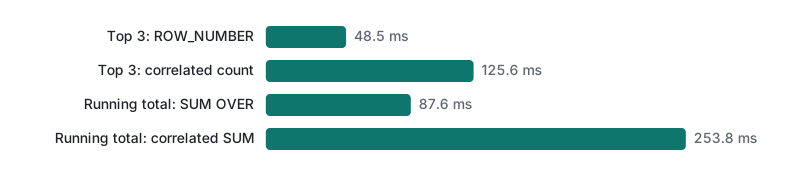
The window function reads the data once and sorts it; the correlated subquery runs one inner query per row. With an index that inner query is a short SEARCH, so the gap is 2.6× and 2.9×. Without an index each inner query is a full scan of 100,212 rows, about 10 billion row visits, and the gap becomes over 4,000×. The window version did not even need the index.
Which tool for which report question
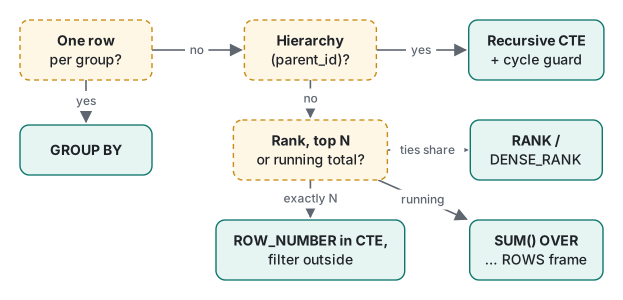
| Question | Tool |
|---|---|
| One row per group (total per shop) | GROUP BY |
| Every row plus a group value (share of shop total) | SUM(x) OVER (PARTITION BY g) |
| Ranking with ties sharing a place | RANK / DENSE_RANK |
| Exactly N per group | ROW_NUMBER in a CTE, filter outside |
| Change vs previous row | LAG / LEAD |
| Change vs previous day when days are missing | recursive CTE calendar + LEFT JOIN, then LAG |
| Running total | SUM() OVER (ORDER BY … unique tiebreaker ROWS …) |
| Conditional count in one pass | count(*) FILTER (WHERE …) |
| Hierarchy (categories, org chart, comments) | recursive CTE with a path or depth guard |
| Values inside JSON | ->>, json_each, json_group_array |
FILTER in action, for completeness: count(*) FILTER (WHERE amount >= 100) returned 3, 0 and 3 big days for Shibuya, Tenjin and Umeda.
Exercises
- For each shop, find the recorded day with the largest increase over the previous recorded day.
- Generate the first day of every month of 2026 with a recursive CTE. Why should you not start from
'2026-01-31'and add'+1 month'for "month ends"?
Answers
- Compute the difference with
LAG, then pick the top row per shop withROW_NUMBER:
WITH d AS (
  SELECT shop, day, amount - LAG(amount) OVER (PARTITION BY shop ORDER BY day) AS diff
  FROM sales
), r AS (
  SELECT shop, day, diff, ROW_NUMBER() OVER (PARTITION BY shop ORDER BY diff DESC) AS rn
  FROM d WHERE diff IS NOT NULL
)
SELECT shop, day, diff FROM r WHERE rn = 1 ORDER BY shop;
shop     day         diff
-------  ----------  ----
Shibuya  2026-10-04  70
Tenjin   2026-10-03  25
Umeda    2026-10-05  50
The diff IS NOT NULL filter matters: in SQLite NULL sorts first in ascending order and last in descending, so here it would not win, but in an ascending "largest drop" query it would.
WITH RECURSIVE m(d) AS (SELECT '2026-01-01' UNION ALL SELECT date(d, '+1 month') FROM m WHERE d < '2026-12-01') SELECT count(*), min(d), max(d) FROM m;returned12|2026-01-01|2026-12-01. Starting from the 31st breaks:date('2026-01-31', '+1 month')returned2026-03-03, because February 31 overflows. For month ends usedate(d, 'start of month', '+1 month', '-1 day').
Honest limits / version notes
- Everything ran on SQLite 3.51.0 only. Window functions arrived in SQLite 3.25.0, frame options such as
GROUPSandEXCLUDEin 3.28.0,FILTERon ordinary aggregates in 3.30.0, recursive CTEs in 3.8.3, the->and->>operators in 3.38.0, and JSON5 input in 3.42.0. Older SQLite in old Android versions or old servers will reject parts of this post. - The correlated query without an index ran once (5.8 minutes); its median of 5 was not worth another half hour. "Not run" in the table means we did not run it at all.
- PostgreSQL and MySQL 8 support the same window functions and recursive CTEs, but MySQL caps recursion depth with
cte_max_recursion_depth(1000 by default) and PostgreSQL uses its own JSON operators with different semantics (not run here). - The sales table is tiny on purpose; the timing table uses synthetic data with repeating amounts. Your ratios will differ with data shape.
This is the last SQL lecture. Next steps: the programming learning roadmap for what to learn alongside SQL, or PDO + SQLite and SQL injection to put these queries safely behind a web page.
Previous: Lecture 5: transactions, isolation and locking · Back to the start: Lecture 1: SELECT, WHERE and ORDER BY
FAQ
How do I get the top N rows per group in SQL?
Number the rows inside each group with ROW_NUMBER() OVER (PARTITION BY group ORDER BY value DESC) in a CTE, then filter rn <= N in the outer query. You cannot filter a window function in WHERE directly; SQLite answers with 'misuse of window function ROW_NUMBER()'. On 100,212 rows the window version took 48.5 ms, a correlated subquery 125.6 ms with an index and 350.6 seconds without one.
Why does my running total jump for rows with the same date?
With ORDER BY and no frame clause, the default frame is RANGE BETWEEN UNBOUNDED PRECEDING AND CURRENT ROW, which includes every row with the same ORDER BY value (its peers). Rows on the same day therefore all show the day's final total. Add a unique tiebreaker and ROWS BETWEEN UNBOUNDED PRECEDING AND CURRENT ROW.
How do I stop a recursive CTE from running forever?
A cycle in the data (a category that is its own ancestor) makes UNION ALL recursion endless; our example was still running after 5 seconds and had to be killed. Add a depth limit in the recursive WHERE, keep a path and skip ids already on it, or use LIMIT while testing.