SQL Transactions, WAL and 'database is locked'
Real BEGIN/COMMIT/ROLLBACK errors, 10,000 inserts timed in autocommit vs one transaction, rollback journal vs WAL, and three causes of database is locked.
Series: SQL lecture 5/6 (advanced). For developers who already write queries and indexes and now run code where two things touch the database at once: a web app with several workers, a batch job next to an API, a mobile app with a background sync. After this lecture you will know what a transaction does and does not guarantee, how to make bulk writes 100× faster, and how to diagnose every database is locked you will meet.
Most transaction bugs are invisible in development, where only one process uses the database. They appear in production as a balance that went wrong once a month, or as a database is locked error in a log that nobody can reproduce. This lecture reproduces them on purpose with two sqlite3 processes and a few lines of Python, shows the exact messages, and measures what transactions do to write speed.
Environment: SQLite 3.51.0 CLI and Python 3.9.6's sqlite3 module (bundled SQLite also 3.51.0), Apple Silicon Mac (M1 Pro), macOS, APFS SSD. MySQL and PostgreSQL were not available; anything about them is labelled "not run here".
What a transaction is, and the first errors you will see
A transaction is a group of statements that the database applies all together or not at all. BEGIN opens one, COMMIT makes it permanent, ROLLBACK throws it away. Outside BEGIN, SQLite runs every statement in its own little transaction: this is autocommit mode.
Our example is a money transfer between two accounts, with a rule that a balance can never go negative:
CREATE TABLE accounts (
  id      INTEGER PRIMARY KEY,
  owner   TEXT    NOT NULL,
  balance INTEGER NOT NULL CHECK (balance >= 0)
);
INSERT INTO accounts VALUES (1, 'alice', 100), (2, 'bob', 50);
The two errors everyone meets in their first week:
sqlite> COMMIT;
Runtime error near line 1: cannot commit - no transaction is active
sqlite> BEGIN;
sqlite> BEGIN;
Runtime error near line 3: cannot start a transaction within a transaction
Transactions do not nest. For a "transaction inside a transaction" use a savepoint, a named point you can roll back to:
SAVEPOINT transfer;
UPDATE accounts SET balance = balance + 150 WHERE id = 2;
UPDATE accounts SET balance = balance - 150 WHERE id = 1;  -- CHECK fails
ROLLBACK TO transfer;   -- undoes the first UPDATE too
RELEASE transfer;
Runtime error near line 3: CHECK constraint failed: balance >= 0 (19)
1|alice|100
2|bob|50
Common mistake: assuming an error rolls the transaction back
The mistake. Alice has 100 and tries to send 150. The code wraps both updates in BEGIN … COMMIT and assumes the CHECK constraint will protect it:
BEGIN;
UPDATE accounts SET balance = balance + 150 WHERE id = 2;
UPDATE accounts SET balance = balance - 150 WHERE id = 1;
COMMIT;
SELECT * FROM accounts;
SELECT 'total', sum(balance) FROM accounts;
What actually happens. The failing statement is undone, but the transaction stays open, and COMMIT commits the statement that worked:
Runtime error near line 6: CHECK constraint failed: balance >= 0 (19)
1|alice|100
2|bob|200
total|300
The bank just created 150 out of thin air. (PostgreSQL behaves differently: after an error it refuses every further statement with "current transaction is aborted" until you roll back. Not run here.)
The fix. Roll back yourself when any statement fails. In a script, sqlite3 -bail stops at the first error; the process exits with the transaction still open, and SQLite rolls it back:
$ sqlite3 -bail bank.db < transfer.sql
Runtime error near line 3: CHECK constraint failed: balance >= 0 (19)
$ echo $?
1
$ sqlite3 bank.db "SELECT * FROM accounts"
1|alice|100
2|bob|50
In application code, use the language's transaction helper. Python's with con: commits on success and rolls back on an exception. The same file also shows a Python-specific trap:
import sqlite3
print("SQLite", sqlite3.sqlite_version)

# Trap 1: Python 3.9's sqlite3 opens a transaction for you before INSERT/UPDATE/DELETE
con = sqlite3.connect("bank.db")
con.execute("UPDATE accounts SET balance = 999 WHERE id = 1")
print("in_transaction:", con.in_transaction)
con.close()                                   # no commit() -> rolled back
print("after close:", sqlite3.connect("bank.db").execute("SELECT balance FROM accounts WHERE id=1").fetchone())

# Fix: one transfer = one transaction; `with con:` commits, or rolls back on exception
def transfer(con, src, dst, amount):
    with con:
        con.execute("UPDATE accounts SET balance = balance + ? WHERE id = ?", (amount, dst))
        con.execute("UPDATE accounts SET balance = balance - ? WHERE id = ?", (amount, src))

con = sqlite3.connect("bank.db")
try:
    transfer(con, 1, 2, 150)
except sqlite3.IntegrityError as e:
    print("IntegrityError:", e)
print(con.execute("SELECT id, balance FROM accounts").fetchall())
transfer(con, 1, 2, 30)
print(con.execute("SELECT id, balance FROM accounts").fetchall())
SQLite 3.51.0
in_transaction: True
after close: (100,)
IntegrityError: CHECK constraint failed: balance >= 0
[(1, 100), (2, 50)]
[(1, 70), (2, 80)]
The first half is the opposite surprise: the update "disappeared" because Python had silently opened a transaction and nobody called commit().
Measured: 10,000 inserts, autocommit vs one transaction
The same 10,000 INSERT statements (generated with random.Random(42)) were piped into sqlite3 under different settings. Each configuration ran 5 times on a fresh database; the time includes starting the sqlite3 process, which alone took 6 ms.
| Journal mode | synchronous |
Mode | Median | Range of 5 runs |
|---|---|---|---|---|
| DELETE (default) | FULL (default) | autocommit | 4,490 ms | 3,338–6,759 |
| DELETE | FULL | one transaction | 23 ms | 22–25 |
| DELETE | OFF | autocommit | 2,041 ms | 1,952–2,584 |
| WAL | FULL | autocommit | 949 ms | 901–953 |
| WAL | NORMAL | autocommit | 192 ms | 180–464 |
| WAL | NORMAL | one transaction | 27 ms | 26–28 |
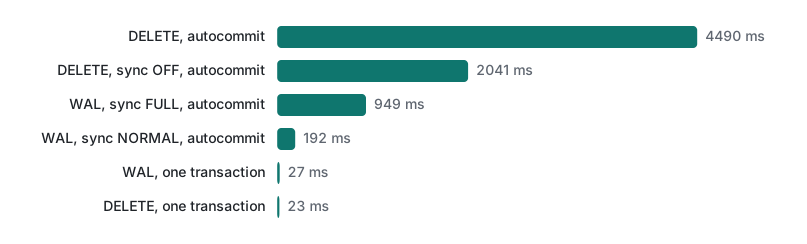
Three lessons. Wrapping the batch in one transaction made it about 195× faster. Turning off syncing (synchronous=OFF, which risks corruption on power loss) only halved the autocommit time, because in DELETE mode each commit also creates and deletes a -journal file. And WAL mode with synchronous=NORMAL is the best setting when you cannot batch, for example a web app committing one row per request.
The spread in the first row is real: other jobs were running on the machine, and file creation is the most sensitive operation to that.
Rollback journal vs WAL: who blocks whom
SQLite has two ways to keep a transaction safe. The default rollback journal (journal_mode=DELETE) copies original pages to a -journal file and writes changes into the database file itself. WAL (write-ahead log, journal_mode=WAL) appends changes to a -wal file and leaves the database file alone until a checkpoint copies them back:
w.db 8192          <- after 10,000 inserts in WAL mode
w.db-wal 189552
w.db-shm 32768
(0, 0, 0)          <- PRAGMA wal_checkpoint(TRUNCATE)
w.db 188416
w.db-wal 0
The practical difference is concurrency. In this test, process A opens a read transaction and holds it for 3 seconds; one second later, process B tries to write:
( echo "BEGIN;"; echo "SELECT 'A sees', balance FROM accounts WHERE id = 1;"; sleep 3
  echo "SELECT 'A still sees', balance FROM accounts WHERE id = 1;"; echo "COMMIT;"
  echo "SELECT 'A after COMMIT', balance FROM accounts WHERE id = 1;" ) | sqlite3 bank.db &
sleep 1
printf "UPDATE accounts SET balance = 0 WHERE id = 1;\nSELECT 'B wrote', balance FROM accounts WHERE id = 1;\n" | sqlite3 bank.db
wait
--- delete mode
A sees|100
Runtime error near line 1: database is locked (5)
B wrote|100
A still sees|100
A after COMMIT|100
--- wal mode
A sees|100
B wrote|0
A still sees|100
A after COMMIT|0
In DELETE mode a reader blocks a writer from committing. In WAL mode both proceed, and A keeps seeing 100 until its transaction ends: it reads a snapshot. That is snapshot isolation, shown in three lines.
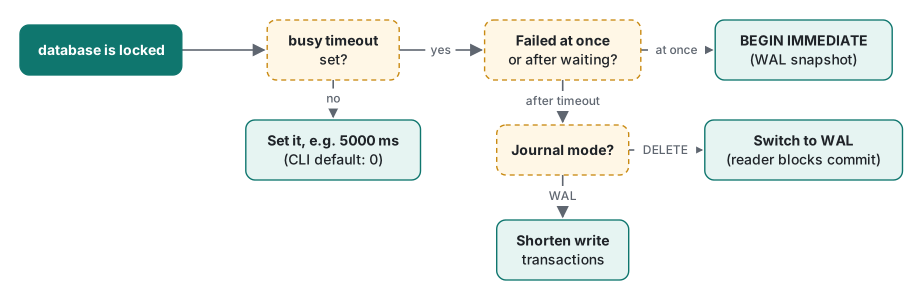
The three causes of "database is locked"
1. Another connection is writing, and you did not wait. The CLI's busy timeout is 0, so a write during another write fails at once:
$ ( echo "BEGIN IMMEDIATE;"; echo "UPDATE accounts SET balance = balance - 10 WHERE id = 1;"; sleep 3; echo "COMMIT;" ) | sqlite3 bank.db &
$ sleep 1; sqlite3 bank.db "UPDATE accounts SET balance = balance + 10 WHERE id = 2;"; echo "exit=$?"
Error: stepping, database is locked (5)
exit=5
Fix: a busy timeout. With .timeout 5000, B waited 2.05 s for A to commit and succeeded. Python's sqlite3.connect() already sets 5 seconds (PRAGMA busy_timeout returned 5000), which is why the same code may fail in the CLI but not in Python.
2. A long reader in rollback-journal mode blocks the writer's commit, as shown above. Fix: WAL mode, or shorter read transactions.
3. The upgrade trap in WAL mode. This one surprises even experienced developers, because the timeout does not help. A transaction started with plain BEGIN (a deferred transaction) reads first, then tries to write after someone else has committed:
( echo ".timeout 5000"; echo "BEGIN;"; echo "SELECT 'A read', balance FROM accounts WHERE id = 1;"; sleep 2
  echo ".timer on"; echo "UPDATE accounts SET balance = balance - 30 WHERE id = 1;"; echo "COMMIT;" ) | sqlite3 bank.db &
sleep 1
sqlite3 bank.db ".timeout 5000" "UPDATE accounts SET balance = balance - 50 WHERE id = 1;"
wait
A read|100
Runtime error near line 5: database is locked (5)
Run Time: real 0.000 user 0.000044 sys 0.000030
Run Time: real 0.000 user 0.000005 sys 0.000005
(The second Run Time line is the COMMIT, which only ends A's read transaction.)
A failed in under a millisecond despite a 5-second timeout. Its snapshot is older than B's commit, so letting A write would mean writing on top of data it never saw; waiting cannot fix that, and SQLite returns SQLITE_BUSY (the extended code is SQLITE_BUSY_SNAPSHOT) immediately. Python reports the same thing as sqlite3.OperationalError: database is locked. With BEGIN IMMEDIATE, A takes the write lock up front; B then waits for A, and both updates land: the final balance was 20 (100 − 30 − 50).
Lost updates: the race in your application code
No lock error at all, yet money is lost. Two workers read a balance, compute in the application, and write back (Python, two connections, deterministic order):
import sqlite3
a = sqlite3.connect("bank.db", isolation_level=None)   # two app workers, autocommit mode
b = sqlite3.connect("bank.db", isolation_level=None)
q = "SELECT balance FROM accounts WHERE id = 1"
ba = a.execute(q).fetchone()[0]      # worker A reads 100
bb = b.execute(q).fetchone()[0]      # worker B reads 100
a.execute("UPDATE accounts SET balance = ? WHERE id = 1", (ba - 30,))
b.execute("UPDATE accounts SET balance = ? WHERE id = 1", (bb - 50,))
print("read-modify-write in app:", a.execute(q).fetchone()[0], "(expected 20)")

a.execute("UPDATE accounts SET balance = 100 WHERE id = 1")
a.execute("UPDATE accounts SET balance = balance - 30 WHERE id = 1")
b.execute("UPDATE accounts SET balance = balance - 50 WHERE id = 1")
print("atomic UPDATE          :", a.execute(q).fetchone()[0])
read-modify-write in app: 50 (expected 20)
atomic UPDATE          : 20
Fix in order of preference: do the arithmetic in SQL (SET balance = balance - ?); if you must read first, do the read and write inside BEGIN IMMEDIATE … COMMIT; in other databases, SELECT … FOR UPDATE (SQLite has no such clause).
Isolation levels: SQLite vs other databases
Isolation is how much concurrent transactions can see of each other. The SQL standard defines four levels by which anomalies they allow. SQLite is simple: there is only one writer at a time, so transactions are effectively serializable; in WAL mode readers get a snapshot as shown above. (PRAGMA read_uncommitted only applies to the rarely used shared-cache mode.)
| Database | Default level | Notes |
|---|---|---|
| SQLite 3.51 (run here) | serializable (one writer) | WAL: readers see a snapshot; deferred BEGIN can fail with BUSY_SNAPSHOT |
| PostgreSQL | Read Committed | Repeatable Read is snapshot isolation; Serializable may abort with a serialization failure (not run here) |
| MySQL InnoDB | Repeatable Read | consistent snapshot reads; locking reads with FOR UPDATE (not run here) |
| SQL Server | Read Committed | optional snapshot isolation (not run here) |
| Oracle | Read Committed | also offers Serializable (not run here) |
The rows for other databases are from their documentation, not from runs. The practical consequence: the lost update above happens under Read Committed in any of them, so the atomic UPDATE fix is portable.
Which setting for which situation
| Situation | Do this |
|---|---|
| Bulk import or batch job | one transaction per batch (thousands of rows) |
| Web app, one write per request | WAL + synchronous=NORMAL |
| Readers and writers in different processes | WAL |
| Read, then write in the same transaction | BEGIN IMMEDIATE |
database is locked with busy timeout 0 |
set a busy timeout (e.g. 5000 ms) |
| Multi-step change that must be all-or-nothing | BEGIN … check every statement … COMMIT or ROLLBACK |
| Partial undo inside a transaction | SAVEPOINT / ROLLBACK TO |
| Many writers on many machines | a client-server DB, not SQLite (see shared hosting connection limits) |
Exercises
- A nightly job inserts 50,000 rows with one
execute()per row in Python 3.9 and callscommit()at the end. Is it running in autocommit mode? What happens if it crashes at row 40,000? - Your WAL-mode app sometimes fails with
database is lockedwithin milliseconds, even thoughbusy_timeoutis 5000. Which pattern is the likely cause, and what is the one-word fix?
Answers
- No. Python 3.9's
sqlite3(defaultisolation_level="") opened a transaction before the first INSERT, so all 50,000 rows are one transaction: fast, and a crash at row 40,000 leaves nothing written because the open transaction is rolled back. We simulated it withos._exit(1)at row 40,000:in_transactionwasTrue, andSELECT count(*)afterwards returned 0. That is usually what you want, but it is the reverse of what many people assume. - A deferred
BEGINthat reads first and writes later, after another connection committed (cause 3 above). UseBEGIN IMMEDIATE.
Honest limits / version notes
- Run only on SQLite 3.51.0 (CLI and Python 3.9.6's bundled library). WAL mode exists since SQLite 3.7.0 and savepoints since 3.6.8.
- This macOS build sets
synchronous=FULLby default and, per its compile options,NORMALfor WAL databases (DEFAULT_WAL_SYNCHRONOUS=1); a stock build uses FULL for both.PRAGMA fullfsyncwas 0, so syncs used plainfsync(), which on macOS does not force the drive to flush its own cache. On Linux, or withfullfsync=ON, autocommit numbers will differ, probably upward. - Python 3.12 added
Connection.autocommitand changed how transactions can be controlled; we ran 3.9 only. - WAL needs shared memory between processes, so it does not work over network file systems.
- The isolation table for PostgreSQL, MySQL, SQL Server and Oracle is from documentation, not from runs.
Need a refresher on why UPDATE without WHERE is dangerous? See lecture 2. For the bigger learning path, see the programming learning roadmap.
Previous: Lecture 4: indexes and EXPLAIN QUERY PLAN · Next: Lecture 6: window functions and CTEs
FAQ
Why are SQLite inserts so slow without a transaction?
Each statement outside BEGIN…COMMIT is its own transaction, and every commit has to create, sync and delete a journal (or append and sync the WAL). 10,000 INSERTs took a median of 4,490 ms in autocommit with the default rollback journal and 23 ms inside one transaction on an Apple M1 Pro with SQLite 3.51.0.
How do I fix 'database is locked' in SQLite?
First find which case you have. If another connection is writing, set a busy timeout (.timeout 5000 in the CLI, PRAGMA busy_timeout, or the timeout argument in Python). If long readers block writers, switch to WAL mode. If a transaction started with plain BEGIN reads first and writes later in WAL mode, the timeout does not help; start it with BEGIN IMMEDIATE.
Does an error inside a transaction roll it back automatically?
Not in SQLite. A failing statement (for example a CHECK constraint failure) is undone, but the transaction stays open and a later COMMIT commits the statements that succeeded. Your code must issue ROLLBACK, or use a wrapper such as Python's with connection: that rolls back on an exception.