Swift Basics: let, Types, Strings and Optionals, Run
Swift from zero with real swiftc output: let vs var, no implicit conversion, overflow traps, why word[0] fails, optionals and the force-unwrap crash, timed.
Series: Swift lecture 1/6 (beginner). For new developers who have never written Swift, or who have only copied snippets into Xcode. After this lecture you will run Swift from the terminal, choose between let and var, read the first compiler errors without panic, and handle optionals without crashing your app.
If you are joining an iOS team, the first week usually goes like this: Xcode shows a red error you do not understand, someone tells you "just add !", and a week later the app crashes in a tester's hands. This lecture is for that new hire. We skip Xcode entirely and use one text file and the terminal, so every error you see below is the exact text swiftc printed, not a screenshot from a slide.
Everything here was run with Swift 6.4.2 (swift-driver 1.168.6) on an Apple Silicon Mac (M1 Pro). One detail most tutorials leave out: when you run a single file with swift file.swift, this toolchain still uses Swift 5 language mode (its crash log literally says Compiling with effective version 5.10). We also type-checked every finished snippet with -swift-version 6, which turns on strict concurrency checking; where that changes something, we say so.
Your first program in five minutes
You need the Swift toolchain. On a Mac it comes with Xcode or the Command Line Tools; check with swift --version. Then create a file called hello.swift:
let name = "Swift"
print("Hello, \(name)!")
Run it:
$ swift hello.swift
Hello, Swift!
That is a complete Swift program. There is no main function and no class: in a file run as a script, statements at the top level run from top to bottom. print writes a line to standard output, and \(name) inside a string literal is string interpolation, meaning "put the value of name here".
Two commands matter from day one:
| Command | What it does | When to use it |
|---|---|---|
swift file.swift |
compiles in memory, without optimization, and runs immediately | trying things, the exercises in this series |
swiftc file.swift -o app |
builds a debug binary called app |
when you want a file you can run again |
swiftc -O file.swift -o app |
builds an optimized (Release-style) binary | measuring speed, shipping |
Keep that table in mind; at the end of this lecture we measure how big the difference between those rows is.
let and var: constants first
let declares a constant: a name whose value is set once. var declares a variable that can be reassigned. Try assigning to a constant:
let maxUsers = 10
maxUsers = 20
letvar.swift:2:1: error: cannot assign to value: 'maxUsers' is a 'let' constant
1 | let maxUsers = 10
  | `- note: change 'let' to 'var' to make it mutable
2 | maxUsers = 20
  | `- error: cannot assign to value: 'maxUsers' is a 'let' constant
Read Swift errors in this order: the first line gives file:line:column and the message; the note: lines point at the place to fix. Here the note even tells you the fix.
The opposite mistake produces a warning, not an error. Inside a function, a var that is never changed gets flagged, and Swift 6.x adds a diagnostic group name in brackets that you can look up:
w2.swift:2:9: warning: variable 'rate' was never mutated; consider changing to 'let' constant [#VariableNeverMutated]
w2.swift:3:9: warning: initialization of immutable value 'unused' was never used; consider replacing with assignment to '_' or removing it [#NoUsage]
The habit Swift teams expect: write let by default and change to var only when the compiler tells you that you need it. Fewer things that can change means fewer things to keep in your head when you read code later.
Types, inference and no implicit conversion
Every value in Swift has a type, such as Int (whole numbers, 64-bit on current Macs and iPhones), Double (decimal numbers), String (text) and Bool (true/false). You rarely write the type, because the compiler infers it from the value:
let count = 3          // Int
let price = 1.5        // Double
let title = "hi"       // String
let ok = true          // Bool
print(type(of: count), type(of: price), type(of: title), type(of: ok))
// Int Double String Bool
You can also write it explicitly: let count: Int = 3. Now the rule that surprises people coming from JavaScript, Python or C: Swift never converts between number types for you.
let count = 3
let price = 1.5
let total = count * price
conv.swift:3:19: error: binary operator '*' cannot be applied to operands of type 'Int' and 'Double'
  |                   |- error: binary operator '*' cannot be applied to operands of type 'Int' and 'Double'
  |                   `- note: overloads for '*' exist with these partially matching parameter lists: (Double, Double), (Duration, Double), (Int, Int)
The same happens with text: "Age: " + 30 fails with binary operator '+' cannot be applied to operands of type 'String' and 'Int'. The fixes are explicit:
let total = Double(count) * price    // 4.5
let label = "Age: \(30)"             // interpolation converts for you
One subtle point: let t = 3 * 1.5 does compile and gives a Double 4.5. The literal 3 has no fixed type until the compiler sees how it is used. The error only appears once a value has been stored in an Int name. That is why the error seems to appear "randomly" when you refactor a literal into a constant.
Integer overflow is a crash, not a wrap
Int8 holds -128 to 127. In C, 127 + 1 silently wraps to -128. Swift refuses. With constants, the compiler catches it:
let x: Int8 = 127 + 1
ovc.swift:1:19: error: arithmetic operation '127 + 1' (on type 'Int8') results in an overflow
When the overflow only happens at run time, the program stops. This file prints two lines and then overflows inside the loop:
let big = Int8.max
print("Int8.max =", big)
let wrapped = big &+ 1
print("big &+ 1 =", wrapped)
var n: Int8 = 120
for _ in 0..<10 { n += 1 }
print(n)
$ swiftc ovf.swift -o ovfd && ./ovfd
Int8.max = 127
big &+ 1 = -128
$ echo $?
133
There is no friendly message: exit code 133 is 128 + 5, signal 5 is SIGTRAP, which means Swift hit a trap instruction on purpose. Running it with swift ovf.swift instead printed a long Stack dump: from the compiler process. The -O build trapped the same way; overflow checking is not removed by optimization. The &+, &- and &* operators are the explicit "I want wrap-around" versions, which is what hash functions and random number generators use.
A trap we hit while preparing this: when the same binary's output was piped (./ovfd | cat, or a CI log), neither print line appeared. Standard output is buffered when it is not a terminal, and the trap killed the process before the buffer was written. If your logs "lose" the last lines before a crash, this is a likely reason.
Strings: interpolation, and why word[0] does not compile
Interpolation works with any expression:
let city = "Tōkyō"
let temp = 21.5
print("\(city): \(temp)°C, tomorrow \(temp + 1.5)°C")
// Tōkyō: 21.5°C, tomorrow 23.0°C
Now try what every newcomer tries:
let word = "café"
let first = word[0]
str.swift:2:13: error: 'subscript(_:)' is unavailable: cannot subscript String with an Int, use a String.Index instead.
This is deliberate. A Swift Character is what a human sees as one character, and it can be made of several Unicode scalars and many bytes. Look at the counts:
let word = "café👍🏽"
print("characters:", word.count, "| utf8 bytes:", word.utf8.count, "| utf16 units:", word.utf16.count)
let first = word[word.startIndex]
let third = word[word.index(word.startIndex, offsetBy: 2)]
print(first, third, word.first!, word.last!)
print(Array(word)[3], word.prefix(3))
characters: 5 | utf8 bytes: 13 | utf16 units: 8
c f c 👍🏽
é caf
Five characters, 13 bytes. The thumbs-up with a skin tone is one Character but two scalars and eight bytes. Finding "character number 3" therefore means walking from the start, which is slow, and Swift does not want word[i] in a loop to look cheap. The right tools:
word.first,word.last,word.prefix(n),word.dropFirst(n)for the common cases.word.index(word.startIndex, offsetBy: n)when you really need a position.Array(word)once, thenIntindexing, if you must jump around a lot.
Optionals: a value, or nothing
Many operations may not have an answer. Converting text to a number is the classic one: Int("42") works, Int("4二") cannot. Swift expresses "maybe a value" with an optional type, written with a question mark: Int? means "an Int or nil", and nil means "no value".
let a = Int("42")      // Int?
let b = Int("4二")
print(a as Any, b as Any)
// Optional(42) nil
You cannot use an Int? as if it were an Int:
let n = Int("10")
print(n + 1)
opt_err.swift:3:7: error: value of optional type 'Int?' must be unwrapped to a value of type 'Int'
  |       |- note: coalesce using '??' to provide a default when the optional value contains 'nil'
  |       `- note: force-unwrap using '!' to abort execution if the optional value contains 'nil'
Unwrapping means getting the value out safely. Four ways, in the order you should reach for them:
// 1. if let: use the value only inside the block
if let n = Int("42") {
    print("parsed:", n * 2)              // parsed: 84
}

// 2. guard let: leave early, then use the value for the rest of the function
func describe(_ text: String) -> String {
    guard let n = Int(text) else {
        return "'\(text)' is not a number"
    }
    return "\(text) doubled is \(n * 2)"
}
print(describe("21"))                    // 21 doubled is 42
print(describe("abc"))                   // 'abc' is not a number

// 3. ?? : fall back to a default
let port = Int("abc") ?? 8080            // 8080

// 4. optional chaining ?. : call through, get nil if anything is nil
let names: [String] = []
print(names.first?.uppercased() ?? "(nobody)")   // (nobody)
guard has one rule the compiler enforces: its else block must leave the scope. Forget the return and you get error: 'guard' body must not fall through, consider using a 'return' or 'throw' to exit the scope.
Another warning you will see in your first week: print("value: \(maybe)") with an optional prints value: Optional(5) and warns string interpolation produces a debug description for an optional value; did you mean to make this explicit?. If a label in your UI ever says "Optional(…)", that is this mistake.
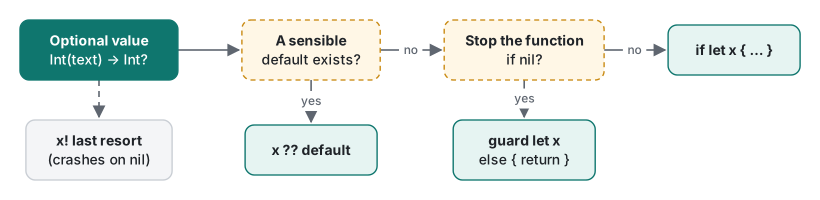
| Situation | Use | Why |
|---|---|---|
| A default value is fine (port, page size, empty text) | x ?? default |
one line, no branches |
| The rest of the function needs the value | guard let x else { return } |
keeps the happy path unindented |
| Only a small block needs the value | if let x { … } |
the value cannot leak out of the block |
| You only call a method or read a property | x?.method() |
the result is optional again; finish with ?? |
| It is a bug if the value is nil (a bundled resource) | x! |
crash loudly in testing; never for user input |
Common mistake: "just add !"
The mistake: force unwrapping user input.
let userInput = "twelve"
let age = Int(userInput)!
print(age + 1)
What actually happens, in a debug build:
$ swiftc force.swift -o forced && ./forced
forced/force.swift:2: Fatal error: Unexpectedly found nil while unwrapping an Optional value
$ echo $?
133
And in an optimized build, which is what your users run:
$ swiftc -O force.swift -o forceo && ./forceo
$ echo $?
133
Nothing was printed at all. The -O build kept the crash but dropped the message with file and line. On a device you would have a crash report pointing at the line, but the friendly text you saw while testing is gone. The fix is one of the unwraps from the table, for example:
guard let age = Int(userInput) else {
    print("Please type your age as a number")
    return   // or show an error in the UI
}
(Inside a function. At the top level of a script, use if let or ??.)
A measurement: swift file.swift vs swiftc -O
Beginners often time code with swift file.swift and conclude Swift is slow. Here is one loop, run three ways. It steps a simple pseudo-random generator 50 million times from a fixed seed, so every run must print the same total:
// Sums a pseudo-random sequence. Fixed seed, so every run computes the same total.
let n = CommandLine.arguments.count > 1 ? Int(CommandLine.arguments[1])! : 50_000_000
var seed: UInt64 = 42
var total = 0
let clock = ContinuousClock()
let elapsed = clock.measure {
    for _ in 0..<n {
        seed = seed &* 6364136223846793005 &+ 1442695040888963407   // LCG step
        total += Int(seed >> 59)                                     // 0...31
    }
}
print("n=\(n) total=\(total) time=\(elapsed)")
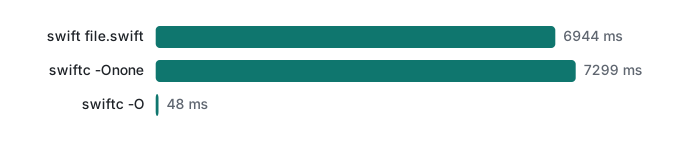
ContinuousClock measures only the loop, not the compile step. Three runs each, Apple Silicon Mac (M1 Pro):
| How it was run | Runs (seconds) | Median |
|---|---|---|
swift loop.swift |
6.855, 6.944, 6.955 | 6,944 ms |
swiftc -Onone binary |
7.095, 7.299, 7.981 | 7,299 ms |
swiftc -O binary |
0.0481, 0.0479, 0.0478 | 48 ms |
All nine runs printed total=774944913. The optimized binary was about 145 times faster. Without optimization, the operators, the closure and the global variables are handled step by step as written; with -O the compiler inlines all of it and the loop becomes a handful of machine instructions (the overflow check on += is still there). The lesson for beginners: never judge speed from swift file.swift or a Debug build in Xcode. For Xcode, that means Product → Scheme → Run in Release, or Profile.
Honest limits / version notes
- Everything ran on Swift 6.4.2 only.
swift file.swiftused Swift 5 language mode (effective version 5.10); every finished snippet also type-checked with-swift-version 6. One thing that does change in Swift 6 mode: a top-levelvar countermutated from a plainfuncfails withmain actor-isolated var 'counter' can not be mutated from a nonisolated context. That is concurrency checking, covered in lecture 5. - The
[#VariableNeverMutated]and[#NoUsage]tags are diagnostic group names printed by recent compilers. Older Xcode versions print the same warning without the tag. - The missing "Fatal error" text in
-Obuilds is what we saw on macOS with this toolchain. Crash reports on iOS still show the line; do not rely on the console text in either case. - Exit code 133 is how a shell reports SIGTRAP. Xcode shows the same crash as a red line in the editor with
Thread 1: Fatal errororEXC_BREAKPOINT, which we describe but did not screenshot here. - Timings are from one machine. The ratio is the point, not the milliseconds.
Exercises
-
This does not compile. Fix it so it prints
Total: 7.5.swift let count = 3 let price = 2.5 print("Total: " + count * price) -
Write
func parsePort(_ text: String) -> Intthat returns the number whentextis a valid port (1 to 65535) and8080otherwise. Useguard let. Test it with"3000","http","70000"and" 80"(with a leading space). -
Before running it, predict the four columns this prints:
swift
let words = ["naïve", "가나다", "ラーメン"]
for w in words {
    let second = w[w.index(after: w.startIndex)]
    print(w, w.count, w.utf8.count, second)
}
Answers
1. The compiler reports two errors: '*' cannot be applied to operands of type 'Int' and 'Double' and '+' cannot be applied to operands of type 'String' and 'Int'. Convert explicitly and interpolate:
print("Total: \(Double(count) * price)") // Total: 7.5
2.
func parsePort(_ text: String) -> Int {
    guard let n = Int(text), (1...65535).contains(n) else {
        return 8080
    }
    return n
}
print(parsePort("3000"), parsePort("http"), parsePort("70000"), parsePort(" 80"))
// 3000 8080 8080 8080
" 80" returns 8080 because Int(_:) does not trim spaces. A guard can combine an unwrap and a condition with a comma.
3.
naïve 5 6 a
가나다 3 9 나
ラーメン 4 12 ー
ï takes 2 bytes in UTF-8, each Hangul syllable and each Japanese kana takes 3. The character count is what a person sees.
Next
- Next: Swift lecture 2/6: functions, closures and collections, with argument labels,
inout, closures that capture variables, and copy-on-write measured. - Later in the series: structs, classes and protocols, errors and generics, async/await and actors, ARC, memory and performance.
- The same first lecture in other languages: Dart lecture 1: null safety and types, Python lecture 1: types and mutability, Java lecture 1: types, strings and equality.
FAQ
Why can't I index a Swift String with an Int like word[0]?
Because one Character can be several bytes or Unicode scalars, so finding the n-th character means walking the string. Swift refuses word[0] with "'subscript(_:)' is unavailable: cannot subscript String with an Int, use a String.Index instead." Use word.first, word.prefix(n) or word[word.index(word.startIndex, offsetBy: n)].
What does "Fatal error: Unexpectedly found nil while unwrapping an Optional value" mean?
You used ! on an optional that was nil, for example Int("twelve")!. The program stops with exit code 133. In a debug build Swift prints that message with the file and line; in our swiftc -O build the process stopped with no message at all. Replace ! with if let, guard let or ?? .
Does Swift integer overflow wrap around like C?
No. Int8 at 127 plus 1 stopped the program (exit code 133, a trap), in both debug and -O builds. A constant like let x: Int8 = 127 + 1 does not even compile. If you really want wrap-around, use the overflow operators &+, &-, &*: 127 &+ 1 gave -128.