C# if vs switch: Patterns, CS8509 and Speed (.NET 10)
C# if and switch on .NET 10: switch expressions, relational and list patterns, what warning CS8509 means at run time, and measured if vs switch speed.
Revised November 2026. This tutorial first appeared in Korean in 2021. We recompiled every example on .NET 10.0.14 (C# 14), and the
if,else ifand nestedifexamples print exactly what the original showed. Two statements in the original are out of date: it said aswitchworks only with integers, characters and strings (not true since C# 7), and its odd/evenswitch (a % 2)silently does nothing for negative numbers. Below are the corrections, the switch expression and pattern syntax added since then, warning CS8509 and what it means at run time, and a measurement of when aswitchis actually faster than anifchain.
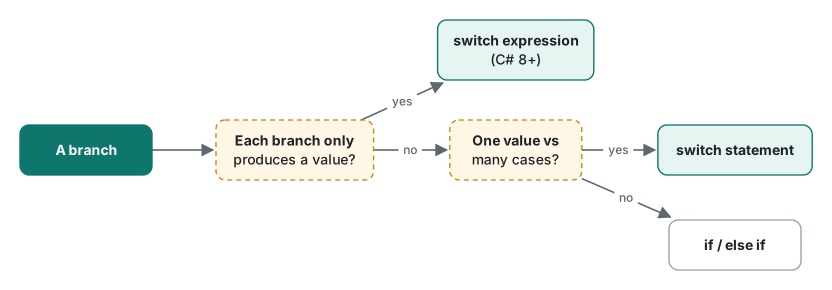
This article is for C# beginners learning branching, and for developers who learned switch in its classic case … break; form and now meet code like score switch { >= 90 => "A", _ => "F" }. The short answer: use if when conditions test different things, a switch statement when one value is compared with many cases and each case does work, and a switch expression when each case only produces a value. Speed is rarely the reason to choose; in our measurement only a 30-key string switch was clearly faster than the equivalent if chain.
if, else if and else: the 2021 examples on .NET 10
The condition of an if must be a bool. C# does not convert integers to bool, so if (count) is a compile error (error CS0029: Cannot implicitly convert type 'int' to 'bool'), unlike in C.
int a = 50, b = 50;
if (a < b)
    Console.WriteLine("b is greater than a.");
else if (a == b)
    Console.WriteLine("a and b are equal.");
else
    Console.WriteLine("a is greater than b.");
a and b are equal.
The original walked through three versions of this example, and its reasoning still holds:
- Two separate
ifstatements (a < banda > b) evaluate both conditions even when the first is true. - Replacing the second with
elseis shorter but wrong whena == b: the program then prints "a is greater than b". We confirmed it: witha = 50, b = 50, theif/elseversion printed that line. else ifcovers the third case explicitly.
The nested example (if (a > 0) { …; if (a > 30) … }) also printed both lines as before. One practical point the original did not raise: the braceless form if (x) DoA(); DoB(); runs DoB() unconditionally, whatever the indentation says. Many teams require braces for this reason.
Since C# 9, an if condition can use patterns, which removes repeated variable names:
int t = 15;
if (t is >= 10 and < 20) Console.WriteLine("teen-ish");
string? maybe = null;
if (maybe is not null) Console.WriteLine(maybe.Length);
char c = 'k';
Console.WriteLine(c is (>= 'a' and <= 'z') or (>= 'A' and <= 'Z') ? "letter" : "other");
teen-ish
letter
is not null is the idiomatic null check; unlike != null, it cannot be redirected by an overloaded != operator.
The switch statement: what changed since 2021
The original weekday example still works and prints 수요일 (Wednesday) for "수" and the default message for anything else. The rules it described are also still true. Without break, .NET 10 reports two errors, now with codes:
error CS0163: Control cannot fall through from one case label ('case 0:') to another
error CS8070: Control cannot fall out of switch from final case label ('case 1:')
C# never falls through implicitly, unlike C. You can stack labels on one block, and you can jump with goto case when you really want the C behavior:
int n = 2;
switch (n)
{
    case 1:
    case 2:
        Console.WriteLine("1 or 2");
        goto case 3;
    case 3:
        Console.WriteLine("then 3");
        break;
}
1 or 2
then 3
Duplicate labels are caught too: error CS0152: The switch statement contains multiple cases with the label value '2'.
What is no longer true is "switch only supports integer, character and string types". Since C# 7, switch accepts any type, and cases are patterns. Since C# 9, relational patterns work on a double:
double temp = 36.9;
switch (temp)
{
    case < 35.0: Console.WriteLine("low"); break;
    case >= 37.5: Console.WriteLine("fever"); break;
    default: Console.WriteLine("normal"); break;
}
normal
The odd/even example and negative numbers
The 2021 article used this to tell odd from even:
switch (a % 2) { case 0: Console.WriteLine("even"); break; case 1: Console.WriteLine("odd"); break; }
With a = 13 it prints "odd". With a = -13, it prints nothing: in C#, -13 % 2 is -1, which matches neither case, and there is no default. The reason is explained in C# operators. The fix is to test a % 2 != 0, or use int.IsOddInteger(a). It is a good example of why a switch without default deserves a second look.
Switch expressions and patterns
C# 8 added the switch expression: the value comes first, each arm is pattern => result, and the whole thing is an expression you can return or assign. C# 9 added relational (<, >=) and logical (and, or, not) patterns.
static string Grade(int score) => score switch
{
    < 0 or > 100 => "invalid",
    >= 90 => "A",
    >= 80 => "B",
    >= 70 => "C",
    _ => "F",
};
foreach (var s in new[] { 95, 85, 72, 10, 101, -5 }) Console.Write($"{s}:{Grade(s)} ");
95:A 85:B 72:C 10:F 101:invalid -5:invalid
Arms are tested from top to bottom, and _ is the discard that matches everything. The compiler also checks the order. If you write >= 70 before >= 90, the >= 90 arm can never match, and that is an error, not a warning:
error CS8510: The pattern is unreachable. It has already been handled by a previous arm of the switch expression or it is impossible to match.
Type and property patterns let one switch replace a chain of is checks and casts:
static string Describe(object? o) => o switch
{
    null => "null",
    int n when n < 0 => $"negative int {n}",
    int n => $"int {n}",
    string { Length: 0 } => "empty string",
    string s => $"string({s.Length})",
    int[] { Length: > 3 } arr => $"long array, first {arr[0]}",
    _ => o.GetType().Name,
};
null | negative int -3 | int 7 | empty string | string(3) | long array, first 1 | Double
Tuple patterns test two values at once, which is where an if chain gets ugly fastest:
static string Rps(string a, string b) => (a, b) switch
{
    var (x, y) when x == y => "draw",
    ("rock", "scissors") or ("scissors", "paper") or ("paper", "rock") => "win",
    _ => "lose",
};
// Rps("rock","scissors") = win, Rps("paper","paper") = draw, Rps("rock","paper") = lose
List patterns (C# 11)
C# 11 added list patterns, which match arrays and lists by shape. .. matches any number of elements, and var captures them:
static string Cmd(string[] args) => args switch
{
    [] => "no args",
    ["help"] => "help",
    ["add", var item] => $"add {item}",
    ["rm", .. var rest] when rest.Length > 0 => $"remove {rest.Length} item(s)",
    [var first, .., var last] => $"{first}..{last}",
    _ => "?",
};
[]→no args [help]→help [add,milk]→add milk [rm,a,b]→remove 2 item(s) [rm]→? [x,y,z]→x..z
Note [rm]: the rm arm has a when guard that fails for zero items, and [var first, .., var last] needs at least two elements, so it falls to _. When you test list patterns, test the short inputs.
Exhaustiveness: CS8509 and what happens at run time
A switch expression must produce a value for every input. If the compiler can find an input that no arm matches, it warns:
static string Sign(int n) => n switch { > 0 => "+", < 0 => "-" };
Console.WriteLine(Sign(0));
warning CS8509: The switch expression does not handle all possible values of its input type (it is not exhaustive). For example, the pattern '0' is not covered.
It is only a warning, so the program builds. At run time, Sign(0) throws:
System.Runtime.CompilerServices.SwitchExpressionException: Non-exhaustive switch expression failed to match its input.
Unmatched value was 0.
Enums have a subtler version. With enum Color { Red, Green }, a switch that handles both Red and Green still gets a different warning, because any integer can be cast to an enum:
warning CS8524: The switch expression does not handle some values of its input type (it is not exhaustive) involving an unnamed enum value. For example, the pattern '(Color)2' is not covered.
Calling it with (Color)7 threw SwitchExpressionException ... Unmatched value was 7. This happens in practice when an enum value comes from a database, JSON or a newer version of another service.
What to do:
- Add a
_ => …arm that throws a meaningful exception (throw new ArgumentOutOfRangeException(nameof(n))) or returns a safe default. - If you want the compiler to enforce it, add
<WarningsAsErrors>CS8509</WarningsAsErrors>to the project. We built theSignexample with-p:WarningsAsErrors=CS8509and it becameerror CS8509. - A classic
switchstatement has no such check: a missing case simply does nothing, as the odd/even example showed.
When a switch beats an if chain (measured)
The usual advice is that switch is faster because the compiler can build a jump table. We measured three cases with 1,000,000 random inputs looked up 20 times (20 million branches), each variant in a [MethodImpl(NoInlining)] method, Release build, Apple Silicon Mac (M1 Pro), one warm-up and three measured runs:
| Cases | if chain | switch |
|---|---|---|
10 int values (0-9, plus default) |
131 / 134 / 134 ms | 139 / 141 / 137 ms |
| 7 weekday strings (plus a non-matching one) | 224 / 226 / 222 ms | 216 / 219 / 215 ms |
30 string keys key00-key29 |
416 / 407 / 417 ms | 296 / 292 / 286 ms |
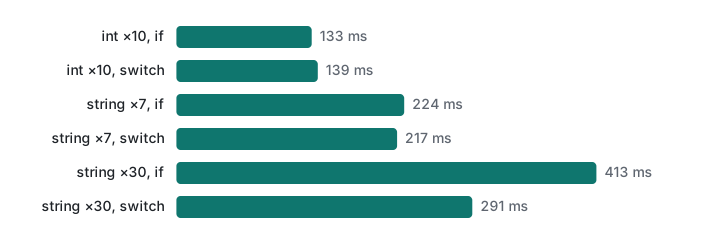
With 10 integers or 7 strings, the difference was a few percent in either direction, and an earlier run of the same program on the same machine was noisier than that (254-284 ms for the string if). With random input, branch misprediction dominates both versions. Only the 30-key string switch was clearly faster, about 30%: for many string cases the C# compiler emits code that first checks the length and specific characters (or a hash) instead of comparing the input with each string in turn, so the cost stops growing with the number of cases.
So the choice is mostly about clarity:
| Situation | Use |
|---|---|
| Conditions on different variables, or ranges mixed with other checks | if / else if |
| One value, many cases, each case runs statements | switch statement |
| One value (or a tuple), each case only produces a value | switch expression |
| Many string keys on a hot path | switch (or a Dictionary if the keys are data, not code) |
| The set of cases must be complete | switch expression, plus <WarningsAsErrors>CS8509</WarningsAsErrors> |
The comparison and logical operators used in these conditions are covered in C# operators, and the types being switched on in C# variables and types. Throwing a meaningful exception from the _ arm is shown in C# exception handling, and switch expressions combine well with lambda expressions.
Tested with .NET SDK 10.0.403 / runtime 10.0.14, C# 14 (the net10.0 default), macOS on an Apple Silicon Mac (M1 Pro).
FAQ
What does warning CS8509 mean in C#?
CS8509 says a switch expression is not exhaustive: some input value matches no arm, and the compiler names one, for example 'the pattern 0 is not covered'. It is only a warning, but if that value arrives at run time the program throws System.Runtime.CompilerServices.SwitchExpressionException. Add the missing arm or a discard arm (_ => ...), or make it a build error with <WarningsAsErrors>CS8509</WarningsAsErrors>.
Is switch faster than if/else in C#?
Only sometimes. On .NET 10 (Release, Apple Silicon Mac), 20 million lookups took 133 ms with an if chain and 139 ms with a switch for 10 int cases, and 224 ms vs 217 ms for 7 string cases, which is within noise. With 30 string keys the switch took 291 ms against 413 ms for the if chain, because the compiler dispatches on string length and characters instead of comparing one by one. Pick by readability unless there are many string cases.
Can a C# switch only use integers, chars and strings?
That was true before C# 7. Since C# 7 a switch can test any type with patterns, and since C# 9 it can use relational patterns such as case < 35.0 on a double. The 2021 version of this article still stated the old rule.