C# Loops on .NET 10: foreach Internals and Speed
C# loops re-tested on .NET 10: what foreach compiles to for arrays, List and Span, the collection-modified exception, and measured for vs foreach speed.
Revised November 2026. This tutorial first appeared in Korean in 2021. We recompiled and ran all five of its examples on .NET 10.0.14 (C# 14). They still build without a single warning, but the text described the
forloop backwards: its heading said it repeats "until the condition becomes true", and it said the loop exits "when the condition is satisfied". Both are fixed below. We also added what the compiler actually emits forforeach(checked in the IL), the real exception you get when you modify a collection duringforeach, and a for-vs-foreach measurement over arrays andList<T>.
This article is for developers learning C# loops, and for anyone who has been told "foreach is slow, use for" and is not sure whether that is still true. The short answer: on .NET 10 we could not measure any difference between for and foreach over an array or a List<T>. Choose based on whether you need the index and whether you change the collection while looping, not on speed.
while and do-while, re-run on .NET 10
A while loop repeats its body as long as a bool condition is true. The original examples were written in the old style, with namespace ConsoleApplication1 and static void Main. Pasted unchanged into a fresh dotnet new console project targeting net10.0, they compile with zero warnings. Here is the core of the first one:
int num = 1;
while (num <= 10)
    Console.WriteLine("num: {0}", num++);   // print first, then increment (postfix)
num: 1
num: 2
…
num: 10
The original output ended with "Press any key to continue . . .". That line came from Visual Studio holding the console window open; dotnet run does not print it.
Remove the num++ and num stays at 1 forever, so the loop prints num: 1 without end. One practical note from running it: piping the output into | head -3 on macOS did not stop the .NET process. It kept spinning after head exited, and we had to kill it. Stop a runaway loop with Ctrl+C. Deliberate infinite loops and the statements that leave them are covered in the companion article on break, continue and goto.
A do-while loop runs the body first and checks the condition afterwards, so the body always runs at least once. The trailing semicolon after while (condition) is required; without it the compiler stops with error CS1002: ; expected.
int num = 1;
do {
    Console.WriteLine("num: {0}", num++);
} while (num <= 10);
With a starting value of 1 the output is identical to the while version. The difference shows when the condition is false from the start. We started both loops at num = 100: the while loop printed nothing, and the do-while printed do num: 100 once. That is exactly what you want for "ask for input, then validate it" loops.
for: execution order, and a correction
for (initializer; condition; iterator) gathers the three parts of a counting while loop onto one line:
for (int num = 1; num <= 10; num++)
    Console.WriteLine("num: {0}", num);
The order is: initializer once, then condition → body → iterator → condition → body → … A variable declared in the initializer, like num here, is not visible after the loop.
The 2021 text needed two corrections:
- Its heading described
foras repeating "until the condition becomes true". Aforloop repeats while the condition is true, exactly likewhile. - It said the loop exits "when the condition is satisfied". It is the opposite: the loop exits when the condition becomes false. Above, that happens when
numreaches 11.
The nested-loop example that prints a multiplication table (2 through 9, times 1 through 9) also ran unchanged. We counted the output lines: exactly 72, as the original said.
for (int a = 2; a < 10; a++)
    for (int b = 1; b < 10; b++)
        Console.WriteLine("{0} * {1} = {2}", a, b, a * b);
2 * 1 = 2
…
9 * 8 = 72
9 * 9 = 81
If you need to leave both loops at once, the break, continue and goto article compares goto, a flag and a local function, with timings.
What foreach compiles to: arrays, List and Span
foreach (var item in collection) hands you each element in order. The original array example still works as written:
int[] arr = { 1, 2, 5, 7, 4, 9, 8, 10, 4, 7, 11 };
foreach (int i in arr)
    Console.WriteLine("i: {0}", i);
What is less obvious is that the compiler emits different code depending on the static type of the collection. We wrote the same summing method four times, built it in Release, and opened the IL with the ILSpy command-line tool (ilspycmd):
static int Arr(int[] a)            { int s = 0; foreach (int x in a) s += x; return s; }
static int Lst(List<int> a)        { int s = 0; foreach (int x in a) s += x; return s; }
static int Spn(Span<int> a)        { int s = 0; foreach (int x in a) s += x; return s; }
static int Seq(IEnumerable<int> a) { int s = 0; foreach (int x in a) s += x; return s; }
- Array: no enumerator at all. The IL is a plain index loop using
ldelem.i4andldlen, the same as a hand-writtenfor. Span<int>: also an index loop, throughget_Item(int32)andget_Length(). Decompiled with C# 1 syntax it reads literally asfor (int i = 0; i < span.Length; i++).List<int>: callsList<T>.GetEnumerator(), which returnsList<T>.Enumerator, a struct. The loop callsMoveNext()andCurrenton it, inside atry/finallythat callsDispose(). No heap allocation.IEnumerable<int>: goes through theIEnumerator<int>interface. In principle the enumerator is boxed on the heap and every call is a virtual call.
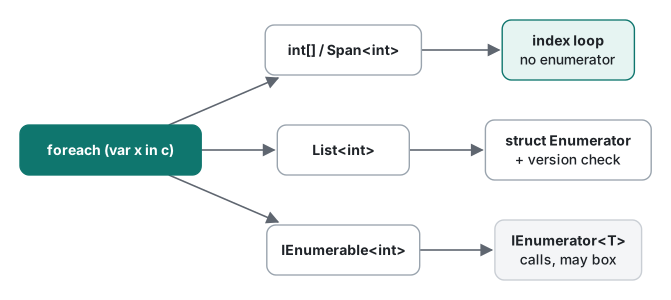
This works because foreach is pattern-based: the compiler only needs a GetEnumerator() method, not the interface. That is why List<T> can return a struct enumerator and avoid the allocation. For more on arrays and Span<T> themselves, see C# arrays on .NET 10.
Modifying a collection during foreach
List<T>'s enumerator stores the list's internal version number when it starts and compares it on every MoveNext(). Change the list mid-loop and the next MoveNext() throws. This is the real output on .NET 10:
var list = new List<int> { 1, 2, 3 };
foreach (int x in list)
    if (x == 2) list.Remove(x);
Unhandled exception. System.InvalidOperationException: Collection was modified; enumeration operation may not execute.
   at System.Collections.Generic.List`1.Enumerator.MoveNext()
   at Program.<Main>$(String[] args) in …/Program.cs:line 53
We tried a series of modifications to see which ones are actually caught:
| Done during foreach | Result on .NET 10 |
|---|---|
List.Remove of a middle element |
InvalidOperationException |
List.Remove of the second-to-last element |
InvalidOperationException |
List.Add |
InvalidOperationException |
list[0] = 100 (indexer, same count) |
InvalidOperationException |
Array arr[2] = 30 |
No exception; the value changes |
Dictionary.Remove |
No exception (allowed since .NET Core 3.0) |
Adding a new key to a Dictionary |
InvalidOperationException |
foreach (ref int x in arr.AsSpan()) x *= 10; |
No exception; the array becomes 10, 20, 30 |
Two results surprise people. Replacing a value through the List<T> indexer throws even though the count does not change, while removing from a Dictionary during enumeration is allowed. Assigning to the iteration variable itself never gets to run; the compiler rejects it:
error CS1656: Cannot assign to 'v' because it is a 'foreach iteration variable'
Three ways to remove even numbers safely. All three produced 1,3,5:
for (int i = l1.Count - 1; i >= 0; i--)          // 1) for loop, backwards
    if (l1[i] % 2 == 0) l1.RemoveAt(i);
int removed = l2.RemoveAll(x => x % 2 == 0);      // 2) RemoveAll: removed 3
foreach (int x in l3.ToList())                    // 3) iterate over a copy
    if (x % 2 == 0) l3.Remove(x);
RemoveAll is the shortest and compacts the list in a single pass, so prefer it when removal depends on a condition. The predicate syntax is explained in lambda expressions.
Measured: for vs foreach over an array and a List
We filled an int[] and a List<int> with 1,000,000 values and summed them 200 times per measurement (200 million reads). Each variant lived in its own [MethodImpl(MethodImplOptions.NoInlining)] method. After a warm-up pass we timed 3 runs with Stopwatch, and repeated the whole process 3 times, for 9 measurements per variant. Release build, .NET 10.0.14, Apple Silicon Mac (M1 Pro).
| Variant | Median of 9 | Range |
|---|---|---|
Array for (i < a.Length) |
130.3 ms | 125.8–133.2 |
Array foreach |
130.2 ms | 125.8–134.4 |
List<int> for (i < l.Count) |
129.5 ms | 126.7–190.4 |
List<int> foreach |
129.2 ms | 126.5–148.6 |
foreach over CollectionsMarshal.AsSpan(list) |
129.5 ms | 126.2–134.1 |
foreach over the list as IEnumerable<int> |
140.9 ms | 126.5–228.4 |
Same, with DOTNET_TieredPGO=0 |
931.5 ms | 906.9–949.9 |
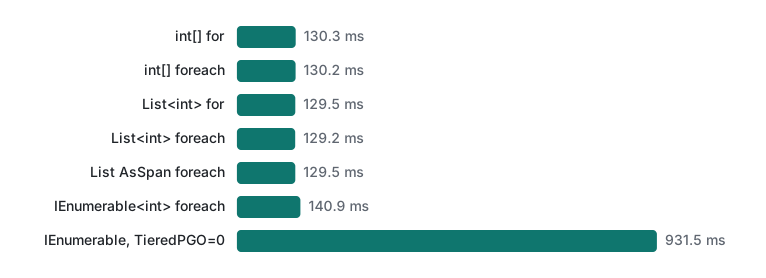
For arrays, lists and spans, for and foreach were within about 1% of each other, which is noise. The occasional outlier (190.4 ms for List for, for example) appeared in random variants from process to process.
The interesting row is IEnumerable<int>. With default settings it was mostly as fast as the others; only the first measured round in each process was slow, at 223–228 ms. GC.GetAllocatedBytesForCurrentThread() also showed zero bytes allocated per loop. Dynamic PGO noticed that the IEnumerable<int> was always a List<int>, replaced the interface calls with direct ones, and stopped allocating the enumerator on the heap. With PGO turned off (DOTNET_TieredPGO=0) the same loop was about seven times slower at 931.5 ms and allocated 40 bytes per loop for the boxed enumerator. So "foreach is slow" is really about iterating through an interface when the JIT cannot see the concrete type, not about foreach itself.
Which loop to use
| Situation | Use |
|---|---|
| Read every element | foreach (same speed as for on arrays and lists) |
| You need the index, or only part of the range | for |
| Remove items that match a condition | RemoveAll, or a backwards for |
| Change array elements in place | for, or foreach (ref var x in arr.AsSpan()) |
| Unknown number of iterations, only a condition | while |
| The body must run at least once | do-while |
A hot loop receives an IEnumerable<T> |
Accept the concrete type (List<T>, array, span) if you can |
When the loop only filters or transforms data, LINQ often says the same thing in fewer lines. LINQ uses the same enumerators underneath, so the table above still applies when performance matters.
Tested with .NET SDK 10.0.403 / runtime 10.0.14, C# 14 (the net10.0 default), macOS on an Apple Silicon Mac (M1 Pro). IL inspected with ilspycmd 11.2.
FAQ
Is for faster than foreach in C#?
Not for arrays or List<T> on .NET 10. Summing 1,000,000 ints 200 times took 130.3 ms with an array for loop, 130.2 ms with array foreach, 129.5 ms with List for and 129.2 ms with List foreach (median of 9 runs, Release, Apple Silicon Mac). The case that can be slower is foreach over an IEnumerable<T>: with tiered PGO disabled it took 931.5 ms.
Why does removing an item inside foreach throw InvalidOperationException?
List<T>'s enumerator remembers the list's version number and checks it on every MoveNext. Remove, Add and even an indexer assignment such as list[0] = 100 change the version, so the next MoveNext throws 'Collection was modified; enumeration operation may not execute.' Use RemoveAll with a predicate, or a for loop that runs backwards.
When should I use do-while instead of while?
When the body must run at least once. do-while checks the condition after the body, so it runs once even if the condition is false from the start: starting at num = 100, the while loop printed nothing and the do-while printed 'do num: 100'. Prompt-then-validate input loops are the typical case.