Current Directory vs Exe Path in Win32 and .NET
The current directory is per process and changes. Fix GetModuleFileName MAX_PATH truncation with a growing buffer; real .NET ProcessPath output.
Revised November 2026. This tutorial first appeared in Korean in 2021. Both C++ samples were recompiled for Windows with MinGW-w64 14.0.0 (GCC 16.2.0); they were not run on this machine, which is a Mac. The 2021 output listings contained a personal user-folder path and have been removed; every Windows path below is an example of the form
C:\work\app\. The first sample had an invisible character (U+200B) after its closing brace, so copying it verbatim failed to compile, and the 2021 text described the short-buffer return value incorrectly. The three .NET path APIs are cross-platform, so their output below comes from real runs on the Mac.
This article is for anyone whose program finds its settings file on some launches and not on others. The cause is almost always confusing the current directory with the executable's location. The short answer: build absolute paths to files next to your executable from the folder returned by GetModuleFileNameW(NULL, …) (in .NET, AppContext.BaseDirectory), and use GetCurrentDirectory only to resolve relative paths the user typed on the command line.
The two prototypes, and what the 2021 text got wrong
DWORD WINAPI GetCurrentDirectoryW(DWORD nBufferLength, LPWSTR lpBuffer);
DWORD WINAPI GetModuleFileNameW(HMODULE hModule, LPWSTR lpFilename, DWORD nSize);
The 2021 prototypes spelled the parameters IpBuffer and IpFileName, with a capital I where the Hungarian prefix is a lowercase l for "long pointer". Harmless, but the names are lpBuffer and lpFilename. The more important point is that the two functions behave differently when the buffer is too small. Per Microsoft Learn:
| Situation | GetCurrentDirectoryW | GetModuleFileNameW |
|---|---|---|
| Success | Characters copied, excluding NUL | Characters copied, excluding NUL |
| Buffer too small | Returns the required size including NUL; buffer not filled | Fills a truncated string, returns nSize, sets ERROR_INSUFFICIENT_BUFFER |
| Failure | 0 | 0 |
The 2021 text said GetCurrentDirectory "returns the buffer value" when the buffer is too small. It returns the required size, including the terminating NUL, which is what makes the "call with size 0 first" pattern work. GetModuleFileName, by contrast, never tells you the size it needs, and it returns a nonzero value with a truncated result, so a quick look at the return value suggests success. The documentation adds that on Windows XP the truncated string was not even NUL-terminated.
Recompiling the 2021 samples
Both samples used char Path[MAX_PATH], so they only compile with the multibyte (ANSI) setting. With Unicode on:
$ x86_64-w64-mingw32-g++ -Wall -Wextra -DUNICODE -D_UNICODE orig_cwd.cpp
orig_cwd.cpp:7:35: error: cannot convert 'char*' to 'LPWSTR' {aka 'wchar_t*'}
$ x86_64-w64-mingw32-g++ -Wall -Wextra -DUNICODE -D_UNICODE orig_mod.cpp
orig_mod.cpp:7:29: error: cannot convert 'char*' to 'LPWSTR' {aka 'wchar_t*'}
The first sample had another trap. In the original blog post, a zero-width space (U+200B) followed the final }. Copy it along with the code and even the ANSI build fails:
orig_cwd_zw.cpp:11:2: error: '\U0000200b' does not name a type
Web editors slip this character into code more often than you would think, so when a compile error points at something you cannot see, suspect it. Beyond that, neither sample checked a return value, and both would print a silently truncated path once it exceeds MAX_PATH.
The 2021 output came from a Visual Studio 2012 project. The current directory was the project folder and the executable sat in the solution's Debug folder, because Visual Studio sets the working directory to the project folder while debugging. Double-click the same exe in Explorer and both values become the exe's folder. So it is common for the two to differ during development and only look identical after deployment. With example paths, the shape was (an illustration of the structure, not real output):
GetCurrentDirectory : C:\work\app\ConsoleApplication4\ConsoleApplication4
GetModuleFileName   : C:\work\app\ConsoleApplication4\Debug\ConsoleApplication4.exe
One current directory per process, and it changes
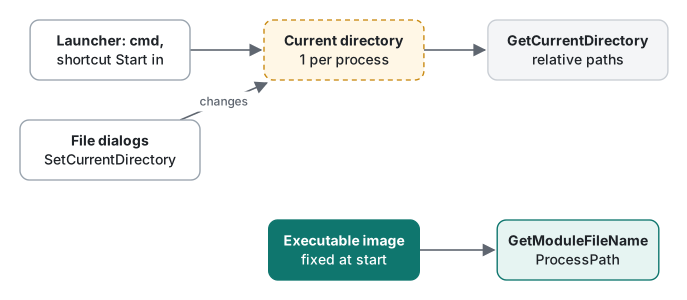
The current directory is a single value for the whole process. The GetCurrentDirectory documentation says the value written by SetCurrentDirectory is stored as a global variable in each process, and therefore recommends that multithreaded applications and shared library code not use GetCurrentDirectory and avoid relative path names. More things set or change it than people expect:
- The launcher. Started from cmd, it inherits cmd's current folder. From a shortcut, the "Start in" field. From Task Scheduler, the task's "Start in" setting.
- File dialogs. The common file dialogs can change the current directory while the user browses. The documentation for
OFN_NOCHANGEDIReven notes that the flag is ineffective forGetOpenFileName. "Relative paths break after the user opens a file" is a classic bug report. - Other code. It does not have to be your thread: a plug-in or library that calls
SetCurrentDirectorychanges it for every thread.
So code like fopen("settings.json", …) behaves differently depending on how the program was started. We demonstrated this with .NET. These three APIs are cross-platform, so this ran on the Mac (Apple Silicon, .NET 10.0.14, Release). In the output, paths are rewritten to /work/app (build output), /work/src (project folder) and /Users/me (home folder).
Print("start");
Directory.SetCurrentDirectory(Path.GetTempPath());   // any code in the process can do this
Print("after SetCurrentDirectory");

static void Print(string when)
{
    Console.WriteLine($"[{when}]");
    Console.WriteLine($"  Environment.CurrentDirectory : {Environment.CurrentDirectory}");
    Console.WriteLine($"  AppContext.BaseDirectory     : {AppContext.BaseDirectory}");
    Console.WriteLine($"  Environment.ProcessPath      : {Environment.ProcessPath}");
}
Running the app's own executable from the home folder:
[start]
  Environment.CurrentDirectory : /Users/me
  AppContext.BaseDirectory     : /work/app/
  Environment.ProcessPath      : /work/app/Where
[after SetCurrentDirectory]
  Environment.CurrentDirectory : /private/var/folders/…/T
  AppContext.BaseDirectory     : /work/app/
  Environment.ProcessPath      : /work/app/Where
Running dotnet /work/app/Where.dll from the project folder instead:
[start]
  Environment.CurrentDirectory : /work/src
  AppContext.BaseDirectory     : /work/app/
  Environment.ProcessPath      : /opt/homebrew/Cellar/dotnet/10.0.403/libexec/dotnet
Three things show up. The current directory follows where the program was launched from, and one SetCurrentDirectory call changes it instantly. AppContext.BaseDirectory is the app folder however you start it, and it ends with a separator. Environment.ProcessPath is the process's executable, so under dotnet xxx.dll it points to the dotnet host, not your app (dotnet run launches the app's executable, and there it was /work/app/Where). To locate files shipped next to the app, use BaseDirectory.
One more: in a single-file publish (-p:PublishSingleFile=true), typeof(Program).Assembly.Location is an empty string. Publishing produced this warning, and the published program really printed '':
warning IL3000: 'System.Reflection.Assembly.Location.get' always returns an empty string for assemblies embedded in a single-file app. If the path to the app directory is needed, consider calling 'System.AppContext.BaseDirectory'.
We also timed one call each (fifth round after four warm-up rounds, three runs). Environment.ProcessPath took 1.1–1.2 ns; the older Process.GetCurrentProcess().MainModule.FileName took 2,014–2,141 ns, roughly 1,800 times slower, because ProcessPath caches the value after the first call. You rarely call either in a hot loop, but there is no reason to use MainModule in new code.
GetModuleFileName: a growing buffer, and long paths
MAX_PATH is 260 characters. The 2021 text said path length "is limited to 260". Since Windows 10 version 1607, many file APIs can lift that limit when the LongPathsEnabled registry value and the app manifest's longPathAware setting are both in place, and paths prefixed with \\?\ could always reach about 32,767 characters. An app installed deep in a folder tree can have an executable path longer than 260, so do not use a fixed buffer:
// x86_64-w64-mingw32-g++ -municode -Wall -Wextra paths2026.cpp -o paths2026.exe
#include <windows.h>
#include <cstdio>
#include <string>

// GetModuleFileNameW does not report the size it needs: grow until it fits.
std::wstring ExePath(DWORD start = MAX_PATH)
{
    std::wstring buf(start, L'\0');
    for (;;) {
        DWORD n = GetModuleFileNameW(nullptr, buf.data(), (DWORD)buf.size());
        if (n == 0) return {};                                   // real failure
        if (n < buf.size()) { buf.resize(n); return buf; }       // fitted
        // n == size: truncated (ERROR_INSUFFICIENT_BUFFER on Vista and later)
        if (buf.size() >= 32768) return {};                      // UNICODE_STRING_MAX_CHARS
        buf.resize(buf.size() * 2);
    }
}

// GetCurrentDirectoryW DOES report it: call once for the size, once for the text.
std::wstring CurrentDir()
{
    DWORD need = GetCurrentDirectoryW(0, nullptr);               // includes the NUL
    if (need == 0) return {};
    std::wstring buf(need, L'\0');
    DWORD n = GetCurrentDirectoryW(need, buf.data());            // excludes the NUL
    if (n == 0 || n >= need) return {};                          // changed in between
    buf.resize(n);
    return buf;
}

int wmain()
{
    std::wstring exe = ExePath(8);                               // tiny start: forces the loop
    std::wstring dir = exe.substr(0, exe.find_last_of(L"\\/") + 1);
    std::wprintf(L"exe : %ls\n", exe.c_str());
    std::wprintf(L"dir : %ls\n", dir.c_str());
    std::wprintf(L"cwd : %ls\n", CurrentDir().c_str());

    // Open files next to the exe by absolute path, never by a bare relative name
    std::wstring config = dir + L"settings.json";
    std::wprintf(L"open: %ls\n", config.c_str());
    return 0;
}
It compiled with no warnings under -Wall -Wextra. It was not run, so no output is shown. Two rules carry the whole thing. If GetModuleFileNameW returns exactly the buffer size, the path was truncated: double the buffer and call again. For GetCurrentDirectoryW, ask for the size with a zero-length buffer first; if the second call returns a value at least that large, another thread changed the directory in between, so retry or fail.
If you need GetModuleFileNameW from C#, for example to get the path of a different loaded module, use LibraryImport and the same loop. Built for net10.0-windows with -p:EnableWindowsTargeting=true -p:AnalysisMode=All, it had zero warnings. For the executable itself, Environment.ProcessPath is enough.
[LibraryImport("kernel32.dll", EntryPoint = "GetModuleFileNameW", StringMarshalling = StringMarshalling.Utf16, SetLastError = true)]
private static partial uint GetModuleFileName(nint hModule, Span<char> buffer, uint size);

internal static string ModulePath(nint module = 0)
{
    for (int size = 260; size <= 32768; size *= 2)
    {
        char[] buf = new char[size];
        uint n = GetModuleFileName(module, buf, (uint)size);
        if (n == 0) throw new System.ComponentModel.Win32Exception();
        if (n < size) return new string(buf, 0, (int)n);
        if (Marshal.GetLastPInvokeError() != ERROR_INSUFFICIENT_BUFFER)   // 122
            throw new System.ComponentModel.Win32Exception();
    }
    throw new PathTooLongException();
}
Which one to use
| You want | Win32 | .NET |
|---|---|---|
| The executable's path | GetModuleFileNameW(NULL, …) with a growing buffer |
Environment.ProcessPath |
| The folder holding the app's files | That path minus the file name | AppContext.BaseDirectory |
| Where the user launched from (to resolve relative arguments) | GetCurrentDirectoryW |
Environment.CurrentDirectory |
- The current directory is one per process and changes with the launch method, file dialogs and other code. Never use it as the base for your own files.
- GetModuleFileName does not return 0 on truncation. When the result equals the buffer size, grow and retry.
- Replace fixed
MAX_PATHbuffers with patterns that ask for or grow to the needed size.
The same recompile-and-verify pass was done for SetWindowText and GetWindowText and GetKeyState and GetAsyncKeyState.
FAQ
Can I load my settings file relative to GetCurrentDirectory?
No. The current directory is set by whoever launched the program (cmd, a shortcut's Start in field, Task Scheduler) and can change while it runs, through file dialogs or SetCurrentDirectory on any thread. Build an absolute path from the folder returned by GetModuleFileName(NULL), or AppContext.BaseDirectory in .NET.
Why is a MAX_PATH buffer for GetModuleFileName risky?
If the path does not fit, the function fills the buffer with a truncated path, returns nSize and sets ERROR_INSUFFICIENT_BUFFER. The return value is nonzero, so it looks like success. When the return value equals the buffer size, double the buffer and call again. With long paths enabled, paths over 260 characters really occur.
What is the difference between Environment.ProcessPath and AppContext.BaseDirectory?
ProcessPath is the executable of the running process; BaseDirectory is the folder that holds the app's files. Launched through its own executable they point to the same folder, but launched as dotnet Where.dll, ProcessPath is the dotnet host. To find files next to your app, use BaseDirectory.